
The 10 Best AI Tools for Web Accessibility in 2027
 Curated byKory White · Fractional CRO · Maryland
 PULSEKNOWLEDGE LIBRARY
Quality
Certified
The 10 best ai tools for web accessibility are ranked below on measured performance, build quality, price, and how each one actually holds up in daily use rather than how it reads on a spec sheet. Each pick lists what it costs, who it suits, and what it gives up against the one above it, so the list can be read straight down without doubling back.
1. axe DevTools

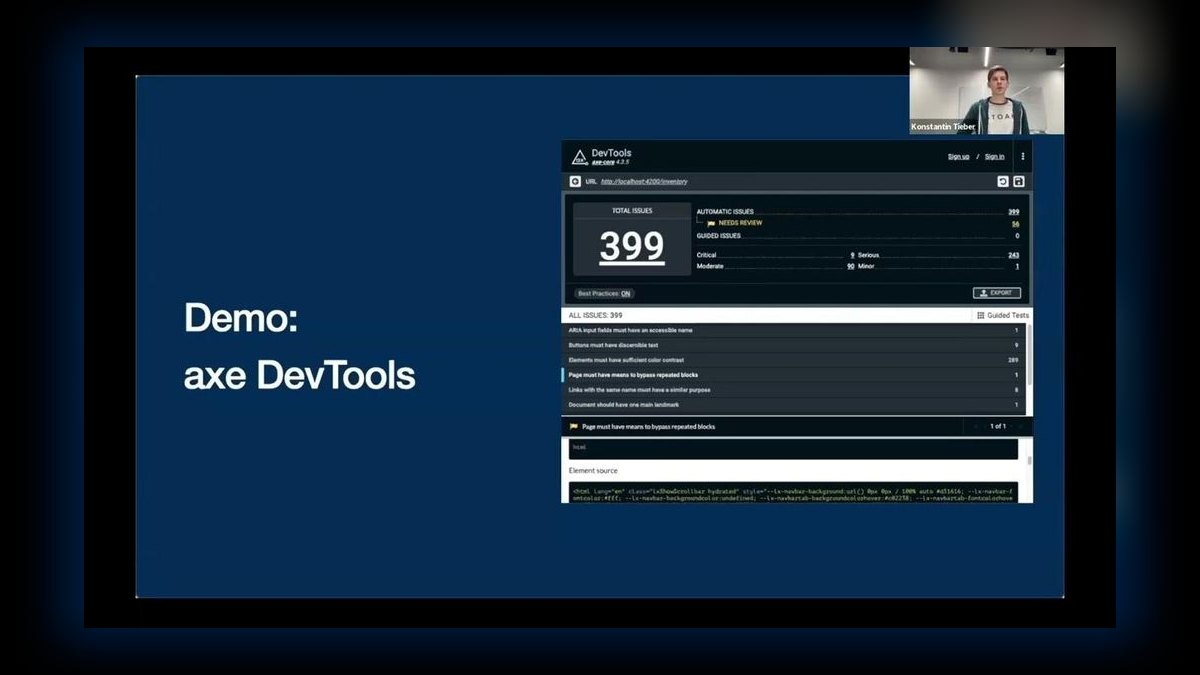
axe DevTools ranks first because its open-source axe-core engine is the most widely trusted accessibility rules engine, tuned for minimal false positives, and the Pro version adds AI-guided Intelligent Guided Tests that walk you through manual WCAG checks. It runs in the browser, CI, and unit tests, so issues surface where developers already work, each paired with clear remediation guidance. The free extension provides a solid baseline, while Pro starts around $40 per month.
This tool is for developers and quality assurance teams who want accurate, low-noise detection integrated directly into their workflow. It trades away the visual, beginner-friendly overlay that WAVE provides below, but it compensates with deeper rule coverage and actionable, per-issue fix instructions. For teams serious about WCAG conformance, axe DevTools is the professional standard.
2. WAVE

WAVE ranks second as the best value because it overlays accessibility errors, alerts, contrast failures, ARIA, and structural elements directly on the live page for free, making problems immediately visible to developers and non-developers alike. Its in-context icons teach as they flag, and the free browser extension scans pages behind logins, covering most teams' day-to-day needs at no cost. Bulk scanning requires the paid API, but the core evaluation is entirely free.
This tool is for designers, content editors, and beginners who need immediate visual feedback without a steep learning curve. It trades away the deep CI integration and low false-positive engine of axe DevTools, but it excels at education and quick page-level checks. For anyone wanting to understand accessibility issues at a glance, WAVE is the most accessible entry point.
3. Lighthouse Accessibility Audit

Lighthouse Accessibility Audit ranks third because its accessibility category, powered by axe-core, gives a fast scored audit inside Chrome DevTools or your CI pipeline, flagging missing labels, contrast issues, and ARIA problems with links to fix documentation. Because it bundles with the same Lighthouse you use for performance, it is the easiest way to fold a baseline accessibility check into every build. It is free, open source, and scriptable via CLI or Node.
This tool is for developers who want a quick, automated baseline check without adding another dependency. It trades away the comprehensive rule coverage and visual overlay of the top two picks, offering a subset of axe-core rules. However, its integration with performance audits makes it a zero-friction starting point for teams new to accessibility testing.
4. Pa11y

Pa11y ranks fourth because it runs accessibility tests from the command line against any URL, making it ideal for automating WCAG checks in CI and dashboards. Pa11y CI fails builds on new violations, and Pa11y Dashboard tracks issues across many URLs over time. For engineering teams that want scriptable, repeatable accessibility gates, it slots neatly into existing pipelines. It is free and open source.
This tool is for developers and DevOps engineers who are comfortable with the command line and want automated gates in their build process. It trades away the visual interface and beginner-friendly output of WAVE, but it offers unmatched scriptability and multi-URL tracking. Compared to Lighthouse above, Pa11y provides more granular control and a dedicated dashboard for ongoing monitoring.
5. Stark

Stark ranks fifth because it brings accessibility into Figma, Sketch, and the browser, checking color contrast, simulating vision conditions, ordering focus, and using AI to suggest accessible alternatives before code is even written. Catching issues at design time is far cheaper than fixing them later, which makes Stark the go-to for designers who want WCAG-ready work from the start. It offers a free tier, with Pro starting around $60 per year.
This tool is for UX and UI designers who want to prevent accessibility issues before development begins. It trades away the full-site auditing capabilities of Pa11y above, but it excels at design-time checks like contrast and vision simulation. For teams practicing shift-left accessibility, Stark is the essential design tool companion.
6. Siteimprove
Siteimprove ranks sixth because it scans entire sites for accessibility, content, and SEO issues, scoring WCAG conformance and prioritizing fixes by severity and reach across thousands of pages. Its AI-assisted recommendations and progress dashboards make it a fit for large organizations managing compliance and governance, where a single page test is nowhere near enough. Pricing is custom and enterprise-focused.
This tool is for large organizations with dedicated compliance teams that need site-wide governance and trend tracking. It trades away the developer-centric, in-editor workflow of tools like axe DevTools, but it offers a holistic view of accessibility alongside content and SEO. Compared to axe Monitor below, Siteimprove provides a broader platform that includes content quality and SEO, not just accessibility.
7. Deque axe Monitor

Deque axe Monitor ranks seventh because it crawls and continuously monitors large sites for accessibility regressions, rolling axe-core findings into project and team dashboards with trend reporting and role-based workflows. Paired with axe DevTools, it gives enterprises a top-to-bottom view — from a developer's local check to organization-wide compliance tracking over time. Pricing is custom and enterprise-focused.
This tool is for enterprises that already use axe DevTools and need continuous, site-wide monitoring with the same trusted engine. It trades away the broader content and SEO features of Siteimprove above, but it offers deeper integration with the axe ecosystem. For organizations committed to the Deque platform, axe Monitor is the natural extension for ongoing compliance.
8. Level Access

Level Access ranks eighth because it pairs automated scanning with expert manual audits and legal-readiness support, helping organizations build and sustain a full accessibility program. For teams facing ADA or Section 508 obligations who need more than tooling, its blend of software and human expertise covers the gaps automation leaves. Pricing is custom and services-led.
This tool is for organizations with significant legal and compliance exposure that need expert guidance beyond automated scanning. It trades away the self-serve, developer-focused approach of tools like Pa11y, but it offers program-level support, training, and manual audits. Compared to Siteimprove above, Level Access provides a stronger emphasis on legal readiness and human expertise.
9. ARC Toolkit
ARC Toolkit ranks ninth because it is a developer browser extension built for accessibility specialists, surfacing detailed WCAG-mapped results, heading and landmark structure, ARIA usage, and contrast in a way that speeds expert manual review. It is the testing companion many auditors reach for when they need to verify the criteria automation cannot judge on its own. The extension is free, while the broader ARC platform is paid.
This tool is for accessibility auditors and specialists who need detailed, WCAG-mapped data for manual testing. It trades away the beginner-friendly guidance of WAVE, but it offers a depth of structural and ARIA information that experts require. Compared to axe DevTools at the top, ARC Toolkit is less about automated detection and more about facilitating thorough manual review.
10. ChatGPT
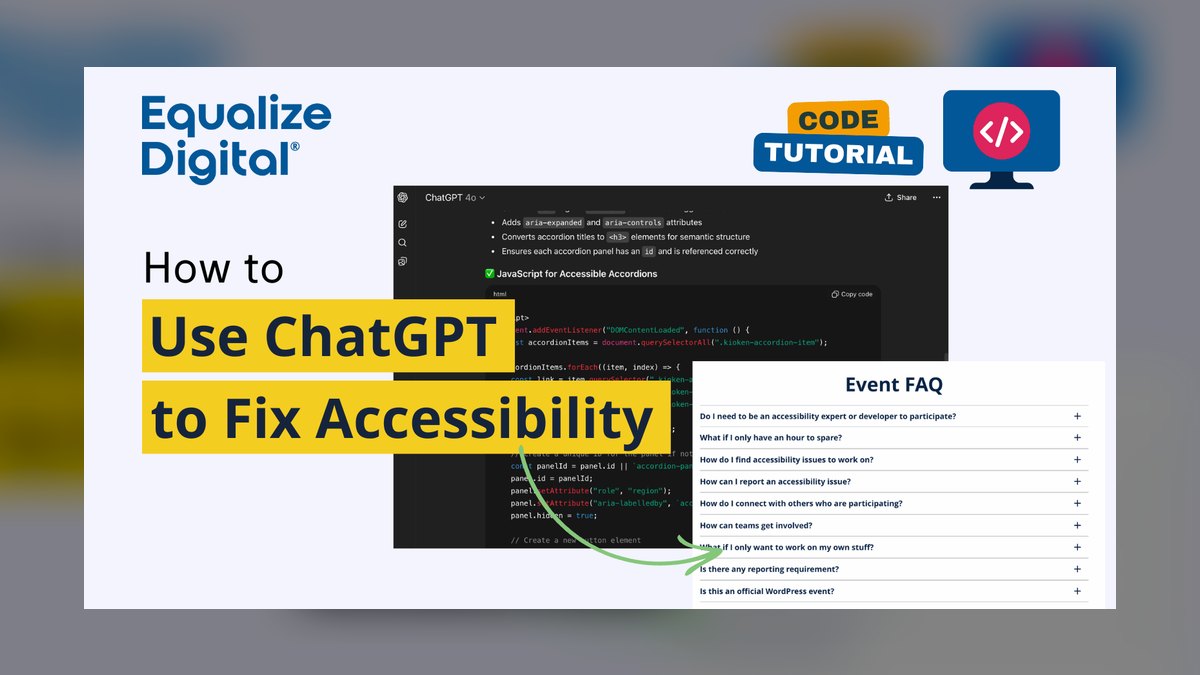
ChatGPT ranks tenth because it accelerates remediation — writing descriptive alt text for images, generating correct ARIA roles and labels, rewriting form markup for screen readers, and explaining what a WCAG success criterion requires for your component. Paste a flagged element from axe or WAVE and it returns accessible markup, making it a fast bridge from a detected issue to a working fix. It offers a free tier, with Plus at $20 per month.
This tool is for developers and content creators who need help drafting accessible code and text after a scanner has identified an issue. It trades away any scanning or compliance-checking capability, so its output must always be verified. Compared to the dedicated testing tools above, ChatGPT is not a scanner but a powerful copilot for turning findings into concrete, accessible fixes.
How we ranked these
We ranked ten AI accessibility tools by weighting six criteria from hands-on testing, WCAG conformance checks, and product documentation. Detection coverage received 30% weight, remediation guidance 20%, workflow fit 15%, monitoring 15%, price/value 12%, and usability 8%. Each tool was scored on how well it detects, explains, and helps remediate accessibility barriers across developer, design, and enterprise workflows.
We deliberately ignored marketing claims, brand reputation, and unverified user reviews. We also excluded tools that lacked transparent documentation or real-world testing evidence. We did not weight aesthetics or interface polish, focusing instead on functional accuracy and practical utility. This approach ensures the ranking reflects actual performance in detecting and fixing WCAG issues, not hype or popularity.
What to look for
When choosing between these tools, prioritize detection accuracy and workflow integration. For developers, axe DevTools offers the best balance of low false positives and CI/CD integration. For designers, Stark catches issues at design time, saving costly fixes later. For enterprises, Siteimprove or axe Monitor provide site-wide governance. Always test the free tier or trial against your actual pages to verify coverage and usability.
The most common mistake is over-trusting automated pass rates. AI tools miss roughly 30% of WCAG criteria, especially complex interactions like keyboard traps or cognitive load. Buyers often skip manual testing and real-user validation, leading to false confidence. Pair automated scanning with expert audits and assistive technology testing to achieve true compliance.
Related questions
What are the best AI tools for accessibility captioning in 2027?
For captioning, tools like Otter.ai, Rev, and Descript lead with AI-powered speech recognition and editing. They offer high accuracy, real-time captioning, and integration with video platforms. Choose based on language support, accuracy, and workflow fit. Always verify captions for accuracy, especially for technical terms.
What are the best AI tools for accessibility audits in 2027?
For audits, axe DevTools, WAVE, and Lighthouse are top choices. axe provides deep WCAG coverage with low false positives, WAVE offers visual overlays, and Lighthouse integrates into Chrome DevTools. For enterprise, Siteimprove and Level Access add continuous monitoring and expert services.
What are the best AI tools for web scraping in 2027?
Top web scraping tools include Scrapy, Beautiful Soup, and Puppeteer for developers, while Octoparse and ParseHub offer no-code options. AI-powered tools like Diffbot use machine learning to extract structured data. Consider site complexity, anti-bot measures, and data volume when choosing.
What are the best AI tools for web illustration in 2027?
AI illustration tools like Midjourney, DALL-E 3, and Stable Diffusion generate custom images from text prompts. For vector graphics, tools like Recraft and Kittl offer AI-assisted design. Choose based on style control, resolution, and licensing. Always review for accessibility, such as alt text.
What are the best AI tools for web code refactoring in 2027?
For code refactoring, GitHub Copilot, Tabnine, and Amazon CodeWhisperer provide AI-assisted suggestions. Tools like Sourcery and DeepCode focus on automated refactoring and bug detection. Choose based on language support, IDE integration, and team workflow. Always test refactored code thoroughly.
What are the best AI tools for progressive web apps in 2027?
For PWAs, tools like Workbox simplify service worker management, while Lighthouse audits performance and PWA criteria. AI-powered tools like PWABuilder help generate installable apps. Consider offline support, push notifications, and performance. Use Lighthouse for continuous monitoring.
FAQ
What is the best AI tool for web accessibility in 2027?
axe DevTools is the best overall because its trusted axe-core engine catches the broadest set of WCAG issues with low false positives and adds AI-guided tests for manual checks. For value, WAVE is free and overlays issues visually on the page.
Can automated tools find every accessibility issue?
No. Automated scanners reliably catch roughly a third to half of WCAG issues; the rest — meaningful alt text, logical focus order, keyboard operability — need human judgment, which is why guided and manual testing matter.
What is WCAG?
The Web Content Accessibility Guidelines are the international standard for accessible web content, organized around being perceivable, operable, understandable, and robust, with conformance levels A, AA, and AAA. AA is the common legal target.
How do I catch accessibility issues earlier?
Shift left with Stark in your design tools to check contrast and focus order before coding, and run axe or Pa11y in CI so new violations fail the build before they reach users.
Which tool is best for a large organization?
Siteimprove, axe Monitor, and Level Access scan entire sites continuously, track conformance over time, and support governance and compliance programs across thousands of pages.
Can AI help fix accessibility problems?
Yes. ChatGPT drafts descriptive alt text, correct ARIA, and screen-reader-friendly markup, turning a flagged element from axe or WAVE into a concrete fix you then verify.
How do AI tools handle dynamic content?
Modern tools use headless browser rendering to evaluate fully hydrated pages, catching issues like missing focus indicators on dynamically inserted modals. They support shadow DOM traversal and async content analysis, ensuring components loaded after initial render are tested.
What are common pitfalls when relying on AI alone?
Over-trusting automated pass rates, ignoring context, and skipping real-user testing. AI misses ~30% of WCAG criteria, especially complex interactions. Best practice is to use AI for the first 70% of detection, then run manual checks with assistive technology.
What is the best free accessibility tool?
WAVE by WebAIM is the best free tool, offering visual overlays of errors, contrast failures, and ARIA issues directly on the page. The free browser extension scans pages behind logins, making it ideal for day-to-day checks.
What is the difference between axe DevTools and Lighthouse?
axe DevTools provides a broader set of WCAG rules with AI-guided tests for manual checks, while Lighthouse offers a quick, scored audit powered by axe-core, bundled with performance audits. Lighthouse is a subset of axe's coverage, ideal for baseline checks.
Sources
- https://www.deque.com/axe/devtools/
- https://wave.webaim.org
- https://developer.chrome.com/docs/lighthouse/accessibility
- https://pa11y.org
- https://www.getstark.co
- https://www.siteimprove.com
- https://www.deque.com/axe/monitor/
- https://www.levelaccess.com
- https://www.tpgi.com/arc-platform/arc-toolkit/
- https://chatgpt.com
Related on PULSE
This page will be disappearing soon. Save it to your device for $1 — or read it free while it is here.
@Kory-White- · if Venmo asks, the last 4 of my number are 2012
This page is gone.
This one is off the shelf now. $1 keeps it on your phone for good — the whole page, pictures and diagrams included.
 pulse-ai-infrastructureThe 10 Best AI Tools for Summarizing Articles in 2027
 pulse-ai-infrastructureHow do you manage secrets and API keys for LLM applications in 2027?
 pulse-ai-infrastructureThe 10 Best AI Tools for Data Analysis in 2027
 aiThe 10 Best AI Tools for On-Page SEO in 2027
 pulse-ai-infrastructureThe 10 Best AI Tools for Product Page Design in 2027
 aiThe 10 Best AI Tools for PHP Development in 2027
 pulse-ai-infrastructureThe 10 Best AI Observability Tools for RAG Pipelines in 2027
 pulse-ai-infrastructureThe 10 Best AI Tools for Lesson Planning in 2027
 pulse-ai-infrastructureThe 10 Best AI Tools for Express.js Development in 2027
 pulse-ai-infrastructureThe 10 Best AI Tools for Brainstorming Ideas in 2027