


Lead-to-Cash Process Map
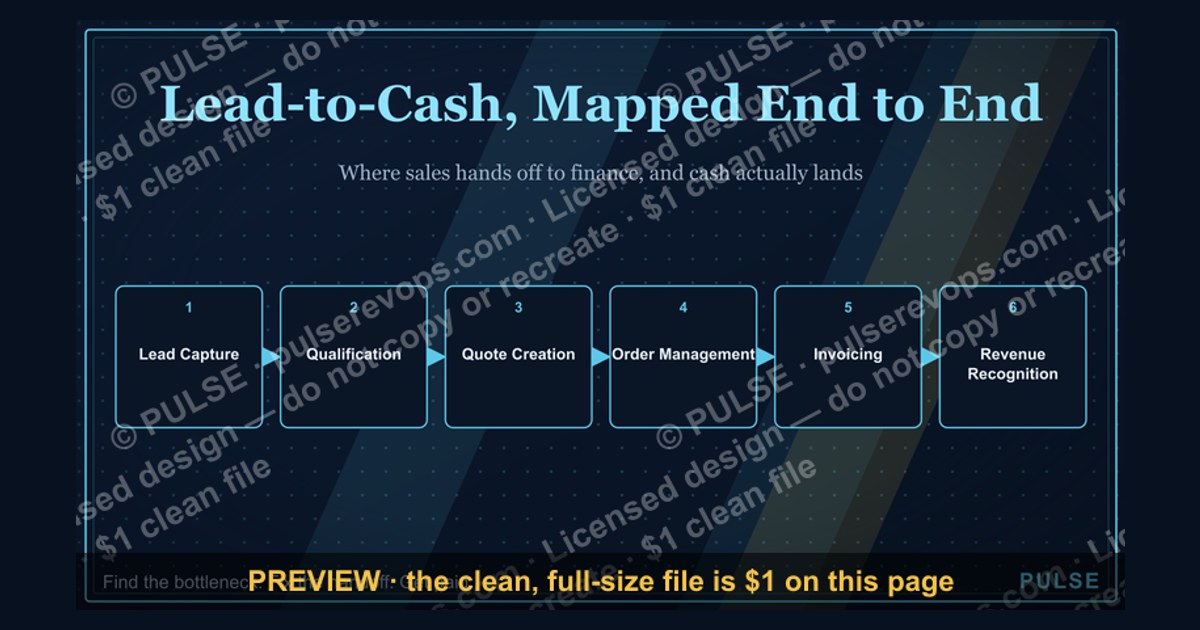
A lead-to-cash process map visually charts the complete customer lifecycle from initial lead generation through order fulfillment and payment collection. It typically includes stages such as lead capture, qualification, quote creation, order management, invoicing, and revenue recognition. The map helps organizations identify bottlenecks, improve handoffs between sales and finance, and accelerate cash flow. Exact steps and timelines vary by industry and company size.
Lead-to-Cash Process Map

End-to-end Lead-to-Cash process map: MQL → SAL → SQL → Demo → Proposal → Negotiation → Closed → Provisioned → Renewed.
Format: SVG (scalable vector) · Size: 1584×396 px · Category: Process · License: Free to use — no attribution required.
Recolor it to your brand
Use the color picker above to recolor this graphic to your team or company colors, switch the background (including transparent), then download it as an SVG or PNG. No sign-up, no watermark.
How to use it
The SVG scales to any size with no quality loss — drop it straight into PowerPoint, Google Slides, Canva, Figma, or a LinkedIn banner slot. The PNG export is ready to upload anywhere that wants a raster image.
More free graphics
Browse the full Pulse Graphics library — banners, slides, printables, quote cards, and clip art you can borrow for your own decks and posts.
Related on PULSE
- B2B Buyer Journey Map
- Renewal Process Flow
- RevOps / Process Icon — Icon / Clip Art
- “TRUST THE PROCESS” — Sales Floor Print
- “Process scales. Heroics don't.” — Quote Card
- "Process over pressure." — LinkedIn Banner
Common Pitfalls and How to Avoid Them in Lead-to-Cash
Even with a well-designed lead-to-cash process map, organizations frequently stumble at predictable points. Recognizing these common failure modes—and knowing how to address them—can save months of remediation and millions in lost revenue.
Pitfall 1: Siloed Data Across Stages
The most pervasive issue is that marketing, sales, finance, and customer success each maintain their own systems of record. A lead might be "qualified" in Marketo but "unqualified" in Salesforce, while the billing system shows a completely different customer status. This creates handoff friction where leads fall through cracks, opportunities get double-counted, and revenue recognition becomes a forensic exercise.
*How to avoid it:* Establish a single source of truth for customer data—typically your CRM—and enforce strict data governance. Every stage transition should update the CRM record automatically. Use integration platforms (like Workato, Tray.io, or native connectors) to sync key fields bidirectionally between systems. Run weekly data audits comparing counts across systems; a variance of more than 2-3% between marketing-qualified leads in your MAP vs. CRM is a red flag.
Pitfall 2: Over-Engineering the Process Before Validation
Teams often design a 47-step lead-to-cash process map on a whiteboard, complete with conditional branches and approval gates, before they've validated that the basic flow works. This results in a fragile, hard-to-maintain process that frustrates sales reps and causes bottlenecks.
*How to avoid it:* Start with a "minimum viable process" that covers the core 5-7 stages (Lead → MQL → SQL → Opportunity → Closed Won → Billed → Collected). Run it for 30-60 days, measure conversion rates and cycle times, then iterate. Only add complexity (e.g., lead scoring models, automated contract approvals) once you have baseline data showing where the real friction is. A good rule of thumb: if you can't explain your process on a single page, it's too complex.
Pitfall 3: Ignoring the "Cash" Part of Lead-to-Cash
Many process maps treat billing and collections as an afterthought—a simple "send invoice" step at the end. In reality, this is where revenue leakage most often occurs. Common issues include: invoices sent to wrong contacts, pricing errors from unapproved discounts, delayed invoicing causing revenue recognition issues, and no automated dunning for past-due accounts.
*How to avoid it:* Map the billing sub-process with the same rigor as the sales stages. Include steps for: contract-to-invoice validation (matching signed terms to billing system), automated invoice generation triggered by contract start date, payment gateway integration (Stripe, Braintree, etc.), and a dunning sequence (day 1, 7, 14, 30 past due). Run a monthly "revenue reconciliation" comparing closed-won deals in CRM against invoices generated in your billing system—any gap over 1% needs immediate investigation.
Pitfall 4: No Clear Handoff Criteria
When a lead moves from marketing to sales, or from sales to finance, the criteria for that handoff are often vague. "When the lead is ready" or "when the rep says so" leads to inconsistent quality. Marketing may pass leads that are barely interested, sales may hold opportunities too long before handing to billing, and customer success may not get notified until weeks after a deal closes.
*How to avoid it:* Document explicit, measurable handoff criteria for every transition. For example: MQL → SQL requires "BANT met" (Budget, Authority, Need, Timeline) with at least 3 of 4 criteria confirmed. SQL → Opportunity requires a scheduled demo or proposal request. Closed Won → Billing requires a signed contract PDF uploaded to CRM. Closed Won → Customer Success requires a handoff call within 48 hours. Automate these checks where possible using workflow rules.
Pitfall 5: No Feedback Loops
The process map is treated as a static document rather than a living system. Marketing doesn't know which leads actually converted, sales doesn't know which pricing structures cause payment delays, and finance doesn't know which contract terms cause collection issues. This creates a culture of blame rather than continuous improvement.
*How to avoid it:* Build feedback loops into the process map itself. After a deal closes, automatically send a "deal post-mortem" survey to the sales rep and the customer success manager asking: "What could have been smoother in the handoff?" Monthly, review a "lead-to-cash friction report" showing: average time per stage, stage-to-stage conversion rates, and revenue leakage points. Use this data to adjust the process quarterly.
Pitfall 6: Underestimating Change Management
Implementing a new lead-to-cash process often requires changes in behavior across multiple departments. Sales reps may resist using a new contract approval workflow. Marketing may object to stricter lead qualification criteria. Finance may push back on automated billing triggers. Without buy-in, even the best-designed process map will fail.
*How to avoid it:* Involve stakeholders from each department in the process design phase—not just the process owner. Run a "process walkthrough" session where each team demonstrates how they currently work and what pain points they experience. Show how the new process solves their specific problems (e.g., "This will reduce your time spent chasing signatures by 40%"). Pilot the new process with one team or one product line first, gather testimonials, then roll out broadly. Provide training and a 30-day "grace period" where old processes are still accepted but discouraged.
Technology Stack Considerations for Each Stage
The lead-to-cash process map is only as effective as the technology that supports it. While the specific tools vary by company size, industry, and budget, there are common patterns for what technology serves each stage best. Below is a stage-by-stage breakdown of typical tool categories, what they should do, and how to evaluate them.
Stage 1: Lead Generation & Capture
*Tools needed:* Website analytics, forms/chat, lead enrichment, and ad tracking.
At this stage, you need to capture visitor intent and convert anonymous traffic into known leads. A good form builder (Typeform, HubSpot Forms, Formstack) should allow conditional logic and auto-fill from IP data. Chat tools (Intercom, Drift, LivePerson) can capture leads before they bounce. Lead enrichment (Clearbit, ZoomInfo, Lusha) fills in missing data like company size, industry, and job title automatically.
*Evaluation criteria:* Can it integrate with your CRM in real-time? Does it support progressive profiling (asking different questions on repeat visits)? What's the data quality score (e.g., Clearbit claims 85%+ accuracy on company data)? Avoid tools that require manual CSV uploads—that's a sign of poor integration.
Stage 2: Lead Qualification & Scoring
*Tools needed:* Marketing automation platform (MAP) with scoring engine, CRM with lead management.
The MAP (Marketo, HubSpot, Pardot, ActiveCampaign) should allow you to build lead scoring models based on behavioral data (email opens, page visits, form fills) and demographic data (job title, company size, industry). The CRM (Salesforce, HubSpot CRM, Zoho) should automatically update lead status based on score thresholds.
*Evaluation criteria:* Can you create multiple scoring models for different products or buyer personas? Does the system support negative scoring (e.g., subtracting points for competitor page visits)? How quickly does score changes sync to CRM—real-time or batch? A good rule: if score updates take more than 5 minutes, reps will lose trust in the data.
Stage 3: Sales Engagement & Opportunity Management
*Tools needed:* Sales engagement platform (SEP), CRM, conversation intelligence, and CPQ (configure, price, quote).
SEPs (SalesLoft, Outreach, Groove) automate email sequences, call logging, and task management. Conversation intelligence (Gong, Chorus, Jiminny) records and analyzes sales calls to identify best practices and coaching opportunities. CPQ (Salesforce CPQ, DealHub, PandaDoc) helps reps generate accurate quotes with pricing rules, discount approvals, and product configuration.
*Evaluation criteria:* Does the SEP integrate with your CRM so all activity is logged automatically? Can the conversation intelligence tool identify specific phrases (e.g., "budget," "competitor X") and tag them? For CPQ, can it handle your most complex pricing scenarios (tiered pricing, volume discounts, multi-year contracts)? Test with your actual product catalog before committing.
Stage 4: Contracting & E-Signature
*Tools needed:* Contract lifecycle management (CLM) or e-signature platform, document generation.
E-signature tools (DocuSign, Adobe Sign, PandaDoc) have become table stakes. More advanced CLM solutions (Icertis, Conga, Agiloft) manage contract templates, approval workflows, and renewal tracking. Document generation tools (WebMerge, Formstack Documents) can auto-populate contracts from CRM data.
*Evaluation criteria:* Does the tool support template-based contracts with merge fields? Can you set up approval workflows (e.g., "discounts over 20% require VP approval")? How does it handle amendments and addendums? For compliance-heavy industries, check if it supports audit trails and retention policies. Most e-signature platforms charge per envelope—estimate your monthly volume and negotiate a tiered plan.
Stage 5: Billing & Invoicing
*Tools needed:* Billing/invoicing system, payment gateway, subscription management (if recurring).
For one-time transactions, tools like QuickBooks, Xero, or FreshBooks work. For recurring revenue, specialized subscription management (Stripe Billing, Recurly, Chargebee, Zuora) is essential. These handle proration, dunning, and revenue recognition. Payment gateways (Stripe, Braintree, Adyen) process credit cards, ACH, and digital wallets.
*Evaluation criteria:* Can the billing system handle your pricing model (one-time, subscription, usage-based, hybrid)? Does it support automated dunning (retry failed payments, send reminder emails)? What's the payment gateway's uptime SLA (99.9% is standard)? For global businesses, check multi-currency support and local payment methods (e.g., SEPA in Europe, Alipay in China).
Stage 6: Revenue Recognition & Collections
*Tools needed:* Revenue recognition software
Sources
- Salesforce — lead-to-cash software solutions and process overviews
- Gartner — market analysis and best practices for lead-to-cash workflows
- HubSpot — CRM and sales pipeline guidance for lead-to-cash stages
- Forrester Research — industry reports on revenue operations and lead-to-cash optimization
- American Institute of CPAs (AICPA) — accounting and revenue recognition standards affecting lead-to-cash
- International Association of Contract and Commercial Management (IACCM) — contract lifecycle management and its role in lead-to-cash
FAQ
What is a lead-to-cash process map? A lead-to-cash process map is a visual diagram that outlines every step from initial lead generation through to final payment collection. It helps teams see the full customer journey, identify bottlenecks, and align sales, marketing, and finance workflows.
How long does it typically take to implement a lead-to-cash process? Implementation timelines vary widely based on company size and complexity, often ranging from a few weeks for simple setups to several months for organizations with multiple systems and custom integrations. Most teams plan for a phased rollout over 2–6 months.
What are the key stages in a lead-to-cash process? Common stages include lead generation, qualification, proposal or quote creation, contract negotiation, order fulfillment, invoicing, and payment collection. Some maps also include post-sale support and renewal steps.
Which departments need to be involved in mapping this process? Sales, marketing, finance, and customer success teams are typically core participants. Depending on the business, operations, legal, and IT may also contribute to ensure accurate handoffs and data flow.
Can a lead-to-cash process map help reduce revenue leakage? Yes, by visualizing each step, teams often spot gaps like missed follow-ups, delayed invoicing, or inconsistent contract terms that can cause lost revenue. Fixing these leaks can improve cash flow and close rates.
What tools are commonly used to create and manage these process maps? Teams use diagramming tools like Lucidchart or Miro for initial mapping, then often integrate with CRM and ERP systems (e.g., Salesforce, HubSpot, NetSuite) to automate and track the actual workflow. Some also use dedicated revenue operations platforms.
This page will be disappearing soon. Save it to your device for $1 — or read it free while it is here.
@Kory-White- · if Venmo asks, the last 4 of my number are 2012
This page is gone.
This one is off the shelf now. $1 keeps it on your phone for good — the whole page, pictures and diagrams included.
 graphicDemo Flow Diagram
 graphicDeal Inspection Flow
 graphicCustomer Onboarding Flow
 graphicRenewal Process Flow
 graphicDiscovery Call Flow Diagram
 graphicPirate Metrics (AARRR) — Infographic
 graphicSeries A Sales Org Chart
 graphic"Pipeline is the product." — LinkedIn Banner
 graphic5 Stages of a Healthy Pipeline — Infographic
 graphic“Sell the problem, not the product.” — LinkedIn Banner