
"Open to work — Sales." — LinkedIn Banner
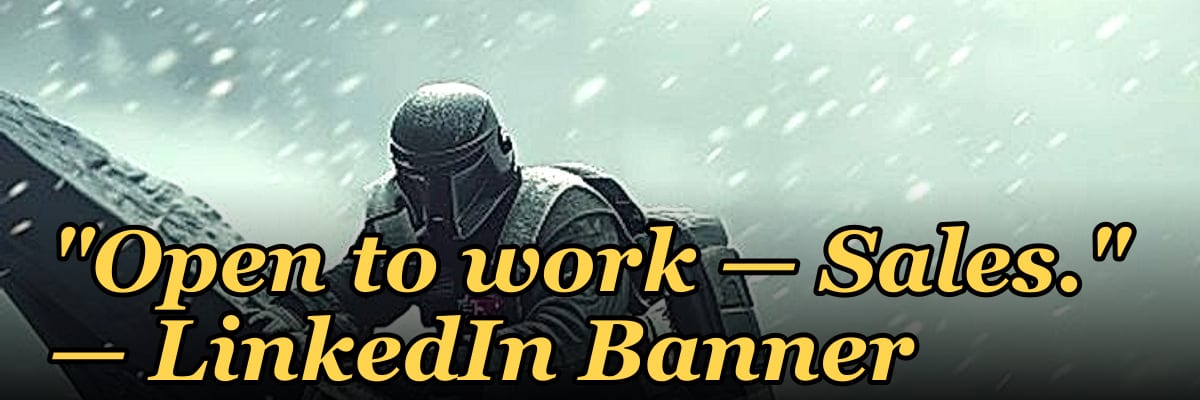
A LinkedIn banner reading "Open to work — Sales" signals that you are actively seeking a sales role, typically in B2B or B2C environments. It invites recruiters and hiring managers to view your profile for experience in areas like account management, lead generation, or closing deals. This simple statement can increase your visibility to opportunities ranging from entry-level to senior sales positions.
"Open to work — Sales." — LinkedIn Banner

A dark, on-brand LinkedIn banner — "Open to work — Sales." over a "Hunter Closer Builder" line with a pulse motif. Put it on your profile to signal what you do.
Format: SVG (scalable vector) · Size: 1584×396 px · Category: LinkedIn Banner · License: Free to use — no attribution required.
[⬇ Download this graphic](/graphics/assets/gb0049.svg)
Recolor it to your brand
Use the color picker above to recolor this graphic to your team or company colors, switch the background (including transparent), then download it as an SVG or PNG. No sign-up, no watermark.
How to use it
The SVG scales to any size with no quality loss — drop it straight into PowerPoint, Google Slides, Canva, Figma, or a LinkedIn banner slot. The PNG export is ready to upload anywhere that wants a raster image.
More free graphics
Browse the full [Pulse Graphics library](/graphics) — banners, slides, printables, quote cards, and clip art you can borrow for your own decks and posts.
Related on PULSE
- [“Open to sales leadership roles.” — LinkedIn Banner](/knowledge/gb0353)
- [“Open to Customer Success roles.” — LinkedIn Banner](/knowledge/gb0359)
- [AI does 60% of SDR work — RevOps Banner](/knowledge/gb0423)
- [Fill it. Work it. Win it. — LinkedIn Wallpaper](/knowledge/gb0381)
- [“Available for fractional CRO work.” — LinkedIn Banner](/knowledge/gb0357)
- [SaaS Sales Cycle Stages](/knowledge/gb0539)
Strategic Placement: Where This Banner Works Best
The "Open to work — Sales." banner isn't just a profile decoration—it's a tactical signal that should be deployed where it generates maximum visibility. LinkedIn's algorithm favors profile completeness, and a custom banner is one of the few visual elements that appears both in your profile header and in search results. When recruiters or hiring managers scroll through LinkedIn Sales Navigator or standard search, your banner is often the first visual cue they register before reading your headline or experience section.
Consider placing this banner across multiple touchpoints beyond your main profile photo area. Your LinkedIn banner image (1584×396 px) is the most obvious home, but the same SVG can be repurposed for:
- LinkedIn featured section thumbnails – Crop a square version (400×400 px) to use as a visual anchor in your "Featured" posts or articles about your job search.
- Resume header – Export a high-contrast PNG version and place it at the top of your PDF resume, just below your name and contact info. This creates visual consistency between your digital presence and application materials.
- Email signature – Scale down to 600×150 px and embed as a subtle graphic below your sign-off. Recruiters who receive your outreach emails will see the same "Hunter Closer Builder" messaging they saw on your profile.
- Portfolio or personal website – If you maintain a simple landing page with your work history, this banner serves as an immediate value proposition above the fold.
The dark background works particularly well for industries where professionalism and authority matter—SaaS, enterprise sales, medical devices, capital equipment, and B2B services. However, if your target industry is more creative (advertising, media, fashion), consider whether the dark, high-contrast aesthetic aligns with the visual culture of that space. In those cases, you might want a lighter variant that still carries the same messaging.
A practical tip: change the banner every 4–6 weeks if your search is active. Recruiters who've seen your profile before may re-engage if they notice a visual update. You can keep the core "Open to work — Sales." text but rotate the subline to reflect different aspects of your expertise—for example, "Enterprise SaaS Closer" or "Hunter — Builder — Revenue Driver." This signals that you're actively iterating on your positioning rather than letting your profile gather dust.
The Psychology of "Hunter Closer Builder" in Sales Hiring
The three-word subline "Hunter Closer Builder" isn't arbitrary—it targets three distinct competencies that hiring managers in sales organizations actively screen for, often using behavioral interview questions and assessment tools. Understanding why these words matter can help you leverage them more effectively in conversations and applications.
Hunter refers to the ability to generate new business from scratch. In sales hiring, this is the most frequently cited gap—companies struggle to find people who can consistently prospect, cold call, and open doors without relying on inbound leads. If your background includes roles where you built your own pipeline from zero, the "Hunter" label signals that you don't need a warm handoff to succeed. When a recruiter sees this, they mentally check a box that says "self-starter who can fill their own funnel."
Closer addresses the closing ratio and deal execution. Many salespeople can get meetings but struggle to convert them into signed contracts. The "Closer" label implies that you have a track record of overcoming objections, negotiating terms, and securing commitments. This is particularly valuable in roles with long sales cycles (6–12 months) or high-ticket items ($50k+ ACV), where the ability to navigate procurement and legal is a differentiator. If you have specific closing metrics—like a 35% win rate on qualified opportunities or $2M in closed-won revenue last year—mention them in your profile summary to back up the label.
Builder is the most nuanced of the three. It suggests that you don't just execute within an existing sales process—you help create or improve one. This is especially relevant for startups and scale-ups where the sales playbook is still being written. A "Builder" might have designed a new territory plan, implemented a CRM workflow, trained junior reps, or created collateral that increased conversion rates. This label signals that you're not a mercenary—you're someone who invests in the long-term infrastructure of the sales organization.
When you combine all three, you're essentially saying: "I can find the deal, close the deal, and build the system that makes it repeatable." That's a rare combination that appeals to both early-stage companies (who need generalists) and mature organizations (who want process-oriented closers).
To make this more concrete, consider how you might use these labels in a networking conversation. If a recruiter asks, "Tell me about your sales style," you can respond: "I'm a hunter closer builder—I love the thrill of opening new accounts, I have the discipline to see deals through to signature, and I'm always thinking about how to make the process more efficient for the team." That's a memorable, structured answer that covers three dimensions of value.
If you're concerned about over-labeling yourself, remember that these are aspirational signals, not rigid job titles. Most salespeople have strengths in one or two areas—the banner communicates that you're aware of all three and are actively developing across the spectrum. It's a conversation starter, not a final exam.
Common Mistakes to Avoid With Your "Open to Work" Banner
While the "Open to work — Sales." banner is a powerful tool, its effectiveness depends on how you integrate it with the rest of your LinkedIn presence. Here are the most common pitfalls that can undermine its impact, along with practical fixes.
Mistake #1: Using the banner without updating your headline. Your LinkedIn headline is the second most visible element after your name, and it appears in search results, connection requests, and InMail previews. If your headline still says "Sales Representative at XYZ Corp" without any indication that you're open to new opportunities, the banner and headline are sending mixed signals. Fix: Update your headline to something like "Sales Professional | Open to New Opportunities | Hunter Closer Builder" or "Enterprise Sales | Open to Work | SaaS & B2B." This creates visual and textual alignment.
Mistake #2: Leaving your profile photo as a generic headshot. Your banner is dark and professional, but if your profile photo is a casual selfie or an outdated image, the contrast undermines your credibility. The banner sets a tone of authority—your photo should match. Invest in a professional headshot with solid lighting, neutral background, and business-appropriate attire. If budget is tight, use your phone's portrait mode against a clean wall, ensuring your face is well-lit and you're smiling naturally.
Mistake #3: Not customizing the banner for specific target roles. The generic "Sales." label is broad—it works for SDRs, BDRs, account executives, sales managers, and even some customer success roles. But if you're targeting a specific niche (e.g., "Enterprise SaaS Sales" or "Medical Device Sales"), consider creating a variant that includes that specificity. A banner that says "Open to work — Enterprise SaaS Sales" with the same "Hunter Closer Builder" subline will resonate more with recruiters in that vertical. You can swap banners weekly based on which roles you're actively applying for.
Mistake #4: Ignoring the "About" section. The banner is a hook, but the "About" section is where you close the deal. Many recruiters click into your profile, see the banner, then scroll to read your summary. If your "About" section is empty, generic, or filled with jargon, you've wasted the banner's attention-grabbing power. Write a 3–4 paragraph summary that expands on the "Hunter Closer Builder" theme: specific industries you've sold into, average deal sizes, quota attainment percentages, and what you're looking for next. Use bullet points for readability.
Mistake #5: Using the banner as a substitute for activity. A static banner won't get you hired on its own. LinkedIn's algorithm favors active users—those who post, comment, and engage with content. If you're job searching, commit to posting 2–3 times per week about sales topics, sharing insights from your experience, or commenting on industry news. The banner signals intent, but your activity demonstrates expertise. Combine the two for maximum effect.
Mistake #6: Forgetting to update your "Open to Work" settings. The banner is a visual cue, but LinkedIn also has a native "Open to Work" feature that adds a green ring to your profile photo and signals to recruiters in Recruiter Lite and Sales Navigator. Make sure this setting is turned on and configured with your target roles, locations, and start date preferences. The banner and the native feature work in tandem—one is visual, the other is algorithmic.
Mistake #7: Overusing the banner in connection requests. When you send a connection request to a recruiter or hiring manager, your banner is visible in the preview. If you've already sent them a message or they've seen your profile, the banner might feel repetitive. Instead, use the banner as a passive signal and focus your connection requests on personalized, value-driven messages that reference their company or role.
By avoiding these mistakes, you ensure that your "Open to work — Sales." banner functions as a professional asset rather than a missed opportunity. It's a signal of readiness, but only when supported by a complete, active, and intentional LinkedIn presence.
Sources
- LinkedIn Help Center — guidance on using the "Open to Work" feature and profile settings
- Harvard Business Review — articles on job search strategies, personal branding, and sales career development
- U.S. Bureau of Labor Statistics — occupational outlook and salary data for sales roles
- Sales Hacker — industry blog and community covering sales techniques, tools, and career advice
- The Balance Careers — practical tips for writing LinkedIn profiles and optimizing job search banners
- Glassdoor — company reviews, interview insights, and salary benchmarks for sales positions
FAQ
What does “Open to work — Sales” mean on a LinkedIn banner? It signals that the profile owner is actively seeking a sales role, such as SDR, AE, or sales leadership. The banner is a quick visual cue for recruiters and hiring managers to identify candidates who are ready to engage.
How should I use this banner to stand out? Pair the banner with a clear headline and a summary that highlights your sales achievements. Avoid generic phrases—mention your target industry, deal size range, or quota attainment to attract relevant opportunities.
Will this banner hurt my chances with current employers? LinkedIn’s “Open to Work” feature can be set to visible only to recruiters, not your network. However, using a public banner may signal you’re looking, so consider your current job security before displaying it openly.
Can I customize the banner for a specific sales niche? Yes, you can edit the text to add your focus, like “SaaS Sales” or “Enterprise Sales.” Keep it concise—long phrases may get cut off on mobile views.
Does this banner guarantee more recruiter messages? It increases visibility, but results vary. Recruiters often filter by location, experience, and skills, so ensure your profile is complete with relevant keywords and a strong background section.
How long should I keep the banner active? Use it until you’ve secured a role or reached a target number of interviews. Remove it once you’ve accepted an offer to avoid confusion with your new employer.
 tlHow Many Sales Reps Do I Need to Hire for My SaaS Company to Hit Next Year''s Goal?
 tlHow Many Sales Reps Do I Need to Hire for My Landscaping Company This Year?
 tlHow Many Membership Sales Reps Do I Need to Hire for My Gym?
 tlHow Many Sales Consultants Do I Need to Hire for My Medical Spa?
 pulse-toolsHow Many Salespeople Do I Need to Hire for My Car Dealership?
 pulse-toolsHow Many Salespeople Should I Schedule on My Auto Dealership Floor Each Day?
 pulse-toolsHow Many Sales Reps Do I Need to Hire for My Painting Company to Grow Next Year?
 pulse-toolsHow Many Sales Reps Do I Need to Hire for My HVAC Company to Hit Its Growth Target?
 pulse-aquariumsTop 10 Canister Filters 2027
 pulse-toolsHow Many Salespeople Should I Schedule Each Day at My Jewelry Store?