


How do you sync product-qualified leads from Snowflake to HubSpot nightly in 2027?
Quality
Certified
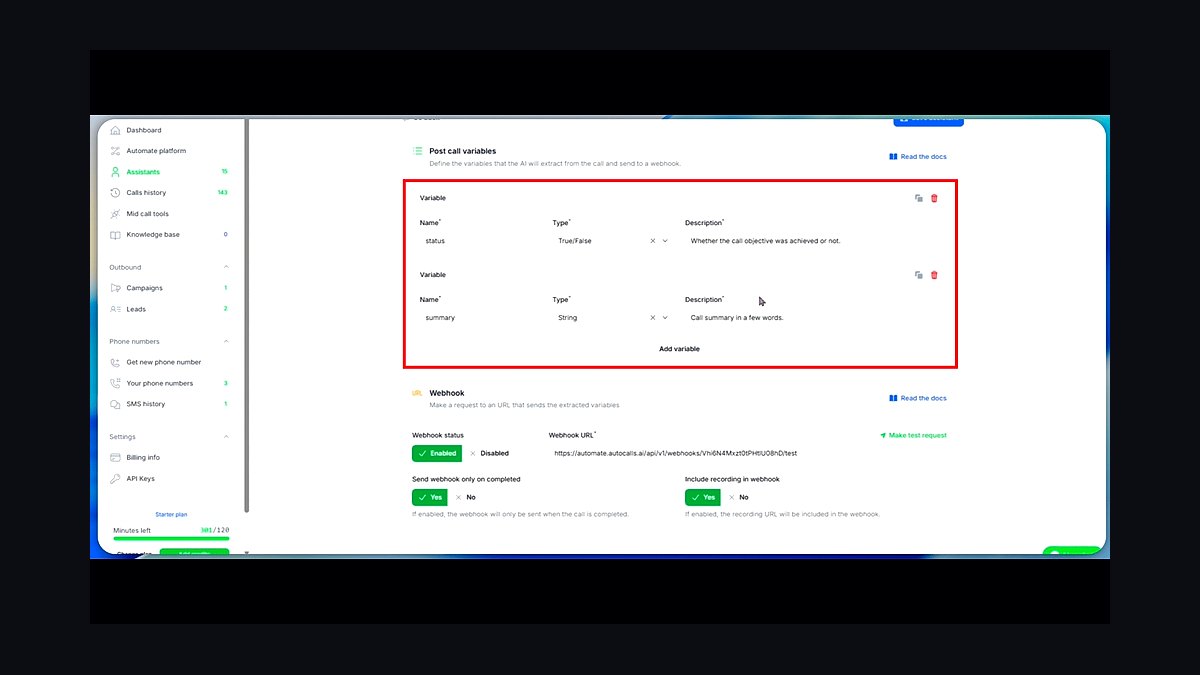
To sync product-qualified leads from Snowflake to HubSpot nightly, you need a reverse-ETL pipeline that queries a deduplicated Snowflake view for qualifying events, transforms that data into HubSpot's contact and company object schema, and upserts records using email as the unique identifier. Most teams use tools like Census, Hightouch, or custom Python scripts scheduled via Airflow, with incremental syncs pulling only records modified since the last run.
The Two Main Approaches: Reverse-ETL Tools vs. Custom Scripts
When you need to move product-qualified leads from Snowflake into HubSpot every night, you have two fundamentally different architectural paths. The first is using a dedicated reverse-ETL platform such as Census, Hightouch, or Grouparoo. These tools are purpose-built for exactly this workflow: they connect directly to Snowflake as a source, let you define SQL queries that identify your PQLs, and then map those results to HubSpot objects with a few clicks. The second approach is writing and maintaining your own sync script — typically Python or Node.js — that queries Snowflake, transforms the data, and calls the HubSpot API directly.
The reverse-ETL route shines in its operational simplicity. You define your PQL query once, configure the mapping between Snowflake columns and HubSpot properties, and the tool handles scheduling, retries, rate limiting, and error logging. Most of these platforms also include a dry-run mode that shows you exactly which records will be created, updated, or skipped before you commit to a live sync. This is invaluable when you are first validating your PQL definition against real HubSpot data.

Custom scripts give you maximum control but demand ongoing maintenance. You are responsible for handling HubSpot's API rate limits — which sit around 100 requests per 10 seconds for most standard tiers — managing authentication token refreshes, and building your own retry logic for transient failures. A Python script using the requests library or the official hubspot-api-client SDK is entirely feasible, but you need to think about where it runs, how it's scheduled, and who gets paged when it breaks at 2 AM.
A hybrid approach is also common. Some teams use a reverse-ETL tool for the core PQL sync while maintaining a small custom script for edge cases — like syncing a specific PQL segment that requires complex transformation logic the reverse-ETL tool handles poorly. The key is not to over-engineer the decision. If you have fewer than 10,000 PQLs and a straightforward definition, start with a reverse-ETL tool. If you have unusual data transformations or need to integrate with systems beyond HubSpot, custom code may be justified.
How to Decide Between the Approaches

The decision between reverse-ETL and custom scripts comes down to four factors: your team's engineering capacity, the complexity of your PQL definition, your budget for SaaS tools, and how quickly you need this live. If you have a data engineer who can own a script, the custom route costs nothing in software licensing but consumes engineering hours. If your RevOps team is lean and you need this running this week, a reverse-ETL tool with a free tier or trial is the pragmatic choice.
Consider your PQL definition's stability. If you expect to iterate on the definition frequently — say, adjusting the qualifying event threshold every few weeks based on conversion data — the reverse-ETL tool's SQL editor makes changes trivial. With a custom script, every definition change requires a code deployment, which may introduce unnecessary friction and delay. Conversely, if your PQL definition is rock-solid and unlikely to change for quarters at a time, the custom script's predictability may appeal to you.
Also factor in your broader data stack. If you already use dbt for transformations in Snowflake, a reverse-ETL tool integrates naturally with your existing models. Many of these tools can sync directly from dbt models or even trigger a dbt run before syncing. If you are already using Airflow or Prefect for orchestration, adding a custom sync task to your existing DAG may be simpler than introducing a new tool your team must learn.
Concrete Numbers Behind Each Option

Let's talk real numbers, because the cost and effort differences are substantial. A reverse-ETL tool like Census or Hightouch typically charges based on the number of synced records or API calls. Pricing often starts around $200 to $500 per month for a starter tier that handles up to 10,000 or 25,000 records per month. For a company with 50,000 PQLs and nightly syncs, you might land in the $1,000 to $2,500 monthly range. These tools also offer free trials and sometimes free tiers for small volumes, which is useful for proof-of-concept work.
A custom Python script, by contrast, has essentially zero marginal cost beyond your engineering time. A competent data engineer might spend 10 to 20 hours building the initial sync — querying Snowflake, writing the transformation logic, implementing HubSpot API calls, and setting up scheduling. At a fully loaded cost of $100 to $150 per hour, that's $1,000 to $3,000 in one-time engineering investment. The ongoing maintenance is where custom scripts get expensive: expect 2 to 4 hours per month for monitoring, debugging, and handling API changes.

HubSpot's API rate limits are a practical constraint regardless of your approach. The standard API tier allows roughly 100 requests per 10 seconds, which translates to about 36,000 requests per hour. If you are syncing 50,000 PQLs nightly, you need to batch your API calls — HubSpot's batch endpoints accept up to 100 records per request — so 500 requests total. That's well within rate limits, taking only a few minutes. But if you also need to update company records, associate contacts to companies, or set custom properties, your request count multiplies. Plan for 2 to 3 API calls per PQL record if you are doing full association and property updates.
The data volume from Snowflake matters too. A nightly query that scans a raw event table with 100 million rows will be slow and expensive in Snowflake credits. Building a materialized view or a daily snapshot table that pre-aggregates qualifying events keeps your query cost low. A well-designed PQL view with proper clustering on qualifying_event_timestamp might scan only 1 to 5 million rows per night, costing a few dollars in Snowflake compute. A poorly designed query scanning the full event table could cost $50 to $100 per night — an avoidable expense that adds up to $1,500 to $3,000 monthly.
Implementation Details and Sequencing
Start by building your PQL view in Snowflake. Use a query like this as a starting point — it deduplicates by user ID and captures only the first qualifying event per lead:

CREATE OR REPLACE MATERIALIZED VIEW pql_daily AS SELECT user_id, email, MIN(qualifying_event_timestamp) AS first_qualifying_event, qualifying_event_name, CURRENT_TIMESTAMP() AS last_qualified_at FROM product_usage_events WHERE qualifying_event_name IN ('created_workspace', 'invited_team_member') GROUP BY user_id, email, qualifying_event_name;
This view gives you one row per qualifying user, which is exactly what you want to push to HubSpot. Add a last_qualified_at column so your incremental sync can query only new or updated PQLs since the last run.
Next, configure your sync tool. If you are using Census or Hightouch, create a new sync that sources from your pql_daily view and targets HubSpot contacts. Map email to the contact's email property, user_id to a custom pql_user_id property, and first_qualifying_event to a pql_qualifying_event property. Set the sync mode to "upsert" so existing contacts are updated rather than duplicated.
For the custom script route, here's a minimal Python example using the HubSpot API client:
import requests from datetime import datetime, timedelta
last_sync = get_last_sync_time() # from a control table query = f""" SELECT email, user_id, qualifying_event_name FROM pql_daily WHERE last_qualified_at > '{last_sync}' """
results = snowflake_execute(query) batches = [results[i:i+100] for i in range(0, len(results), 100)]
for batch in batches: payload = { "inputs": [ { "id": row["email"], "properties": { "pql_user_id": row["user_id"], "pql_qualifying_event": row["qualifying_event_name"], "pql_last_synced_at": datetime.utcnow().isoformat() } } for row in batch ] } response = requests.post( "https://api.hubapi.com/crm/v3/objects/contacts/batch/upsert", headers={"Authorization": f"Bearer {access_token}"}, json=payload ) response.raise_for_status()
Schedule this script to run nightly at 2 AM using cron or Airflow. Store your last sync timestamp in a small control table in Snowflake so the incremental query knows where to pick up.
Data Quality and Monitoring Considerations

A silent failure in your nightly sync is worse than no sync at all — your sales team will chase stale PQLs while hot leads sit untouched in Snowflake. Build at least two monitoring checks into your pipeline. First, a row-count comparison: after each sync, compare the number of PQLs in your Snowflake view to the number of HubSpot contacts with your PQL property set to true. If the delta exceeds 5%, trigger an alert. A simple Python script can query both systems and log the difference.
Second, set up an age-of-last-sync alert. If your Snowflake pipeline fails — say, a dbt model breaks — your last successful sync might be 48 hours old. Create a cron job that checks the timestamp of your last sync marker. If it is older than 26 hours (giving a 2-hour buffer for overnight maintenance), send a Slack or email alert to your RevOps team.
Add a pql_last_synced_at property to each HubSpot contact. This lets your sales reps see how fresh the data is, and it helps you debug whether a lead's PQL status is from tonight's sync or last Tuesday's. When a rep asks "why is this lead still marked as PQL?" you can check the timestamp and immediately know if the sync has been failing.

Finally, review your PQL definition at least monthly. A threshold that works today — say, 10 API calls in a week — may become too broad or too narrow as your user base grows. Track conversion rates from PQL to opportunity to validate your criteria. If your PQL-to-opportunity rate drops below 5%, your definition may be too loose. If it rises above 30%, you may be missing qualified leads that should have converted.
Handling Edge Cases and Common Pitfalls
The most common mistake teams make is automating the sync before validating the PQL definition manually. As noted in the raw source material, you should first test the workflow on one segment for two weeks, document the before/after, and only then turn on the automation. Otherwise you risk flooding sales with low-quality leads or missing the right signals entirely.
Duplicate handling is another frequent pain point. HubSpot's batch upsert endpoint matches on the id property you provide — typically email. But if your Snowflake data has inconsistent email formatting (e.g., User@Example.com vs. user@example.com), you will create duplicates. Normalize emails to lowercase in your Snowflake view before syncing.
Consider what happens when a PQL loses their qualification status. If a user was product-qualified last week but has churned this week, should HubSpot reflect that? Most teams choose to update the PQL property to false or remove it entirely. Your sync should handle both qualification and de-qualification. In your Snowflake view, include a currently_qualified boolean that your sync uses to set or clear the HubSpot property.

Timezone handling matters for nightly syncs. If your Snowflake data uses UTC timestamps but your HubSpot team operates in Pacific Time, a sync running at 2 AM UTC will capture events up to 6 PM Pacific the previous day. That's usually fine, but if you have a sales team that needs real-time alerts on hot PQLs, consider running a second sync at 6 AM Pacific to catch overnight activity.
Related Questions
How do you handle PQL de-qualification when users churn?
Add a currently_qualified boolean to your Snowflake PQL view. When a user stops meeting your qualifying criteria — for example, they haven't logged in for 30 days — the nightly sync updates their HubSpot contact to clear the PQL property. This prevents stale PQLs from clogging your sales pipeline.
What's the best way to sync PQLs without a reverse-ETL tool?
Write a Python script that queries Snowflake, transforms the data, and calls HubSpot's batch upsert endpoint. Schedule it with cron or Airflow. Store your last sync timestamp in a control table. This approach costs nothing in software licensing but requires engineering time for building and maintenance.
How do you prevent duplicate contacts when syncing PQLs?

Normalize email addresses to lowercase in your Snowflake view. Use HubSpot's batch upsert endpoint with email as the unique identifier. Run a dry-run sync on a small test segment first to verify your matching logic works before committing to a full nightly sync.
FAQ
What exactly is a product-qualified lead (PQL) in this context?
A product-qualified lead is a user or account that has shown strong engagement or value signals inside your product — such as completing a key action, reaching a usage threshold, or hitting a specific feature adoption milestone. These signals are typically stored in Snowflake as event or usage data, not in HubSpot.
Why would I sync PQLs from Snowflake to HubSpot instead of just using HubSpot's native scoring?
HubSpot's native scoring is limited to CRM and marketing data, not deep product usage. Snowflake holds the granular event-level data (e.g., API calls, feature clicks, session frequency) that better indicates buying intent. Syncing nightly ensures HubSpot's lead scoring and sales alerts are based on actual product behavior, not just form fills.
How do I set up the nightly sync without writing custom code from scratch?

You can use an ETL/ELT tool like Airbyte, Fivetran, or a reverse-ETL platform such as Census or Hightouch. These tools connect to Snowflake, run a scheduled query to identify PQLs based on your criteria, and push the resulting records into HubSpot's contact or company objects each night.
What happens if a lead is already in HubSpot — will the sync create duplicates?
Most reverse-ETL tools allow you to match on a unique identifier (like email or HubSpot contact ID). If the record exists, the tool updates it; if not, it creates a new one. You should test this matching logic on a small segment first to avoid accidental duplicates or overwrites.
How often should I review or change the PQL definition after the sync is running?
Review the definition at least monthly, or whenever your product or sales process changes. A PQL threshold that works today (e.g., 10 API calls in a week) may become too broad or too narrow as your user base grows. Track conversion rates from PQL to opportunity to validate your criteria.
What's the biggest mistake teams make when setting up this sync?
The most common mistake is automating the sync before validating the PQL definition manually. You should first test the workflow on one segment for two weeks, document the before/after, and only then turn on the automation. Otherwise you risk flooding sales with low-quality leads or missing the right signals entirely.
Sources
- Snowflake Documentation — official technical guides for data extraction, transformation, and loading (ETL) processes.
- HubSpot Knowledge Base — official support articles on CRM integration, API usage, and lead management.
- Fivetran Documentation — documentation for automated data pipeline setup between Snowflake and HubSpot.
- Stitch (by Talend) Documentation — guides for replicating data from Snowflake to HubSpot using a managed ETL service.
- HubSpot Developer Docs — API reference for creating, updating, and syncing product-qualified leads programmatically.
- dbt (data build tool) Documentation — best practices for transforming Snowflake data before syncing to HubSpot.
Related on PULSE
- How do you score and route product-qualified leads in 2027?
- How do you reduce Salesforce API errors from nightly enrichment jobs without turning off sync?
- How do you score renewal risk from product usage tiers synced nightly into HubSpot?
- How do you sync Palantir Foundry ontology usage signals into HubSpot for expansion plays?
- How do you sync product usage telemetry from Palantir Foundry into HubSpot for expansion plays?
- How do you sync Stripe subscription changes to HubSpot deal amount without breaking renewal forecasting?
This page will be disappearing soon. Save it to your device for $1 — or read it free while it is here.
@Kory-White- · if Venmo asks, the last 4 of my number are 2012
This page is gone.
This one is off the shelf now. $1 keeps it on your phone for good — the whole page, pictures and diagrams included.
 revopsHow do you structure RevOps OKRs that tie to net revenue retention in 2027?
 revopsHow do you decide if a full-time CRO is right for a PE-backed company when sales and marketing are misaligned in 2027?
 revopsHow do you decide if a interim CRO is right for a post-merger company when missed two quarters of quota in 2027?
 revopsHow do you define when a deal should leave Commit after legal stalls more than 30 days in 2027?
 revopsHow do you sync Stripe subscription changes to HubSpot deal amount without breaking renewal forecasting in 2027?
 revopsHow do you decide if a part-time revenue leader is right for a Series A company when board wants a revenue turnaround in 2027?
 revopsHow do you validate marketing campaign member influence on closed-won in 2027?
 revopsHow do you decide if a CRO advisory before a full-time hire is right for a Series A company when RevOps exists but no revenue leader in 2027?
 revopsHow do you attribute expansion revenue to customer success vs sales overlays in 2027?
 revopsHow do you redesign territory assignments mid-year without reassigning closed-won accounts in 2027?