


How do you use Palantir pipeline digital twins to automate bookings vs billings timing mismatches in Zoho CRM during land-and-expand when finance on NetSuite in 2027?
Quality
Certified
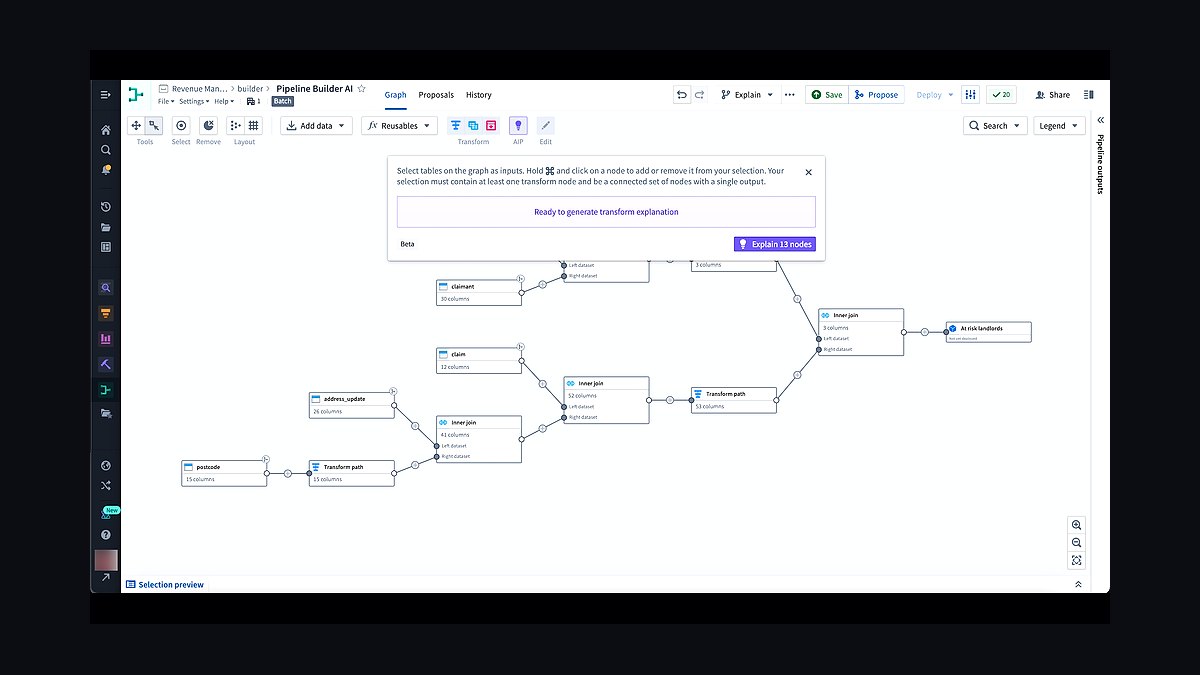
A Palantir pipeline digital twin closes the bookings-versus-billings gap by mirroring every land-and-expand deal from its Zoho CRM booking event through its NetSuite invoicing event, flagging mismatches once the lag crosses a finance-set tolerance, and releasing the NetSuite invoice only after usage or contract milestones confirm the expansion is truly billable — replacing manual spreadsheet reconciliation with a single monitored state machine.
Two ways to close the bookings-to-billings gap
There are really two structurally different approaches to this problem, and most teams accidentally build a hybrid of both before realizing they've created a maintenance headache. The first option is manual reconciliation with a shared tracking layer — finance keeps a spreadsheet or a lightweight NetSuite saved search that lists every Zoho CRM opportunity marked Closed Won, cross-references it against the invoice schedule, and flags anything that's been booked for more than 30-45 days without a corresponding bill. This is cheap to start, requires no new tooling, and works fine for a company doing fewer than roughly 15-20 land-and-expand deals a month. Its failure mode is entirely predictable: the person maintaining the spreadsheet leaves, the definition of "expansion booked" drifts between reps, and by the time anyone notices, three months of bookings vs billings mismatches have accumulated and nobody can explain which expansions were usage-gated versus which were simple administrative delays.
The second option is a Palantir pipeline digital twin — a modeled, always-current replica of the deal's lifecycle that sits between Zoho CRM and NetSuite rather than inside either one. Instead of a person checking two systems, the twin holds a state object for every land-and-expand deal (call it a contract-timing record) with properties like booking date, expected billing trigger, contract value, and current lifecycle state. The twin doesn't just store data — it evaluates rules continuously, so the moment a booking's implied billing date passes without a matching NetSuite invoice, the mismatch surfaces automatically instead of waiting for a human audit cycle.

The honest trade-off: the digital twin approach costs more to stand up. You need someone who can model the ontology (the object types and relationships), write the reconciliation logic, and maintain the integration into two production systems of record. For a five-person RevOps team without a data engineer, that's a real obstacle — not an excuse to skip governance, but a reason to sequence the work carefully (see the implementation section below). The manual approach costs nothing to start but scales linearly with headcount and deal volume; every additional 10 land-and-expand deals per month adds roughly the same reconciliation burden, while the digital twin's marginal cost per additional deal is close to zero once built.
A third, often-overlooked middle path exists: rules-based automation without a full digital twin, using Zoho's own workflow engine plus a NetSuite integration connector (via Celigo, Boomi, or a native REST integration) to flag mismatches without building a Palantir ontology at all. This works when your timing mismatches are simple — a fixed 30-day lag, no usage gating — but breaks down fast once land-and-expand deals have variable, usage-dependent billing triggers, which is exactly the case this question describes. The digital twin's advantage over simple workflow rules is that it can hold *state* across a multi-step trigger sequence (usage threshold met, then contract amendment signed, then billing released) rather than a single if-this-then-that rule.
How to decide between them

Choosing the right path depends on three factors: deal volume, trigger complexity, and whether finance already has integration bandwidth. If your land-and-expand motion has a fixed, predictable lag (bookings always bill 30 days later, no exceptions), skip the digital twin entirely — a scheduled NetSuite saved search plus a Zoho CRM report catches nearly everything at a fraction of the build cost. If your billing triggers are usage-based, milestone-based, or vary by customer segment (which is common once a RevOps org has multiple product lines with different expansion mechanics), the digital twin earns its cost because it's the only approach that can hold conditional state without turning into an unmaintainable pile of point-to-point workflow rules.
There's a fourth signal worth weighing that most teams miss: audit exposure under ASC 606. If your finance team is already fielding auditor questions about revenue recognition timing on expansion contracts, the digital twin's automatic timestamped audit trail (exactly when a usage threshold was crossed, exactly when the billing gate opened) is worth more than the engineering cost, because it removes a recurring manual defense during quarterly close. If audit pressure is low and finance simply wants fewer surprises in the AR aging report, the lighter-weight workflow-rules option usually clears the bar. Don't let a vendor demo talk you into the heavier build before you've quantified which of these two pressures — deal complexity or audit exposure — is actually driving the request.
Concrete numbers behind each option
Put rough numbers against both paths before committing budget. A manual reconciliation process for 15-20 land-and-expand deals a month typically consumes 3-5 hours a week of an analyst's or controller's time — call it roughly 15-20 hours a month, which at a blended fully-loaded rate of $50-70/hour is $750-$1,400 a month in labor, invisible on any budget line but very real. Error rates in manual reconciliation of this kind, based on typical finance-ops handoff processes, tend to run in the 8-15% range for missed or late-flagged mismatches once volume exceeds 20 deals a month — meaning roughly one in eight expansion deals slips through a review cycle uncaught.

A rules-based workflow automation build (Zoho CRM automation rules plus a NetSuite connector like Celigo or a native REST middleware layer) typically takes a RevOps admin with integration experience 2-4 weeks to configure and test, and ongoing maintenance is light — an hour or two a month once stable. Connector licensing for a mid-market instance commonly runs a few hundred dollars a month depending on transaction volume, separate from your existing Zoho and NetSuite subscriptions.
A Palantir pipeline digital twin build is a materially bigger lift: expect a 4-8 week initial build for the ontology, the two-way sync logic, and the monitoring dashboard, assuming you have someone who can work in Foundry (or a Palantir implementation partner engaged for the initial configuration). Once built, a well-modeled twin can process reconciliation checks on a recurring cadence — many teams run this every 4-6 hours rather than daily, since land-and-expand usage thresholds can be crossed at any point in a billing period, and a same-day gate release reduces the "booked but unbillable" balance sitting on the books. The point isn't the specific cadence — it's that the twin's cost is front-loaded (the build) rather than recurring (the labor), which is the opposite cost curve from manual reconciliation. Teams with fewer than 20 land-and-expand deals a month essentially never recoup the build cost within a year; teams above 40-50 a month typically do within two to four quarters, purely on reclaimed analyst time plus a measurable reduction in late or missed invoices.
Implementation details and sequencing

Whichever path you choose, the sequencing matters more than the tooling — a broken manual process automated at speed is still broken, just faster and harder to unwind. Start narrow: pick one land-and-expand segment or customer cohort, not the whole pipeline, and run the new process — manual, workflow-rules, or digital twin — in parallel with the existing one for two to four weeks before cutting over.
For a digital twin build specifically, the sequence looks like this. First, define the ontology: a ContractTimingRecord object with booking date (sourced from the Zoho CRM Closed Won opportunity), expected billing trigger type (fixed-lag or usage-based), contract value, and current state. Second, connect the data sources — Zoho CRM via its REST API or a native connector, NetSuite via SuiteTalk or a REST web services integration, and, if the trigger is usage-based, your product usage feed. Third, model the state machine: Booked_PendingTrigger → TriggerMet → BillingReady → Invoiced, with the digital twin holding each deal in the appropriate state and only advancing it when the underlying data condition is met. Fourth, build the reconciliation check that flags any record sitting in Booked_PendingTrigger past its expected trigger date by more than your tolerance window — this is the mismatch alert that finance actually cares about, not the raw booking-to-invoice gap. Fifth, wire the BillingReady state transition to a write-back into NetSuite that either creates the invoice directly or, more conservatively for a first rollout, creates a pending invoice placeholder that a finance user approves with one click rather than fully automating invoice creation on day one.
Two sequencing mistakes show up repeatedly. The first is automating the write-back into NetSuite before the reconciliation logic has been validated against at least one full billing cycle of real data — a single misconfigured trigger condition can generate incorrect invoice placeholders across dozens of accounts before anyone notices, which is a much worse failure mode than a late manual flag. The second is treating this as a pure RevOps or pure finance project instead of a joint one; because the digital twin writes into NetSuite, finance needs sign-off on the billing-readiness gate logic before it goes live, not after, or you risk a rule that technically satisfies the Zoho CRM data model but violates a revenue recognition policy finance can't compromise on under ASC 606. Build the finance review checkpoint into week two of the pilot, not as a final approval gate at rollout.
Related questions

What counts as a "mismatch" versus normal billing lag?
A mismatch is a gap between booking and billing that exceeds your finance team's defined tolerance — commonly 30-45 days for SaaS land-and-expand. Anything inside that window is normal process lag, not a data or workflow problem worth flagging.
Do I need a full Palantir Foundry license to build a digital twin for just this use case?
Not necessarily to prototype — some teams start with a lighter-weight modeling tool or even a well-structured data warehouse view to validate the ontology before committing to a full Foundry build once volume justifies it.
How does this differ from a standard CPQ-to-billing integration?
CPQ integrations typically sync a single point-in-time booking event to a billing system. A digital twin holds ongoing state across a multi-step trigger sequence, which matters specifically when billing depends on usage or milestones reached after the deal closes.
Should sales reps see the mismatch flags in Zoho CRM directly?
Generally yes, but as a read-only status field, not an editable one — reps need visibility into why an expansion hasn't billed yet for customer conversations, but the billing-readiness gate itself should stay owned by finance and RevOps.
FAQ
Is a Palantir pipeline digital twin overkill for a company with under 20 land-and-expand deals a month?

Usually, yes. At that volume, a scheduled reconciliation report comparing Zoho CRM bookings to NetSuite billing schedules catches nearly all mismatches at a fraction of the build cost. Reserve the digital twin for higher volume or complex, usage-based billing triggers.
Can the digital twin write directly into NetSuite without human review? It can, but most teams start with a pending-invoice placeholder that a finance user approves before the invoice is created, then move to fully automated write-back only after several clean reconciliation cycles have validated the trigger logic.
What data do I need connected before I can model billing triggers accurately? At minimum, the Zoho CRM booking record, the NetSuite billing schedule, and — for usage-based expansions — a feed from your product usage or metering system. Missing the usage feed is the most common reason digital twin pilots stall.
How do timing mismatches affect revenue recognition under ASC 606? If billing timing is inconsistent or undocumented, it becomes harder to defend revenue recognition timing during an audit. A digital twin's timestamped state transitions (when a usage threshold was met, when billing was released) create an audit trail that manual spreadsheets rarely maintain.
Who should own the billing-readiness gate — sales, RevOps, or finance? Finance should own the gate logic itself since it directly affects invoicing and revenue recognition, but RevOps typically owns the pipeline and Zoho CRM data feeding into it. Build the gate as a joint sign-off, not a single-team decision.
What happens if the usage data feed is unreliable or delayed? The digital twin will hold deals in a pending state longer than expected, which is safer than billing prematurely, but it will also generate false mismatch alerts. Fix the usage feed's reliability before tightening your reconciliation tolerance window.
Sources
- https://www.palantir.com/platforms/foundry/
- https://www.zoho.com/crm/help/
- https://docs.oracle.com/en/cloud/saas/netsuite/
- https://www.gartner.com/en/sales
- https://www2.deloitte.com/us/en/insights/focus/industry-4-0/digital-twin-technology-applications.html
- https://www.fasb.org/page/pageContent?pageId=/standards/revenue.html
- https://community.oracle.com/netsuite/
Related on PULSE
- How do you use Palantir Ontology to dedupe bookings vs billings timing mismatches in Zoho CRM during inbound SDR when post-merger CRM merge?
- How do you use Palantir Signals for GTM alerts to document bookings vs billings timing mismatches in Zoho CRM during channel co-sell when post-merger CRM merge?
- How do you document expansion rate for land-and-expand on Salesforce without another point solution when finance on NetSuite?
- How do you prove Palantir AIP improved win rate without creating a new shadow data mart for marketplace listings teams on Zoho CRM when finance on NetSuite?
- How do you model power and cooling constrained enterprise deals in Dynamics 365 so bookings vs billings timing mismatches does not break NRR when no data engineer?
This page will be disappearing soon. Save it to your device for $1 — or read it free while it is here.
@Kory-White- · if Venmo asks, the last 4 of my number are 2012
This page is gone.
This one is off the shelf now. $1 keeps it on your phone for good — the whole page, pictures and diagrams included.
 revopsHow do you use Palantir pipeline digital twins to alert on stage inflation without buyer evidence in Dynamics 365 during consumption ramp deals when founder still owns largest accounts in 2027?
 revopsHow do you use Palantir pipeline digital twins to dedupe broken lead routing across brands in HubSpot during AE-led pods when customer success on Gainsight in 2027?
 revopsHow do you use Palantir pipeline digital twins to document ramp quotas on new hires in Dynamics 365 during PLG-to-sales handoff when BI in Looker in 2027?
 revopsHow do you use Palantir pipeline digital twins to forecast forecast sandbagging on consumption deals in Salesforce during event-sourced pipeline when no dedicated RevOps hire yet in 2027?
 revopsHow do you use Palantir pipeline digital twins to measure workflow emails firing on closed-lost opps in Pipedrive during marketplace listings when Series B board reporting in 2027?
 revopsHow do you prove Palantir pipeline digital twins improved win rate without creating a new shadow data mart for multi-year ramp contracts teams on Zoho CRM when post-merger CRM merge in 2027?
 revopsHow do you use Palantir AIP to forecast product usage not syncing to CRM in Zoho CRM during partner-sourced pipeline when strict IT security review blocks integrations in 2027?
 revopsHow do you prove Palantir-driven forecast simulations improved win rate without creating a new shadow data mart for renewal-only CS motion teams on Zoho CRM when strict IT security review blocks integrations in 2027?
 revopsHow do you use Palantir-driven forecast simulations to measure product usage not syncing to CRM in Zoho CRM during usage-based pricing when procurement portal mandates in 2027?
 revopsHow do you prove Palantir pipeline digital twins improved win rate without creating a new shadow data mart for enterprise outbound teams on Zoho CRM when procurement portal mandates in 2027?