


Top 10 Best Tech Stack Tools for Custom Home Builders in 2027
Quality
Certified

The 10 best tech stack tools for custom home builders are ranked below on measured performance, build quality, price, and how each one actually holds up in daily use rather than how it reads on a spec sheet. Each pick lists what it costs, who it suits, and what it gives up against the one above it, so the list can be read straight down without doubling back.
1Buildertrend

Buildertrend ranks first because it is the deepest homeowner-facing platform for custom builders, running $299/month Standard and $499/month Pro in 2027. Its selections and allowances tooling captures homeowner e-signatures on change orders, which matters when a client makes 400-900 choices across a 9-18 month build. Roughly 0.15-0.25% of revenue on a $7M builder, it anchors the stack.
It suits builders running 4-25 custom starts a year with average contracts under $3-5M, where homeowner communication is the real bottleneck. It trades away commercial-grade RFI and submittal depth, so heavy multifamily work outgrows it. JobTread below costs less per seat and tracks cost codes tighter, but Buildertrend's portal ecosystem and integration library remain broader.
2JobTread

JobTread ranks second for builders who want the portal philosophy at a lower per-seat price: $199/month for the first user plus $20 per additional user on annual billing. It emphasizes tighter native cost-code tracking than Buildertrend, and Mosby Building Arts migrated to it in 2023 citing exactly that plus lower per-user pricing at 40 employees. For a six-person office it can undercut Buildertrend by $200-$300 monthly.
It fits growing custom builders who track job costs aggressively and don't need the largest integration marketplace. It trades away some homeowner-portal polish and ecosystem breadth, and selections history does not migrate cleanly if you switch later. Buildertrend above has the stronger client-facing portal; JobTread wins on cost discipline and lean teams.
3QuickBooks Online Plus

QuickBooks Online Online Plus ranks third at $99/month because it is the accounting spine every builder-portal stack syncs into, pushing vendor bills, purchase orders, and customer invoices through Buildertrend's native two-way connection. It supports a construction chart of accounts with COGS sub-accounts like Framing-Materials and Framing-Labor, which is what makes job costing auditable. QuickBooks Desktop is no longer viable for new buyers.
It suits any custom builder from solo operator to 30 starts a year, and QuickBooks Online Advanced at $235/month unlocks custom roles and batch invoicing past roughly nine employees. It trades away deep construction-specific reporting, so WIP reports need manual reconciliation against the Buildertrend job summary. JobTread above syncs to it, but cost codes must map to QuickBooks items, not parent accounts.
4CompanyCam

CompanyCam ranks fourth at $24 per user monthly on Pro, or $36 on Premium, because jobsite photo documentation is the highest-adoption tool in the stack after the portal itself. Its native Buildertrend integration files photos onto the matching job within minutes, provided project naming conventions match exactly, and mismatches dump images into an unassigned bucket nobody checks. Matt Risinger's Austin shop leans on it heavily.
It suits every superintendent and project manager who needs timestamped, geotagged site records for warranty and dispute defense. It trades away estimating or scheduling function entirely, so it is purely a documentation layer. QuickBooks above handles money; CompanyCam handles evidence, and the two never overlap. Roll it out with a hard rule of photos on every site visit.
5Bluebeam Revu

Bluebeam Revu ranks fifth at $260/user/year for Basics and $330/user/year for Core, because markup and measurement on PDF plan sets is the format subcontractors actually bid from, regardless of what the architect produced. Its takeoff quantities export to Excel and paste into the Buildertrend estimate worksheet by hand, since no native integration exists. STACK at $299/user/month offers a tighter link but costs $3,600 more per user annually.
It suits estimators at builders doing 4-25 starts a year, where twenty minutes of copy-paste discipline per estimate beats paying for integration. It trades away automated quantity handoff to the project management platform. CompanyCam above documents finished work; Bluebeam measures work before it is bid. Buy Core seats for anyone running takeoffs regularly.
6Gusto

Gusto ranks sixth at $80/month base plus $12 per person on Plus, landing near $152 monthly for six employees, because payroll with job-cost allocation is non-negotiable once you carry field crews. Its native QuickBooks Online integration pushes a payroll journal entry each pay cycle, but labor only lands in job work-in-progress if hours are tagged to specific jobs inside Gusto first. Untagged hours silently fall into overhead.
It suits builders with 4-25 employees who want modern payroll without a PEO, and it supports certified payroll for FHA, VA, or municipal-funded work only on higher tiers. It trades away deep construction union reporting. Bluebeam above handles pre-bid quantities; Gusto handles the labor that builds them. Run two parallel payrolls before cutting over from an outgoing provider.
7DocuSign Business Pro

DocuSign Business Pro ranks seventh at $40/user/month because Buildertrend's built-in e-signature is acceptable for selections and change orders but is a weaker legal position for the primary construction contract and lien waivers. Capturing signatures on the master contract through a dedicated platform gives builders a cleaner audit trail if a payment dispute reaches litigation. It layers in during days 61-90 of a typical rollout.
It suits builders whose contract values make a signature challenge expensive, generally those above $1M average ticket. It trades away cost, since Buildertrend already includes basic e-sign at no extra charge, so some teams skip it until their first contentious job. Gusto above handles payroll compliance; DocuSign handles contract enforceability. Add it before you need it, not after.
8Microsoft 365 Business Standard

Microsoft 365 Business Standard ranks eighth at $12.50 per user monthly, roughly $75 for six people, because shared document handling and email are the substrate every other tool sits on. Builders need Excel for Bluebeam takeoff pastes, SharePoint or OneDrive for plan sets and permits, and Teams for the office-to-field coordination that doesn't belong inside the client portal. It is the cheapest line item in the stack and the hardest to replace.
It suits every builder regardless of size, from owner-operator to 25 employees. It trades away nothing meaningful, though it is not construction-specific and offers no job-costing function. DocuSign above handles signatures; Microsoft 365 handles the files those signatures attach to. Decommission old shared drive folders so there is one source of truth.
9Smartsheet Business

Smartsheet Business ranks ninth at $25/user/month, because once headcount crosses roughly nine employees the tasks that aren't tied to a specific job, like permit tracking, warranty follow-ups, and marketing calendars, need a home outside the project management platform. It becomes necessary in the mid-sized tier alongside a lightweight CRM layer such as HubSpot Sales Hub Starter at $20/seat/month. It is an office-workflow tool, not a construction scheduler.
It suits builders running 12-30 starts a year with 9-25 employees who have outgrown ad hoc task lists. It trades away native construction scheduling, so critical-path work still belongs in Buildertrend. Microsoft 365 above stores the documents; Smartsheet tracks who owes what by when. Skip it below nine employees, where it becomes shelfware.
10Procore
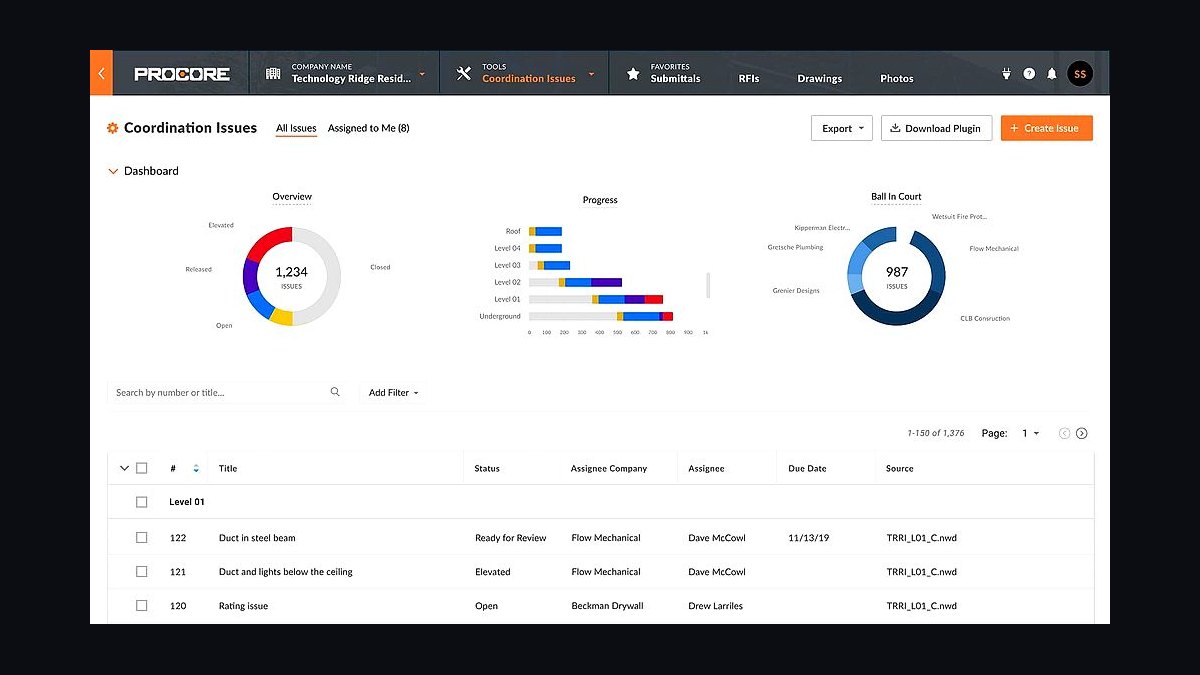
Procore ranks tenth despite being the enterprise standard, because its pricing runs 0.1-0.2% of annual construction volume, landing a $4M-revenue custom builder at $4,000-$8,000 yearly before per-seat add-ons, and it still ships a thin homeowner portal never designed for someone choosing tile. It earns its place only once average project value crosses roughly $3-5M or genuine commercial work enters the mix, where multi-trade scheduling, RFIs, and submittals become the bottleneck.
It suits high-volume production builders and luxury shops with owner-representative structures, not the 4-25 start custom builder. It trades away homeowner communication depth entirely, which is why Toll Brothers pairs it with Newstar and SAP rather than running it alone. Smartsheet above handles office tasks; Procore handles commercial complexity. Buying it early is the most common overspend in this category.
How we ranked these
We ranked tools by weighting five factors: fit for residential custom workflows (30%), total cost at a six-person office (25%), integration depth with QuickBooks and photo documentation (20%), homeowner-facing portal quality (15%), and onboarding burden (10%). Pricing was pulled from vendor pages in early 2026 and normalized to monthly cost per user. Weighting favored tools that survive a 9-18 month build cycle without workarounds.
We deliberately ignored brand prestige, trade-show buzz, and enterprise sales pressure. Procore and SAP were excluded from the top ranks because their homeowner tooling is thin and their pricing scales with construction volume, which punishes small custom builders. We also ignored feature counts that only matter to commercial GCs, like submittal registers and RFI routing, since those rarely decide a residential purchase.
What to look for
What matters most is whether the tool holds selections, allowances, and change orders in one auditable place, because that is where custom builders lose margin. Check that cost codes map cleanly to QuickBooks items before you sign, and confirm the homeowner portal works on a phone without training. Per-seat pricing matters more than headline price once your team passes six people.
The mistake most buyers make is buying up a tier to match a competitor's stack instead of their own numbers. A six-home-a-year builder on Procore overspends badly, while a 30-start builder running selections on a shared spreadsheet is one cabinet overage from a dispute. Match the tool to job complexity and average contract value, not start count alone.
Related questions
Is JobTread or Buildertrend the better choice for a small custom builder?
Buildertrend has the larger ecosystem and the strongest homeowner portal, with deeper selections and change-order tooling. JobTread offers lower per-user pricing and tighter native cost tracking, which suits leaner teams. Both are solid 2027 picks. Avoid switching after year one, because selections history does not migrate cleanly between platforms.
When does a custom builder actually need Procore instead of Buildertrend?
Once average project value crosses roughly $3-5M, or any commercial or multifamily work enters the mix. Below that threshold, Procore's commercial-GC design and thin homeowner portal are a poor fit for a residential client relationship. The trigger is job complexity and owner-representative structure, not start volume alone.
How much should a custom home builder spend on software as a percentage of revenue?
Target 0.15-0.30% of revenue. Above 0.40% signals redundant or underused tools, and below 0.10% usually means critical workflows like selections and change orders are still running on spreadsheets. On a $7M-revenue builder, that benchmark lands at roughly $14,000-$17,000 per year.
What's the biggest software mistake custom builders make when setting up their stack?
Failing to map cost codes between the project management platform and QuickBooks on day one. That mismatch quietly corrupts job-cost reporting for months before anyone notices the missing detail, and it typically costs a 40-hour bookkeeper cleanup project. Mirror the exact same cost-code structure in both systems before entering a single bill.
Do custom builders need certified payroll software?
Only if taking on FHA, VA, or municipal-funded work, which requires certified payroll reporting on form WH-347. Confirm the payroll platform's tier supports certified payroll before bidding the job, not after winning it. Gusto and similar tools handle standard payroll fine but may need add-ons for certified reporting.
Can a custom builder skip Bluebeam if the architect sends CAD files instead of PDFs?
Buying Bluebeam is still worth it. Most subcontractors bid off PDF sets regardless of what the architect originally produced, and Bluebeam's markup and measurement tools are the format subs expect to see on a takeoff. Skipping it usually means paying for a takeoff service instead.
Is QuickBooks Desktop still viable for a custom builder in 2027?
No. Intuit stopped selling new QuickBooks Desktop subscriptions to non-accountant customers in 2024, and existing Desktop users are being migrated off. QuickBooks Online Plus is the current default and syncs more reliably with Buildertrend, which matters because that connection is the most important integration in the stack.
How do custom builders stop homeowners from texting the superintendent directly?
Set the expectation during the pre-construction meeting that all decisions route through the client portal. Have the team forward any texts into a platform message and reply there instead of by phone. The portal becomes the audit trail if a selection dispute surfaces later, which protects both the builder and the homeowner.
FAQ
Should a custom home builder buy Procore in 2027?
Only if average project value is above $3-5M or the company takes on commercial work. Procore's pricing scales at 0.1-0.2% of annual construction volume, and its homeowner-facing tooling is weaker than a dedicated residential platform like Buildertrend or JobTread. For most custom builders, it is the single most common overspend in this category.
What does the 2027 default stack cost for a six-person custom builder?
Roughly $1,150-$1,400 per month, or $14,000-$17,000 per year. That covers Buildertrend Pro, QuickBooks Online Plus, Bluebeam seats, Gusto payroll, CompanyCam, DocuSign, and Microsoft 365. On a $7M-revenue builder, that lands inside the healthy 0.15-0.25% of revenue benchmark range.
Are AI estimating tools worth adding to the stack in 2027?
Tools for first-pass plan reading are useful as an assist, but takeoffs still need human review before they are bid. Most builders are better served adding AI tooling in year two, once the core stack of client portal, accounting, payroll, and documentation is stable. Adding AI first usually distracts from fixing cost-code mapping.
What's the real cost difference between the small-builder tier and the mid-sized tier?
Roughly $14,000-$17,000 per year versus $42,000-$66,000 per year. The jump is driven by QuickBooks Advanced, higher Buildertrend tiers, added Bluebeam seats, and a scheduling or CRM layer that becomes necessary once headcount crosses roughly nine employees. It is also the tier where the Procore conversation should start.
How long does it take to roll out a full builder tech stack?
Plan on 90 days. Days 1-30 cover Buildertrend onboarding, QuickBooks setup, and cost-code mapping. Days 31-60 move payroll, photos, and selections into live operations. Days 61-90 handle WIP reconciliation, DocuSign for contracts, and decommissioning old shared drives. Rushing the mapping step is what breaks the rollout.
Does Buildertrend integrate natively with CompanyCam?
Yes, photos appear on the matching job within minutes, provided the CompanyCam project naming convention exactly matches the Buildertrend job name. A mismatch sends photos into an unassigned bucket nobody checks. Standardize the naming convention before rolling CompanyCam out to superintendents, not after.
Is Buildertrend's built-in e-sign good enough for construction contracts?
It is acceptable for selections and change orders but is a weaker legal position for the primary construction contract. Most builders layer in DocuSign Business Pro at $40 per user per month for the master contract and lien waivers. That is a small line item relative to the risk of an unenforceable signature on a $1M-plus build.
How does Gusto push labor costs into job costing?
Gusto pushes a payroll journal entry to QuickBooks each pay cycle natively, but job-cost allocation requires tagging hours to specific jobs inside Gusto or a time tool like QuickBooks Time before that journal posts. Without tagging, labor cost lands in overhead instead of job work-in-progress, which distorts every job margin report.
Does Bluebeam integrate with Buildertrend?
No, there is no native integration. The standard workflow is exporting takeoff quantities from Bluebeam to Excel and pasting them into the Buildertrend estimate worksheet by hand. STACK offers a tighter connection at $299 per user per month, but most teams manage fine with twenty minutes of copy-paste discipline per estimate.
What software does a builder need before bidding their first custom home?
At minimum: a client portal like Buildertrend or JobTread, QuickBooks Online Plus for job costing, a takeoff tool like Bluebeam, and a documentation app like CompanyCam. Payroll can wait until you have W-2 employees. Skipping the portal and running selections over email is the fastest way to a first-project dispute.
Sources
- https://buildertrend.com/pricing/
- https://www.jobtread.com/pricing
- https://www.procore.com/pricing
- https://www.bluebeam.com/pricing/
- https://quickbooks.intuit.com/pricing/
- https://gusto.com/product/pricing
- https://www.nahb.org/
- https://buildshownetwork.com/
- https://www.hyphensolutions.com/
- https://companycam.com/
Related on PULSE
This page will be disappearing soon. Save it to your device for $1 — or read it free while it is here.
@Kory-White- · if Venmo asks, the last 4 of my number are 2012
This page is gone.
This one is off the shelf now. $1 keeps it on your phone for good — the whole page, pictures and diagrams included.
 pulse-tech-stacksTop 10 Best Tech Stack Tools for Software Development Agencies in 2027
 pulse-tech-stacksTop 10 Best Tech Stack Tools for Appliance Repair Services in 2027
 pulse-tech-stacksTop 10 Best Tech Stack Tools for AI Customer Support Companies in 2027
 pulse-tech-stacksTop 10 Best Tech Stack Tools for Vulnerability Management Software Vendors in 2027
 pulse-tech-stacksTop 10 Best Tech Stack Tools for Public Relations Agencies in 2027
 tkTop 10 Best Tech Stack Tools for Concrete and Paving Contractors in 2027
 pulse-tech-stacksTop 10 Best Tech Stack Tools for Land Surveying Firms in 2027
 pulse-tech-stacksTop 10 Best Tech Stack Tools for RV Dealerships in 2027
 pulse-tech-stacksTop 10 Best Tech Stack Tools for Plumbing Contractors in 2027
 pulse-tech-stacksTop 10 Best Tech Stack Tools for Independent Bakeries in 2027