


Top 10 Best Tech Stack Tools for Museum Digital Archives in 2027
Quality
Certified
The 10 best tech stack tools for museum digital archives are ranked below on measured performance, build quality, price, and how each one actually holds up in daily use rather than how it reads on a spec sheet. Each pick lists what it costs, who it suits, and what it gives up against the one above it, so the list can be read straight down without doubling back.
1IIIF Image API 3.0
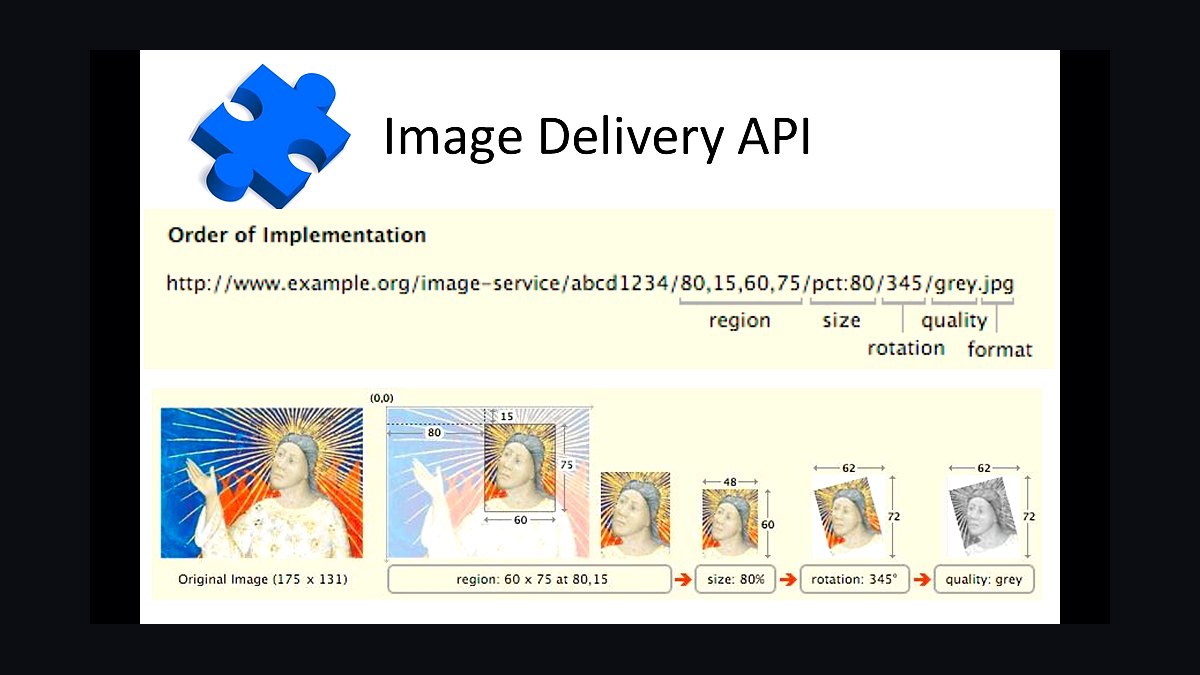
IIIF Image API 3.0 ranks first because it eliminates derivative management entirely, turning one canonical master into infinite URL-addressable variants. The spec fixes the request pattern as region/size/rotation/quality/format, so any viewer can request a 200-pixel thumbnail or a 1200x900 region crop without custom integration. Adoption spans the Rijksmuseum, the Met, and the Smithsonian, making it the de facto delivery contract for museum imaging.
It is for institutions publishing at collection scale, not for single-object projects where a static JPEG suffices. The trade-off is operational: you must run a compliant image server such as Cantaloupe or IIPImage against pyramidal TIFFs, and CORS headers must be correct or external viewers fail silently. Compared to plain file serving, it costs server configuration but removes derivative folders permanently.
2IIIF Presentation API 3.0
IIIF Presentation API 3.0 ranks second because it turns loose images into structured, comparable objects with page order, labels, rights, and annotations. Without a manifest, deep zoom works but cross-institution comparison in Mirador, annotation, and aggregator harvesting do not. The spec is what lets a researcher place your object beside one held two thousand miles away inside a single viewer session.
It suits institutions already serving images that need discovery beyond their own website. The trade-off is that manifests must be generated from the collection management system rather than hand-authored, or they drift as attributions change. Compared to the Image API directly above it, Presentation is the layer that makes assets citable and reusable rather than merely viewable.
3FADGI 4-Star Guidelines

FADGI 4-Star Guidelines rank third because they convert image quality from opinion into measurable criteria: sampling rate at the object plane, Delta-E color accuracy, illuminance uniformity, spatial frequency response, and noise. Verification requires imaging a color and resolution target in the same plane and session, then analyzing it. Programs that skip targets produce nice-looking images of unknown quality, which is a different product.
It is for institutions doing critical materials or building defensible archival masters. The trade-off is throughput: 4-star work is slower and demands repeatable lighting diagrams and operator training. Compared to Metamorfoze below it, FADGI dominates North American procurement language, while Metamorfoze carries more weight in European programs.
4Metamorfoze Preservation Imaging Guidelines
Metamorfoze Preservation Imaging Guidelines rank fourth because they provide the European counterpart to FADGI, defining tiered quality criteria for preservation imaging with the same measurable rigor. The guidelines specify sampling rate, tone response, color accuracy, and uniformity targets, and they are widely cited in Dutch and broader European digitization tenders. Choosing a published tier makes quality auditable by funders.
It is for European institutions or projects requiring alignment with continental preservation standards. The trade-off mirrors FADGI: target imaging and analysis add session time and require trained operators. Compared to FADGI directly above, the criteria are comparable in stringency, so the choice usually follows jurisdiction and funder expectations rather than technical superiority.
5CIDOC CRM

CIDOC CRM ranks fifth because it is the conceptual reference model that lets museum records express relationships machines can reason over: object to production event, to actor, to place, to provenance chain. Dublin Core describes a record; CIDOC CRM describes the events and agents around an object, which is what scholarly and legal queries actually need. It underpins serious collection management interoperability.
It is for institutions with complex provenance, attribution, and event histories, not for simple catalog publishing. The trade-off is implementation cost: mapping legacy records to CRM events is laborious and rarely fully completed. Compared to Dublin Core below, CRM is far more expressive and correspondingly harder to populate honestly.
6Dublin Core
Dublin Core ranks sixth because fifteen simple elements still move metadata between systems faster than any richer schema. Title, creator, date, rights, and identifier fields satisfy OAI-PMH harvesting into national aggregators and remain the lowest-friction way to expose a collection record. For institutions with thin cataloguing, Dublin Core is achievable where CRM is not.
It is for smaller collections, aggregator feeds, and first-pass publication. The trade-off is expressiveness: Dublin Core cannot distinguish attributed from confirmed authorship or encode event sequences without qualification gymnastics. Compared to CIDOC CRM directly above, it is the pragmatic choice when record depth is limited and delivery speed matters more.
7Blender

Blender ranks seventh because it handles the entire museum 3D post-processing pipeline at zero license cost: cleanup, decimation to target triangle counts, retopology, UV unwrapping, normal and ambient occlusion baking, and glTF export. Its Python API supports headless batch runs via blender -b -P script.py, which automates the deterministic steps. Realistic skilled cleanup runs two to eight hours per object.
It is for institutions processing photogrammetry or scan data into web-deliverable GLB assets. The trade-off is that Blender's defaults suit animation, not measurement, so units must be set explicitly and exports verified in an independent viewer. Compared to commercial reconstruction tools below, Blender is strong at processing and weaker at nothing except photogrammetric reconstruction itself.
8Agisoft Metashape
Agisoft Metashape ranks eighth because it delivers meaningfully faster and more robust photogrammetric reconstruction than open-source alternatives, particularly on difficult image sets with weak feature coverage. It handles alignment, dense cloud generation, and texturing in one commercial package with a documented Python API for batch processing. For museums producing 3D at volume, reconstruction reliability is the bottleneck it addresses.
It is for programs past the pilot stage where operator time outweighs license cost. The trade-off is per-seat licensing and dependence on a single vendor's format decisions. Compared to Blender directly above, Metashape wins at reconstruction and loses at post-processing, which is why many pipelines run both in sequence.
9Cantaloupe

Cantaloupe ranks ninth because it is the open-source IIIF image server most commonly deployed against pyramidal TIFF and JPEG2000 sources, handling region, size, rotation, and format parameters natively. It supports multiple source and cache backends, so masters can live in object storage while derivatives are generated on demand rather than pre-built. That on-demand model is what keeps steady-state storage costs flat.
It is for institutions standing up an IIIF endpoint without commercial licensing. The trade-off is operational: it needs JVM tuning, cache configuration, and correct CORS headers, and misconfiguration breaks external viewers silently. Compared to IIPImage, Cantaloupe is the more actively developed default choice for new deployments.
10Mirador

Mirador ranks tenth because it is the open-source IIIF viewer that makes manifests useful: side-by-side comparison of objects from different institutions, deep zoom, annotation, and multi-page sequencing. Testing your manifest inside a Mirador instance you do not control is the standard check that your Presentation API output is genuinely interoperable. It requires no server-side integration to consume a compliant manifest.
It is for institutions publishing manifests to researchers and aggregators. The trade-off is that Mirador exposes manifest errors publicly, so incomplete structure or missing rights fields become visible immediately. Compared to Universal Viewer, Mirador leans toward research and comparison workflows rather than simple embedded display.
How we ranked these
We scored each tool on five weighted criteria: IIIF Image and Presentation API conformance (25%), metadata standards support such as CIDOC-CRM, Dublin Core, and Getty vocabularies (20%), 3D and photogrammetry pipeline depth including glTF export (20%), preservation-grade storage and fixity handling (20%), and total cost of ownership across five years (15%). Scores came from documentation review, published conformance tests, and hands-on trials with sample museum datasets.
We deliberately ignored vendor marketing claims, awards, and analyst quadrant placement, because none of those predict whether a manifest validates or a GLB loads in an independent viewer. We also excluded licensing-revenue projections and per-object cost estimates, since reproduction income at most institutions is negligible and quoted throughput figures vary too widely by object type to compare fairly across tools.
What to look for
What matters most is whether the tool produces standards-compliant output you can leave behind. A IIIF manifest that validates, a GLB that opens outside Blender, and metadata that maps cleanly to CIDOC-CRM or Dublin Core will outlive any vendor relationship. Check export formats and API conformance before feature lists, and confirm the tool writes checksums and technical metadata automatically rather than as an optional add-on.
The mistake most buyers make is choosing tools around capture volume instead of around the exceptions. Reflective objects, oversized works, contested attributions, and rights-restricted material break pipelines that looked fine in a demo. Pilot with your worst objects, not your best. A second common error is treating software as the budget line when people, storage, and object handling dominate real digitization costs.
Related questions
What is the IIIF Image API URL pattern?
The IIIF Image API fixes the request path as {scheme}://{server}/{prefix}/{identifier}/{region}/{size}/{rotation}/{quality}.{format}. A request like /full/1000,/0/default.jpg returns a thousand-pixel-wide image, while /1200,900,400,400/full/0/default.jpg returns exactly that region. Because parameters are standardized, one canonical master serves thumbnails, deep-zoom tiles, and lecture-slide crops without derivative files going stale.
What are FADGI star levels and which should a museum target?
FADGI defines measurable tiers covering sampling rate, tone response, color accuracy as Delta-E, illuminance uniformity, sharpness, and noise. Four-star is the demanding tier reserved for critical materials, while three-star is a common practical target for general collection work. You verify the tier by imaging a color and resolution target in the same session, plane, and lighting as the object, then analyzing it in software.
Why does photogrammetry fail on glass and polished metal?
Photogrammetry depends on surface features that stay fixed between viewpoints. Specular highlights move as the camera moves, so the reconstruction algorithm hallucinates geometry where the reflection was. Cross-polarized capture suppresses some specularity, structured-light or laser scanning handles some cases, and for the rest the honest answer is excellent 2D documentation with no 3D model at all.
How do you give a photogrammetry model real-world scale?
A photogrammetric reconstruction is dimensionless until something in the frame or the record supplies metric ground truth. Capture a calibrated scale bar in frame, or record a known object dimension in the capture metadata, and carry that through export. Set Blender's unit system explicitly and verify export scale in an independent viewer, because glTF unit mismatches commonly arrive off by a factor of a thousand.
What polygon count should a web-ready museum 3D model use?
For glTF delivery, 50,000 to 250,000 triangles with a 2K or 4K basecolor texture is a practical range, plus normal and occlusion maps baked from the high-resolution mesh so silhouette detail survives without geometry cost. Draco mesh compression and KTX2 or Basis texture compression cut transfer size substantially. Above roughly half a million triangles, mobile viewers struggle and you gain little.
Why keep the raw photogrammetry dataset after exporting a GLB?
A raw dataset of source images, project file, and dense cloud routinely exceeds 20 to 50 GB per object, while the decimated textured GLB is usually 5 to 50 MB. Keep both, because the raw dataset is the negative and the GLB is the print. Re-processing from raw is the only way to adopt better reconstruction or compression later without re-shooting the object.
What is the difference between an archival master and a preservation copy?
In a working stack the archival master and preservation copy share one lineage, and every web derivative is downstream and disposable. If you can regenerate all derivatives from the master plus the metadata record, you have a stack. If any web derivative holds information found nowhere else, such as a hand-made crop or a JPEG-only color correction, you have a pile of files instead.
What are RightsStatements.org statements used for?
RightsStatements.org provides standardized machine-readable rights declarations so a system can interpret whether an image may be reused, rather than parsing free-text lawyer prose. The rights and rightsStatement fields in a record determine whether anyone outside the building can legally use what you produced. They deserve the same care as title and date fields, not a copy-pasted boilerplate sentence.
FAQ
What tools make up a museum digital archive stack in 2027?
A complete stack pairs high-resolution capture under color-managed light with structured metadata and 3D geometry. It typically includes a medium-format or scanning-back camera, a IIIF Image and Presentation API layer for delivery, a CIDOC-CRM or Dublin Core record per object, and Blender for cleaning, retopologizing, and exporting photogrammetry meshes to glTF for web viewing.
Do museums make money licensing high-resolution images?
Rarely. Reproduction income at most museums is modest, and institutions that moved to open access, including the Rijksmuseum, the Met, the Smithsonian, and the Art Institute of Chicago, release public-domain images at no fee deliberately. Build the business case on access, research capacity, exhibition reuse, conservation documentation, and risk mitigation rather than on a licensing forecast.
What is the most common failure mode in museum digitization projects?
The metadata debt spiral. A capture sprint outruns cataloguing, producing thousands of images tied to thin records, and retro-description never gets funded because it is unglamorous. The mitigation is to gate capture on record readiness. If an object record cannot support a publishable IIIF manifest, either fix the record first or flag the image as unpublished with a real ticket.
How much storage should a digitization program plan for?
Plan on at least three copies across two distinct media or providers, with one geographically separated. A 100-megapixel 16-bit uncompressed TIFF is roughly 600 MB, and a raw photogrammetry dataset can exceed 20 to 50 GB per object. Budget for egress charges too, because a full-collection migration in year seven will pull everything back out of cold storage.
What is fixity checking and why do institutions skip it?
Fixity checking recomputes file checksums on a schedule and compares them against a stored manifest, catching silent bit rot in cold storage before restore time. Institutions skip it because nothing visibly breaks until the day someone needs the file. Every scheduled job in the pipeline, including checksum sweeps and derivative generators, needs a heartbeat record and a staleness alert, not just error alerts.
Which metadata standards should a museum archive use?
CIDOC-CRM or Dublin Core for the object record, Getty AAT for object types and materials, ULAN for people, TGN for places, and Iconclass or Wikidata for subjects. Controlled vocabularies are what turn free-text strings into something a machine can reason over. Distinguish known, inferred, and unknown values explicitly, since attributed to and date unknown are more useful than a confident wrong value.
What are the common Blender traps when preparing 3D models for the web?
Recurring problems include n-gons and non-manifold geometry that survive decimation and break downstream tools, UV seams placed for modeling convenience that show on the web model, normal maps baked in the wrong tangent space or green-channel convention, and material node graphs using Blender-specific nodes that silently drop on glTF export. Always test the exported GLB in an independent viewer.
What does a half-implemented IIIF deployment look like?
Serving tiled images without publishing Presentation manifests gets you deep zoom and nothing else, with no cross-institution comparison, annotation, or aggregator reuse. Publishing manifests that point at a server missing CORS headers makes every external viewer fail silently. Validate manifests against the IIIF validator and test loading your manifest in a Mirador instance you do not control.
How long does 3D scanning and cleanup take per museum object?
Capture for a hand-sized object, roughly 80 to 200 photographs on a turntable, takes 20 to 60 minutes of camera time, with reconstruction running 30 minutes to several hours on a workstation GPU. The human time is cleanup: removing the turntable, filling holes, merging orientations, decimating, unwrapping UVs, and baking maps. Two to eight hours of skilled Blender work per object is realistic.
What should a digitization pilot include before buying equipment?
Pick 50 to 200 objects chosen because they represent your handling and lighting problems, not because they are your greatest hits. Include at least one nightmare: something reflective, something oversized, something with contested attribution. The pilot's job is to surface exceptions before you have bought equipment around the easy cases, and to prove a second operator can reproduce the first operator's results.
Sources
- https://iiif.io/api/image/3.0/
- https://iiif.io/api/presentation/3.0/
- https://www.digitizationguidelines.gov/guidelines/
- https://www.metamorfoze.nl/
- https://www.cidoc-crm.org/
- https://www.getty.edu/research/tools/vocabularies/
- https://rightsstatements.org/en/
- https://www.loc.gov/preservation/digital/
- https://docs.blender.org/manual/en/latest/
- https://www.khronos.org/gltf/
Related on PULSE
This page will be disappearing soon. Save it to your device for $1 — or read it free while it is here.
@Kory-White- · if Venmo asks, the last 4 of my number are 2012
This page is gone.
This one is off the shelf now. $1 keeps it on your phone for good — the whole page, pictures and diagrams included.
 pulse-tech-stacksTop 10 Tech Stacks strategies for 2027
 pulse-tech-stacksTop 10 Best Tech Stack Tools for Mid-Size Logistics Tech Companies in 2027
 pulse-tech-stacksTop 10 Best Tech Stack Tools for Startups in 2027
 pulse-tech-stacksTop 10 Best Tech Stack Tools for Early-Stage Startups in 2027
 pulse-tech-stacksTop 10 Best Tech Stack Tools for Satellite Ground Station Operators in 2027
 pulse-tech-stacksTop 10 Best Tech Stack Tools for Small Businesses in 2027
 tkTop 10 Best Tech Stack Tools for First-Time Business Owners in 2027
 pulse-tech-stacksTop 10 Database Stacks for Large-Scale Inventory Management in 2027
 pulse-tech-stacksTop 10 Best Tech Stack Tools for Bootstrapped Startups in 2027
 pulse-tech-stacksTop 10 Best Tech Stack Tools for Mid-Size E-Commerce Businesses in 2027