


Top 10 Best Tech Stack Tools for Remote Engineering Teams in 2027
Quality
Certified
The 10 best tech stack tools for remote engineering teams are ranked below on measured performance, build quality, price, and how each one actually holds up in daily use rather than how it reads on a spec sheet. Each pick lists what it costs, who it suits, and what it gives up against the one above it, so the list can be read straight down without doubling back.
1Cloudflare Zero Trust

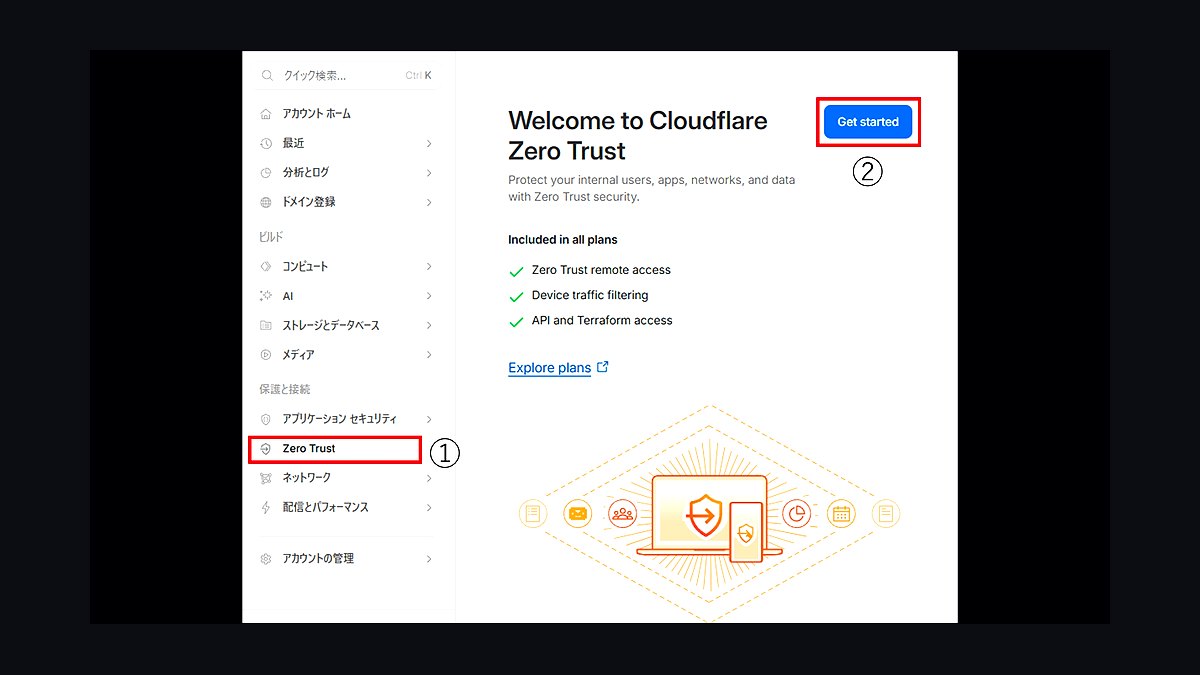
Cloudflare Zero Trust ranks first because it pairs a free tier for up to 50 users with a global edge network that brokers per-application access without hairpinning traffic through a central concentrator. It handles HTTP, SSH, and raw TCP through the same policy engine, and its WARP client feeds device posture signals into every authorization decision. Teams report removing tens of milliseconds of latency versus a Virginia concentrator for European engineers.
It suits engineering orgs of 10 to 500 that want clientless browser access for web apps and agent-based access for SSH and databases. It trades away deep packet inspection and some legacy protocol support, so an appliance with a hardcoded management IP still needs a jump host. Compared to Tailscale at rank 2, it offers stronger per-application authorization but a less elegant peer-to-peer mesh for infrastructure.
2Tailscale

Tailscale ranks second for remote engineering teams because its WireGuard-based mesh establishes direct peer-to-peer connections between devices, removing the middlebox entirely when NAT traversal succeeds. Identity comes from your existing OIDC provider, ACLs are written as code in a Git-friendly format, and the free tier covers up to 100 devices and 3 users, making it the fastest credible zero-trust deployment for small teams. Direct connection rates typically exceed 90 percent on typical home networks.
It is built for infrastructure access, SSH, and internal services rather than browser-based application brokering. It trades away per-application authorization granularity and browser isolation, so contractors on unmanaged devices get full network reachability once admitted. Compared to Cloudflare Zero Trust at rank 1, it is simpler and faster to deploy but weaker at segmenting individual HTTP applications.
3Okta Identity Cloud

Okta ranks third because identity is the control plane of any zero-trust stack, and Okta's OIDC and SAML federation is the most widely integrated identity provider for engineering tooling. Adaptive access policies evaluate device, location, and behavior at each authentication, and its support for WebAuthn and FIDO2 hardware keys satisfies the phishing-resistant baseline NIST 800-63B now expects. Enterprise pricing typically lands in the low double-digit dollars per user per month.
It is aimed at organizations of 50 or more that need a single authentication source of truth across dozens of SaaS and internal applications. It trades away cost efficiency for small teams, since the free tier is limited and per-user pricing scales steeply. Compared to Microsoft Entra ID at rank 4, Okta integrates more cleanly with non-Microsoft tooling but costs more per seat.
4Microsoft Entra ID
Microsoft Entra ID ranks fourth because it is bundled with most Microsoft 365 and Azure subscriptions, making it effectively free for organizations already in that ecosystem. Conditional Access policies evaluate device compliance, sign-in risk, and named locations per request, and its integration with Intune provides device posture signals without a separate agent deployment. Passwordless authentication via Windows Hello and FIDO2 keys is natively supported.
It is best for engineering teams whose tooling already lives in Azure, GitHub, or Microsoft 365, where the marginal cost of adoption is near zero. It trades away clean integration with non-Microsoft SaaS, where provisioning and policy configuration are more cumbersome than Okta. Compared to Okta at rank 3, it is cheaper for Microsoft-heavy shops but less flexible for heterogeneous toolchains.
5CrowdStrike Falcon

CrowdStrike Falcon ranks fifth because endpoint posture is a first-class input to every zero-trust authorization decision, and Falcon's lightweight agent delivers disk encryption state, OS patch level, and EDR health signals that feed policy engines directly. Its threat graph correlates process, network, and identity telemetry, which is what makes the audit query "who accessed the billing service last Tuesday" answerable in one place. Pricing typically lands in the same per-endpoint band as competing EDR products.
It is designed for organizations of 100 or more that need both detection and posture signals from a single agent. It trades away simplicity for smaller teams, since the platform's full value requires dedicated security staff to tune. Compared to Wazuh at rank 6, it delivers stronger detection but costs meaningfully more per endpoint.
6Wazuh

Wazuh ranks sixth because it is the strongest open-source option for the logging and endpoint monitoring layer of a zero-trust stack, with no per-endpoint license cost. Its agents collect file integrity, process, and authentication telemetry, and its SIEM ruleset covers common compliance frameworks including SOC 2 and ISO 27001 controls. A ten-person engineering team can run a complete deployment on a single modest VM.
It is aimed at teams with engineering time to spare and no budget for commercial EDR or SIEM licensing. It trades away the polished detection engineering and managed threat intelligence that CrowdStrike at rank 5 provides, so tuning rules and triaging alerts falls entirely on your team. Compared to the Elastic Stack at rank 7, it ships with more out-of-the-box security content but scales less gracefully past a few thousand endpoints.
7Elastic Stack

The Elastic Stack ranks seventh because it provides the log pipeline that ties every zero-trust authorization to a named human and machine, with ingest-based pricing that scales with volume rather than headcount. Elasticsearch, Logstash, and Kibana handle authentication events, broker logs, and endpoint telemetry in one queryable store, and the open-source distribution carries no license cost. Retention tiering across hot, warm, and cold storage is natively supported.
It is built for teams that need flexible log retention and custom dashboards but already have the operational skill to run a distributed search cluster. It trades away simplicity, since cluster sizing, index lifecycle management, and ingest pipelines are real operational work. Compared to Wazuh at rank 6, it scales further and queries faster but requires more configuration to reach the same security coverage.
8HashiCorp Boundary

HashiCorp Boundary ranks eighth because it brokers privileged access to infrastructure with session recording and just-in-time credential injection, which is the piece most zero-trust stacks get wrong for production hosts. It issues short-lived credentials per session rather than standing SSH keys, and every session is recorded and tied to an identity for audit. It integrates natively with Vault for dynamic secrets and with OIDC providers for authentication.
It is designed for platform and infrastructure teams that need to eliminate standing root access on production hosts. It trades away ease of deployment, since it requires running its own control plane and typically Vault alongside it. Compared to Teleport at rank 9, it integrates more tightly with the HashiCorp ecosystem but offers less built-in support for Kubernetes and database protocols.
9Teleport

Teleport ranks ninth because it consolidates SSH, Kubernetes, database, and web application access behind a single certificate authority with short-lived certificates, replacing the patchwork of bastion hosts and static keys most engineering teams accumulate. Sessions are recorded and searchable, and per-role access requests support just-in-time elevation tied to an approval workflow. The open-source edition covers SSH and Kubernetes without license cost.
It is aimed at engineering organizations running Kubernetes and mixed infrastructure that want one access plane rather than four. It trades away some depth in browser-based application brokering compared to Cloudflare Zero Trust at rank 1. Compared to HashiCorp Boundary at rank 8, it covers more protocols out of the box but integrates less deeply with Vault's dynamic secrets engine.
10Yubico YubiKey 5
The YubiKey 5 ranks tenth because phishing-resistant hardware authentication is the baseline for engineers holding production credentials, and this key supports FIDO2, WebAuthn, PIV, and TOTP in one USB and NFC device. At roughly $50 to $70 per key, budgeting two per engineer for account recovery costs an organization of 100 about $10,000 to $14,000 one time. NIST 800-63B guidance now treats hardware-backed factors as the practical standard for high-value accounts.
It is for every engineering team that has moved or is moving to WebAuthn-based authentication, regardless of which identity provider sits above it. It trades away convenience, since losing both keys means a help-desk recovery flow that reintroduces the social-engineering risk the hardware was meant to eliminate. Compared to platform authenticators like Windows Hello or Touch ID at no extra cost, it offers portability across machines but requires physical possession at every login.
How we ranked these
We ranked each tool on four weighted criteria: identity integration depth (30%), how cleanly it brokers non-HTTP protocols like SSH and raw TCP (25%), device posture signal quality and enforcement granularity (25%), and total cost at a 50-engineer scale including log ingest (20%). Scores came from vendor documentation, published pricing pages, and hands-on configuration against a test fleet of managed and unmanaged devices.
We deliberately ignored brand recognition, analyst quadrant placement, and demo polish, because none of those predict whether an engineer can reach a legacy internal appliance at 2am. We also excluded breach-count marketing claims, since no vendor can honestly attribute avoided incidents to their product on a one-year horizon. Feature checklists were discounted unless the feature was configurable and documented.
What to look for
What matters most is whether the tool consumes your existing identity provider as the single source of truth, or quietly maintains its own user database. The second thing is protocol coverage: confirm it brokers the specific database clients, SSH workflows, and internal admin panels your team actually uses, not just web apps. Third, verify posture signals are actionable and can degrade access rather than only block it.
The mistake most buyers make is purchasing the networking layer first and discovering their identity hygiene is not clean enough to write policy against. Local accounts, shared service credentials, and org-chart-shaped groups will undermine any broker. Inventory applications and consolidate authentication before signing a ZTNA contract, or you will deploy an expensive VPN with a new logo.
Related questions
Does a mesh overlay replace a ZTNA broker, or do you need both?
They solve adjacent problems. Mesh overlays like WireGuard-based networks give encrypted device-to-device connectivity with strong identity binding. Brokers add per-application authorization, browser isolation, and clientless access for unmanaged devices. Small teams often run mesh alone; larger ones typically run mesh for infrastructure access and a broker for applications, accepting the integration work.
How do you handle engineers who need root on production hosts?
Route privileged access through a brokered, session-recorded path with just-in-time elevation rather than standing root. Grant time-boxed elevation tied to an approved ticket, log the full session, and let it expire automatically. Standing root on production is the entitlement most likely to survive an otherwise successful zero-trust rollout, so treat it as a named exception with a review date.
What does this mean for on-call incident response?
Design for it explicitly. On-call engineers need access during exactly the conditions where strict enforcement is most fragile, including degraded infrastructure and possible identity provider disruption. Break-glass credentials stored offline, an out-of-band communication channel, and a rehearsed procedure are not optional extras. Untested break-glass is functionally identical to having none at all.
Can you adopt this incrementally without a big-bang cutover?
Yes, and incremental is strongly preferred. Run the broker alongside the existing VPN, migrate application by application, and delete the corresponding legacy route as each application moves. The discipline that makes it work is deleting the old path at each step rather than accumulating parallel access, because parallel paths mean blast radius never actually shrinks.
How long does a realistic rollout take for a mid-size engineering org?
For 50 to 300 engineers, plan three to six months of elapsed time. Identity provider setup and enrollment takes two to four weeks, application inventory two to six weeks, and wave migration four to twelve weeks. The bulk of effort lands in application inventory, not tooling. Expect an indefinite tail for legacy systems that speak neither modern auth nor anything close.
What metrics should we instrument from day one?
Track percentage of engineers enrolled with a phishing-resistant factor, percentage of internal applications reachable only through the broker, count of surviving direct network routes to production, median time from offboarding ticket to last-access revocation, and percentage of authorizations carrying a fresh posture signal. Each is a number you can move. "We did zero trust" is not a metric.
How do you handle contractors and BYOD devices?
Full agent-based posture checking is often unavailable on devices you do not own. Browser isolation lets you serve internal web applications to unmanaged devices without an agent, keeping data off the endpoint. This works well for web apps and poorly for anything needing a local toolchain. For contractors requiring real development access, a managed device or cloud development environment is the honest answer.
What is the biggest hidden cost in these deployments?
Log ingest. Endpoint telemetry and access logs are high-volume, and SIEM billing scales with data volume rather than headcount, so it routinely surprises teams. Tier your data deliberately: high-fidelity short-retention for verbose telemetry, filtered long-retention for authentication and authorization events. Decide retention policy before ingest begins, not after the first invoice arrives.
FAQ
How is zero-trust networking actually different from a VPN for a remote engineering team?
A VPN authenticates once and then grants network-level reachability, so the device sits on a routed segment and can reach whatever that segment reaches. Zero trust grants application-level access per request, evaluated against identity and device posture, with no underlying route to scan. The practical test is whether a port scan from an enrolled laptop finds anything.
Can a small team afford this, or is it enterprise-only?
Small teams can run a credible stack at very low cost. Major vendors publish free tiers for small user counts, and open-source options like Keycloak, Wazuh, and the Elastic Stack cover identity and monitoring. Hardware security keys cost tens of dollars each. The real constraint for small teams is time, not licensing budget.
Do we still need a VPN after deploying zero trust?
Usually not for engineer access, but many organizations retain a narrow VPN path for legacy systems that cannot be brokered. The danger is that this exception quietly expands. If you keep any flat path, document exactly which systems it reaches, restrict it to named individuals, and put a review date on it.
What happens if our identity provider goes down?
Every access path depending on one identity provider means an outage is a total work stoppage, including the tooling engineers would use to respond. The mitigation is a documented, tested break-glass path: a small number of emergency credentials stored offline, tied to named individuals, with alerting on every use and mandatory post-use rotation. Rehearse quarterly.
Are push-based MFA prompts still acceptable in 2027?
Push-based MFA alone is no longer sufficient. Push fatigue attacks are well documented, and NIST guidance has moved toward phishing-resistant factors. For engineering teams specifically, WebAuthn and FIDO2 hardware keys or platform authenticators are the practical baseline, because engineers hold the credentials that matter most. Budget two keys per engineer for recovery.
How do we handle service accounts and CI runners?
Non-human identities vastly outnumber humans in most engineering organizations and rarely get equivalent treatment. Push workload identity toward short-lived federated credentials, such as OIDC federation between your CI provider and your cloud, or SPIFFE-style identities. Inventory every static credential that remains, because a long-lived build token is the weakest link you just moved.
What about internal applications that only speak raw TCP?
Brokers handle HTTP and SSH well and raw TCP less gracefully. Every organization has three to five appliances with hardcoded management IPs and no auth integration. Decide their fate deliberately: broker at the TCP layer with tight per-identity policy, isolate behind a brokered jump host, or accept a documented exception with compensating controls and a review date.
How aggressive should device posture enforcement be?
Graduated response works far better than binary blocking. Blocking on any pending OS update or unrecognized peripheral trains engineers to seek workarounds, and the predictable result is a shadow path like a personal SSH tunnel. Warn first, then degrade to read-only or browser-isolated access, then block, with clear self-service remediation at each step.
Should we buy everything from one vendor or best-of-breed?
Buying identity, ZTNA, endpoint, and logging from one vendor simplifies integration but worsens your negotiating position and creates correlated failure risk. Four best-of-breed products maximize flexibility and hand you an integration project. Neither choice is wrong. Pick deliberately and write down the reasoning, because whoever renegotiates in three years will need it.
How do we verify the deployment actually reduced blast radius?
After the final migration wave, disable the legacy remote-access path and attempt the things that should now be impossible: scanning an internal range from an enrolled device, reaching an unentitled application, connecting with the EDR agent stopped, and using a revoked account. Document each result. This verification step separates a real deployment from an architecture diagram.
Sources
- https://www.nist.gov/publications/zero-trust-architecture
- https://csrc.nist.gov/pubs/sp/800/207/final
- https://developers.cloudflare.com/cloudflare-one/
- https://tailscale.com/kb/
- https://www.wireguard.com/
- https://www.keycloak.org/documentation
- https://documentation.wazuh.com/current/index.html
- https://www.elastic.co/guide/index.html
- https://fidoalliance.org/specifications/
- https://www.cisa.gov/zero-trust-maturity-model
Related on PULSE
This page will be disappearing soon. Save it to your device for $1 — or read it free while it is here.
@Kory-White- · if Venmo asks, the last 4 of my number are 2012
This page is gone.
This one is off the shelf now. $1 keeps it on your phone for good — the whole page, pictures and diagrams included.
 pulse-tech-stacksTop 10 Best Tech Stack Tools for CrossFit Boxes in 2027
 pulse-tech-stacksTop 10 Best Tech Stack Tools for HOA and Community Association Management Companies in 2027
 pulse-tech-stacksTop 10 Best Tech Stack Tools for Independent Driving Schools in 2027
 tkTop 10 Best Tech Stack Tools for Fencing and Deck Contractors in 2027
 pulse-tech-stacksTop 10 Best Tech Stack Tools for AI Legal Tech Companies in 2027
 pulse-tech-stacksTop 10 Best Tech Stack Tools for Employee Benefits Consulting Firms in 2027
 pulse-tech-stacksTop 10 Best Tech Stack Tools for Self-Storage Operators in 2027
 pulse-tech-stacksTop 10 Best Tech Stack Tools for Window Cleaning Services in 2027
 pulse-tech-stacksTop 10 Best Tech Stack Tools for Pilates Studios in 2027
 pulse-tech-stacksTop 10 Best Tech Stack Tools for Independent Bakeries in 2027