


What is the best approach to automate renewal reminders within a RevOps workflow in 2027?
Quality
Certified
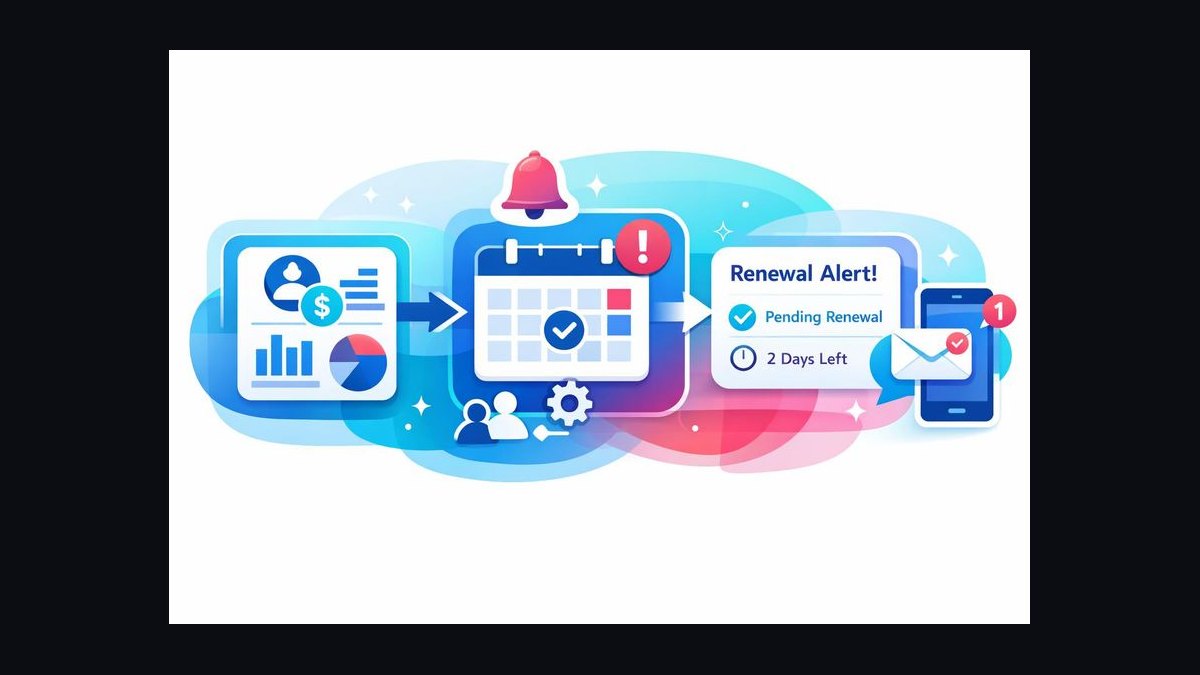
The best approach is an event-driven renewal engine: normalize contract end dates, term lengths, and notice periods into structured fields on one system of record, then trigger reminders off relative offsets (T-120, T-90, T-60, T-30, T-14), route them by contract value and risk signal, and pass every branch through a shared suppression gate so the workflow escalates or cancels automatically instead of firing fixed blasts.
The outcome you should expect
A working automated renewal program does not primarily produce more emails. It produces earlier visibility and shorter reaction time. The concrete outcome is that no renewal reaches expiration without a documented touch, and the median gap between "renewal enters the window" and "an owner takes an action" collapses from weeks to hours. Teams running manual tracking — a spreadsheet reviewed monthly, or a CRM report someone remembers to open — discover renewals late. A contract expiring on the 8th gets noticed on the 1st, leaving a week to negotiate a multi-year agreement. When reminders are anchored to contract end dates, that same renewal surfaces four months out and the negotiation happens on your calendar instead of the customer's.
The second outcome is auto-renew hygiene. Many B2B contracts carry evergreen clauses with a notice window — commonly 30, 60, or 90 days before term end — during which either party can give notice of non-renewal. If your reminders fire inside that window, you have already lost the ability to reprice or restructure before the clause takes effect. A sequence whose earliest touch sits outside the longest notice period in your contract base is the difference between a renegotiation and a rollover you did not choose.
Third, expect a shift in who does the work. Manual renewal chasing burns senior CSM and AE hours on calendar arithmetic. When the workflow handles date math, ownership lookup, and first-touch drafting, that time redirects to accounts the risk signals flagged. The realistic gain is not "no human involvement" — it is that humans spend their hours on the 15–25% of renewals genuinely at risk instead of the 75–85% that renew with a confirmation email.

Finally, expect measurable forecast improvement. Renewal revenue is the most predictable revenue a company has, yet often the least well forecast because the data lives in contract PDFs and billing systems rather than the CRM. Automating reminders forces you to first normalize end dates, term lengths, and notice periods into structured fields — and that normalization work, more than the reminders themselves, is what makes renewal revenue forecastable a quarter or two out. Set expectations honestly with leadership: automation does not raise gross retention by itself. It removes the failure mode where a renewal is lost to inattention rather than to a decision, and in most portfolios that failure mode accounts for a small but non-trivial share of churn.
What drives that outcome
The mechanism has four dependencies, and the sequence fails if any one is weak.
Contract data quality is the foundation. Every reminder is a function of a date. If contract end date, term length, notice period, and renewal type (auto-renew versus opt-in) are not structured fields on an object in your system of record, you have nothing to trigger from. In practice this is where most implementations stall: dates live in signed PDFs, in a billing system that only knows "next invoice date," or in a subscription object reflecting the current billing period rather than the contractual term. Reconciling these is unglamorous work but it is the actual project.

The trigger model matters more than the channel. Two patterns exist. A scheduled batch job runs nightly, queries every record where end_date - today equals one of your offsets, and enqueues actions. An event-driven model reacts to changes — a contract record is created or its end date shifts, and the system schedules the full downstream sequence at that moment. Batch is simpler and adequate for most mid-market portfolios; event-driven is more responsive but requires reliable change-data capture and careful handling of rescheduling when a date moves. Many teams run a hybrid: event-driven scheduling with a nightly reconciliation job that catches drift.
Segmentation determines whether people trust the output. A uniform sequence sent to every account produces alert fatigue within a quarter. The workflow needs to branch on contract value, account tier, renewal type, and risk signal — a $4,000 self-serve renewal with healthy usage should get a light automated notice to the customer and nothing to a human; a $200,000 strategic renewal with declining logins should generate a task, a channel alert, and a calendar hold for an executive check-in.
Suppression logic is what keeps it credible. The reminder must know when to stop. If a renewal opportunity is already marked closed-won, if the customer has given notice, if an active negotiation is logged, or if a human has already touched the account this week, the sequence should suspend rather than fire on schedule. Sequences without suppression logic are the single most common reason renewal automation gets switched off six months after launch. The diagram makes the key structural point: suppression sits between segmentation and delivery, not before it. Every branch passes through the same gate, so you maintain one suppression ruleset rather than three divergent copies embedded in three sequences.
Benchmarks and realistic ranges

Treat the following as planning ranges to calibrate against your own baseline, not targets to import wholesale. Your portfolio's contract sizes, term lengths, and sales motion move all of these.
Offset cadence. For annual contracts, a five-touch internal cadence at T-120, T-90, T-60, T-30, and T-14 days is a defensible default. T-120 opens the strategic conversation and sits outside any 90-day notice clause. T-90 is the practical start of the commercial motion for enterprise deals. T-60 and T-30 are escalation points. T-14 should be an exception alert, not a routine step — if a six-figure renewal is still untouched at T-14, that is a process failure worth surfacing to a leader. For multi-year contracts, add a T-180 touch; for monthly or short-term subscriptions, compress to T-30/T-14/T-7 and lean almost entirely on automated customer-facing notices.
Segmentation thresholds. Most teams end up with three tiers. A common split: low-touch for contracts below roughly 1–2% of median deal value where the cost of a human touch exceeds the marginal retention gain; mid-touch for the broad middle; high-touch for the top decile of ARR plus any account with an open escalation. Precise dollar cut-offs should come from your own distribution — compute ARR percentiles of your renewal base and set boundaries at natural breaks rather than round numbers.
Volume ceilings. A single CSM or renewal manager can meaningfully own somewhere in the range of 40–120 renewals per year depending on complexity and average contract value. Design the automation so human-routed reminders per owner per week stay under roughly 10–15. If your offsets and segmentation produce more than that, the tiering is too aggressive and reminders will be ignored.

Notice periods. Audit the actual distribution across your contract base before setting the earliest offset. If any material share of contracts carries a 90-day notice requirement, a T-90 first touch is already too late for those accounts. The earliest internal reminder should sit at least 30 days outside your longest common notice period.
Data completeness. Before launch, require a floor on field population — end date, term length, and owner present on a high share of active contracts. Launching against a base where a meaningful fraction of records lack an end date guarantees silent misses, and silent misses destroy trust in the system faster than false positives do.
Latency to action. The metric worth instrumenting from day one is median hours between a reminder firing and the owner logging an action. If that number sits in the multi-day range, the reminders are landing in a channel nobody watches. Moving alerts from email to the channel where the team already works is usually a larger improvement than any change to timing or copy.
Sequence health. Track suppression rate and misfire rate. A healthy sequence suppresses a meaningful share of scheduled sends — that is evidence the logic works. A suppression rate near zero means your suppression conditions are not actually wired up.
Risks, edge cases, and failure modes
Date drift and mid-term changes. Contracts get amended. A customer adds seats in month seven with a co-terminus amendment, or the renewal is pushed 60 days while procurement finishes. If your reminders were scheduled once at contract creation and never reconciled, they now fire against a stale date. The mitigation is a nightly reconciliation job that recomputes scheduled reminders from the current end date and cancels or reschedules anything that no longer matches — plus an explicit rule for what happens to reminders already sent under the old date.

Timezone and boundary errors. Date math that runs in UTC against end dates stored as local dates produces off-by-one errors at month and quarter boundaries. A renewal that should surface on the last day of a quarter surfaces on the first day of the next, moving it into a different forecast period. Normalize to a single timezone convention explicitly and test the boundaries — end of month, end of quarter, leap day, and daylight-saving transitions.
Duplicate and overlapping contracts. Enterprise accounts frequently have several contracts with different end dates — a master agreement, an order form, a professional services SOW. Naive automation generates a reminder per contract, so an account manager receives four alerts for what is commercially one conversation. Roll up reminders to the account level with contract-level detail nested inside, and define which date drives the conversation.
Auto-renew accounts treated as safe. Records flagged auto-renew often get excluded from reminder sequences on the theory that they need no action. This is the most expensive edge case. Auto-renew contracts still have notice windows, still carry uplift clauses that need to be applied, and still represent accounts where a competitor conversation may be underway. Auto-renew should change the content of the reminder, never remove the account from the sequence.
Customer-facing notices sent without review. If your workflow emails customers directly — especially notices tied to price increases or notice-period deadlines — the failure mode is a wrong-address, wrong-name, or wrong-amount send that becomes a commercial problem. Gate any customer-facing message that references pricing behind human approval, keep purely informational notices automated, and hard-block sends to accounts flagged in an escalation state.

Alert fatigue. The predictable arc: launch with generous alerting, owners find the alerts useful for three weeks, volume accumulates, alerts get muted, and within a quarter the system is running but nobody is reading it. Prevent it by starting deliberately conservative — high-touch tier only for the first month — then expanding once you can see response rates. It is much easier to add alerts than to rebuild trust after muting.
Ownership gaps. Reminders routed to a departed employee, an unassigned territory, or a shared inbox nobody owns simply vanish. Build a fallback: if the owner field is empty or the owner is inactive, route to a manager queue and raise a data-quality flag. Ownerless renewals are disproportionately the ones that get lost.
Over-automation of the wrong step. Automating the reminder is high value; automating the negotiation is not. Auto-generated renewal quotes sent without a human reading them create pricing errors and awkward conversations. Keep the automation boundary at "surface the work and prepare the context" rather than "execute the commercial motion."
Silent pipeline failure. The worst failure mode produces no error: an integration token expires, a nightly job stops running, a filter change excludes half the base, and reminders simply stop. Nobody notices because the absence of an alert looks identical to a quiet week. Add a heartbeat — a daily summary reporting how many renewals were evaluated and how many reminders fired, sent even when the count is zero.
A practical rollout plan
Sequence the work so each phase produces something usable, and so a failure in a later phase does not invalidate the earlier ones.

Phase 1 — Audit the contract base (roughly 1–2 weeks). Export every active contract. Measure field completeness for end date, term length, notice period, renewal type, owner, and ARR. Produce a distribution of notice periods and term lengths — this determines your offsets. Identify accounts with multiple overlapping contracts. Do not build anything yet; the audit's output is a data-quality backlog and a definitive answer to "what is the earliest reminder we need?"
Phase 2 — Establish the system of record (2–4 weeks). Pick the single object that owns renewal dates and make everything else defer to it. Backfill missing fields. Wire the integration from the billing or contract system so future contracts populate structured fields automatically. Add validation so a contract cannot be marked active without an end date. This phase is unglamorous and is where the schedule usually slips — protect the time.
Phase 3 — Build the internal reminder engine (1–2 weeks). Start with internal-only reminders to the highest tier. No customer-facing messages yet. Fire tasks and channel alerts on your offsets, route by owner with a manager fallback, and instrument logging from the first day. Run it in parallel with whatever manual process exists and compare: what did the automation catch that the humans missed, and vice versa?
Phase 4 — Add suppression and segmentation (1–2 weeks). Layer in the suppression gate — closed-won, notice given, active negotiation, recent human touch — and expand to mid-touch accounts. Measure suppression rate. If nothing is being suppressed, the conditions are not wired correctly.
Phase 5 — Add customer-facing notices (2–3 weeks). Only now introduce automated messages to customers, starting with the low-touch tier and purely informational content. Keep anything referencing price behind approval. Validate deliverability and check that the sending identity, reply-to address, and unsubscribe behavior are correct for transactional contract notices.
Phase 6 — Instrument and tune (ongoing). Weekly for the first quarter: review misfires, suppression rate, latency to action, and any renewal that reached T-14 untouched. Each of those is a defect with a root cause in data, routing, or tiering. Fix the cause, not the individual instance.

A reasonable end-to-end timeline is 8–14 weeks for a mid-market portfolio with reasonably clean data, and longer where contract terms live outside a structured system. The most common mistake is compressing Phases 1 and 2 to reach the visible work in Phase 3 — which produces a reminder engine firing against dates nobody trusts.
Related questions
How early should the first renewal reminder fire?
Anchor it outside your longest common contract notice period, then add buffer. If 90-day notice clauses appear in your base, a T-120 first internal touch is a sound default. For multi-year enterprise agreements, T-180 gives room for a genuine strategic conversation rather than a rushed renewal.
Should renewal reminders go to the customer or only internally?
Start internal-only. Internal reminders carry low blast radius and let you validate date accuracy and routing before anything reaches a customer. Add customer-facing notices after the data is proven, beginning with informational content in the low-touch tier and keeping any pricing reference behind human approval.
What is the right system of record for contract end dates?
Whichever object your team already updates reliably — usually the CRM opportunity or a dedicated contract object, fed from billing or a contract lifecycle system. The technical choice matters far less than picking one and making every other system defer to it rather than maintaining competing copies.
How do you keep automated renewal reminders from being ignored?

Cap human-routed alerts to roughly 10–15 per owner per week, deliver them where the team already works rather than by email, and enforce suppression so no one receives a reminder for a renewal already closed. Volume, not copy, is what kills response rates.
Do auto-renewing contracts need reminders?
Yes. Auto-renew changes the message, not the inclusion. Notice windows still expire, uplift clauses still need applying, and competitor conversations still happen. Excluding auto-renew accounts from the sequence removes visibility precisely where the contract terms make late discovery irreversible.
FAQ
What is the best approach to automate renewal reminders within a RevOps workflow in 2027?
Build an event-driven engine on top of clean contract data. Normalize end date, term length, notice period, and renewal type into structured fields on one system of record; compute reminder offsets from the end date; branch by contract value and risk signal; and pass every branch through a shared suppression gate before delivery. Start internal-only and top-tier, then expand. The tooling is secondary — the same design works in a CRM's native automation, a workflow platform, or a scheduled job. What separates working implementations from abandoned ones is data quality and suppression logic, not the automation product.
How many reminder touches should a single renewal generate?
For an annual contract, four to five internal touches across the window is typical — enough to escalate, few enough to stay credible. Each touch should have a distinct purpose: open the conversation, start the commercial motion, escalate, and exception-alert. If two consecutive touches say effectively the same thing, delete one. More touches do not produce more retention; they produce muted channels.

What data has to be clean before this works at all?
Contract end date and account owner are non-negotiable. Term length, notice period, renewal type, and ARR are needed for segmentation and for setting the earliest offset correctly. Missing any of the first two means silent misses; missing the rest means you can build reminders but not tier them, which leads directly to alert fatigue.
How do you handle a renewal date that changes mid-cycle?
Run a nightly reconciliation that recomputes scheduled reminders from the current end date, cancels anything now invalid, and reschedules the remainder. Define explicitly what happens to touches already sent under the old date — usually they stand, and the owner gets one notification that the date moved with the revised schedule attached.
Should risk signals like usage decline change the reminder sequence?
Yes, and this is where automated renewal workflows earn their value over a calendar. Declining usage, an open escalation, a support ticket spike, or a champion departing should escalate an account to a higher touch tier and pull its first reminder earlier. Treat the signal as a tier promotion rather than a separate parallel sequence — one sequence with dynamic tiering is far easier to maintain than several competing ones.
How do you know the automation is actually running?
Send a heartbeat. A daily or weekly summary reporting how many renewals were evaluated, how many reminders fired, how many were suppressed, and how many records were skipped for missing data — delivered even when every count is zero. Silent failure is the dominant failure mode in scheduled revenue workflows, and only a message that arrives on empty days will surface it.
Sources
- https://learn.microsoft.com/en-us/dynamics365/sales/ — Microsoft Dynamics 365 Sales documentation on workflow and process automation
- https://help.salesforce.com/s/articleView?id=sf.flow.htm — Salesforce Flow documentation for record-triggered and scheduled automation
- https://developer.salesforce.com/docs/atlas.en-us.apexcode.meta/apexcode/apex_scheduler.htm — Apex Scheduler documentation for scheduled batch jobs
- https://knowledge.hubspot.com/workflows/create-workflows — HubSpot workflow creation and enrollment trigger documentation
- https://www.ftc.gov/business-guidance/resources/negative-option-rule — U.S. FTC guidance on negative option and automatic renewal offers
- https://oag.ca.gov/consumers — California Attorney General consumer resources, including automatic renewal law guidance
- https://www.nist.gov/publications — NIST publications on data quality and systems reliability practices
- https://cloud.google.com/scheduler/docs — Google Cloud Scheduler documentation for cron-based job scheduling
- https://docs.aws.amazon.com/eventbridge/latest/userguide/eb-what-is.html — AWS EventBridge documentation for event-driven scheduling and rules
Related on PULSE
- What are the key signs your RevOps workflow is causing friction for customer handoffs in 2027?
- How do you automate contract renewal notifications without a CPQ system in 2027?
- How should RevOps design escalation paths for at-risk renewals in 2027?
- What data model changes make renewal forecasting reliable in 2027?
- How do you measure whether renewal automation is actually working in 2027?
This page will be disappearing soon. Save it to your device for $1 — or read it free while it is here.
@Kory-White- · if Venmo asks, the last 4 of my number are 2012
This page is gone.
This one is off the shelf now. $1 keeps it on your phone for good — the whole page, pictures and diagrams included.
 revopsHow do you handle data deduplication when merging two companies' CRMs in 2027?
 revopsHow do you calculate customer acquisition cost accurately with hybrid GTM models in 2027?
 revopsWhat are the key signs your RevOps workflow is causing friction for customer handoffs in 2027?
 revopsWhat are the key metrics to track for a subscription-based revenue model in 2027?
 revopsHow do you audit a RevOps tech stack for redundant tools in 2027?
 revopsHow do you prevent duplicate leads from inflating pipeline metrics in 2027?
 revopsWhat is the best way to measure rep productivity against marketing spend in RevOps in 2027?
 revopsWhat is the best approach for cleaning up stale opportunity data in 2027?
 revopsWhat is the optimal cadence for refreshing revenue forecasts in 2027?
 revopsHow do you calculate lead-to-revenue conversion rate across a multi-CRM environment in 2027?