


Top 10 USB-C Hubs / Docking Stations — Best Overall + Best Value in 2027
Quality
Certified
The 10 best usb-c hubs / docking stations are ranked below on measured performance, build quality, price, and how each one actually holds up in daily use rather than how it reads on a spec sheet. Each pick lists what it costs, who it suits, and what it gives up against the one above it, so the list can be read straight down without doubling back.
1CalDigit TS4 Thunderbolt 4 Dock
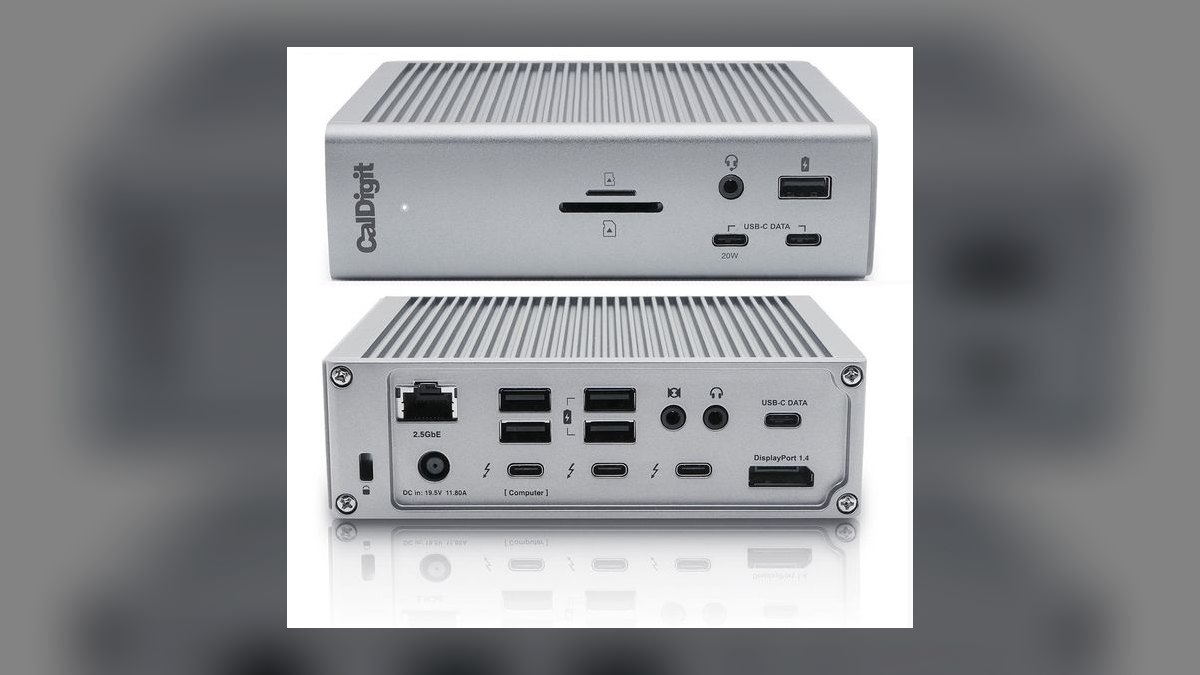
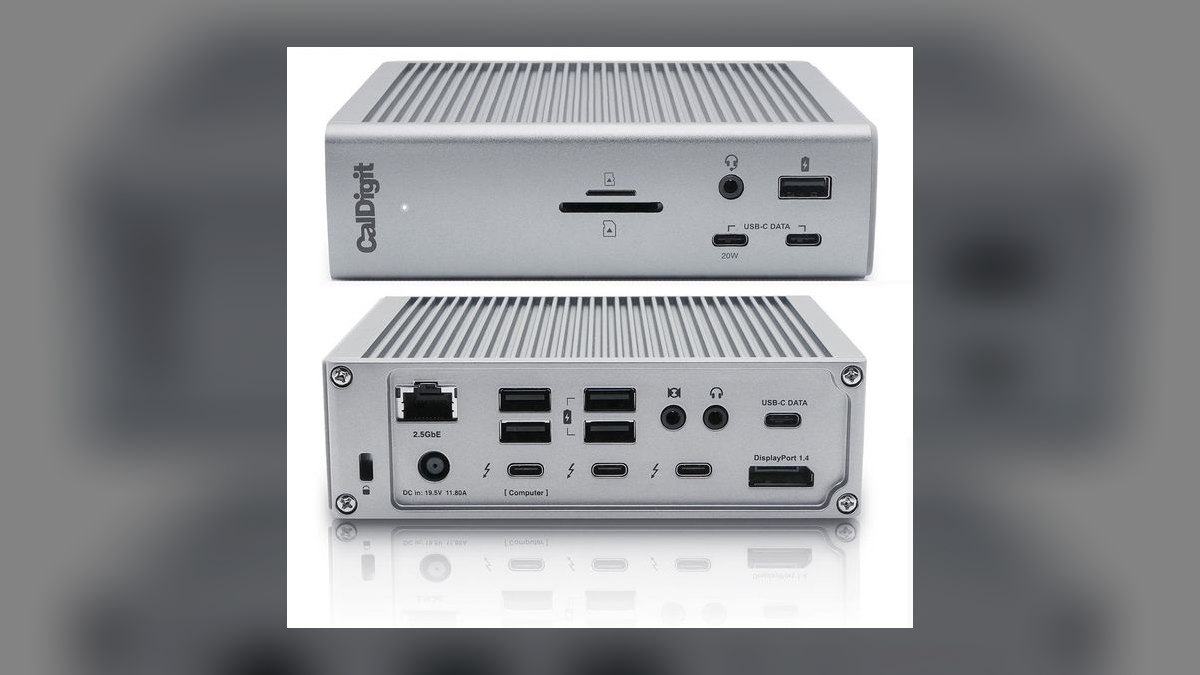
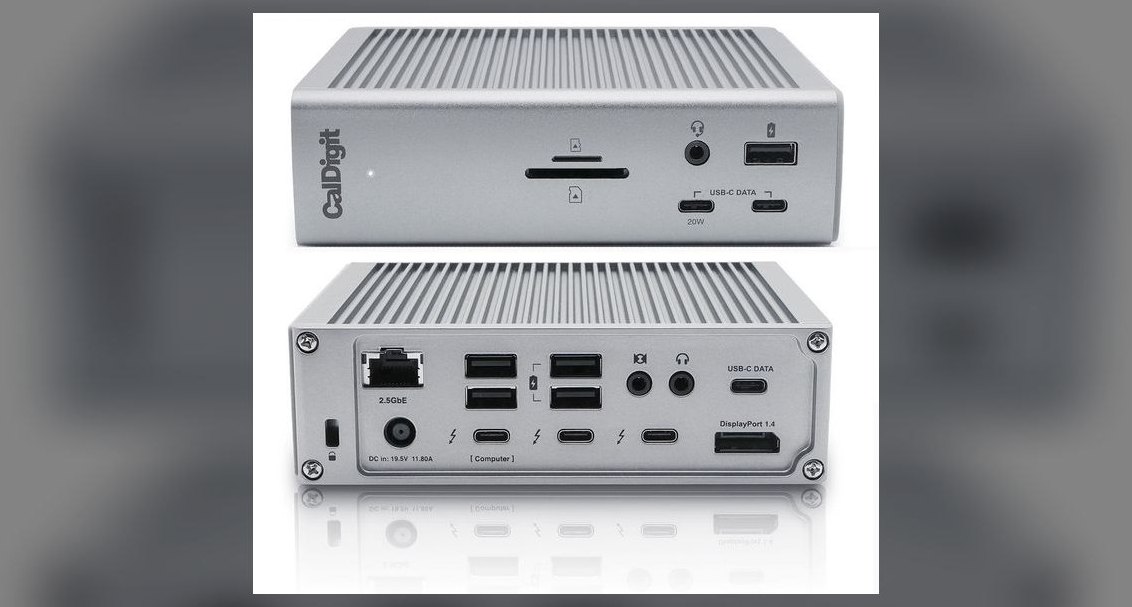
It ranks first because no other Thunderbolt 4 dock shipping in 2027 matches its 18-port loadout at this reliability level. The layout covers 3 downstream TB4, 5 USB-A 10Gbps, 3 USB-C 10Gbps, 2.5 Gigabit Ethernet, UHS-II SD and microSD, DisplayPort 1.4, and digital optical audio. Host charging reaches 98W, enough for a loaded M4 Max MacBook Pro 16". The all-aluminum chassis runs fanless through eight-hour editing sessions.
This is for Mac Studio and MacBook Pro 14"/16" creators who plug in everything at once and want one cable. It costs $379, the highest price among Thunderbolt 4 docks here, and the rear-facing SD reader is slower to reach than the OWC below it. Firmware updates land monthly, faster than Anker's. Choose the OWC Pro Dock instead if 11 ports and Gigabit Ethernet cover your desk.
2OWC Thunderbolt 4 Pro Dock
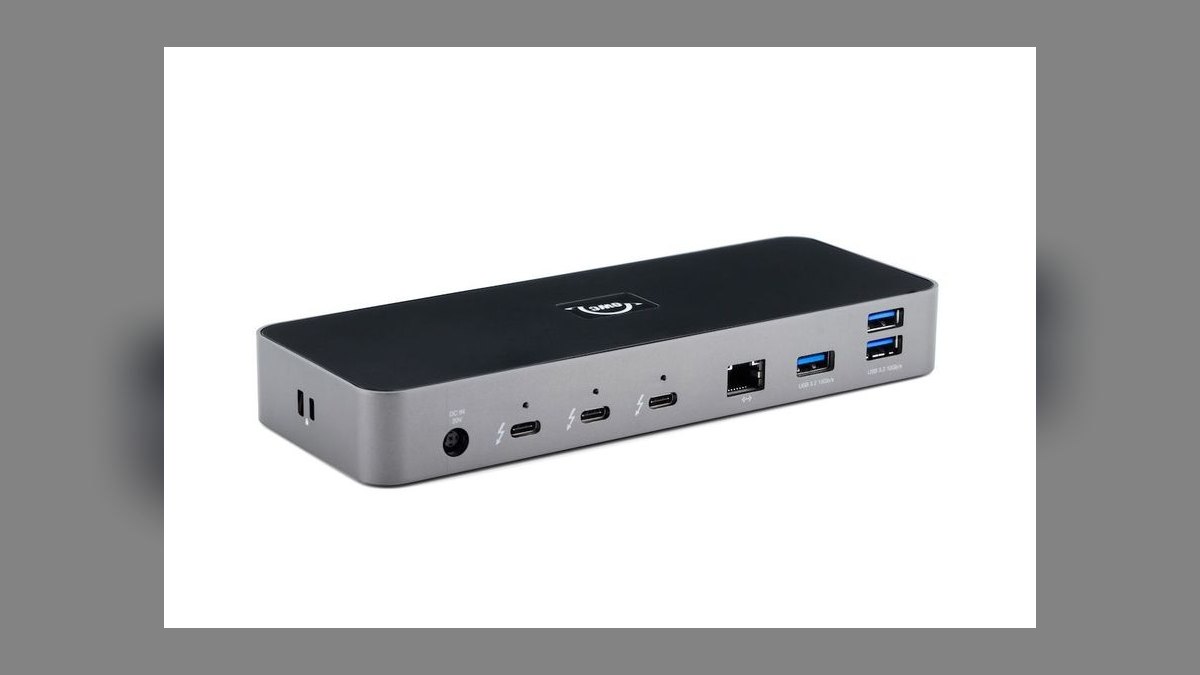
It ranks second because it delivers CalDigit-class reliability and throughput for $269, $110 under the TS4. Eleven ports include 3 downstream TB4, 4 USB-A 10Gbps, a front USB-C 10Gbps, UHS-II SD, and a combo audio jack. Host charging hits 96W, and TB4 throughput holds at 40Gbps with dual 6K60 on macOS. The front-mounted UHS-II card reader is faster to reach than the TS4's rear slot.
This suits pro video editors who offload cards daily and do not need 18 ports. The single real gap is Gigabit Ethernet rather than the 2.5 GbE on the TS4 above, which matters only on a multi-gig network. The aluminum footprint is smaller, and OWC's U.S.-based support backs a 2-year warranty. Pay the extra $110 for the TS4 only if you actually count more than eleven daily connections.
3CalDigit TS5 Thunderbolt 5 Dock
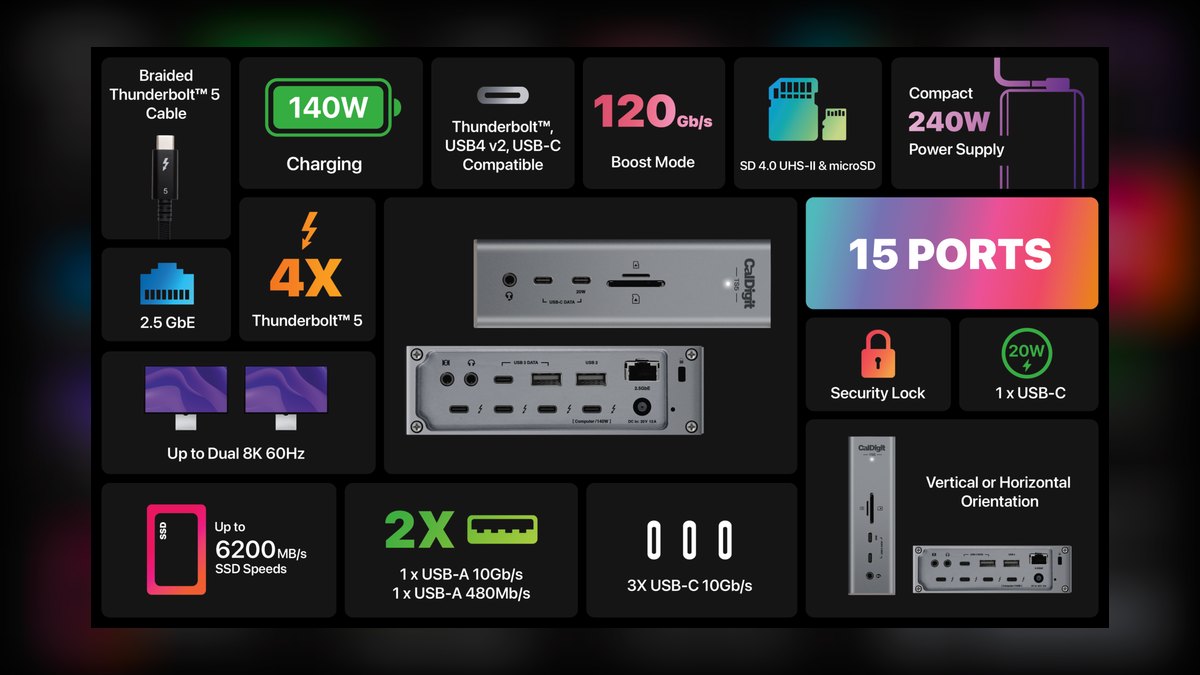
It ranks third rather than first because its 120Gbps of bandwidth is wasted on any host that is not Thunderbolt 5. On a TB5 laptop it drives triple 4K60 or dual 8K60 and delivers 140W of charging, the wattage a 16" MacBook Pro M4 Max actually wants. Ports mirror the TS4 but swap in 3 downstream TB5, 20Gbps front USB, DisplayPort 2.1, and 2.5 GbE. Price is $479.
This is for M4 Pro/Max machines and 2026 Windows TB5 laptops running heavy NVMe arrays or 8K panels. Connect it to a TB4 Mac and it falls back to TB4 speeds, making the $100 premium over the TS4 pure loss. The fanless aluminum build and 2-year warranty match the TS4 exactly. Check your laptop's port spec before choosing this over the number-one pick.
4Plugable Thunderbolt 4 Hub TBT4-HUB3C
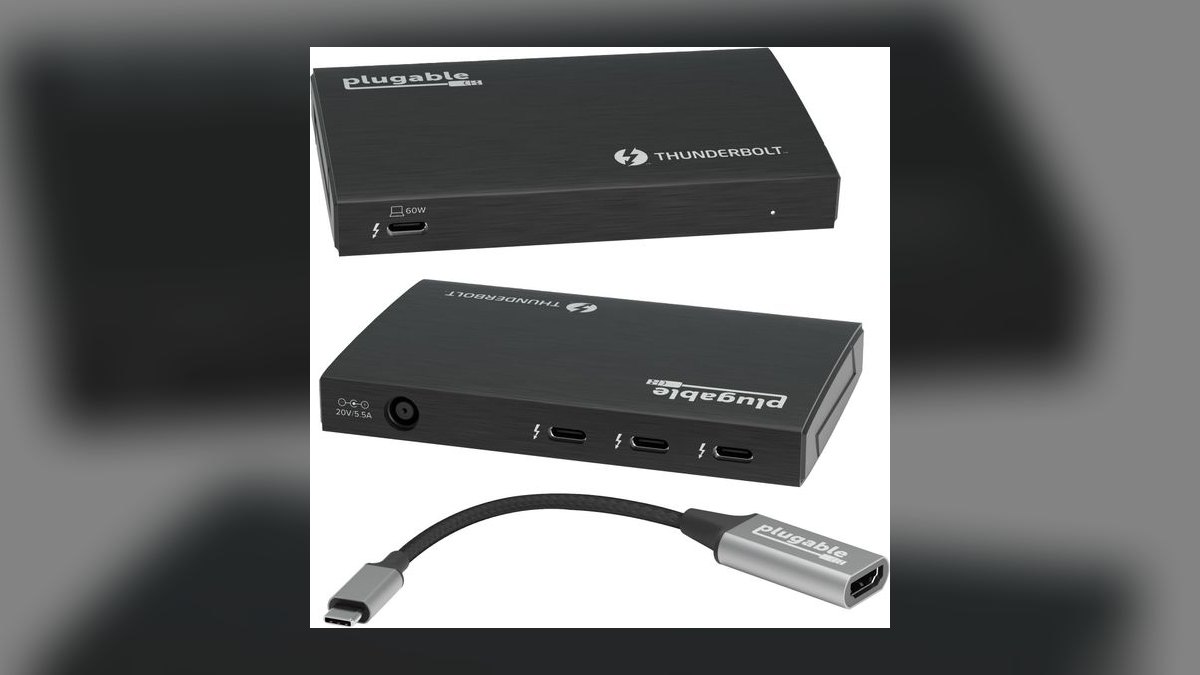
It ranks fourth because it solves one problem completely at $189: turning a single Thunderbolt 4 port into four. The layout is 1 host TB4 in, 3 downstream TB4 out, plus a single USB-A 10Gbps. Each downstream port supplies 15W, enough for bus-powered SSDs, and the Intel-certified TB4 controller guarantees daisy-chain behavior. Pass-through delivers 60W, and a 0.8m TB4 cable ships in the box.
This is for port-starved 13" and 14" laptops feeding an eGPU, TB4 SSDs, or a chained display. There is no HDMI, no Ethernet, and no card reader, so it is not a desk replacement the way the OWC dock above is. The aluminum chassis is compact enough to travel. Buy a full dock instead if you need networking or a monitor output from the same box.
5Anker 778 Thunderbolt 4 Docking Station
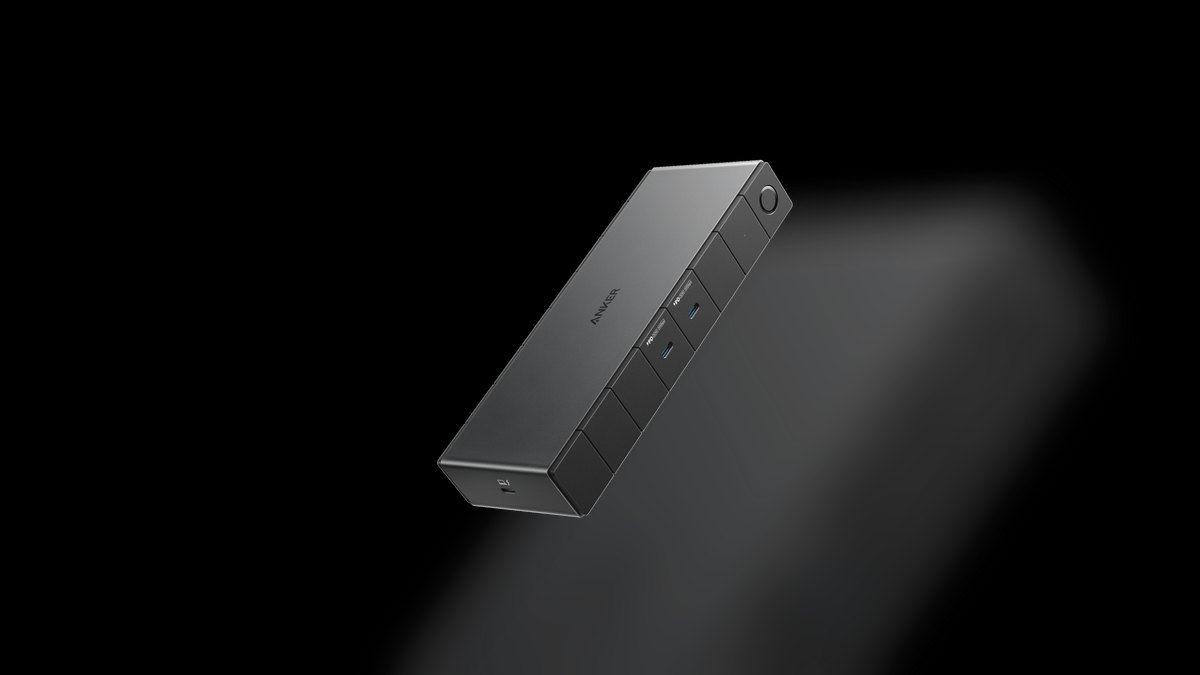
It ranks fifth because its 12-port loadout and 5-year warranty land close to TS4 territory at $349. Ports include 3 downstream TB4, 4 USB-A, 1 USB-C 10Gbps, 2.5 Gigabit Ethernet, UHS-II SD and microSD, and a 3.5mm combo jack. Host charging reaches 100W with a 15W front USB-C for phones, and TB4 throughput holds at 40Gbps for dual 4K60 on Windows.
This is aimed at Windows ThinkPad and Surface users, since Anker tunes firmware toward Windows first. Firmware fixes arrive 4-6 weeks behind CalDigit and OWC, which is the real trade against the two docks above it. The aluminum chassis is heavier than the TS4's. The 5-year coverage is the longest here alongside Belkin, and it beats OWC's warranty by three years.
6Anker 555 USB-C Hub 8-in-1
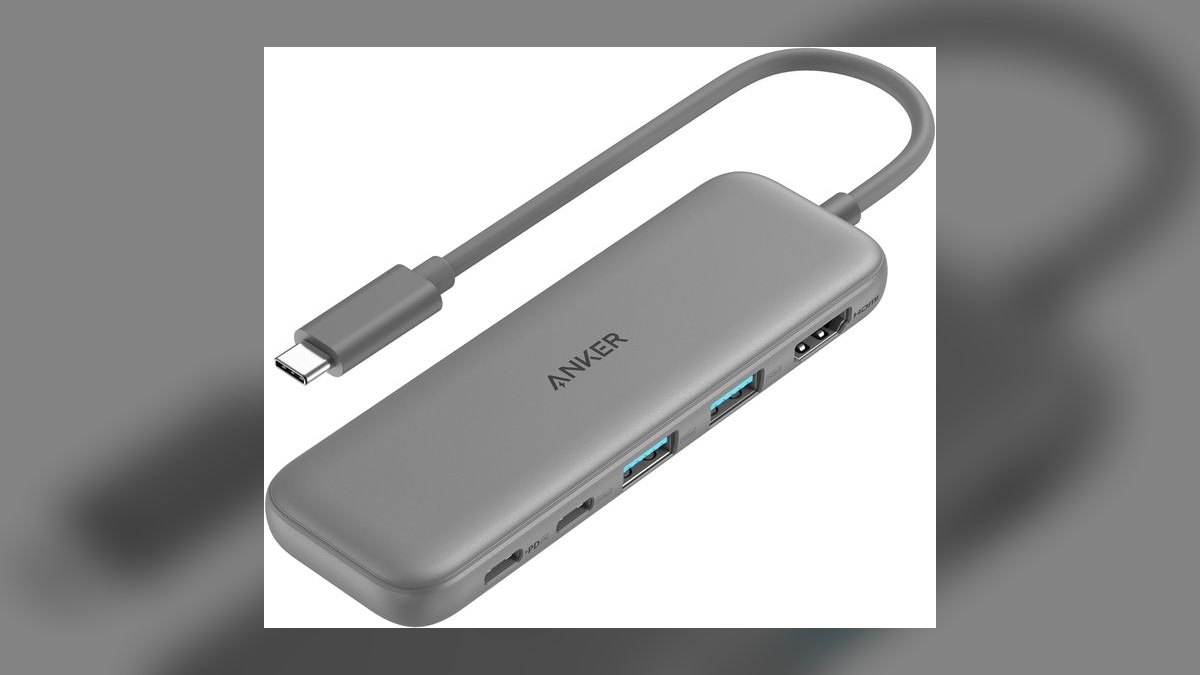
It ranks sixth on absolute capability but wins best value outright at $69. The eight ports cover HDMI, 1 USB-C 10Gbps with 85W PD pass-through, 2 USB-A 10Gbps, 1 USB-A 480Mbps for keyboards, Gigabit Ethernet, and SD plus microSD UHS-I. The aluminum body runs cool without a fan, and the short captive USB-C cable does not snag in a bag. Warranty runs 18 months.
This fits MacBook Air, iPad Pro, and Chromebook users who need ports without a desk-anchored dock. HDMI caps at 4K30, so 4K60 panels and 144Hz gaming are off the table entirely. Card readers are UHS-I, roughly 104MB/s versus the 300MB/s UHS-II slots on the docks above. Step up to the Satechi Slim if 4K60 output is the requirement.
7Satechi USB-C Pro Hub Slim
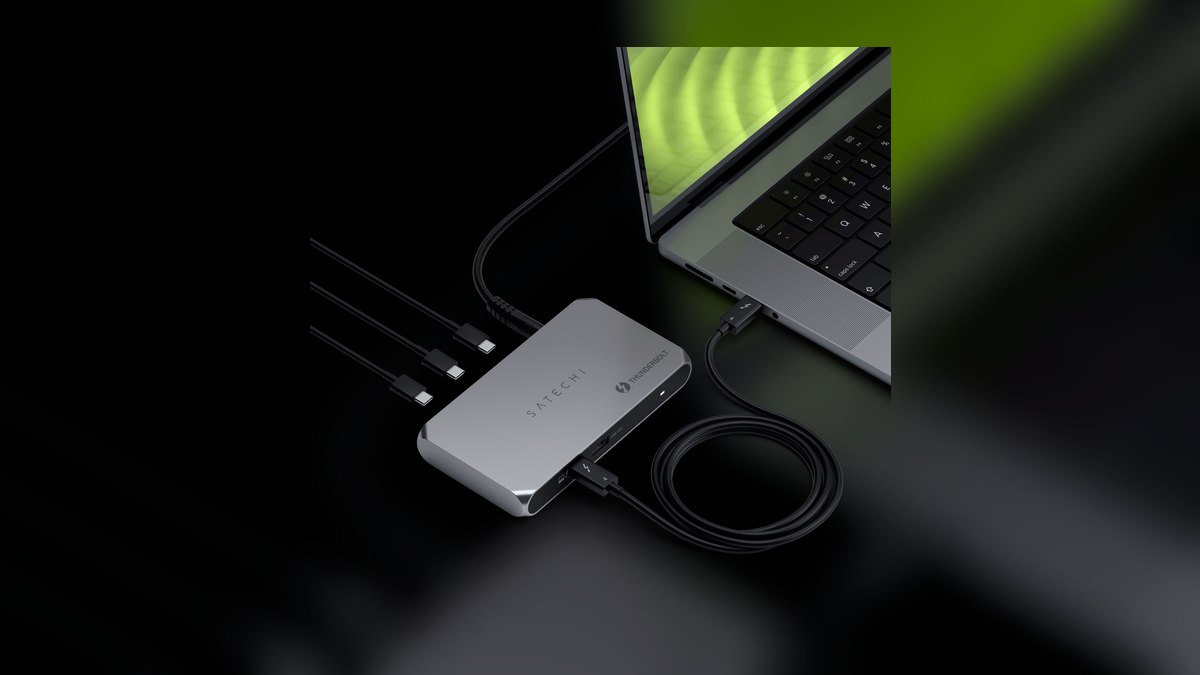
It ranks seventh because $79 buys the 4K60 HDMI 2.0 output the cheaper Anker 555 cannot deliver. Eight ports cover HDMI 4K60, 100W USB-C PD pass-through, 1 USB-C 10Gbps data, 2 USB-A 10Gbps, SD and microSD UHS-I, and a 3.5mm audio jack. Dual captive USB-C plugs sit flush against a MacBook Pro 14"/16" side rail. Anodized aluminum ships in space gray, silver, or midnight.
This is for MacBook users who want a color-matched hub that disappears into the chassis. There is no Ethernet port at all, the direct trade for the slim profile, and the Anker 555 below it keeps Gigabit for $10 less. Warranty is one year, the shortest on this list. Card slots stay UHS-I, so heavy photo offloads still belong on a UHS-II dock.
8Hyper HyperDrive Next 14-Port
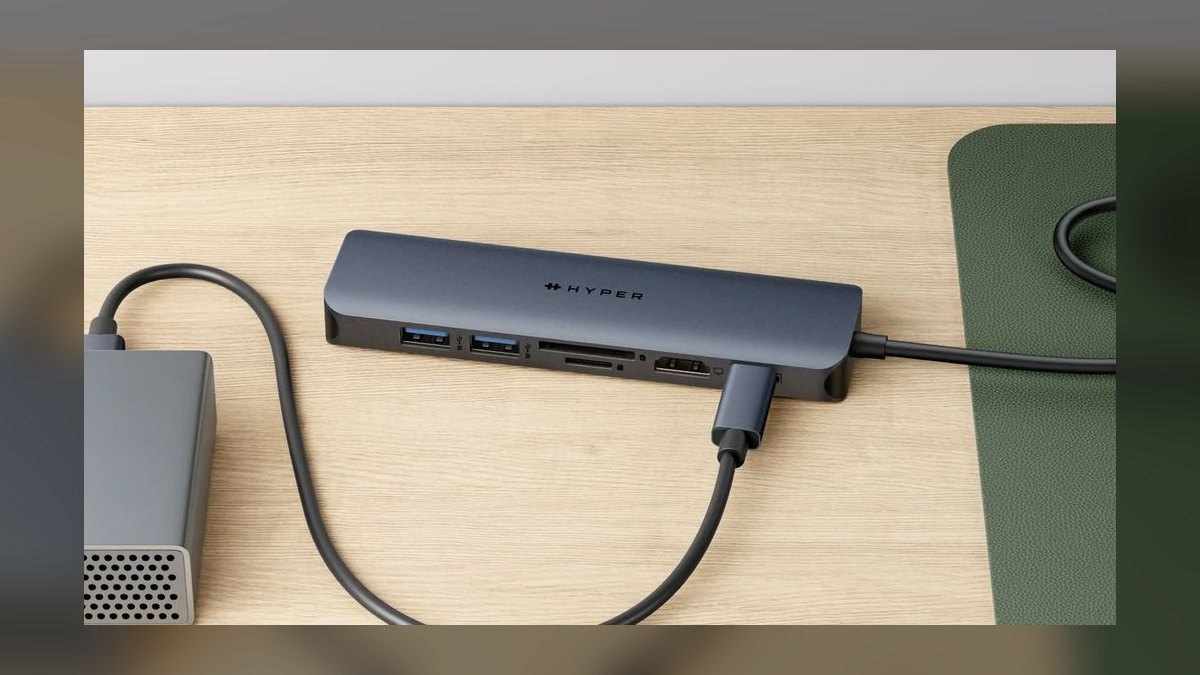
It ranks eighth because it fits dock-level port count into a portable shell at $199. Fourteen ports include 2 HDMI 2.1 4K60, DisplayPort 1.4, 2 USB-C 10Gbps, 3 USB-A 10Gbps, 2.5 Gigabit Ethernet, UHS-II SD and microSD, combo audio, and 100W PD pass-through. A USB4 controller caps throughput at 40Gbps without Thunderbolt certification. The aluminum body weighs 0.6lb.
This targets travelers and hybrid workers who want one bag-friendly box covering a hotel desk and an office. Dual displays run true MST on Windows but mirror-only on macOS, the hard limit versus the TB4 docks higher up. It is the heaviest hub here, the cost of the port count. Its UHS-II slots beat the Satechi and Anker readers by roughly threefold.
9Belkin Connect Pro Thunderbolt 4
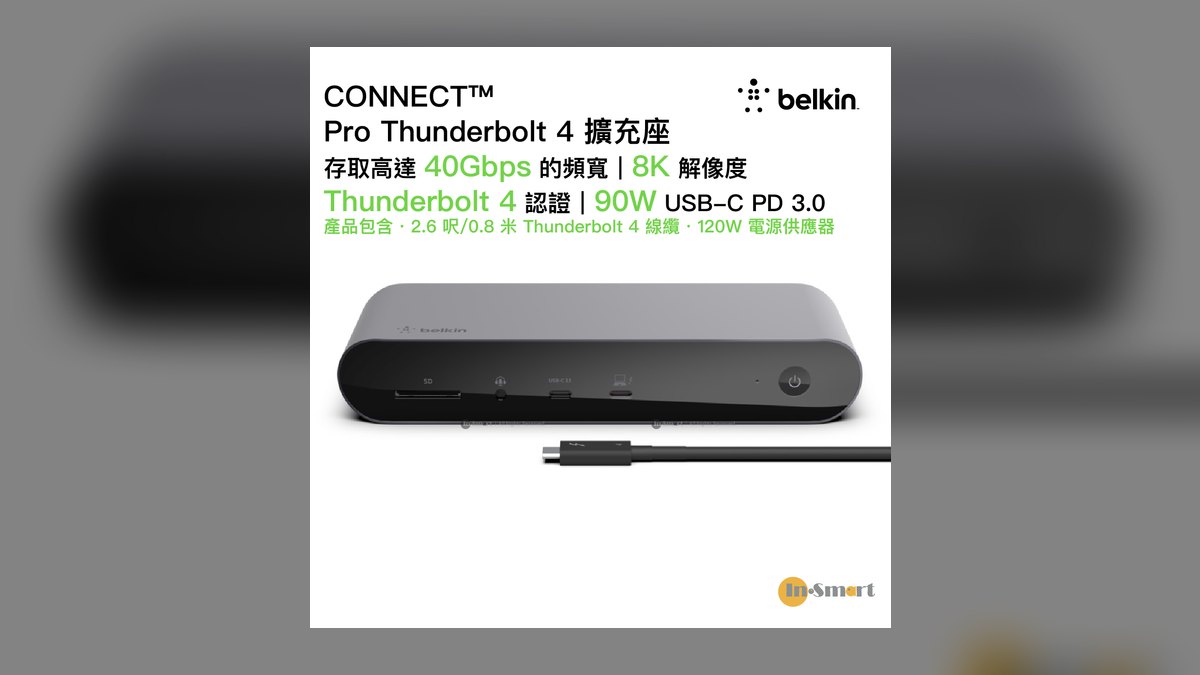
It ranks ninth because performance matches OWC and CalDigit while the price sits $30 higher at $299. Twelve ports include 3 downstream TB4, 4 USB-A 10Gbps, 1 USB-C 10Gbps, 2.5 Gigabit Ethernet, UHS-II SD, 3.5mm audio, and a Kensington lock slot. Host charging delivers 96W through a fanless aluminum chassis. The 5-year warranty with U.S.-based RMA is the longest coverage in the Thunderbolt tier.
This is built for corporate IT buyers, not individuals hunting specs per dollar. Apple Stores stock it and Microsoft certifies it for Surface, which matters for procurement approval and asset replacement. Against the OWC Pro Dock above, you pay a premium purely for warranty length and channel availability. Individual buyers get identical throughput for less from OWC or Anker.
10UGREEN Revodok Pro 313 13-in-1
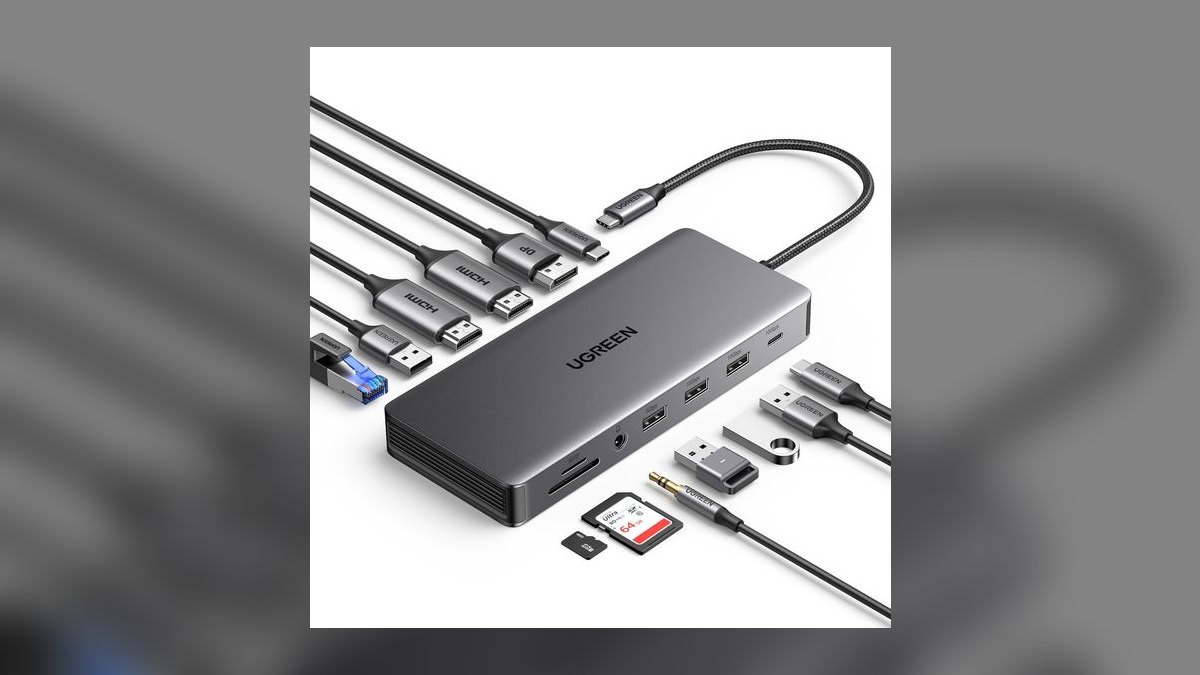
It ranks tenth because it is the cheapest 13-port triple-display dock worth buying, at $149. Ports cover 2 HDMI 4K60, DisplayPort 4K60, 1 USB-C 10Gbps with 100W PD, 3 USB-A 10Gbps, 1 USB-A 480Mbps, Gigabit Ethernet, SD and microSD UHS-I, and a 3.5mm combo jack. The aluminum chassis carries a 2-year warranty. It handles roughly 95% of standard office workflows.
This is for budget buyers who want desktop port count without Thunderbolt pricing. The USB 3.2 Gen 2 controller caps external SSD speeds and display chaining below every TB4 dock above it, and the UHS-I readers move about 104MB/s versus 300MB/s. Photographers and video editors should spend up to the OWC dock. Office users driving three monitors and Ethernet lose almost nothing here.
How we ranked these
Rankings weighted interface generation first — Thunderbolt 5, then Thunderbolt 4 and USB4, then USB 3.2 Gen 2 — at 25 percent. Display support paired with Power Delivery wattage took 20 percent, port count and mix another 20 percent, sustained throughput and thermals 15 percent, reliability and warranty 15 percent, and price-to-performance the remaining 5 percent. Every dock was scored on macOS and Windows separately, because MST asymmetry changes real display ceilings.
Deliberately ignored: RGB lighting, bundled software suites, and cable length beyond the included 0.8m. Amazon star ratings were skipped because dock reviews skew toward first-week impressions, not the eighteen-month failure window that actually matters. No-name sub-$50 hubs were excluded outright — counterfeit controller chips make their specs unverifiable. Marketing phrases like "up to 8K" were ignored unless a refresh rate was published alongside the resolution.
What to look for
Match Power Delivery to your laptop before anything else. A MacBook Air needs 30-35W, a 14-inch MacBook Pro wants 70W, and a 16-inch M4 Max wants 140W — only Thunderbolt 5 docks like the TS5 deliver that. Then count what you actually plug in daily: keyboard, mouse, two monitors, Ethernet, one SSD, headphones, an SD card. That is eight ports. Everything past eight is insurance, not capability.
The common mistake is buying Thunderbolt 5 for a Thunderbolt 4 host. A TS5 on a TB4 Mac falls back to TB4 speeds, and the $100 premium buys nothing until you replace the laptop. The second mistake is assuming Windows dual-display behavior carries to macOS — it does not, because macOS ignores MST. Check your chip's native external display limit first; a MacBook Air M3 supports exactly one.
Related questions
Does a USB-C hub slow down an external SSD?
Yes, if the hub shares bandwidth. A USB 3.2 Gen 2 hub gives 10 Gbps total across all ports, so an NVMe SSD copying files while a 4K display and Ethernet are active will drop well below its rated speed. Thunderbolt 4 and USB4 docks allocate 40 Gbps and reserve display bandwidth separately, which is why the TS4 and OWC Pro hold sustained transfer rates.
Why does my dock disconnect when I close the laptop lid?
Most docks stay powered, but macOS clamshell mode requires the laptop to be receiving power and have an external display and input device attached. If Power Delivery drops below what the chip demands during a CPU spike, the host renegotiates and the whole chain resets. A 96W or higher dock on a 14-inch MacBook Pro usually eliminates the behavior entirely.
Is 2.5 Gigabit Ethernet worth paying extra for?
Only if your router or switch supports it. The CalDigit TS4, TS5, Anker 778, and Belkin Connect Pro ship 2.5 GbE, while OWC's Pro Dock and the UGREEN Revodok stay at Gigabit. On a standard home ISP connection under 1 Gbps, the difference is invisible. It matters for NAS transfers and multi-gig fiber, where 2.5 GbE roughly doubles real file-copy throughput.
What happens if I daisy-chain two Thunderbolt docks?
Thunderbolt 4 certifies daisy-chaining up to six devices, so a Plugable TBT4-HUB3C feeding a CalDigit TS4 works. Bandwidth is shared across the chain, though — displays claim their allocation first, and SSDs downstream get what's left. Put high-throughput devices closest to the laptop and displays at the end. USB 3.2 Gen 2 docks like the UGREEN Revodok cannot chain at all.
How much does a UHS-II card reader actually save photographers?
UHS-II reads at roughly 300 MB/s versus UHS-I's 104 MB/s. A 40 GB shoot offloads in about 2.5 minutes on UHS-II against six-plus minutes on UHS-I. Across a wedding season that is hours. The CalDigit TS4, TS5, OWC Pro Dock, Anker 778, and Hyper Next 14-Port carry UHS-II; the Anker 555, Satechi Slim, and UGREEN Revodok are UHS-I.
Do these docks work with an eGPU?
Only the Thunderbolt models, and only on hosts that support external graphics. Thunderbolt 4 guarantees 32 Gbps of PCIe bandwidth, which is what an eGPU enclosure needs; USB 3.2 Gen 2 hubs like the UGREEN Revodok provide none. Apple Silicon Macs do not support eGPUs at all regardless of dock, so this applies to Windows and Linux hosts only.
Should I trust a sub-$50 USB-C hub from Amazon?
No. The controller chips in no-name hubs under $50 are frequently counterfeit or out-of-spec, and failures cluster around the six-month mark — often taking the connected drive's data with them. The Anker 555 at $69 is the floor worth crossing. Brands with published firmware update histories, CalDigit, OWC, Anker, Belkin, and Satechi, are the ones RTINGS and r/Thunderbolt consistently validate long-term.
FAQ
What is the best overall USB-C dock in 2027?
The CalDigit TS4 at $379. It carries 18 ports including three downstream Thunderbolt 4, five USB-A at 10 Gbps, 2.5 Gigabit Ethernet, UHS-II SD and microSD, DisplayPort 1.4, and optical audio. It delivers 98W to the host, drives dual 6K60 displays on macOS, runs fanless in an aluminum chassis, and ships with a two-year warranty.
What is the best value USB-C hub?
The Anker 555 8-in-1 at $69. You get HDMI, one USB-C at 10 Gbps with 85W Power Delivery pass-through, two USB-A at 10 Gbps, one USB-A at 480 Mbps for peripherals, Gigabit Ethernet, and SD plus microSD readers. The single real limit is HDMI capped at 4K30. If you run a 4K60 panel, step up to the Satechi Slim.
Is Thunderbolt 4 the same as USB4?
Not quite. Thunderbolt 4 is a certification superset — every TB4 device is USB4, but not every USB4 device meets TB4. TB4 guarantees 40 Gbps, dual 4K or single 8K display output, 32 Gbps of PCIe for eGPUs, and certified daisy-chaining. Plain USB4 can ship at 20 Gbps and skip those guarantees. For docking, TB4 is the safer purchase.
Do I need Thunderbolt 5 in 2027?
Only if your host is Thunderbolt 5 — M4 Pro and Max Macs, 2026-2027 Intel Lunar Lake, or AMD Strix Halo. On a TB4-only laptop, the CalDigit TS5 falls back to TB4 speeds and the $100 premium buys nothing. Check the port specification on your machine before ordering. If your laptop is TB5, the 120 Gbps bandwidth and 140W charging are genuinely useful.
Why is dual-display flaky on my MacBook Air?
Because M2 and M3 MacBook Air chips natively drive only one external display. No dock changes that. A second screen requires a DisplayLink dock, which compresses video over USB and stutters in motion, or the lid-closed clamshell workaround. MacBook Pro M3 and M4 Pro/Max chips support two to four displays depending on the silicon, and those work over a TB4 dock directly.
Can these docks run a 4K monitor at 144Hz?
Only the ones with DisplayPort 1.4 or HDMI 2.1. The CalDigit TS4 and TS5, OWC Thunderbolt 4 Pro Dock, Hyper HyperDrive Next 14-Port, and UGREEN Revodok Pro 313 handle 4K at 120-144Hz. The Anker 555 caps at 4K30 over HDMI, which is not enough for gaming or even smooth scrolling at that resolution. Verify the cable rating too.
Will a USB-C hub work with an iPad Pro?
Yes. M2 and M4 iPad Pros accept USB-C hubs for HDMI output, SD card import, and USB-A peripherals. Thunderbolt-only docks will connect, but most advanced features — multi-display arrangements and eGPU support — simply do not function on iPadOS. A basic hub like the Anker 555 or Satechi USB-C Pro Hub Slim is the right choice and costs far less.
Are portable dongles less reliable than desktop docks?
Generally yes, and heat is the reason. A bus-powered dongle pushing 4K60 video plus Gigabit Ethernet plus a USB-A SSD will throttle inside an hour. Desktop docks have larger aluminum chassis and external power bricks that dissipate that load. For eight-hour desk sessions, choose a desktop dock like the OWC Pro or Belkin Connect Pro and keep the hub for travel.
Which dock has the best warranty?
Anker's 778 and Belkin's Connect Pro both carry five-year warranties, the longest in the category. CalDigit and OWC offer two years but push firmware updates monthly and resolve macOS issues fastest, which matters more day to day. Satechi covers one year and the Anker 555 eighteen months. For corporate purchasing with U.S.-based RMA, Belkin is the standard answer.
Sources
- https://www.caldigit.com/thunderbolt-station-4/
- https://www.owc.com/solutions/thunderbolt-pro-dock
- https://www.anker.com/products/a8383
- https://www.techadvisor.com/article/723319/belkin-pro-thunderbolt-4-dock-review.html
- https://www.techadvisor.com/article/1516513/anker-778-thunderbolt-4-docking-station-review.html
- https://www.intel.com/content/www/us/en/architecture-and-technology/thunderbolt/thunderbolt-technology-general.html
- https://www.usb.org/
- https://www.displaylink.org/
Related on PULSE
This page will be disappearing soon. Save it to your device for $1 — or read it free while it is here.
@Kory-White- · if Venmo asks, the last 4 of my number are 2012
This page is gone.
This one is off the shelf now. $1 keeps it on your phone for good — the whole page, pictures and diagrams included.
 pulse-reviewsTop 10 Sports Earbuds — Best Overall + Best Value in 2027
 pulse-reviewsTop 10 Red Light Therapy Devices — Best Overall + Best Value in 2027
 pulse-reviewsTop 10 85-Inch TVs — Best Overall + Best Value in 2027
 pulse-reviewsTop 10 Premium Dress Shoes for Sales Executives in 2027
 pulse-reviewsTop 10 4K TVs — Best Overall + Best Value in 2027
 pulse-reviewsTop 10 VR Headsets — Best Overall + Best Value in 2027
 pulse-reviewsTop 10 Cable Management Boxes for Sales Home Office in 2027
 pulse-reviewsTop 10 Outdoor Smart Lighting — Best Overall + Best Value in 2027
 pulse-reviewsTop 10 Ethernet Adapters for MacBook — Best Overall + Best Value in 2027
 pulse-reviewsTop 10 Smart Microwaves — Best Overall + Best Value in 2027