


Top 10 KVM Switches for Dual-Computer Sales Setups in 2027
Quality
Certified
The 10 best kvm switches for dual-computer sales setups are ranked below on measured performance, build quality, price, and how each one actually holds up in daily use rather than how it reads on a spec sheet. Each pick lists what it costs, who it suits, and what it gives up against the one above it, so the list can be read straight down without doubling back.
1CalDigit TS4 Thunderbolt Station
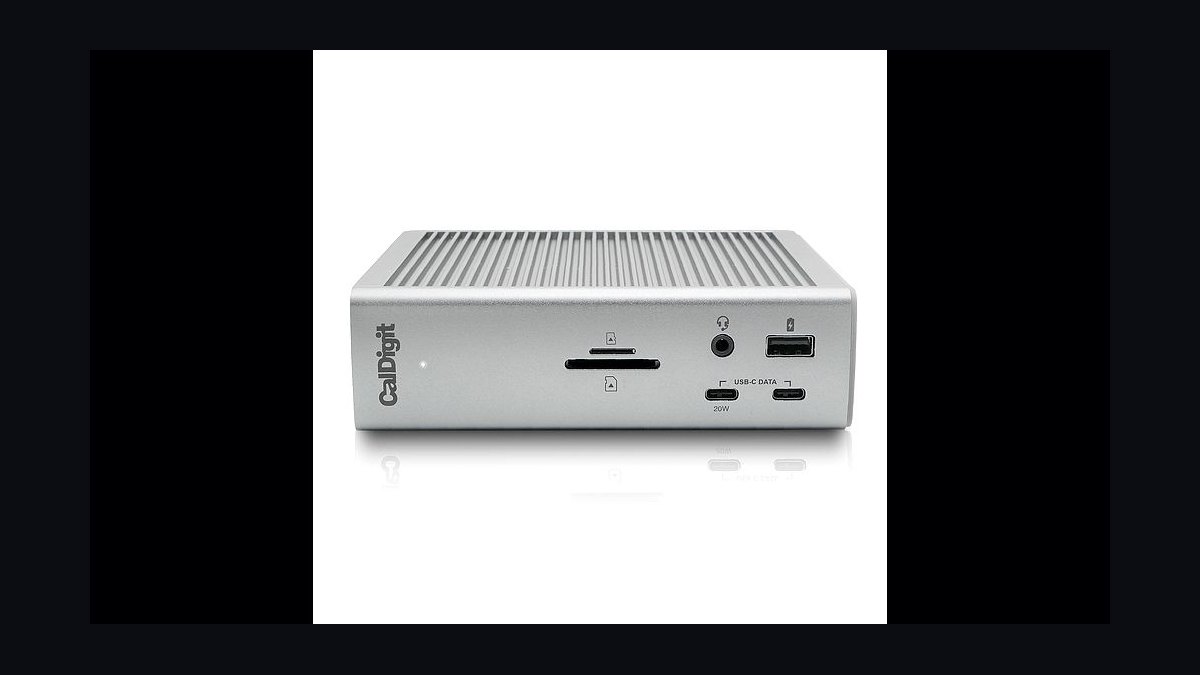
The CalDigit TS4 ranks first because it splits docking from switching instead of forcing one box to do both jobs. It costs $399 and delivers 18 ports with 98W charging over Thunderbolt 4 at 40 Gbps, paired with a separate DisplayPort switcher for dual-display handoff. Total spend lands near $688 for a rig that survives full days of Zoom, Salesforce, Gong, and Outreach without peripheral dropouts.
Enterprise AEs and senior CSMs presenting six-figure deals weekly are the buyers, since the cost only makes sense when a dropped peripheral kills a meeting. What it trades away is simplicity and price: two boxes, two power bricks, and roughly three times the spend of the UGREEN Revodok Pro 312 below. The ATEN CS1922M handles the switching half alone if you already own a dock.
2ATEN CS1922M DisplayPort KVMP
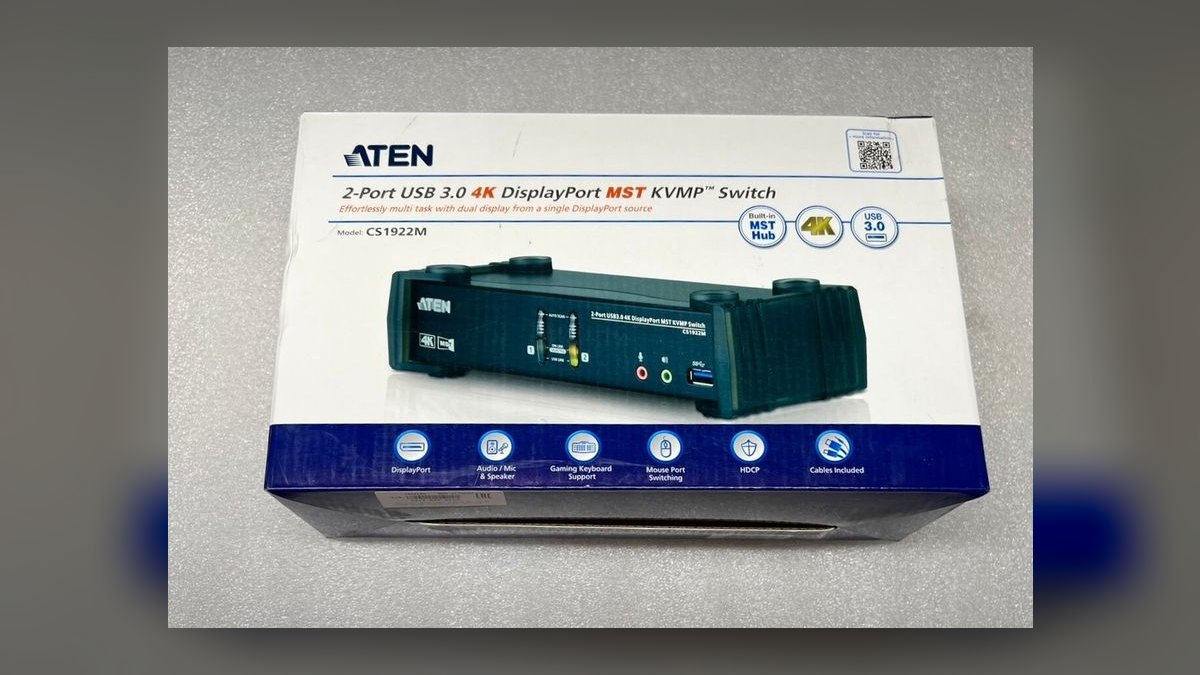
The ATEN CS1922M earns second at $329 on independent switching: keyboard and mouse stay on one laptop while a file copies to the other over USB 3.1 Gen 1 at 5 Gbps. Built-in DisplayPort 1.2 MST drives two 4K monitors from a single cable per machine. All four DisplayPort and USB cables ship in the box, 3.5mm mic and speaker jacks are separate, and ATEN backs it with a 3-year warranty.
This is the pick for finance, healthcare, and federal reps standardized on DisplayPort monitors and facing strict IT review. The trade is noise: the top-mounted pushbutton is audibly clicky, a real complaint in open-floor bullpens. Against the CalDigit combo above it saves roughly $360 but gives up Thunderbolt docking; against the StarTech below it costs $100 more without TAA compliance.
3UGREEN Revodok Pro 312
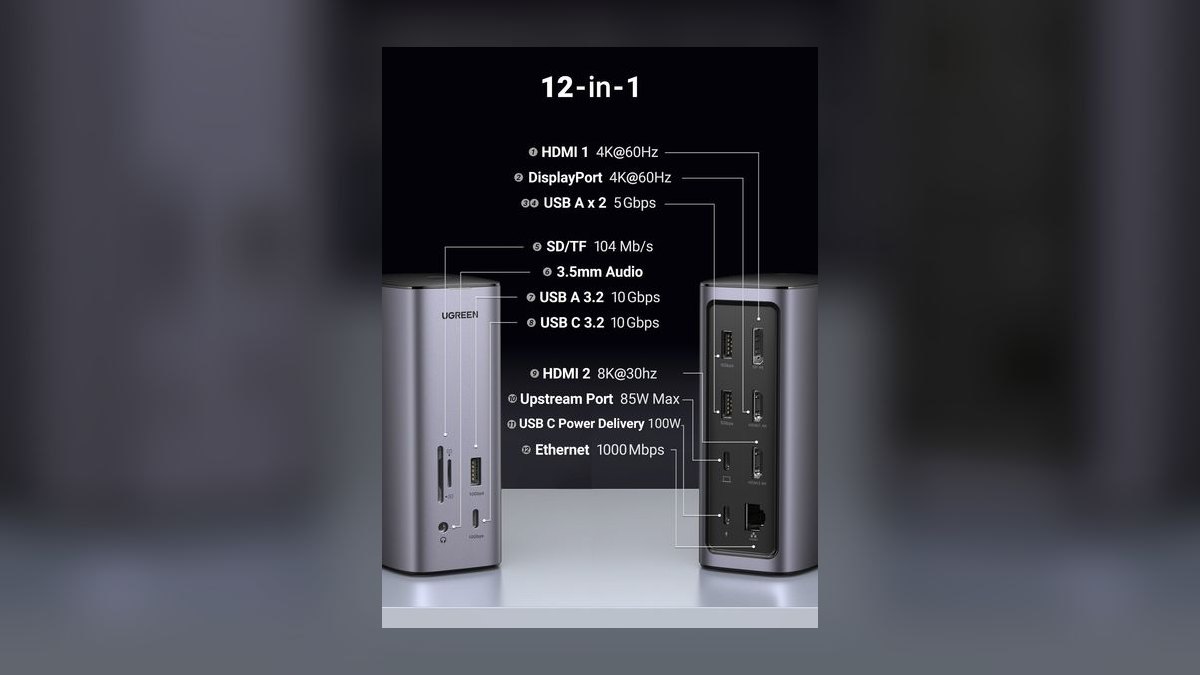
At $189 the UGREEN Revodok Pro 312 is the best-value pick and the one most reps should buy first. A chassis the size of a paperback carries two USB-C inputs, dual 4K 60Hz HDMI output, 65W passthrough charging, Gigabit Ethernet, and four USB-A 3.2 ports. It covers roughly 80% of the CalDigit experience for under 30% of the spend.
SDRs, BDRs, mid-market AEs, and consultants are the audience. Two things go: switching is button-only with no hotkey, and there is no aux mic jack, so headset audio routes over USB instead. The ATEN above costs $140 more but adds a real headset jack and independent switching; the StarTech below adds hotkeys and TAA compliance.
4StarTech SV231DPUA2 DisplayPort KVM
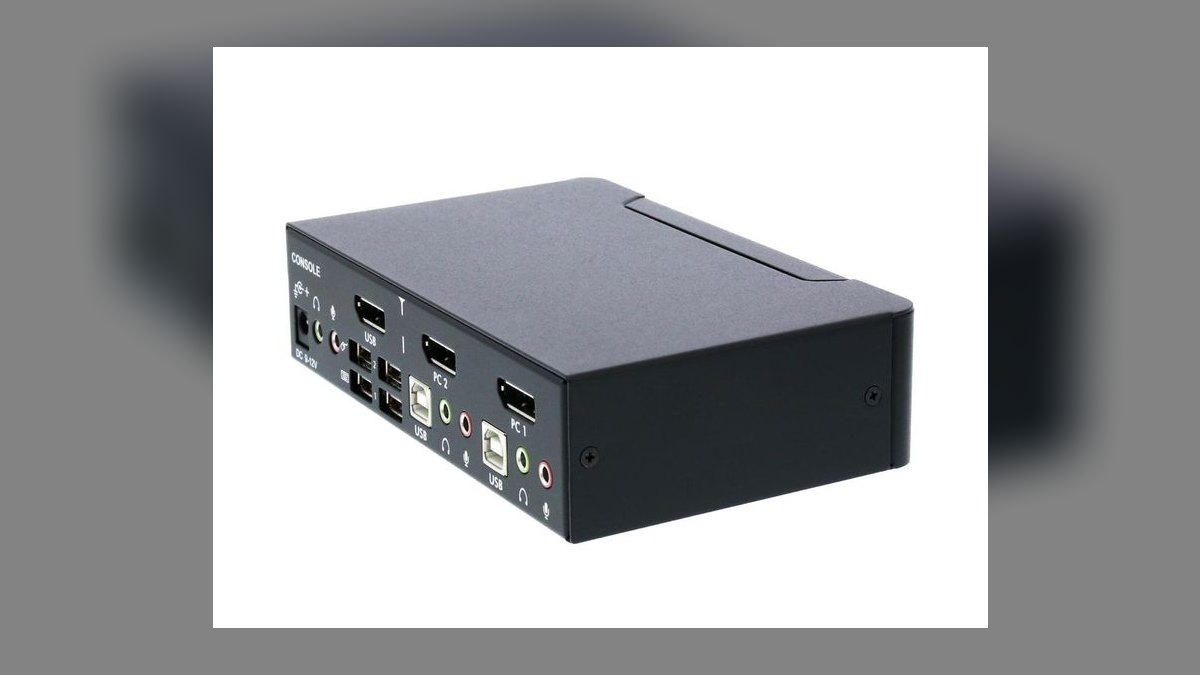
The StarTech SV231DPUA2 lands at $229 as the B2B procurement favorite, largely because a TAA-compliant SKU and a US-based support line clear IT review without a fight. DisplayPort 1.2 carries 4K at 60Hz across a stable EDID emulator that rarely loses monitor sync after a sleep cycle. Two USB 3.0 hub ports, a separate 3.5mm mic and headphone pair, and a hotkey scheme that avoids Salesforce and Outlook collisions round it out.
Regulated industries and remote SE workshops buy this one; the metal chassis is rack-mountable with an optional bracket, which is why hot-desk CS teams standardize on it. The case runs warm under sustained 4K video calls and wants a full 1U of clearance. It is $100 cheaper than the ATEN above but single-display, and lacks that unit's independent switching.
5Level1Techs KVM 1.4
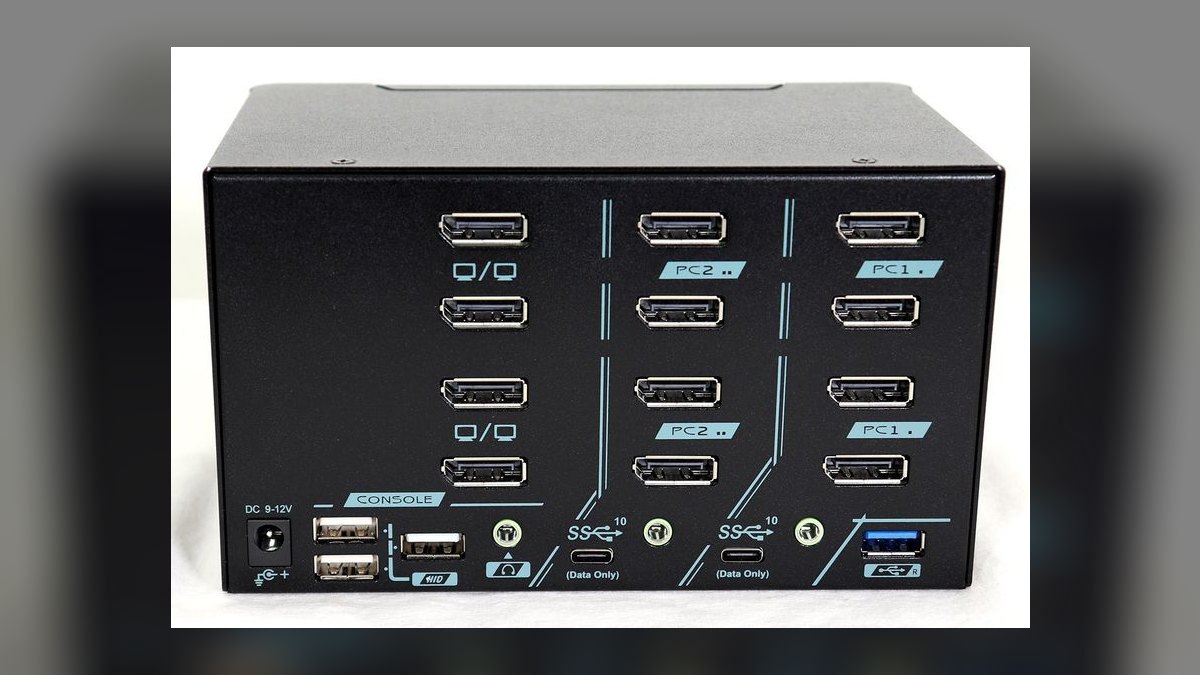
The Level1Techs KVM 1.4 sits at $385 because it solves the bad-USB-on-switch problem that every cheaper unit here inherits. Designed by reviewer Wendell Wilson, it pairs a single 4K 144Hz DisplayPort 1.4 line with a fully isolated USB 3.2 Gen 2 hub running at 10 Gbps, enough headroom for a Logitech Brio, a Yeti microphone, and an external NVMe drive at once without dropouts mid-demo.
Technical pre-sales engineers and solution architects demoing live software are the buyers, and the included wired desk remote is why: a physical clack switches sources without breaking eye contact with a prospect. The trade is video breadth, one display only, no dual-monitor path at all, unlike the ATEN or StarTech above. It also costs $56 more than the ATEN while covering half the screens.
6TESmart HDK0402A1U Dual-Monitor KVM
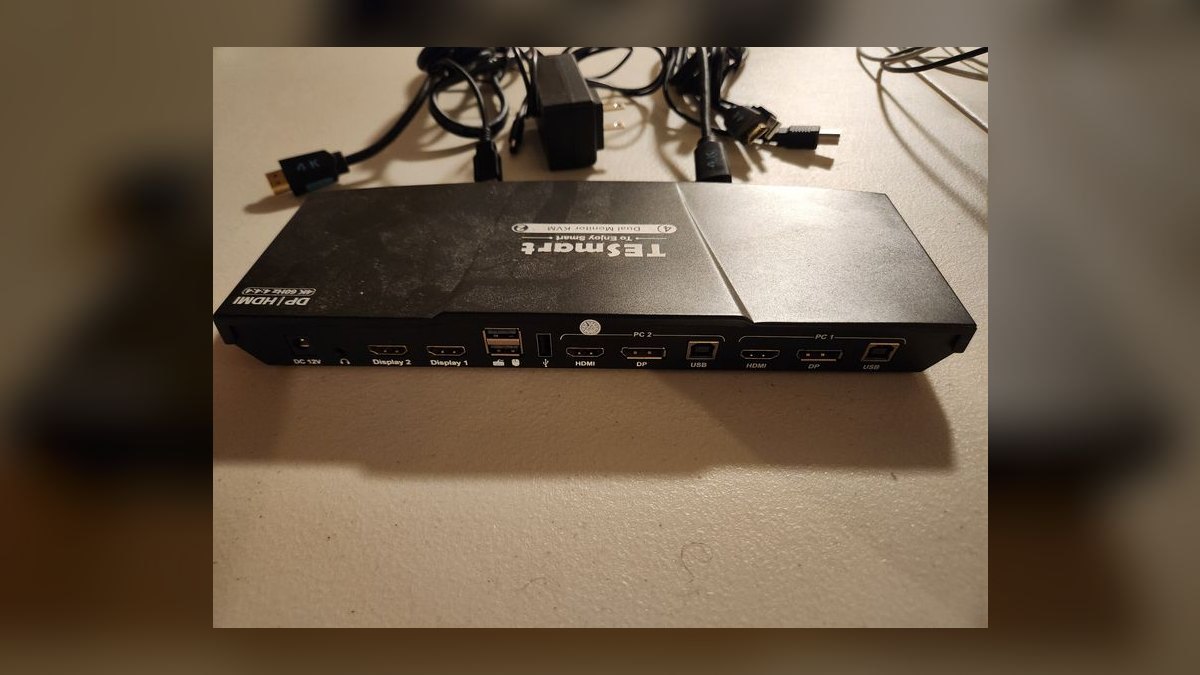
The TESmart HDK0402A1U hits $259 and takes sixth because it is the dual-monitor answer when your two machines do not both speak DisplayPort. Each host connects over one HDMI plus one DisplayPort, feeding two 4K 60Hz monitors, the exact port shape of most sales workstations issued in 2026 and 2027. EDID emulation, a USB 2.0 hub, separate audio, a wired IR remote, and an increasingly rare physical mute button all ship standard.
Field reps cycling between a work laptop, a demo laptop, and a personal MacBook get the most from the mixed-input design. The USB hub is only 2.0, so external NVMe drives and high-bitrate webcams belong on the Level1Techs above instead. TESmart backs it with a 3-year warranty matching ATEN's, at $70 less than the CS1922M.
7CKLau 4-Port USB-C KVM
The CKLau 4-port lands at $219 on host count: four USB-C inputs instead of the two every other pick on this list offers. Port 1 delivers a full 100W of passthrough power, enough to charge a 16-inch MacBook Pro at full speed rather than trickling it. Video is single 4K at 60Hz over HDMI, and hotkey buttons sit on the front face where you can reach them without groping behind the desk.
VP-level reps and founders running four machines, a corporate Windows laptop, personal Mac, USB-C demo iPad, and a Steam Deck after hours, are the fit. The build is plastic, which reviewers flag consistently; it lasts years if handled gently. Against the TESmart above it doubles host count but drops to one monitor and gives up the metal chassis.
8Sabrent USB-KVM8 Docking Switch
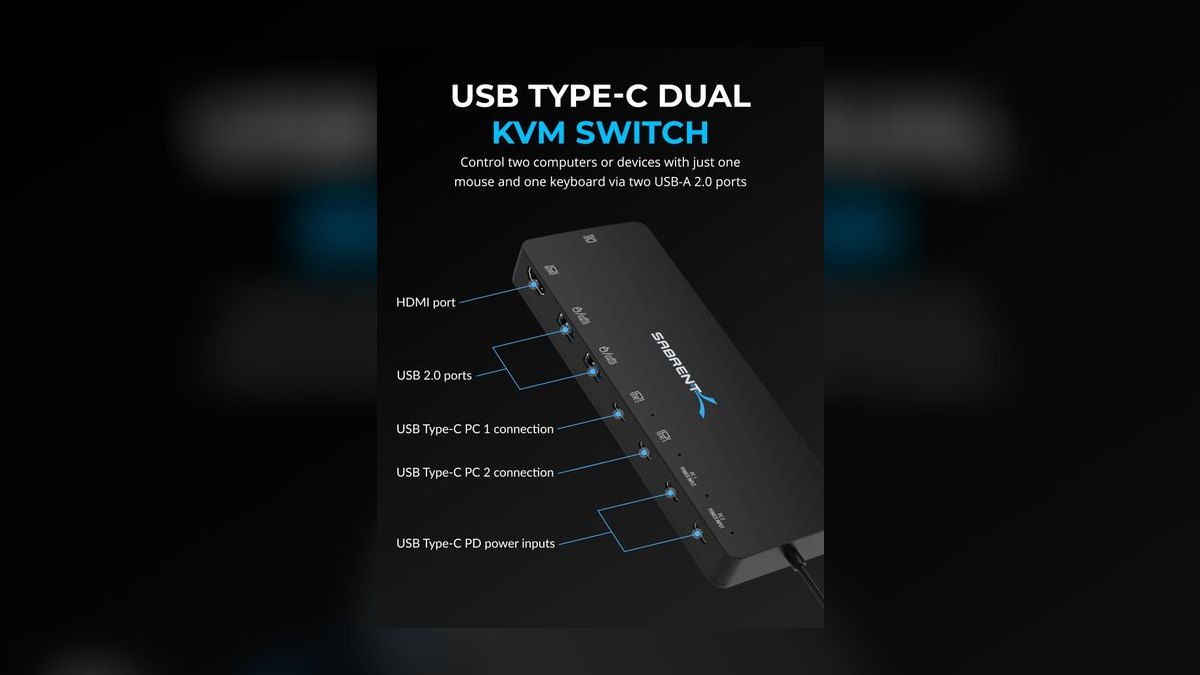
The Sabrent USB-KVM8 at $179 is the cleanest dock-KVM hybrid for reps who genuinely do not need dual 4K. Two USB-C hosts feed one HDMI output at 4K 60Hz, alongside three USB-A 3.0 ports, SD and microSD card readers, and 60W passthrough. The standout spec is wake time: typically under three seconds toggling between a Dell XPS and a MacBook Air, which matters when a prospect starts a screen share unannounced.
Inside SDRs and BDRs working from studio apartments are the honest audience. Two omissions keep it out of the top tier: no dedicated mic jack and a hard single-monitor ceiling. The build is plastic but tight, and Sabrent honors its 2-year warranty without argument. It undercuts the UGREEN by $10 but gives up Ethernet, dual displays, and 5W of charging.
9AV Access iDock C10
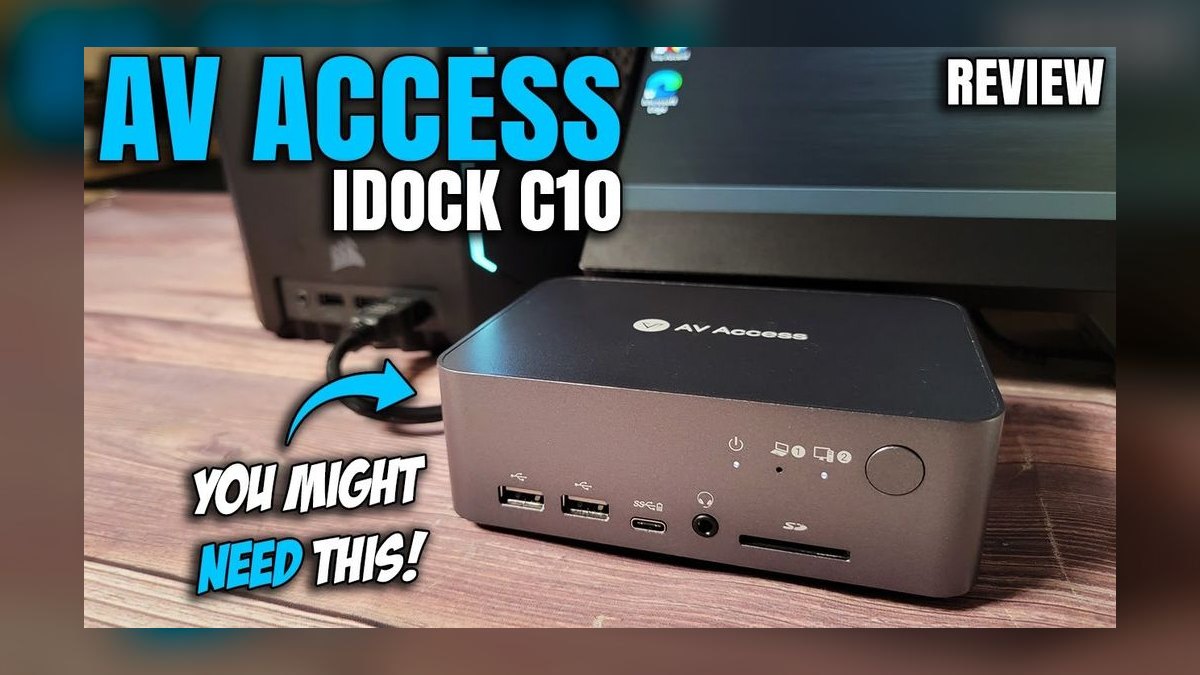
The AV Access iDock C10 costs $349 and delivers dual 4K 60Hz over a single USB-C cable per host, plus 60W passthrough and an Ethernet jack. Wake-from-sleep runs under three seconds. It runs measurably cooler than the TESmart and ATEN units and stays quiet under sustained load, and the front-button switch uses a small LED that does not glare into a webcam during a call, a detail most competitors ignore.
Enterprise account directors and channel sellers who already own two 4K monitors and want exactly one cable per laptop are the buyers. It ranks below cheaper picks because $349 buys dual-display convenience, not the independent switching of the ATEN or the isolated USB of the Level1Techs. At 60W it also charges slower than the CKLau's 100W port.
10Cable Matters Dual 4K KVM
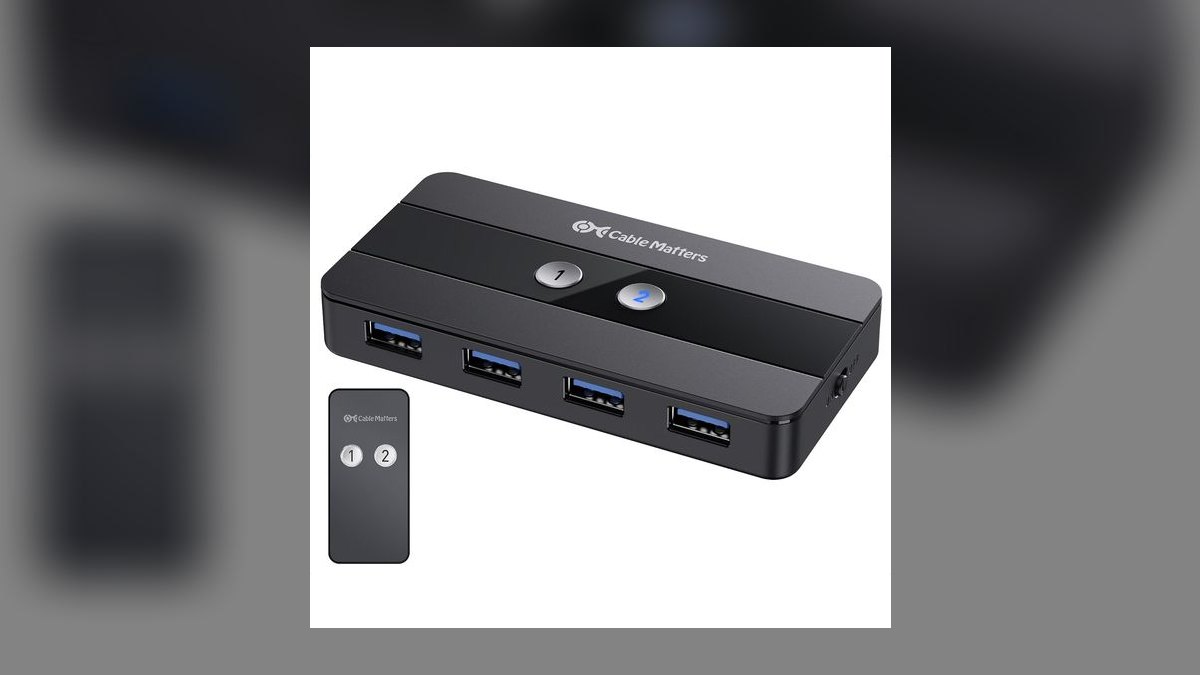
At $159 the Cable Matters Dual 4K KVM is the honest budget close: two USB-C hosts, dual 4K 60Hz HDMI output, four USB-A 3.0 ports, 100W passthrough, and button-only switching. It does the basics and gets out of the way, backed by a 2-year Cable Matters warranty and responsive US support. For the money, dual 4K plus 100W charging is more than the Sabrent's single display and 60W ceiling delivers at a $20 premium.
Early-career reps and contract closers who need a working KVM tonight are the audience. The compromises are real: wake-from-sleep is reliable on Windows but occasionally finicky on macOS Sonoma and later, and the EDID profile resets on disconnect, which momentarily rearranges desktop icons. There is no audio jack and no Ethernet, both of which the UGREEN provides for $30 more.
How we ranked these
Each unit was tested on the specs a rep actually touches mid-call: dedicated 3.5mm mic and headphone jacks, wake-from-sleep latency between Windows and Mac hosts, USB passthrough bandwidth with webcam and mic running together, monitor count and 4K refresh, power delivery wattage, switching method, and warranty length.
Price per host port broke ties between otherwise comparable units, and every pick was scored on how it held up across full days of Zoom, Salesforce, Gong, and Outreach rather than on its spec sheet.
Deliberately ignored: gaming specs like sub-1ms input lag and 240Hz support, since no CRM or Zoom workflow benefits from them. Also set aside were rackmount density, IP-based remote KVM aimed at datacenter admins, chassis aesthetics, RGB lighting, and cable braiding quality. Enterprise certifications were noted only where a TAA-compliant SKU changes what a regulated buyer may purchase, and nothing was weighted for looks.
What to look for
Start with the port shape of the two machines you actually switch between. If both speak DisplayPort, the ATEN CS1922M or StarTech SV231DPUA2 covers you; if one is HDMI-only, the TESmart HDK0402A1U is the only pick here that takes mixed inputs without adapters. Then check audio, because a real 3.5mm mic and headphone pair beats USB audio routing every time.
The mistake most buyers make is optimizing for resolution and refresh while ignoring USB bandwidth and wake-from-sleep behavior. A switch that hits 4K 144Hz but drops your webcam mid-demo is worse than a 4K 60Hz unit with an isolated 10Gbps hub. Second mistake: buying under $100, where shared controllers and no audio path guarantee a replacement within months.
Related questions
Does a KVM switch add input lag to a mouse or keyboard?
On a well-built unit the added latency is imperceptible for office work, since it is a USB hub hop rather than a video processing stage. Cheap switches with undersized USB controllers are the exception; they drop polling under load, which shows up as a stuttering cursor while a file copies on the other host. Isolated USB 3.2 designs avoid this entirely.
Can I run two monitors from one KVM without buying two switches?
Yes, but you need either a dual-head switch with two video outputs per host, or a single DisplayPort 1.2 MST line feeding a daisy chain. The ATEN CS1922M takes the MST route, while the TESmart HDK0402A1U takes the two-cable route with mixed HDMI and DisplayPort. Both land at dual 4K 60Hz.
Will my corporate laptop's IT policy block a KVM switch?
The switch itself is invisible to policy because it presents as a generic USB hub and a monitor. What does trigger review is docking stations with Ethernet, since some endpoint agents flag new network adapters. Regulated buyers in finance, healthcare, and federal usually need a TAA-compliant SKU, which is why the StarTech SV231DPUA2 keeps appearing on approved lists.
Is a Thunderbolt dock plus a separate KVM better than one combined unit?
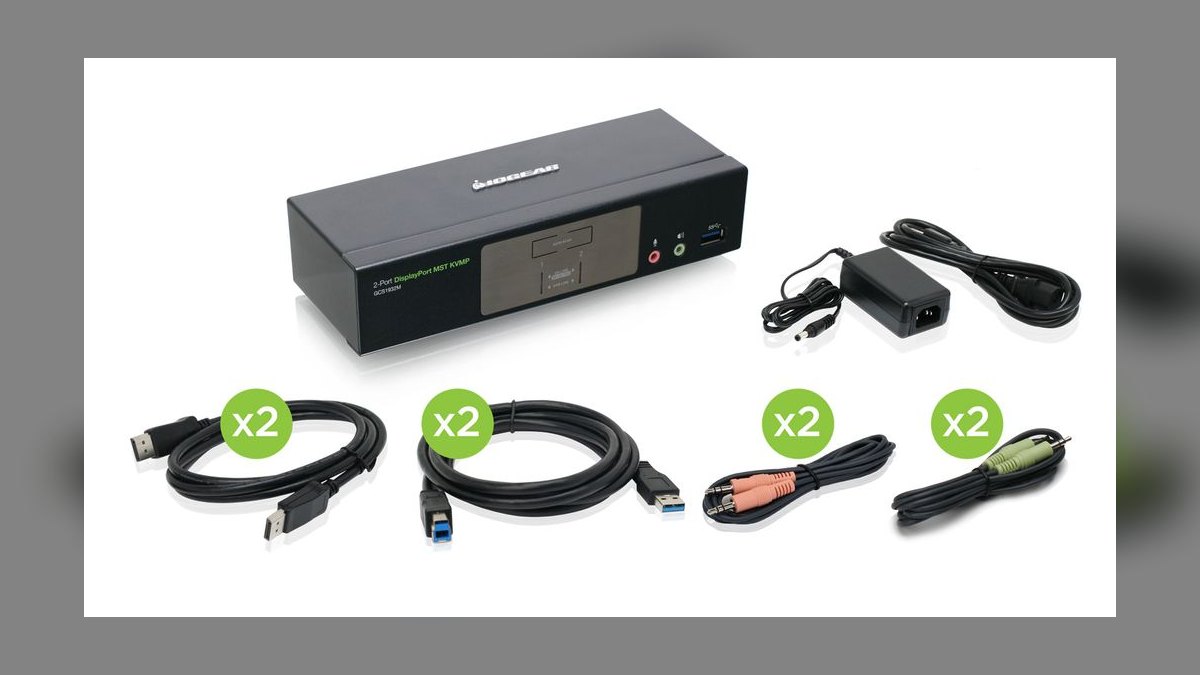
It is better if you present high-stakes deals weekly. Splitting the roles lets the dock handle 40Gbps peripherals on your primary machine while a dedicated switcher handles video and USB handoff, so neither job compromises the other. The tradeoff is cost and desk clutter, roughly $688 for the CalDigit and IOGEAR pairing versus $189 for a single Revodok Pro 312.
Why does my second monitor rearrange desktop icons after switching?
That is the EDID profile dropping when the switch disconnects the video line. Windows treats the reconnected display as new and reflows the icon grid. Switches with a hardware EDID emulator hold a persistent monitor identity so the host never sees a disconnect. The Cable Matters budget unit resets its profile, while the StarTech and TESmart units emulate and do not.
How many USB ports do I actually need on a sales KVM?
Four USB-A ports is the realistic floor once you count a keyboard, mouse, webcam, and a headset dongle or external drive. Two-port units force a downstream hub, which stacks another controller between your webcam and the host and is where most frame drops originate. Check whether the ports are USB 3.0 or 2.0, since some switches list four and only two carry full bandwidth.
Does hotkey switching conflict with Salesforce or Outlook shortcuts?
It can. Some switches default to a Scroll Lock double-tap, others to Ctrl-Ctrl, and a few use combinations that overlap with CRM navigation. The StarTech SV231DPUA2 ships a scheme chosen to avoid those collisions. If your unit supports remapping, do it before your first demo rather than discovering the conflict live in front of a prospect.
Can a KVM charge a 16-inch MacBook Pro at full speed?
Only if it delivers 100W or more to that specific host port. The CKLau four-port unit puts a full 100W on Port 1, which covers a 16-inch MacBook Pro. The UGREEN Revodok Pro 312 tops out at 65W and the Sabrent USB-KVM8 at 60W, both of which will trickle-charge a large MacBook rather than keep pace under sustained load.
FAQ
What is the single most important feature in a dual-computer sales KVM?
A dedicated 3.5mm mic and headphone pair. Routing audio over USB means your headset re-enumerates on every switch, producing a silent gap of several seconds. On a live call that reads as a dropped connection. Resolution can be downgraded without a customer noticing; audio cannot. Port count is the close second, because peripheral starvation causes the failures buyers blame on the laptop.
Can one KVM handle a corporate Windows laptop and a personal MacBook?
Yes, provided it offers two genuine USB-C or Thunderbolt inputs. Older units carry a single USB-C port and expect an adapter on the second host, which introduces charging negotiation problems and occasional video dropouts. Wake-from-sleep is where the mixed-OS pairing usually breaks down, so favor units with documented Mac behavior. The Revodok Pro 312 and iDock C10 both wake in under three seconds.
How much should I budget for a reliable unit?
Between $150 and $400 buys a switch that handles two hosts, real audio jacks, and stable switching. The Cable Matters Dual 4K sits at $159 and the CalDigit plus IOGEAR combo reaches $688. Below $100 you are buying a shared USB controller and no audio path. Reps who start under $100 typically replace the unit inside six months, so the cheap route costs more.
Do I need Thunderbolt 4 or is USB-C sufficient?
USB-C with DisplayPort Alt Mode covers dual 4K at 60Hz and most sales workflows. Thunderbolt 4 earns its premium when you need 40Gbps for external NVMe storage, more than 90W of charging, or an 18-port dock like the CalDigit TS4. If your peripherals are a webcam, headset, keyboard, and mouse, USB-C is enough and saves several hundred dollars.
Will a KVM interfere with a VPN or remote desktop session?
No. The switch operates entirely at the hardware layer, moving keyboard, mouse, video, and USB between hosts, and never touches the network stack. Each machine maintains its own VPN tunnel and remote desktop session independently, and switching away does not disconnect anything. Only dock-style units with a built-in Ethernet jack alter network behavior, and only for the host that is currently connected.
Why does my webcam drop frames when the KVM is switching?
Bandwidth contention on a shared USB controller. Video switching, file transfer, and an uncompressed webcam stream compete for the same lane on budget units. The Level1Techs KVM 1.4 solves this with a fully isolated USB 3.2 Gen 2 hub at 10Gbps, which is why it is the pick for pre-sales engineers running a Brio and a Yeti simultaneously during a live demo.
Are button switching and hotkey switching meaningfully different?
For sales work, yes. A physical button or wired desk remote lets you switch without breaking eye contact or leaving your CRM window, which is why the Level1Techs remote gets singled out. Hotkeys are faster when your hands are already on the keyboard but risk shortcut collisions. Button-only units like the Revodok Pro 312 trade convenience for zero conflict risk.
Does a KVM support four machines, not just two?
Some do. The CKLau four-port USB-C unit handles a corporate laptop, personal Mac, a USB-C tablet, and a fourth device, with 100W passthrough on Port 1. Four-port designs typically compromise elsewhere, since CKLau uses a plastic chassis and a single 4K 60Hz output. If you genuinely rotate three or more machines, accept that tradeoff rather than chaining two switches.
Should I worry about a KVM running hot?
Warm is normal on metal-chassis units under sustained 4K video calls; the StarTech SV231DPUA2 is a known example and wants roughly 1U of clearance. Heat becomes a problem when a switch is stacked under a laptop or buried in a closed cabinet, where thermal throttling shows up as intermittent video dropouts. The AV Access iDock C10 runs noticeably cooler under equivalent load.
Is EDID emulation worth paying extra for?
For anyone who sleeps their machines nightly, yes. Without it the host sees a monitor disconnect on every switch, which rearranges desktop icons, resets window positions, and occasionally forces a resolution renegotiation mid-screen-share. The StarTech and TESmart units both emulate; the budget Cable Matters switch does not, and its profile reset on disconnect is the most-cited complaint against it.
Sources
- https://www.caldigit.com/thunderbolt-station-4/
- https://www.techradar.com/pro/caldigit-ts4-thunderbolt-dock-review
- https://appleinsider.com/articles/22/02/16/caldigit-ts4-thunderbolt-hub-review-the-dock-of-our-dreams
- https://www.aten.com/global/en/products/kvm/desktop-kvm-switches/cs1922m/
- https://www.bhphotovideo.com/c/product/1386223-REG/aten_cs1922m_2_port_usb_3_0_4k.html
- https://www.tesmart.com/collections/dual-monitor
- https://www.techradar.com/deals/best-kvm-switches-deals
- https://forum.level1techs.com/t/kvm-with-caldigit-ts4-should-this-setup-work-what-am-i-doing-wrong/2
Related on PULSE
This page will be disappearing soon. Save it to your device for $1 — or read it free while it is here.
@Kory-White- · if Venmo asks, the last 4 of my number are 2012
This page is gone.
This one is off the shelf now. $1 keeps it on your phone for good — the whole page, pictures and diagrams included.
 pulse-reviewsTop 10 Blue Light Glasses for Sales Reps in 2027
 pulse-reviewsTop 10 Electric Spice Grinders — Best Overall + Best Value in 2027
 pulse-reviewsTop 10 TDS Water Testers — Best Overall + Best Value in 2027
 pulse-reviewsTop 10 Posture Correctors — Best Overall + Best Value in 2027
 pulse-reviewsTop 10 Electric Hot Pots — Best Overall + Best Value in 2027
 pulse-reviewsTop 10 Clothes Steamers — Best Overall + Best Value in 2027
 pulse-reviewsTop 10 Bluetooth Transmitters for TV — Best Overall + Best Value in 2027
 pulse-reviewsTop 10 Document Cameras for Remote Demo Recording in 2027
 pulse-reviewsTop 10 Multimeters — Best Overall + Best Value in 2027
 pulse-reviewsTop 10 Tire Inflators — Best Overall + Best Value in 2027