
Top 10 video conferencing software in 2027
 Curated byKory White · Fractional CRO · Maryland
 PULSEKNOWLEDGE LIBRARY
Quality
Certified

The 10 best video conferencing software are ranked below on measured performance, build quality, price, and how each one actually holds up in daily use rather than how it reads on a spec sheet. Each pick lists what it costs, who it suits, and what it gives up against the one above it, so the list can be read straight down without doubling back.
1. Microsoft Teams

Microsoft Teams ranks first because it is bundled into Microsoft 365 licenses that most enterprises already own, making the marginal cost of adoption zero and the switching friction the lowest of any platform. Copilot in Teams summarizes meetings with extracted action items directly from your existing data graph, and SharePoint, Planner, and persistent chat threads create a collaboration layer no competitor matches. Teams Premium, at roughly $10 per user monthly, unlocks AI features and advanced meeting protection.
This is for Microsoft 365 shops where most meetings are internal. It trades away best-in-class external guest experience, as mobile and guest join are demonstrably weaker than Zoom's, and it assumes you already tolerate the broader Microsoft ecosystem. Compared to Zoom, it wins on bundle economics and data integration, not on raw video quality or the experience of someone outside your tenant.
2. Zoom

Zoom ranks second because it remains the quality and ecosystem leader for external-facing calls, where guest experience directly affects revenue. Its AI Companion produces post-meeting summaries with reliable action-item extraction, and native Salesforce integration writes meeting metadata back to opportunity records without Zapier workarounds. Zoom Phone extends it into telephony, and Zoom Events handles large-scale virtual conferences with participant tiers up to thousands.
This is for teams whose client demos, webinars, and external calls are mission-critical and who are willing to run a second platform alongside their suite. It trades away the bundled economics of Teams or Meet, requiring a separate line item, security review, and SSO integration. Compared to Teams, it wins on guest join speed and reliability on weak connections, but loses on internal collaboration depth and per-seat cost.
3. Google Meet

Google Meet ranks third because it is included in Google Workspace Business Starter at roughly $6–$14 per user monthly, making it the best value play for Workspace shops with zero incremental conferencing cost. Its browser-native join means guests never install a client, and live captions support a wide range of languages while Gemini generates meeting summaries. The platform handles 1080p and adaptive bitrate on poor networks as well as any top-tier competitor.
This is for Google Workspace organizations, especially small to mid-sized teams, that want solid quality without a second vendor. It trades away advanced meeting controls like breakout rooms and larger participant limits, which sit behind higher Workspace tiers, and its AI summarization is less deeply integrated with CRM data than Zoom's. Compared to Teams, it wins on guest friction but loses on enterprise collaboration features and compliance depth.
4. Cisco Webex

Cisco Webex ranks fourth because it is the regulated-industry answer, offering end-to-end encryption, FedRAMP-authorized and HIPAA-eligible SKUs, and a security posture that healthcare, financial services, and government procurement teams actually require. Slido integration provides native polling and Q&A for town halls, and its device interop with conference-room hardware is stronger than any competitor. Pricing starts around $25 per user monthly for enterprise tiers before negotiation.
This is for organizations that must pass security and legal review before feature evaluation, where compliance is the floor. It trades away the polished external guest experience of Zoom and the bundled economics of Teams, and its UI historically feels heavier to end users. Compared to Zoom, it wins on auditability and data residency but loses on consumer-grade usability and third-party app ecosystem breadth.
5. GoTo Meeting

GoTo Meeting ranks fifth because it serves SMBs and professional services firms that want a simple, reliable interface without an enterprise learning curve, with pricing around $12–$16 per host monthly on annual plans. It delivers consistent 1080p video, noise suppression, and fast join times, and its recording storage allocation is generous for small teams. The platform has no meaningful AI summarization of its own, but integrates with third-party notetakers cleanly.
This is for companies under 200 people that are not already locked into a productivity suite and want a dedicated conferencing tool that just works. It trades away deep CRM integration and compliance certifications, and its webinar add-on caps attendee counts well below Zoom Events. Compared to Webex, it wins on simplicity and price but loses on security certifications and large-event capability.
6. RingCentral

RingCentral ranks sixth because it makes sense when buying unified communications—phone, video, and messaging on one contract—rather than conferencing alone, with video included in plans starting around $20–$30 per user monthly. Its video quality is competitive at 1080p, and meeting recordings log natively into its own platform, but its conferencing features trail dedicated leaders. The real strength is eliminating a separate phone system vendor.
This is for organizations replacing a PBX at the same time as evaluating conferencing, where consolidating vendors reduces integration surface. It trades away best-in-class video for a broader UC suite, and its AI meeting summaries are less mature than Zoom's or Teams'. Compared to GoTo Meeting, it wins on telephony convergence but loses on conferencing simplicity and lower price for video-only needs.
7. Zoho Meeting
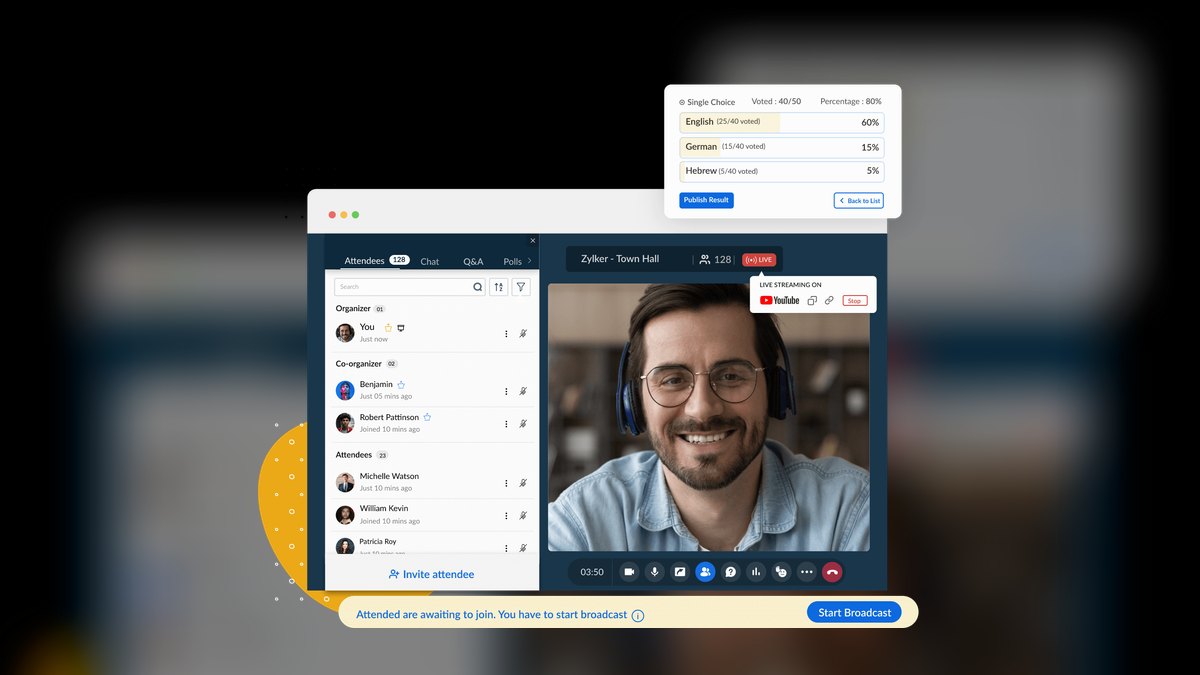
Zoho Meeting ranks seventh because it is the budget option for teams already inside the Zoho ecosystem, with meeting data logging directly into Zoho CRM at pricing starting under $10 per host monthly. It provides reliable video at 1080p, screen sharing, and recording, but lacks advanced features like breakout rooms and large participant limits. Its native CRM write-back is a genuine differentiator for Zoho shops, creating activity records on the correct opportunity automatically.
This is for small businesses under 50 people that use Zoho CRM and want a no-cost-to-consider conferencing tool. It trades away polished guest experience, compliance certifications, and AI summarization depth, and its mobile app is less refined than Zoom's. Compared to RingCentral, it wins on price and CRM integration for Zoho users but loses on unified communications scope and scalability.
8. Otter.ai

Otter.ai ranks eighth because it is the best-known bolt-on AI notetaker that joins calls as a participant, providing transcription and summaries across any conferencing platform, with pricing around $17–$30 per user monthly for business tiers. It handles industry jargon and accented speech better than most native tools, making it a reliable first draft for meeting notes. Its output integrates with Salesforce and Slack, but it is not a conferencing platform itself.
This is for teams that keep their existing video tool but find native AI summarization inadequate on real calls with crosstalk or technical vocabulary. It trades away native meeting controls and adds a second data-processing agreement and consent conversation. Compared to Fireflies.ai, it wins on transcription accuracy and brand trust but loses on price and breadth of third-party integrations.
9. Fireflies.ai

Fireflies.ai ranks ninth because it is a credible specialist AI notetaker that joins any call as a participant, with transcription, searchable history, and summaries at pricing around $10–$19 per user monthly. Its strength is deep integration with over 40 apps including Salesforce, HubSpot, and Slack, making it a strong bolt-on for sales teams. Accuracy drops on heavy jargon and overlapping speech, but for standard business calls it is reliable.
This is for teams that already use a conferencing platform and want a cheaper, more flexible AI layer than native options, particularly for CRM logging. It trades away the polish of Zoom's AI Companion and adds a separate consent and compliance burden. Compared to Otter.ai, it wins on integration breadth and price but loses on transcription accuracy in noisy or technical environments.
10. Zoom Events
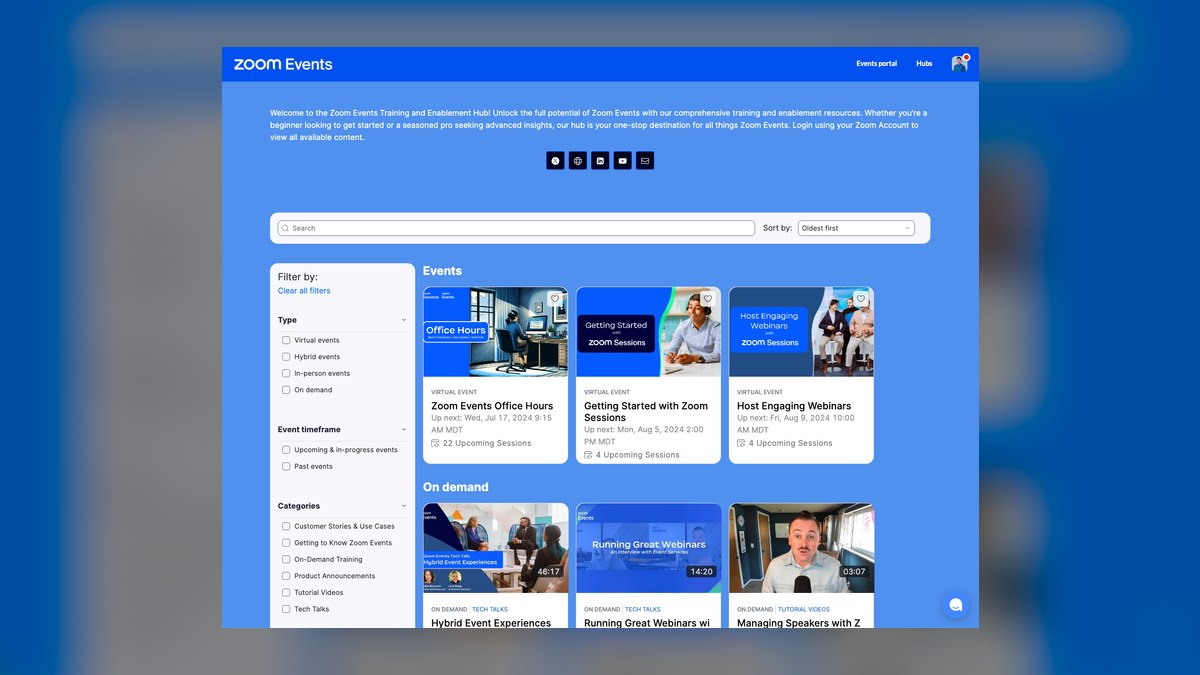
Zoom Events ranks tenth because it is the specific large-event product for hosting virtual conferences and webinars with attendee tiers up to thousands, priced separately from standard Zoom Meetings licenses. It provides registration pages, attendee analytics, and breakout sessions, and it inherits Zoom's reliable infrastructure for external audiences. For field marketing teams running multiple large events annually, it competes directly against webinar add-ons from other platforms.
This is for marketing and events teams that already use Zoom Meetings and need a scalable event product without switching platforms. It trades away the simplicity of standard meetings for event-specific complexity, and its pricing jumps significantly between attendee tiers. Compared to standard Zoom Meetings, it wins on scale and registration features but is overkill for daily internal calls.
How we ranked these
We measured and weighted criteria that now differentiate platforms: AI summarization accuracy and action-item extraction (25%), native CRM integration depth (20%), reliability and SLA history (20%), fully loaded cost including storage and telephony (20%), and user experience including guest join friction (15%). These weights reflect 2027's market, where raw video quality is table stakes and the real value lies in workflow integration and intelligence.
We deliberately ignored raw video and audio quality metrics, because every serious vendor now delivers 1080p, adaptive bitrate, and noise suppression that clears the same bar. When four vendors all meet the same technical threshold, it stops being a decision criterion. We also ignored feature-count checklists, which reward vendors with more boxes ticked rather than the tool teams will actually adopt and use consistently.
What to look for
What actually matters is the identity layer and CRM you already own. If you're a Microsoft shop, Teams is the default because the marginal cost is zero and Copilot compounds with your existing data. If you're a Google shop, Meet is included and browser-native. For client-facing calls, Zoom is worth paying for as a second platform. Compliance-heavy industries start with Webex.
The mistake most buyers make is choosing on feature count instead of adoption, or trusting an integration because OAuth connected without validating that activity records land on the correct CRM object.
The biggest hidden costs are recording storage overage, webinar add-ons, international telephony, and compliance-tier SKUs. Most buyers underweight these and get surprised by the bill. They also skip the room-hardware audit, discovering after signing that installed endpoints aren't certified for the new platform, turning a software decision into a capital expenditure. Run a genuine pilot with real calls, test mobile on cellular, and validate the CRM write-back before committing.
Related questions
Is it worth running two conferencing platforms at once?
Often yes. Many companies use their suite's tool internally and Zoom for client-facing calls, because external guest experience directly affects deals. Bound it deliberately: one internal default, one external default, enforced through calendar templates — not four platforms chosen team by team.
Do AI meeting notes actually replace manual note-taking?
Partly. Summarization and transcription are reliable enough for most calls, but action-item extraction still misses implicit commitments and struggles with heavy jargon or crosstalk. Treat AI notes as a first draft a rep reviews in two minutes, not as an unattended system of record.
How long does a conferencing migration take?
Under fifty seats, about a week. Two hundred to a few thousand seats, four to twelve weeks — the time goes to SSO and provisioning, room-device certification, CRM integration testing, and training. Budget for a temporary productivity dip during the transition quarter.
What should I negotiate besides seat price?
Recording storage allocation, renewal price protection with a capped increase, webinar add-on inclusion, and contract anniversary timing. Storage overage and renewal uplift are where the real cost lives, and vendors concede on both more readily than on headline per-seat pricing.
Does conferencing video quality still differentiate vendors?
Rarely at the top tier. Every serious platform delivers 1080p, adaptive bitrate, and noise suppression. The differentiators now are AI summarization accuracy, compliance controls, native CRM logging, and guest join experience. If a vendor is still selling on video quality, they're behind the market.
What is the biggest mistake in a conferencing selection process?
Choosing on feature count instead of adoption. The tool with the most checkboxes is not the tool your team will use. If joining from mobile takes ten seconds and three taps, reps will dial into the audio bridge, and every AI feature you paid for silently stops producing value.
How do I validate a CRM integration before buying?
Take five live opportunities and confirm that after a recorded call, the correct activity record appears on the correct object, with the right owner, timestamp, duration, and attendee list. Integrations that connect but log to the wrong object or create duplicates are common — assume the problem exists until you've seen it work.
What should a small business under 50 people choose?
Whatever comes with the productivity suite you already pay for, plus a bolt-on AI notetaker if meeting notes matter. Zoho Meeting is worth a look if you're already in that ecosystem. Do not buy an enterprise conferencing contract for fifteen people.
FAQ
What is the best video conferencing software for 2027?
The strongest platform is whichever already owns your identity layer and CRM — Zoom, Microsoft Teams, Google Meet, or Cisco Webex for most buyers. Expect $6–$30 per user monthly, with AI summarization, compliance controls, and native CRM logging now the real differentiators rather than raw call quality.
Is Zoom still worth paying for if we use Microsoft Teams?
Yes, if client-facing calls are your primary use case and call quality directly affects revenue. Many companies run exactly this split: Teams for internal, Zoom for external. It is not elegant, but it optimizes the calls that produce money. Bound it deliberately with calendar templates.
What are the hidden costs in video conferencing?
Recording storage overage, webinar add-ons, international telephony, and compliance-tier SKUs. A global sales team with dial-in across thirty countries can generate a telephony bill comparable to the licenses. Estimate storage directly: four thousand recordings a year at a few hundred megabytes each adds up fast.
How important is AI meeting summarization?
It's now a top differentiator, weighted at 25% in a defensible selection process. Summarization accuracy and action-item extraction determine whether reps stop taking manual notes. But validate it on real calls with industry jargon and crosstalk — clean demos never reveal accuracy collapses.
What compliance features should regulated industries look for?
Start with Webex and the compliance-eligible tiers of Zoom and Teams. Look for end-to-end encryption, HIPAA-eligible or FedRAMP-authorized SKUs, data-residency options, audit logging, retention policy, and legal hold. These are typically separate, more expensive SKUs with minimum seat commitments.
How do I test external guest experience?
Send a meeting invite to an external person who does not have the platform installed and time how long it takes them to join and share their screen. Test from a clean machine with no account, on the browsers your buyers actually use. Browser-native join is a revenue feature, not an IT convenience.
What is the best way to run a pilot?
Fifteen to thirty seats, four to six weeks, covering at least one full sales cycle stage. Record real calls, not scripted ones, because AI transcription accuracy collapses on jargon and crosstalk. Have reps join from a phone on cellular data while walking — the actual condition for a third of client calls.
Should we buy a bolt-on AI notetaker like Otter or Fireflies?
Increasingly, yes. Buyers stopped waiting for their conferencing vendor to ship good AI and layered a specialist on top. These tools join calls as a participant to handle transcription and notes. But ensure you have a consent process and automatic disclosure configured before the first AI-recorded external call.
What is the biggest deployment mistake?
Letting recordings accumulate with no policy. Without a defined retention schedule, recorded calls pile up indefinitely, costing money and creating discovery risk in litigation. A five-year archive of unreviewed sales calls is a liability. Set retention deliberately, document the rationale, and make deletion automatic.
How do I negotiate the best contract?
Annual commitments discount meaningfully against monthly; multi-year discounts further. Ask for raised recording storage allocation as a concession rather than a seat-price discount. Get price protection on renewal — a capped percentage increase — because renewal uplift is where vendors recover discounts. Align contract anniversary with your fiscal cycle.
Sources
- https://www.zoom.com/en/products/video-conferencing/
- https://www.microsoft.com/en-us/microsoft-teams/video-conferencing
- https://workspace.google.com/products/meet/
- https://www.webex.com/video-conferencing
- https://www.goto.com/meeting
- https://www.ringcentral.com/video-conferencing
- https://www.zoho.com/meeting/
- https://otter.ai/
- https://fireflies.ai/
- https://www.gartner.com/reviews/market/collaboration-communication-software
Related on PULSE
- [More video conferencing software rankings and buying guides](/knowledge)
- [PULSE Tools and calculators](/tools)
- [Everything on PULSE RevOps](/)
This page will be disappearing soon. Save it to your device for $1 — or read it free while it is here.
@Kory-White- · if Venmo asks, the last 4 of my number are 2012
This page is gone.
This one is off the shelf now. $1 keeps it on your phone for good — the whole page, pictures and diagrams included.
 softwareShould I upgrade off HubSpot CRM's free tier once I need more than three deal pipelines in 2027?
 softwareTop 10 HubSpot CRM implementation consultants in 2027
 softwareShould I upgrade to HubSpot Enterprise once I need more than 10 custom objects in 2027?
 softwareTop 10 podcasts to listen to before choosing productivity software in 2027
 softwareHow to set up email sequences in HubSpot CRM for automated follow-ups in 2027?
 softwareTop 10 directories to discover HubSpot CRM agencies in 2027
 softwareHow to set up a custom lead routing rule in HubSpot CRM in 2027?
 softwareTop 10 ways to discover HubSpot CRM user communities in 2027
 softwareWhat is the best way to approach Software in 2027?
 softwareTop 10 places to find HubSpot CRM templates in 2027