


How Many Employees Should I Schedule Each Day at My Garden Center in 2027?
Quality
Certified

To decide how many Employees to Schedule each day at your Garden Center in 2027, divide that day's forecast gross profit by an agreed daily gross-profit-per-associate target. If a spring Saturday projects $2,400 in gross profit and your target is $200, you Schedule twelve associates; a slow winter Wednesday at $400 needs two. Staff to the season, not habit.
The end-to-end process for sizing daily Garden Center staffing
The method is a division problem wrapped in a seasonal forecast. Start by setting one honest number: the daily gross profit an average associate produces doing average work. For a Garden Center selling healthy-margin plants, soil, mulch, pottery, and hard goods, $200 per associate per day is a defensible floor, though centers with strong margin mixes and high average tickets often run $250–$400. You and your yard lead agree on this number out loud, then publish it to the crew so everyone shares one yardstick.
Next, pull trailing gross profit by day of week — not revenue, gross profit. Revenue flatters low-margin days; gross profit is what actually covers wages. Split that history by season: early spring, peak spring, summer, fall, winter. A March weekend behaves nothing like a January weekday at a Garden Center, and a single annual average will overstaff slow days and starve busy ones.
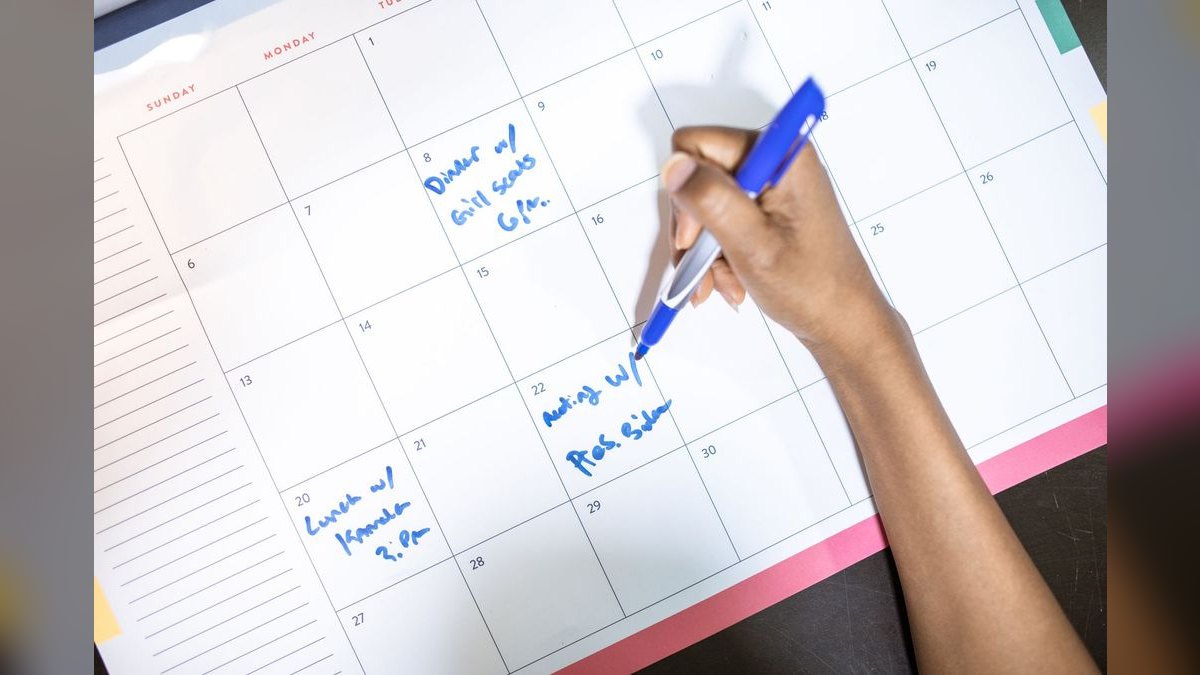
Then divide. Forecast gross profit for the day, divide by your per-associate target, and round to the nearest whole shift. If a peak spring Saturday averages $2,400 in gross profit and your target is $200, you need twelve associates. If a dead winter Wednesday averages $400, you need two. Run that division for every day against the season you are actually in.
Finally, place the shifts where receipts ring. Pull hourly transaction data and stack bodies into the windows that produce: the cool morning rush before afternoon heat, the all-day weekend planting push, and the sharp surge on the first clear weekend after rain. Build flex shifts you can call off when a forecast turns, because a rained-out Saturday can halve your gross profit by noon.
The loop matters more than any single pass. After you publish, compare actual gross profit per associate against the target. If the spring Saturday crew consistently beats $200 each, your target is too low and you are overstaffing. If they consistently miss, either the forecast was optimistic or the target is unrealistic for your product mix. Adjust monthly, not annually, because a Garden Center's margin mix shifts as the season moves from bedding plants to mums to Christmas trees.

One nuance specific to this business: your headcount requirement is not smooth. A Garden Center can run a 4-to-1 ratio between its busiest spring Saturday and its slowest winter Tuesday. That means your Schedule has to flex harder than a grocery store's or a restaurant's. Build the roster in tiers — a core year-round crew that covers the floor minimum, a seasonal layer you add in waves, and an on-call bench you activate when the forecast flips sunny. The division tells you the total; the tiers tell you how to assemble it without hiring and firing every six weeks.
Where this process creates or leaks revenue at a Garden Center
Done well, the gross-profit division creates revenue in three places. First, it protects peak selling hours. A spring Saturday at a Garden Center is a short, violent window — customers arrive with trucks, they want loading help, plant advice, and a cart full of soil. If you understaff that window, you do not just lose the sale; you lose the add-on soil amendment, the matching pottery, the second tree. Every associate short on a peak Saturday can cost you several hundred dollars in gross profit, far more than the shift wage.

Second, it creates upsell capacity. When you staff to a $200-per-associate floor, you give each associate room to sell above average. The number is a floor, not a ceiling. Associates who hit $200 doing average work then sell the bigger specimen tree, the delivery service, the planting consult. That incremental gross profit is where a Garden Center beats its labor cost.
Third, it creates pricing and mix discipline. When you know a slow Wednesday only generates $400 in gross profit, you stop pretending you can afford five people on the floor. You either run lean, or you use the quiet day for restocking, plant care, and training — work that pays off on Saturday. The math forces honest decisions about what a slow day is for.
Revenue leaks in four predictable places. Overstaffing slow days is the most common: owners schedule by habit, running six on a Tuesday because "we've always run six." At $200 per associate, six people need $1,200 in gross profit to break even on the target — if the day only does $400, you are burning four shifts of wages. Understaffing peak days is the second leak, and it is more expensive because it costs sales, not just wages. A short-staffed spring Saturday loses customers who drive to the next nursery.

The third leak is flat scheduling — spreading twelve associates evenly from open to close instead of stacking them into the 9 a.m. to 2 p.m. window. You pay for twelve shifts and capture the traffic of eight. The fourth leak is ignoring weather. A Garden Center's demand is weather-driven, so a forecast of rain should trigger a call-off, and a forecast of the first clear weekend after a wet stretch should trigger a call-in. Without flex shifts, you eat the cost of both errors.
RevOps thinking applies here even though this is a retail floor, not a sales team. The same discipline that sizes a quota-carrying team — revenue per rep, seasonality, pipeline timing — sizes a Garden Center crew. You are matching capacity to demand with a number everyone trusts.
Concrete numbers and benchmarks for Garden Center staffing in 2027
Anchor your plan with real ranges rather than guesses. A single-location independent Garden Center in a temperate market typically sees gross margins of 40–55% on live goods and 35–50% on hard goods, with blended margins landing around 40–45%. On a $6,000 sales Saturday, that is roughly $2,400–$2,700 in gross profit — which is where the twelve-associate example comes from at a $200 target.

Daily gross profit swings hard by season. A peak spring Saturday might run $2,000–$4,000 in gross profit for a mid-size center. A summer weekday might run $500–$1,200. A winter weekday might run $200–$600. Those ranges translate directly into headcount: two to twenty associates depending on the day and season, at a $200 target.
Labor cost as a percentage of sales is the guardrail metric. Healthy Garden Centers target labor at 12–18% of sales, with peak weeks pushing toward the top of that band and winter running lower. If your Schedule pushes labor above 20% of forecast sales, either your forecast is wrong or your per-associate target is too low. Watch this weekly, not monthly, because a bad weekend can blow the month.
Per-associate productivity benchmarks: a strong associate on a peak Saturday can produce $300–$500 in gross profit; an average associate on an average day produces $200–$250; a new seasonal hire in their first two weeks may produce $100–$150 while learning the plant inventory. That ramp matters — do not staff a peak Saturday entirely with first-week hires and expect the $200 target to hold.
Seasonal headcount multipliers are useful for planning. A Garden Center that runs eight year-round Employees might triple to twenty-four in peak spring, then settle to twelve in summer, drop to eight in fall, and run six in winter. Plan hiring in waves: bring on the first seasonal group two weeks before your historical spring lift, and the second group one week before peak. Training time is real cost — budget two to three shifts of shadowing per new hire before they count toward the target.

Weather sensitivity is measurable. A rained-out spring Saturday can cut gross profit by 40–60% versus forecast. The first clear weekend after a wet stretch can run 20–30% above a normal weekend. That is why flex shifts and a call-off list are not optional — they are the difference between hitting and missing your labor target across a volatile season.
Pitfalls and how to avoid them when you Schedule Garden Center Employees
The first pitfall is using sales instead of gross profit. A day can post strong revenue on discounted mulch and bagged soil at thin margins, and staffing to that revenue overpays the crew relative to what the day earned. Always divide gross profit, never top-line sales.
The second pitfall is a single annual average. If you average a $3,000 spring Saturday with a $300 winter Wednesday, you get a number that fits neither day. Break the baseline by season and by day of week, or your Schedule will be wrong in both directions.
The third pitfall is scheduling to the clock instead of the receipt curve. Knowing you need twelve associates on Saturday is only half the answer; if they all leave at noon and your traffic peaks at 1 p.m., you have paid for coverage you did not use. Pull hourly transaction data monthly and re-stack shifts against it.

The fourth pitfall is treating the per-associate target as fixed forever. Your product mix, pricing, and average ticket move through the year. A target set in March may be too low by June. Review it monthly against actual gross profit per associate and adjust.
The fifth pitfall is ignoring labor law for seasonal hires. Minor-labor rules, break requirements, and overtime thresholds apply to your spring crew just as they do year-round. Build compliance into the Schedule from day one rather than fixing it after a violation.
The sixth pitfall is no flex mechanism. If every shift is fixed a week out, you cannot respond to a forecast change, and a Garden Center's demand is a weather derivative. Keep a call-off list and an on-call bench, and give associates clear expectations about flex shifts when you hire them.
Selection checklist for your Garden Center scheduling approach
Use this checklist to decide whether your current method — spreadsheet, app, or instinct — is good enough for 2027. If you cannot answer yes to most of these, the method, not the tool, is your bottleneck.

Work the checklist top to bottom. The metric comes first, the baseline second, the shift placement third, the flex mechanism fourth, and the feedback loop last. Only after all five are in place does the software choice matter — and at that point any of the mainstream hourly scheduling apps will execute a sound method well.
Related questions
How do I forecast gross profit for a day I have never run before?
Use trailing gross profit for the same day of week in the same season, then adjust for weather and any known events. If you lack history, start with sales forecast times your blended margin, then refine weekly as actuals come in.
What if my Garden Center has no hourly transaction data?
Start with daily totals and split them using your best estimate of traffic shape — morning, midday, afternoon. Track hourly for four to six weeks and you will have a real curve to schedule against.
Should seasonal hires count toward the per-associate target immediately?
No. Budget a two-to-three-shift ramp where new hires produce below target while learning inventory and layout. Staff peak days with a mix of experienced and new Employees so the blended average holds.
Does this method work for a Garden Center with multiple locations?

Yes, but run the division per location. Each store has its own season, margin mix, and traffic curve. Share the method and the target-setting discipline; keep the numbers local.
FAQ
Why divide gross profit instead of sales to decide how many Employees to Schedule?
Sales can be high on low-margin days and low on high-margin ones, so headcount tied to revenue alone misfires. Gross profit captures what a day actually earns after cost of goods — the number that has to cover wages. Dividing gross profit by a per-associate target keeps labor honest against what the floor truly produces.
How do I set the right daily gross-profit-per-associate target for my Garden Center?
You and your yard lead agree on what an average associate produces on an average day. Many centers use $200 as an honest floor, with stronger operations running $250–$400. Pick a figure your own trailing numbers support, then revisit it monthly as margins and product mix change.
Why does seasonality matter so much for a Garden Center specifically?

Demand is seasonal and weather-driven, so a March weekend looks nothing like a January weekday. A busy spring Saturday might generate ten times the gross profit of a slow winter Wednesday, which means the same formula yields very different headcounts. Run the division against the season you are actually in.
Should I use one weekly average or break staffing down by day?
Break it down by day of week, then by season. Demand clusters around the weekend planting rush and the post-rain surge, so a single weekly average overstaffs slow days and leaves busy ones thin. Running each day separately is the whole point of the method.
Where should I place shifts once I know how many Employees to Schedule?
Put bodies on the floor when receipts actually ring — the cool morning before the heat, the all-day weekend push, and the first clear weekend after rain. Knowing you need twelve associates on a spring Saturday does not help if they are spread evenly across dead hours.
Do I have to calculate this by hand for every day?
No. A scheduling matrix or app that runs the gross-profit division across every day at once removes the manual math. You still own the target and the seasonal baseline; the tool handles distribution and publishing.
Sources
- U.S. Bureau of Labor Statistics, retail trade employment and hours data: https://www.bls.gov/iag/tgs/iag44-45.htm
- U.S. Small Business Administration, retail staffing and labor cost guidance: https://www.sba.gov/business-guide
- National Retail Federation, retail labor and workforce research: https://nrf.com/research
- U.S. Department of Labor, Wage and Hour Division, minor labor and overtime rules: https://www.dol.gov/agencies/whd
- AmericanHort, garden retail industry resources: https://americanhort.org
- Garden Center magazine, industry operations and staffing coverage: https://www.gardencentermag.com
- Cornell University, seasonal retail labor and scheduling research: https://www.cornell.edu
- IRS, employer tax and seasonal worker guidance: https://www.irs.gov/businesses/small-businesses-self-employed
Related on PULSE
This page will be disappearing soon. Save it to your device for $1 — or read it free while it is here.
@Kory-White- · if Venmo asks, the last 4 of my number are 2012
This page is gone.
This one is off the shelf now. $1 keeps it on your phone for good — the whole page, pictures and diagrams included.
 pulse-toolsHow do I hand off a fractional CRO engagement to a full-time sales leader without losing momentum in 2027?
 pulse-toolsHow Many Crew Members Should I Schedule Each Shift at My Hamburger Franchise in 2027?
 pulse-toolsHow do I calculate the right team size for a fractional CRO engagement in 2027?
 pulse-toolsWhere do I find a fractional CRO for a hospitality and restaurant group in 2027?
 pulse-toolsHow do I structure a fractional CRO contract to include performance-based compensation in 2027?
 pulse-toolsHow do I transition a fractional CRO's responsibilities to an internal sales leader once we're ready to hire full-time in 2027?
 pulse-toolsHow do I determine the right equity or profit-sharing structure for a fractional CRO in 2027?
 pulse-toolsHow do I find a fractional CRO who can also cover interim VP of Sales duties in 2027?
 pulse-toolsHow Many Baristas Should I Schedule Each Shift at My Coffee Drive-Thru in 2027?
 pulse-toolsHow Many Technicians Should I Schedule Each Day at My Nail Salon in 2027?