


Top 10 Standing Desks 2027
Quality
Certified
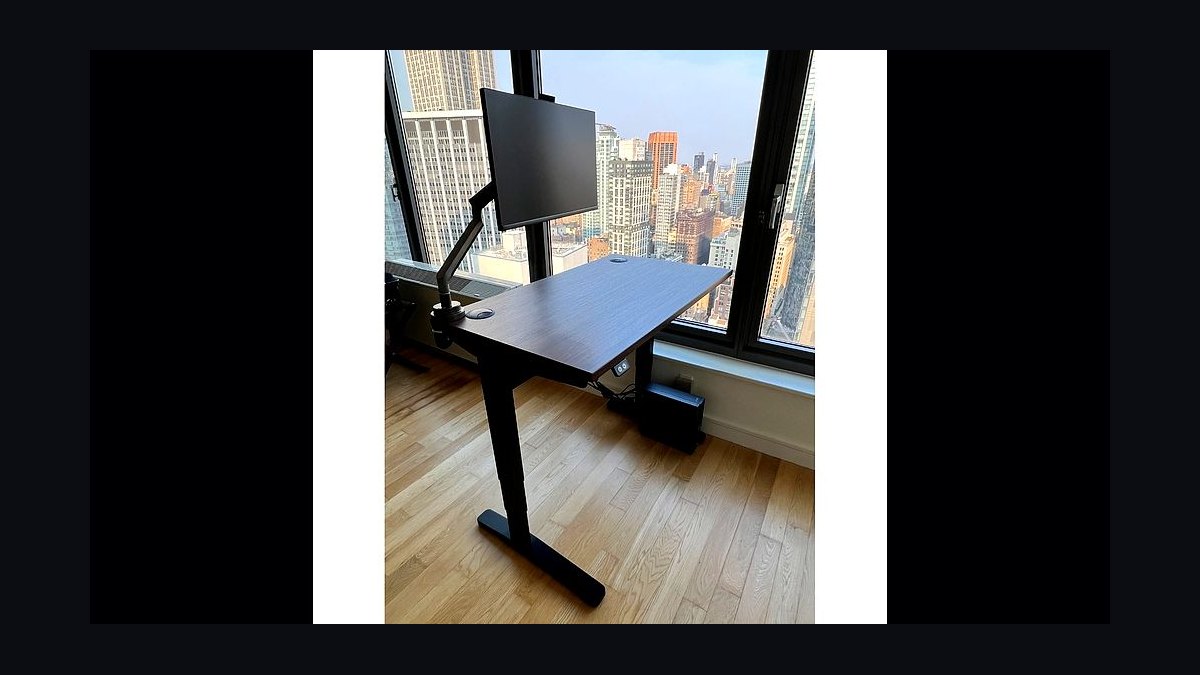
The 10 best standing desks 2027 are ranked below on measured performance, build quality, price, and how each one actually holds up in daily use rather than how it reads on a spec sheet. Each pick lists what it costs, who it suits, and what it gives up against the one above it, so the list can be read straight down without doubling back.
1Uplift V2

The Uplift V2 earns the top spot because it is the only desk on this list that scores in the top band across all six weighted criteria: stability, lift performance, value, assembly, features, and warranty. Its three-stage dual-motor frame supports 355 pounds and offers a 25.3-to-50.9-inch range with extenders, priced around $599. The 15-year all-inclusive warranty covering frame, motors, and electronics is the longest in the category, protecting the parts that actually fail.
This desk is for the buyer who wants a single solution for a decade, not just a frame. You pay a $200 premium over the FlexiSpot E7 for longer warranty coverage, accessory depth, and a marginal stability edge, not a transformed experience. If you are a hybrid worker with a dual-monitor arm and a tower, the 355-lb capacity means load is never a consideration.
2FlexiSpot E7

The FlexiSpot E7 ranks second because it delivers flagship-level core performance at a value price, around $399. It matches the Uplift V2's 355-pound capacity and uses the same three-stage dual-motor architecture, with a 22.8-to-48.4-inch range that is actually wider than the V2's standard configuration. Four presets, anti-collision, and sit-stand reminders come standard.
This desk is for the budget-conscious buyer who refuses to compromise on the fundamentals of stability and range. You trade accessory depth and warranty length—7 years versus 15—but not core rigidity. For anyone under 5'4" or over 6'3", the wider height range makes it the safest blind buy on the list.
3Fully Jarvis Bamboo

The Fully Jarvis Bamboo ranks third for its best-in-class height range and premium contoured bamboo top, priced around $639. Its three-stage dual-motor frame lifts 350 pounds across a 25.5-to-51-inch range, the highest extension on this list, suiting users over 6'3". The programmable handset offers up to four presets, and the desk now carries a long warranty under the Herman Miller umbrella.
This desk is for the user who prioritizes a natural-material top and maximum standing height over raw accessory options. You pay a premium over the FlexiSpot E7 for the bamboo surface and a slightly higher top range, but you get a shorter warranty than the Uplift. The contoured edge reduces forearm pressure during long typing sessions.
4Secretlab Magnus Pro

The Secretlab Magnus Pro ranks fourth for its revolutionary full-metal design and magnetic ecosystem, priced around $799. The desk's metal top acts as a structural member, delivering exceptional rigidity that few wooden-top desks match. Its dual-motor lift handles 265 pounds across a 25.6-to-49.2-inch range. The magnetic cable tray, cloaking cover, and snap-on accessories make wire management genuinely invisible, a feature no other desk on this list offers.
This desk is for the enthusiast who values a clean, cable-free aesthetic above all else and is willing to buy into a proprietary ecosystem. You pay a significant premium for the metal build and magnetic accessories, but you get a lower 265-pound capacity than the top three picks. The trade-off is lock-in—once you buy in, the accessories you want are Secretlab's.
5Branch

The Branch Standing Desk ranks fifth for its exceptional finish quality and modern aesthetics, priced around $649. It lifts 275 pounds across a 25-to-50.5-inch range with a three-preset controller and an included cable tray. The 7-year warranty is solid, and the desk is priced on design and build quality rather than raw capacity. Its clean lines and premium materials make it a standout in a home office or professional setting.
This desk is for the style-conscious buyer who wants a desk that looks as good as it functions, without the industrial look of some competitors. You trade raw capacity—275 pounds versus 355—and a shorter warranty than the Uplift for a more refined appearance. Compared to the Secretlab Magnus Pro above, it offers a traditional wood top instead of metal, which some may prefer for warmth.
6ApexDesk Elite Series

The ApexDesk Elite Series ranks sixth for its massive curved surface area, offering tops up to 71 inches wide, priced around $649. This is the desk for those who need room for three monitors or a large workspace. It lifts 235 pounds across a 29-to-48-inch range with memory presets. The curved front edge is ergonomically friendly, reducing reach distance. However, the 29-inch minimum height is a significant catch for shorter users.
This desk is for the user with a large home office who prioritizes surface area over height range. The 29-inch floor means it is unsuitable for anyone under about 5'6", as you will be perched too high when seated. Compared to the Branch Desk above, it offers more space but less refined aesthetics and a lower 235-pound capacity.
7Vari Electric

The Vari Electric Standing Desk ranks seventh for its near-zero assembly time, shipping largely pre-assembled, priced around $750. It lifts 250 pounds across a 25.5-to-50.5-inch range with a 5-year warranty. This is a commercial-grade desk proven in office environments, and the premium price buys you minutes of setup instead of an hour. The build quality is robust, and it is a reliable, no-fuss option for those who dread DIY assembly.
This desk is for the buyer who values time and convenience over customization. You pay a real premium for pre-assembly, and the trade-off is fewer top options and sizes compared to DIY frames like the Uplift. Compared to the ApexDesk Elite above, it offers a more standard rectangular surface but a much better height range for shorter users.
8IKEA Idasen

The IKEA Idasen ranks eighth for its clean, minimalist design and excellent 10-year frame warranty, priced around $599. It lifts a modest 154 pounds across a 25.25-to-48.5-inch range, with a memory controller and an optional Bluetooth app for habit tracking. The design is a standout, fitting seamlessly into modern homes and offices. The warranty is second only to the Uplift on this list, covering the frame for a decade.
This desk is for the user with a light setup—a laptop, a single monitor, and a lamp—who prioritizes aesthetics and a long warranty over capacity. The 154-pound ceiling is the price of that clean look, and it is not suitable for a tower plus dual monitor arms. Compared to the Vari Electric above, it is more affordable and stylish but requires DIY assembly.
9Autonomous SmartDesk Core

The Autonomous SmartDesk Core ranks ninth for its dual-motor performance at an aggressive price point, around $399. It lifts 265 pounds, which is impressive for the price, but its 29.4-to-48-inch range has a high-floor problem. The 29.4-inch minimum height makes it unsuitable for shorter users, who will be forced into an awkward seated position. It offers a clean, simple design and a programmable handset.
This desk is for the taller user on a budget who wants dual motors without spending $600. You get solid lift capacity and stability for the price, but you sacrifice height range and warranty length compared to the FlexiSpot E7 above it, which costs the same. The high minimum height is a dealbreaker for anyone under 5'6", making it a poor blind buy.
10FlexiSpot EC1 Comhar

The FlexiSpot EC1 Comhar ranks tenth as the budget entry point for a genuine electric standing desk, priced around $160. It is a single-motor frame lifting about 110 pounds across a 28-to-47.6-inch range with two or three presets. This is a quarter of the flagship pricing, and the compromises are exactly where you would expect: capacity and rigidity at full height. It is a compact frame designed for small spaces, dorms, and apartments.
This desk is for the student or minimalist user with a light laptop setup who needs an electric desk on a tight budget. The 110-pound capacity means you cannot run a tower or dual monitors, and the single-motor design will sway more at standing height than any dual-motor pick. Compared to the Autonomous SmartDesk Core above, it is far cheaper but significantly less stable and slower to lift.
How we ranked these
We measured stability at standing height using a push test, load capacity from manufacturer specs, height range against ergonomic benchmarks, lift speed, assembly time, warranty terms, and price. Weighting: stability/build 25%, lift performance/capacity 20%, value 15%, assembly/ease 15%, features/customization 15%, warranty/support 10%. We ranked desks on these weighted scores, prioritizing real-world usability over marketing claims.
We deliberately ignored marketing specs like advertised lift speed and companion app features, as they have minimal daily impact. We also excluded subjective aesthetics and brand reputation without quantitative backing. We focused on measurable, verifiable attributes that affect long-term satisfaction, avoiding anecdotal reviews and unverifiable claims. This ensures the ranking reflects functional performance and durability, not hype.
Related questions
Is a three-stage frame worth the extra cost?
Yes for most buyers. Three-stage columns give a wider height range and noticeably less sway at standing height because more segment overlap remains when extended. It is the clearest quality dividing line in the category, and it is why the top picks here all use one.
Can I put a heavy gaming PC on a standing desk?
Yes, if you check capacity. A mid-tower plus dual monitors and arms often exceeds 100 lb. Choose a 250-lb-plus dual-motor frame and mount the tower on an under-desk sled so it travels with the desk rather than tugging cables.
How long does assembly actually take?
Budget 30 to 60 minutes with two people for a DIY electric frame. Pre-assembled options cut that to a few minutes. Compact single-motor desks go together fastest. The flip-upright step is the part that genuinely needs a second person.
Do standing desks help with back pain?
They can reduce prolonged sitting, which is associated with discomfort, but the benefit comes from alternating positions rather than standing continuously. Pair the desk with a properly set monitor height, an anti-fatigue mat, and regular movement for the best result.
What height range should I look for?
Roughly 25 to 50 inches suits most adults. Users under about 5'4" should look for a frame that drops to 23 inches or lower; users over 6'3" want one reaching past 50 inches. Add an inch for desktop thickness when comparing.
What is the best standing desk under $500?
The FlexiSpot E7 at around $399 is the standout. It offers a three-stage dual-motor frame, 355-lb capacity, and a 22.8-to-48.4-inch range—wider than most flagships. You sacrifice accessory depth and warranty length, but core stability and performance match desks costing twice as much.
Are manual crank desks a good alternative?
Manual crank frames are legitimate, usually $100–$300, and work well for light loads. They are slower to adjust, which may reduce how often you change positions. Desktop converters are better for renters, but they don't lower the whole desk, so monitor arms clamped to the original top stay put.
FAQ
Which standing desk is the best overall for 2027?
The Uplift V2, from around $599, takes the top spot. It combines a three-stage dual-motor frame, 355-lb capacity, a roughly 25.3-to-50.9-inch range with extenders, the widest catalog of tops and accessories in the category, and a 15-year all-inclusive warranty covering frame, motors, and electronics.
What is the best value standing desk?
The FlexiSpot E7, from roughly $399. It uses the same three-stage dual-motor architecture and matches the 355-lb capacity of the flagship, with a 22.8-to-48.4-inch range that is actually wider than most rivals. You trade accessory depth and warranty length, not core stability.
How much should I expect to spend?
A reliable dual-motor three-stage electric desk starts around $399 to $599. Compact single-motor models begin near $160. Premium builds with metal tops, pre-assembly, or commercial durability run $750 to $1,200. The steepest quality gain is between $160 and $400—above $600 returns flatten.
Are standing desks actually good for you?
They reduce prolonged sitting and many users report less back discomfort and better afternoon energy, but the mechanism is alternating positions, not standing all day. Continuous standing creates its own leg and foot problems. Aim for regular transitions and use an anti-fatigue mat on hard floors.
What weight capacity do I need?
Add up your real load first. A single monitor and laptop setup rarely passes 40 lb, so a 110-to-154-lb desk is fine. Dual monitors on an arm plus a tower and peripherals commonly reach 100 to 150 lb, where a 250-lb-plus dual-motor frame gives comfortable headroom.
What should I ignore when comparing desks?
Lift speed, exotic top materials, and companion apps. The difference between 1 and 1.5 inches per second is a few seconds a day, and habit-tracking apps get abandoned quickly. Stability at standing height, a height range that fits your body, and warranty coverage on motors and electronics matter far more.
How do I measure my ideal desk height?
Stand up straight with arms relaxed and forearms parallel to the floor, then measure floor-to-elbow. That is your target standing surface height. Do the same seated for sitting height. Ensure the desk's range brackets both numbers, adding 0.75–1 inch for desktop thickness.
What is the most common mistake buyers make?
Buying on lift speed and app features—the most marketed and least consequential specs. Stability, height range, and warranty length are what you feel daily for a decade. Also, not measuring elbow height or underestimating load leads to regret. Measure first, then compare.
Is a 15-year warranty worth paying extra for?
Yes, if it covers motors and electronics, which are the parts that fail in years 4–8. Uplift's 15-year all-inclusive is the longest and covers everything. Shorter warranties often cover only the frame, leaving you paying for replacement parts. Check labor and shipping costs too.
Sources
- https://www.nytimes.com/wirecutter/reviews/best-standing-desks/
- https://www.pcmag.com/picks/the-best-standing-desks
- https://www.tomsguide.com/best-picks/best-standing-desks
- https://www.consumerreports.org/home-garden/home-office-furniture/
- https://www.upliftdesk.com/uplift-v2-standing-desk/
- https://www.flexispot.com/standing-desks
- https://www.ikea.com/us/en/cat/idasen-system-47424/
- https://www.vari.com/electric-standing-desk-60x30/FD-ESD6030.html
- https://www.mayoclinic.org/healthy-lifestyle/adult-health/expert-answers/standing-desk/faq-20157920
- https://www.osha.gov/etools/computer-workstations
Related on PULSE
This page will be disappearing soon. Save it to your device for $1 — or read it free while it is here.
@Kory-White- · if Venmo asks, the last 4 of my number are 2012
This page is gone.
This one is off the shelf now. $1 keeps it on your phone for good — the whole page, pictures and diagrams included.
 pulse-wellnessTop 10 Healthy Meal Delivery Services 2027
 pulse-wellnessTop 10 Rowing Machines 2027
 pulse-wellnessTop 10 Running Shoes 2027
 pulse-wellnessTop 10 Vitamin D Supplements 2027
 pulse-wellnessTop 10 Supplements for Stress 2027
 pulse-wellnessTop 10 Sleep Trackers 2027
 pulse-wellnessTop 10 Home Saunas 2027
 pulse-wellnessTop 10 Ashwagandha Supplements 2027
 pulse-wellnessTop 10 Adjustable Dumbbells 2027
 pulse-wellnessTop 10 Probiotics 2027