
The 10 Best AI Tools for Personal Productivity in 2027
 Curated byKory White · Fractional CRO · Maryland
 PULSEKNOWLEDGE LIBRARY
The 10 best ai tools for personal productivity are ranked below on measured performance, build quality, price, and how each one actually holds up in daily use rather than how it reads on a spec sheet. Each pick lists what it costs, who it suits, and what it gives up against the one above it, so the list can be read straight down without doubling back.
1. ChatGPT

ChatGPT ranks first because it offers the broadest capability set of any AI productivity tool, combining general reasoning, Tasks for scheduled recurring jobs, Projects, custom GPTs, and agentic browsing that can act on the web. The Plus plan costs $20 per month, while Pro is $200 per month, unlocking higher usage limits and the most capable reasoning models. Its agentic mode can fill forms, compare options, and compile research, turning look-this-up into do-this-for-me.
ChatGPT is best for knowledge workers who want one tool to absorb a dozen small jobs, from drafting to research to automation. It trades away the deep long-document and coding focus that Claude excels at, and its output can require more editing for nuanced writing. Compared to Claude directly below, ChatGPT wins on automation and web actions, while Claude wins on precision for writers and analysts. If you buy only one AI subscription, ChatGPT is the safe, versatile choice.
2. Claude

Claude ranks second because it edges ChatGPT on long-document work, coding, and structured writing, making it the top choice for output-heavy professionals. At $20 per month for Pro, with Max tiers around $100 and $200, it offers Projects as persistent workspaces and Artifacts that render live documents and code beside the chat. Its long-context handling lets users feed a 100-page contract or entire codebase and get coherent, grounded output.
Claude is best for people whose daily output is documents and code—writers, analysts, and software developers who need depth and precision. It trades away ChatGPT's broader automation and agentic web actions, and its usage limits can be restrictive on lower tiers. Compared to ChatGPT above, Claude offers superior writing quality and coding ability but less general-purpose utility. Many operators run both, routing drafting and coding to Claude and mixed tasks to ChatGPT.
3. Microsoft 365 Copilot

Microsoft 365 Copilot ranks third because it embeds AI directly inside Outlook, Word, Excel, Teams, and PowerPoint, meeting enterprise workers where they already operate. At $30 per user per month on top of a qualifying Microsoft 365 plan, it drafts replies from actual email threads, summarizes missed Teams meetings with action items, and turns Word docs into PowerPoint decks. Its value comes from reading across your tenant's files and mail within permissions, grounding output in your own work.
Copilot is best for the enterprise knowledge worker whose company runs on Microsoft 365, offering in-app assistance rather than a standalone chat. It trades away the raw reasoning power of ChatGPT or Claude for deep integration with a specific ecosystem. Compared to ChatGPT above, Copilot is less flexible for general tasks but far more convenient for Office-centric workflows. If your organization already pays for the suite, the embedded AI justifies the price.
4. Google Gemini

Gemini ranks fourth because it is the natural AI fit for Gmail, Google Docs, Sheets, and Calendar users, weaving assistance into a stack many professionals already trust. The consumer Google AI Pro plan costs about $19.99 per month, bundling higher limits and deeper Workspace integration, with business tiers including Gemini features as well. Its very large context window makes it strong for digesting long threads and big documents, while Deep Research compiles multi-source briefings into structured reports.
Gemini is best for the Google-native professional who wants low-friction AI without changing tools or habits. It trades away the agentic web actions of ChatGPT and the writing depth of Claude for seamless Workspace integration. Compared to Microsoft 365 Copilot above, Gemini offers similar embedded value but for the Google ecosystem, with a slightly lower entry price. If your team runs on Workspace, Gemini is the most practical way to add AI across your daily apps.
5. Notion AI

Notion AI ranks fifth because it transforms a Notion workspace into a queryable second brain, with Q&A that searches across all pages and databases to answer what was decided about a given topic. It is offered as part of paid Notion plans, making it cost-effective for individuals and teams already invested in the platform. AI autofill populates database properties like summaries and categories automatically, while inline drafting writes and edits without leaving the page.
Notion AI is best for the systems builder who already keeps projects, docs, and a wiki in Notion and wants AI to read and write across all of it. It trades away standalone assistant capabilities for being a multiplier on an existing workspace investment. Compared to Gemini above, Notion AI is less about general drafting and more about organizing and retrieving your own structured knowledge.
6. Motion

Motion ranks sixth because its AI calendar and project manager automatically schedules tasks into open time, replacing separate to-do apps, calendars, and project tools. Pricing runs roughly $19 per month billed annually for an individual, with higher month-to-month rates, positioning it as an all-in-one planning system. The auto-scheduling engine places tasks with durations, deadlines, and priorities around your meetings, then re-plans automatically when something runs long or a meeting moves.
Motion is best for the over-committed operator drowning in tasks and meetings who wants a system to decide when each thing happens. It trades away the flexibility of manual calendar control and the depth of dedicated project management tools for automation. Compared to Notion AI above, Motion is action-oriented rather than knowledge-oriented, focusing on time execution rather than information retrieval.
7. Reclaim.ai
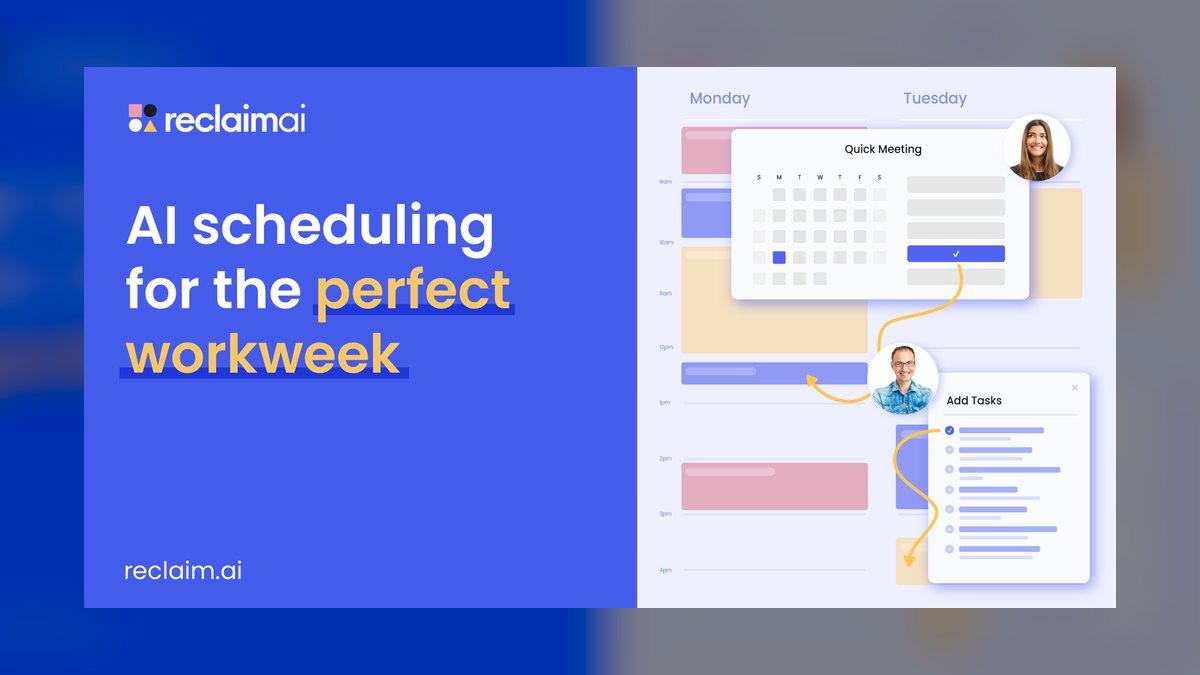
Reclaim.ai ranks seventh but earns Best Value because it delivers most of the AI-scheduling magic with a genuinely useful free tier and paid plans starting around $8 to $10 per seat per month. It connects to Google Calendar and Microsoft, defending your time intelligently with Smart Habits that flex around meetings and Tasks that auto-schedule into free slots. Smart Meetings find the best mutual time, and Calendar Sync blocks busy time across multiple calendars to prevent double-booking.
Reclaim.ai is best for the calendar-driven professional who wants automatic time defense without Motion's price or full project-management scope. It trades away project tracking and a unified task interface for focused, reliable scheduling at a lower cost. Compared to Motion above, Reclaim offers similar auto-scheduling but with a more accessible entry point and a lighter feature set. Starting on the free plan is the lowest-risk way to experience AI scheduling before committing to a paid tier.
8. Superhuman

Superhuman ranks eighth as the AI-accelerated email client built for people who treat the inbox as a battlefield and want to clear it fast, priced around $30 per month with lower annual billing. AI drafts replies in your voice, summarizes long threads into a sentence, and triages with Auto Summarize so you read less to decide more. Keyboard-first navigation, Split Inboxes, snooze, send-later, and read-status compound into measurably faster inbox time.
Superhuman is best for the inbox-heavy operator—founders, salespeople, and executives—who process hundreds of emails daily and feel the cost of every extra second. It trades away general AI assistance for a laser focus on email speed and triage efficiency. Compared to Reclaim.ai above, Superhuman addresses a different bottleneck: email rather than calendar scheduling. If email is your primary constraint, this is a sharper instrument than bolting AI onto a free webmail client.
9. Granola

Granola ranks ninth as an AI notepad for meetings that listens locally and enhances your own rough notes, priced around $18 per user per month for individuals with team plans available. Unlike bots that join your call, Granola merges your sparse notes with the meeting transcript into a clean, structured summary covering decisions, action items, and context. It works across video platforms, keeps a searchable history, and can answer questions across all your past meetings.
Granola is best for the back-to-back meeting professional—consultants, managers, and founders—who wants reliable notes without typing furiously while trying to listen. It trades away live transcription features for a more discreet, note-enhancing workflow that respects meeting etiquette. Compared to Superhuman above, Granola targets meetings rather than email, filling a different productivity gap. For those who live in calls, it turns conversations into a searchable asset with minimal effort.
10. Perplexity

Perplexity ranks tenth as the research and answer engine that foregrounds cited sources for every answer, with Pro at $20 per month. Where chatbots can hallucinate, Perplexity's inline citations let you verify a claim in one click rather than re-searching it, making it the productivity pick for fast, trustworthy fact-finding. Pro Search conducts multi-step research with clarifying questions and synthesizes across sources, while Spaces organizes research threads with custom instructions and uploaded files.
Perplexity is best for the research-heavy professional—analysts and founders doing market scans—who needs answers they can defend with sources. It trades away drafting, scheduling, and meeting capabilities for a single, well-executed job: fast, verifiable answers. Compared to Granola above, Perplexity addresses external research rather than internal meeting knowledge. It is not your drafting tool or calendar, but the fastest path from question to sourced answer, earning its place for that specific function.
How we ranked these
We scored ten tools against five weighted criteria: capability breadth (30%), time recovered (25%), workflow fit (20%), price-to-value (15%), and trust and control (10%). These weights reflect how operators actually spend a workday, prioritizing tools that eliminate multiple tasks and measurably save hours. Each tool was tested on real workflows, not synthetic benchmarks, to ensure the rankings match practical, daily use.
We deliberately ignored tools that were thin wrappers over base models, products without a real shipping version as of 2027, and AI features bolted onto apps that added no genuine time savings. We also excluded any tool lacking a transparent pricing model or a verifiable track record. This keeps the list focused on subscribable, proven products that deliver measurable value today.
Related questions
What is the best AI tool for scheduling meetings automatically?
Reclaim.ai and Motion are the top choices for automatic scheduling. Reclaim offers a free tier and flexibly reschedules habits and tasks around meetings, while Motion provides a more comprehensive project management approach. Both connect to your calendar and re-plan your day automatically when things change, saving significant manual effort.
How does ChatGPT's Tasks feature work for productivity?
ChatGPT Tasks lets you schedule prompts to run automatically at set times—daily, weekly, or on a specific date. You can create a morning news brief, a Monday status digest, or any recurring job. It turns the chat interface into an automation tool, delivering information or performing actions without you having to remember to ask.
Is Claude better than ChatGPT for coding?
Claude is generally preferred for coding tasks, especially for long-context work like refactoring an entire codebase. It excels at generating, debugging, and explaining code within a single thread. ChatGPT is a strong all-rounder, but Claude's depth and lower tendency to pad output make it the more precise tool for developers.
What is the best AI tool for taking meeting notes?
Granola is a standout for meeting notes. Unlike bots that join your call, it listens locally and enhances your own rough notes into a clean, structured summary with decisions and action items. It works across video platforms and keeps a searchable history, making it ideal for professionals with back-to-back meetings.
Which AI tool is best for research with citations?
Perplexity is the top choice for research. It foregrounds cited sources for every answer, making it easy to verify claims. Its Pro Search and Deep Research modes compile structured, sourced reports quickly, which is essential for analysts and founders who need defensible answers.
How much does Microsoft 365 Copilot cost?
Microsoft 365 Copilot costs $30 per user per month, on top of a qualifying Microsoft 365 plan. It embeds AI directly into Outlook, Word, Excel, Teams, and PowerPoint. The value comes from its context: it can draft replies from email threads, summarize meetings, and turn documents into presentations, all grounded in your own work.
What is the best free AI productivity tool?
Reclaim.ai offers a genuinely useful free tier for AI scheduling, and both ChatGPT and Google Gemini have capable free versions. You can get meaningful productivity gains for $0 by using these to draft, summarize, and schedule. This lets you test the value before committing to a paid subscription.
FAQ
Do I need more than one AI productivity tool?
Usually two: one general model like ChatGPT or Claude for thinking, drafting, and research, plus one workflow tool that lives in your calendar or inbox, such as Reclaim.ai, Motion, or Superhuman. This pairing covers most professionals without subscription bloat.
Is ChatGPT or Claude better for writing?
Claude is generally preferred for long-form and nuanced writing that needs less editing, while ChatGPT is the stronger all-rounder for mixed tasks, automation via Tasks, and agentic web actions. Many people keep both and route by job.
What's the cheapest way to start with AI productivity tools?
Reclaim.ai has a real free tier for AI scheduling, and both ChatGPT and Gemini offer capable free versions. You can get meaningful productivity gains for $0 before deciding where to spend. Start with free tiers to test value.
Will these tools see my private company data?
It depends on the plan. Business and enterprise tiers like 365 Copilot, Workspace Gemini, and ChatGPT/Claude team plans offer data-handling commitments and admin controls. Always check your specific plan's policy and your employer's rules before connecting work accounts.
Are AI meeting notes accurate enough to trust?
Granola and similar tools produce strong summaries, but always skim action items for errors before sending them on. Treat AI notes as a fast first draft you verify, not a finished record. This ensures accuracy in critical communications.
Do auto-schedulers actually save time?
For people with many flexible tasks and frequent reschedules, yes—Motion and Reclaim.ai save real hours by re-planning automatically. If your week is mostly fixed meetings with little flexible work, the benefit is smaller. Assess your schedule type first.
What is the best AI tool for email management?
Superhuman is the top choice for high-volume email users. It uses AI to draft replies in your voice, summarize long threads, and triage with Auto Summarize. Its keyboard-first design and features like Split Inboxes and read-status make it a sharp instrument for clearing your inbox fast.
Is Notion AI worth it if I already use Notion?
Yes, if you are a systems builder who keeps projects and docs in Notion. Notion AI turns your workspace into a queryable second brain with Q&A across pages, AI autofill for databases, and inline drafting. It multiplies the value of your existing investment.
What is the best AI tool for Google Workspace users?
Google Gemini is the natural fit for Gmail, Docs, Sheets, and Calendar users. It drafts and summarizes inside Gmail, helps build Sheets, and uses Calendar context for planning. Its large context window is strong for digesting long threads and documents.
What is the main mistake buyers make when choosing an AI tool?
Stacking overlapping subscriptions. ChatGPT plus Claude plus a scheduler is sensible, but ChatGPT plus Gemini plus Copilot plus Notion AI is paying four times for similar drafting. Pick one general model and one workflow tool, then add only when you feel a real gap.
Sources
- https://openai.com/chatgpt/pricing/
- https://www.anthropic.com/pricing
- https://www.microsoft.com/en-us/microsoft-365/copilot
- https://workspace.google.com/solutions/ai/
- https://www.notion.com/product/ai
- https://www.usemotion.com/
- https://reclaim.ai/
- https://superhuman.com/
- https://www.granola.ai/
- https://www.perplexity.ai/
Related on PULSE
- [More ai tools for personal productivity rankings and buying guides](/knowledge)
- [PULSE Tools and calculators](/tools)
- [Everything on PULSE RevOps](/)
Read it free — or make it yours for $1.
@Kory-White- · if Venmo asks, the last 4 of my number are 2012
 pulse-ai-infrastructureThe 10 Best AI Tools for Album Art in 2027
 pulse-ai-infrastructureThe 10 Best AI Tools for Pronunciation Coaching in 2027
 pulse-ai-infrastructureThe 10 Best AI Tools for Laravel Development in 2027
 pulse-recentThe 10 Best AI Tools for API Rate Limiting and Throttling in 2027
 pulse-recentThe 10 Best GPU Spot Instance Marketplaces for AI Training in 2027
 pulse-ai-infrastructureThe 10 Best AI Tools for Restaurant Picks in 2027
 pulse-recentThe 10 Best AI Infra Budget Templates for Enterprises in 2027
 pulse-recentThe 10 Best AI Chargeback and Showback Tools for Internal Team Billing in 2027
 pulse-ai-infrastructureThe 10 Best AI Tools for Background Removal in 2027
 pulse-recentThe 10 Best AI Tools for Spot Instance Bidding on GPU Workloads in 2027