


The 10 Best AI Tools for Financial Modeling in 2027
Quality
Certified

The 10 best ai tools for financial modeling are ranked below on measured performance, build quality, price, and how each one actually holds up in daily use rather than how it reads on a spec sheet. Each pick lists what it costs, who it suits, and what it gives up against the one above it, so the list can be read straight down without doubling back.
1Microsoft Copilot in Excel
Microsoft Copilot in Excel ranks first because it embeds AI reasoning directly into the spreadsheet where the vast majority of financial models already live. It generates formulas like XLOOKUP and SUMIFS from plain English, builds sensitivity tables, and explains inherited model logic. Combined with Python in Excel, it runs pandas and statsmodels for Monte Carlo simulations and regression forecasts inside the same workbook. Pricing is a clear $30 per user per month as an add-on to Microsoft 365.
This tool is for FP&A analysts and controllers standardized on Excel who want AI without re-platforming. Its trade-off is that auditability depends entirely on your own discipline, since Copilot helps but does not impose structure. Compared to Causal at rank two, it offers far more flexibility for bespoke models but lacks the built-in version control and variable-based clarity that Causal provides for driver-based planning.
2Causal (Lucanet)

Causal ranks second because it replaces opaque cell references with named variables and readable formulas like Revenue = Customers × ARPU, making models dramatically easier to audit and hand off. It was built for scenario planning, supporting ranges and probabilistic inputs so you can model uncertainty and see resulting distributions. Native integrations with QuickBooks Online, Xero, NetSuite, and Stripe pull actuals automatically, keeping models current. Pricing is quote-based by seat and use case.
This tool is for startups and mid-market finance teams that want structured, driver-based models with clean version history without enterprise complexity. Its trade-off is less flexibility for ad-hoc, cell-level manipulation compared to Excel. Versus Microsoft Copilot in Excel above, Causal offers superior transparency and governance but requires moving out of the spreadsheet grid, which can be a hurdle for teams deeply entrenched in Excel workflows.
3Mosaic

Mosaic ranks third because its Arc AI assistant answers natural-language questions about financials with sourced answers tied to underlying data, bridging raw modeling and reporting. Founded by former Palantir operators, it connects to ERP, CRM, and HRIS systems to build a single metric layer. It auto-generates dashboards, metric definitions, and variance analysis, cutting time spent assembling decks. Pricing is quote-based and targeted at growth-stage companies.
This tool is for Series B-through-pre-IPO companies needing rigorous reporting and headcount planning alongside modeling. Its trade-off is that it is stronger on analysis and reporting than on heavy bespoke model-building, so power modelers often pair it with Excel. Compared to Causal at rank two, Mosaic offers more automated reporting and metric governance, but Causal provides deeper variable-based modeling for complex scenario planning.
4Pigment

Pigment ranks fourth because it handles complex multi-dimensional models—revenue by product, region, and channel simultaneously—at a scale where spreadsheets break. Its Pigment AI adds natural-language exploration and formula assistance on top of a dimensional engine used by companies like Figma and Klarna. Real-time, multi-user editing allows hundreds of stakeholders to plan against the same model without version conflicts. Pricing is enterprise and quote-based.
This tool is for larger mid-market and enterprise teams that have outgrown spreadsheets and need governed, dimensional planning spanning finance, sales, and supply chain. Its trade-off is a steeper learning curve and higher cost than spreadsheet-native tools. Compared to Mosaic at rank three, Pigment offers superior multi-dimensional modeling and integrated business planning, but Mosaic is more focused on strategic finance reporting and metric definitions.
5Cube

Cube ranks fifth as the best value because it provides a real FP&A platform without forcing abandonment of Excel or Google Sheets. It is spreadsheet-native and bidirectional, flowing actuals from source systems into a governed central layer and back into analyst templates. AI features automate data consolidation, flag variances, and speed up reporting, addressing the painful parts of the monthly cycle. Published pricing is notably more accessible than enterprise-only competitors.
This tool is for lean mid-market finance teams that love spreadsheets but need governance and automation. Its trade-off is that it does not offer the same depth of multi-dimensional modeling as Pigment at rank four, which handles complex scenarios across large enterprises. Cube delivers lower total cost of ownership by preserving existing templates and muscle memory, making it ideal for teams that want structure without a full re-platform.
6Datarails (FP&A Genius)
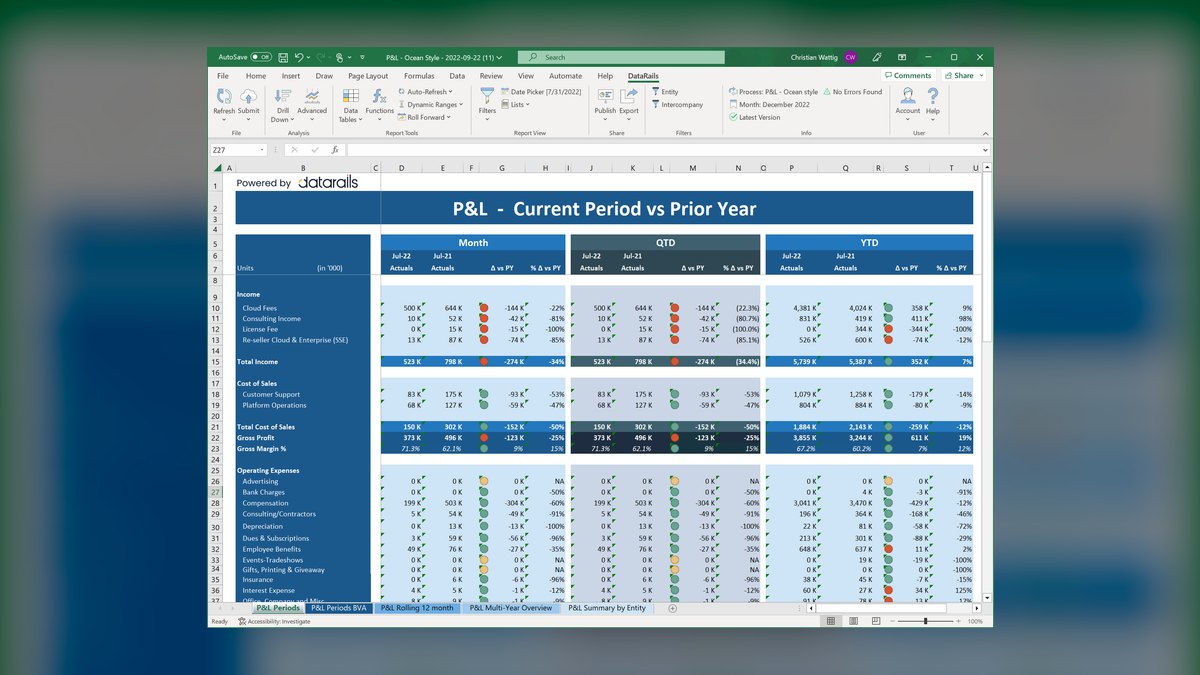
Datarails ranks sixth because its FP&A Genius chat assistant answers financial questions using your actual numbers, with source cells traceable for auditability. It consolidates dispersed Excel workbooks into a central database while preserving formulas, automating budget consolidation, reporting, and variance commentary. This addresses the recurring grind for controllers managing legacy Excel files. Pricing is quote-based.
This tool is for finance teams at established small and mid-sized businesses with many legacy Excel files who want AI-driven answers without migrating off existing models. Its trade-off is that it is less suited for complex, forward-looking scenario modeling compared to Cube at rank five, which offers stronger bidirectional spreadsheet integration. Datarails excels at automating consolidation and reporting, but Cube provides a more governed central layer for modeling workflows.
7Rogo

Rogo ranks seventh because it is built specifically for financial services, ingesting filings, transcripts, and internal data to draft comparable company analyses and build model scaffolding. Founded by Gabriel Stengel, it trains on the workflows of deal teams under deadline pressure, answering deep diligence questions with citations. It understands comps, precedent transactions, and pitch book structures. Pricing is enterprise-level, aimed at firms where analyst time is the expensive constraint.
This tool is for investment banks, private equity firms, and corporate development teams that spend hours assembling models from disclosure documents. Its trade-off is that it is not a general-purpose modeling tool, so it must be paired with Excel or another platform for full model construction. Compared to Datarails at rank six, Rogo offers specialized deal workflow support, but Datarails is broader for standard FP&A consolidation and reporting.
8Daloopa

Daloopa ranks eighth because it solves the most error-prone step in modeling: getting clean historical data into the model. It uses AI to extract financials from SEC filings, press releases, and investor presentations into structured, audit-linked datasets, with every figure tracing back to its source document. Analysts push updated historicals directly into existing Excel models, eliminating manual data entry from 10-Ks. Pricing is quote-based.
This tool is for hedge funds, equity research, and anyone maintaining many ticker-level models who needs reliable, sourced fundamentals. Its trade-off is that it is not a standalone modeler, so it must be used alongside a modeling tool like Excel or Copilot. Compared to Rogo at rank seven, Daloopa focuses narrowly on data extraction rather than deal workflow, making it a complementary specialist tool for data-heavy modeling tasks.
9Anaplan

Anaplan ranks ninth because its Hyperblock calculation engine handles massive multi-dimensional models across finance, sales, and supply chain for global enterprises. PlanIQ brings AI forecasting, applying statistical and machine-learning models to drive demand and revenue projections inside the planning environment. Implementations are measured in months and often involve partners, but the payoff is a single planning fabric for thousands of users. Pricing is the most expensive tier here.
This tool is for large organizations that need thousands of users planning against shared, governed models with serious dimensionality. Its trade-off is that it is overkill for small teams, with high implementation costs and complexity. Compared to Pigment at rank four, Anaplan offers greater scale and enterprise integration, but Pigment provides a more modern, user-friendly interface and faster time-to-value for mid-market teams.
10Aleph

Aleph ranks tenth because it is an AI-native FP&A platform that connects source systems directly to spreadsheets and dashboards while keeping a governed data model underneath. It automates data collection from ERPs and lets analysts query and model with AI assistance, reducing manual stitching that eats analyst hours. It targets the same pain as Cube and Datarails, with a stronger emphasis on AI-driven workflows. Pricing is quote-based.
This tool is for modern finance teams that want spreadsheet familiarity plus aggressive automation of reporting and consolidation cycles. Its trade-off is that it is less established than competitors, with a smaller customer base and fewer proven case studies. Compared to Anaplan at rank nine, Aleph is more accessible and spreadsheet-friendly, but Anaplan offers unmatched enterprise scale and a mature implementation ecosystem for complex global planning.
How we ranked these
We scored each tool on six weighted factors: modeling depth (ability to build three-statement models with circular references), AI accuracy (auditable formulas vs. hallucinations), data connectivity (native links to NetSuite, QuickBooks, Stripe, Snowflake), version control and auditability, collaboration features, and total cost. We weighted modeling depth and AI accuracy most heavily because they directly impact model reliability.
We deliberately ignored marketing claims, roadmap promises, and features not yet in production as of 2027. We excluded pure accounting close tools and BI dashboards unless they supported forward-looking modeling. We also did not consider tools without verifiable pricing or those that required extensive professional services to implement, as these are less accessible to typical finance teams.
What to look for
When choosing, focus on where your models live. If you're Excel-native, Copilot or Cube minimizes disruption. If you need structured, auditable driver-based models, Causal or Pigment offer cleaner version control. For enterprise scale, Anaplan handles massive dimensionality. Always trial with your own data—rebuild one quarter of your actual model to test circular references and debt schedules.
The biggest mistake is choosing based on demo aesthetics rather than workflow fit. Many buyers pick a platform like Pigment or Anaplan without realizing their team will resist leaving Excel. Conversely, some buy Copilot expecting it to impose structure, but it won't fix poor spreadsheet discipline. Match the tool to your team's existing habits and governance needs.
Related questions
What is the best AI tool for financial modeling in 2027?
For most finance teams, Microsoft Copilot in Excel is the top pick because it integrates directly into the spreadsheet where the majority of models are built. It allows you to generate formulas, run scenarios, and analyze data using natural language, making it ideal for FP&A analysts and controllers who want to stay in Excel.
How does Causal compare to Copilot for financial modeling?
Causal (now part of Lucanet) is a strong runner-up, especially for teams that prefer a purpose-built modeling environment over a spreadsheet. It focuses on variables, ranges, and uncertainty rather than cell references, and offers built-in version control, which can be cleaner for complex driver-based models.
Can these AI tools handle three-statement modeling?
Yes, both Copilot in Excel and Causal can handle three-statement modeling. Copilot leverages Excel’s existing structure to automate linking income statements, balance sheets, and cash flow statements, while Causal uses a variable-based approach that can model interdependencies more transparently.
Are these tools suitable for small businesses or startups?
They can be, but they are primarily designed for FP&A analysts, controllers, and corporate development teams. Small businesses with simpler models might find Copilot in Excel more accessible, while startups with rapid growth may prefer Causal or Pigment for their flexibility and version history.
Do I need to know Python to use these AI tools?
No, you don’t need Python for most tasks. Copilot in Excel offers natural-language formula generation, and Causal uses a visual, variable-based interface. However, Copilot also supports Python-in-Excel for advanced users who want to run custom analyses or machine learning models.
What is the price range for these AI financial modeling tools?
Pricing varies widely based on team size and features. Copilot in Excel typically costs between $30 and $60 per user per month as part of Microsoft 365 subscriptions. Causal (Lucanet) and similar tools like Pigment or Cube often range from $50 to $150 per user per month, with enterprise plans costing more.
FAQ
What is the best AI tool for financial modeling in 2027?
For most finance teams, Microsoft Copilot in Excel is the top pick because it integrates directly into the spreadsheet where the majority of models are built. It allows you to generate formulas, run scenarios, and analyze data using natural language, making it ideal for FP&A analysts and controllers who want to stay in Excel.
How does Causal compare to Copilot for financial modeling?
Causal (now part of Lucanet) is a strong runner-up, especially for teams that prefer a purpose-built modeling environment over a spreadsheet. It focuses on variables, ranges, and uncertainty rather than cell references, and offers built-in version control, which can be cleaner for complex driver-based models.
Can these AI tools handle three-statement modeling?
Yes, both Copilot in Excel and Causal can handle three-statement modeling. Copilot leverages Excel’s existing structure to automate linking income statements, balance sheets, and cash flow statements, while Causal uses a variable-based approach that can model interdependencies more transparently.
Are these tools suitable for small businesses or startups?
They can be, but they are primarily designed for FP&A analysts, controllers, and corporate development teams. Small businesses with simpler models might find Copilot in Excel more accessible, while startups with rapid growth may prefer Causal or Pigment for their flexibility and version history.
Do I need to know Python to use these AI tools?
No, you don’t need Python for most tasks. Copilot in Excel offers natural-language formula generation, and Causal uses a visual, variable-based interface. However, Copilot also supports Python-in-Excel for advanced users who want to run custom analyses or machine learning models.
What is the price range for these AI financial modeling tools?
Pricing varies widely based on team size and features. Copilot in Excel typically costs between $30 and $60 per user per month as part of Microsoft 365 subscriptions. Causal (Lucanet) and similar tools like Pigment or Cube often range from $50 to $150 per user per month, with enterprise plans costing more.
Which tool is best for investment banking or private equity?
Rogo is specifically built for financial services, ingesting filings and transcripts to draft comps and build model scaffolding. Daloopa is also valuable for extracting clean historical data from SEC filings. These are specialized tools that complement general modeling platforms.
What is the biggest risk when using AI for financial modeling?
AI assistants can produce confident, wrong numbers. Always trace AI-generated formulas back to source cells before shipping a board model. Tools with strong audit trails—like Causal, Daloopa, and Cube—reduce this risk, but the analyst remains accountable for every figure.
Sources
- https://support.microsoft.com/en-us/copilot-excel
- https://www.lucanet.com
- https://www.mosaic.tech
- https://www.pigment.com
- https://www.cubesoftware.com
- https://www.datarails.com
- https://www.rogo.ai
- https://daloopa.com
- https://www.anaplan.com
Related on PULSE
This page will be disappearing soon. Save it to your device for $1 — or read it free while it is here.
@Kory-White- · if Venmo asks, the last 4 of my number are 2012
This page is gone.
This one is off the shelf now. $1 keeps it on your phone for good — the whole page, pictures and diagrams included.
 pulse-ai-infrastructureWhat is the best way to approach AI Infra in 2027?
 pulse-ai-infrastructureWhat is a semantic cache and how much can it cut inference costs in 2027?
 pulse-ai-infrastructureHow do you reduce GPU costs when serving large language models in 2027?
 pulse-ai-infrastructureThe 10 Best AI Tools for Competitor Analysis in 2027
 pulse-ai-infrastructureHow do you choose a vector database for a production RAG system in 2027?
 pulse-ai-infrastructureThe 10 Best AI Tools for Favicon and Icon Design in 2027
 pulse-ai-infrastructureWhat infrastructure do you need for fine-tuning versus RAG in 2027?
 pulse-ai-infrastructureHow do you get started with AI Infra in 2027?
 pulse-ai-infrastructureHow do you set up observability for a RAG application in 2027?
 pulse-ai-infrastructureHow much does a single NVIDIA H100 cluster node cost to lease in 2027?