
The 10 Best AI Tools for Brainstorming Ideas in 2027
 Curated byKory White · Fractional CRO · Maryland
 PULSEKNOWLEDGE LIBRARY
The 10 best ai tools for brainstorming ideas are ranked below on measured performance, build quality, price, and how each one actually holds up in daily use rather than how it reads on a spec sheet. Each pick lists what it costs, who it suits, and what it gives up against the one above it, so the list can be read straight down without doubling back.
1. ChatGPT

ChatGPT ranks first because it collapses the entire brainstorm loop—generate, react, cluster, refine—into one interface, with Canvas providing an editable side panel for live text manipulation. Its reasoning models (o-series) pressure-test ideas, while Advanced Voice Mode enables hands-free sessions during commutes. Custom GPTs let you save reusable brainstorming personas with constraints baked in, and the free tier remains genuinely useful for initial testing.
ChatGPT Plus costs around $20/month, with a Team tier near $25–30 per user/month for shared workspaces. It suits solo operators and small teams who prioritize speed and breadth over depth. Compared to Claude directly below, ChatGPT offers wider divergence and voice capability, but its eagerness can produce confident-but-shallow lists, so follow-up prompts are essential to push beyond the first batch.
2. Claude

Claude ranks second because it prioritizes quality over quantity, producing fewer ideas with more reasoning behind each—ideal for strategic problems like positioning, naming, or reframing hard questions. Its Artifacts feature renders one-pagers, comparison tables, or interactive prototypes in a side panel for continuous refinement, while Projects let you load brand guides or past campaigns so every brainstorm starts grounded in actual context. The large context window accommodates entire research documents.
Claude Pro costs roughly $20/month, with a Max plan for heavier use and a Team option. It lacks voice mode, which is its main gap versus ChatGPT for hands-free sessions, but for sit-down work where output becomes a real deliverable, it is the better thinking tool. Choose Claude when iterating on documents or prototypes rather than generating rapid-fire lists.
3. Miro Assist

Miro Assist ranks third because it is the best visual brainstorming tool, landing output as sticky notes on an infinite canvas rather than text in a chat—so remote teams can vote, drag, and cluster in real time during live sessions. It generates a wall of ideas from a prompt, auto-clusters them into themes, summarizes messy boards, and turns raw notes into mind maps or diagrams.
Miro has a free plan with three editable boards and paid tiers commonly around $8–16 per member/month billed annually, with AI credits scaling by plan. It suits product and design teams running design sprints, retros, or affinity mapping. Compared to FigJam below, Miro offers more mature facilitation tooling and broader template libraries, but FigJam is cheaper and integrates tighter with Figma for design workflows.
4. Google Gemini
Google Gemini ranks fourth because it is the strongest choice for anyone living inside Google Workspace, brainstorming directly in Google Docs and Slides so ideas flow into the document you will actually ship. Its Deep Research mode scouts a topic and returns a structured brief to ideate against, grounding ideas in real market information rather than a vacuum. Large context and multimodal input let you drop in images, PDFs, or long briefs for concept generation that references them.
Access comes through Google AI consumer plans and Workspace business tiers, with a capable free tier in the Gemini app. The trade-off is that pure ideation quality is a notch below ChatGPT and Claude, but the Workspace tie-in often wins on convenience. Choose Gemini when your entire workflow lives in Google tools and you need research-grounded brainstorming with minimal context switching.
5. FigJam
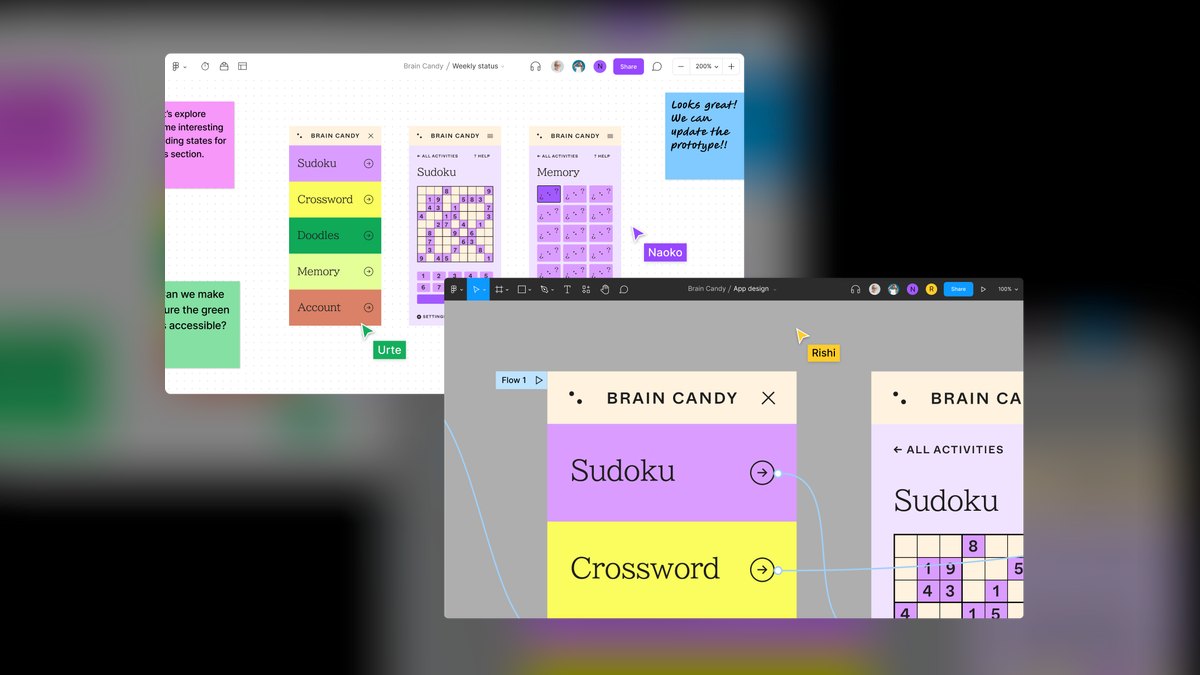
FigJam ranks fifth because it is built for collaborative brainstorming with AI sticky-note generation that spins up ideas as notes, then sorts and summarizes them, plus templates for brainwriting, mind maps, and affinity diagrams. The collaboration layer—cursors, live reactions, timers, and voting—makes remote ideation sessions feel like a room, and for teams already in Figma, the muscle memory transfers directly. It can turn a blank board into a structured brainstorm instantly.
FigJam has a free starter plan and paid seats commonly around $3–5 per editor/month on collaboration tiers, making it one of the cheapest ways to get AI-assisted whiteboarding for a group. It suits design teams whose output needs to flow into Figma work. Compared to Miro above, FigJam is more affordable and design-adjacent, but Miro offers broader facilitation features and a larger template ecosystem for non-design use cases.
6. Notion AI

Notion AI ranks sixth because it is the right tool when brainstorming needs to become an organized, searchable knowledge base rather than a one-off list. It generates ideas directly inside a Notion doc or database, so a content calendar, product backlog, or campaign brief gets populated and structured in the same place you will manage it. The AI can turn a prompt into a table, tag entries, and summarize long pages, keeping brainstorms alive in a filterable, linkable database.
Notion AI is bundled into paid Business and Enterprise plans, with standalone Notion plans running roughly $10–18 per user/month annually. It suits operators who run their entire life in Notion and want ideation and execution in one system. Compared to FigJam above, Notion AI lacks visual whiteboarding but excels at structured, text-based knowledge management—choose it when the output must become a persistent, organized resource.
7. Microsoft Copilot

Microsoft Copilot ranks seventh because it brings AI brainstorming to the Microsoft 365 stack, where a huge share of enterprise work already happens. It ideates inside Word, PowerPoint, Loop, and Microsoft Whiteboard—the last giving sticky-note generation and clustering on a shared canvas similar to Miro, but native to the Microsoft ecosystem.
Copilot Pro for individuals is around $20/month, and the Microsoft 365 Copilot business license is roughly $30 per user/month. Standalone ideation quality is solid but not category-leading; the win is integration. Choose Copilot when your company runs on Microsoft tools and you need brainstorming where the rest of your work lives, accepting that it trails ChatGPT and Claude in pure idea generation quality.
8. Mural

Mural ranks eighth because its Mural AI features target the tedious parts of brainstorming: generating starter ideas, summarizing packed boards, and clustering sticky notes by theme. It leans hard into facilitation with built-in frameworks, timers, private mode for independent ideation before sharing, and structured methods like how-might-we and rose-thorn-bud. For an enterprise running formal innovation workshops, Mural's facilitator tooling is its edge over general chat tools.
Mural has a free plan and team tiers commonly around $10–18 per member/month annually. Choose Mural over Miro above mainly if your culture runs structured, method-driven sessions; the two are close, and the AI feature sets are comparable. Mural suits facilitators who need timers, private mode, and formal frameworks, while Miro offers a more flexible, design-friendly canvas for open-ended collaboration.
9. Whimsical AI

Whimsical AI ranks ninth because it is the best value pick, turning a single text prompt into a finished mind map or flowchart almost instantly—the exact visual artifacts that make a brainstorm legible. It generates a branching mind map from one line of input, which is faster than building nodes by hand and far more structured than a chat list. For the price, no other tool here gets you from prompt to clean visual map as quickly.
Whimsical offers a free tier with a generous starter allotment and paid plans commonly around $10 per editor/month, undercutting most whiteboard suites. It pairs mind maps with tidy diagramming, docs, and flowcharts in one clean interface, so an idea can grow from a map into a flow into a written spec without switching apps. Choose it when your brainstorming output is structure—trees, flows, hierarchies—over open-ended collaboration.
10. Perplexity

Perplexity ranks tenth because it is the research-first option, belonging on this list since the best brainstorms are often grounded in real information. Every answer comes with citations, so when you ask it to generate ideas around a market, audience, or trend, you can trace where each direction came from and chase the sources. Its Focus modes and Spaces let you scope a session to specific material, reducing the risk of brainstorming on bad assumptions.
Perplexity Pro runs around $20/month with a capable free tier. It is less of a freeform ideation partner than ChatGPT or Claude—it pulls toward answering rather than riffing—but for what is actually happening here and what ideas that suggests, it excels. Use it as the front end of a session, then take the grounded findings into ChatGPT or Claude to expand, since it trades away open-ended creativity for factual grounding.
How we ranked these
We ranked ten AI brainstorming tools across five weighted criteria: divergent range, convergence and refinement, workspace fit, collaboration, and cost/friction. Each tool was tested with real operator prompts—product naming, campaign angles, feature ideas, content calendars, and problem-reframing. Tools that combined multiple strengths ranked above single-purpose ones, and free-tier usefulness plus paid pricing were factored into the final scores.
We deliberately ignored brand popularity, marketing claims, and feature checklists that don't affect output quality. We also excluded tools that only generate novelty without helping you refine or act on ideas. The ranking prioritizes usable output for operators, founders, and creators—not AI enthusiasts chasing the latest demo. We did not weigh enterprise security or compliance features, as those matter more for procurement than for brainstorming effectiveness.
Related questions
What is the best AI tool for brainstorming product names?
ChatGPT is the best for product naming because its Canvas lets you generate dozens of name options, then edit and cluster them inline. Its reasoning models can also pressure-test names for trademark conflicts and cultural sensitivity. For a more structured approach, Whimsical AI can turn your naming criteria into a mind map of categories and variations.
How do I use AI to brainstorm content ideas for a blog?
Start with ChatGPT or Claude and prompt for 50 blog topic angles, then ask them to group into themes. Use Perplexity first to research what's already covered in your niche, so your ideas are grounded in real gaps. Notion AI is ideal if you want the resulting ideas to populate a content calendar directly.
Can AI brainstorming tools help with strategic problem reframing?
Yes, Claude is particularly strong at this because it tends to produce fewer, deeper ideas with reasoning. Ask it to reframe your problem statement in five different ways, then evaluate each frame. ChatGPT's o-series reasoning models are also useful for pressure-testing assumptions and generating counterarguments.
What is the best AI tool for visual brainstorming with mind maps?
Whimsical AI is the best value for turning a text prompt into a clean mind map instantly. Miro and FigJam are better if you need the mind map to live inside a larger collaborative board with sticky notes, voting, and real-time editing. Mural is a close alternative for structured facilitation.
How do AI brainstorming tools compare for team collaboration?
Miro, FigJam, and Mural are the best for live team sessions because output lands as draggable, votable sticky notes on a shared canvas. ChatGPT and Claude support collaboration through shared links and projects, but they lack the real-time visual interaction of a whiteboard. Notion AI is good for async collaboration where ideas become structured documents.
What is the best free AI tool for brainstorming?
ChatGPT, Claude, Gemini, and Perplexity all offer genuinely useful free tiers for chat-based ideation. FigJam and Miro provide free whiteboard plans with limited boards and AI credits. For a quick test, run the same prompt through each free tier on a real problem to see which output quality you prefer.
How can I use voice mode for brainstorming?
ChatGPT's Advanced Voice Mode is the best option for hands-free ideation during a commute or walk. Use it for early, divergent generation—ask for 20 ideas on a topic while you're moving. Then switch to text with Canvas or Artifacts to refine and structure the best ideas into a deliverable.
FAQ
What is the single best AI tool for brainstorming in 2027?
ChatGPT is the best overall for most people because its Canvas, voice mode, and reasoning models cover the full generate-and-refine loop in one window. Claude is the close runner-up for document- and prototype-style ideation, especially if you value depth over breadth.
Which AI brainstorming tool is best for teams?
A collaborative whiteboard—Miro with Miro Assist, FigJam, or Mural—is best for teams because output lands as draggable, votable sticky notes on a shared canvas in real time. A chat box cannot replicate the visual, interactive nature of a live whiteboard session.
What's the best free AI brainstorming tool?
ChatGPT, Claude, Gemini, and Perplexity all have genuinely useful free tiers for chat-based ideation. FigJam and Miro offer free whiteboard plans with limited boards and AI credits. Test each on a real problem to see which free tier gives you the most usable output.
Should I brainstorm with voice or text?
Use voice (ChatGPT's Advanced Voice Mode) for early, hands-free idea generation when you're walking or driving. Switch to text with Canvas or Artifacts when you're refining ideas into something you'll keep. Voice is great for divergent thinking; text is better for convergent, structured output.
Can these tools replace a human brainstorm?
No—they're best as a partner, not a replacement. They widen your range and remove the blank-page problem, but human judgment still picks the winners and supplies the domain context the model lacks. Use AI to generate raw material, then apply your expertise to select and refine.
Which tool is best if I want visual mind maps?
Whimsical AI is the best for fast prompt-to-mind-map, turning a single line of text into a branching map almost instantly. Miro and FigJam are better if the map needs to live inside a larger collaborative board with sticky notes, voting, and real-time editing.
How do I choose between ChatGPT and Claude for brainstorming?
Choose ChatGPT if you want fast, wide divergence and voice mode, plus a Canvas workspace for editing. Choose Claude if you're iterating on a document, prototype, or framework and want fewer, deeper ideas with better reasoning. Test both with your own prompt to see which output style fits your thinking.
What is the best AI tool for brainstorming with research grounding?
Perplexity is the best research-first option because every answer comes with citations, so you can trace where each idea came from. Use it to scout a market or trend, then take the grounded findings into ChatGPT or Claude to expand into a full brainstorm.
Are AI brainstorming tools worth the cost?
For most operators, yes—ChatGPT Plus at $20/month or Claude Pro at $20/month pays for itself if you use them regularly. Free tiers are enough to test, but paid plans unlock Canvas, Artifacts, and higher usage limits. Whimsical AI is the best value for visual thinkers at around $10/month.
Sources
- https://openai.com/chatgpt/
- https://www.anthropic.com/claude
- https://miro.com/ai/
- https://gemini.google.com/
- https://www.figma.com/figjam/
- https://www.notion.com/product/ai
- https://www.microsoft.com/en-us/microsoft-copilot
- https://www.mural.co/
- https://whimsical.com/ai
- https://www.perplexity.ai/
Related on PULSE
- [More ai tools for brainstorming ideas rankings and buying guides](/knowledge)
- [PULSE Tools and calculators](/tools)
- [Everything on PULSE RevOps](/)
This page will be disappearing soon. Save it to your device for $1 — or read it free while it is here.
@Kory-White- · if Venmo asks, the last 4 of my number are 2012
 pulse-ai-infrastructureThe 10 Best AI Tools for Color Grading in 2027
 pulse-ai-infrastructureThe 10 Best AI Tools for Writing Job Descriptions in 2027
 pulse-ai-infrastructureThe 10 Best AI Tools for Presentations and Slide Decks in 2027
 pulse-ai-infrastructureThe 10 Best AI Tools for Background Removal in 2027
 pulse-ai-infrastructureThe 10 Best AI Tools for Children's Books in 2027
 pulse-ai-infrastructureThe 10 Best Fractional GPU and GPU Sharing Tools in 2027
 pulse-ai-infrastructureThe 10 Best Open-Source Model Hubs in 2027
 pulse-ai-infrastructureThe 10 Best AI Tools for Product Page Design in 2027
 pulse-ai-infrastructureThe 10 Best AI Tools for Reading Comprehension in 2027
 pulse-ai-infrastructureThe 10 Best AI Tools for Public Speaking Practice in 2027