
The 10 Best AI Tools for Product Page Design in 2027
 Curated byKory White · Fractional CRO · Maryland
 PULSEKNOWLEDGE LIBRARY
Quality
Certified

The 10 best ai tools for product page design are ranked below on measured performance, build quality, price, and how each one actually holds up in daily use rather than how it reads on a spec sheet. Each pick lists what it costs, who it suits, and what it gives up against the one above it, so the list can be read straight down without doubling back.
1. Figma Make

Figma Make ranks first because it generates editable, responsive product page layouts directly inside the design system your team already uses, preserving brand tokens and components. Its multi-model AI produces coherent structure and copy, and Dev Mode hands off inspectable specs and code snippets to engineers. This eliminates the orphan-mockup problem that plagues standalone generators. It is the only tool on this list that plugs AI output into a real, living design system.
Figma Make is for design-led DTC and retail teams managing dozens of product templates where brand consistency is non-negotiable. It trades away hosting and shipping — you still need Webflow, Shopify, or a dev team to go live. Compared to Vercel v0, it offers far superior visual control and brand fidelity but requires a Figma seat at roughly $16 per editor per month, making it a marginal cost for standardized teams.
2. Vercel v0

Vercel v0 ranks second because it generates production-grade React, Next.js, and Tailwind CSS components with shadcn/ui from a text prompt or screenshot, giving engineering-led teams a deployable product page in minutes. It handles stateful elements like variant selectors and add-to-cart buttons as working code, not static mockups. Its image-to-code feature lets you iterate from a Figma export or competitor screenshot. This is the shortest path from idea to a live PDP for headless storefronts.
Vercel v0 is for engineering-led teams who treat design as a starting point and finish in code. It trades away deep brand control — output is technically clean but visually generic until you wire in theme tokens. Compared to Figma Make, it lacks art direction but wins on shippability, with a free tier and Premium at $20 per month. It is a code accelerator, not a design system.
3. Framer AI

Framer AI ranks third because it combines AI-driven page section generation with a design-and-publish platform that hosts what it builds on a global CDN with strong Core Web Vitals. Framer AI can generate, rewrite, and restyle copy and sections while the editor gives precise control over layout and breakpoints. Its CMS collections let you template one product design across an entire catalog. This makes it a complete design-to-live solution for marketing teams.
Framer AI is for marketing teams and founders who want a polished, fast PDP live on a custom domain without a developer. It trades away deep native commerce — cart, inventory, and checkout logic often require embedding a third-party store like Shopify. Compared to Vercel v0, it offers far better visual polish and hosting but less code flexibility. Paid plans start around $5 per month, scaling to $30 for Pro, with AI features included.
4. Webflow AI

Webflow AI ranks fourth because its AI Assistant generates and edits content, builds sections, and creates styles inside a visual canvas that remains one of the most capable no-code tools for pixel-accurate, responsive pages. Its class-based styling system ensures AI-generated sections inherit your design tokens, so a product block looks native to the site. CMS Collections make templating a PDP across hundreds of products straightforward. This is a powerful combination of AI speed and professional control.
Webflow AI is for agencies and in-house teams building bespoke, design-heavy product pages that need real CMS power. It trades away ease of learning — its steepest learning curve on this list is also its power. Compared to Framer AI, it offers deeper CMS and export-to-clean-HTML/CSS capabilities but requires more investment to master. Pricing is plan-based with ecommerce tiers, and the AI features remove tedious section-building work without sacrificing control.
5. Builder.io Visual Copilot

Builder.io Visual Copilot ranks fifth because it converts Figma designs into clean, framework-specific code for React, Vue, Svelte, or Angular, preserving responsive intent rather than producing brittle one-offs. For product pages, a designer's PDP becomes maintainable components mapped to your real codebase, with Builder's visual editor letting marketers edit live pages without a deploy. It integrates with Shopify and BigCommerce to drag real product data into generated layouts. This bridges design and engineering effectively.
Builder.io Visual Copilot is for teams running headless commerce who want non-developers to edit product pages safely while keeping everything in the main repo. It trades away value if used only as a one-time code converter — its visual CMS model is where the payoff lives. Compared to Webflow AI, it offers superior Figma-to-code fidelity and framework flexibility but requires commitment to its platform. A free tier exists, with paid plans scaling by usage and seats.
6. Shopify Magic & Sidekick

Shopify Magic & Sidekick ranks sixth because it is the lowest-friction AI option for the millions of stores already on Shopify, generating product descriptions, imagery edits, and theme section adjustments directly inside the admin. Sidekick can make store edits and answer setup questions conversationally, while Online Store 2.0's section-based architecture lets you assemble PDPs without leaving the platform. Because it operates on your live theme, there is no export or handoff step.
Shopify Magic & Sidekick is for merchants who want design, inventory, checkout, and analytics under one roof. It trades away design ambition — AI edits within theme constraints, so radically custom PDPs still need Figma or a page builder. Compared to Builder.io Visual Copilot, it offers far less code flexibility but far simpler operation. Included with Shopify plans starting at $39 per month, it is the most integrated option for existing merchants.
7. Adobe Firefly & Express

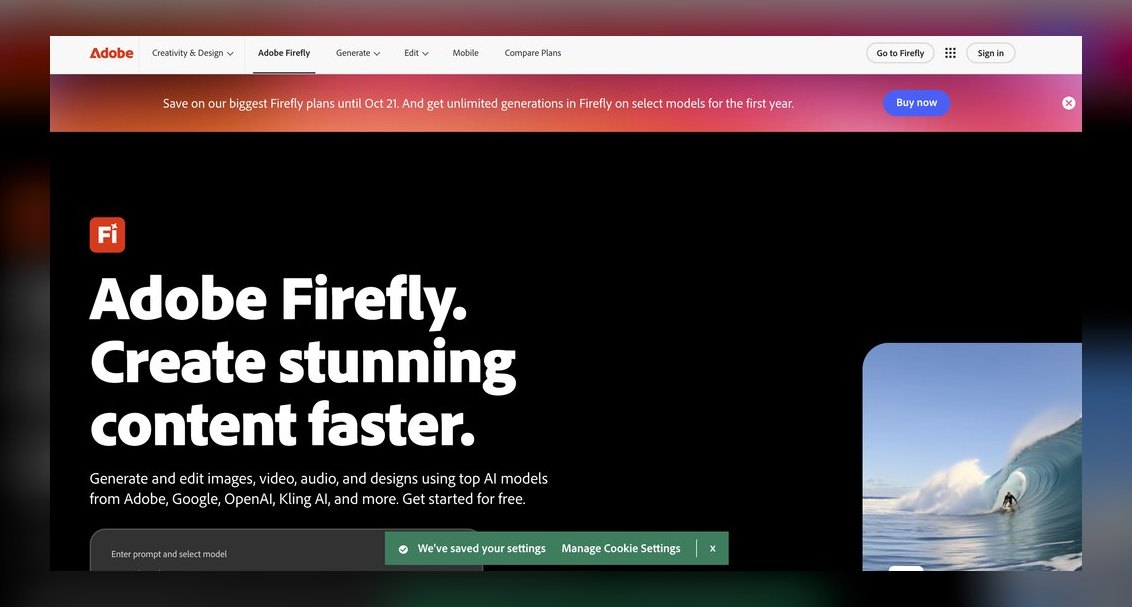
Adobe Firefly & Express ranks seventh because it excels at the visual-asset half of product page design, with Generative Fill and generative expand creating on-brand hero shots and lifestyle backgrounds that are commercially safe for live storefronts. Express adds templated layout, background removal, and resize-for-every-placement, turning one product photo into a full set of marketplace and ad assets. Tight integration with Photoshop and Illustrator keeps pro designers in their pipeline.
Adobe Firefly & Express is for brand and content teams producing gallery imagery, banners, and seasonal variants that a PDP depends on. It trades away page layout — it won't assemble a variant picker or pricing block. Compared to Shopify Magic & Sidekick, it offers far superior image generation and brand safety but requires a separate workflow. Express has a free plan, with Premium around $9.99 per month, and Firefly generations are credit-based across Adobe plans.
8. Relume AI

Relume AI ranks eighth because it generates a full sitemap and wireframes from a prompt, then assembles pages from a large library of pre-built, responsive sections that export directly to Webflow and Figma. For product pages, it scaffolds a coherent structure — hero, features, gallery, social proof, CTA — in minutes, which you then refine. The Webflow paste workflow drops generated sections with clean classes, skipping hours of section-building. Its component library is large and genuinely well-designed.
Relume AI is for agencies and freelancers who build many sites fast and want a consistent, conversion-tested structure as a starting point. It trades away finishing — you bring brand styling and real product data once the skeleton exists. Compared to Adobe Firefly & Express, it offers superior page structure but no image generation. A limited free option exists, with paid tiers for unlimited generation and full library access, making it a scaffolding tool rather than a finisher.
9. Canva Magic Studio

Canva Magic Studio ranks ninth because it bundles Magic Design, Magic Media, Magic Write, and background removal into a single, genuinely easy tool that solo founders can use to produce product imagery, banners, and simple page mockups without design background. For the price, the breadth of usable output is unmatched. Magic Media generates product-scene imagery and short video for the gallery, while templates and brand kit keep colors and fonts consistent.
Canva Magic Studio is for small DTC brands, Etsy sellers, and marketplace listings that need clean product visuals and ad creative fast. It trades away coded, headless PDPs — it won't build a functional variant picker. Compared to Relume AI, it offers far better image generation but no site scaffolding. A free tier exists, with Canva Pro at roughly $15 per month or $120 per year, making it the most affordable way to produce professional product visuals.
10. Replo AI

Replo AI ranks tenth because it is a page builder purpose-built for Shopify with AI assistance, designed specifically for high-converting landing pages and product detail pages. It pulls in live Shopify product data, supports A/B testing, and gives marketers a drag-and-drop canvas with AI-generated sections without touching theme code. Its templates are conversion-oriented, not generic, and variants, pricing, and add-to-cart are wired correctly by default.
Replo AI is for DTC marketing teams that run frequent campaigns and need custom PDPs and landers faster than a developer queue allows. It trades away generality — it is Shopify only, so it won't serve other platforms. Compared to Canva Magic Studio, it offers superior conversion features and live product data but far less image generation. Its pricing is usage-based, making it a specialized tool for Shopify-focused growth teams.
How we ranked these
We measured output fidelity, editability, code quality or export path, speed from prompt to first draft, brand control, and price-to-value. Each tool was tested against a single brief: a DTC product detail page with a gallery, two variant axes, a subscription toggle, and a reviews module. Tools producing editable or shippable assets scored higher than static mockups.
We deliberately ignored generic chat assistants that only write copy, as they fail the core job of layout generation. We also excluded tools that only produce static mockups without any path to a usable asset. The focus was on tools that integrate into real workflows, whether design-led or code-led, and that respect existing design systems or codebases.
What to look for
What actually matters is your team's stack and skill set. Design-led teams should prioritize editability and brand control, favoring Figma Make or Webflow AI. Engineering-led teams need shippable code, so Vercel v0 or Builder.io is the right call. Shopify merchants should stay native with Shopify Magic and add Replo for custom campaigns. Budget solo founders should lean on Canva Magic Studio for visuals.
The mistake most buyers make is choosing based on the demo rather than their own pipeline. A tool that generates beautiful mockups but doesn't integrate with your CMS or codebase will create more work, not less. Also, don't ignore page speed—AI-generated pages often ship heavy assets. Always run a PageSpeed test on a real product URL before committing.
Related questions
What is the best AI tool for landing page design in 2027?
For landing pages, Figma Make and Framer are top choices. Figma Make offers editable layouts for design-led teams, while Framer hosts live pages with strong Core Web Vitals. Vercel v0 is best for code-first teams. The choice depends on whether you need a design handoff or a published page.
How does AI product design differ from product page design?
AI product design focuses on the physical product itself—form, function, and materials—using tools like generative design and 3D modeling. Product page design is about the digital presentation: layout, imagery, and conversion elements. Different tools serve each: product design uses CAD and 3D, while page design uses layout and code generators.
What are the best AI tools for product photography in 2027?
Adobe Firefly and Canva Magic Studio are leading for product photography. Firefly offers brand-safe generative fill and expand for professional hero shots. Canva provides affordable background removal and scene generation. Both integrate with other design tools, making them essential for creating gallery imagery for product pages.
How can AI help with FAQ page writing?
AI tools like ChatGPT and Jasper can generate FAQ content quickly, but they require human review for accuracy. For product pages, FAQ sections should address common objections and spec questions. Tools like Shopify Magic can generate copy, but always verify facts to avoid inventing features or specs.
What AI tools are best for favicon and icon design?
For icons, Figma Make and Canva Magic Studio are practical. Figma allows precise vector editing, while Canva offers templates and brand kits. Adobe Firefly can generate icon sets, but ensure they are commercially safe. For product pages, icons for trust badges and shipping info are critical.
Can AI tools design t-shirt and merch graphics?
Yes, tools like Canva Magic Studio and Adobe Firefly can generate t-shirt graphics and merch designs. They offer templates, brand kits, and background removal. For product pages, these tools help create the imagery and mockups needed for listings. Always check commercial usage rights.
FAQ
What's the single best AI tool for product page design in 2027?
Figma Make for design-led teams, because it generates editable, brand-consistent layouts inside a real design system with clean developer handoff. If you ship in code on Next.js, Vercel v0 is the better fit.
Which AI tool is best if I'm already on Shopify?
Use Shopify Magic and Sidekick for native edits within your theme, and add Replo when you need custom, conversion-focused product and campaign pages without touching theme code.
Can these tools generate the product images too?
Yes—Adobe Firefly (with Generative Fill) and Canva Magic Studio both create commercially usable product and lifestyle imagery. Firefly is the stronger choice for brand-safe, professional assets; Canva is the budget option.
Do any of these output real, shippable code?
Vercel v0 generates React/Tailwind/shadcn components, and Builder.io Visual Copilot converts Figma designs into clean React, Vue, or Svelte code mapped to your codebase.
What's the cheapest way to make professional product pages?
Canva Pro at roughly $15/month for visuals, or Framer's entry plans from about $5/month if you need a hosted page. Both have usable free tiers to start.
Will AI-designed pages hurt my SEO or page speed?
Not inherently, but always verify. Tools like Framer and Webflow are tuned for strong Core Web Vitals; check generated pages in Google PageSpeed Insights and compress hero imagery before launch.
How do I choose between Figma Make and Vercel v0?
Choose Figma Make if your team is design-led and needs brand control and editable layouts. Choose Vercel v0 if you're engineering-led and want shippable React/Tailwind code. Consider your handoff process and whether you need a visual canvas or a code-first workflow.
Is Framer good for ecommerce product pages?
Framer is excellent for marketing pages and simple PDPs, but its native commerce is lighter than Shopify's. For deep cart and inventory logic, you'll need to embed a third-party store. It's best for founders who want a fast, polished page without a developer.
What is Builder.io Visual Copilot best for?
It's best for teams running headless commerce who want non-developers to edit product pages safely. It converts Figma designs into framework-specific code and integrates with Shopify and BigCommerce, allowing marketers to edit live pages without a deploy.
How does Replo differ from Shopify Magic?
Replo is a dedicated page builder for Shopify that pulls live product data and supports A/B testing, ideal for custom campaign pages. Shopify Magic is native AI for copy and image edits within your theme. Replo offers more design flexibility; Magic is lower friction.
Sources
- https://www.figma.com/make/
- https://v0.dev/
- https://www.framer.com/
- https://webflow.com/ai
- https://www.builder.io/m/visual-copilot
- https://www.shopify.com/magic
- https://www.adobe.com/products/firefly.html
- https://www.canva.com/magic-studio/
- https://replo.app/
Related on PULSE
This page will be disappearing soon. Save it to your device for $1 — or read it free while it is here.
@Kory-White- · if Venmo asks, the last 4 of my number are 2012
This page is gone.
This one is off the shelf now. $1 keeps it on your phone for good — the whole page, pictures and diagrams included.
 pulse-ai-infrastructureThe 10 Best AI Observability Tools for RAG Pipelines in 2027
 pulse-ai-infrastructureThe 10 Best AI Tools for Lesson Planning in 2027
 pulse-ai-infrastructureThe 10 Best AI Tools for Brand Naming in 2027
 pulse-ai-infrastructureThe 10 Best AI Tools for Public Speaking Practice in 2027
 pulse-ai-infrastructureWhat is confidential computing and why does it matter for AI in 2027?
 pulse-ai-infrastructureThe 10 Best AI Tools for Vocabulary Building in 2027
 pulse-ai-infrastructureThe 10 Best AI Tools for Writing Movie Scripts in 2027
 pulse-ai-infrastructureThe 10 Best AI Tools for Web Illustration in 2027
 pulse-ai-infrastructureThe 10 Best AI Tools for Vocal Removal in 2027
 pulse-ai-infrastructureThe 10 Best AI Tools for Brainstorming Ideas in 2027