


How much does upgrading a laptop's RAM actually improve everyday performance in 2027?
Quality
Certified
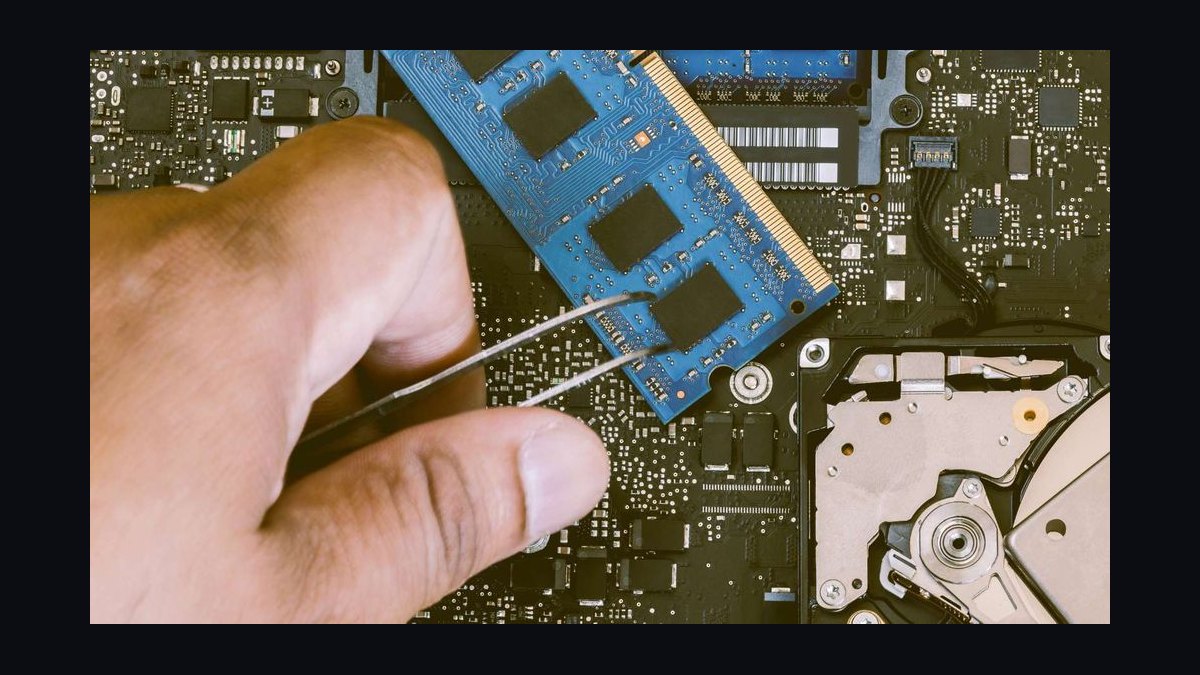
Upgrading a laptop's RAM in 2027 delivers a large, measurable gain only when memory is your bottleneck: going from 8 GB to 16 GB typically cuts app-switching stalls and browser tab reloads noticeably, while 16 GB to 32 GB helps mainly with heavy multitasking, large spreadsheets, virtual machines, and creative tools. If you already have enough RAM, faster storage or a newer CPU matters more.
The outcome you should expect
The honest framing is that RAM upgrades are conditional, not universal. On a machine that is genuinely memory-starved, the improvement in everyday responsiveness can feel dramatic — windows stop re-rendering when you alt-tab, browser tabs stay loaded instead of reloading, and background tasks no longer freeze the foreground. On a machine that already has adequate memory, adding more changes almost nothing you can perceive, because the system was never waiting on RAM in the first place.
The clearest way to think about it is in terms of what the RAM is doing. Modern operating systems use unused memory as a cache, so a laptop with 16 GB that only needs 9 GB will show high "memory usage" in Task Manager while running perfectly. That high number is not a problem; it is the OS being efficient. The problem appears when demand exceeds physical capacity and the system starts paging — moving data to and from the SSD because there is nowhere else to put it. Paging is orders of magnitude slower than RAM access, and it is the mechanism behind nearly every symptom people describe as "my laptop got slow."
So the expected outcome splits into three tiers. First, machines at 8 GB running a modern browser with many tabs plus a video call or a large document: expect a substantial, obvious improvement from moving to 16 GB. Second, machines at 16 GB doing ordinary office work, streaming, and moderate browsing: expect little to no perceptible change from going to 32 GB. Third, machines at 16 GB or 32 GB running virtual machines, large data models, video editing, or many containers: expect meaningful gains from 32 GB or 64 GB, because those workloads genuinely consume memory in bulk.

There is also a ceiling imposed by the rest of the system. If the CPU is several generations old, or the storage is a slow eMMC drive rather than an NVMe SSD, adding RAM will not fix the underlying slowness. A memory upgrade removes one bottleneck; it does not remove the others. Practitioners should therefore treat RAM as one lever among several and diagnose before spending.
What drives that outcome
The single biggest driver is whether the workload's working set — the actively used portion of memory — exceeds physical RAM. When it does, the operating system pages to storage, and every page fault adds latency. When it does not, extra RAM sits idle as cache and changes nothing perceptible.
The second driver is the storage underneath. Paging to a fast NVMe SSD is far less painful than paging to a mechanical drive or slow eMMC, which is why two laptops with identical 8 GB can feel completely different under pressure. A machine that pages occasionally to fast storage may feel merely sluggish; one that pages constantly to slow storage feels broken.
The third driver is how the memory is configured. Dual-channel operation — two matched modules rather than one — roughly doubles memory bandwidth, which helps integrated graphics and memory-heavy applications. A laptop with a single 16 GB stick can sometimes be outperformed in specific tasks by one with two 8 GB sticks, even though total capacity is identical. This is why "how much" and "how arranged" both matter.

The fourth driver is soldering. Many thin laptops now solder RAM to the mainboard, making upgrades impossible. Before planning any upgrade, confirm the machine has accessible SO-DIMM or LPCAMM slots. If it does not, the only path is a new laptop, and the calculus changes entirely.
The decision tree above captures the practical logic. The key branch is the first one: if memory demand is not exceeding capacity, no amount of RAM will help, and the user should look at storage, thermals, or the CPU instead. Only after confirming a genuine memory bottleneck does the capacity question become relevant.
Benchmarks and realistic ranges

Concrete numbers help, though they vary by machine. In typical office and browser workloads, a laptop at 8 GB under pressure may spend a meaningful share of its time paging, and moving to 16 GB can reduce app-switch latency from seconds to near-instant. Users often describe this as the single most noticeable upgrade they have made, precisely because the before-state was so degraded.
For browser-heavy work specifically, the difference is stark. A modern browser with twenty to thirty tabs, several of them running web apps, can consume 6 to 10 GB on its own. On an 8 GB machine, this forces constant eviction and reloading; on 16 GB, tabs stay resident. The improvement is not about raw speed but about eliminating the repeated cost of rebuilding state.
For creative and technical workloads, the thresholds shift upward. Video editing at 4K, large photo catalogs, virtual machines, and local development environments with containers routinely want 32 GB or more. At 16 GB these workloads page heavily; at 32 GB they run smoothly; beyond 32 GB the gains flatten unless the projects are unusually large. Data analysis with large in-memory datasets behaves similarly — the working set, not the file size, determines the requirement.
Gaming is a special case. Most games in 2027 are comfortable at 16 GB, and 32 GB mainly helps with heavy modding, streaming overlays, or running other apps alongside. Because many gaming laptops use integrated or hybrid graphics that share system memory, dual-channel configuration can matter as much as total capacity for frame consistency.

A useful rule of thumb: match RAM to the peak working set plus headroom, not to the largest number you can afford. Overprovisioning wastes money that would deliver more perceived benefit if spent on faster storage or a better display. Underprovisioning guarantees paging and the exact slowdown the upgrade was meant to fix.
It is also worth noting that perceived performance and measured performance can diverge. A benchmark may show only a modest average improvement while the user reports a dramatic change, because benchmarks average across time while humans notice the worst moments — the stalls, the freezes, the reloads. When evaluating whether an upgrading decision paid off, weight the elimination of worst-case stalls heavily, since that is what people actually feel.
Risks, edge cases, and failure modes
The first risk is buying the wrong memory. Laptops use specific generations of DDR4 or DDR5 SO-DIMM, and some use LPDDR soldered directly. Installing incompatible memory can prevent boot or cause instability. Always confirm the exact specification from the manufacturer's documentation or a reputable compatibility tool before purchasing.
The second risk is mismatched modules. Mixing capacities or speeds can force the system to run at the slower module's speed, and in some configurations can disable dual-channel operation. Where possible, install matched pairs. If adding to an existing module, check that the resulting configuration still runs in dual-channel mode.

The third risk is expecting RAM to fix a non-RAM problem. If the laptop is slow because of a failing drive, thermal throttling, malware, or an overloaded startup sequence, new memory will not help. Diagnosing first — watching memory pressure, disk activity, and CPU behavior under load — prevents wasted spending.
The fourth risk is warranty and physical damage. Opening a laptop can void warranties in some regions, and mishandling connectors or static discharge can damage components. If the machine is under warranty or the user is not comfortable with hardware, professional installation is worth the cost.
The fifth edge case is the soldered-RAM laptop, which is increasingly common in thin-and-light designs. For these machines there is no upgrade path, and the honest advice is to buy the right capacity up front or replace the device. Telling a user to "just add RAM" to a soldered machine is a failure mode in itself.
Finally, there is the risk of over-upgrading. Spending heavily to go from 32 GB to 64 GB on a machine used for email and browsing produces no perceptible benefit. The money would be better spent elsewhere. Matching the upgrade to the actual workload is the discipline that separates a good decision from an expensive one.
A practical rollout plan

A disciplined approach turns a vague "my laptop is slow" complaint into a measured decision. The plan below works for individuals and for IT teams managing fleets, and it front-loads diagnosis so that money is spent only where it changes outcomes.
Step one: establish the baseline. Before changing anything, record how the machine behaves under a realistic everyday load — the actual mix of apps and tabs the user runs. Note where it stalls, how long app switches take, and whether the disk activity light or Task Manager shows heavy paging. This baseline is what you will compare against later.
Step two: measure memory pressure, not just usage. High usage with no paging is fine. The signal to watch is whether the system is committing more memory than it physically has, which shows up as sustained disk activity during memory-heavy tasks. Tools that report "committed" versus "in use" memory make this clear.
Step three: confirm upgradeability. Check the service manual for slot count, memory type, and maximum supported capacity. Confirm whether memory is soldered. This step determines whether an upgrade is even possible.
Step four: choose the target capacity based on workload, not habit. For general office and browser use, 16 GB is the sensible target in 2027. For development, virtual machines, or creative work, 32 GB. For heavy professional workloads, 32 to 64 GB. Buy matched modules where possible to preserve dual-channel operation.

Step five: install and verify. After installation, confirm the system recognizes the full capacity and runs at the expected speed and channel configuration. Then re-run the same baseline tasks from step one and compare. The difference — or its absence — is the answer to whether the upgrade was worthwhile.
Step six: document and decide at fleet level. For organizations, track which machine profiles actually benefit. If a large share of tickets are "slow laptop" complaints on 8 GB machines, a standardized upgrade to 16 GB may resolve a disproportionate number of them at modest cost. If the complaints persist after upgrading, the bottleneck lies elsewhere and the fleet strategy should shift toward storage or replacement cycles.
The plan's value is that it forces evidence before expenditure. Most disappointing RAM upgrades happen because the diagnosis step was skipped and the real bottleneck was never memory. Following the sequence avoids that outcome and produces a defensible answer to whether the upgrade actually helped.
Related questions
Is 16 GB enough for everyday use in 2027?

For most office work, browsing, streaming, and light creative tasks, yes. 16 GB comfortably handles a modern browser with many tabs plus common productivity apps. Only heavy multitasking, virtual machines, or professional creative tools push past it. Start at 16 GB unless your workload clearly demands more.
Does faster RAM matter more than more RAM?
Usually more capacity matters first. Going from 8 GB to 16 GB removes paging, which dwarfs any speed difference between memory kits. Once capacity is adequate, faster memory and dual-channel configuration can help integrated graphics and memory-heavy apps modestly. Fix capacity before chasing speed.
Can I upgrade RAM on any laptop?
No. Many thin-and-light laptops solder RAM to the mainboard, leaving no upgrade path. Others have one or two accessible slots. Check the service manual or manufacturer specs before buying. If memory is soldered, the only option is choosing the right capacity at purchase or replacing the device.
Will more RAM speed up gaming?
Only if the game or your multitasking was exceeding available memory. Most games are fine at 16 GB in 2027. Going to 32 GB helps with heavy modding, streaming overlays, or running other apps alongside. Dual-channel configuration often matters more than raw capacity for frame consistency.
How do I know if RAM is my bottleneck?

Watch for sustained disk activity during memory-heavy tasks, slow app switching that improves after closing programs, and browser tabs that reload when revisited. If memory commitment exceeds physical RAM under your normal load, RAM is likely the bottleneck. If not, look at storage, thermals, or the CPU.
FAQ
How much faster will my laptop feel after a RAM upgrade?
It depends entirely on whether memory was the bottleneck. On an 8 GB machine that pages constantly, moving to 16 GB can feel transformative — app switches become instant and tabs stop reloading. On a machine that already has enough RAM, the change is usually imperceptible because nothing was waiting on memory.
Should I go from 16 GB to 32 GB?
Only if your workload demands it. General office and browser use rarely needs more than 16 GB in 2027. Development with containers, virtual machines, large spreadsheets, video editing, and heavy multitasking are the cases where 32 GB pays off. Otherwise the money is better spent on faster storage or a better display.
What happens if I install incompatible RAM?

The laptop may fail to boot, boot but run unstably, or run at reduced speed. Memory comes in specific generations like DDR4 and DDR5, and mixing types or mismatched modules can disable dual-channel operation. Always verify the exact specification and maximum supported capacity before purchasing.
Is dual-channel RAM worth it?
Yes, when the machine supports it. Two matched modules roughly double memory bandwidth compared to a single module, which helps integrated graphics and memory-intensive applications. If you are upgrading, prefer matched pairs, and confirm the system actually runs in dual-channel mode afterward.
Can RAM fix a slow laptop with an old CPU?
No. RAM removes one specific bottleneck — memory pressure and paging. If the CPU is several generations old, the storage is slow, or the machine thermally throttles, adding memory will not address those limits. Diagnose the actual bottleneck before spending on an upgrade.
How do I check my current RAM usage and configuration?
On Windows, Task Manager shows total capacity, slots used, speed, and whether memory is committed beyond physical limits. On macOS, Activity Monitor shows memory pressure and swap usage. These tools tell you both how much RAM you have and whether you are actually running short of it.
Sources
- https://www.intel.com/content/www/us/en/products/docs/memory-storage/desktop-memory.html
- https://www.crucial.com/articles/about-memory/how-much-ram-do-i-need
- https://www.kingston.com/en/blog/pc-performance/how-much-memory
- https://learn.microsoft.com/en-us/windows/win32/memory/memory-management
- https://support.apple.com/guide/activity-monitor
- https://www.tomshardware.com/reviews/memory-buying-guide,2369.html
- https://www.pcmag.com/explainers/how-much-ram-do-you-need
- https://www.anandtech.com
Related on PULSE
This page will be disappearing soon. Save it to your device for $1 — or read it free while it is here.
@Kory-White- · if Venmo asks, the last 4 of my number are 2012
This page is gone.
This one is off the shelf now. $1 keeps it on your phone for good — the whole page, pictures and diagrams included.
 pulse-reviewsTop 10 Heated Mattress Pads — Best Overall + Best Value in 2027
 pulse-reviewsTop 10 Treadmills — Best Overall + Best Value in 2027
 pulse-reviewsTop 10 Standing Desks for Remote AEs in 2027
 pulse-reviewsTop 10 Mirrorless Cameras — Best Overall + Best Value in 2027
 pulse-reviewsTop 10 Electric Crepe Makers — Best Overall + Best Value in 2027
 pulse-reviewsTop 10 Heated Towel Racks — Best Overall + Best Value in 2027
 pulse-reviewsTop 10 Wine Fridges — Best Overall + Best Value in 2027
 pulse-reviewsTop 10 Laser Levels — Best Overall + Best Value in 2027
 pulse-reviewsTop 10 Hoverboards — Best Overall + Best Value in 2027
 pulse-reviewsTop 10 Bluetooth Transmitters for TV — Best Overall + Best Value in 2027