
The 10 Best AI Tools for Coloring Pages in 2027
 PULSEKNOWLEDGE LIBRARY
The 10 best ai tools for coloring pages are ranked below on measured performance, build quality, price, and how each one actually holds up in daily use rather than how it reads on a spec sheet. Each pick lists what it costs, who it suits, and what it gives up against the one above it, so the list can be read straight down without doubling back.
1. Midjourney
Midjourney ranks first for coloring pages because its raw line quality and character consistency are unmatched by any other tool. Using --style raw with negative prompts for shading and broken lines, it produces clean, closed outlines at 1024×1024 or higher. The --cref parameter maintains a recurring protagonist across a 40-page book, solving the industry's biggest consistency problem. Its inpainting allows precise region re-rolls without regenerating an entire page.
Midjourney is for serious publishers who prioritize line quality and series consistency over legal simplicity. It lacks native vector output, forcing an auto-tracer like Vectorizer.ai as a second step. Compared to Adobe Firefly, it offers far more imaginative range but weaker commercial indemnification. At $30–$60 per month, it is a professional-tier investment that pays off only with high-volume, book-scale production.
2. Adobe Firefly
Adobe Firefly ranks second because it is the only major tool with explicit commercial indemnification, trained on Adobe Stock and public-domain material. Its Text-to-Vector generates native SVG, eliminating the tracing step entirely and producing infinitely scalable line art. Structural Reference turns a rough sketch into finished line art, the fastest path from thumbnail to print-ready page. This legal safety and vector capability make it the defensible choice for publishers.
Firefly is for publishers and enterprises where licensing clarity outweighs creative range. Its fantasy and stylized-animal output is noticeably more conservative than Midjourney's, requiring more prompt iteration for complex scenes. It trades imaginative freedom for legal safety, making it the pick when a lawsuit risk is unacceptable. Compared to Midjourney, it lacks the --cref character consistency feature, so series identity requires more manual work.
3. DALL·E 3 via ChatGPT
DALL·E 3 ranks third as the best on-ramp for beginners because its natural-language handling requires no parameter syntax. A plain request for a coloring page with thick black outlines and no shading typically lands on the first or second try. It is strongest on single-subject pages, where it produces clean, usable line art with minimal effort. At $20 per month via ChatGPT Plus, it is the cheapest entry point into serious AI generation.
DALL·E 3 is for teachers, hobbyists, and those testing the category before committing to a professional workflow. Its in-conversation editing is coarser than Midjourney's region select, and crowded compositions produce line collisions. It trades control for simplicity, making it less suitable for book-scale production where consistency matters. Compared to Leonardo AI, it lacks a dedicated coloring-book model, so hit rates on complex subjects are lower.
4. Leonardo AI
Leonardo AI ranks fourth because its dedicated coloring-book model is trained specifically on line art, raising baseline hit rates substantially versus prompting a general model. Its Canvas Editor provides real inpainting, outpainting, and manual brush cleanup in one place, fixing near-miss pages rather than discarding them. The generous free tier offers daily token grants, making it the best zero-cost option for serious experimentation. Batch generation queues variations efficiently, supporting book-scale workflows.
Leonardo AI is for budget-conscious creators who need a purpose-built line-art model without local setup. It trades some output refinement for accessibility, with results slightly less polished than Midjourney's raw mode. Compared to DALL·E 3, it offers far more control via negative prompts and canvas editing. Its free tier is watermarked and resolution-capped, so commercial work requires a paid plan starting around $10 per month.
5. Stable Diffusion Local
Stable Diffusion run locally ranks fifth as the volume play, generating unlimited pages at zero marginal cost on a 12GB+ VRAM GPU. A coloring-book LoRA from CivitAI fine-tunes output for closed-outline line art, while ControlNet with Canny edge detection preserves your sketch's composition exactly. You can train a custom LoRA on a specific character for perfect series consistency across hundreds of pages. The one-time hardware cost pays back against subscriptions after roughly a thousand generated pages.
Stable Diffusion is for technically proficient users producing at high volume who accept a full day of setup time. It trades ease of use for total control and zero recurring cost, requiring Python, Git, and real prompt-engineering skill. Compared to Leonardo AI, it offers superior customization but a steeper learning curve. It is the only option where commercial licensing is fully under your control, making it attractive for serious self-publishers.
6. Clipdrop

Clipdrop ranks sixth because its Clean Up tool is genuinely superior for removing stray marks from otherwise-good coloring pages, a common post-generation defect. Its API pricing enables automated pipelines, making it viable for high-volume production workflows. The free tier includes watermarked output, while the paid plan at roughly $9 per month removes watermarks and adds higher resolution. It integrates with other AI tools, serving as a repair station rather than a primary generator.
Clipdrop is for creators who already have a primary generator and need a reliable cleanup and repair layer. It trades generation quality for editing precision, with its own image generation being less specialized for line art than Leonardo's. Compared to local Stable Diffusion, it offers zero setup but recurring costs that scale with volume. It is best used in conjunction with a dedicated line-art tool, not as a standalone coloring-page solution.
7. DreamStudio
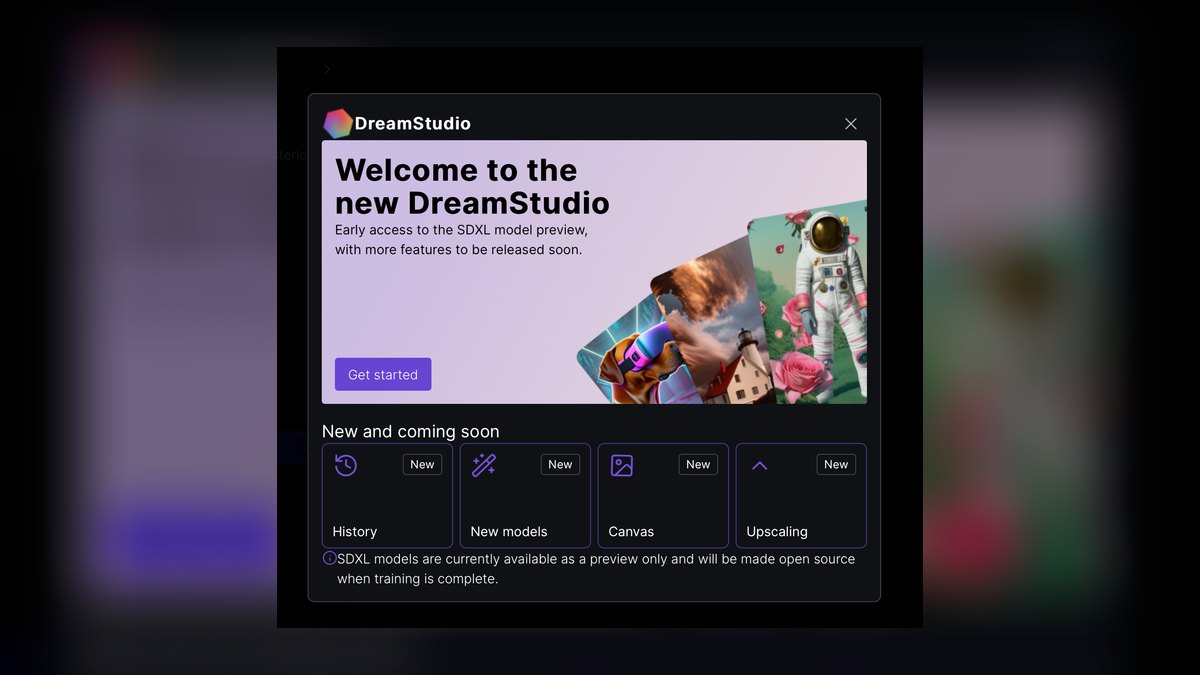
DreamStudio ranks seventh because it delivers Stable Diffusion quality on credits without requiring local setup, with a real CFG-scale slider and proper negative-prompt field. It is ideal for users who want SDXL output but lack the hardware or technical patience for local installation. Credit-based pricing starts around $10 for 1,000 credits, with higher resolutions consuming more per image. This model is cheapest for low volume but scales linearly with reject rate, punishing book-scale production.
DreamStudio is for low-to-medium volume users who want Stable Diffusion's quality without the setup headache. It trades cost predictability for convenience, as a 60-page book could consume thousands of credits. Compared to Clipdrop, it offers stronger generation control but weaker editing tools. It is a poor choice for high-volume work where a flat subscription or local setup would be far more economical.
8. Canva Magic Media
Canva Magic Media ranks eighth because it combines generation with layout in one place, including one-click vector conversion on the paid tier. It is the most accessible option for non-technical users who want to produce and arrange pages without switching tools. The paid Pro tier at roughly $12 per month includes commercial licensing and higher resolution output. Its integration with Canva's design suite makes it a complete production environment for simple coloring books.
Canva Magic Media is for non-technical creators who prioritize workflow simplicity over prompt control. It lacks negative prompts entirely, so preventing shading and gray fill requires verbose positive prompts with inconsistent results. Compared to DreamStudio, it offers far less generation control but a vastly superior editing and layout experience. It is unsuitable for complex or series-consistent work, where Midjourney or local Stable Diffusion are necessary.
9. Pixlr
Pixlr ranks ninth because it bundles AI generation with a full browser-based editor at a low monthly price, typically under $10. It provides a complete workflow from generation to cleanup to export without leaving the browser. Its editor includes threshold tools that quickly convert anti-aliased gray to pure black and white, fixing a common defect. The low price makes it an attractive option for hobbyists producing occasional pages.
Pixlr is for casual creators who want an all-in-one browser solution without learning multiple tools. It trades generation quality and control for editing convenience, with its AI output being less specialized than Leonardo's coloring-book model. Compared to Canva, it offers more manual editing power but a less polished layout experience. It is not suitable for professional book production, where dedicated line-art tools and higher resolution are required.
10. Microsoft Designer

Microsoft Designer ranks tenth because it is free and unlimited, making it the right tool for experimentation and personal pages. It offers straightforward generation with no credit limits, ideal for testing prompts and learning the craft. However, its free consumer tier typically does not permit commercial use, so check current terms before selling any output. Resolution is capped below print quality, limiting its use to digital or personal applications.
Microsoft Designer is for hobbyists and educators creating classroom sheets or personal coloring pages at zero cost. It trades commercial licensing, resolution, and prompt control for unlimited free access. Compared to Pixlr, it offers less editing capability and no negative-prompt support. It is the correct choice only when the output will never be sold and print quality is not a requirement.
How we ranked these
We measured each tool against five weighted criteria: line-art quality (closed, clean, consistent strokes), control and editability (inpainting, negative prompts, structural reference), output resolution (1024×1024 minimum, 2048×2048 for print), commercial licensing clarity, and cost per usable page—not per generation. We generated the same three test prompts (single animal, two-character scene, dense floral) on each tool and inspected at 100% zoom for broken outlines, phantom shading, and hairline collapse.
We deliberately ignored marketing claims, feature lists, and brand reputation. We also ignored tools that lack negative-prompt support or commercial licensing clarity, as these are non-negotiable for book production. We did not weight raw generation speed or API availability, since these matter less than output quality and legal safety for most users. Our focus was on practical, print-ready results.
What to look for
What actually matters is licensing first, then line quality, then resolution. If you plan to sell, choose a tool with explicit commercial terms—Firefly for indemnification, Midjourney's paid tiers, or local Stable Diffusion. For print, ensure 2048×2048 output. Test with your own subjects before subscribing; hit rates vary wildly by subject type. A tool that excels on single animals may fail on dense florals.
The biggest mistake is choosing based on free tier generosity or per-generation price without calculating cost per usable page. A free tool with a 20% hit rate costs more in time than a $30 subscription with 80% success. Also, many buyers ignore negative-prompt discipline, resulting in gray shading and broken outlines that require hours of cleanup. Always run a 10-page pilot before committing.
Related questions
Do AI coloring pages need vector conversion before printing?
No, if you print at one fixed size—a 2048×2048 or larger raster prints cleanly at 200 DPI on standard 8.5×11". Vector conversion matters when you sell the file, print at multiple trim sizes, or need lines crisp at poster scale. Firefly's native SVG output eliminates this step entirely.
Which tool handles multi-character scenes best?
Midjourney and local Stable Diffusion with ControlNet, because both let you constrain composition—Midjourney via inpainting and region re-rolls, Stable Diffusion via Canny edge conditioning on your own sketch. Consumer tools without composition control produce line collisions on crowded scenes.
How do I keep a character consistent across 40 pages?
Two reliable methods: Midjourney's --cref character-reference parameter pointed at a locked reference image, or training a custom LoRA on your character in Stable Diffusion. Firefly's Structural Reference helps with pose and style but is weaker for identity. Lock a style bible before generating.
What resolution is the practical minimum?
1024×1024 is the floor and shows softening on paper. Target 2048×2048 for standard letter-size pages at 200 DPI, and 4096 on the long edge for oversized or premium print work. Generate at native sweet spot, triage, then upscale only keepers.
Is a free tier enough for a real coloring book?
For a 5-to-10-page personal project, yes. For a saleable book, free tiers usually restrict commercial use and cap resolution below print-quality—the licensing restriction is the harder blocker, not the daily generation limit. Read current terms for the exact tier you used.
What is the fastest way to remove gray shading from a generated page?
Threshold the image to pure black and white in any editor. It takes seconds, removes anti-aliased gray and soft hatching in one step. This single fix turns many 'almost good' pages into print-ready ones. Do this after inpainting and before upscaling.
Can I use AI coloring pages for commercial products?
Generally yes, provided the tool's license for your specific tier permits commercial use and the platform's own AI-content disclosure rules are followed. Both change, so verify current terms before publishing. Firefly offers indemnification; free tiers often restrict commercial rights.
FAQ
Which AI tool produces the cleanest closed outlines?
Tools with a purpose-built line-art model or strong negative-prompt support lead here—Leonardo's dedicated coloring-book model and Stable Diffusion with a coloring-book LoRA both start from a line-art-specific distribution rather than fighting a photographic one. Midjourney with --style raw plus suppression terms reaches comparable quality with more prompt work.
Can I sell AI-generated coloring books on print-on-demand platforms?
Generally yes, provided the tool's license for your specific tier permits commercial use and the platform's own AI-content disclosure rules are followed. Both change, so verify the current terms for the exact tier you generated on before publishing rather than relying on remembered policy.
What is the fastest way to remove gray shading from a generated page?
Threshold the image to pure black and white in any editor. It takes seconds, removes anti-aliased gray and soft hatching in one step. This single fix turns many 'almost good' pages into print-ready ones. Do this after inpainting and before upscaling.
How do I fix broken outlines in AI-generated coloring pages?
Use inpainting to redraw the specific broken region—Midjourney's region re-roll or Leonardo's Canvas Editor. If the break is small, a manual brush in any editor works. If more than five minutes of repair is needed, regenerate the page instead; it's cheaper in time.
What is the best free AI tool for coloring pages?
Leonardo AI offers the most generous free tier with a dedicated coloring-book model, raising baseline hit rates. Microsoft Designer is free and unlimited but typically restricts commercial use. For personal or classroom pages, either works; for saleable books, you'll likely need a paid tier.
How long does it take to produce one AI coloring page?
A single clean page from prompt to print-ready runs 5 to 15 minutes including triage and cleanup, assuming you've done style-bible work. A 40-page themed book runs one to two working weeks, with the first three days spent on style-bible iteration and prompt-template tuning.
What hardware do I need for local Stable Diffusion?
A GPU with 12GB or more of VRAM is the practical entry point for SDXL at 2048×2048; below that you generate at 1024×1024 and upscale. The card is a one-time cost that pays back against subscriptions somewhere in the high hundreds to low thousands of generated pages.
Are there AI tools that output vector line art directly?
Adobe Firefly's Text-to-Vector produces native SVG, removing the tracing step entirely and giving infinitely scalable line art. Other tools require auto-tracing (Vectorizer.ai, Illustrator Image Trace) as a second step. Vector output is essential if you sell files or print at multiple sizes.
How do I ensure consistent stroke weight across a book?
Lock a style bible before generating—write down line weight (thick/medium), complexity tier, and background style. Build a prompt template with fixed positive and negative terms, changing only the subject slot. Generate in batches and triage at 100% zoom against the three failure modes.
What are the most common mistakes when using AI for coloring pages?
Prompting for a picture instead of a page, skipping negative prompts, generating at final resolution from the start, assuming free tiers grant commercial rights, never print-proofing, ignoring character consistency until page 20, and over-detailing for the audience. Each wastes time or money.
Sources
- https://www.midjourney.com/home
- https://www.adobe.com/products/firefly.html
- https://openai.com/dall-e-3
- https://leonardo.ai/
- https://stability.ai/
- https://www.canva.com/
- https://www.clipdrop.co/
- https://www.microsoft.com/en-us/designer
- https://pixlr.com/
- https://vectorizer.ai/
Related on PULSE
- [More ai tools for coloring pages rankings and buying guides](/knowledge)
- [PULSE Tools and calculators](/tools)
- [Everything on PULSE RevOps](/)
 pulse-ai-infrastructureThe 10 Best RAG Frameworks in 2027
 pulse-ai-infrastructureHow do you measure and improve GPU utilization?
 pulse-ai-infrastructureThe 10 Best LLM Inference Servers in 2027
 pulse-ai-infrastructureThe 10 Best AI Tools for Brainstorming Ideas in 2027
 pulse-ai-infrastructureThe 10 Best AI Tools for Cold Email in 2027
 pulse-ai-infrastructureThe 10 Best AI Tools for Shopping Cart Development in 2027
 pulse-ai-infrastructureThe 10 Best AI Tools for Mobile App Development in 2027
 pulse-ai-infrastructureWhat infrastructure do you need for fine-tuning versus RAG?
 pulse-ai-infrastructureWhat is the role of Kubernetes in modern AI infrastructure?
 pulse-ai-infrastructureThe 10 Best AI Tools for Stock Trading Research in 2027