

The 10 Best AI Tools for Colorizing Old Photos in 2027
The 10 best ai tools for colorizing old photos are ranked below on measured performance, build quality, price, and how each one actually holds up in daily use rather than how it reads on a spec sheet. Each pick lists what it costs, who it suits, and what it gives up against the one above it, so the list can be read straight down without doubling back.
1. Palette.fm
Palette.fm ranks first because it is the only colorizer that lets you override the model's guess with plain-text prompts and exact hex codes, so a teal dress the AI painted green becomes a two-second edit instead of a re-roll. Built by machine-learning engineer Emil Wallner, it returns a row of distinct filters — natural, modern, vintage, dramatic — from a single upload, so you pick the best of several interpretations rather than fighting one bad result.
This is the pick for restorers, small studios, and anyone working from a client's verbal memory of the original colors. It runs in the browser with no install; the free tier previews at reduced resolution, and paid plans unlock full-resolution downloads, bulk processing, and the commercial license you legally need to resell output. Compared with MyHeritage In Color below it, Palette demands more decisions but never leaves you stuck with an automatic-only result.
2. MyHeritage In Color
MyHeritage In Color ranks second on forgiveness: it licensed the DeOldify technology and tuned it specifically for faded, low-contrast, damaged family scans, producing warm believable results with almost no fiddling. It sits beside MyHeritage Photo Enhancer for sharpening blurry faces and Photo Repair for scratches, so one damaged scan runs through a full restoration pipeline without switching applications or re-uploading files.
This is genealogy first and photo art second — the tool for a non-technical family historian digitizing one branch across a weekend. It requires a free MyHeritage account, caps free colorizations before a subscription, and stamps output with a small colorized badge that paid plans remove. Unlike Palette.fm above, color is automatic only: no prompts, no hex codes, and a slightly warm cast you cannot dial back.
3. Adobe Photoshop Colorize Neural Filter
Photoshop's Colorize Neural Filter ranks third because it is the only entry that drops colorization into a real editing environment. The filter analyzes the image in the cloud and returns editable color on a layer you can mask, blend, dodge, burn, and correct with adjustment layers. Focal-point color hints nudge specific regions, and the wider Neural Filters set — including Photo Restoration for scratches and dust — makes it a full restoration bench.
This is for professional retouchers delivering paid work where every hair and button may need adjustment. It is also the most expensive path: access runs through a Creative Cloud subscription, typically the Photography plan, and the cloud filters need an internet connection. For a hobbyist with ten photos it is overkill — MyHeritage In Color above finishes the same job free, without layers.
4. DeOldify
DeOldify ranks fourth because it is the open-source model much of this field is built on, free to run yourself. Jason Antic's NoGAN training approach was a genuine advance in colorization realism, and the code stays available on GitHub with notebooks that run on Google Colab without owning a GPU. You control the model and parameters, so identical input and settings reproduce identical output every time.
This is the archivist's and developer's pick: script thousands of files, fold it into a larger pipeline, and keep every photo on your own machine so nothing sensitive touches a third-party server. The trade-off is friction — a notebook or command line instead of an interface, plus a render-factor setting that trades color accuracy against resolution. Photoshop above costs money but never makes you learn Python.
5. VanceAI Photo Colorizer
VanceAI Photo Colorizer ranks fifth as a one-stop restoration shop: colorization sits in the same account as AI upscaling, denoise, sharpen, and scratch repair, so a blurry damaged scan comes out colorized and sharp in a single session. It works online or through the PC Toolkit desktop app, which supports batch processing for anyone grinding through a large archive. Color leans natural rather than oversaturated.
This suits someone who wants full restoration without learning Photoshop. The catch is the credit system — a limited free monthly allotment, then subscriptions or credit packs — and a big batch burns a month's credits fast, so read the per-operation costs first. DeOldify above is free and unlimited but colorize-only; VanceAI charges for the convenience of bundled repair tools.
6. Remini
Remini ranks sixth on mobile convenience and face reconstruction. Built by Bending Spoons, it became one of the most downloaded photo apps on iOS and Android by rebuilding blurry, low-resolution faces convincingly and pairing that with colorization — an old soft portrait returns sharp and in color from a single tap. Photograph a printed photo with your phone or upload a scan; it handles enhancement and color together.
This is for quick, shareable results away from a desk. The trade-off is aggressive over-processing: faces come back smoothed or subtly altered, which purists reject for archival accuracy. The free tier carries ads and daily processing limits; a subscription removes them. VanceAI above gives more honest output and desktop batching, while Remini wins on speed from a phone in your hand.
7. Hotpot.ai Colorize
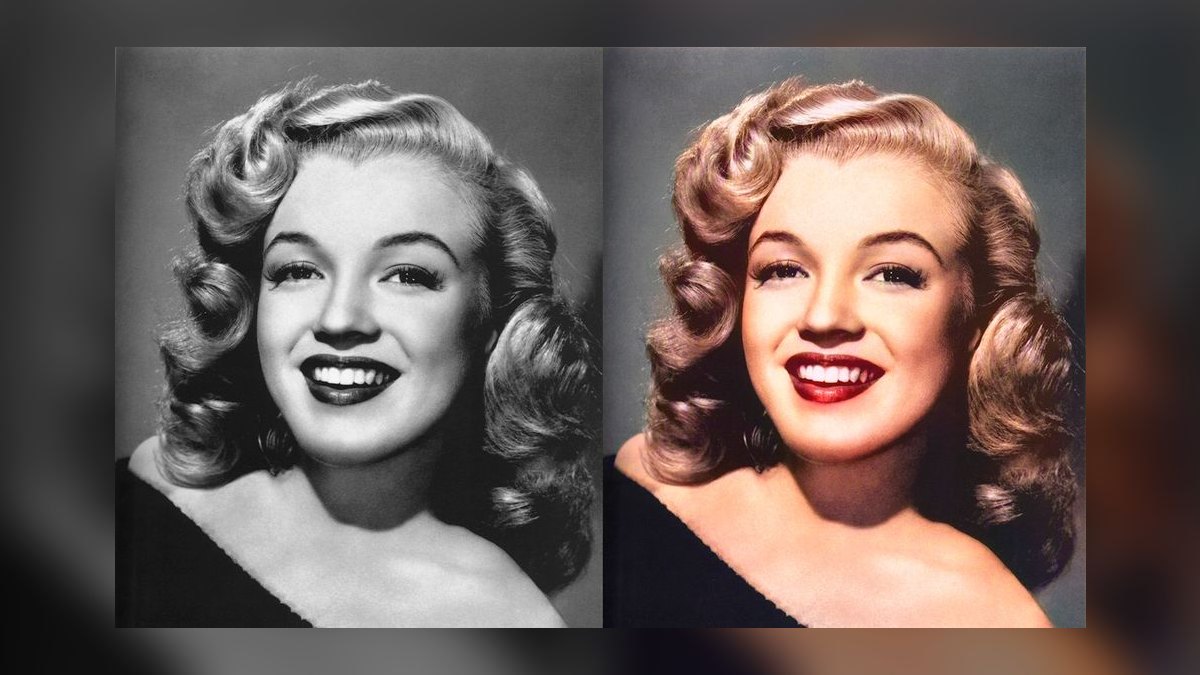
Hotpot.ai Colorize ranks seventh as the value champion: a genuinely usable free tier, then cheap transparent per-image pricing instead of a monthly subscription. For someone with a finite stack of photos who resents recurring bills, nothing here is cheaper per finished photo. The interface is plain — upload, colorize, download — and quality is dependable on everyday portraits and snapshots without any settings to learn.
It suits pay-only-for-what-you-use buyers and light developer work, since Hotpot exposes an API for wiring colorization into a workflow without standing up DeOldify. Background removal, picture restoration, and upscaling live on the same site, so a small job avoids four separate services. It lacks Palette.fm's hex steering and Remini's face rebuilding — you get competent color at the lowest per-image cost.
8. ImageColorizer
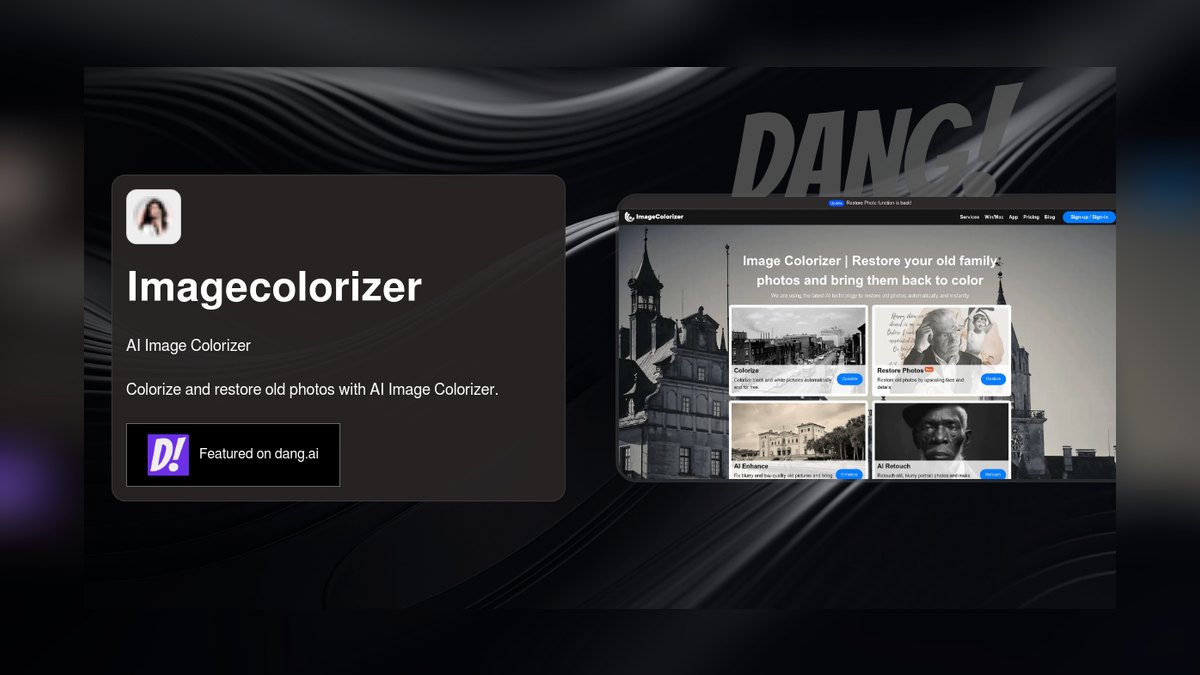
ImageColorizer ranks eighth as a dependable restoration-first web service where colorization is the headline feature, wrapped in companion tools: Retouch for scratches and Enlarge for upscaling. Results are reliable on standard portraits and landscapes, and paid plans handle batch work alongside single uploads. Desktop applications for Windows and macOS plus mobile apps mean large archives can stay on local machines rather than a browser tab.
It targets old-photo restoration rather than artistic work, which the presets and sample galleries reflect. Pricing starts with a limited free trial, then subscription or credits. There is no hex-level steering like Palette.fm's, and color quality does not lead the class — it is a solid mid-pack choice for someone who wants a dedicated restoration service with native apps instead of Hotpot's pure browser workflow.
9. Pixbim Colorize AI
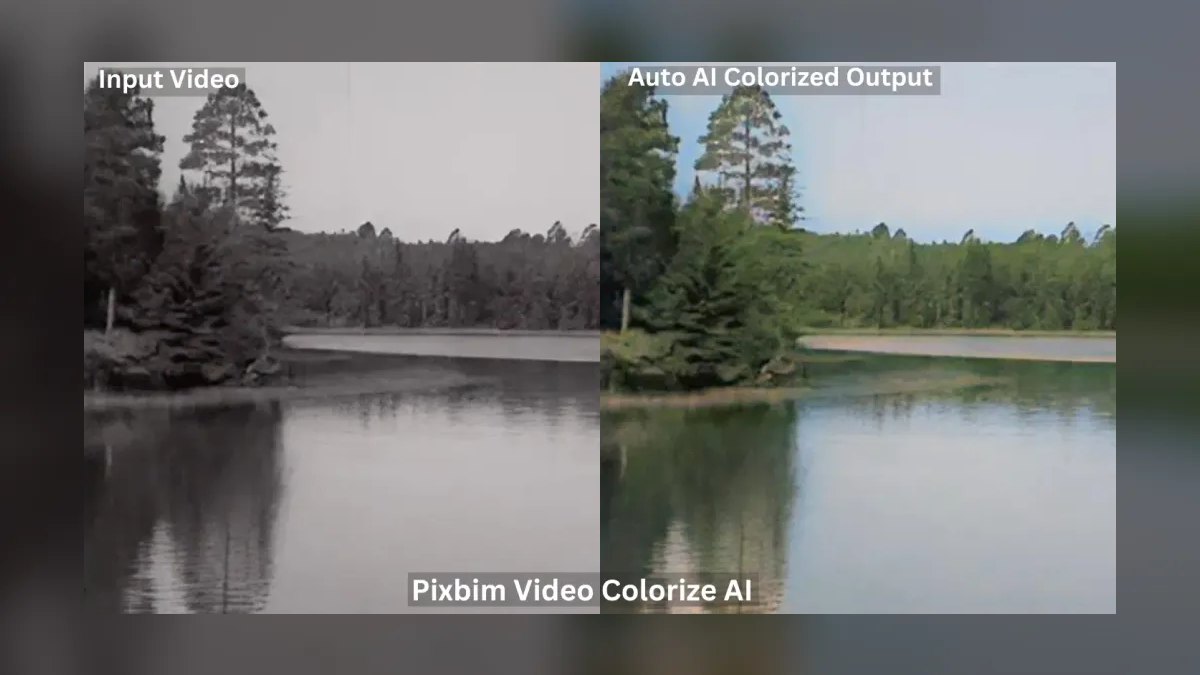
Pixbim Colorize AI ranks ninth for one differentiated reason: it is desktop software you buy once with a perpetual license, and it processes photos on your own computer instead of uploading them to a server. It runs on Windows and macOS and supports batch colorization of whole folders. Color quality is good rather than class-leading, and throughput depends entirely on your machine's hardware.
This is for privacy-conscious operators — sensitive estate images, family photos that should never touch someone else's cloud — and for anyone who refuses subscriptions while holding a large local library. DeOldify above is also fully local and costs nothing, but demands Python and a notebook; Pixbim sells the same offline guarantee as installable software with a real interface and a single up-front payment.
10. DeepAI Image Colorization API
DeepAI's Image Colorization API ranks tenth because output quality is the weakest here, but it is the easiest colorizer to call programmatically: a single HTTP request returns a colorized image. Pricing is pay-as-you-go on API usage with a free web demo for one-off tests, so a developer can process thousands of images on a schedule with no human in the loop and no infrastructure to maintain.
The real audience is engineers wiring colorization into a larger app as a service endpoint — batch jobs, prototypes, automated pipelines. The web tool works for a casual single image but is not why this exists. Hotpot.ai above also ships an API with better results and similar per-image economics; DeepAI's edge is the barest possible integration surface for automation-first work.
How we ranked these
We scored ten colorizers on six axes: realism (skin, foliage, sky, and fabric landing in believable ranges rather than muddy sepia), control (can you correct a wrong guess without a re-roll), resolution handling on high-megapixel scans, batch throughput for shoebox-sized archives, pricing transparency, and privacy terms covering who sees uploads and who owns output. Hard cases drove the ranking: crowd shots, signage, water damage, and pre-1920 prints.
We ignored sample galleries and marketing before-and-afters entirely — those are cherry-picked from images the model handles well. We ignored app-store star ratings, which reward speed and novelty over archival fidelity. We did not grade open-source tools on a curve; DeOldify met the same realism bar as paid services. Social-media virality and follower counts carried zero weight, as did vendor-supplied accuracy claims nobody can reproduce.
What to look for
Start from which job you actually have. If you know the true colors — Grandma's dress was teal — you need prompt-and-hex override, and Palette.fm is the only pick. If you have 200 faded family scans and no patience, MyHeritage In Color's forgiveness beats raw realism. If you bill clients per restoration, Photoshop's layer-based Colorize filter is the only workflow where you can mask and hand-correct downstream. Privacy-bound work runs local: DeOldify or Pixbim.
The common mistake is buying on output quality alone and discovering the license doesn't cover resale. Free tiers almost never grant commercial rights, and colorizing an image never transfers copyright in the underlying photograph. The second mistake is feeding the tool a phone snapshot of a print. Glare, paper texture, and JPEG artifacts defeat every model here — a 600 DPI flatbed scan changes results more than switching tools does.
Related questions
What is DeOldify and why does it matter?
DeOldify is Jason Antic's open-source colorization project, and much of this field is built on it — MyHeritage In Color licensed the technology behind it. Its NoGAN training approach was a genuine realism advance. The code lives on GitHub with notebooks that run on Google Colab, so you can colorize without owning a GPU or paying anything.
Does colorization also repair scratches and damage?
Not by default. MyHeritage pairs In Color with Photo Repair and Photo Enhancer, VanceAI bundles denoise and scratch repair, ImageColorizer ships Retouch, and Photoshop includes a Photo Restoration Neural Filter. Colorize-only endpoints like DeepAI leave damage untouched. If your scans are torn or foxed, pick a suite rather than a single-purpose colorizer.
Which tool works best on a phone?
Remini, from Bending Spoons, is the mobile-first pick and one of the most downloaded photo apps on iOS and Android. It rebuilds blurry faces convincingly and colorizes in the same pass. The catch is aggressive over-processing — faces can look smoothed or subtly altered, which makes it better for sharing than for archival accuracy.
Can I colorize photos without uploading them anywhere?
Yes. Pixbim Colorize AI is desktop software for Windows and macOS that processes entirely on your own machine and sells a one-time perpetual license instead of a subscription. DeOldify run locally does the same for free. Both matter for estate images, medical records, or anything you refuse to put on someone else's server.
What does Palette.fm's hex control actually do?
When the model paints a region wrong, you type a description like "navy wool coat, brass buttons" or paste an exact hex value, and it recolors that region toward your target. Palette also returns a row of distinct filters per upload — natural, modern, vintage, dramatic — so you pick the best of several rather than fighting one guess.
Is there an API for automated colorization?
Two. DeepAI's Image Colorization API returns a colorized image from a single HTTP request and prices pay-as-you-go, making it the natural fit for batch jobs and prototypes. Hotpot.ai also exposes an API at cheap per-image rates. Either saves a developer from standing up and maintaining a DeOldify deployment themselves.
Why does Photoshop cost so much more than the alternatives?
You are paying for what happens after colorization. The Colorize Neural Filter returns editable color on a layer you can mask, blend, dodge, burn, and refine with adjustment layers — no standalone web tool offers that. Access requires a Creative Cloud subscription, typically the Photography plan. For ten hobby photos it is overkill; for paid restorations it pays back.
How do credit-based pricing models compare to subscriptions?
VanceAI and ImageColorizer run on credits with limited free monthly allotments, which suits sporadic use but burns fast on a large batch — read the per-image credit cost before committing. Hotpot.ai charges transparent per-image fees with no fat monthly bill. Pixbim avoids the question entirely with a one-time perpetual license.
FAQ
Is AI photo colorization accurate to the real original colors?
No — it is a plausible reconstruction, not a recovery. The model predicts likely colors from patterns it learned during training, so grass, sky, and skin land roughly right while specific items like clothing and uniforms are guesses. Use a tool with manual override, such as Palette.fm, whenever you actually know the true colors.
What is the best free AI photo colorizer?
For polished free results with no technical setup, MyHeritage In Color (free with an account) and Hotpot.ai's free tier are the easiest starting points. For genuinely unlimited free use with no caps or watermarks, DeOldify on Google Colab is unbeatable — provided you are comfortable working inside a notebook.
Can I use colorized photos commercially?
Only under the right license. Palette.fm and most paid tools grant commercial rights on paid plans, while free tiers generally do not — you cannot legally resell free-tier output. You also still need rights to the underlying photograph itself, since colorizing someone else's image does not transfer copyright to you.
Will these tools fix scratches and blur too?
Some will. MyHeritage, VanceAI, ImageColorizer, and Photoshop pair colorization with scratch repair and face enhancement in the same account. Remini specializes in rebuilding blurry, low-resolution faces. Colorize-only services like DeepAI will not clean damage, so run a separate repair pass before or after coloring.
Are my uploaded photos kept private?
It varies, so read each tool's privacy policy before uploading anything sensitive. Cloud tools process images on their servers, which means your scan leaves your machine. If privacy is non-negotiable, run DeOldify locally or buy Pixbim Colorize AI, both of which keep every file on your own computer.
What resolution should I upload for best results?
The highest you have. A clean flatbed scan at 300–600 DPI colorizes far better than a low-resolution copy or a phone snapshot of a print, because glare, paper texture, and JPEG compression confuse every model on this list. Most paid tiers also output higher-resolution downloads than their free counterparts do.
Which tool is best for genealogy and family archives?
MyHeritage In Color, built into the genealogy platform and tuned specifically for old family photographs — portraits, weddings, military service photos, and the soft, damaged scans that fill real shoeboxes. It is forgiving with faded low-contrast prints and pairs with Photo Enhancer and Photo Repair for a full pipeline without switching apps.
Do colorized outputs carry a watermark or badge?
Some do. MyHeritage In Color adds a small colorized badge in the corner, removable on paid plans. Palette.fm's free tier limits you to reduced-resolution previews rather than watermarking. Remini's free tier runs ads and caps daily processing. Check the free-tier terms before you commit an entire archive to one service.
Which tool handles large batches best?
DeOldify wins outright if you can script it — thousands of files, no per-image cost, fully reproducible output. Among commercial options, VanceAI's PC Toolkit desktop app and Pixbim both batch folders locally, and ImageColorizer supports batch work on paid plans. DeepAI's API is the pick when the batch is part of an automated pipeline.
Should I keep the original black-and-white scan?
Always. AI colorization is an educated guess, not a record — the model invents a sky's blue or a uniform's shade from training data, not from anything present in your photo. For historical, archival, or legal use, label colorized images as reconstructions and preserve the untouched original alongside them.
Sources
- https://palette.fm/
- https://www.myheritage.com/incolor
- https://helpx.adobe.com/photoshop/using/neural-filters.html
- https://github.com/jantic/DeOldify
- https://vanceai.com/old-photo-colorizer/
- https://remini.ai/
- https://hotpot.ai/colorize-picture
- https://www.pixbim.com/colorize-black-and-white-photo
- https://deepai.org/machine-learning-model/colorizer
- https://colab.research.google.com/github/jantic/DeOldify/blob/master/ImageColorizerColab.ipynb
Related on PULSE
- [More ai tools for colorizing old photos rankings and buying guides](/knowledge)
- [PULSE Tools and calculators](/tools)
- [Everything on PULSE RevOps](/)
 pulse-ai-infrastructureThe 10 Best AI Tools for Decision Making in 2027
 pulse-ai-infrastructureThe 10 Best AI Tools for Subtitles and Captions in 2027
 pulse-ai-infrastructureHow do you design a disaster recovery plan for AI services?
 pulse-ai-infrastructureThe 10 Best AI Tools for Sales Call Summaries in 2027
 pulse-ai-infrastructureThe 10 Best AI Tools for No-Code App Building in 2027
 pulse-ai-infrastructureThe 10 Best AI Tools for Concept Art in 2027
 pulse-ai-infrastructureThe 10 Best AI Tools for Meta Description Writing in 2027
 pulse-ai-infrastructureThe 10 Best AI Tools for Writing Movie Scripts in 2027
 pulse-ai-infrastructureThe 10 Best AI Tools for Product Design in 2027
 pulse-ai-infrastructureThe 10 Best AI Tools for Wix Websites in 2027