
“Seeking enablement leadership.” — LinkedIn Banner
 Curated byKory White · Fractional CRO · Maryland
 PULSEKNOWLEDGE LIBRARY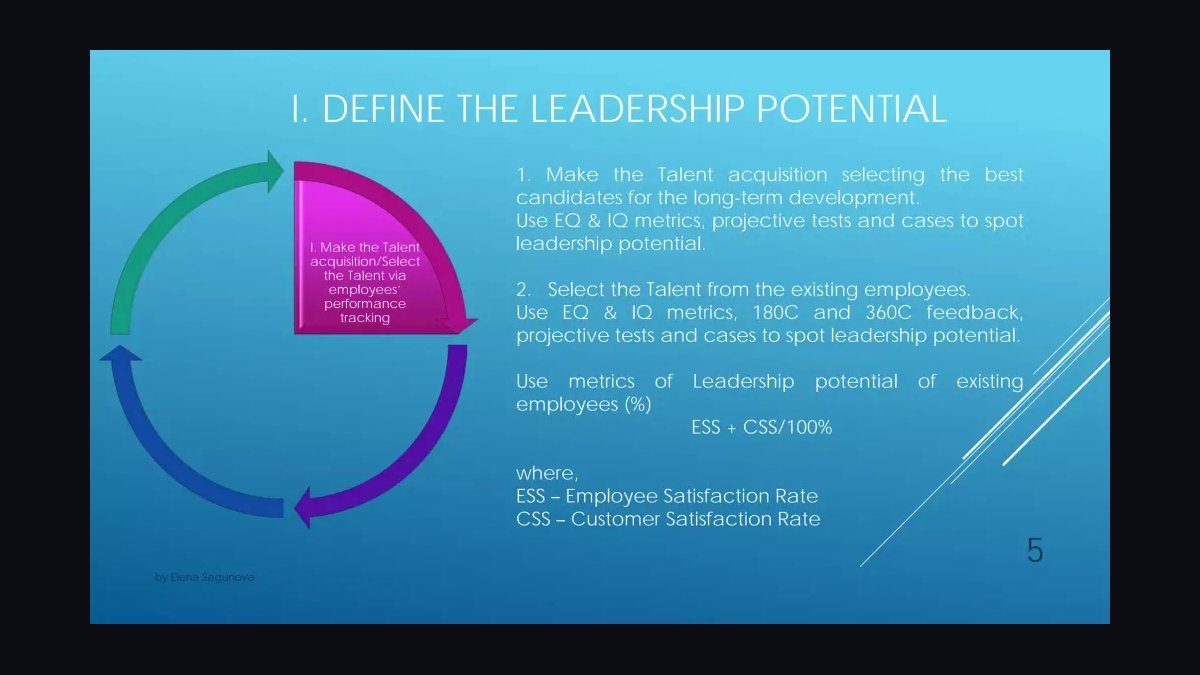
A “Seeking enablement leadership.” LinkedIn banner is a 1584×396 px cover image that signals you want a leadership seat in enablement — the function that equips sales, partner, or customer teams with skills, content, and process. It tells recruiters and peers you are pursuing strategy and program ownership, not task execution. Pair it with an aligned headline, quantified About section, and recent proof of impact.
The two options compared: signal openly versus signal quietly
When you decide to broadcast that you are Seeking an enablement leadership role, you are really choosing between two distinct visibility strategies on LinkedIn: the public banner and the private, targeted approach. Both work. They attract different opportunity flows, carry different risks, and suit different career situations. Understanding the trade-offs before you upload anything is the difference between a banner that generates qualified inbound and one that quietly damages your current position.
The public banner option means replacing your default cover image with a designed graphic — typically the 1584×396 px SVG or PNG template — that carries a short statement like “Seeking enablement leadership.” Anyone who visits your profile sees it: recruiters, peers, former colleagues, customers, and your current employer if they look. The upside is reach. LinkedIn profile views are heavily driven by banner and headline changes because the platform surfaces “profile updated” signals in feeds and search. A banner change is one of the few low-effort actions that reliably lifts profile views for a short window. Recruiters who search by keyword often scan banners as a fast filter, so an explicit statement compresses their evaluation time and increases the odds they shortlist you without a full read.
The quiet option is the inverse. You keep a neutral or brand-aligned banner, and instead signal availability through LinkedIn’s “Open to Work” recruiter-only setting, targeted outreach to a curated list of hiring managers, and referrals through your network. Nothing is publicly visible except to LinkedIn’s recruiter product. The upside is safety: your current employer’s leadership is unlikely to stumble onto a public declaration. The downside is reach. Recruiter-only signals depend on recruiters actually searching that filter, and many hiring managers for enablement roles — especially at Series A through Series C companies — do not run structured recruiter searches at all. They hire from network, from content, and from inbound.

There is a third, hybrid option worth naming because it is often the best fit for senior leadership candidates: a banner that states a point of view rather than an availability status. Instead of “Seeking enablement leadership,” the banner reads something like “Enablement that shortens ramp.” That signals expertise and openness without the word “seeking,” which some candidates find carries a whiff of desperation at the director and VP level. The trade-off is clarity. A point-of-view banner attracts fewer explicit recruiter pings but tends to attract higher-quality conversations from people who already understand the function.
The core comparison comes down to three variables: how safe your current situation is, how broad your target market is, and how much you are willing to work the network versus wait for inbound. If you are between roles, the public banner is nearly always correct — there is no employer to protect and every additional impression helps. If you are employed and passively looking, the hybrid or quiet approach usually wins. If you are employed and actively looking but your employer is unlikely to check your profile, the public banner is a reasonable calculated risk.

One more dimension: geography and industry norms. In US B2B SaaS, public job-seeking banners are common and largely accepted, particularly in go-to-market functions like sales, customer success, and enablement. In more conservative industries — financial services, healthcare, some enterprise hardware — a public “seeking” banner can read as a negative signal about discretion. If you are targeting a move into a conservative sector, consider the point-of-view banner instead.
How to decide between them
The decision tree below walks through the practical logic. Start with your employment status, then layer in employer visibility risk and target market breadth. The branches are not exhaustive, but they cover the situations most enablement candidates actually face.
The logic in plain terms: unemployment removes the downside of public signaling, so take the reach. Employment adds a downside, so evaluate whether your employer will actually see it. If they will not, public signaling is still efficient. If they will, use the recruiter-only setting and compensate for lower reach with deliberate outreach. Then, regardless of path, decide whether your banner should say “Seeking” or state a point of view — and that decision hinges on how narrow your target market is. A narrow niche rewards specificity over availability.

A practical note on the mechanics: LinkedIn’s “Open to Work” feature has both a public version (a green frame on your profile photo) and a recruiter-only version. The recruiter-only version is the one to use if you are employed and want to stay quiet. You can also set the “Open to Work” details — job titles, location, start date — which feed LinkedIn’s recruiter search. Set the job titles to the exact strings recruiters search: “Director of Sales Enablement,” “Head of Enablement,” “VP Enablement,” “Sales Enablement Manager,” and so on. The banner and the Open to Work settings should tell the same story.
Concrete numbers behind each option
Numbers matter here because the decision is partly a math problem about expected inbound. The figures below are directional benchmarks drawn from widely reported LinkedIn usage patterns and enablement hiring norms — treat them as planning assumptions, not guarantees, and calibrate against your own profile analytics.

Profile view lift after a banner or headline change: candidates typically see a short-term spike in the range of 2x to 5x their baseline weekly profile views for the first one to two weeks, decaying back toward baseline within 30 to 45 days. If your baseline is 40 views per week, expect roughly 80 to 200 in week one, then a decline. This is why a banner alone is a weak long-term strategy — it is a spike, not a plateau.
Inbound recruiter messages: a public “Seeking” banner combined with an aligned headline and an active posting cadence typically produces somewhere between 3 and 15 inbound recruiter messages per month for a mid-to-senior enablement candidate in a major metro. The quiet recruiter-only approach produces fewer — often 1 to 5 per month — but the messages are frequently better matched because the recruiter already filtered on your Open to Work titles.
Enablement team sizes and reporting lines: in B2B SaaS, enablement functions commonly range from a single owner at companies under roughly 50 quota-carrying reps to teams of 5 to 15 people at companies with 200 or more reps. Reporting lines vary — enablement frequently sits under the CRO, sometimes under sales operations, and less often under HR or L&D. Knowing this helps you target the right titles: “Director of Sales Enablement” and “Head of Enablement” are the most common leadership titles, with “VP of Enablement” appearing more at larger organizations.

Ramp time benchmarks: new-rep ramp to first quota attainment is commonly cited in the range of 3 to 9 months depending on segment and deal complexity. Enablement leaders are frequently hired with a mandate to reduce that number, and improvement targets in the 20% to 40% range are common in job descriptions. If you have moved ramp from, say, 6 months to 4 months, that is a 33% reduction and a strong banner-adjacent proof point.
Quota attainment and win-rate benchmarks: enablement programs are often justified against quota attainment (commonly targeted in the 60% to 80% of reps at or above quota range) and win rate by segment. A credible enablement resume line reads like “lifted team quota attainment from 55% to 72% over four quarters.”

Time-to-fill for enablement leadership roles: director-level and above enablement searches commonly run 6 to 12 weeks from first interview to offer, with total search cycles of 2 to 4 months. That means your banner should stay up long enough to be seen across a full search cycle — typically 2 to 6 months — not a single week.
Cost of the wrong signal: if a public banner damages your standing with a current employer, the downside can be significant — lost internal promotion consideration, an awkward conversation, or an accelerated exit. Weigh that against the upside of roughly 3 to 15 extra inbound messages per month. For many employed candidates, the math favors the quiet approach.
These numbers should shape your plan. If you are unemployed, the expected value of the public banner is clearly positive. If you are employed and the downside risk is a lost promotion, the quiet path plus deliberate outreach is usually the better expected-value play.
Implementation details and sequencing
Getting the banner right is a sequencing problem. The graphic is the last step, not the first. If you upload a “Seeking enablement leadership.” banner onto a profile whose headline still says “Sales Training Specialist” and whose About section is a list of job duties, you create the cognitive dissonance that makes recruiters scroll past. Build the profile first, then add the banner.
Step one: define your target titles and segments. Write down the exact job titles you want — for example, “Director of Sales Enablement,” “Head of Enablement,” “Senior Manager, Sales Enablement,” “VP of Customer Enablement.” Write down the company profile: B2B SaaS, roughly 100 to 1,000 employees, Series B through public, sales team of 50 to 300 reps. This constrains everything downstream.

Step two: rewrite your headline. It should contain the word “Enablement” and a leadership signal. Examples: “Enablement Leader | Ramp Time, Quota Attainment, Rep Productivity” or “Sales Enablement Leader | Building Revenue-Ready Teams.” Keep it under roughly 220 characters so it does not truncate in search results.
Step three: rewrite your About section with quantified outcomes. Lead with a one-line positioning statement, then three to five bullets, each with a number. Example bullet: “Designed a 4-week onboarding program that cut time-to-first-quota from 6 months to 4 months for a 50-rep team.” Numbers make the narrative credible and give recruiters something to repeat internally.
Step four: build the banner. Use the 1584×396 px template. Keep the text short — the statement plus at most a supporting line. High contrast, large type, no clutter. If you use the template’s pulse motif, keep it subtle. Export as PNG for a direct upload or SVG if you plan to edit in Canva, Figma, or PowerPoint.

Step five: align the Open to Work settings with the banner. Set the job titles to your target list, set the location, and choose recruiter-only or public depending on the decision from the earlier section.
Step six: publish and post. A banner change alone generates a spike. Pair it with two to three posts per week — one tactical (a discovery-call playbook structure, a coaching cadence) and one strategic (why enablement should report to the CRO). Over 90 days this builds credibility that outlasts the banner.

Step seven: measure and iterate. Track profile views, search appearances, inbound messages, and connection requests weekly. If inbound is flat after four to six weeks, the problem is usually the headline or About section, not the banner. Test one variable at a time.
The sequencing matters because each step reinforces the last. The banner is a headline for the profile; the profile is the article. A strong headline over a weak article still fails. A weak headline over a strong article also fails, because nobody clicks through. Do them together.
One more implementation detail: the banner is not permanent. LinkedIn lets you change your cover image as often as you like, and there is no penalty for iterating. Run one version for four to six weeks, note the inbound volume and quality, then test a variant. A version that says “Seeking enablement leadership.” versus a version that says “Enablement that shortens ramp.” will produce measurably different inbound, and the data will tell you which framing your market responds to.
Related questions
What size should a LinkedIn banner be?
LinkedIn cover images render at 1584×396 px with roughly a 4:1 aspect ratio. Design at that exact size to avoid cropping or letterboxing. Keep critical text away from the lower-left area, where your profile photo overlaps on desktop and mobile.
Can I use this banner if I am employed?
Yes, but weigh the risk. If your employer is likely to see a profile update, use LinkedIn’s recruiter-only “Open to Work” setting instead, or choose a point-of-view banner that signals expertise without the word “Seeking.” Public signaling while employed can cost you internal promotion consideration.
What headline pairs best with this banner?
A headline that repeats the word “Enablement” and adds a leadership signal plus an outcome. For example: “Enablement Leader | Ramp Time, Quota Attainment, Rep Productivity.” Keep it under about 220 characters so it does not truncate in search results.
How long should the banner stay up?
Plan for two to six months, which covers a typical director-level enablement search cycle of roughly 6 to 12 weeks from first interview to offer. Remove it once you accept a role or decide to stop signaling availability.
Does the banner alone generate opportunities?
Rarely. A banner change produces a short profile-view spike that decays within 30 to 45 days. Sustained inbound comes from an aligned headline, a quantified About section, and consistent posting — the banner is the anchor, not the engine.
FAQ
What does “Seeking enablement leadership.” mean on a LinkedIn banner? It signals that the profile owner is pursuing a leadership role in enablement — the function that equips sales, partner, or customer teams with skills, content, process, and tools. It tells recruiters and peers the person wants strategy and program ownership, not task execution. It is a positioning statement, not just an availability flag.
Is this banner only for people who are unemployed? No. Many employed professionals use it to attract better-fit opportunities while staying selective. That said, employed candidates should weigh visibility risk carefully and often choose the recruiter-only “Open to Work” setting or a point-of-view banner instead of a public “Seeking” statement.
What kinds of companies hire for enablement leadership? Mostly mid-market and enterprise B2B technology companies, especially SaaS firms with sales teams of roughly 50 to 300 or more quota-carrying reps. Startups scaling past Series A and larger organizations formalizing an enablement function are also common. Titles include Director of Sales Enablement, Head of Enablement, and VP of Enablement.
Will this banner hurt my chances with my current employer? It can, if your employer sees the update and you have not discussed leaving. To reduce risk, adjust your profile visibility settings so your current company is excluded from updates, or use the recruiter-only Open to Work feature. Only go public when you are ready for that conversation.
What should I pair with this banner to get better results? An aligned headline containing “Enablement” and a leadership signal, a quantified About section with outcomes like ramp-time reduction or quota-attainment lift, a featured post about a real enablement initiative, and a consistent posting cadence of two to three times per week. The banner is the anchor; the profile is the substance.
How do I measure whether the banner is working? Track four metrics weekly: profile views, search appearances, inbound recruiter messages, and connection requests. Expect a short spike in the first one to two weeks, then a decay. If inbound stays flat after four to six weeks, test the headline or About section before changing the banner again.
Sources
- LinkedIn Help — cover image and profile settings: https://www.linkedin.com/help/linkedin
- LinkedIn Official Blog — career and networking insights: https://blog.linkedin.com
- Harvard Business Review — leadership and organizational behavior: https://hbr.org
- Society for Human Resource Management (SHRM) — talent management resources: https://www.shrm.org
- McKinsey & Company — research on organizational performance: https://www.mckinsey.com
- Center for Creative Leadership — leadership development publications: https://www.ccl.org
- Association for Talent Development (ATD) — learning and development research: https://www.td.org
- Gartner — sales and revenue operations research: https://www.gartner.com
Related on PULSE
- [Coach to the top — Sales Leadership Banner](/knowledge/gb0427)
- [Sales Enablement — LinkedIn Banner](/knowledge/gb0026)
- [“Seeking a RevOps role.” — LinkedIn Banner](/knowledge/gb0358)
- [“Seeking my next AE seat.” — LinkedIn Banner](/knowledge/gb0354)
- [“Open to sales leadership roles.” — LinkedIn Banner](/knowledge/gb0353)
- [Sales Enablement Lead — LinkedIn Banner](/knowledge/gb0234)
Read it free — or make it yours for $1.
@Kory-White- · if Venmo asks, the last 4 of my number are 2012
 graphicMid-Market AE — LinkedIn Banner
 graphic“Start your sales career here.” — LinkedIn Banner
 graphicSales Ops Analyst — LinkedIn Banner
 graphic"Sell the problem." — LinkedIn Banner
 graphic“Stay in the deal.” — LinkedIn Banner
 graphicHow to find champions before the first call in 2027
 graphic“Clarity closes.” — LinkedIn Banner
 graphicForecast Accuracy Heatmap in 2027
 graphicProduct Marketing Lead — LinkedIn Banner
 graphicInspect. Qualify. Commit. — LinkedIn Wallpaper