
Inspect. Qualify. Commit. — LinkedIn Wallpaper
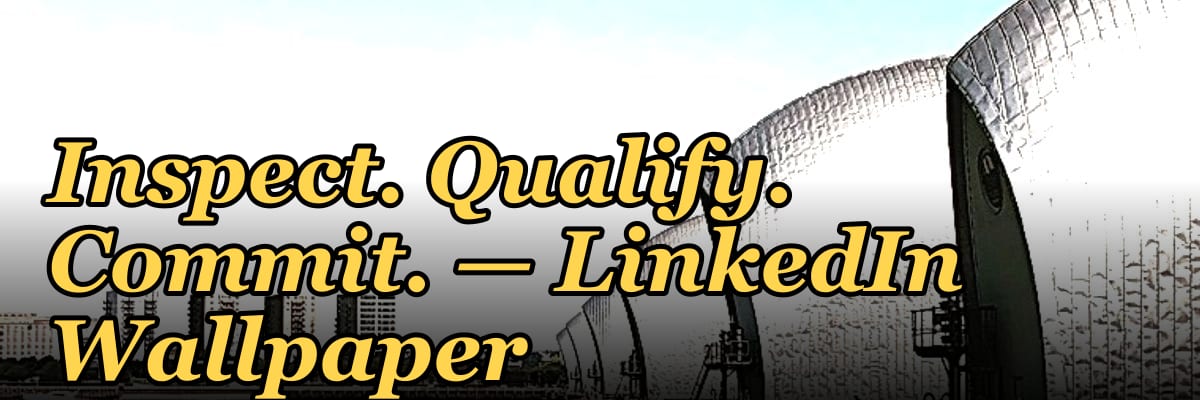
"Inspect. Qualify. Commit." is a free, dark, on-brand LinkedIn cover banner built by PULSE. It's a scalable SVG sized exactly to LinkedIn's profile background slot (1584×396 px), with the three-word sales mantra set in a clean sans-serif over a monogram backdrop and the Pulse mark. Download it as-is, or use the color picker to recolor it to your brand and export it as SVG or PNG — no sign-up, no watermark, no attribution required. The phrase itself is a discovery discipline: inspect the prospect's situation, qualify whether it's a real fit, then commit to a clear next step.
Inspect. Qualify. Commit. — LinkedIn Wallpaper

A dark, on-brand LinkedIn cover wallpaper — a bold monogram backdrop with an "Inspect. Qualify. Commit." line and the Pulse mark. A clean, branded banner for your profile.
Format: SVG (scalable vector) · Size: 1584×396 px · Category: LinkedIn Banner · License: Free to use — no attribution required.
[⬇ Download this graphic](/graphics/assets/gb0380.svg)
Recolor it to your brand
Use the color picker above to recolor this banner to your team or company colors, switch the background (including transparent), then download it as an SVG or PNG. No sign-up, no watermark.
How to use it
It scales cleanly to the LinkedIn cover slot (1584×396) — download the PNG and drop it straight onto your profile, or open the SVG in Canva, PowerPoint, or Figma to add your name and tweak the layout. Keep the lower-left clear: your profile photo overlaps that corner on most screens.
Why "Inspect. Qualify. Commit." holds up
The phrase works because each word maps to a distinct decision, and skipping any one of them is where deals quietly go wrong.
Inspect is the part most reps rush. Before you decide anything, read the situation honestly: what changed at the account, who's involved, what problem they're actually trying to solve. Deliberate inspection is a guard against confirmation bias — the well-documented tendency to notice the signals that support what you already want to do and discount the ones that don't.
Qualify is where you trade ambiguity for a decision. Frameworks like BANT, MEDDIC, and CHAMP exist for one reason: to force explicit answers to need, budget, authority, and timing instead of leaving a deal in a comfortable gray zone. Qualifying isn't disqualifying for its own sake — it's deciding where your time should and shouldn't go this week.
Commit leans on one of the most reliable findings in persuasion research: Robert Cialdini's principle of commitment and consistency, which holds that people act in ways consistent with steps they've already taken. When a buyer has worked through inspect and qualify with you, agreeing to a clear next step feels like the natural continuation rather than a pressure point. The job in the commit phase is to make the next step small, specific, and dated.
Displaying the framework on your profile sends a quiet signal to your network: you're methodical, not pushy. On a feed full of hustle messaging, "I'll understand your world before I ask for your business" is a differentiator.
Putting the framework to work
A banner is only worth the behavior it triggers. A simple way to operationalize it:
- Inspect (daily): Review active deals in your CRM and note what's actually new — company news, a leadership change, a funding event. Set Sales Navigator alerts on your top accounts. Observe before you act.
- Qualify (weekly): Score each open deal on need, budget, authority, and timing. Low scores go to nurture; high scores earn a real next-step. The point is to make the call explicitly rather than carrying everything forward by default.
- Commit (in every working block): Batch your outbound and close activity so you're not context-switching all day — frequent task-switching is a well-known drag on focused work. For committed deals, send the proposal or book the close call; log the outcome.
- Reflect (Friday): Glance at the banner and ask whether you truly inspected, qualified honestly, and committed with confidence this week.
Common pitfalls: jumping to qualification before you've inspected; staying in qualification forever because there's always one more question; asking for commitment the buyer isn't ready for; and letting the banner become wallpaper you stop noticing. Watch deal size, close rate, and cycle length over time — those are the metrics the discipline should move.
How to design your own version
If you want to adapt the concept for your personal brand, a few honest design principles:
- Contrast and color: High contrast reads as clarity. Dark backgrounds (charcoal, navy, deep green) signal authority; light backgrounds suggest openness. Pick one accent that fits your field and stop there — the idea is simplicity.
- Type and rhythm: A clean sans-serif (Inter, Montserrat, Helvetica) keeps it legible on mobile, where most people will see it. The periods after each word create deliberate pauses that mirror the steps. Arrows (Inspect → Qualify → Commit) work if you prefer to show progression.
- Negative space: Center the words and leave the canvas mostly empty. A cluttered banner reads as a cluttered process.
- Safe zone: Your profile photo overlaps the lower-left on most layouts, so keep text out of that corner.
- Specs and tools: LinkedIn's cover slot is 1584×396 px. Canva and Figma both have free templates; export as PNG to avoid JPEG artifacts, or keep it as SVG so it stays sharp at any size — which is exactly why the PULSE version above ships as an SVG.
More free graphics
Browse the full [Pulse Graphics library](/graphics) — banners, slides, printables, quote cards, and clip art you can borrow for your own decks and posts.
Related on PULSE
- [Inspect with rigor — Sales Management Banner](/knowledge/gb0428)
- [Forecast Commit / Best Case / Upside](/knowledge/gb0508)
- [“COMMIT MEANS COMMIT” — Sales Floor Print](/knowledge/gb0171)
- [“Qualify hard. Close easy.” — Quote Card](/knowledge/gb0147)
- [“Qualify hard, close easy.” — LinkedIn Banner](/knowledge/gb0287)
- [Make it predictable. — LinkedIn Wallpaper](/knowledge/gb0420)
Why This Mantra Works for Sales & Revenue Teams
"Inspect. Qualify. Commit." isn't just a wallpaper — it's a lightweight sales framework that prevents the two most common revenue killers: chasing unqualified leads and skipping discovery. Unlike lengthy methodologies (MEDDIC, BANT, Challenger), this three-word loop fits on a banner because it's designed for quick mental checks during pipeline reviews or cold calls.
- Inspect replaces assumption with curiosity. Instead of pitching immediately, you probe for budget, authority, need, and timeline — but without rigid checklists. A typical inspect phase lasts 15–30 minutes in a first call.
- Qualify separates "interested" from "invested." Real qualification means the prospect has shared pain, timeline, and decision process. If they won't share these in 2–3 interactions, they're likely not qualified.
- Commit is the overlooked step. Many reps get verbal interest but no next action. Commitment means a scheduled demo, an intro to procurement, or a signed NDA — something that costs the prospect time or reputation.
The framework works for SDRs, AEs, and even founders doing their own outbound. It's especially useful for teams moving from volume-based to quality-based pipelines.
How to Customize the Wallpaper for Your Brand
The PULSE tool lets you recolor the SVG in seconds — no design skills needed. Here's how to make it match your company's visual identity:
- Open the wallpaper link (from the direct answer above) in any modern browser — Chrome, Firefox, Safari, or Edge all work.
- Click the color swatch (usually a circle or palette icon) near the top-right of the editor. You'll see a color picker with hex, RGB, and HSL options.
- Paste your brand's primary hex code — for example,
#0056B3for a corporate blue or#E63946for a bold red. The background, text, and monogram will update instantly. - Export as SVG for crisp scaling on retina displays (LinkedIn supports retina, so SVG is best). PNG works if you need a static file for email signatures or slide decks.
- Download is immediate — no account creation, no email capture, no watermark overlay.
Pro tip: If your brand uses dark mode on LinkedIn (common for SaaS and B2B founders), the dark background of this wallpaper fits naturally without clashing. For lighter profiles, use a pale brand color and export with a white or light gray background.
When to Use This Wallpaper (and When to Skip It)
This banner works best for specific LinkedIn profile scenarios. Here's a quick decision guide:
| Use It When… | Skip It When… |
|---|---|
| Your profile headline mentions sales, revenue, or growth | Your role is purely operational or administrative |
| You're actively prospecting or building pipeline | You're in a non-revenue function (HR, legal, support) |
| You want a subtle "I know what I'm doing" signal | Your personal brand is about thought leadership, not process |
| Your profile photo is professional and current | Your profile lacks a photo or uses a casual selfie |
The "Inspect. Qualify. Commit." wallpaper acts as a trust signal to other sales professionals and decision-makers. It says you value discipline over hustle. But if your profile targets recruiters for non-sales roles, a more neutral banner (company logo or industry graphic) will serve you better.
For maximum impact, pair this wallpaper with a headline that includes "CRO," "Revenue Operations," "Sales Leadership," or "Fractional Sales" — the three-word mantra then reinforces your expertise without extra text.
Design & Typography Details
The banner uses a restrained dark palette (typically #1a1a2e to #16213e) with high-contrast white or light gray text for readability. The "Inspect. Qualify. Commit." line is set in a geometric sans-serif like Montserrat or Inter at roughly 48–56 px, centered on the canvas. The monogram backdrop is a subtle, semi-transparent letter or logo mark (often "P" or a custom glyph) scaled to fill the left third of the banner, adding depth without distracting from the headline. The Pulse mark — a small circular emblem — sits in the bottom-right corner as a brand anchor. The SVG structure uses clean <rect>, <text>, and <path> elements, making it easy to edit colors, fonts, or layout in any vector tool (e.g., Figma, Illustrator, or directly in code).
When to Use This Banner
This wallpaper works best for sales professionals, SDRs, or B2B founders who want to signal a methodical, consultative approach to prospecting. It's ideal for:
- Active deal cycles — reinforces your focus on discovery and qualification.
- Team or company pages — consistent branding across multiple profiles.
- Career transitions — shows you're serious about sales methodology.
Avoid using it if your brand uses light/white themes (the dark background may clash), or if your profile already has a busy header (the bold monogram can compete with other visuals). For lighter brands, simply recolor the background to #f4f4f9 and the text to #222 — the SVG color picker handles this in seconds.
Customization Beyond Color
Beyond recoloring, you can edit the SVG directly to:
- Swap the monogram — replace the backdrop letter with your company initial or a simple icon (e.g., a diamond or arrow).
- Adjust the tagline — change "Inspect. Qualify. Commit." to a different 3-word mantra (e.g., "Discover. Validate. Close.").
- Resize for other platforms — the SVG scales cleanly to Twitter headers (1500×500 px) or YouTube banners (2560×1440 px) by adjusting the
viewBoxand element positions. No rasterization artifacts, since it's pure vector.
Sources
- LinkedIn Help Center — Add or edit a background photo — official guidance and the 1584×396 px cover-image spec.
- Robert B. Cialdini, *Influence: The Psychology of Persuasion* — the commitment-and-consistency principle behind the "commit" step.
- Daniel Kahneman, *Thinking, Fast and Slow* — System 1 vs. System 2 thinking and the value of deliberate evaluation over snap judgment.
- Harvard Business Review — Sales & decision-making coverage — research-backed articles on qualification and buyer behavior.
- MEDDIC qualification methodology — reference for the metrics/economic-buyer/decision-criteria qualification framework.
- Canva — LinkedIn banner templates — free templates and the recommended LinkedIn banner dimensions.
FAQ
What exactly is this graphic? It's a free LinkedIn cover banner (the wide background image behind your profile header), built by PULSE as a scalable SVG. The "Inspect. Qualify. Commit." line sits over a dark monogram backdrop with the Pulse mark.
What size and format is it, and will it fit my profile? It's an SVG sized to 1584×396 px — LinkedIn's exact cover-photo slot — so it drops in without cropping. Because it's vector, you can also export a PNG at any scale without losing sharpness.
Is it really free, and do I need to credit anyone? Yes. It's free to use with no attribution required, no sign-up, and no watermark. You can use it on your personal profile or for internal team profiles.
Can I change the colors to match my brand? Yes. Use the color picker on the page to recolor the banner to your team or company colors, switch the background (including a transparent one), then download it as SVG or PNG.
Can I edit it in Canva, Figma, or PowerPoint? Yes. Open the SVG in any of those tools to add your name, a tagline, or your logo. Keep text out of the lower-left corner, since your profile photo overlaps that area on most screens.
What does "Inspect. Qualify. Commit." actually mean for selling? It's a discovery discipline: inspect the prospect's real situation before forming an opinion, qualify whether there's genuine need, budget, authority, and timing, then commit to a specific, dated next step. The banner is a daily reminder to run all three in order rather than rushing to the close.
 tlHow Many Sales Reps Do I Need to Hire for My SaaS Company to Hit Next Year''s Goal?
 tlHow Many Sales Reps Do I Need to Hire for My Landscaping Company This Year?
 tlHow Many Membership Sales Reps Do I Need to Hire for My Gym?
 tlHow Many Sales Consultants Do I Need to Hire for My Medical Spa?
 pulse-toolsHow Many Salespeople Do I Need to Hire for My Car Dealership?
 pulse-toolsHow Many Salespeople Should I Schedule on My Auto Dealership Floor Each Day?
 pulse-toolsHow Many Sales Reps Do I Need to Hire for My Painting Company to Grow Next Year?
 pulse-toolsHow Many Sales Reps Do I Need to Hire for My HVAC Company to Hit Its Growth Target?
 pulse-aquariumsTop 10 Canister Filters 2027
 pulse-toolsHow Many Salespeople Should I Schedule Each Day at My Jewelry Store?