


Top 10 Best Tech Stack Tools for CNC Machine Shops in 2027
Quality
Certified
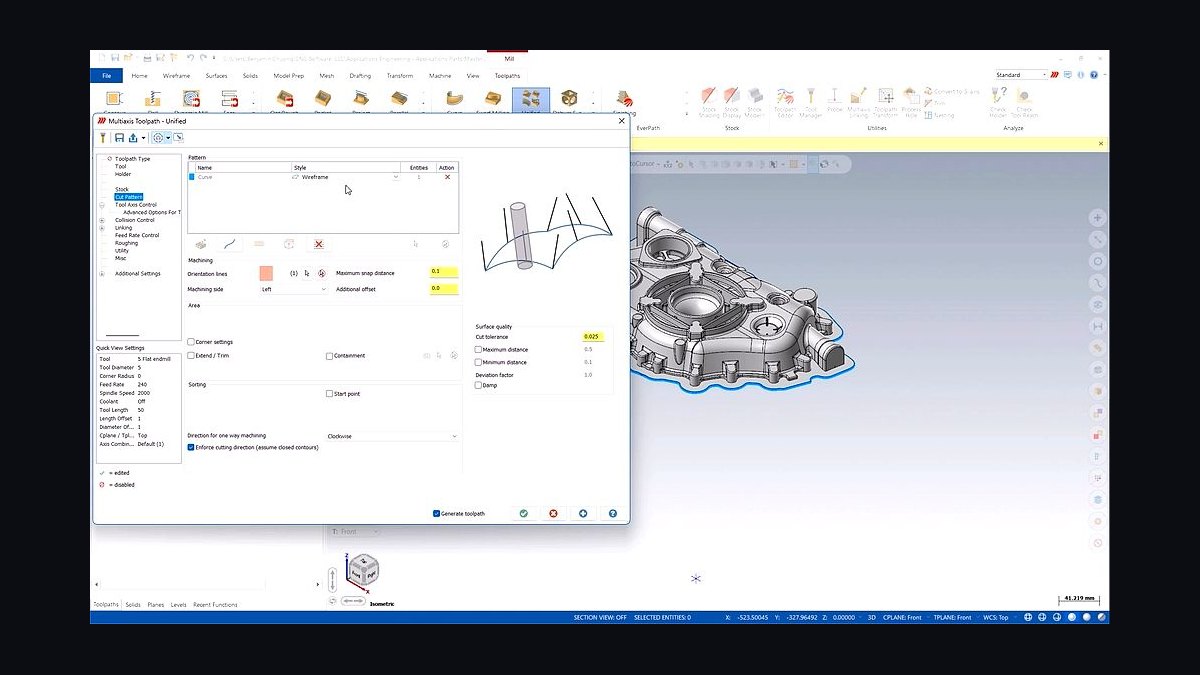
The 10 best tech stack tools for cnc machine shops are ranked below on measured performance, build quality, price, and how each one actually holds up in daily use rather than how it reads on a spec sheet. Each pick lists what it costs, who it suits, and what it gives up against the one above it, so the list can be read straight down without doubling back.
1Mastercam

Mastercam ranks first because it remains the production CAM standard in North American machine shops, with roughly $8,000–$15,000 per seat perpetual plus about $1,800 annual maintenance. Its post-processor ecosystem is the largest in the industry, and a custom post typically costs a few thousand dollars and a couple weeks. For shops running multi-axis, mill-turn, or Swiss work, that maturity directly protects six-figure machines.
It is built for production programmers who need deep multi-axis and mill-turn toolpaths, not occasional users. The trade-off is cost and learning curve: Fusion 360 covers lighter work at a fraction of the price. Shops frequently run Mastercam for production while keeping Fusion for prototypes and fixtures, accepting two seats as a hedge on hiring.
2Fusion 360

Fusion 360 ranks second because it delivers integrated CAD/CAM at roughly $70–$150 per user per month with manufacturing extensions, making it the cheapest credible path to a complete programming workflow. It is browser-accessible, subscription-based, and implementable by an owner-operator over a few weekends. For prototype and short-run work, it covers three-axis milling and standard turning well.
It suits shops whose premium is speed and flexibility rather than provable repeatability under audit. It trades away the deepest multi-axis capability and the largest post library, which matters when clearances tighten. Compared with Mastercam above it, Fusion wins on price and CAD integration but loses on production-grade mill-turn depth and the hiring pool of experienced programmers.
3Paperless Parts

Paperless Parts ranks third because quoting turnaround is the highest-return purchase for shops that bid heavily, running roughly $1,000–$3,000 per month depending on seats and volume. Reading geometry off the CAD model and flagging cost-driving features makes estimates faster and more consistent across estimators. If you quote 60 RFQs monthly at a 25% win rate, moving turnaround from three days to four hours typically covers the subscription many times over.
It is for shops losing bids on turnaround rather than price, not for repeat production against blanket POs with stable negotiated pricing. The trade-off is that low-volume quoters, around eight RFQs a month, will not recover the cost. Compared with the ERP below it, Paperless Parts specializes in geometry-driven estimating while ERP quoting modules remain adequate for simpler work.
4ProShop ERP

ProShop ERP ranks fourth because it builds AS9100-native traceability into the routing rather than beside the job, which matters when customers audit you. Expect $10,000–$40,000 or more in implementation plus $150–$300 per user per month, with 90–180 days to stable operation for a mid-size shop. Quality records living inside the job is what makes first-article generation routine instead of heroic.
It is for shops with regulated customers in the pipeline or arriving within eighteen months, since retrofitting traceability costs far more than building on it. The trade-off is implementation load: budget one experienced person at roughly half-time for the ERP quarter, plus item master cleanup. Compared with Paperless Parts above it, ProShop is the operational backbone while quoting stays a separate discipline.
5MachineMetrics

MachineMetrics ranks fifth because it converts spindle utilization and downtime from a guess into a managed number, running roughly $60–$120 per machine per month plus connectivity hardware. On a 20-machine floor that is $1,200–$2,400 monthly. The return is entirely conditional on management cadence, and shops holding a daily fifteen-minute downtime review commonly find meaningful OEE hiding in setup time and tooling shortages.
It is for shops whose constraint is spindle time and who cannot currently say why machines sit idle. The trade-off is that installed and ignored, monitoring is screens on a wall and a monthly invoice. Compared with ProShop above it, MachineMetrics answers what the floor is doing right now, while ERP answers what the job requires and what records prove.
6Vericut

Vericut ranks sixth because independent G-code verification is the case for expensive five-axis and mill-turn machines, running roughly $15,000–$30,000 per seat plus maintenance. Justify it against machine value, not shop revenue: one avoided crash on a $250,000 five-axis, counting spindle, fixture, scrapped part, and two weeks of downtime, typically exceeds the license outright. CAM-native simulation covers most three-axis work adequately without it.
It is for shops running tight clearances and high-value parts where a single crash costs more than the software. The trade-off is real money that three-axis verticals and two-axis lathes with generous clearances should spend on tooling instead. Compared with MachineMetrics above it, Vericut prevents the crash before it happens while monitoring explains the idle time after.
7Predator DNC

Predator DNC ranks seventh because it controls which program revision reaches a machine control, running roughly $3,000–$10,000 plus per-machine licensing. Small shops manage programs in CAM or PDM and accept the risk. The failure DNC prevents, an operator running a superseded program, is rare but expensive when it happens on a long production run where scrap accumulates across thousands of parts.
It is for shops with many machines, long runs, and multiple programmers touching the same part numbers. The trade-off is added infrastructure and per-machine licensing for a failure mode many shops never actually experience. Compared with Vericut above it, Predator DNC governs distribution and revision control while Vericut verifies the toolpath itself before it ever reaches the floor.
8High QA

High QA ranks eighth because ballooned prints, inspection plans, and first-article reports are the documentation layer regulated customers actually audit, running roughly $2,000–$6,000 per year. It connects inspection results to the quality system so conformance records are a byproduct of running the job rather than paperwork assembled at shipping. For AS9102 first-article work, that distinction decides whether audits pass.
It is for shops under AS9100 or ISO 13485 where documentation is as much the product as the part. The trade-off is that unregulated shops gain little from it and should scope inspection tooling only to the regulated customer. Compared with Predator DNC above it, High QA manages what the part measures while DNC manages which program revision produced it.
9PC-DMIS

PC-DMIS ranks ninth because it is the CMM software most aerospace and medical contract shops standardize on, usually bundled with the machine or running $10,000–$20,000-plus per seat. The CMM itself dwarfs the software, and a shop's first CMM purchase is typically its single largest quality capital decision. Results that live only on the CMM PC are results that vanish when that PC is replaced.
It is for shops whose customers require documented dimensional conformance, not for prototype work held with hard gages. The trade-off is that the capital commitment arrives long before the revenue justifying it does. Compared with High QA above it, PC-DMIS generates the measurement data while High QA organizes it into inspection plans and first-article reports the customer accepts.
10Power BI

Power BI ranks tenth because it is the cheapest line on the page at roughly $10–$20 per user per month relative to what it surfaces across utilization, on-time delivery, scrap, and margin by job. It is the analytics layer that joins monitoring data to job numbers, which is far more useful than viewing raw machine uptime. Without that join, floor data stays a dashboard nobody acts on.
It is for shops already running ERP and monitoring that need the numbers joined and reviewed on a cadence. The trade-off is that BI surfaces problems without fixing them, so it rewards shops with management discipline and punishes those without. Compared with PC-DMIS above it, Power BI reports on the business while the CMM software proves the parts conform.
How we ranked these
We ranked each tool on four weighted criteria: fit with real CNC workflows (30%), integration depth with CAM, ERP, and inspection systems (25%), total cost of ownership across five years including implementation and posts (25%), and evidence of actual shop adoption rather than vendor claims (20%). Scores came from published pricing, documented APIs, and recurring configurations in job shops, production shops, and regulated contract manufacturers.
We deliberately ignored feature-count checklists, demo polish, and analyst quadrant placement, because those reward breadth over the specific depth a machine shop needs. We also excluded vendor-published ROI claims and any tool whose value depends on a management habit the shop has not built. Machine count was ignored as a proxy for stack choice; customer requirements and machine replacement cost matter far more.
What to look for
Match the quoting tool to how your work is priced and the quality tool to what your customer audits. If you quote heavily and lose on turnaround, quoting software returns more than ERP or monitoring. If you run repeat production against blanket POs, quoting speed is nearly irrelevant and the ERP module suffices. Justify verification against machine value, not revenue.
The mistake most buyers make is purchasing in the wrong order: ERP before quoting and CAM are solid, which orchestrates a broken process. The second mistake is buying monitoring without a daily review cadence, turning a real tool into wall decor. The third is letting each programmer keep a private tool library, so output depends on who is at the terminal.
Related questions
Should a small shop buy ERP or quoting software first?
Quoting, in almost every case. Quote turnaround wins or loses work, and quoting tools deploy in weeks against ERP's months. Run the shop on your existing system while quoting stabilizes, then bring ERP in once you have clean historical cost data to migrate. Buying ERP first usually means orchestrating a process that is still wrong.
Can one system replace CAM, ERP, and quoting?
No credible single product covers all three well in 2027. ProShop and JobBOSS² include quoting modules adequate for lower RFQ volumes, but CAM is a distinct engineering discipline with its own vendors and post libraries. Plan for two or three systems and validate the integrations between them before signing anything.
How long before machine monitoring pays for itself?
Typically one to two quarters, but only with a management cadence attached. The data itself changes nothing. Shops that review downtime reasons daily and attack setup time see returns quickly; shops that install and observe see none regardless of how long they wait. The habit is the product, not the dashboard.
Is perpetual CAM licensing still worth it over subscription?
If you keep seats five-plus years and your programmers are stable, perpetual plus maintenance usually costs less over the life. Subscription wins when headcount fluctuates, when you need multi-axis add-ons seasonally, or when cash flow favors operating expense. Factor in custom post costs either way, since those do not transfer between vendors.
Do I need Vericut if my CAM software already simulates?
Only if machine replacement cost and clearance risk justify it. A five-axis trunnion running near-fixture toolpaths is the case for independent verification. If your fleet is three-axis verticals and two-axis lathes with generous clearances, CAM-native simulation genuinely covers you, and Vericut money is better spent on tooling or a second CAM seat.
What does ERP implementation actually cost beyond the license?
Expect $10,000 to $40,000 or more in implementation plus $150 to $300 per user monthly. The underestimated line is internal labor: item master cleanup, routing definition, and data migration consume real hours nobody schedules. Budget one experienced person at roughly half-time for the ERP quarter, and assume 90 to 180 days to stable operation.
How do I know if my shop is audit-ready?
Run an internal traceability dry run. Pick a shipped job at random and reconstruct material certs, operator, program revision, inspection results, and ship date from the system alone. If that takes more than fifteen minutes, you are not audit-ready. Repeat quarterly, because audit readiness decays as processes drift.
Is Fusion 360 good enough for production machining?
For prototype, short-run, and mixed low-volume contract work, yes. For five-axis, Swiss, and mill-turn production where cycle time and toolpath efficiency drive margin, Mastercam or Esprit remain the standard. Many shops run both: Fusion for prototypes and fixture design, Mastercam for anything entering production, accepting the seat cost as a talent hedge.
FAQ
What is the best tech stack for a CNC machine shop in 2027?
It depends on your customers, not your machine count. The lean cloud stack pairs Fusion 360, Paperless Parts, a lightweight ERP, selective MachineMetrics, and QuickBooks. The deep production stack pairs Mastercam or Esprit, Vericut, ProShop or Global Shop Solutions, Predator DNC, floor-wide monitoring, and CMM inspection software. Regulated customers push you deep regardless of size.
How much does a full CNC shop tech stack cost per month?
A 2 to 10 machine owner-operated shop lands around $2,000 to $4,500 monthly all-in. A 10 to 40 machine job shop runs $6,000 to $14,000 plus implementation. A 40-plus machine AS9100 contract manufacturer runs $20,000 to $55,000-plus fully loaded. Every vendor negotiates, and seat counts move these brackets substantially.
Do I really need independent G-code verification?
Justify Vericut against machine value, not shop revenue. One avoided crash on a $250,000 five-axis, counting spindle, fixture, scrapped part, and two weeks of downtime, typically exceeds the license outright. If your fleet is three-axis verticals with generous clearances, CAM-native simulation covers you and the money is better spent elsewhere.
When should a shop add a CMM?
When a regulated customer forces documented conformance, or when tolerances exceed what hard gages and operators can reliably hold. The CMM itself dwarfs the software cost, and it is typically the single largest quality capital decision a shop makes. Add inspection software such as High QA or NET-Inspect alongside it, not later.
Why do shops run two CAM systems?
Programmers hired out of trade school increasingly know Fusion, while senior programmers have years of Mastercam muscle memory and a post library nobody wants to rebuild. Running both costs seat money and creates a standards problem, but it is a reasonable hedge while a talent generation turns over. Standardize tool libraries across both.
What integrations break most often?
Quoting-to-ERP is first: won quotes must become jobs with routings intact, and manual re-keying silently doubles administrative load. CAM-to-DNC-to-control is second, failing through version drift. Monitoring-to-ERP is third, because utilization data is far more useful joined to job numbers. CMM-to-quality-system is fourth, and results living only on the CMM PC vanish when it is replaced.
Does quoting software pay for itself?
Only at volume. If you quote 60 RFQs monthly at a 25% win rate and average $6,000 per job, moving turnaround from three days to four hours and lifting win rate a few points covers the subscription many times over. If you quote eight RFQs monthly, it does not. Run the math on your own numbers first.
What should I buy first, second, and third?
Quote and program first, days 1 to 30, including post standardization and tool libraries. Operations and monitoring second, days 31 to 60, with a daily utilization stand-up from day one. Quality and analytics third, days 61 to 90, including an internal traceability dry run. Money spent on ERP before quoting and CAM are solid is money wasted.
How do I avoid vendor lock-in?
Ask every vendor for API documentation before purchase. Insist models and programs live in vendor-neutral formats such as STEP alongside native files. Prefer monitoring and quality tools that read standard machine protocols. The CAM-to-ERP-to-monitoring boundary is where lock-in hurts most, so validate those integrations against your actual data during evaluation, not after signing.
What is the biggest mistake shops make with this stack?
Buying ERP before fixing quoting and CAM. An ERP cannot rescue a shop that quotes slowly or programs badly. The second mistake is monitoring machines and never acting on the data. The quiet third is letting each programmer keep a private tool library, which makes every machine's output depend on which person happened to be at the terminal.
Sources
- https://www.mastercam.com/
- https://www.autodesk.com/products/fusion-360/overview
- https://www.paperlessparts.com/
- https://www.proshoperp.com/
- https://www.jobboss.com/
- https://www.machinemetrics.com/
- https://www.cgtech.com/
- https://www.hexagon.com/products/pc-dmis
- https://www.predator-software.com/
- https://www.highqa.com/
Related on PULSE
This page will be disappearing soon. Save it to your device for $1 — or read it free while it is here.
@Kory-White- · if Venmo asks, the last 4 of my number are 2012
This page is gone.
This one is off the shelf now. $1 keeps it on your phone for good — the whole page, pictures and diagrams included.
 pulse-tech-stacksTop 10 Best Tech Stack Tools for Staffing Agencies in 2027
 pulse-tech-stacksTop 10 Best Tech Stack Tools for Independent Roofing Contractors in 2027
 pulse-tech-stacksTop 10 Best Tech Stack Tools for Small Pest Control Companies in 2027
 pulse-tech-stacksTop 10 Best Tech Stack Tools for Tire Shops in 2027
 pulse-tech-stacksTop 10 Best Tech Stack Tools for Plastics and Injection Molding Manufacturers in 2027
 pulse-tech-stacksTop 10 Best Tech Stack Tools for Pressure Washing Companies in 2027
 pulse-tech-stacksTop 10 Best Tech Stack Tools for Software Development Agencies in 2027
 tkTop 10 Best Tech Stack Tools for Fencing and Deck Contractors in 2027
 pulse-tech-stacksTop 10 Best Tech Stack Tools for Home Inspection Companies in 2027
 pulse-tech-stacksTop 10 Best Tech Stack Tools for Garden Centers and Nurseries in 2027