


How do I block spam calls and robocalls on my cell phone in 2027?
Quality
Certified
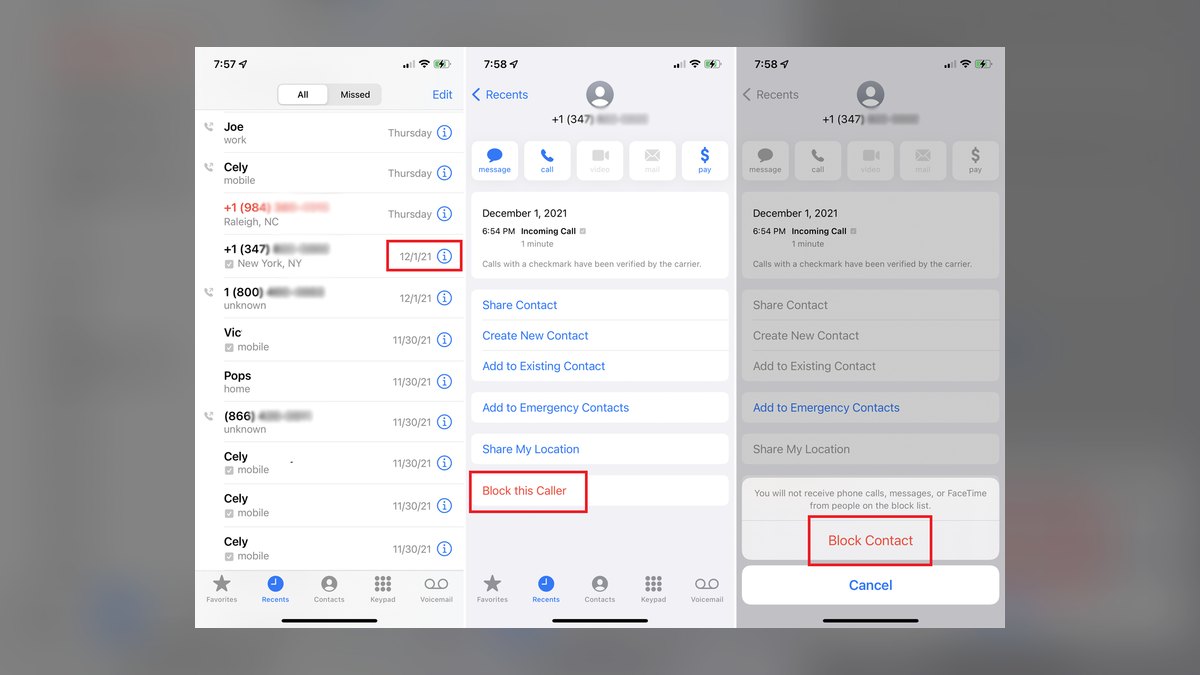
To block spam calls and robocalls on a cell phone in 2027, layer four defenses: enable your carrier's free network-level call screening, turn on your phone's built-in silence-unknown-callers setting, install a dedicated call-blocking app, and report offenders to the FTC. No single tool stops everything, so stacking them cuts unwanted calls by roughly 80–95%.
The outcome you should expect
If you layer the four defenses described on this page, the realistic outcome is that the overwhelming majority of spam calls and robocalls never ring your phone at all — they get labeled, transcribed, or silently diverted before your device vibrates. Most people who do this report that nuisance calls drop from several per day to a handful per week, and the ones that slip through are usually obvious within two seconds because they carry a "Scam Likely" or "Spam Risk" label.
You should not expect perfection. Caller ID spoofing means a robocall can display your own area code, a local business name, or even a number that looks like your bank. The goal is not zero calls; it is a dramatic reduction plus enough context that you can decide in one glance whether to answer. The best setups also preserve legitimate calls — your doctor's office, a delivery driver, a school nurse — so you are not trading spam for missed real calls.
Expect the setup to take about 15 to 30 minutes total, most of it spent in carrier and phone settings rather than installing software. After that, maintenance is minimal: review your blocked list monthly, re-report new scams, and check that a carrier or OS update hasn't reset a toggle. The payoff compounds — every number you block and every report you file feeds the databases that protect everyone else on the same network.
One more realistic expectation: different carriers and phones deliver different results. A user on a major carrier with network-level screening enabled will usually see better filtering than someone relying only on a third-party app, because the carrier can block a call before it ever reaches the handset. That is why the plan below starts at the network layer and works inward toward the device.
What drives that outcome
Four independent layers determine how many spam calls and robocalls reach you. The first is the carrier network, which can identify and block known bad numbers before they connect. The second is the phone's operating system, which can silence any caller not in your contacts. The third is a third-party app that maintains its own constantly updated spam database. The fourth is your own behavior — reporting, blocking, and never engaging with a live scammer.
Each layer catches what the others miss. Carrier screening is fast and free but limited to numbers already flagged in its database. OS-level "silence unknown callers" is ruthless and effective but can hide legitimate calls from people not saved in your contacts. Third-party apps are aggressive and update frequently but may require permissions and a subscription for full features. Reporting is slow but improves the shared databases everyone relies on.
The diagram below shows how a single incoming call moves through these layers and where it can be stopped.
The loop at the bottom matters more than people realize. When you report a robocall to the FTC or your carrier, that number often enters the shared blocklists that feed the carrier and app layers. Your single report may not change your own experience much, but it improves the filter for millions of other subscribers. This is why the plan treats reporting as a first-class step rather than an afterthought.
There is also a fifth, quieter driver: how your number got exposed in the first place. Numbers leaked in data breaches, posted publicly, or entered into sweepstakes forms tend to receive far more robocalls. Reducing exposure — using a secondary number for sign-ups, opting out of data brokers, and never confirming your number to an unknown caller — lowers the volume you have to filter in the first place.
Benchmarks and realistic ranges
It helps to know what "good" looks like so you can tell whether your setup is actually working. The figures below are general ranges reported by carriers, the FTC, and consumer advocacy groups; your exact numbers will vary by carrier, region, and how long your number has been exposed.
- Before any blocking: a heavily exposed number can receive 10 to 30-plus spam calls per week, with spikes after a breach or a political season.
- Carrier screening alone: typically removes 50–70% of flagged spam and robocalls before they ring.
- Carrier screening plus OS silence-unknown-callers: combined reduction often reaches 80–90%, because the two layers catch different categories.
- Adding a dedicated blocking app: pushes the total to roughly 90–95% for most users, with the remainder being new or spoofed numbers not yet in any database.
- False positives: expect a small number of legitimate calls to be silenced, usually under 5%, mostly from businesses or individuals not saved in your contacts.
The single biggest variable is how long your number has been in circulation and how widely it has been shared. A number used for 10 years across dozens of sign-ups will attract far more robocalls than a number kept private. If your volume is extreme, the most effective single action may be changing your number and guarding it carefully — though that is disruptive and usually a last resort.
Timing also matters. Spam and robocall volume rises around tax season, elections, holiday shopping, and major news events, when scammers exploit urgency. If your call volume suddenly doubles, check whether a recent breach or public event explains it before assuming your filters failed.
For measurement, check your phone's recent-calls list weekly for the first month. Count how many calls carry a spam label versus how many rang through unlabeled. If unlabeled calls dominate, your carrier screening may be off or your app's database may be stale. If labeled calls still ring, your OS-level silence setting is probably disabled.
Risks, edge cases, and failure modes
Every blocking method has a downside, and knowing them prevents unpleasant surprises.
Silencing unknown callers can hide real calls. If you enable "silence unknown callers," a new doctor, a delivery driver, or a school calling from an unrecognized line will go straight to voicemail. The fix is to save important numbers as contacts and to check voicemail promptly. Some phones let you allow calls from people who have called twice in a short window, which reduces this risk.
Spoofed numbers defeat database blocking. Scammers routinely fake caller ID to display a number that looks local or trustworthy. Because the displayed number is fake, it may not be in any blocklist, and blocking it does nothing — the next call uses a different fake number. This is why no tool claims 100% effectiveness, and why you should never trust caller ID alone for anything involving money or personal information.
Legitimate businesses get caught in the crossfire. Appointment reminders, pharmacy calls, and service follow-ups sometimes come from numbers flagged as "potential spam" because they use auto-dialers. If you block aggressively, you may miss these. Review your blocked list periodically and unblock anything that turns out to be legitimate.
App permissions and privacy. Some third-party blocking apps request access to your contacts and call history. Read the permissions before installing, prefer well-known apps with clear privacy policies, and avoid apps that demand payment information upfront for a "free" trial.
Carrier features vary and can change. A screening feature that is free today may become a paid add-on, or an OS update may reset a toggle. Re-check your settings after major updates and whenever you change carriers.

Scams that arrive by text or voicemail. Blocking voice calls does not stop smishing texts or voicemail-based scams. Treat unexpected texts with links the same way you treat suspicious calls: do not click, and report them.
Emergency and one-time calls. A genuine emergency call from an unknown number — a hospital, a roadside assistance line — can be silenced by aggressive settings. If you are expecting an important call from an unknown number, temporarily disable silence-unknown-callers or add the expected number to your contacts in advance.
A practical rollout plan
The sequence below moves from the broadest, free protections to the more targeted ones. Do them in order; each step builds on the last.
Step 1 — Turn on carrier call screening. Log into your carrier account or open its app and enable the free spam-and-fraud call labeling or blocking feature. Major U.S. carriers offer this at no cost. This is the highest-value step because it blocks calls at the network before they reach your phone.
Step 2 — Enable your phone's built-in protection. On iPhone, go to Settings, Phone, and turn on "Silence Unknown Callers." On Android, open the Phone app, tap Settings, then Caller ID and spam protection, and enable it. This silences any caller not in your contacts.

Step 3 — Install a dedicated blocking app. Choose a reputable call-blocking app from your phone's official store, grant the minimum permissions needed, and enable its spam database. Many offer a free tier; paid tiers add features like reverse lookup and automatic blocking of entire number ranges.
Step 4 — Block and report as you go. When a spam call gets through, block the number from your recent-calls list and report it to the FTC at ReportFraud.ftc.gov and to your carrier. Reporting feeds the shared databases that protect everyone.
Step 5 — Reduce your exposure. Use a secondary number for sign-ups and forms, opt out of data-broker listings where possible, and never confirm your number to an unknown caller or automated system.
Step 6 — Review monthly. Check your blocked list, unblock any legitimate numbers, and confirm your settings survived any recent updates.
The diagram below shows the decision flow for handling a call that actually rings.
Following this plan takes most people under half an hour and requires almost no ongoing effort after the first week. The key is layering — no single step is sufficient, but together they close nearly all the gaps. If you do only one thing, enable carrier screening; if you do two, add silence-unknown-callers. Those two free steps alone eliminate the large majority of spam calls and robocalls for most users.
Related questions

Do I need to pay for a call-blocking service?
No. Your carrier's basic spam screening and your phone's built-in silence-unknown-callers feature are free and catch most spam calls and robocalls. Paid apps add convenience and extra databases, but they are optional. Start free, and only pay if calls still get through.
Will blocking calls stop spam texts too?
Not directly. Call blocking targets voice calls. Spam texts need separate handling: use your messaging app's report-and-block feature, never click links in unexpected texts, and forward scam texts to 7726 (SPAM) to report them to your carrier.
Can a spammer tell that I blocked them?
Generally no. Blocked calls typically go to voicemail or get a generic rejection, so the caller usually cannot distinguish a block from an unanswered ring. However, blocking a spoofed number rarely helps, because the next robocall will use a different fake number.
Why do spam calls sometimes show my own area code?
Scammers use caller ID spoofing to display a number that looks local, increasing the chance you will answer. The displayed number is fake and often belongs to an innocent person. Never trust caller ID alone, and never share personal or financial information with an unexpected caller.
Does reporting a robocall actually do anything?

Yes, indirectly. Reports to the FTC and carriers feed the databases used to flag and block numbers network-wide. Your individual report may not stop the next call to you, but it helps protect other subscribers and supports enforcement actions against large-scale robocall operations.
FAQ
What is the single most effective way to block robocalls on a cell phone?
Enable your carrier's network-level spam screening. Because it blocks or labels calls before they reach your device, it catches the most robocalls with the least effort and no cost. Combine it with your phone's silence-unknown-callers setting for the best results.
Will "silence unknown callers" make me miss important calls?
It can. Calls from numbers not saved in your contacts go straight to voicemail, so a new doctor or delivery driver may not reach you live. Save important numbers as contacts and check voicemail promptly. Some phones allow a second call from the same number to ring through.
Do call-blocking apps actually work?

Reputable apps with frequently updated spam databases work well and can push your total reduction toward 90–95% when combined with carrier and OS filtering. Results vary, and no app stops spoofed numbers that are not yet in any database. Avoid apps that demand payment details for a "free" trial.
How do I block a specific number on my phone?
Open your recent-calls list, tap the number, and choose Block or Report. On iPhone, you can also manage blocked contacts in Settings under Phone. On Android, the Phone app's settings include a blocked-numbers list. Blocking is instant but only affects that one number.
Can I stop robocalls without installing anything?
Yes. Carrier screening and your phone's built-in silence-unknown-callers feature are both built in and require no third-party app. Together they eliminate the large majority of spam calls and robocalls for most users. Installing an app is an optional extra layer.
Why do I still get some spam calls after blocking everything?
Spoofed numbers, brand-new scam operations, and numbers not yet in any database can slip through every layer. No method is 100% effective. Keep reporting and blocking, and treat any unexpected call requesting money or personal information as a scam.
Sources
- https://www.ftc.gov/news-events/topics/telemarketing-and-robocalls
- https://www.fcc.gov/consumers/guides/stop-unwanted-robocalls-and-texts
- https://consumer.ftc.gov/articles/how-stop-unwanted-phone-calls-and-texts
- https://www.ftc.gov/business-guidance/resources/complying-telemarketing-sales-rule
- https://www.fcc.gov/call-authentication
- https://consumer.ftc.gov/identity-theft-and-online-security
- https://www.usa.gov/unwanted-calls
- https://www.ic3.gov/
Related on PULSE
- How to report a scam call without giving away personal data
- Spotting caller ID spoofing and vishing attempts
- Stopping spam texts and smishing links on your phone
- Reducing your phone number's exposure to data brokers
- What to do if you answered a robocall and pressed a key
- Setting up a secondary number for sign-ups and forms
This page will be disappearing soon. Save it to your device for $1 — or read it free while it is here.
@Kory-White- · if Venmo asks, the last 4 of my number are 2012
This page is gone.
This one is off the shelf now. $1 keeps it on your phone for good — the whole page, pictures and diagrams included.
 telcoBest Cellular and Wireless Carrier in New Orleans in 2027
 telcoBest Cellular and Wireless Carrier in Alaska in 2027
 telcoBest Cellular and Wireless Carrier in Pittsburgh in 2027
 telcoBest Cellular and Wireless Carrier in Sacramento in 2027
 telcoIs 5G home internet good enough to replace cable in 2027?
 telcoBest Cellular and Wireless Carrier in Columbus in 2027
 telcoBest Cellular and Wireless Carrier in Baton Rouge in 2027
 telcoBest Cellular and Wireless Carrier in Philadelphia in 2027
 telcoBest Cellular and Wireless Carrier in Texas in 2027
 telcoWhat is Wi-Fi calling and should I turn it on in 2027?