


How Much Should You Budget for a Wireless Charger in 2027?
Quality
Certified
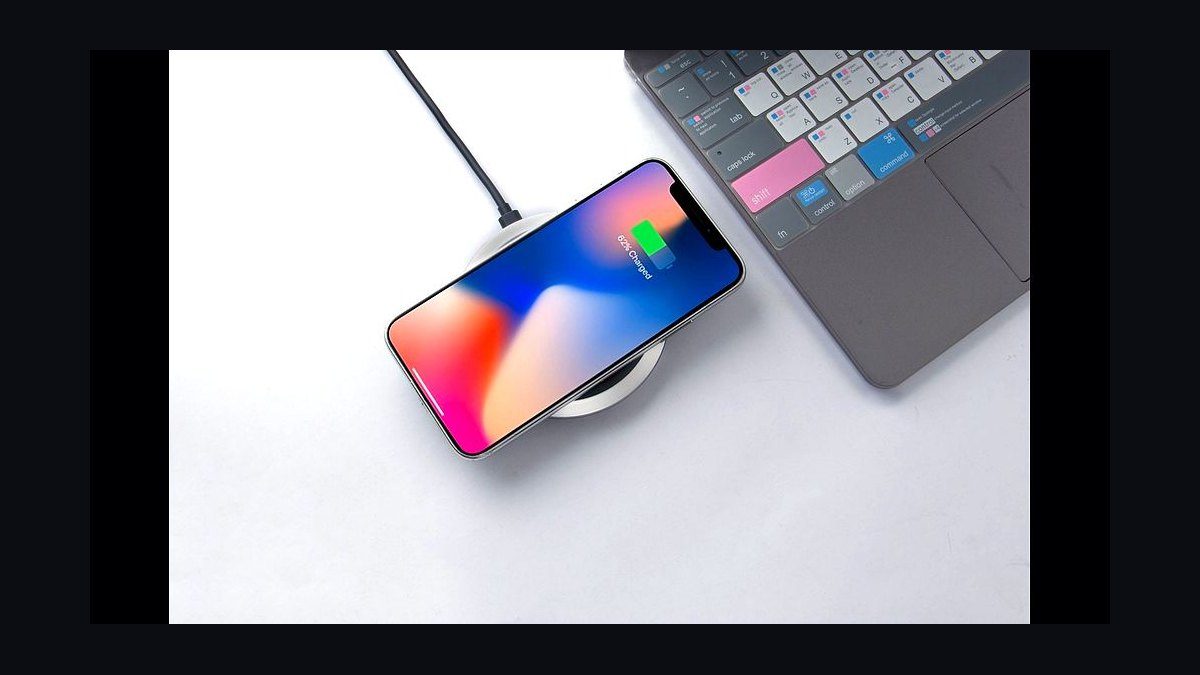
Budget $20–$40 for a solid single-device wireless charger in 2027, $50–$90 for a Qi2 magnetic stand or 3-in-1 multi-device dock, and $100–$200 for premium travel or desk-integrated systems. Add $15–$25 for a compatible high-wattage USB-C power adapter, which many chargers still exclude from the box.
What a wireless charger actually costs and why the spread is so wide
The phrase "wireless charger" covers at least five distinct product categories that share a coil and almost nothing else, which is why quoted prices swing from under twenty dollars to well over two hundred. Understanding which category you are actually buying is the single biggest lever on your budget, and it matters more than brand name.
At the entry tier, a flat pad that delivers 5W to 15W is a commodity. These are the pucks sold in checkout lanes, three-packs on marketplace sites, and hotel nightstand fixtures. They work, they charge slowly, and they have no magnets, so alignment is manual. If your only requirement is "put the phone down overnight and have it full by morning," this tier is genuinely sufficient and you should not spend more. Expect $12 to $25.
The middle tier is where most buyers land in 2027, and it is defined by magnetic alignment. The Qi2 standard, published by the Wireless Power Consortium, brought a magnetic attachment profile into the open specification rather than leaving it proprietary to one phone maker. That change is the reason mid-tier prices consolidated: magnets that were once a premium differentiator became table stakes. A Qi2 stand or puck with a braided cable typically runs $35 to $70. You are paying for the magnet array, better thermal design, and a form factor that lets you keep using the phone while it charges.

Above that sits the multi-device dock. One base, three coils, and a folding travel geometry. These are $80 to $150 because you are effectively buying three chargers plus the industrial design that makes them collapse into a pocketable shape. The premium is real but it is a convenience premium, not a performance one. A three-device dock does not charge your phone faster than a $40 single-coil stand.
The top tier is furniture and fixtures — desks with embedded coils, car mounts with active cooling, nightstands with integrated pads. These start around $150 and climb past $400 for built-in solutions. They are almost never a good first purchase because they lock you into a coil position for years while phone form factors keep shifting.
The one line item people consistently forget is the power adapter. A large fraction of wireless chargers ship with a USB-C cable but no wall brick, and the charger will silently underperform on an old 5W adapter. A 30W to 45W USB-C PD adapter costs $15 to $30 and should be a line in your budget, not an afterthought. This is the most common reason a charger a buyer just paid $60 for feels slower than the $8 cable it replaced.
How to size your budget step by step

Work from your actual usage pattern backward to a number rather than starting with a product and rationalizing it. The sequence below takes about ten minutes and reliably lands people on a charger they still use a year later.
Step one: count the placements, not the devices. A placement is a surface where you would put a phone down for more than ten minutes — desk, nightstand, kitchen counter, car. Most households need two or three placements. This number, not the number of phones you own, drives your total spend. Two placements at $30 each beats one $80 dock that lives in the wrong room.
Step two: decide whether each placement needs a stand or a pad. A pad is cheaper and disappears into the surface. A stand costs $10 to $20 more and lets you see notifications, take video calls, and use standby-style clock displays. Nightstands and desks generally justify the stand. Kitchen counters and entryway drop zones do not.
Step three: check your phone's actual peak wireless wattage. This is the number that determines whether high-wattage marketing claims mean anything to you. Many mainstream phones cap wireless input at 15W regardless of what the pad advertises. If your phone caps at 15W, a charger advertising 50W is selling you a number you cannot use. Look up your specific model on the manufacturer's spec page before paying a premium for wattage.
Step four: verify magnet compatibility. If your phone does not have a built-in magnet array, a magnetic charger requires a magnetic case, which adds $20 to $45. Include that in the budget or choose a non-magnetic pad. This is a frequent hidden cost that turns a $45 purchase into a $75 one.

Step five: add the adapter and the cable. Assume $20 unless you have confirmed a spare high-wattage USB-C PD brick. If the charger uses a proprietary or captive cable, note that replacement cost too — a captive cable failure means replacing the whole unit.
Step six: set a per-placement ceiling and stop. For most people that ceiling is $50 for a primary placement and $25 for a secondary one. Total household budget lands between $75 and $150 for full coverage, plus adapters.
Typical price ranges, lifespan, and what you actually get per dollar
Thinking in cost per year of service rather than sticker price changes which tier looks expensive. A wireless charger is a device with a coil, a controller, and usually a fan or a thermal pad. The failure modes are predictable: cable strain relief cracks, adhesive foot pads peel, and the controller degrades under sustained heat. Cheap units tend to fail on the cable first, premium units on nothing in particular for several years.
A $20 pad that lasts eighteen months costs roughly $13 per year. A $60 Qi2 stand that lasts four years costs $15 per year. Those are close enough that the decision should be made on daily experience, not on longevity math. Where the math actually breaks down is the very bottom of the market — sub-$12 no-name pads with poor foreign-object detection and thin thermal margins fail often enough that replacement churn erases the savings.
Multi-device docks are the tier where cost per year is genuinely worse. A $130 three-in-one dock replaces perhaps $70 of separate chargers, and the folding hinge is a mechanical wear point that single-piece chargers do not have. Buy one because you travel and want a single object in the bag, not because you think it is cheaper.

Consider the adjacent spend too. If you are budgeting for charging generally, wireless is one line among several. A high-quality USB-C cable is $10 to $20, a 65W multi-port GaN adapter that serves a laptop and two phones is $40 to $70, and a power bank with pass-through magnetic charging runs $40 to $90. In many homes the GaN adapter delivers more practical benefit per dollar than a second wireless pad, because it collapses three wall warts into one. Budget the charging setup as a system, not as isolated purchases.
Car charging deserves its own line. A magnetic vent mount with active cooling runs $50 to $90, and the cooling matters — a phone running navigation in direct sun while charging wirelessly will thermally throttle and may stop charging entirely. In-car wireless is the one context where paying for a fan is defensible. A $25 passive car mount plus a $10 cable frequently outperforms a $70 passive wireless mount in that scenario, which is a rare case where the wired option wins on both cost and function.
Timeline-wise, expect to re-evaluate every three to four years, driven by phone changes rather than charger failure. Coil positions and magnet arrays shift between phone generations, and a charger that fit perfectly can become marginal after an upgrade. That replacement cadence argues against building coils into furniture and in favor of keeping the charging layer cheap and swappable.
Where budgets go wrong

The most expensive mistake is buying for advertised wattage. Marketing on charging pads quotes the coil's maximum output, not what any given phone accepts. A pad claiming high wattage delivers exactly the same result as a 15W pad to a phone that caps at 15W, and the price difference can be double. Check the phone spec first, every time.
The second mistake is ignoring case thickness. Wireless charging works through most cases, but thick rugged cases, wallet cases with card slots, and anything containing metal will reduce efficiency or block charging entirely. A card in a wallet case can also be damaged. If you use a heavy case, either test before buying or budget for a slimmer case alongside the charger.
Third, people buy one expensive charger instead of two cheap ones. Charging is about placement convenience. A charger you have to walk to is a charger you stop using. Two $25 pads in two rooms produce a better daily experience than one $60 stand in one room, for almost everyone.
Fourth, treating the box contents as complete. Read the listing for whether a wall adapter is included. If it is not, and you plug into an old low-wattage brick, you will get slow charging and conclude the charger is defective. This single issue accounts for an enormous share of one-star reviews on otherwise fine products.
Fifth, buying furniture-integrated charging early. Embedded desk coils and nightstand pads are attractive and they age badly. Phone coil positions move, magnet arrays change, and a coil under three-quarter-inch wood has thermal problems that a surface pad does not. Keep charging modular until the standard stops moving.

Sixth, overlooking foreign-object detection quality on cheap units. A pad that fails to detect a coin, key, or card between the phone and the coil can heat that object. Reputable certification through the Wireless Power Consortium exists precisely to test this. A certified $22 pad is a better buy than an uncertified $14 one, and that eight-dollar delta is the least negotiable line in the whole budget.
Finally, forgetting that wireless charging is less efficient than wired. More energy becomes heat. Over a year the electricity difference is small in absolute terms, but the heat is not irrelevant — sustained heat is hard on battery longevity. If a phone lives on a pad for ten hours a night, a charger with decent thermal design and a phone-side optimized-charging setting are both worth having.
Choosing the right tier for your situation
The decision reduces to three questions: how many places do you charge, do you interact with the phone while it charges, and do you travel with the setup. Everything else is preference.
If you charge in one place and mostly leave the phone alone, buy the cheapest certified pad and a decent adapter. Total: $35 to $45. Spending more buys you nothing you will notice.
If you charge at a desk and use the phone while it charges, buy a Qi2 magnetic stand. The magnet keeps alignment while you tap, and the stand angle makes the screen usable. Total: $50 to $70 with adapter. This is the highest-satisfaction tier for the money and where most people should land.
If you carry earbuds and a watch and travel monthly, a folding three-in-one is worth the premium — one object, one cable, one adapter in the bag instead of four. Total: $110 to $170. Verify it supports your specific watch's proprietary charging puck, since watch charging is frequently the compatibility failure point.

If you want charging in the car, budget separately and prioritize cooling over wattage. Total: $50 to $90.
If someone else is paying — an office equipment budget, a client gift, a hotel amenity spec — the calculus shifts toward durability and certification over price, because support cost dominates. Certified units from established brands, no captive cables, replaceable adapters. That is a $45 to $65 per-unit spend at volume.
Adjacent spending that changes the answer
A wireless charger rarely gets bought in isolation, and the surrounding purchases often matter more to the outcome than the charger itself.
Power banks with magnetic attachment have become the fastest-growing adjacent category. They cost $40 to $90 and solve a different problem — charging while walking rather than charging while parked. If your actual pain is running out of battery mid-day away from a desk, a magnetic power bank is a better use of $60 than a second desk charger. Diagnose the real problem before allocating the budget.
Multi-port GaN adapters are the other high-leverage purchase. A single 65W to 100W adapter with three ports can drive a wireless pad, a laptop, and a tablet from one outlet. At $40 to $70 it consolidates clutter and eliminates the underpowered-brick failure mode across every device you own. If you are buying more than one wireless charger, buy the good adapter first.

Cases interact with the whole budget. A magnetic-ring case at $25 to $45 converts every non-magnetic phone into a Qi2-compatible one, which can be cheaper than buying magnetic-free chargers for a mixed-device household. Conversely, if a household has three phones with three different case situations, plain flat pads sidestep the compatibility matrix entirely and may be the pragmatic choice despite being less pleasant.
Watch and earbud charging is where multi-device docks earn or lose their premium. Many smartwatches use proprietary pucks that a generic Qi coil cannot drive. Before budgeting for a three-in-one, confirm the specific model supports your watch — otherwise you are paying for a coil that will never be used and would have been better served by a $30 stand plus the watch's included cable.
For a shared or office environment, quantity and standardization beat individual quality. Ten identical certified pads at $22 each are easier to support than a mix of premium units, and losses and damage are cheaper to absorb. Budget roughly $250 for a ten-desk deployment plus adapters, and keep two spares.
Related questions
Does a more expensive charger charge faster?
Only up to your phone's cap. Phones limit wireless input regardless of pad output, and many cap at 15W. Above that cap, extra wattage on the charger's spec sheet changes nothing. Verify your phone's maximum wireless input before paying for headroom you cannot use.
Do I need to buy the phone maker's own charger?
No. Qi2 certification means third-party chargers deliver the same magnetic alignment and standardized power profile. First-party units cost more and generally offer build quality and support, not speed. Certification through the Wireless Power Consortium is the meaningful signal, not the logo.
Is wireless charging bad for battery health?

Heat is the concern, not wireless per se. Wireless is less efficient, so more energy becomes heat, and sustained heat degrades batteries. Use a charger with good thermal design, avoid charging in direct sun, and enable your phone's optimized-charging setting for overnight use.
Should I buy a charger with a fan?
Only for the car or for sustained high-wattage charging. Fans add noise and cost, and on a nightstand the tradeoff is bad. In a hot car running navigation, active cooling is the difference between charging and thermal throttling.
What is the cheapest safe option?
A certified pad from an established brand at $18 to $25, paired with a 20W to 30W USB-C PD adapter. Skip uncertified sub-$12 units — foreign-object detection is the safety function you are paying for and it is the first thing cut at that price.
FAQ
Why does my new wireless charger seem slower than my old cable?
Almost always the power adapter. Many chargers ship without a wall brick, and an old 5W adapter cannot supply what the pad needs. Pair it with a 30W or higher USB-C PD adapter. Wireless will still be slower than a fast wired connection by design — that is expected, not a defect.
How much should I budget for a household with three phones?

Plan on $100 to $150 total. That covers two good primary placements at $40 to $50 each and one or two cheap secondary pads at $20 to $25, plus one multi-port adapter. Buying three identical mid-tier stands is simpler to support but usually overspends by $40.
Does the case need to come off?
Usually not. Standard cases under about 3mm are fine. Thick rugged cases, metal cases, wallet cases with cards, and PopSocket-style attachments cause problems. If you use a heavy case, budget for a slim alternative or test the specific combination before committing.
Is Qi2 worth paying extra for?
For most people, yes. The magnetic alignment eliminates the single most common wireless charging failure — waking up to a phone that was slightly off the coil all night. The premium over a plain pad is usually $15 to $25, which is the best-value upgrade in the whole category.
Should I get charging built into my desk or nightstand?
Generally no, not yet. Embedded coils fix a position for years while phone coil placement and magnet arrays keep shifting between generations, and coils under thick surfaces have thermal problems. Keep the charging layer cheap and replaceable until the hardware stops moving.
What about charging a watch and earbuds on the same base?
Verify compatibility first. Earbud cases are usually standard Qi and work fine. Smartwatches frequently use proprietary pucks that generic coils cannot drive, so a three-in-one dock that does not explicitly list your watch model will leave one coil permanently unused.
Sources
- https://www.wirelesspowerconsortium.com/qi2/
- https://www.wirelesspowerconsortium.com/
- https://www.usb.org/usb-charger-pd
- https://support.apple.com/en-us/HT204003
- https://www.consumerreports.org/electronics/phone-accessories/
- https://www.energy.gov/energysaver/articles/energy-efficient-device-charging
- https://www.cnet.com/tech/mobile/best-wireless-charger/
- https://www.techradar.com/news/best-wireless-charger
Related on PULSE
- How much should you budget for a portable power bank in 2027?
- What is Qi2 and how is it different from Qi?
- Do phone cases affect wireless charging performance?
- How many watts do you actually need in a USB-C wall adapter?
- Is wireless charging worse for battery health than a cable?
This page will be disappearing soon. Save it to your device for $1 — or read it free while it is here.
@Kory-White- · if Venmo asks, the last 4 of my number are 2012
This page is gone.
This one is off the shelf now. $1 keeps it on your phone for good — the whole page, pictures and diagrams included.
 pulse-reviewsTop 10 UPS Battery Backups for Gaming PCs — Best Overall + Best Value in 2027
 pulse-reviewsTop 10 Budget 3D Printers — Best Overall + Best Value in 2027
 pulse-reviewsTop 10 Sunrise Alarm Clocks — Best Overall + Best Value in 2027
 pulse-reviewsTop 10 TDS Water Testers — Best Overall + Best Value in 2027
 pulse-reviewsTop 10 Blood Pressure Monitors — Best Overall + Best Value in 2027
 pulse-reviewsTop 10 Smart Pill Dispensers — Best Overall + Best Value in 2027
 pulse-reviewsTop 10 Portable USB-C Monitors for Sales Travel in 2027
 pulse-reviewsTop 10 Ethernet Adapters for MacBook — Best Overall + Best Value in 2027
 pulse-reviewsTop 10 Air Purifiers — Best Overall + Best Value in 2027
 pulse-reviewsTop 10 Pin Nailers — Best Overall + Best Value in 2027