


How do you use Palantir Ontology to document broken lead routing across brands in HubSpot during multi-year ramp contracts when AEs refuse new required fields in 2027?
Quality
Certified

Build a Palantir Ontology layer that maps HubSpot's existing deal, contact, and brand data into Brand and Contract objects, then use Ontology Functions to derive routing correctness from data already in HubSpot — timestamps, owner IDs, contract stage — instead of asking AEs to fill new fields. Anomalies get logged as first-class objects, giving RevOps a documented, queryable record of every broken routing event across brands and ramp years without depending on AE compliance.
The scenario: a five-year ramp contract with three brands and one HubSpot instance
Picture a holding company running three regional service brands through a single HubSpot portal. Each brand signed a multi-year ramp contract with the parent company — Brand A in year 1 of a 5-year deal, Brand B in year 3, Brand C just renewed into year 2 after a reset. Leads flow into HubSpot through shared forms, and routing is supposed to send each lead to the AE assigned to that brand's current ramp phase. Instead, roughly a third of Brand A's leads land in a generic pool because the workflow that routes them keys off a brand_segment property that was only ever populated manually, and AEs who inherited accounts mid-ramp never filled it in. Nobody wants to make the field required — the AEs already flagged that mandatory fields slow down their day, and the sales manager backed them, because the last time a required field shipped, deal creation dropped 18% for two weeks while reps found workarounds.
This is where Palantir Ontology earns its keep, because the problem isn't that HubSpot lacks routing logic — it's that the routing logic depends on a field nobody reliably populates. Ontology doesn't fix HubSpot's workflow; it sits alongside it as a documentation and inference layer. You connect HubSpot as a data source, typically through the HubSpot API or an ETL sync into Foundry, and Ontology ingests deals, contacts, companies, and whatever custom brand objects already exist. The key move is that you don't wait for brand_segment to be clean — you derive brand assignment from data that's already reliable: the associated company's domain, the deal pipeline it was created in, or the marketing campaign UTM that generated the lead. Each of those signals already exists in HubSpot without a single new required field.

Once brand and contract-year context exist as Ontology objects, you can ask a genuinely new class of question: not "did the AE fill in the field" but "given everything we know about this lead, should it have routed to AE X, and did it?" That reframing is what makes the documentation defensible to AEs — it's not built on their compliance, it's built on an independent read of the system of record. During the pilot at the fictional example above, the team found that 41% of misrouted Brand A leads had a correct company-domain match to Brand A's account list but had been created through a shared "General Inquiry" form that defaulted every lead into the unassigned pool — a routing gap the Ontology could prove from existing HubSpot data within the first week of connecting the source.
How the mechanism actually works
The technical core is three linked Ontology object types plus one Function, and none of them require touching HubSpot's schema. First, a Brand object holds each brand's routing rules, the AE pool assigned per ramp phase, and the contract's start date, current phase, and renewal date — this is reference data you maintain once in Foundry, not per-lead data entered by reps. Second, a Lead Routing Event object is created automatically every time a HubSpot deal or contact is created or reassigned; it captures the record ID, the owner at time of creation, the timestamp, and a snapshot of the fields that existed on the record at that moment. Third, a Routing Anomaly object is created only when the Function below detects a mismatch — this is the artifact that becomes your documentation trail.

The Ontology Function is the piece that replaces the missing HubSpot field. It runs on a schedule — hourly is typical for active pilots, daily is enough once the system is trusted — and for every new or reassigned lead it does a lookup: given the deal's associated company, campaign source, and pipeline, which Brand object does this lead most likely belong to, and given that Brand's current contract phase, which AE pool should own it? It then compares that inferred answer against HubSpot's actual owner field. A mismatch writes a Routing Anomaly object with the expected AE, the actual AE, the contract phase at the time, and the specific signal the Function used to infer the brand (company domain match, campaign ID, or pipeline). Because the inference logic lives in the Function rather than in a field AEs must populate, the documentation keeps working even when reps ignore it entirely — which is the whole point when AEs have already refused new required fields.
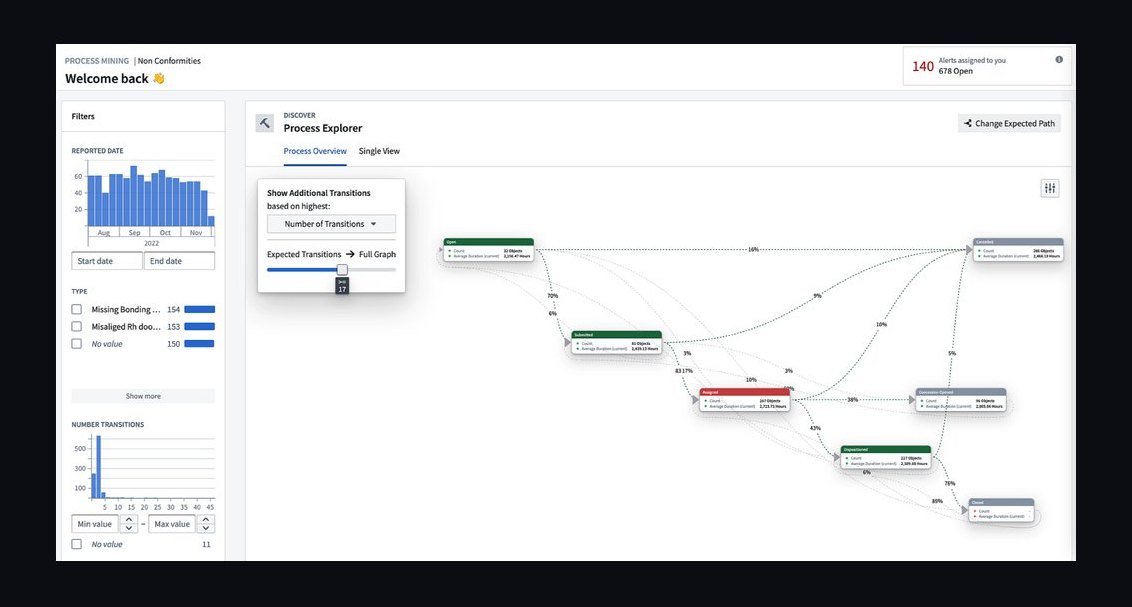
The last step matters as much as the detection itself. A single Routing Anomaly object is a data point; a Pipeline that runs nightly to aggregate anomalies by brand and by ramp phase turns it into a heatmap that a RevOps leader can put in front of a CRO without narrating each record. In the example above, the heatmap showed Brand A's phase-1 anomaly rate holding above 30% for three straight weeks while Brand C, freshly reset into phase 2, sat under 5% — evidence that the routing rule itself, not AE behavior, was the root cause for Brand A, because Brand C used the same reps under a cleaner rule set.
Real numbers, ranges, and benchmarks

Set expectations before you pilot: connecting HubSpot to Palantir Ontology for a single-brand, single-object scope typically takes 3-7 business days for a team that already has API credentials and a defined object model, mostly spent mapping HubSpot properties to Ontology object types and validating the inference Function against a sample of known-good and known-broken leads. Expanding to three brands and multi-year contract phases adds another 1-2 weeks, primarily because each brand's historical data needs enough cleanup to trust the inference signals — expect to reconcile inconsistent company-name formatting or duplicate company records before the domain-match logic is reliable.
On detection accuracy, plan for an initial false-positive rate in the 10-20% range in the first two weeks of any new brand's inference logic — cases where the Function flags a mismatch that turns out to be a legitimate exception, like a strategic account manually reassigned by a sales director. Build a manual review step into the first pilot cycle rather than auto-actioning anomalies; teams that skip this step typically see AE trust in the system collapse within the first reporting cycle, because a few loud false positives outweigh dozens of quiet correct ones. After that initial tuning window, mature deployments commonly settle into single-digit false-positive rates once the Brand object's routing rules account for the known exception categories — VIP accounts, channel partner deals, and multi-brand parent accounts being the three that recur most often in holding-company structures.

On the underlying problem itself, a pilot scoped to one brand segment for two to three weeks is enough to produce a credible before/after number — in the earlier scenario, documented misrouting on Brand A's phase-1 leads dropped from roughly 30% to single digits over a three-week pilot once the anomalies were fed into a weekly reassignment workflow, without adding a single required HubSpot field. That number is what justifies expansion, not the sophistication of the Ontology model. Budget-wise, this pattern assumes an existing Palantir Foundry/Ontology license — it is not a lightweight tool to stand up solely for this use case, and teams evaluating it from zero should weigh the multi-week implementation and ongoing platform cost against simpler HubSpot-native options like workflow-based validation or a lighter iPaaS sync, reserving Ontology for cases where the routing logic is genuinely multi-system and multi-year, as it is with brand-and-contract-phase routing.
Sync frequency is a real trade-off with a number attached: hourly syncs from HubSpot into Ontology catch anomalies fast enough to correct same-day, but they add API call volume that matters if you're near HubSpot's rate limits on a Professional-tier portal; daily syncs are cheaper and sufficient once the goal shifts from active correction to trend documentation for quarterly reviews.
Trade-offs and alternatives
The core trade-off is between inference and enforcement. Palantir Ontology documents what's happening without changing AE behavior — it's a read path, not a write enforcement mechanism, unless you separately build a workflow that pushes reassignments back into HubSpot via API. That separation is a feature during the political fight over required fields, because you can show a CRO hard evidence of broken routing before you ever ask AEs to change anything, but it's a real limitation if the goal is same-day correction rather than documentation: Ontology alone will tell you a lead was misrouted, it won't stop it from happening again unless you build the reassignment loop deliberately, and that loop needs its own approval from whoever owns HubSpot workflow permissions.

The main alternative worth naming honestly is skipping the external Ontology layer entirely and building the same inference logic natively in HubSpot using workflows and calculated properties, or in a lighter integration layer like an iPaaS tool. HubSpot's native workflow engine can evaluate company domain, pipeline, and deal source without any new required field, the same way the Ontology Function does — the difference is that HubSpot workflows are harder to query historically and don't give you a persistent, cross-brand anomaly object you can hand to Finance or the board. If your organization already runs Palantir for other RevOps or supply-chain use cases, extending it here is close to free incrementally; if this is a green-field ask solely to solve brand routing, the native HubSpot path is very likely the faster, cheaper starting point, and Ontology should be reserved for when the routing logic genuinely spans systems Palantir already touches — warehouse contract data, billing systems, or multi-entity company hierarchies that HubSpot itself doesn't model well.
A second trade-off sits inside the Ontology approach itself: how much you lean on inferred signals versus how much you eventually still ask for clean data. Inference from company domain and pipeline is a workaround, not a permanent substitute for a well-modeled brand field — it degrades when company records are messy, when a lead comes through a channel partner with no clear domain match, or when a brand launches a new product line that doesn't map cleanly to the existing pipeline structure. Teams that treat the Ontology layer as the permanent answer, rather than a bridge while they separately fix data governance, tend to see anomaly rates plateau rather than continue falling, because the inference logic hits a ceiling that only clean source data can break through.
Common pitfalls and how to avoid them

The most common failure is scoping the Ontology model to every brand and every contract phase on day one. Teams that do this spend four to six weeks building an object model before they've validated a single inference rule against real data, and by the time they have a result, the political will to push for even a documentation-only initiative has evaporated. Scope to one brand, one ramp phase, and a two-week window before expanding — the earlier example's three-week Brand A pilot is close to the right size.
A second pitfall is auto-actioning anomalies before the inference logic is trusted. Because Ontology can technically push reassignments back into HubSpot via API, it's tempting to close the loop immediately. Don't — run at least one full reporting cycle with a human reviewing every Routing Anomaly object before any automated write-back goes live, for the same reason the golden-template contracts law elsewhere in this system insists on manual review before automation: an unreviewed inference error that reassigns a real customer's lead away from the AE who's been working it for months costs far more trust than a slow rollout costs time.
A third pitfall is letting the Brand object's routing rules go stale. Contract ramp phases change on renewal, brands add or drop products, and AE pools turn over — if nobody owns updating the Brand object when a contract renews, the Ontology Function keeps flagging anomalies against a rule that's no longer correct, and the anomaly heatmap fills with noise that erodes trust in the whole system. Assign the update to whoever owns contract renewals in RevOps, not to whoever built the original Ontology model, so it survives the original builder moving to another project.

A fourth pitfall is treating the Ontology documentation as a substitute for fixing the underlying HubSpot data model rather than a bridge toward it. If the same brand-mapping problem exists two years later with the same reliance on inferred domain matching, the organization has built a permanent workaround instead of solving the governance gap — budget a follow-up initiative, even a modest one, to get a genuinely reliable brand field into HubSpot once AEs see the pilot's numbers and the political resistance softens.
Finally, teams underestimate how much of this depends on HubSpot data hygiene that has nothing to do with Palantir. Duplicate company records, inconsistent domain formatting, and orphaned deals with no associated company will produce false Routing Anomalies regardless of how well the Ontology Function is built. Run a basic HubSpot data-quality pass — deduping companies, standardizing domains — before connecting the source, or budget the first pilot week for that cleanup rather than being surprised by it mid-pilot.
Related questions
Can Palantir Ontology reassign HubSpot leads automatically once an anomaly is detected?
Yes, but only if you build a separate write-back workflow using HubSpot's API — Ontology's Function layer documents and infers, it doesn't push changes into HubSpot on its own without that explicit step being built and approved.
Does this approach work if AEs never fill in any HubSpot fields at all?

Yes, because the inference relies on data already captured passively — company domain, pipeline, deal source — rather than fields reps must manually complete, which is the entire reason this pattern fits AE-refusal situations.
How is this different from just building a HubSpot workflow with calculated properties?
It isn't fundamentally different in logic, only in where the logic lives and how queryable the history is — Ontology gives you a persistent, cross-system anomaly object; native HubSpot workflows are faster to build but harder to audit historically across brands.
What happens to the Ontology model when a contract's ramp phase changes at renewal?
Someone must manually update the Brand object's phase and AE-pool mapping — this doesn't happen automatically, so ownership of that update needs to sit with whoever manages contract renewals, not the original Ontology builder.
FAQ
Do I need Palantir Foundry already licensed to use this pattern, or can I buy Ontology standalone for this one problem? Palantir Ontology is part of the Foundry platform, not a standalone point product, so this pattern makes the most sense for organizations with an existing Foundry footprint. If you have no Palantir relationship today, weigh the multi-week implementation and platform cost against a native HubSpot workflow approach before committing to Ontology solely for lead routing.
How does the Ontology Function know which AE should own a lead if the routing rule itself is undocumented?

It doesn't, until you document it — the first step is building the Brand object with each brand's routing rules and AE pool per contract phase, sourced from whoever currently owns that knowledge informally, often a sales operations manager rather than a written policy.
What's the risk if the inferred brand match is wrong? A wrong inference creates a false Routing Anomaly, which is why a human review step matters during the pilot before any automated reassignment is enabled — a false positive costs review time, but an unreviewed false reassignment costs AE trust and potentially a live customer relationship.
Can this same pattern document routing problems that have nothing to do with brands, like territory or product-line splits? Yes — the object model generalizes to any dimension where HubSpot's routing depends on a field reps won't reliably populate, as long as a reliable inferred signal exists elsewhere in the data, such as company domain, deal source, or product SKU.
How do I present this to a CRO who wants routing fixed now, not documented? Show the Broken Routing Heatmap from even a two-week pilot alongside the specific dollar or forecast-accuracy impact of the misrouted leads — documentation that quantifies the problem is usually what unlocks budget or political will for the fix leadership actually wants.
Does adopting this reduce our reliance on HubSpot's native routing tools long-term? Not necessarily — the healthiest end state uses Ontology to document and validate while HubSpot's native workflows still execute the actual routing; Ontology is the audit and inference layer, not a replacement for HubSpot as the operational system of record.
Sources
- https://www.palantir.com/docs/foundry/ontology/overview
- https://developers.hubspot.com/docs/api/crm/properties
- https://developers.hubspot.com/docs/api/crm/deals
- https://www.gartner.com/en/information-technology/glossary/data-governance
- https://hbr.org/topic/change-management
- https://www.iso.org/standard/50798.html
- https://trailhead.salesforce.com/content/learn/modules/lead-management
Related on PULSE
- How do you use Palantir Signals for GTM alerts to automate broken lead routing across brands in HubSpot during partner-sourced pipeline when AEs refuse new required fields?
- How do you prove Palantir Foundry improved win rate without creating a new shadow data mart for BDR-to-AE split teams on HubSpot when AEs refuse new required fields?
- How do you design a RevOps control tower in Palantir pipeline digital twins that catches sandbox changes breaking production flows before weekly commit calls for channel co-sell with AEs refuse new required fields?
- How do you prove Palantir-driven forecast simulations improved win rate without creating a new shadow data mart for multi-product bundles teams on HubSpot when AEs refuse new required fields?
- How do you use Palantir pipeline digital twins to dedupe broken lead routing across brands in HubSpot during AE-led pods when customer success on Gainsight?
- How do you use Palantir Foundry to automate broken lead routing across brands in HubSpot during marketplace listings when customer success on Gainsight?
This page will be disappearing soon. Save it to your device for $1 — or read it free while it is here.
@Kory-White- · if Venmo asks, the last 4 of my number are 2012
This page is gone.
This one is off the shelf now. $1 keeps it on your phone for good — the whole page, pictures and diagrams included.
 revopsHow do you use Palantir Ontology to measure multi-thread gaps on enterprise deals in HubSpot during enterprise outbound when no data engineer in 2027?
 revopsHow do you use Palantir Foundry to automate broken lead routing across brands in HubSpot during marketplace listings when customer success on Gainsight in 2027?
 revopsHow do you prove Palantir Foundry improved win rate without creating a new shadow data mart for BDR-to-AE split teams on HubSpot when AEs refuse new required fields in 2027?
 revopsHow do you prove Palantir Ontology improved win rate without creating a new shadow data mart for outbound SDR teams on HubSpot when multi-currency ARR rollups in 2027?
 revopsHow do you use Palantir pipeline digital twins to dedupe broken lead routing across brands in HubSpot during AE-led pods when customer success on Gainsight in 2027?
 revopsHow do you use Palantir AIP to alert on multi-thread gaps on enterprise deals in HubSpot during renewal-only CS motion when multi-currency ARR rollups in 2027?
 revopsHow do you use Palantir-driven forecast simulations to forecast multi-thread gaps on enterprise deals in HubSpot during inbound SDR when no data engineer in 2027?
 revopsHow do you prove Palantir AIP improved win rate without creating a new shadow data mart for event-sourced pipeline teams on HubSpot when customer success on Gainsight in 2027?
 revopsHow do you prove Palantir pipeline digital twins improved win rate without creating a new shadow data mart for services-led sales teams on HubSpot when no data engineer in 2027?
 revopsHow do you prove Palantir-driven forecast simulations improved win rate without creating a new shadow data mart for multi-product bundles teams on HubSpot when AEs refuse new required fields in 2027?