


What is Microsoft Copilot for Sales and what does it mean for RevOps in 2027?
Quality
Certified
Published Jun 14, 2026 · Updated Jun 14, 2026
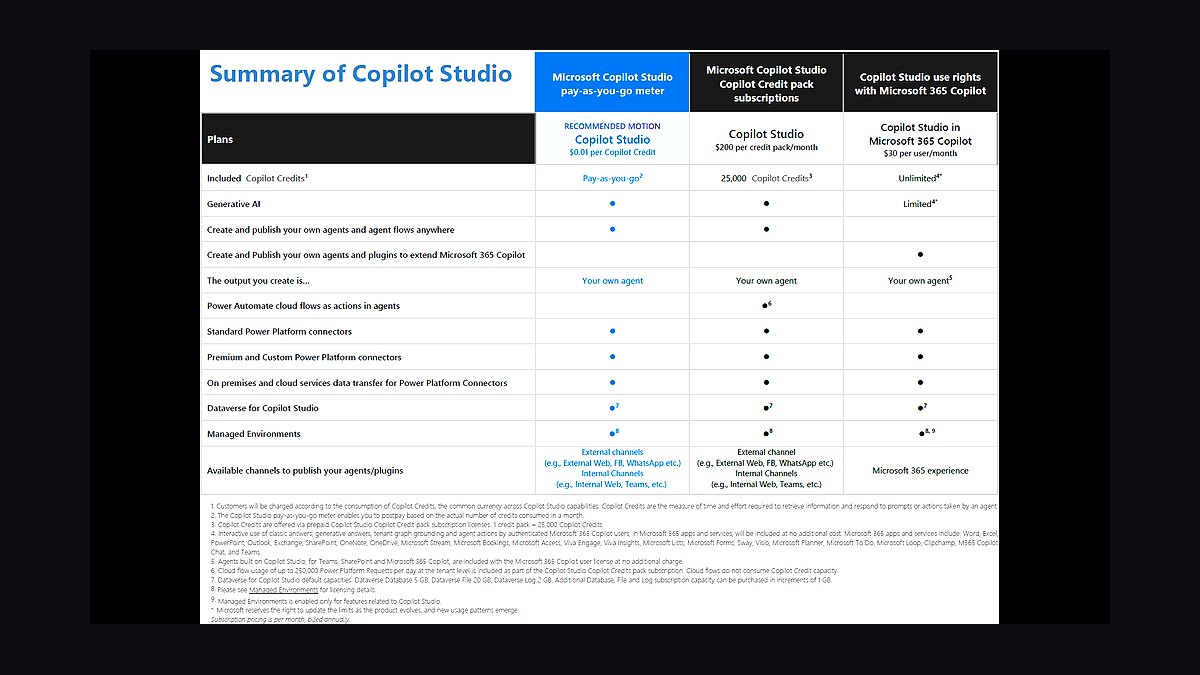
Microsoft 365 Copilot for Sales is an AI sales assistant that lives inside Outlook and Teams and works with both Microsoft Dynamics 365 Sales and Salesforce — making it the rare AI sales tool that augments a competitor's CRM. It does AI-assisted lead scoring, opportunity summarization, CRM-grounded email drafting, call intelligence, and pipeline-risk flagging, and it updates opportunity records automatically from Teams meeting summaries. The 2026 release added an AI agent that autonomously advances leads through qualification stages and a Deal Acceleration capability that recommends next steps from opportunity-health analysis. Pricing folds the Copilot features into the Dynamics 365 Sales Premium plan at $150/user/month, with an add-on path for Salesforce shops that want the assistant inside Microsoft 365 without leaving Outlook.
For RevOps, the strategic point is where it runs: in the inbox and the meeting, not in the CRM. That is a direct play at the oldest problem in revenue operations — reps who will not update the system of record.
1What Copilot for Sales Does
It meets reps where they already work
Most sellers live in Outlook and Teams, not in the CRM. Copilot for Sales surfaces deal context inside those tools: it shows opportunity history in the inbox, drafts emails grounded in CRM data and customer behavior, summarizes meetings, and flags pipeline risk — all without the rep opening Dynamics 365 or Salesforce.
The core feature set
- Lead and opportunity summaries — AI-generated context on any account or deal.
- Email drafting — replies grounded in CRM history and prior behavior.
- Call and meeting intelligence — summaries that capture what was said and committed.
- Automatic CRM updates — opportunity records updated from Teams meeting summaries.
- Pipeline-risk flags — surfacing deals that look stalled or at risk.

2The 2026 Agent Upgrades
Autonomous qualification
The headline 2026 addition is an AI agent that advances leads through qualification stages on its own — researching, reaching out, and moving a lead forward until a human is needed. That shifts Copilot from a passive assistant to an active worker in the funnel, the same direction Salesforce Agentforce and HubSpot Breeze are heading.
Deal Acceleration
The Deal Acceleration capability analyzes opportunity health and recommends specific next steps — who to involve, what to send, where the deal is slipping. It turns the pipeline-risk flag into a prescriptive action rather than just an alert.

3Why Working With Salesforce Matters
Microsoft is attacking from inside the inbox
The unusual move is that Copilot for Sales supports Salesforce, not just Dynamics 365. Microsoft cannot easily rip out an entrenched Salesforce CRM, so instead it embeds an AI layer in the Microsoft 365 tools the same reps already use all day. The CRM stays Salesforce; the daily AI experience becomes Microsoft.
The RevOps read
This is a classic wedge strategy: do not fight for the system of record, win the system of engagement — the place work actually happens. RevOps leaders evaluating AI assistants should weigh this carefully, because the tool reps touch hourly shapes adoption and data quality more than the CRM they touch reluctantly.

4The RevOps Lessons
Fix CRM hygiene by removing the manual step
The most valuable feature is automatic record updates from meeting summaries. The reason CRM data rots is that updating it is manual and reps skip it. Copilot for Sales attacks that root cause by writing the update itself — the same principle RevOps should apply everywhere: eliminate the manual entry rather than nagging reps to do it.
Evaluate AI by where it runs, not just what it does
Two AI assistants with identical features can have wildly different impact based on whether reps actually open them. A tool inside Outlook and Teams gets used; a separate dashboard does not. RevOps should weight point-of-work integration heavily in any AI tooling decision.

Watch the agent autonomy boundary
As the qualification agent acts autonomously, RevOps owns the governance: which actions it can take, what it cannot send without review, and how its CRM writes are validated. Autonomy is leverage only if someone owns the guardrails.
Account for the licensing math
At $150/user/month bundled into Dynamics 365 Sales Premium, Copilot is not a rounding error on a large team. RevOps should model the cost against the time it saves on manual CRM entry and the lift in pipeline accuracy, and decide whether every seller needs it or only the segments where deal complexity justifies the spend. A blanket rollout is rarely the right first move; a pilot on one segment, measured against CRM data-quality and cycle-time benchmarks, tells you whether the bundle pays for itself before you commit the whole team. The vendor that proves ROI on a controlled cohort earns the expansion; the one rolled out everywhere on faith becomes the line item finance questions at renewal.

How Copilot for Sales Reshapes Revenue Attribution in 2027
By late 2027, Microsoft Copilot for Sales has fundamentally altered how RevOps teams approach revenue attribution. Traditional multi-touch attribution models relied on manual activity logging and CRM data entry—both notoriously unreliable. Copilot changes this by automatically capturing every sales interaction that passes through Outlook, Teams, and connected CRM systems. When a rep sends an email, schedules a meeting, or shares a document, Copilot logs the activity and associates it with the correct opportunity record. This creates a near-complete digital footprint of the sales process without requiring reps to lift a finger.
The practical outcome for RevOps is attribution data that is 80-95% complete rather than the 40-60% typical of manually logged systems. This allows operations teams to build weighted pipeline models with far greater accuracy. For example, if Copilot detects that a deal's key stakeholder has not been contacted in 14 days, it can flag the opportunity as at risk before the rep even realizes there is a problem. By 2027, forward-looking RevOps teams have integrated Copilot's activity data into their forecasting tools, reducing forecast error rates by 15-25% compared to pre-Copilot baselines.

However, there is a catch: Copilot only captures interactions that occur within Microsoft 365. If your sales team uses Slack, Zoom, or Google Workspace for significant deal communication, those touchpoints remain invisible. RevOps leaders in 2027 must decide whether to enforce Microsoft 365 as the single source of truth for sales communication or accept a partial view. Most organizations choose a hybrid approach, using Copilot's data as the primary signal while supplementing with CRM-side manual logging for off-platform interactions.
The RevOps Talent Shift: From Data Entry Management to AI Workflow Design
The introduction of Copilot for Sales has triggered a meaningful shift in the skills RevOps teams need. The 2026-2027 period saw a 30-40% reduction in time spent on data hygiene tasks like opportunity cleanup, activity logging verification, and pipeline stage compliance checks. Copilot's autonomous lead advancement agent and automatic record updates handle much of this work. The question for RevOps leaders has become: what do we do with the freed-up capacity?

The answer emerging in 2027 is a pivot toward AI workflow design and prompt engineering. RevOps teams now spend significant time configuring Copilot's behavior—defining which signals trigger autonomous actions, setting guardrails for the deal acceleration agent, and crafting the prompts that determine how Copilot summarizes opportunities and drafts emails. This is not a one-time setup; it requires ongoing refinement as sales processes evolve and as Copilot's underlying models receive updates. Organizations that invested in training their RevOps staff on prompt engineering and AI governance in early 2027 are seeing 2-3x faster time-to-value from their Copilot investment compared to those that treated it as a set-it-and-forget-it tool.
The talent market reflects this shift. Job postings for RevOps roles in mid-2027 increasingly list "AI workflow design" and "Copilot configuration management" as desired skills, alongside traditional requirements like CRM administration and pipeline analysis. Salaries for RevOps professionals who can demonstrate Copilot expertise command a 15-20% premium over generalist RevOps roles. For RevOps leaders, the strategic imperative is clear: either upskill your existing team or risk falling behind as competitors automate the routine work and focus their operations talent on higher-value strategic analysis.

Compliance and Data Governance Implications for RevOps in 2027
Copilot for Sales introduces a new layer of complexity for RevOps teams responsible for data governance and compliance. Because Copilot processes sales communications in real time and stores analysis in CRM records, it creates a permanent, searchable record of every interaction. This is a double-edged sword. On one hand, it provides unprecedented visibility into sales conversations for audit purposes. On the other hand, it raises serious questions about data retention, privacy, and regulatory compliance.
By 2027, most enterprise organizations using Copilot for Sales have implemented automated data classification and redaction policies. For example, if a rep discusses pricing terms or customer financial data in a Teams meeting, Copilot can be configured to flag or redact that information before it enters the CRM record. This is critical for industries like healthcare, financial services, and government contracting, where inadvertent disclosure of protected information could trigger regulatory penalties. RevOps teams now routinely work with legal and compliance departments to define which conversation elements Copilot should capture and which it should exclude.

The 2027 compliance landscape also includes emerging regulations around AI-generated content. Several jurisdictions have introduced rules requiring clear labeling of AI-generated summaries and recommendations. Copilot for Sales now includes automatic disclaimers on AI-generated content, but RevOps teams must verify that these labels appear correctly across all output channels—email drafts, CRM notes, and pipeline reports. Failure to comply can result in fines ranging from 1-4% of annual revenue in regulated industries. For RevOps, this means adding compliance validation to the monthly operational review cycle, ensuring that Copilot's autonomous actions remain within the organization's risk tolerance and regulatory obligations.
FAQ
Does Microsoft Copilot for Sales work with Salesforce, or only with Dynamics 365? It works with both. Copilot for Sales is designed to integrate with Salesforce as well as Microsoft Dynamics 365 Sales, so teams using either CRM can use the AI assistant inside Outlook and Teams without switching platforms.
How much does Microsoft Copilot for Sales cost per user? Pricing typically falls in the range of $150 per user per month when bundled with Dynamics 365 Sales Premium. For Salesforce users, there is an add-on path that adds the Copilot features to their existing Microsoft 365 subscription, though exact costs can vary based on licensing agreements.
Can Copilot for Sales automatically update CRM records from meeting notes? Yes. It can generate meeting summaries from Teams calls and automatically update opportunity records, including lead scores and next steps, directly in the CRM. This reduces manual data entry for sales reps.
What new features were added in the 2026 release? The 2026 update introduced an AI agent that autonomously advances leads through qualification stages and a Deal Acceleration capability that recommends next steps based on opportunity-health analysis. These features aim to speed up sales cycles without requiring constant rep input.
Is Copilot for Sales useful for RevOps teams, or just for sales reps? It is especially relevant for RevOps because it addresses the common problem of reps not updating the CRM. By capturing data from emails and meetings automatically, it helps maintain cleaner pipeline data and more accurate forecasting, which is a core RevOps concern.
Does Copilot for Sales require switching from Salesforce to Dynamics 365? No. It is built to work with both CRMs, so Salesforce users can keep their existing system while gaining the AI assistant inside Outlook and Teams. There is no need to migrate to Dynamics 365 to use the Copilot features.
Bottom Line
Microsoft 365 Copilot for Sales is a wedge into the AI sales market: it lives in Outlook and Teams, works with Salesforce as well as Dynamics 365, and fixes CRM hygiene by writing records from meeting summaries instead of asking reps to. The 2026 agent and Deal Acceleration features push it from assistant to active funnel worker at $150/user/month. For RevOps, the lessons are to remove manual entry rather than enforce it, to weight point-of-work integration heavily, and to own the governance as the agents gain autonomy.
Related on PULSE
- How does Microsoft Sales Copilot compare to Salesforce Einstein in 2027?
- What is the difference between ChatGPT Enterprise and Microsoft Copilot for business?
- How should Datadog price Bits AI against Microsoft Copilot in 2027?
- How should ServiceNow price Now Assist against Microsoft Copilot in 2027?
- What is ZoomInfo Copilot and why is it a hot RevOps AI sales agent for 2027?
- What specific metrics are RevOps teams using to measure AI copilot effectiveness across the entire funnel?
Sources
- Microsoft Learn — Copilot for Sales features for Dynamics 365 users
- Microsoft Learn — Agents, Copilot, and AI in Dynamics 365 apps
- Microsoft — Dynamics 365 Sales pricing
- DynamicsSmartz — Microsoft 365 Copilot 2026 features, pricing, and ROI guide
- Sybill — Microsoft Dynamics 365 vs Salesforce enterprise CRM comparison 2026
---
*Microsoft Copilot for Sales review — Microsoft Copilot for Sales reviews, rating, Dynamics 365 Sales Copilot review 2027, and a review of features, pricing, and Salesforce integration for RevOps buyers.*
This page will be disappearing soon. Save it to your device for $1 — or read it free while it is here.
@Kory-White- · if Venmo asks, the last 4 of my number are 2012
This page is gone.
This one is off the shelf now. $1 keeps it on your phone for good — the whole page, pictures and diagrams included.
 revopsHow Are RevOps Teams Restructuring Sales Compensation Plans for AI-Assisted Reps in 2027?
 revopsHow does Microsoft Sales Copilot compare to Salesforce Einstein in 2027?
 revopsWhat is Salesforce Data Cloud and why does it matter for AI-native RevOps in 2027?
 revopsWhat does ServiceNow's acquisition of Moveworks mean for CRM and RevOps in 2027?
 revopsHow do you reduce CRM data decay in 2027?
 revopsHow do you keep CRM data clean when reps use AI note-takers in 2027?
 revopsHow do you run a CRM data hygiene program in 2027?
 revopsHow do you migrate CRM platforms without losing data in 2027?
 revopsBuild a custom CRM vs. buy Salesforce Enterprise—what's the real long-term cost delta?
 revopsHow do you use Palantir Ontology to automate ramp quotas on new hires in Dynamics 365 during usage-based pricing when consumption pricing with minimum commits in 2027?