


How to integrate Salesforce with LinkedIn Sales Navigator for prospecting in 2027?
Quality
Certified

Connect Salesforce and LinkedIn Sales Navigator through the official Sales Navigator for Salesforce managed package for profile data and embedded widgets, then add CRM Sync for write-back of leads, contacts, accounts, and opportunities. Layer your own scoring and routing on top in Salesforce Flow, because the connector surfaces intelligence but does not qualify anyone.
The two integration paths teams actually choose
Almost every Salesforce–Sales Navigator project resolves into one of two shapes, and confusing them is the single most common reason these builds stall halfway.
Path one: the embedded-widget integration. This is the AppExchange managed package published by LinkedIn, usually called *LinkedIn Sales Navigator for Salesforce* or the *Sales Navigator Embedded Profile*. You install it, authorize it with LinkedIn seats, and drop the Sales Navigator Lightning component onto your Lead, Contact, Account, and Opportunity page layouts. From that point a rep opening a Contact record sees the matched LinkedIn profile inline: current title, tenure, company, mutual connections, recent posts, TeamLink paths, and buttons to save the lead to a Sales Navigator list or send an InMail. Nothing about this path writes LinkedIn data into Salesforce fields. The widget renders live, inside an iframe, against LinkedIn's servers, using the rep's own Sales Navigator seat entitlement. If the rep's seat lapses, the widget goes blank. If your Salesforce record has a bad company name, the auto-match fails and the rep has to search manually and pin the right profile.
The consequence practitioners underestimate: you cannot report on any of it. There is no LinkedIn_Seniority__c field populated by the widget, so you cannot build a Salesforce report of "all contacts whose title changed," cannot route on it, cannot use it in a scoring formula, and cannot feed it to a downstream warehouse. The value is entirely at the point of rep attention. That is not a trivial value — it removes the tab-switching that quietly eats a third of an SDR's prospecting block — but it is a *user-experience* integration, not a *data* integration.
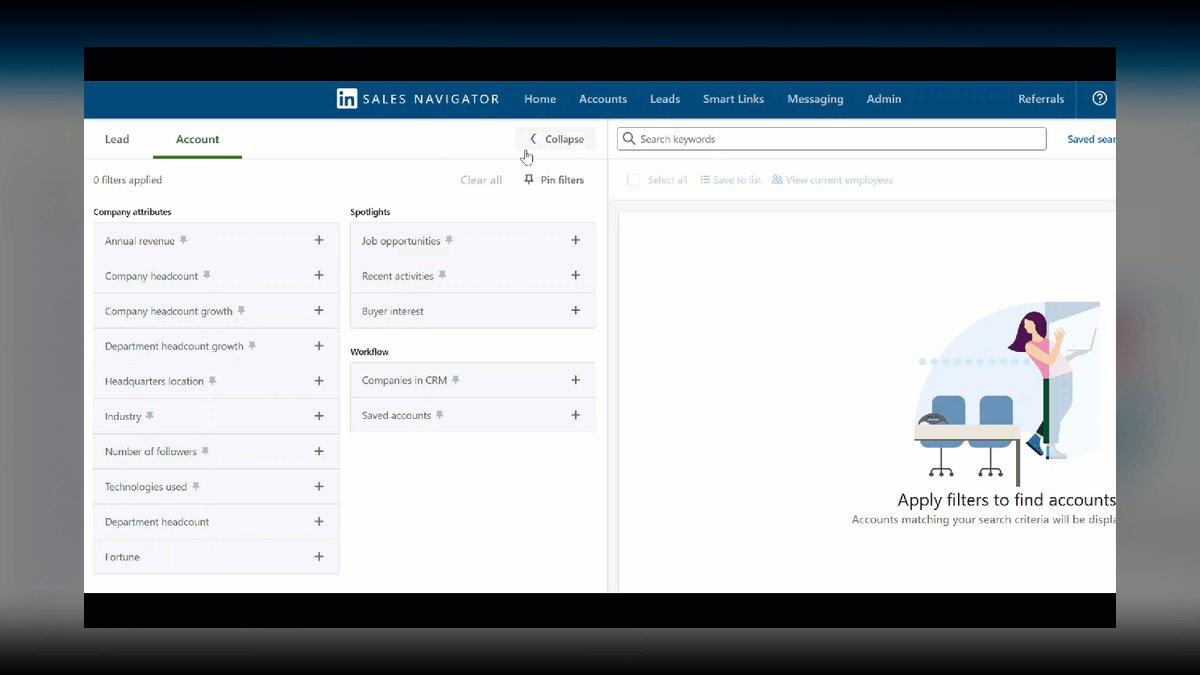
Path two: CRM Sync (the write path). This is the piece that produces records. CRM Sync, available on Sales Navigator Advanced Plus (the tier historically marketed as Team Plus/Advanced Plus, and the only tier where write-back is included), does three distinct jobs that people wrongly bundle together:
- Activity write-back — InMails, messages, and certain Sales Navigator actions are written into Salesforce as Activity/Task records against the matched Lead or Contact. This is what lets an ops person answer "did anyone actually touch this account on LinkedIn?" in a Salesforce report.
- Auto-save / CRM ingest — Salesforce Contacts and Leads attached to open Opportunities are automatically saved into Sales Navigator, so reps see the pipeline reflected in their Sales Navigator lists without manual list-building. Accounts sync into Sales Navigator Account lists the same way.
- Data Validation — Sales Navigator compares your Salesforce Contact records against LinkedIn profiles and flags records where the person appears to have left the company or changed title. It surfaces this as a validation report you can act on. It does not silently overwrite your Salesforce field values; treating it as an enrichment service that repairs your database for you is a misread that has burned plenty of RevOps teams.
Where the drafts of this topic usually go wrong is in asserting a fourth job: a generic activity API that streams every profile view and every saved-lead event into your CRM in real time for scoring. LinkedIn does not offer that as a self-serve integration. Sales Navigator is deliberately not a firehose. If you want per-signal, per-second event data to drive automated prioritization, you are looking at LinkedIn's partner-gated APIs (Sales Navigator Application Platform, SNAP) which are available to approved integration partners under contract — not something you wire up on a Tuesday afternoon with a reverse ETL tool and an API key. Any architecture diagram that assumes open activity endpoints is a diagram of a system you cannot build.

The honest framing: Path one is fast, cheap, and improves rep experience. Path two is the only supported way to get LinkedIn-derived records into Salesforce, and what it gives you is activity logging plus data hygiene, not intent scoring. Everything else — scoring, routing, committee mapping — you build yourself in Salesforce on top of that foundation, or you buy from a third-party data vendor that is not LinkedIn.
How to decide between them
The decision is not "which is better." It is "what problem is loud enough to fund." Work through it in this order.
Start with the failure you are actually seeing. If reps are complaining that they burn time toggling between two tabs and re-typing the same names, that is a widget problem — path one solves it in an afternoon and costs nothing beyond seats you already own. If your VP is asking "how much LinkedIn activity happened on the accounts that closed?" and nobody can answer, that is a write-back problem and no amount of embedded widget will fix it. If the complaint is "our contact data is 30% stale," CRM Sync's Data Validation is genuinely the cheapest lever available, because LinkedIn has the freshest job-change data on earth and your enrichment vendor is inferring the same thing secondhand.

Then check the tier gate. Path one works on the seat tiers that include the Salesforce integration. Path two requires the Advanced Plus tier for the org, not just for one rep. That is a per-seat price step, and it is the real decision point for most teams — you are choosing whether write-back is worth the tier upgrade across your whole selling org, not whether it is worth it for the two people who asked.
Then check your Salesforce hygiene, honestly. Both paths depend on *matching*: LinkedIn has to confidently connect a Salesforce record to a LinkedIn profile. Matching leans on company name, person name, email domain, and title. If your Account records have company names like "ACME - DO NOT USE" or "Acme (parent)", match rates fall off a cliff and reps see empty widgets, which is the fastest way to kill adoption of any integration. Fix account naming *before* you install, not after.
One more filter: who owns it after launch. The widget is effectively zero-maintenance — LinkedIn ships changes to their own iframe. CRM Sync creates ongoing ops work: someone owns the connection health, reviews the Data Validation output, and decides what to do with flagged records. If nobody in RevOps has capacity to own that queue, path two will produce a report nobody reads, and you will have paid a tier upgrade for it.
Concrete numbers behind each option
Treat everything here as planning ranges to validate in your own org, not as vendor-published benchmarks. The point is to give you the right order of magnitude to argue with.
Setup effort. Installing the managed package and adding the Lightning component to four page layouts is a genuine half-day of Salesforce admin work, most of which is layout editing and a sandbox test. Enabling CRM Sync adds an admin-level OAuth connection between the Sales Navigator contract and the Salesforce org, plus decisions about which Salesforce objects and record types participate — call it one to three days including a sandbox pass and a written rollback plan. If you are also doing account-name remediation first, that is the long pole and it scales with your database: a 5,000-account org with moderate mess is a one-to-two-week cleanup; a 50,000-account org that has absorbed two acquisitions is a quarter-long project you should scope separately and not hide inside this integration.

Match rate — the number that decides everything. The metric that predicts adoption is the percentage of Contacts/Leads where the widget auto-resolves to the correct LinkedIn profile with no manual search. Measure it on a sample of 100 records before rollout. In practice, orgs with clean account naming and reasonable title data land in the high-70s to low-90s. Orgs with messy naming, heavy channel/partner records, or lots of generic contacts (info@, accounting@) sit far lower. Below roughly 70%, do not roll out — reps will hit blank widgets often enough to conclude the tool is broken and stop looking, and re-earning that attention costs more than the remediation would have.
Seat economics. Sales Navigator is priced per seat per month and the tier that includes CRM Sync sits meaningfully above the core tier. Check current list pricing directly with LinkedIn or on the Sales Navigator pricing page before you build a business case — the tiers and their names have been reorganized more than once, and quoting a stale price into a budget conversation is how integration projects lose credibility. What is stable enough to plan against: the write-back tier is an *org-wide* step, so multiply the delta by every selling seat, not by the pilot group.
Time saved, framed honestly. The widget's mechanism is removing context switches. If an SDR does 40 prospecting touches a day and each currently involves a 30–60 second detour to find the person on LinkedIn, you are recovering roughly 20–40 minutes per rep per day. That is a defensible, mechanically derived estimate. Measure it: time a rep doing 10 touches before installation and 10 after. Do not import a conversion-lift percentage from a case study you found online and put it in a slide — the mechanism (fewer tab switches) supports a time claim, not a win-rate claim, and executives who have been burned before can tell the difference.

Data staleness. B2B contact databases decay continuously as people change jobs; annual decay in the range of 20–30% is the widely cited planning figure and matches what most teams observe when they audit. If you have 10,000 Contacts, expect something on the order of 2,000–3,000 records per year that quietly become wrong. Data Validation's value is that it flags a meaningful share of those against LinkedIn's own job-change data before your reps discover them by bouncing an email. Score this against what you already pay an enrichment vendor for the same signal — often the honest answer is that you are about to pay twice.
Activity volume for capacity planning. If write-back is on and your team sends InMails at any real volume, you are creating Task records in Salesforce continuously. On a 20-rep team sending 10 InMails a day each, that is roughly 200 Tasks a day, ~4,000 a month, ~50,000 a year, on top of whatever your email and dialer tools already write. Salesforce will absorb this fine, but your Activity-based reports, list views, and any Apex triggers on Task will now see a different mix — check that your "no activity in 30 days" logic still means what you think it means once LinkedIn touches count.
The ROI sentence that survives scrutiny. "We will recover roughly half an hour of prospecting time per rep per day and get LinkedIn touches into pipeline reporting for the first time, at a seat-tier cost of $X per rep per month." That is provable in 60 days. "We will get 2–3x pipeline velocity" is not, and nobody who has run one of these believes it.
Implementation details and sequencing

Run it in this order. Steps two and three are the ones teams skip and the ones that later sink the project.
1. Confirm entitlements before touching Salesforce. Verify with your LinkedIn account team exactly which tier your contract is on and whether the Salesforce integration and CRM Sync are included. Get it in writing. Half the "the integration is broken" tickets in this space are entitlement problems wearing a technical costume.
2. Audit and fix account naming. Pull every Account name and scan for the patterns that break matching: internal prefixes/suffixes, "DO NOT USE", test records, legal entity suffixes where LinkedIn uses the brand name, and duplicate accounts for the same company. Establish one rule — match the company's own LinkedIn page name — and normalize to it. This is unglamorous and it is the highest-leverage hour in the entire project.
3. Install in a sandbox and measure match rate. Install the managed package in a full or partial sandbox with representative data. Pull 100 Contacts stratified across your segments — enterprise, mid-market, SMB, and any partner/channel records — and manually check whether the widget resolves each one correctly. Record the rate per segment. You will usually find one segment dragging the average down, and that is a targeted cleanup, not an org-wide one.
4. Configure page layouts deliberately. Add the Sales Navigator component to Lead, Contact, Account, and Opportunity layouts. Placement matters more than people expect: on the right-hand rail it gets ignored; near the top of the main column it gets used. Do not add it to every record type reflexively — on record types where matching is structurally poor (partner contacts, support-only contacts) an always-empty widget teaches reps the whole tool is unreliable.
5. Enable CRM Sync with a narrow scope first. Turn on write-back for one team, not the whole org. Watch what lands in Salesforce for two weeks: the Task subject format, which fields populate, how the activity attributes to Lead versus Contact, and whether it interacts badly with any existing Task triggers, validation rules, or Activity roll-up automation. Validation rules on Task are a classic silent failure — if a required custom field blocks Task insert, write-back fails quietly and you find out a month later.

6. Set up deduplication keyed on LinkedIn profile URL. Add a LinkedIn_URL__c field, mark it unique where your data allows, and write Duplicate Rules and Matching Rules that use it alongside email. LinkedIn profile URLs are the closest thing to a stable person identifier in B2B, far more durable than an email address that changes with every job move.
7. Build your own scoring layer — and be clear it is yours. This is where you get prioritization, using Salesforce-native signals plus whatever the integration provides. Score in Flow or a formula field on things you actually have: seniority parsed from title, whether the account is in your ICP segment, whether Data Validation flagged the contact as still-in-role, recency of any logged activity including LinkedIn Tasks, and whether the account has an open Opportunity. Weight these to a 0–100 score, cut it into three bands, and route the top band to a human and the rest to nurture. Keep the weights in Custom Metadata so you can tune them without a deploy, and re-tune quarterly against actual conversion.
8. Wire the buying-committee check. Longer, multi-stakeholder deals are the norm in enterprise B2B, and single-threading is a well-documented deal risk. You can enforce a check without any exotic data: a rollup or Flow that counts Contact Roles on an Opportunity and flags any deal past a mid-stage with fewer than three, plus a task to the owner. That is buildable in a day, uses only Salesforce data, and catches the real problem the fancier architectures were reaching for.
9. Set a quarterly review cadence. Re-measure match rate, review Data Validation output, confirm the connection is still authorized (OAuth connections do expire and re-auth is nobody's job until it breaks), and check that the managed package is on a current version. Put it on a calendar with an owner's name on it.

A word on the things you cannot build. If a plan requires streaming profile views into Salesforce, pulling saved-lead lists via an open API, or reading InMail replies through a reverse ETL connector, stop and verify the endpoint exists and is available to you. It almost certainly does not on a standard contract. Design around what LinkedIn actually exposes, and get your intent signal — if you need one — from a vendor whose business model is selling intent data, not from LinkedIn's own surface. A design that assumes access you do not have is worse than a simpler design that ships, because you will discover the gap after you have already promised the dashboard.
Related questions
Do I need Sales Navigator Advanced Plus to use the Salesforce integration at all?
No. The embedded profile widget on Salesforce page layouts works on the tiers that include the Salesforce integration. Advanced Plus is specifically the gate for CRM Sync — activity write-back, auto-save of CRM records into Sales Navigator, and Data Validation. Confirm your exact entitlements with LinkedIn before designing.
Will the integration overwrite my Salesforce contact fields with LinkedIn data?
No. Data Validation flags records that appear stale — job changes, title changes — and surfaces them for review. It does not silently rewrite your field values. If you want automated field updates, you build that yourself in Flow off the flagged output, and you should stage it behind a review step.
Can I export LinkedIn profile data out of Sales Navigator into my warehouse?
Not through the standard integration. What lands in Salesforce is activity records and match linkage, and those flow to your warehouse like any other Salesforce object. Bulk profile export is restricted by LinkedIn's terms; scraping tools that promise it put your seats and your company at risk.
How do I keep the integration working after the initial rollout?

Assign one owner. Quarterly: re-measure match rate on a fresh 100-record sample, review the Data Validation queue, confirm the OAuth connection is still authorized, and check the managed package version. Most failures are silent — an expired connection or a new validation rule blocking Task insert.
FAQ
What is the fastest path to value if I only have a day?
Install the managed package in a sandbox, add the Sales Navigator component to the Contact and Lead layouts, and test it against 20 real records. If the match rate looks good, promote to production and tell reps where it is. That single step removes the tab-switching that eats the most time in a prospecting block, and it costs nothing beyond seats you already pay for. Everything else — write-back, scoring, dedupe — can follow once you know reps are actually using the widget.
Why does the widget show "no match" on so many of my records?
Almost always Salesforce data quality, not a LinkedIn problem. Matching depends on company name, person name, and title lining up with what is on the LinkedIn profile. Account names with internal suffixes, legal-entity names where LinkedIn uses the brand name, duplicate accounts, and generic contacts like info@ all break it. Fix account naming first, then re-measure. If a specific segment is dragging your rate down, remediate that segment rather than launching an org-wide cleanup you will never finish.
Can I automatically score leads using LinkedIn intent signals like profile views?

Not from LinkedIn's standard integration. Sales Navigator does not expose a self-serve activity stream of profile views or saved-lead events for you to pipe into Salesforce. Approved integration partners work with LinkedIn's partner APIs under contract; that is not a build you do yourself. Score instead on what you genuinely have — title seniority, ICP fit, logged LinkedIn activity from write-back, Contact Role coverage, opportunity presence — and buy third-party intent separately if you need it.
How does this interact with our existing enrichment vendor?
Often redundantly. If you already pay for a contact-data provider, you are likely buying job-change detection that overlaps heavily with Data Validation. Before upgrading tiers, audit what your current vendor already flags and how accurately. The honest outcome is sometimes that Sales Navigator's Advanced Plus tier replaces a chunk of an enrichment contract, and sometimes that it duplicates it — either answer is useful, but only if you check.
What breaks most often after go-live?
Three things, in order: an expired or revoked OAuth connection that nobody owns; a Salesforce validation rule or required field on Task that silently blocks activity write-back; and Account naming drift, where new records created after the cleanup reintroduce the same messy patterns and match rate quietly degrades. All three are invisible until someone looks, which is why the quarterly review with a named owner matters more than any part of the initial build.
Should RevOps own this or should sales enablement?
RevOps owns the plumbing — entitlements, the Salesforce configuration, dedupe rules, scoring logic, and the health review. Enablement owns adoption: where the widget sits on the layout, what reps are trained to do with a TeamLink path, and whether the workflow actually changed. Projects that assign both to one team usually under-invest in adoption and end up with a technically correct integration nobody uses.
Sources
- LinkedIn Sales Navigator — Salesforce integration overview
- LinkedIn Sales Navigator — CRM Sync overview
- Salesforce Help — LinkedIn Sales Navigator integration
- LinkedIn Sales Navigator plans and pricing
- LinkedIn Sales Solutions — Sales Navigator product page
- AppExchange — LinkedIn Sales Navigator for Salesforce
- Salesforce Help — Manage duplicate records with duplicate rules
- Salesforce Help — Flow Builder
- LinkedIn Developer — Sales Navigator Application Platform (SNAP)
Related on PULSE
- What is LinkedIn Sales Navigator and why is it a hot RevOps account-intelligence tool for 2027?
- Why is LinkedIn Sales Navigator usage declining in 2027?
- How does SalesLoft integrate with Salesforce compared to Outreach.io?
- How to integrate Shopify with Salesforce for ecommerce CRM?
- How do you integrate Salesforce opportunity data into Palantir Foundry for account planning?
- Why are longer sales cycles in 2027 requiring RevOps to integrate real-time buyer intent data from consolidated platforms?
This page will be disappearing soon. Save it to your device for $1 — or read it free while it is here.
@Kory-White- · if Venmo asks, the last 4 of my number are 2012
This page is gone.
This one is off the shelf now. $1 keeps it on your phone for good — the whole page, pictures and diagrams included.
 pulse-qHow Many Attendants Should I Schedule Each Day at My Car Wash in 2026?
 pulse-qHow Do I Get My Reps to Attach Services to Product Deals in 2026?
 pulse-qDo I Need a Fractional CRO for My Construction Company in 2026?
 pulse-qHow Do I Calculate the Right Service Fee to Charge in 2026?
 pulse-qHow Many Employees Should I Schedule Each Shift at My Language School in 2026?
 pulse-qShould I Hire a Fractional CRO If My CRM Data Is a Mess and Nobody Trusts It in 2026?
 pulse-qWhen Should a Startup Hire a Fractional CRO in 2026?
 pulse-qHow Many Sales Reps Do I Need to Hire for My Welding Supply Company in 2026?
 pulse-qHow Many Staff Should I Schedule Each Shift at My Urgent Care Clinic in 2026?
 pulse-qHow Many Stylists Should I Schedule Each Day at My Hair Salon in 2026?