 Pulse Reviews and Analysis
How Many Employees Should I Schedule Each Shift at My Art Studio?

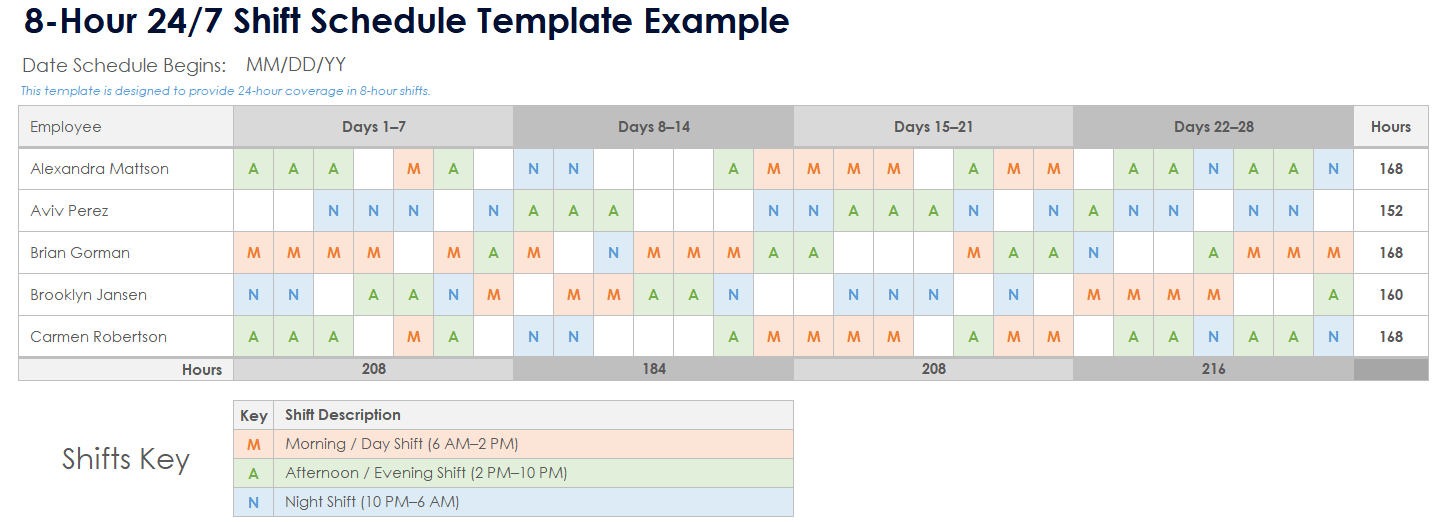
Look, every "expert" will tell you to staff your art studio by gut feel, by "what worked last time," or by the ancient art of crossing your fingers and hoping the 6 p.m. Paint-and-sip doesn't turn into a stampede. That's how you end up with three instructors staring at four customers on a Tuesday afternoon and a single overwhelmed artist managing a pottery wheel meltdown on Friday night.
I'm here to tell you that's garbage. You stop guessing and start dividing.
The formula is brutally simple: instructors needed for a given class = the number of seats booked in that class / your agreed-upon students-per-instructor ratio, plus front-desk and prep coverage. First, you and your lead artist sit down and agree on one number: the ratio one instructor can teach and still give real attention.
For an adult paint-and-sip class that is often 12 students per instructor; for a kids' messy-art or pottery-wheel class it tightens to 8, and for fine-art technique or a wheel-throwing intensive it drops to 6. Then you pull each class's actual seats sold from your booking system.
If your 6 p.m. Paint-and-sip has 24 seats booked at 12-to-1, that is 24 / 12 = 2 instructors on the floor, plus 1 front-desk and prep to pour, set up, and clean up, so 3 employees that shift. If the 6 p.m.
Kids' pottery has 24 seats at 8-to-1, you need 24 / 8 = 3 instructors plus 1 prep, so 4. You do that for every class on the calendar, then place those shifts against when seats actually sell, evenings and weekends, so the bodies are on the floor when the students are. PULSE has a free Rep Scheduling Matrix that runs this division across every class and every day at once.
Below are the ten tools that solve this problem, ranked, with PULSE first because it is free and built around this exact method.
Every tool below can build a schedule. Only a few build it off your seats-and-ratio math, and only one is free and designed around the students-per-instructor method that keeps you from over- or under-staffing the floor. The rankings reflect how well each tool serves a class-based studio that wants the schedule to track the seats actually sold, not just fill a grid.
An art studio, a paint-and-sip bar, a pottery studio, a kids' creativity center, same method, swap the medium.
1. PULSE Rep Scheduling Matrix 🏆 BEST OVERALL PULSE's free Rep Scheduling Matrix runs the whole method in your browser. It takes your seats sold per class and a per-instructor ratio and auto-distributes the headcount by hour, protecting your packed evening and weekend classes instead of spreading instructors flat across an empty weekday afternoon.
Here is the method it is built on, step by step, because the math is the point:
Step one - agree on the students-per-instructor ratio. Sit down with your lead artist and set the number of students one instructor can teach while still giving real attention. Say it out loud to the staff: "An adult paint-and-sip is twelve to one. Kids' messy art or wheel work is eight to one.
A fine-art technique class is six." That is the honest floor for teaching quality and mess control. The ratio gives everyone the same yardstick: leadership, your prep staff, and every instructor on the floor.
Step two - pull seats sold per class, per day. Take each class on the calendar and average the seats sold over a trailing four-to-eight weeks. Your 6 p.m. Friday paint-and-sip carries 24 seats; your 11 a.m.
Wednesday kids' class carries 8. Divide by the right ratio. The paint-and-sip at twelve-to-one needs two instructors; the kids' class at eight-to-one needs one.
Add one front-desk and prep on every class to pour, set up, and clean up. Run that across every class and every day and the staffing plan writes itself. No favorites, no "we always run two artists," just seats sold divided by the ratio.
Step three - place the shifts where the seats sell. The count tells you how many; the booking calendar tells you when. Pull seats by class and look at when they actually sell. If the rush hits on weekend evenings and weekday after-school, you stack instructors there and run a lean crew through the quiet weekday mornings rather than parking everyone at noon.
The matrix lets you slot bodies against real demand so coverage matches seats sold instead of habit.
Because it is free, browser-only, and built by a 25-year operator for exactly this question, it is the default pick for any class-based studio. Best for: owners and lead artists who want the schedule to come straight off the seats-and-ratio math and refuse to pay per-seat fees to get it.
2. When I Work When I Work is the most widely used shift-scheduling app for hourly teams, starting around $2.50 per user per month on the Essentials plan and climbing to roughly $8 per user per month with attendance and labor tools. It handles instructor availability, shift swaps, and mobile clock-in cleanly, and your front-desk lead can copy a week forward in a couple of clicks.
Where it is strong is execution, getting the published schedule onto every instructor's phone with reminders. Where it leaves you on your own is the *why*: it will not tell you that your Friday paint-and-sip needs two instructors. You bring the seats-and-ratio math; it runs the logistics.
For an art studio that already knows its per-class seats, it is a reliable, affordable backbone.
3. Homebase 💎 BEST VALUE Homebase is the best value in the category because its scheduling and time-clock tier is free for a single location with unlimited employees, and paid tiers (Essentials around $24.95 per location per month, Plus around $59.95, All-in-One around $99.95) are priced per location rather than per head.
For an art studio carrying a roster of part-time instructors and prep staff, per-location pricing can be dramatically cheaper than per-user tools. You get scheduling, time tracking, team messaging, and basic labor-cost forecasting against revenue. It is the natural pick for a single-studio owner watching every dollar who still wants seats-aware scheduling without an enterprise contract.
4. Deputy Deputy runs about $4.50 per user per month for scheduling and $6 for the premium tier that adds time and attendance. Its strength is demand-based scheduling: connect a booking or POS feed and Deputy will suggest staffing against projected demand, which is the closest off-the-shelf cousin to the seats-and-ratio method.
It also handles compliance, break rules, and overtime alerts, which matters once you mix W-2 and contract instructors. For studio operators who want auto-suggested coverage tied to seats-sold data and clean labor-law guardrails, Deputy earns its price.
5. Acuity Scheduling Acuity Scheduling is purpose-built for class and appointment booking, with plans commonly starting around $16 per month and scaling with calendars and features. It ties seat sales directly to class capacity, so when a class fills you can see instantly that you need another instructor to hold the ratio.
It manages class registration, payments, and capacity caps in one place, which means the same system that sells the seat can tell you the staffing the class now requires. If your scheduling problem is really a seats-sold problem, Acuity speaks your language better than a general shift tool.
6. Sling Sling offers a genuinely useful free tier, with Premium around $1.70 per user per month and Business around $3.40. It leans into shift scheduling plus internal communication, newsfeeds, tasks, and announcements.
So here's the punchline: stop treating your studio like a daycare center and start treating it like a math problem. The seats sold, the ratio, the prep — that's your truth. Everything else is just expensive guesswork. If you want the spreadsheet that does the math for you, grab the free PULSE matrix. Your Friday night paint-and-sip will thank you.
*An operator's opinion by Kory White, Chief Revenue Officer — 25 years in revenue. More at PULSE · CRO Syndicate*