
How Do I Set SLAs Between RevOps and the Data Team in 2027?
 Curated byKory White · Fractional CRO · Maryland
 PULSEKNOWLEDGE LIBRARY
To set effective SLAs between RevOps and the data team in 2027, write down four things both sides sign: what data RevOps depends on, how fresh it must be, who fixes it when it breaks, and how fast. RevOps lives downstream of the warehouse, reverse-ETL syncs, and CRM enrichment, so when a pipeline job silently fails, the forecast, routing, and attribution all break — usually discovered by a frustrated rep, not an alert. A real SLA replaces that chaos with explicit freshness windows (e.g., CRM-to-warehouse sync lag), uptime commitments for critical models, a severity-tiered incident process, and data-quality thresholds (null rates, duplicate rates, schema-change notice). The goal is to treat the data team as an internal supplier with a contract, and RevOps as a consumer with clear, prioritized requirements — so reliability is engineered, not hoped for.
Why RevOps Needs a Data SLA in 2027
The modern revenue stack is a data pipeline. Lead scoring, lead-to-account matching, routing, NDR cohorts, and forecasting all consume warehouse tables that the data team owns. When those tables go stale or a column changes name, RevOps automations break downstream — leads stop routing, dashboards show wrong numbers, and trust collapses. The failures are often silent: a sync job errors at 2 a.m. and nobody knows until a rep complains that a lead is twelve hours old.
An SLA fixes the accountability gap. Without one, every data issue becomes an ad-hoc fire drill where RevOps begs the data team to prioritize a fix against their own roadmap. With one, both teams agreed in advance which datasets are business-critical, how fresh they must be, and how fast a breach gets fixed.
The Four Pillars of the SLA
1. Scope: Which Datasets Are Critical
List the specific tables and models RevOps depends on and rank them. A handful are tier-1 (forecast inputs, routing keys, billing/usage for NDR) where staleness directly costs revenue. Others are tier-2 or tier-3. You cannot give everything a tight SLA, so force the prioritization.
2. Freshness and Uptime Targets
For each tier-1 dataset, define a freshness window — how old the data may be before it counts as a breach — and an availability target. For example, a routing-critical table might need a sync lag under a defined threshold during business hours, while a monthly cohort model can tolerate daily refresh.
3. Quality Thresholds
Freshness without quality is a trap. Define acceptable null rates, duplicate rates, and referential-integrity checks on key fields, plus a schema-change notice period so the data team never renames or drops a column RevOps depends on without warning.
4. Incident Response and Severity Tiers
Define severities (e.g., Sev-1 = forecast or routing down) and a response and resolution clock for each. Specify the on-call path, the communication channel, and who owns the fix.
Making the SLA Real, Not a Document
An SLA only works if it is monitored automatically. Use data-observability and testing tooling so breaches alert before reps notice. Tools such as dbt for model tests, Monte Carlo or Great Expectations for data-quality monitoring, Fivetran for managed sync with status visibility, and Census or Hightouch for reverse-ETL observability give both teams a shared, objective view of whether the SLA is being met. Review breaches in a recurring joint operations meeting so the SLA evolves with reality.
Governance and Ownership
Name a data product owner on the data side and a RevOps systems owner on the consumer side. They co-own the SLA, review it quarterly, and arbitrate priority conflicts. Put the SLA in a shared document, version it, and reference it in incident reviews. When the data team's roadmap competes with a RevOps breach, the SLA — not the loudest voice — decides priority.
Phasing the Rollout
Do not try to put every dataset under contract at once. Start with the two or three tier-1 datasets where staleness most directly costs revenue — typically the routing keys and the forecast inputs — and prove the SLA works there before expanding. Instrument those first, agree the freshness and severity definitions, and run a few incident cycles so both teams learn how the process feels in practice. Once the tier-1 SLA is stable and trusted, extend coverage to tier-2 datasets. This phased approach keeps the commitments enforceable, gives the data team a realistic on-call load, and avoids the common failure where an ambitious "everything is critical" SLA is signed, immediately breached everywhere, and then quietly ignored. An SLA earns authority by being honored on a small, important scope before it grows.
Common Pitfalls
- SLA on everything. Untiered SLAs are ignored; force tier-1 prioritization.
- No automated monitoring. A document with no alerts is fiction; reps will still find the breaks first.
- Ignoring schema changes. Silent column renames are the most common RevOps breakage — require notice.
- No severity tiers. Without them, a stale dashboard and a dead routing pipeline get the same panicked response.
- No joint review. SLAs rot if nobody revisits them as the stack changes.
The SLA Scorecard: Measuring What Matters Beyond Uptime
A traditional SLA focuses on uptime and freshness, but in 2027, a mature RevOps–Data partnership tracks a SLA scorecard that captures both operational health and business impact. Think of it as a balanced scorecard for the data supply chain. The scorecard typically has four quadrants:
- Availability & Freshness – Was the data available when needed? Did the nightly sync complete within the agreed window? Measure actual vs. promised sync completion times (e.g., 95% of CRM-to-warehouse refreshes finish within 15 minutes of the scheduled time). Track “data age” at the moment RevOps queries it — if the warehouse is 2 hours stale but the SLA says 30 minutes, that’s a breach even if the pipeline is “up.”
- Data Quality – Monitor null rates on critical fields (e.g., “lead source” null rate < 2%), duplicate record rates in the CRM (< 0.5%), and the percentage of records passing automated validation rules. Set a “quality gate” that blocks a sync from completing if thresholds are exceeded — forcing a fix before bad data reaches RevOps.
- Incident Response – Measure mean time to acknowledge (MTTA) and mean time to resolve (MTTR) for each severity tier. For a Tier 1 incident (e.g., all pipeline data is 4 hours stale), MTTA should be under 15 minutes and MTTR under 2 hours during business hours. For Tier 3 (e.g., a non-critical enrichment field is missing), MTTR can be 24–48 hours.
- Business Impact – Track how many times a data issue directly caused a missed forecast target, a misrouted lead, or a delayed commission payout. This is the “revenue at risk” metric — e.g., “In Q1, data SLA breaches impacted 3% of pipeline value, costing an estimated $120K in delayed deals.” This ties the SLA to the P&L.
The scorecard should be reviewed in a monthly SLA business review between RevOps leadership and the data team lead. Both sides bring their own view of the numbers, and the meeting focuses on root causes and systemic fixes — not blame. Over time, the scorecard reveals patterns: maybe the data team is consistently missing freshness targets on Monday mornings because of weekend batch jobs. That’s a process fix, not a people problem.
The “Data Dependency Map”: Your SLA’s Foundation Document
You cannot write a meaningful SLA until you know exactly which data flows RevOps depends on and in what order. The data dependency map is a living diagram that shows every critical data pipeline from source to RevOps consumption. It answers three questions:
- What data does RevOps need, and where does it come from? List every source system (CRM, billing platform, product analytics, customer success tool, enrichment service) and every key field or model that RevOps uses. For example: “Lead scoring model depends on CRM ‘lead source’ field, billing ‘plan type’ field, and product ‘feature usage’ table — all must be fresh within 15 minutes of the nightly sync.”
- What are the critical paths? Identify which pipelines are single points of failure. If the reverse-ETL that sends enriched leads to the CRM fails, does the entire lead routing system stop? If the attribution model depends on a join of three tables, and one table is missing, does attribution break silently? Mark these as “Tier 0” dependencies — they get the strictest SLA guarantees.
- Who owns each link in the chain? For each pipeline step (source extraction, transformation, loading, reverse-ETL, CRM update), assign a clear owner — either a person or a team. This is crucial for incident response: when a sync fails, the first question is “who owns the failing step?” The map should be stored in a shared tool (e.g., a Miro board or a Notion page) and updated whenever a new data source or model is added.
To build the map, run a dependency discovery workshop with both teams. RevOps lists every report, dashboard, and automated action they rely on. The data team traces each back to its source. Together, they identify gaps: “Wait, you’re using the ‘churn risk’ field from the customer success tool? That tool’s API has a 2-hour delay — we need to document that.” The map becomes the single source of truth for SLA scope. Without it, you’re setting promises on invisible pipelines.
The Escalation Playbook: When the SLA Breaks
Even the best SLA will be breached — the question is how both teams respond. In 2027, the escalation playbook is a pre-agreed, tiered response plan that removes ambiguity during a data incident. It covers:
- Severity definitions – Tier 1: Data critical to revenue operations is unavailable or corrupted (e.g., all pipeline data stale > 2 hours, forecast model producing zeros). Tier 2: Data is available but degraded (e.g., enrichment fields missing, sync is slow but completing). Tier 3: Minor quality issues with workarounds (e.g., a few duplicate records, a non-critical field null rate slightly above threshold).
- Notification channels – For Tier 1, the playbook triggers an immediate alert via PagerDuty or Slack with an @channel mention in a dedicated #data-incidents channel. For Tier 2, a Slack notification to the data team’s on-call rotation within 30 minutes. For Tier 3, a Jira ticket or email within 4 hours.
- Response SLAs – Tier 1: Acknowledge within 15 minutes, provide a status update every 30 minutes, and resolve or have a workaround within 2 hours. Tier 2: Acknowledge within 1 hour, resolve within 8 hours. Tier 3: Acknowledge within 4 hours, resolve within 48 hours.
- Communication cadence – During a Tier 1 incident, the data team’s incident lead posts a public update every 30 minutes in a shared Slack channel (e.g., #revops-data-alerts). The update includes: what’s broken, what’s being done, and the estimated time to fix. RevOps’ incident lead communicates the impact to stakeholders (e.g., sales leadership, finance) and decides whether to activate a manual workaround.
- Post-mortem process – After any Tier 1 or recurring Tier 2 incident, a formal post-mortem is held within 48 hours. The output is a short document (1–2 pages) covering: root cause, what went well, what didn’t, and three specific action items with owners and deadlines. The action items are tracked in the same system as the SLA scorecard.
The playbook should be tested quarterly in a tabletop exercise where both teams simulate a Tier 1 incident. This reveals gaps in communication, unclear ownership, or missing automation. For example, if the exercise shows that no one knows who to call when the reverse-ETL tool’s API key expires, that’s a fix to add to the playbook. The goal is to make incident response boring and predictable — not a fire drill every time.
FAQ
What’s the minimum freshness window I should set for CRM-to-warehouse syncs? Freshness windows depend on your GTM velocity. For most B2B companies, a 15–30 minute sync lag is reasonable for core objects like leads and opportunities, while slower-moving fields (e.g., account tier) can tolerate hourly syncs. Anything beyond 60 minutes risks reps making decisions on stale data.
Who owns fixing a broken reverse-ETL sync—RevOps or the data team? The data team owns the pipeline and warehouse layer, so they’re responsible for fixing the root cause (e.g., a failed transformation or schema change). RevOps owns alerting the data team when a sync fails and validating that the downstream CRM data looks correct after the fix.
How do I define severity tiers for data incidents without being too rigid? Use three tiers: P1 (forecast or routing broken—fix within 2–4 hours), P2 (attribution or reporting inaccurate—fix within 8–24 hours), and P3 (minor field-level issues—fix within 1–3 business days). Let both teams agree on examples for each tier, and review the list quarterly as systems evolve.
What data-quality thresholds should we include in the SLA? Common thresholds are: null rates under 5% for critical fields (e.g., deal amount, close date), duplicate rates under 2% for CRM records, and a 5-business-day notice for any schema changes that break downstream models. These are starting points—adjust based on your actual data health.
How often should we review and update the SLA? Every quarter is typical, since GTM priorities and data infrastructure change frequently. During the review, check breach logs, adjust freshness windows if needed, and re-prioritize the data team’s backlog based on RevOps’ current biggest pain points.
What happens when the SLA is breached—do we penalize the data team? No penalties—instead, focus on root-cause analysis and a documented fix plan. The SLA is a reliability contract, not a punishment tool. If breaches repeat, escalate to a shared post-mortem to decide whether to invest in monitoring, add redundancy, or renegotiate the commitment.
Sources
- dbt Labs — documentation on data tests, freshness checks, and analytics engineering practice.
- Monte Carlo — data-observability and data-downtime concepts and reliability guidance.
- Great Expectations — open-source data-quality validation documentation.
- Fivetran and Census/Hightouch — managed sync and reverse-ETL reliability documentation.
- Google Site Reliability Engineering (SRE) book — SLO/SLA design principles applied to data.
Related on PULSE
- How should a 2027 sales org set deal desk SLAs?
- How do you align sales and marketing SLAs in 2027 when AI-generated leads have a 40% faster conversion time?
- How do you set up a lead lifecycle SLA between marketing and sales in 2027?
- How do you set up closed-loop reporting between marketing and sales in 2027?
- How do you set up PLG billing infrastructure between payment gateways and CRMs?
- How do you set up PLG billing infrastructure between payment gateways and CRMs?
This page will be disappearing soon. Save it to your device for $1 — or read it free while it is here.
@Kory-White- · if Venmo asks, the last 4 of my number are 2012
This page is gone.
This one is off the shelf now. $1 keeps it on your phone for good — the whole page, pictures and diagrams included.
 revopsWhy are 40% of B2B deals stalling in the legal review phase despite AI contract analysis tools in 2027?
 revopsHow can RevOps use AI in the funnel to identify stalled deals before the buying committee loses interest in 2027?
 revopsHow is AI in the funnel reshaping the scoring of B2B inbound leads in 2027?
 revopsWhat RevOps metrics are obsolete due to AI in the 2027 funnel?
 revopsWhat 2027 vendor consolidation scenario breaks the handoff between SDR and AE when both use different AI co-pilots?
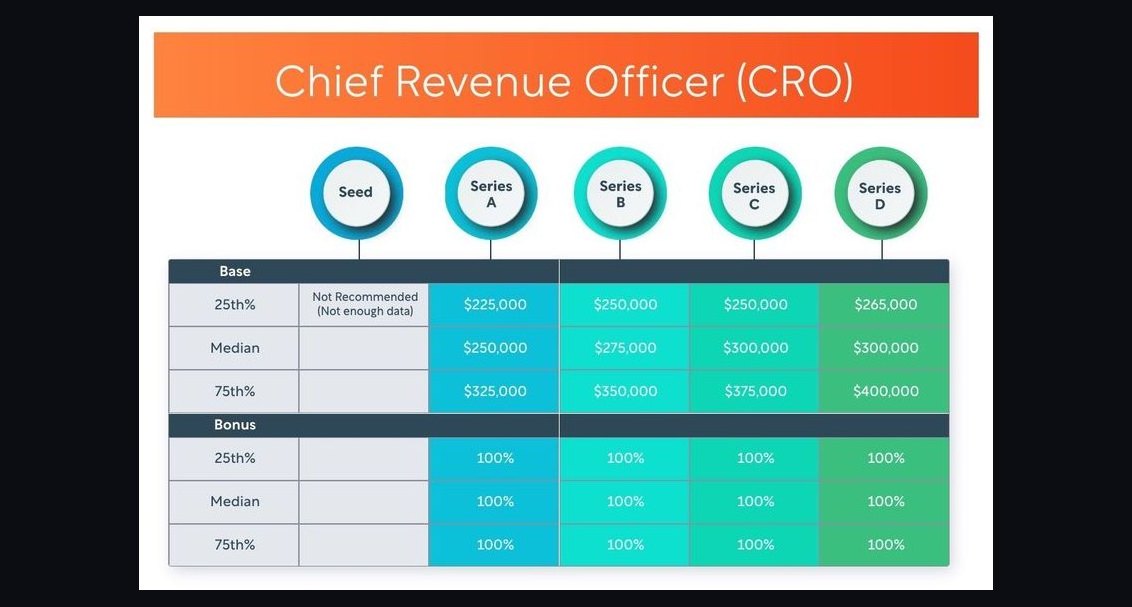 revopsCRO compensation — fractional, full-time, equity in 2027
 revopsHow do you measure outbound effectiveness in 2027?
 revopsHow do you prioritize the RevOps backlog in 2027?
 revopsHow do longer sales cycles in 2027 impact the calculation of customer acquisition cost?
 revopsIs the rise of the 14-person buying committee making vendor consolidation a necessity for RevOps efficiency in 2027?