
How do I check if my carrier supports eSIM activation in 2027?
 PULSEKNOWLEDGE LIBRARY
Check your carrier's eSIM support by dialing *#06# to confirm your phone has an EID, then searching your carrier's support site for "eSIM." Log into your account app and look for an "Add eSIM" or "Transfer SIM" option. If it appears and your plan is postpaid and unlocked, activation is supported.
The Tuesday afternoon that costs you a working phone
Picture the actual failure: it's Tuesday, your flight leaves Thursday, and you've just bought a phone that only has an eSIM slot — no physical tray at all. You assume your carrier handles this because every carrier "does eSIM now." You start the transfer at 9 p.m., the app spins, and it returns a generic error code. You call support at 10 p.m. and the tier-one rep tells you eSIM is supported, then transfers you to a department that closes at 8. Your old phone has already been deactivated as part of the half-finished transfer. You now have two phones and zero working lines, thirty-six hours before a flight.
This scenario is not rare, and it is not caused by carriers lacking eSIM technology. By 2027 essentially every major postpaid network in the US, UK, EU, Australia, Japan, and Korea supports eSIM at the network level. The failures come from a stack of narrower conditions that all have to be true at once: your specific *plan* must be eSIM-eligible, your *account* must be in good standing and past any new-line waiting period, your *device* must be carrier-certified for that network's profile, your *line* must not be a legacy grandfathered rate plan the provisioning system can't re-issue, and your carrier's *activation channel* must be available to you at the moment you try. Any one of those failing produces the same opaque error message.
So the useful question is not "does my carrier support eSIM" — almost certainly yes — but "does my carrier support eSIM *for this line, on this device, through a channel I can reach right now*." Checking that takes about ten minutes and four independent verifications, and doing it *before* you need the phone is the entire difference between a nuisance and a crisis. The rest of this page is that ten-minute check, in order, with what each step actually proves and what it doesn't.

The order matters because each step is cheap and each one eliminates a different class of failure. Confirming your hardware takes fifteen seconds. Confirming your carrier's public documentation takes two minutes. Confirming your *specific line* in the account portal takes five minutes and is the step most people skip. Confirming through a live human or chat agent takes fifteen to forty minutes and is only worth doing when the first three disagree with each other — which happens more often than you'd expect, because carrier marketing pages, support docs, and provisioning systems are maintained by three different teams on three different update cycles.
The four-step check, from cheapest to most definitive
Run these in order and stop when you get a clean answer. Do not start with calling support — that's the most expensive step and the least reliable, because frontline reps read from the same public documentation you can read yourself.
Step one: prove your device has an eUICC. Open the dialer and enter *#06#. On any modern phone this pops an overlay showing IMEI numbers and, if the device has an embedded SIM, a 32-digit EID (eUICC Identifier). If you see an EID, the hardware is capable. If you see only IMEI values, the device has no embedded SIM and no carrier on earth can activate an eSIM on it. On iPhone you can also check Settings → General → About and scroll to the EID row; on most Android builds it's Settings → About phone → SIM status, or Settings → Network & internet → SIMs. Write the EID down — you will need it if you end up doing a manual activation over the phone, and reading a 32-digit number to a rep is easier from a screenshot than from a screen you have to navigate back to mid-call.
Step two: read the carrier's own device compatibility page, not the marketing page. Every carrier that supports eSIM publishes a support article, usually titled something like "Set up an eSIM" or "eSIM FAQ," and — critically — most publish a *device list*. Search the web for [carrier name] eSIM supported devices rather than browsing the homepage, because the homepage sells plans and the support subdomain documents reality. What you're looking for is your exact model on that list. "iPhone" is not on the list; "iPhone 14 and later" is. Model-year granularity matters especially for Android, where a carrier may certify the flagship but not the mid-range variant sold in a different region. If your device was purchased outside the country your carrier operates in, assume it is not certified until the list says otherwise.

Step three: check your actual line inside the account app or portal. This is the step that separates "the carrier supports eSIM" from "my line supports eSIM." Log into the carrier's app or web account, navigate to the line you want to convert, and look for a menu item named some variation of Manage SIM, Change SIM, Transfer SIM, Add eSIM, or Convert to eSIM. If that option is present and clickable for your line, provisioning is enabled for your account and plan. If it's greyed out, missing, or produces a "contact us" interstitial, something about your specific line blocks it — most often a plan type, an account hold, or a device-financing lock. The presence or absence of that button is more reliable than anything a support page says, because it's rendered from the same provisioning system that would run the activation.
Step four: escalate to a human only if steps two and three disagree. If the support page lists your phone but the app won't offer the transfer, you have a line-level block, and that requires an agent with account tooling. Ask a specific question — not "do you support eSIM," which gets you a rehearsed yes, but "is line ending in XXXX eligible for eSIM provisioning on my current rate plan, and if not, what specifically is blocking it?" That phrasing forces the rep to look at the account rather than the FAQ. Ask them to note the answer on the account, and get a reference number.
What the check actually proves at each layer
It helps to know what each of those four signals is really testing, because people over-trust the wrong ones.

The *#06# EID check tests hardware only. An EID means the device contains an eUICC chip that can store carrier profiles. It says nothing about whether your carrier will issue one, whether the device is carrier-locked, or whether the eSIM is enabled in firmware for your region. Some devices sold in mainland China ship with the eSIM hardware physically present but disabled in software, and the EID may not display at all — which is why a missing EID on an otherwise-modern phone is worth double-checking against the model's regional variant number rather than assumed to be a hardware absence.
The carrier device list tests certification. Carriers certify device models against their network — VoLTE, VoNR, emergency calling, carrier-bundle settings — and the eSIM device list is usually a subset of the general certified-device list. A phone can work perfectly on the network with a physical SIM and still not appear on the eSIM list, because the certification for downloading and managing a profile over the air is a separate test suite.
The in-app transfer button tests provisioning. This is the strongest signal short of actually running the activation, because that button is typically gated by a live eligibility call against the account: plan code, account status, line age, device IMEI, and any holds. When the button renders enabled, the provisioning system has already answered "yes" to a query very close to the one activation will run.
The human agent tests exception handling. Reps can see the specific block reason and often clear it — releasing a device lock, moving you to an eSIM-eligible rate plan, or lifting a fraud hold. What they are bad at is answering general capability questions, because they read the same public FAQ you do.

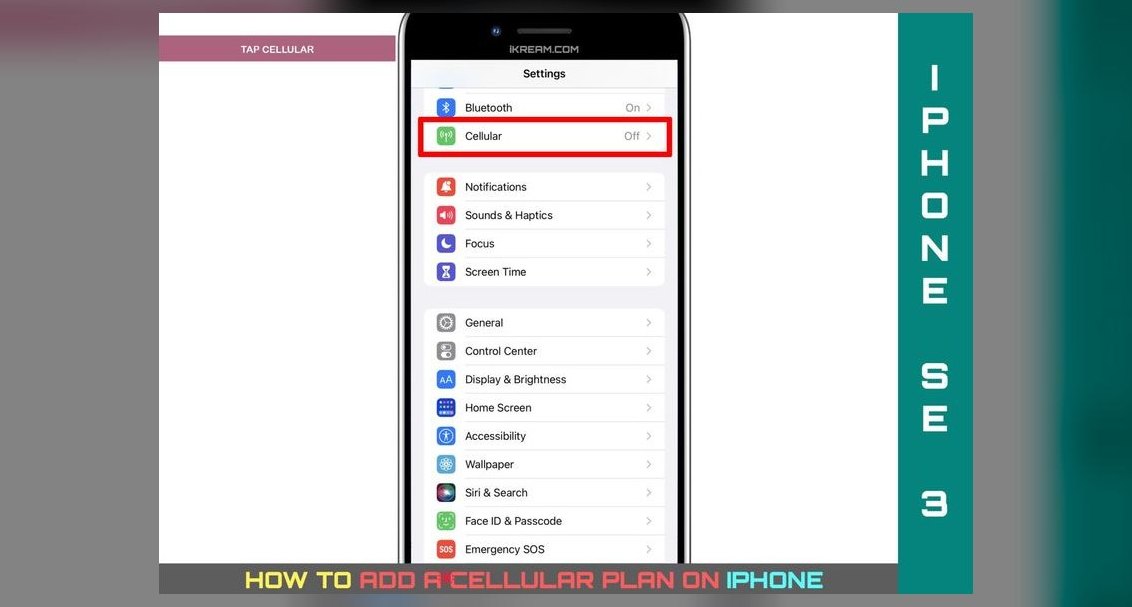
A fifth layer exists that most people never touch: the QR / activation-code channel. Even when the app is broken, many carriers will email or display a QR code containing an SM-DP+ address and matching ID, which you scan or enter manually under Settings → Cellular → Add eSIM → Use QR Code / Enter Details Manually. If a carrier can produce that code for you, they support eSIM activation regardless of what their app is doing that day. Asking "can you send me an eSIM activation QR code for my line?" is one of the fastest ways to cut through a support conversation that's going in circles.
Numbers, timelines, and what "normal" looks like
Concrete expectations help you tell a slow activation from a broken one.
Profile download time. On a healthy Wi-Fi connection, downloading and installing an eSIM profile typically completes in well under a minute — often fifteen to forty seconds. The phone then registers on the network, which usually takes another minute or two and often involves an automatic reboot or a brief "No Service" period. If you are past roughly ten minutes with no service and no error, something is stuck; if you are past thirty, treat it as failed and contact the carrier rather than retrying, because repeated retries can consume the profile's single-use download.

Single-use download codes. This is the single most important number on this page: most activation QR codes and activation codes are one-time use. Once a profile has been downloaded to a device, that code is spent. If you delete the eSIM from the phone — even accidentally, even during a factory reset — you generally cannot re-scan the same code. You must ask the carrier to re-issue. Never delete an eSIM profile unless you are certain you have a fresh code or an in-app re-download path.
New-line waiting periods. Many carriers impose a hold on SIM changes for newly activated lines or lines that recently ported in, as an anti-fraud control. Windows in the range of roughly 24 hours to a couple of weeks are common depending on carrier and account type. If you just ported your number in, expect the eSIM transfer option to be unavailable for a period even though your carrier fully supports eSIM.
Device-lock windows. Carrier-financed devices are typically locked until the financing is paid or a minimum service period elapses, commonly measured in months. A locked device will fail eSIM activation on a *different* carrier's profile even though both carriers support eSIM. Check lock status separately — on iPhone, Settings → General → About → Carrier Lock should read "No SIM restrictions"; on Android the equivalent lives under SIM status or requires a carrier lookup.
Number of stored profiles. Modern phones store multiple eSIM profiles — often on the order of eight to ten depending on model and profile size — but can typically keep only one or two *active* at a time. "Dual SIM Dual Standby" means two lines active simultaneously; storing ten profiles doesn't mean ten active lines. If your phone refuses to add a profile, check whether you've hit the storage ceiling and delete an old, expired travel profile (which, per the single-use rule above, you will not be able to restore).

Prepaid vs. postpaid. Postpaid eSIM support is close to universal among major carriers. Prepaid support is meaningfully spottier, and prepaid brands operating as MVNOs on a host network may not offer eSIM at all even though the host network does. If you're on a prepaid or MVNO plan, do not infer support from the host network's capabilities — check the MVNO's own support page and app.
Travel eSIMs are a different product. A travel/data-only eSIM from a third-party provider is not the same as porting your primary line. Those are usually data-only (no voice, no SMS on your home number), activate in minutes, and are sold in fixed data buckets. They're an excellent fallback when your home carrier's eSIM path fails before a trip — but they don't solve "my number needs to ring on this phone."
Choosing your path when the check comes back mixed
The check rarely returns a clean yes or a clean no. Here's how to read the common combinations and what each path costs you.

Supported everywhere, transfer button live. Take the in-app path. It's the fastest, it usually handles deactivating the old SIM automatically, and it produces a record on your account. Do it on Wi-Fi, plugged in, with both devices present if it's a device-to-device transfer, and do it during business hours in your carrier's support timezone so a human is reachable if it stalls.
Device certified, but no in-app option. Ask for a QR code. This bypasses the app entirely and works even when the self-service flow is broken. The trade-off is that you're now handling a single-use credential manually — screenshot it, but understand a screenshot of a spent code is worthless.
Device not on the certified list, EID present. You can often still activate, but you're unsupported: if calling, texting, VoLTE, or emergency services misbehave afterward, the carrier's answer will be "that device isn't certified." Weigh that against how much you need eSIM. For a primary line you depend on, an uncertified device is a bad bet; for a secondary data line, it's usually fine.
No EID at all. There is no software fix. Your options are a physical SIM in this device, or a different device. Do not buy an "eSIM adapter" that claims to add eSIM capability to a phone without an eUICC — the profile has to live in secure hardware.

Carrier supports eSIM, your rate plan doesn't. This is common on old grandfathered plans that the provisioning system can no longer re-issue. Changing plans usually unblocks it — but you may permanently lose the grandfathered pricing or terms. Ask the rep explicitly: "if I move to a plan that supports eSIM, can I move back to my current plan afterward?" The answer is frequently no. That trade-off is worth thinking about for a full day, not deciding on a support call.
Pitfalls that turn a supported carrier into a dead phone
Deactivating the old SIM before the new one registers. Do not remove the physical SIM, factory-reset the old phone, or delete the old profile until the new line has placed a real call, sent a real SMS, and loaded a page on cellular data with Wi-Fi off. Keep the old path recoverable until the new one is proven.
Doing it while traveling. eSIM activation frequently requires a data connection to reach the carrier's SM-DP+ server, and if your only data was the line you're transferring, you've created a chicken-and-egg problem. Activate on your home network, on Wi-Fi, before you leave. Roaming activation is possible but adds a failure mode you don't need at an airport.
Trusting a frontline "yes." "Do you support eSIM?" gets a yes from almost any rep, because the carrier does support it. That answer tells you nothing about your line. Always ask the line-specific question.
Assuming your MVNO inherits the host network's support. It doesn't. Check the brand you actually pay.
Reusing a QR code. Covered above but worth repeating because it causes the most unrecoverable failures: single use, and a factory reset spends it.
Ignoring the carrier lock. A device can pass every eSIM check and still refuse a competitor's profile because it's financed and locked. Check lock status as a separate item.
Screenshotting the QR code onto the same phone you're scanning it with. Some flows need a second screen to scan from. Either use the manual-entry option (SM-DP+ address plus activation code) or display the code on a laptop.
Letting the battery die mid-download. Plug in. An interrupted profile install is one of the ways a single-use code gets consumed with nothing to show for it.
Not testing emergency calling behavior after the switch. After activation, confirm the phone shows normal service and your carrier name — an uncertified device sometimes registers for data but mishandles emergency services or VoLTE, which is not something you want to discover under pressure.
Related questions
Does a missing EID always mean my phone can't do eSIM?
Almost always, but not quite. Some regional variants ship with the eUICC disabled in firmware, so the EID won't display. Check your exact model number against the manufacturer's regional specifications before concluding the hardware is absent.
Can I check eSIM support without contacting my carrier at all?
Yes — dial *#06# for the EID, read the carrier's published device list, and look for the transfer option in your account app. Those three steps answer the question for most people without any support contact.
Is prepaid eSIM support the same as postpaid?
No. Postpaid support is near-universal on major networks; prepaid and MVNO support varies considerably. Always check the specific brand you pay rather than the underlying network.
What if the transfer option exists but errors out?
Stop retrying — repeated attempts can consume a single-use profile. Contact support, cite the exact error, and ask for a fresh activation QR code for that line.
Can I keep a physical SIM and an eSIM active at once?
On most current dual-SIM phones, yes — one physical plus one eSIM active simultaneously. Check your model's specific dual-SIM mode, since capabilities differ between regions and model years.
FAQ
How do I check if my carrier supports eSIM activation quickly?
Dial *#06# to confirm your device shows an EID, then open your carrier's account app and look for an "Add eSIM," "Transfer SIM," or "Change SIM" option on your line. If that option is present and enabled, your carrier supports activation for that specific line. Cross-check against the carrier's published eSIM device list to confirm your exact model is certified.
Why does my carrier say it supports eSIM but the option is missing on my account?
Network-level support and line-level eligibility are different things. Your rate plan may predate eSIM provisioning, the line may be inside a post-port or new-activation waiting period, the device may be carrier-locked, or the account may have a hold. Ask support about that specific line and plan rather than about eSIM in general.
Can I reuse an eSIM QR code if I reset my phone?
Generally no. Most activation codes are single-use and are consumed on first download. A factory reset or a deleted profile spends the code with nothing recoverable. Ask your carrier to issue a new one — and never delete a working profile without a replacement code in hand.
How long should eSIM activation take?
The profile download itself is usually well under a minute on Wi-Fi, followed by a minute or two of network registration, sometimes with a reboot. Past ten minutes with no service, treat it as stuck; past thirty, contact the carrier instead of retrying, since retries can burn the code.
Does an unlocked phone guarantee my carrier will activate an eSIM on it?
No. Unlocked means no carrier restriction on the device; certified means the carrier has tested that model on its network for eSIM provisioning. An unlocked, uncertified phone may activate fine or may have problems with VoLTE, SMS, or emergency calling that the carrier won't troubleshoot.
Should I activate an eSIM before or after international travel?
Before, on your home network and on Wi-Fi. Activation usually needs a data path to the carrier's provisioning server, and if the line you're transferring is your only data source abroad, you can strand yourself. Test calls, texts, and data before departure.
Sources
- https://support.apple.com/en-us/HT212780
- https://support.google.com/pixelphone/answer/9449293
- https://www.gsma.com/esim/
- https://www.samsung.com/us/support/answer/ANS10002024/
- https://www.fcc.gov/consumers/guides/cell-phone-unlocking-faqs
- https://www.gsma.com/newsroom/esim/
- https://www.ofcom.org.uk/phones-and-broadband/mobile-phones/
- https://consumer.ftc.gov/articles/cell-phone-fraud
Related on PULSE
- How do I transfer my number to a new phone without losing service?
- What is the difference between a locked and unlocked phone?
- How do I set up dual SIM on a single device?
- What should I check before buying a phone from another country?
- How do travel data plans compare to roaming on my home carrier?
 telcoTop 10 Telco strategies for 2027
 telcoTop 10 best Telco options in 2027
 telcoBest Cellular and Wireless Carrier in Nevada in 2027
 telcoHow do I choose the right cell phone carrier for my needs in 2027?
 telcoBest Cellular and Wireless Carrier in Massachusetts in 2027
 telcoBest Cellular and Wireless Carrier in Baltimore in 2027
 telcoIs Visible worth it in 2027?
 telcoBest Cellular and Wireless Carrier in Tennessee in 2027
 telcoBest Cellular and Wireless Carrier in San Antonio in 2027
 telcoBest Cellular and Wireless Carrier in Nashville in 2027