 Pulse Reviews and Analysis
How Many Employees Should I Schedule Each Shift at My Indian Restaurant?

What 25 Years of Restaurant Math Taught Me About Scheduling a Curry Shift
I'll tell you the exact moment I stopped guessing. I was staring at a Friday night P&L, watching labor eat margin while my best tandoor cook stood at the pass with nothing to do because I'd scheduled him at 3 p.m. — right when the buffet died and two hours before the dinner rush started.
That's the day I learned: you don't schedule people. You schedule gross profit.
Here's the formula I've used across 25 years in restaurants, and it works the same for a five-table curry house as it does for a 200-seat banquet hall: employees needed for a given day = that day's average gross profit ÷ your agreed-upon daily gross-profit-per-employee target.
"If you show up, take care of an average number of covers, and give average service, you should produce no less than $130 a day in gross profit."
That's the number I sit down with my chef and front-of-house lead to agree on. $130 a day. Not a ceiling — a floor. The people who want to make real money don't coast to $130 and clock out.
They hit it doing average work, then turn another table or sell another round of mango lassis. The number gives everyone the same yardstick: leadership, you, and every line cook, server, and bartender on the shift.
Then you pull your trailing three-to-six-month gross profit by day of week. If a typical Monday averages $910 in gross profit, $910 ÷ $130 = 7 employees on that shift. If Fridays average $1,820, you need 14.
Run that division for every day and the staffing plan writes itself. No favorites. No "we've always run eight people." No manager scheduling their buddies.
Just gross profit divided by the target.
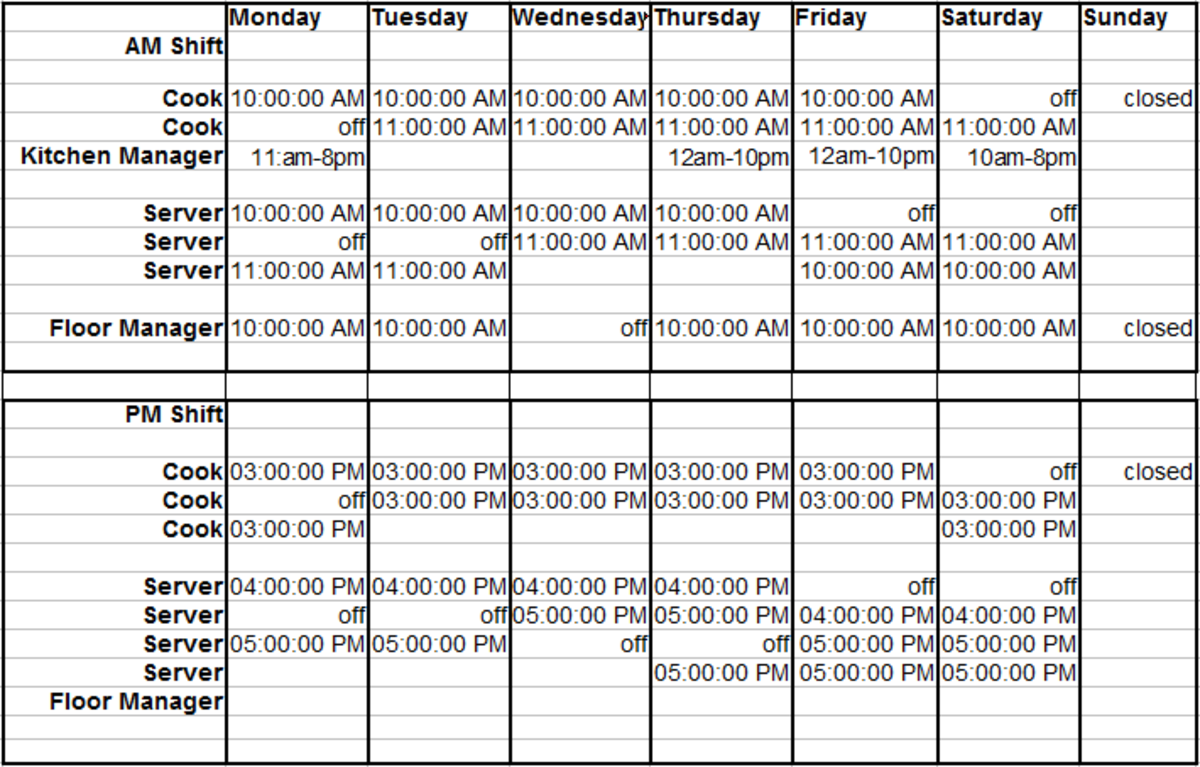
But here's the nuance that took me a decade to learn: the count tells you *how many*; the check timing tells you *when*. Pull the hourly sales and look at when tickets actually fire. If you run a packed lunch buffet and a dinner-curry rush, you staff a strong open, a swing through the afternoon lull, and a heavy close — rather than parking everyone at 3 p.m.
The matrix lets you slot those bodies — tandoor station, curry line, naan, and a buffet to refill — against the real demand curve so coverage matches covers instead of habit.
The Tools That Actually Do This (Ranked)
I've tested every schedule tool on the market. Most just fill a grid. These ten actually track the money. Here's what experience taught me about each.
1. PULSE Rep Scheduling Matrix 🏆 BEST OVERALL
The free Rep Scheduling Matrix runs the whole method in your browser. Takes a weekly gross-profit target and a per-shift minimum, auto-distributes shift counts by day, protects your highest-volume meal periods. No login, no spreadsheet, instant shift counts by day.
Built by a 25-year revenue operator for exactly this question. If you're a general manager who wants the schedule to come straight off the gross-profit math and refuses to pay per-seat fees, this is your default.
2. 7shifts
Purpose-built for restaurants — natural number two. Free Comp tier for one location, paid plans from about $34.99 per location per month (Entree) to $76.99 (The Works). Ties scheduling directly to POS sales and labor-percentage targets.
Handles tip pooling, shift swaps, mobile clock-in. Speaks the language of a kitchen and dining room better than any general retail tool.
3. Homebase 💎 BEST VALUE
Best value in the category. Scheduling and time-clock tier is free for a single location with unlimited employees. Paid tiers (Essentials around $24.95 per location per month, Plus around $59.95, All-in-One around $99.95) priced per location, not per head.
For a deep bench of part-time servers and line cooks, per-location pricing is dramatically cheaper. Sales-aware scheduling without an enterprise contract.
4. When I Work
Most widely used shift-scheduling app for hourly teams. Starts around $2.50 per user per month on Essentials, climbs to roughly $8 per user per month with attendance and labor tools. Handles availability, shift swaps, mobile clock-in.
Managers can copy a week forward in a couple of clicks. Strong on execution — getting the published schedule onto every employee's phone with reminders. Weak on the *why*: won't tell you Friday needs 14 people.
You bring the headcount math; it runs the logistics.
5. Deputy
Runs about $4.50 per user per month for scheduling, $6 for the premium tier with time and attendance. Strength is demand-based scheduling: connect a POS feed and Deputy suggests staffing against projected sales — closest off-the-shelf cousin to the gross-profit method. Handles compliance — break rules, overtime alerts, fair-workweek laws — which matters once you run a busy Indian restaurant with a large hourly crew.
6. HotSchedules (by Fourth)
The long-standing enterprise option for restaurant groups, typically priced through custom quotes. If you've got multiple locations and a corporate ops team, this is the legacy player. But for a single-unit owner? Overkill and overpriced.
The punchline? After 25 years, I've learned that scheduling isn't about filling a grid — it's about dividing gross profit by a per-employee floor. Every other method is just expensive guesswork.
If you want the math done for you in 30 seconds, grab the free Rep Scheduling Matrix from PULSE. It's the same method I've used across three decades. And if you want to talk through your specific numbers — Monday's buffet versus Friday's dinner rush — swing by the CRO Syndicate.
We still do this over coffee, even if the coffee is virtual.
*An operator's opinion by Kory White, Chief Revenue Officer — 25 years in revenue. More at PULSE · CRO Syndicate*