


How do I set up voicemail on a new phone in 2027?
Quality
Certified
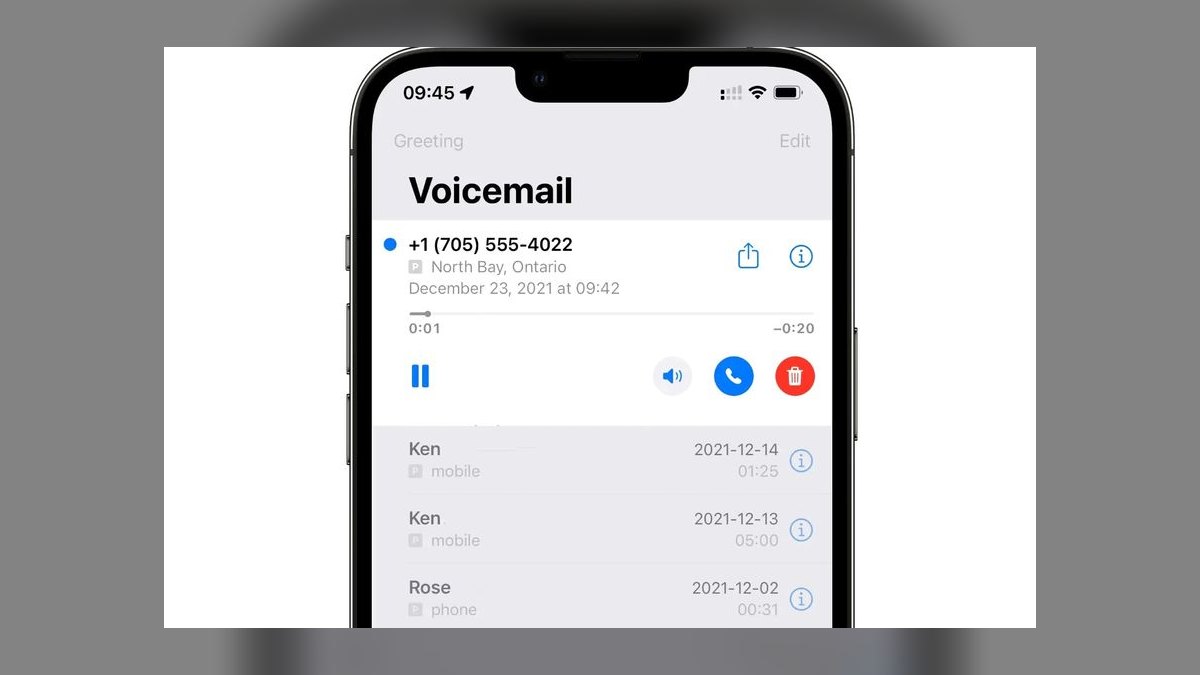
On a new phone, open the built-in Phone app, tap the Voicemail tab, and tap "Set Up Now." Create a numeric PIN (4-7 digits depending on carrier), record a greeting or accept the default, then save. If you kept your old number, voicemail must still be re-activated on the new device — carriers don't carry the setup over automatically, only the number and stored messages if visual voicemail sync was enabled.
The two options compared
There are really two distinct paths for setting up voicemail on a phone in 2027, and which one you land on depends less on the phone itself and more on what you want voicemail to do for you beyond "hold a message until I listen to it."
Carrier-native visual voicemail is the default on essentially every iPhone and most Android phones sold by Verizon, AT&T, T-Mobile, and their prepaid sub-brands. It's built into the Phone app's Voicemail tab, it's free, it activates the moment you set a PIN, and it syncs with the carrier's network-level voicemail box — meaning if someone calls you while your phone is off, the message is captured by the carrier, not the device. Transcription is included on most modern plans (Apple's on-device transcription for iPhone, Google's Voicemail transcription on Pixel and many Android phones enrolled with the carrier's RCS/VoLTE service), but transcription quality and spam-call handling vary a lot by carrier and phone model. This is the path most people take because it requires zero extra apps and zero extra accounts — it's just "part of the phone."
App-based or OTT (over-the-top) voicemail replaces or layers on top of the carrier box. Google Voice is the most common free option and gives you a voicemail inbox tied to a Google account rather than a SIM, which matters if you frequently swap phones, use dual-SIM or eSIM setups, or want the exact same voicemail history whether you're on your phone, a tablet, or a browser. Paid third-party apps (YouMail, RoboKiller, Nomorobo, and similar spam-focused voicemail apps) go a step further: they intercept calls before they ever ring your phone, screen likely spam/robocalls into a separate mailbox, and often provide sharper transcription and custom greetings per caller group (family vs. unknown numbers vs. work). The trade-off is setup complexity — you're usually forwarding your carrier voicemail to a different number or replacing the native Voicemail tab entirely — and, for the more advanced spam-blocking tiers, a monthly subscription.
The practical difference a new-phone owner should care about: carrier voicemail is "set it once, forget it," while app-based voicemail is "more control, more setup, occasionally a subscription." Neither is objectively better — it depends on how much unwanted call volume you get and whether you want voicemail tied to your phone number or to an account you can carry across devices.
How to decide between them
For most people replacing an old phone with a similar one on the same carrier, sticking with carrier-native visual voicemail is the right call — it's already integrated, free, and takes under two minutes to activate. The decision tree really only branches when spam call volume is high, when you're juggling multiple numbers (a work line and a personal line, for instance), or when you specifically want voicemail history that survives a future device swap without carrier re-activation.
If you fall into the "just use what's built in" branch, the setup is finished in the time it takes to read this section. If you fall into the spam-heavy branch, budget an extra 10-15 minutes because most third-party apps require verifying your number by SMS, granting call-screening permissions, and — on iPhone specifically — enabling the app as a Call Blocking & Identification extension in Settings, since iOS doesn't allow third-party apps to fully replace the native voicemail box the way Android does. Android phones generally let an app take over call handling more directly, which is why the spam-focused voicemail apps historically launched on Android first and iPhone support came later and with more restrictions.

One more decision point worth flagging: dual-SIM and eSIM phones, now the default configuration on most flagship phones sold in 2027, can have two independent voicemail boxes — one per line — and each needs its own PIN and greeting set up separately in the Phone app. Skipping this step is the single most common reason someone's "second line" or work eSIM shows callers going straight to a generic carrier greeting instead of a personal one.
Concrete numbers behind each option
The specifics that actually trip people up during setup are numeric, so it's worth being precise about typical ranges rather than vague reassurance.
PIN length and format. Most U.S. carriers require a voicemail PIN between 4 and 7 digits, though the default varies: Verizon and AT&T commonly default new lines to a 6-digit PIN, T-Mobile to 4 digits, and most will let you change the length within that range in account settings. Avoid sequential digits (1234) or repeated digits (0000) — carriers increasingly reject these outright during setup as an anti-fraud measure, since voicemail PIN reset has historically been a vector for account takeover and SIM-swap fraud.

Greeting length limits. Standard greetings are capped at around 3 minutes on most carrier systems, though the practical sweet spot is 15-30 seconds — long enough to state your name and ask for a callback reason, short enough that callers don't hang up before the beep.
Storage and retention. Carrier voicemail boxes typically hold 20-40 saved messages and auto-delete unheard or saved messages after 14-30 days, depending on the carrier and plan tier. Visual voicemail transcripts, by contrast, are usually retained as long as the message itself is retained — deleting the audio also deletes the transcript.
Cost. Carrier-native voicemail, including visual voicemail and transcription, is free on essentially every postpaid plan and most prepaid plans as of 2027. Google Voice is free for personal use. Paid spam-focused voicemail apps generally run in the range of a few dollars up to roughly fifteen dollars per month depending on the tier (basic call screening vs. full robocall blocking plus custom greetings plus multi-line support) — exact pricing varies by app and changes often enough that checking the current listing in the App Store or Play Store before subscribing is worth the extra minute.

Setup time. Carrier-native setup: under 2 minutes from tapping "Set Up Now" to a working voicemail box. Google Voice: 5-10 minutes including number verification. Third-party spam-blocking apps: 10-20 minutes including permission grants, especially on iPhone where the Call Blocking & Identification extension has to be manually enabled in Settings > Phone > Call Blocking & Identification after installing the app.
Implementation details and sequencing
The order of operations matters more than most people expect, particularly on a brand-new phone where the SIM or eSIM, the carrier account, and the physical device are all being connected for the first time.
Start by confirming basic cellular service is working — calls and texts going through — before touching voicemail at all. Voicemail setup fails silently on some carriers if the SIM/eSIM hasn't fully registered on the network yet, which shows up as the Voicemail tab doing nothing when tapped, or looping back to "Set Up Now" after you think you've finished.

Once the Phone app's Voicemail tab is responsive, tapping "Set Up Now" triggers a call (sometimes silent, sometimes audible) to the carrier's voicemail system, which is where the PIN gets created. On iPhone this happens inside the Phone app itself with an on-screen numeric keypad; on Android, some manufacturers (Samsung in particular) route this through a carrier-branded voicemail app rather than the stock dialer, so if the Voicemail tab looks unfamiliar compared to a previous phone, check for a separate "Visual Voicemail" or carrier-named app in the app drawer.
After the PIN is set, record a personal greeting rather than leaving the generic carrier default — a name-and-callback-reason greeting measurably reduces mismatched callbacks and gives callers confidence they reached the right number, which matters especially right after a number port or new phone activation when people might be double-checking they dialed correctly.
If the phone has a second line — a work eSIM, a dual-SIM setup, or a Google Voice number layered on top — repeat the entire sequence for that line independently; voicemail boxes are per-line, not per-device. Finally, test the setup end-to-end by calling the new phone from a different phone, letting it go to voicemail, leaving a short test message, and confirming both the audio and (if enabled) the transcription arrive correctly. This single test catches the most common failure mode: a voicemail box that shows as "set up" in settings but isn't actually receiving carrier-forwarded calls because of a lingering call-forwarding conflict from data migrated off the old phone.

For anyone who ported a number from an old phone rather than getting a brand-new one, one extra step applies: number porting does not carry over voicemail settings, greetings, or saved messages — the new phone starts with a blank voicemail box on the ported number, and any old greeting or saved messages on the previous device are gone once porting completes, unless they were manually saved elsewhere beforehand.
Related questions
Do I need to set up voicemail again if I keep my phone number?
Yes. Porting or keeping your number moves the number itself, not the voicemail box, greeting, or saved messages — the new phone always starts with a blank voicemail setup that needs a fresh PIN and greeting.
How do I change my voicemail PIN later?
On iPhone and most Android phones, go to the Phone app's Voicemail tab, tap Greeting or Settings, and look for "Change Password/PIN." Carriers also allow PIN resets by calling customer support directly.
Can I check voicemail from a different phone?
Yes — dial your own number from another phone, and when the greeting starts, enter your voicemail PIN (usually after pressing # or * depending on carrier) to access messages remotely.
Why does my new phone say "Voicemail Not Set Up"?

Usually because the SIM/eSIM hasn't fully activated on the carrier network yet, or because a second/eSIM line needs its own separate voicemail setup that hasn't been completed.
Is Google Voice voicemail better than carrier voicemail?
It's different, not strictly better: Google Voice ties voicemail to your account across devices, while carrier voicemail is tied to the SIM and requires no forwarding setup — the right choice depends on whether you value portability or simplicity.
FAQ
Do I need a PIN to set up voicemail on a new phone? Yes, virtually every carrier requires a numeric PIN (typically 4-7 digits) before voicemail activates, both to secure the mailbox and to allow remote access from another phone.
What happens to old voicemails when I get a new phone? If they were only stored on the carrier's network voicemail box, they're generally lost once the box resets on setup unless you saved the audio files beforehand; visual voicemail messages synced through an app-based service like Google Voice can persist since they're stored to the account, not the device.

Does an eSIM need a different voicemail setup than a physical SIM? No — the setup steps are identical once the eSIM is active on the network; the only difference is that dual-SIM phones with one eSIM and one physical SIM need voicemail configured separately for each line.
Can I use the same voicemail greeting across two lines on one phone? Not automatically — each line's voicemail box requires its own separately recorded greeting, since carriers treat dual-SIM lines as independent voicemail accounts even on a single device.
Why is my voicemail transcription inaccurate or missing? Transcription quality depends on the carrier's speech-to-text service and, on some Android phones, on whether Voicemail transcription is enabled in the Phone app's settings; background noise and accented or fast speech also reduce accuracy regardless of carrier.
Is it safe to leave the default voicemail PIN unchanged? No — default or easily-guessed PINs are a known vector for voicemail hijacking and SIM-swap-adjacent fraud, so changing it to a non-sequential, non-repeating PIN during initial setup is strongly recommended.
Sources
- https://support.apple.com/en-us/HT201559
- https://support.google.com/android/answer/9020738
- https://support.google.com/voice/answer/115111
- https://www.verizon.com/support/visual-voicemail-faqs/
- https://www.att.com/support/article/wireless/KM1010587/
- https://www.t-mobile.com/support/devices/visual-voicemail
- https://www.fcc.gov/consumers/guides/stop-unwanted-robocalls-and-texts
- https://www.samsung.com/us/support/answer/ANS00062329/
Related on PULSE
- How do I port my phone number to a new carrier?
- How do I set up eSIM on a new phone?
- How do I stop spam calls on my new phone?
- How do I transfer data from an old phone to a new phone?
- How do I set up two-factor authentication on a new phone?
- How do I back up my phone before switching devices?
This page will be disappearing soon. Save it to your device for $1 — or read it free while it is here.
@Kory-White- · if Venmo asks, the last 4 of my number are 2012
This page is gone.
This one is off the shelf now. $1 keeps it on your phone for good — the whole page, pictures and diagrams included.
 telco5G home internet vs fiber: which is better for home internet in 2027?
 telcoBest Cellular and Wireless Carrier in Louisiana in 2027
 telcoBest Cellular and Wireless Carrier in Charleston in 2027
 telcoBest Cellular and Wireless Carrier in Utah in 2027
 telcoBest Cellular and Wireless Carrier in Oklahoma City in 2027
 telcoBest Cellular and Wireless Carrier in Tulsa in 2027
 telcoBest Value Cell Phone Carriers in 2027
 telcoBest Cellular and Wireless Carrier in Dayton in 2027
 telcoBest Cellular and Wireless Carrier in Salt Lake City in 2027
 telcoBest Cellular and Wireless Carrier in Seattle in 2027