


The 10 Best AI Tools for Code Documentation in 2027
Quality
Certified

The 10 best ai tools for code documentation are ranked below on measured performance, build quality, price, and how each one actually holds up in daily use rather than how it reads on a spec sheet. Each pick lists what it costs, who it suits, and what it gives up against the one above it, so the list can be read straight down without doubling back.
1Mintlify

Mintlify ranks first because it is the only tool here that owns the entire path from source code to a published documentation site. Its AI writer drafts docstrings and full reference pages from your repo, and those pages render from MDX files committed alongside the code. It ingests an OpenAPI/Swagger spec and auto-generates interactive endpoint pages with a request playground, full-text search, custom domains, and analytics showing which pages developers actually open.
This suits teams whose documentation is a customer-facing product surface — API providers, SDK vendors, developer platforms. The trade is workflow weight: docs live in Git and ship through pull requests, which is overhead if you only want docstrings in your editor. GitHub Copilot below is far cheaper and requires no adoption, but it stops at generated text in a file and gives you no hosting, versioning, or reader analytics.
2GitHub Copilot

GitHub Copilot takes second because it delivers documentation with essentially zero adoption cost for developers already in VS Code, Visual Studio, or JetBrains IDEs. The /doc slash command in Copilot Chat writes a docstring for any selected function, and inline suggestions fill comments as you type. Individual runs about $10 per month or $100 per year, Business is $19 per user monthly, and Enterprise is $39 per user with org-wide policy controls.
Best for teams wanting in-editor docstrings, code comments, and quick README drafts as a byproduct of normal coding. It trades away publishing entirely: no hosted site, no versioning, no staleness detection when the documented code later changes. Mintlify above handles that full pipeline; Copilot instead wins on price and on the fact that most of your engineers already have it installed.
3Swimm

Swimm ranks third because it targets documentation drift, the failure mode every other tool on this list ignores. Its code-coupled documentation links prose directly to specific code tokens, and the Auto-sync engine flags docs as outdated and updates referenced snippets when that code changes. Its CI integration can fail a build or block a pull request when documentation falls out of sync, converting an intention into an enforced rule.
Built for organizations maintaining internal engineering knowledge and onboarding guides across significant legacy code. It trades away breadth: this is not a tool for drafting docstrings at volume or publishing polished API reference. Sourcegraph Cody below gives deeper whole-codebase reasoning for one-off questions, while Swimm's value only compounds if your team commits to coupling docs to code long-term.
4Sourcegraph Cody

Sourcegraph Cody ranks fourth on context depth: it is built atop Sourcegraph's code-search and graph index, so generated documentation draws on an entire repository, or many repositories on the Enterprise tier. Its Document Code command produces accurate docstrings precisely because it resolves types and references through the code graph rather than guessing from one open file. Pricing spans a free tier, a Pro plan around $9 monthly, and Enterprise with self-hosting and bring-your-own-LLM options.
Aimed at large monorepos and multi-repo platform teams where a function's meaning lives in its fifty call sites. It trades away drift control — Cody generates on demand and will not tell you when docs rot, which is exactly Swimm's specialty above. Cody's chat is stronger for explaining unfamiliar subsystems during onboarding.
5DeepWiki

DeepWiki ranks fifth for speed of comprehension: point it at a GitHub repository and it produces a structured, navigable wiki with architecture overviews, module breakdowns, and generated diagrams, plus a chat that answers questions about how the code works. It comes from Cognition, the team behind the Devin agent. Public GitHub repositories are indexed free — swap github.com for deepwiki.com in a URL and get an instant wiki — with paid options covering private repositories.
This fits engineers onboarding to unfamiliar code, evaluating an open-source dependency, or auditing an inherited system on a deadline. It trades away authoring: you cannot shape polished customer-facing documentation here the way Mintlify allows. Compared with Mutable.ai AutoWiki below, DeepWiki is more a fast one-shot read than a maintained internal knowledge base.
6Mutable.ai AutoWiki

Mutable.ai AutoWiki ranks sixth because it keeps a codebase wiki continuously current rather than generating one snapshot. It crawls the repository, produces Wikipedia-style pages with citations back to the source code, generates architecture diagrams per module, and refreshes on a schedule so pages track reality instead of decaying. That automation targets the most thankless documentation chore — maintenance — without assigning an engineer to own it.
Built for organizations that want an always-current internal knowledge base, particularly those who have watched a hand-maintained Confluence space rot. It trades away editorial control and publishing polish; regenerated pages are reference material, not marketing-grade docs. DeepWiki above is faster and free for public repos, while AutoWiki is oriented toward an internally hosted wiki your team keeps and returns to.
7DocuWriter.ai
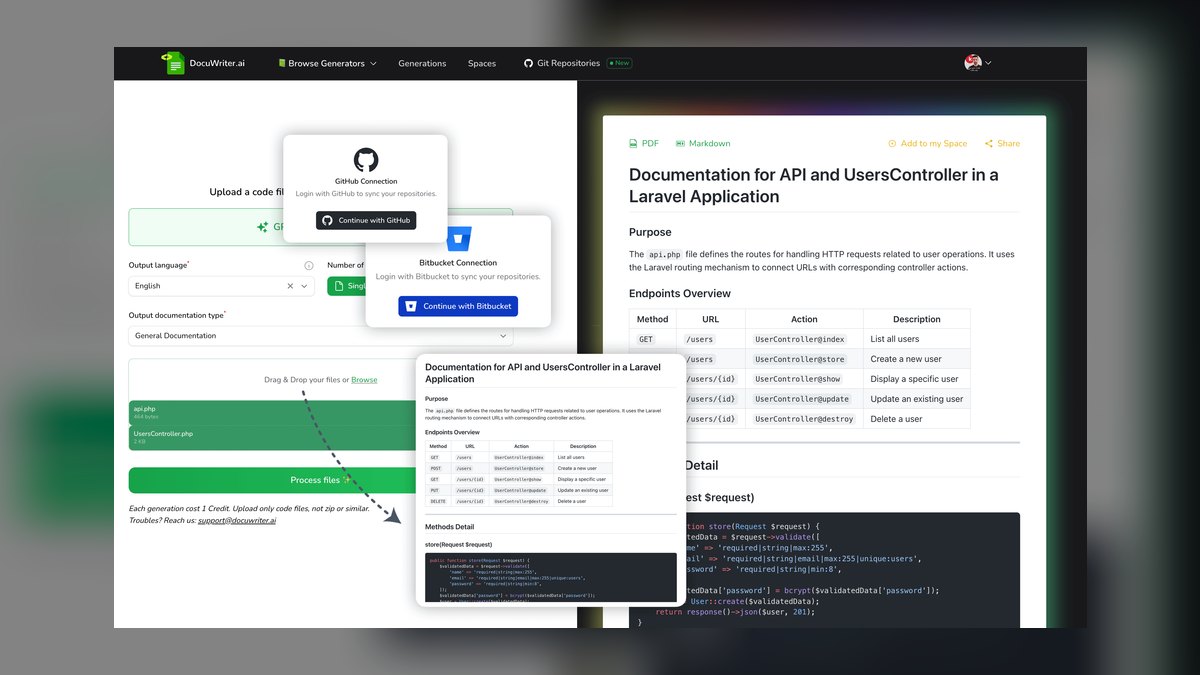
DocuWriter.ai ranks seventh and takes best value because entry plans start around $19 per month and still cover the core job: generating code documentation, docstrings, and API docs from pasted code or connected repositories. It handles multiple languages, outputs formats including Markdown, and bundles adjacent chores — test generation and refactoring suggestions — into one low subscription rather than several enterprise seats.
Aimed at solo developers, freelancers, and small teams who need clean docstrings and reference docs without a hosted publishing platform. It trades away repo-wide graph context, drift detection, and hosting — you get files, not a site. Against JetBrains AI Assistant below, DocuWriter.ai is IDE-agnostic and cheaper, but it lives outside your editor rather than inside your existing static analysis.
8JetBrains AI Assistant
JetBrains AI Assistant ranks eighth because its accuracy comes from the IDE's own static analysis rather than from the model alone. The Generate Documentation action writes language-appropriate doc comments — Javadoc, Python docstrings, KDoc, JSDoc — respecting the conventions of the current file, and it tends to get parameter types and return values right because it reads the IDE's resolved code intelligence. It spans IntelliJ IDEA, PyCharm, WebStorm, and GoLand.
Best for shops standardized on JetBrains IDEs, where there is literally nothing new to adopt. Access runs through the JetBrains AI subscription, with the AI Pro tier bundled for All Products Pack subscribers and a free quota for light use. It trades away portability entirely — outside JetBrains it does not exist, unlike DocuWriter.ai above.
9CodeRabbit

CodeRabbit ranks ninth because it produces documentation at the moment code actually ships. It is primarily an AI code-review tool, posting a structured summary and walkthrough description on every pull request explaining what changed and why, and suggesting or generating docstrings for new functions inline during review. Documentation written at merge time matches the code that shipped. There is a free tier for open-source and public repos, with paid plans in the low double digits per developer monthly.
This fits teams whose real gap is that nobody writes PR descriptions or comments. It trades away deliberate authoring: you get change-level narration, not reference documentation or an architecture guide. JetBrains AI Assistant above writes better in-file docstrings on demand, while CodeRabbit's advantage is that it operates without anyone remembering to invoke it.
10Cursor

Cursor ranks tenth as a capable documentation generator that happens to be an entire editor — a VS Code fork whose chat, inline commands, and codebase indexing produce docstrings and explanatory comments grounded in surrounding code. Its @-mention context system points the model at specific files, folders, or docs to ground a request precisely, and agentic multi-file edits can add documentation across a whole change set in one pass.
This suits individual developers and AI-forward teams willing to switch editors outright. It trades away publishing, drift detection, and any team-wide documentation workflow. Against GitHub Copilot at roughly $10 monthly, Cursor costs double and requires abandoning your current editor, which is why it sits here despite strong output.
How we ranked these
We weighted six things: whether the tool reads real function signatures and call sites instead of guessing, how much of the repo it holds in context, whether it detects and flags drift when code changes, how it fits an existing workflow (IDE, CLI, CI, or hosted platform), coverage across Python, TypeScript, Java, Go, Rust, and C#, and per-seat price against the engineer hours the work would otherwise consume.
We ignored benchmark scores on synthetic snippets, since accuracy on a toy function predicts nothing about a 200,000-line monorepo. We ignored raw model size and vendor claims about parameter counts, which do not survive contact with real repo context. We also set aside marketing-site demo polish and funding announcements, and we did not treat generative flourishes like auto-illustration as documentation value.
What to look for
The deciding question is which documentation job you actually have. Inline docstrings, published API reference, and an onboarding wiki are three different products, and no tool wins all three. If docs are a customer-facing surface, you need hosting, versioning, and OpenAPI ingestion — Mintlify. If you just want comments as a byproduct of coding, an editor-native tool at ten to twenty dollars a month covers it entirely.
The common mistake is buying for generation when the real problem is drift. Teams already have documentation; it is stale and nobody trusts it. Volume tools make that worse by producing more text to rot. Run any candidate on one real module and have the engineer who wrote it grade the output — demo polish on someone else's clean sample code tells you nothing.
Related questions
What is code drift in documentation?
Drift is the gap that opens when code changes and the documentation describing it does not. A function gains a parameter, an error path changes, a module moves — and the doc silently becomes wrong. Swimm addresses this by coupling docs to specific code tokens and flagging them when those tokens change. Mutable.ai AutoWiki takes a different route, regenerating pages on a schedule.
Do AI documentation tools support private repositories?
Most do, but the terms differ. Mintlify, Swimm, Sourcegraph Cody, and JetBrains AI Assistant are all built for private codebases. DeepWiki indexes public GitHub repos for free and charges for private ones. Before connecting proprietary code, confirm the data-handling and retention policy — whether code is used for training and how long it is stored.
Can these tools generate architecture diagrams?
DeepWiki and Mutable.ai AutoWiki both auto-generate architecture and dependency diagrams as part of their wiki output. That matters for onboarding, where a system-level picture beats a hundred accurate docstrings. Editor-native tools like Copilot and Cursor can emit diagram markup on request, but they will not maintain those diagrams as the codebase shifts underneath them.
How does whole-codebase context change docstring quality?
A tool that sees only the open file has to infer what a parameter means from its name. A tool with repo-wide context can resolve the actual type, find the fifty call sites, and describe the real contract. Sourcegraph Cody builds on a code-search graph index for exactly this reason, which is why its Document Code command holds up on large monorepos.
Should documentation live in the Git repository?
Docs-as-code puts documentation in the same repo, pull request, and review flow as the code it describes, so changes ship together. Mintlify renders a hosted site from MDX files in your repo. The tradeoff is that non-engineers need Git fluency to contribute, which pushes some teams toward a hosted wiki instead.
Can documentation be generated during code review?
CodeRabbit does exactly this, posting structured pull request summaries and walkthroughs and suggesting docstrings for new functions inline. Documentation written at review time matches the code that actually shipped, which is a real accuracy advantage. It also catches undocumented functions before they land rather than during a cleanup sprint months later.
How do I evaluate a documentation tool before buying?
Run it on one real module from your own codebase, then have the engineer who wrote that module grade the output line by line. Check edge cases, error handling, and anything security-sensitive. Vendor demos run on clean, well-named sample code that flatters any model. Accuracy on your actual code is the only signal that predicts production performance.
Which tool fits a team already standardized on JetBrains IDEs?
JetBrains AI Assistant, because there is nothing new to adopt. Its Generate Documentation action rides on the IDE's existing static analysis, so Javadoc, KDoc, and Python docstrings tend to get parameter types and return values right. It ships through the JetBrains AI subscription, with the AI Pro tier bundled for All Products Pack subscribers.
FAQ
What is the best AI tool for code documentation in 2027?
Mintlify is the best overall pick. It combines an AI writer that drafts docstrings and reference pages from your codebase with a hosted, versioned docs site rendered from MDX in your repo, covering the full path from code to published page. GitHub Copilot is the runner-up and the easier choice if you only need in-editor docstrings.
What is the cheapest way to start?
Several tools have genuine free tiers: Sourcegraph Cody, CodeRabbit for open-source and public repos, and DeepWiki for public repos. Mintlify also offers a free tier for small projects. Among paid options, GitHub Copilot Individual at roughly ten dollars a month and DocuWriter.ai at around nineteen dollars a month are the lowest-cost entry points.
Which tool is best for API reference documentation?
Mintlify leads here. It ingests an OpenAPI or Swagger spec and generates interactive, testable endpoint pages on a hosted site with full-text search, custom domains, and analytics showing which pages developers actually read. DocuWriter.ai also produces API docs at a lower price if you do not need the hosting layer.
Do these tools keep documentation up to date automatically?
Only some. Swimm and Mutable.ai AutoWiki are purpose-built for drift control — Swimm flags and auto-syncs code-coupled docs and can fail a CI build when they fall out of sync, while AutoWiki regenerates pages on a schedule. Inline tools like Copilot and Cursor generate on demand but will not proactively detect staleness.
Is AI-generated documentation accurate enough to publish unreviewed?
No tool in 2027 clears that bar. Generated docs are an excellent first draft and a genuine time saver, but hallucinations show up on edge cases, error handling, security-sensitive logic, and anything involving intent rather than mechanics. Treat output as a draft to verify, never auto-merge it, and always route it through human review.
What does GitHub Copilot cost for a team?
Copilot Individual runs about ten dollars per month or one hundred dollars per year. Business is nineteen dollars per user per month, and Enterprise is thirty-nine dollars per user per month with organization-wide policy controls. For teams wanting documentation as a byproduct of normal coding rather than a separate publishing workflow, it is the default answer.
How do I document a codebase I just inherited?
DeepWiki is the most direct answer. Built by Cognition, it turns a GitHub repository into a navigable wiki with architecture overviews, module breakdowns, and diagrams, plus a chat that answers questions about how the code works. Public repos are indexed free. Sourcegraph Cody is the alternative when the code spans many private repositories.
What is code-coupled documentation?
It links a doc directly to specific tokens in the source — a function name, a variable, a snippet. When that code changes, the tool knows which docs are now suspect. Swimm built its Auto-sync engine on this idea and can block a pull request when coupled docs drift, which turns keeping docs current into an enforced rule rather than an intention.
Should I pick an editor-native tool or a documentation platform?
It depends on who reads the output. If the audience is your own engineers reading code in an IDE, an editor-native tool like Copilot, Cursor, or JetBrains AI Assistant is sufficient and cheaper. If the audience is external developers consuming an API, you need hosting, versioning, and search, which means a platform like Mintlify.
Do these tools cover languages beyond Python and JavaScript?
Solid support for Python, TypeScript, JavaScript, Java, Go, Rust, and C# was table stakes for this list. JetBrains AI Assistant is notable for emitting the right convention per language — Javadoc, KDoc, JSDoc, or Python docstrings — because it rides on the IDE's static analysis rather than inferring format from surrounding text.
Sources
- https://mintlify.com/
- https://github.com/features/copilot
- https://swimm.io/
- https://sourcegraph.com/cody
- https://deepwiki.com/
- https://www.docuwriter.ai/
- https://www.jetbrains.com/ai/
- https://www.coderabbit.ai/
- https://www.cursor.com/
- https://docs.github.com/en/copilot
Related on PULSE
This page will be disappearing soon. Save it to your device for $1 — or read it free while it is here.
@Kory-White- · if Venmo asks, the last 4 of my number are 2012
This page is gone.
This one is off the shelf now. $1 keeps it on your phone for good — the whole page, pictures and diagrams included.
 ai-tool-reviewThe 10 Best AI Tools for Media Outreach in 2027
 ai-tool-reviewThe 10 Best AI Tools for Legal Document Review in 2027
 ai-infrastructureThe 10 Best AI Tools for Customer Data Platforms in 2027
 ai-tool-reviewThe 10 Best AI Tools for Customer Feedback Analysis in 2027
 pulse-ai-infrastructureThe 10 Best AI Tools for RFP Responses in 2027
 pulse-ai-infrastructureThe 10 Best AI Tools for CI/CD for Web Apps in 2027
 pulse-ai-infrastructureThe 10 Best AI Tools for Writing Movie Scripts in 2027
 pulse-recentThe 10 Best AI Infra Cost per Token Benchmarks in 2027
 ai-tool-reviewThe 10 Best AI Tools for Voice Cloning in 2027
 ai-tool-reviewThe 10 Best AI Tools for Employee Onboarding in 2027