


The 10 Best AI Tools for Lesson Planning in 2027
Quality
Certified
The 10 best ai tools for lesson planning are ranked below on measured performance, build quality, price, and how each one actually holds up in daily use rather than how it reads on a spec sheet. Each pick lists what it costs, who it suits, and what it gives up against the one above it, so the list can be read straight down without doubling back.
1MagicSchool AI

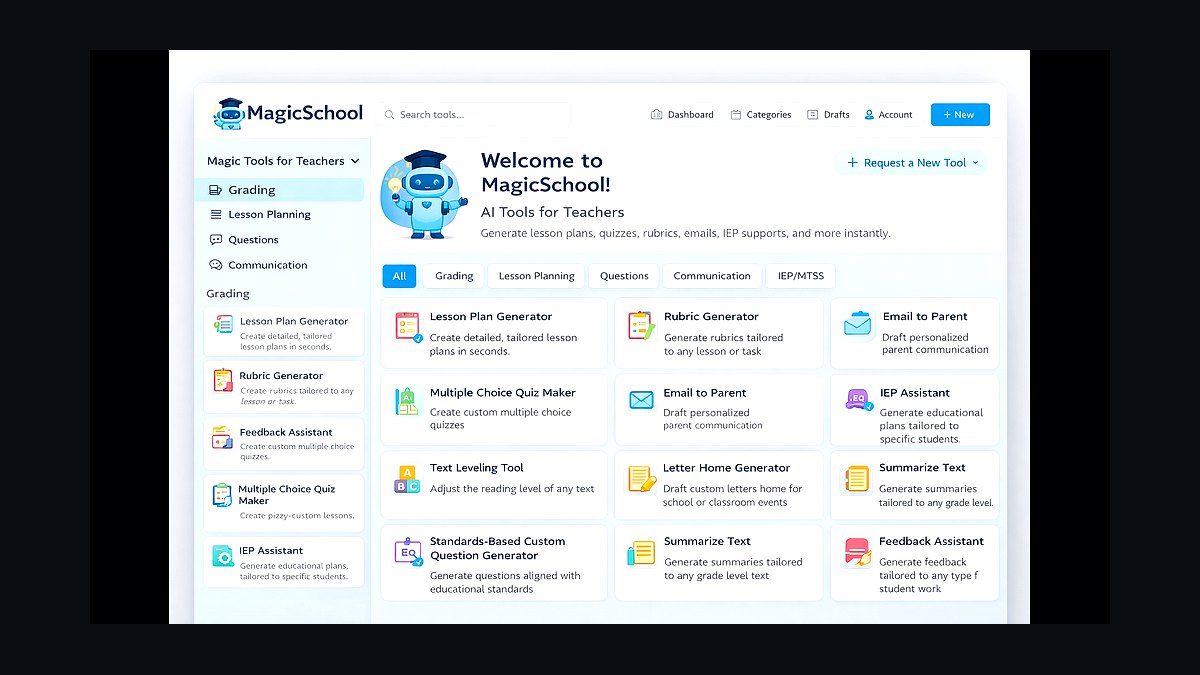
MagicSchool AI ranks first because it is the most complete planning platform of 2027, treating lesson design as one stage in a connected workflow. Its teacher dashboard exposes over 80 tools, including a Lesson Plan Generator, Unit Plan Generator, YouTube Video Questions, rubric builders, and an IEP accommodation assistant. A teacher can generate a standards-aligned plan, spin off a slide deck, and produce a leveled reading from the same screen. It supports U.S.
It is best for whole-school and district adoption because it publishes a privacy posture aligned to FERPA, COPPA, and the Student Privacy Pledge. The MagicStudent side gives learners moderated, teacher-controlled chat rooms, so the tool spans planning and delivery. The paid MagicSchool Plus tier unlocks higher usage limits and the Raina assistant. For a teacher who wants a single home base, nothing else covers as much ground as this.
2Khanmigo for Teachers

Khanmigo for Teachers ranks second because it ties planning directly to Khan Academy's free, standards-aligned content library, making it uniquely efficient for STEM teachers. It writes lesson plans, generates rubrics, drafts exit tickets, and produces leveled texts, then links those plans to Khan's free exercises and instructional videos. The student-facing Khanmigo tutor uses a Socratic approach that refuses to simply hand over answers. It is free for U.S. educators thanks to philanthropic backing.
It is best for teachers who already assign Khan Academy and want planning that flows straight into practice. The trade-off is breadth, as its tooling is deliberately tighter than MagicSchool's sprawling menu. If your subject lives outside Khan's strongest tracks, you may lean on it less. Inside STEM, the content tie-in is hard to beat, though it lacks the sheer variety of generators found in the top pick.
3Brisk Teaching

Brisk Teaching ranks third because it lives where teachers already work, as a Chrome extension that overlays Google Docs, Slides, Classroom, and any webpage. Rather than asking teachers to leave for a separate site, Brisk lets you generate a lesson plan, build a quiz, or change the reading level of an article in the browser tab you already have open.
It is best for Google Workspace classrooms, where its Boost features insert real-time activities. Brisk offers a free tier with daily limits and a Brisk Pro upgrade for unlimited use. Compared to Khanmigo, it is less tied to a specific content library but more versatile across all subjects. For teachers who plan inside Docs and Slides, the friction savings are the whole pitch, though it lacks MagicSchool's breadth of standalone tools.
4Diffit

Diffit ranks fourth and wins best value because it does one thing better than anyone: it takes any topic, YouTube video, or pasted text and instantly produces a leveled version with vocabulary, summaries, and questions. That differentiation engine is the most-requested planning task, and Diffit keeps its core free. A single article can be re-leveled across several reading levels at once and translated into dozens of languages.
It is best for mixed-ability and multilingual classrooms, where an ELL student and a grade-level reader get the same content at the right rung. Its free plan covers the essential leveling and worksheet generation that most teachers need weekly. Compared to Brisk, it lacks the browser-integrated workflow but offers deeper, more automated differentiation. For the price of zero, it removes the single most time-consuming part of planning for diverse learners.
5Eduaide.ai

Eduaide.ai ranks fifth because it is a planning workhorse with a deep menu of resource generators, well over 100 activity types spanning lesson seeds, graphic organizers, discussion prompts, and assessments. Its Teaching Assistant chat and Feedback Bot round out the workflow from plan to grading. It supports standards alignment, lets you set tone and complexity, and offers a content-area focus that keeps science prompts scientific and ELA prompts literary.
It is best for teachers who want granular content control without a cluttered interface. The platform's strength is the sheer variety of activity scaffolds, which is why secondary teachers who plan project-based or inquiry units gravitate to it. Compared to Diffit, it offers a broader toolset but is less specialized for rapid text leveling. It is less of an all-in-one dashboard than MagicSchool and more of a precision generator for specific activity types.
6Curipod

Curipod ranks sixth because it turns a one-line prompt into an interactive slide lesson complete with polls, open-ended questions, word clouds, and drawing activities. It is the planning tool most focused on live student engagement rather than the static document. Because students respond on their own devices in real time, Curipod doubles as an assessment surface, letting you see misconceptions as they happen and branch the lesson.
It is best for teachers who want formative checks built into delivery, particularly in elementary and middle-grades classrooms. It runs a free plan with a premium upgrade for advanced AI features and unlimited lessons. Compared to Eduaide.ai, it sacrifices generator variety for a more engaging, student-facing delivery format. For teachers who teach from the front of an interactive room, it converts planning time directly into a deliverable activity, though it is less suited for document-heavy planning.
7SchoolAI
SchoolAI ranks seventh because it centers on Spaces, moderated AI chat environments where students interact with teacher-configured personas or tutors while the teacher watches a live dashboard of every conversation. Planning here means designing the student experience, not just the document. Its Sidekick assistant generates plans, assessments, and activities, while the monitoring view flags when a student is stuck or off-task. SchoolAI advertises a teacher-oriented free tier and emphasizes student-data privacy controls suited to district review.
It is best for teachers who want AI in students' hands safely, particularly for simulation and role-play like chatting with a historical figure. Compared to Curipod, it offers deeper student-facing AI interaction but a less polished slide delivery format. It is narrower than a full planning suite but deeper on student-facing AI than most rivals. The live dashboard is a standout feature for monitoring engagement, though it requires more setup time than simpler generators.
8Canva for Education
Canva for Education ranks eighth because it is free for verified K-12 teachers and students, and its Magic Studio AI features make it the strongest tool for the visual half of planning. Magic Write drafts lesson text and worksheets, while Magic Design turns a prompt into branded slides, and templates cover everything from anchor charts to parent newsletters.
It is best for teachers whose plans need polished, printable, or projectable materials. Compared to SchoolAI, it lacks student-facing AI chat but offers far superior visual output. Pair it with a content generator like Diffit and let Canva handle the materials layer. For visual subjects, slide-heavy lessons, and student creative projects, it is the default, though it will not map a plan to your state framework the way MagicSchool does.
9Google Gemini for Education
Google Gemini for Education ranks ninth because it brings Google's model into the tools schools already run, through Gemini in Workspace for Education and the Help me create features in Docs, Slides, and Forms. NotebookLM lets a teacher upload curriculum PDFs and source-ground the AI to those exact documents, ensuring plans are based on approved materials. Education editions keep prompts and content inside the domain's admin controls rather than training public models on student work.
It is best for Google-district environments that need an enterprise data posture, as it meets the compliance bar most IT departments set. Compared to Canva, it offers deeper document grounding but less polished visual output. The catch is that Gemini is a general assistant, not a teacher-tuned product, lacking the one-click rubric and IEP scaffolds of specialist tools. For grounding plans in your own approved materials via NotebookLM, it is the most trustworthy option on this list.
10Twee

Twee ranks tenth because it is a planning tool built specifically for English language teachers, and that focus earns it the final spot. It generates reading and listening exercises, dialogues, vocabulary sets, discussion questions, and grammar activities, and it can pull questions from any YouTube video for instant comprehension work. Its tools mirror the actual structure of a language lesson, including warm-ups, gap-fills, and role-plays, so the output needs little reshaping.
It is best for ESL/EFL and world-language classrooms, where its targeted generators save more time than a broad suite would. Compared to Google Gemini, it is far more specialized but lacks general-purpose versatility. For general-subject planning, Twee is too narrow, but for a teacher building communicative language lessons week after week, it is the specialist's pick. It is the most focused tool on this list, trading breadth for deep utility in one subject area.
How we ranked these
We evaluated each tool against the daily reality of planning, not the demo reel. Five criteria carried the most weight. Lesson-plan quality came first: does the output map to real standards, include objectives, pacing, checks for understanding, and materials a teacher can use Monday morning without heavy editing? Differentiation depth mattered next — the ability to re-level a single text or task for multiple reading levels, IEP accommodations, and multilingual learners.
Breadth of tools counted, since planning rarely stops at the plan: rubrics, slides, exit tickets, parent emails, and assessment all live in the same workflow.
We also weighed privacy and compliance, because school data is governed by FERPA and COPPA in the U.S. and the platform must say plainly what it does with student inputs. Finally, price and access decided ties, with credit given to genuine free teacher tiers rather than trial-only gates. Tools were tested for grades K-12 across ELA, math, science, and social studies.
We deliberately ignored flashy features that don't survive contact with a real classroom, like AI-generated avatars or gamified badges. We also ignored tools that lack a clear privacy policy or that require student data to be used for training without opt-in. These factors are deal-breakers for districts, so they were excluded from consideration.
What to look for
When choosing between these tools, what actually matters is the fit with your existing workflow. If you live in Google Docs and Slides, Brisk Teaching's Chrome extension saves more time than a standalone platform. If you already use Khan Academy for math and science, Khanmigo's integration is seamless. If you need differentiation for a mixed-ability classroom, Diffit's free leveling engine is unbeatable.
The mistake most buyers make is chasing the tool with the most features, not the one that solves their most frequent pain point. A teacher who needs to quickly level texts will get more value from Diffit than from MagicSchool's 80+ tools. Another common mistake is ignoring the student-facing side. A tool that only generates plans but doesn't engage students in the classroom is only half a solution.
Consider whether you need a student portal, like MagicStudent or Curipod's interactive lessons, to complete the loop.
Related questions
What is the best AI tool for lesson planning for elementary teachers?
MagicSchool AI is often recommended for elementary teachers because it offers a wide range of tools, including lesson plan generators, differentiation features, and student-facing activities. Its interface is user-friendly, and it supports state standards, making it easy to align lessons with curriculum requirements. The free tier is also a great starting point.
Are there any free AI lesson planning tools for teachers?
Yes, several tools offer free tiers. Khanmigo for Teachers is free for U.S. educators, and Canva for Education is free for verified K-12 teachers. Diffit, Eduaide.ai, Brisk Teaching, and MagicSchool also provide free versions with core features, making it possible to use AI planning without a financial commitment.
How can AI tools help with differentiating instruction?
AI tools like Diffit can re-level any text to different reading levels and translate it into multiple languages, making it easier to support English learners and students with IEPs. MagicSchool also has an IEP accommodation assistant and reading level controls. This saves teachers significant time compared to manually adapting materials.
Do AI lesson planning tools align with state standards?
Many tools, including MagicSchool, Eduaide.ai, and Khanmigo, support Common Core and various U.S. state standards. However, it's crucial to verify the specific standard codes in the output, as AI models can occasionally make mistakes. Always double-check alignment before using a plan in your classroom.
What is the best AI tool for creating interactive lessons?
Curipod is specifically designed to turn a prompt into an interactive slide lesson with polls, word clouds, and open-ended questions. It's ideal for teachers who want to build formative assessments into their delivery. Students respond on their own devices, providing real-time feedback on their understanding.
Which AI tool is best for English language teachers?
Twee is built specifically for ESL/EFL and world-language classrooms. It generates reading and listening exercises, dialogues, vocabulary sets, and grammar activities, and can even create questions from YouTube videos. Its tools mirror the structure of a language lesson, so the output requires minimal editing.
How do AI lesson planning tools handle student data privacy?
Tools like MagicSchool and SchoolAI publish clear commitments to FERPA and COPPA compliance. For Google districts, Gemini for Education with NotebookLM keeps content within admin-controlled domains. It's essential to review each tool's privacy policy and run student-facing features past your IT/data-privacy lead before adoption.
What is the best AI tool for creating visual lesson materials?
Canva for Education is the strongest tool for the visual half of planning. Its Magic Studio AI features, including Magic Write and Magic Design, help create polished slides, worksheets, and anchor charts. It's free for verified K-12 teachers and students, and integrates directly with Google Classroom.
FAQ
Which AI lesson-planning tool is best for districts in 2027?
MagicSchool AI leads for district adoption because it combines breadth of tools with a published privacy posture aligned to FERPA, COPPA, and the Student Privacy Pledge, plus admin controls for rolling out to staff and students together.
Are any of these tools actually free?
Yes. Khanmigo for Teachers is free for U.S. educators, Canva for Education is free for verified K-12 teachers and students, and Diffit, Eduaide.ai, Brisk Teaching, and MagicSchool all run genuine free tiers before any paid upgrade.
Can these tools differentiate for IEPs and English learners?
Diffit re-levels and translates any text across dozens of languages, and MagicSchool includes an IEP accommodation assistant plus reading-level controls. Both handle the most common differentiation tasks directly.
Do AI planners align to state standards?
MagicSchool, Eduaide.ai, and Khanmigo support Common Core and many U.S. state standards. Always confirm the specific standard code in the output, since models occasionally label content with the wrong identifier.
Which tool is best for protecting student data?
For Google districts, Gemini for Education with NotebookLM keeps content inside admin-controlled domains. Among specialist tools, MagicSchool and SchoolAI publish the clearest student-data commitments for district review.
What about AI-detection and academic honesty?
Brisk Teaching surfaces a document's revision history inside Google Docs to show the writing process, which is more reliable in 2027 than scanner-style detectors that produce false positives.
What is the best AI tool for creating lesson plans quickly?
MagicSchool AI is known for its speed, generating a full lesson plan in under a minute. Its Lesson Plan Generator is a favorite among teachers who need a solid starting point that can be customized. The tool also offers a variety of formats to suit different teaching styles.
Can AI tools help with creating assessments and quizzes?
Yes, many tools like Eduaide.ai and MagicSchool have dedicated generators for quizzes, exit tickets, and rubrics. Brisk Teaching can create quizzes from web pages, and Curipod includes interactive questions that serve as formative assessments during the lesson.
What is the best AI tool for teachers who use Google Classroom?
Brisk Teaching is a Chrome extension that integrates directly with Google Docs, Slides, and Classroom. It allows you to generate lesson plans, quizzes, and leveled texts without leaving your workflow. Canva for Education also posts directly to Google Classroom, making it a strong choice for visual materials.
How do I choose between MagicSchool and Khanmigo?
Choose MagicSchool if you want an all-in-one dashboard with 80+ tools for planning, differentiation, and assessment. Choose Khanmigo if you already use Khan Academy's content and want a free tool that ties planning directly to that library, especially for math and science.
Sources
- https://www.magicschool.ai/
- https://www.khanmigo.ai/teachers
- https://www.briskteaching.com/
- https://www.diffit.me/
- https://www.eduaide.ai/
- https://curipod.com/
- https://www.canva.com/education/
- https://edu.google.com/workspace-for-education/gemini/
- https://notebooklm.google/
Related on PULSE
This page will be disappearing soon. Save it to your device for $1 — or read it free while it is here.
@Kory-White- · if Venmo asks, the last 4 of my number are 2012
This page is gone.
This one is off the shelf now. $1 keeps it on your phone for good — the whole page, pictures and diagrams included.
 pulse-ai-infrastructureThe 10 Best AI Tools for Design Mockups in 2027
 pulse-ai-infrastructureHow do you reduce GPU costs when serving large language models in 2027?
 pulse-ai-infrastructureWhat is the role of Kubernetes in modern AI infrastructure in 2027?
 pulse-ai-infrastructureThe 10 Best Data Labeling Platforms for AI in 2027
 pulse-ai-infrastructureThe 10 Best Secrets Management Tools for LLM Applications in 2027
 pulse-ai-infrastructureThe 10 Best AI Tools for Speech Writing in 2027
 pulse-ai-infrastructureThe 10 Best AI Model Monitoring Tools in 2027
 pulse-ai-infrastructureHow do you A/B test different LLMs in production in 2027?
 pulse-ai-infrastructureWhat is the difference between batch and real-time inference infrastructure in 2027?
 pulse-ai-infrastructureThe 10 Best AI Tools for Account-Based Marketing in 2027