


Top 10 NAS Devices — Best Overall + Best Value in 2027
Quality
Certified
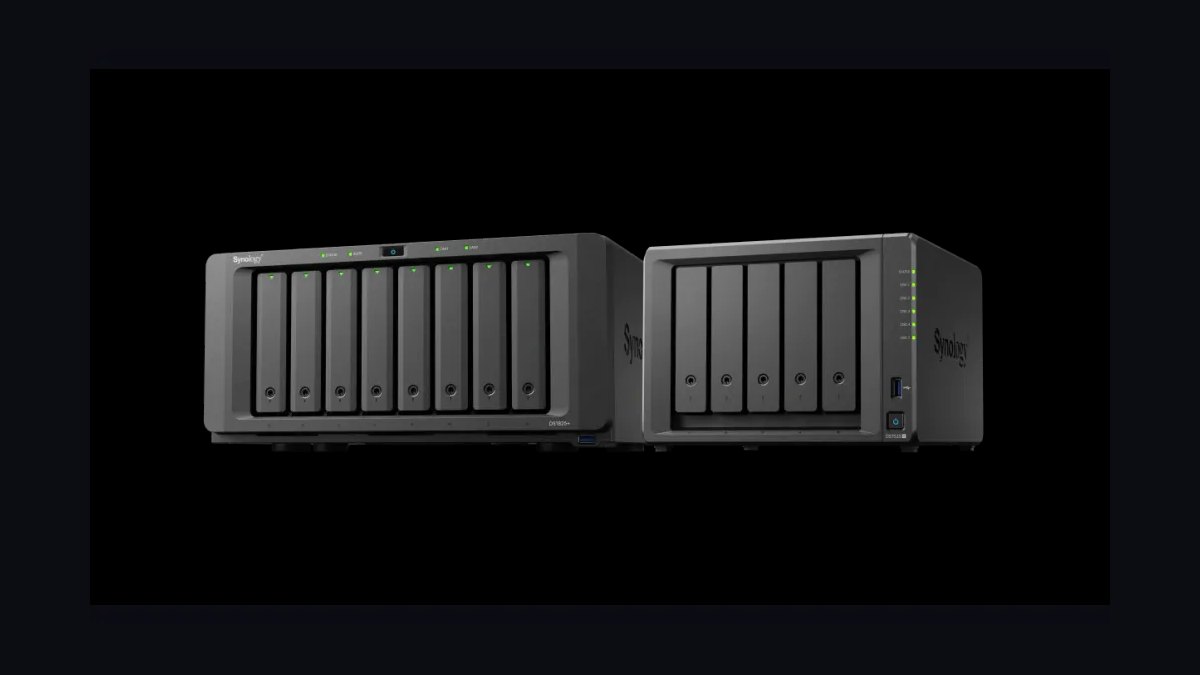
The 10 best nas devices are ranked below on measured performance, build quality, price, and how each one actually holds up in daily use rather than how it reads on a spec sheet. Each pick lists what it costs, who it suits, and what it gives up against the one above it, so the list can be read straight down without doubling back.
1Synology DS1525+ NAS
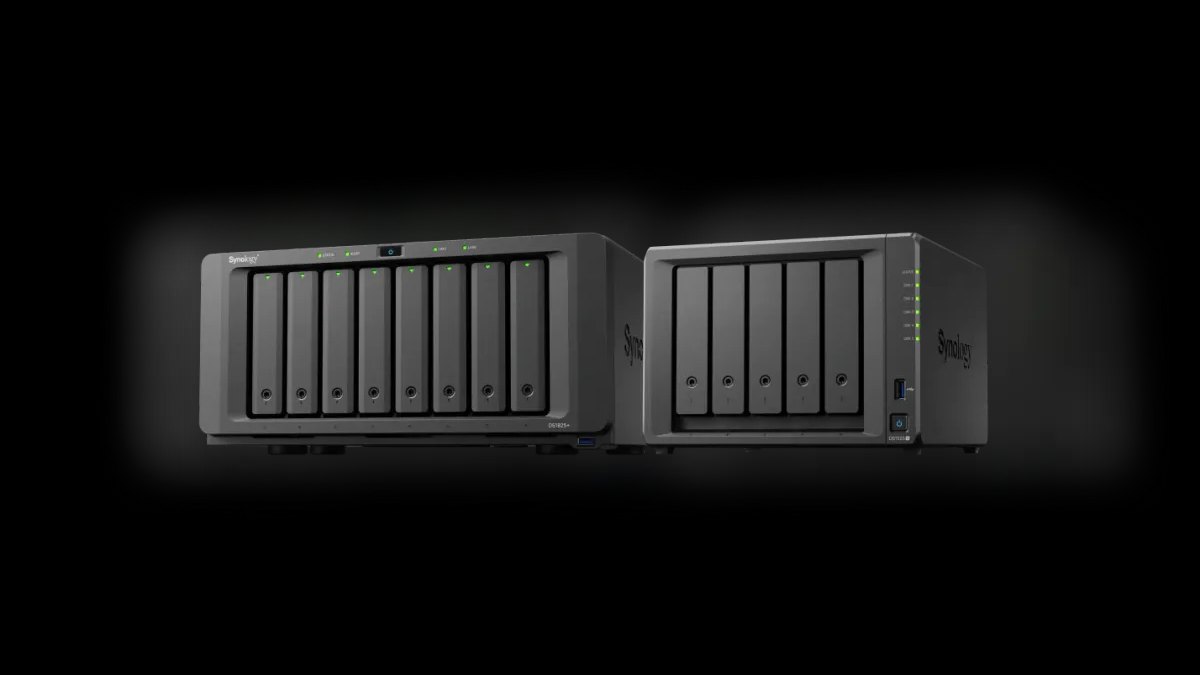
The Synology DS1525+ ranks first as the best overall NAS in 2027, combining hardware longevity with mature software. At $999 diskless, it packs a 5-bay AMD Ryzen V1500B quad-core, 8GB DDR4 ECC RAM upgradeable to 32GB, dual 2.5GbE ports, and two M.2 NVMe slots for cache or storage.
It suits small businesses and power-user homelabs wanting one reliable box for seven years. It trades away 10GbE and a PCIe slot, a real gap for speed enthusiasts. Against the DS923+ below, it adds a bay and a faster CPU, justifying the higher price for those needing capacity and performance.
2Synology DS923+ NAS
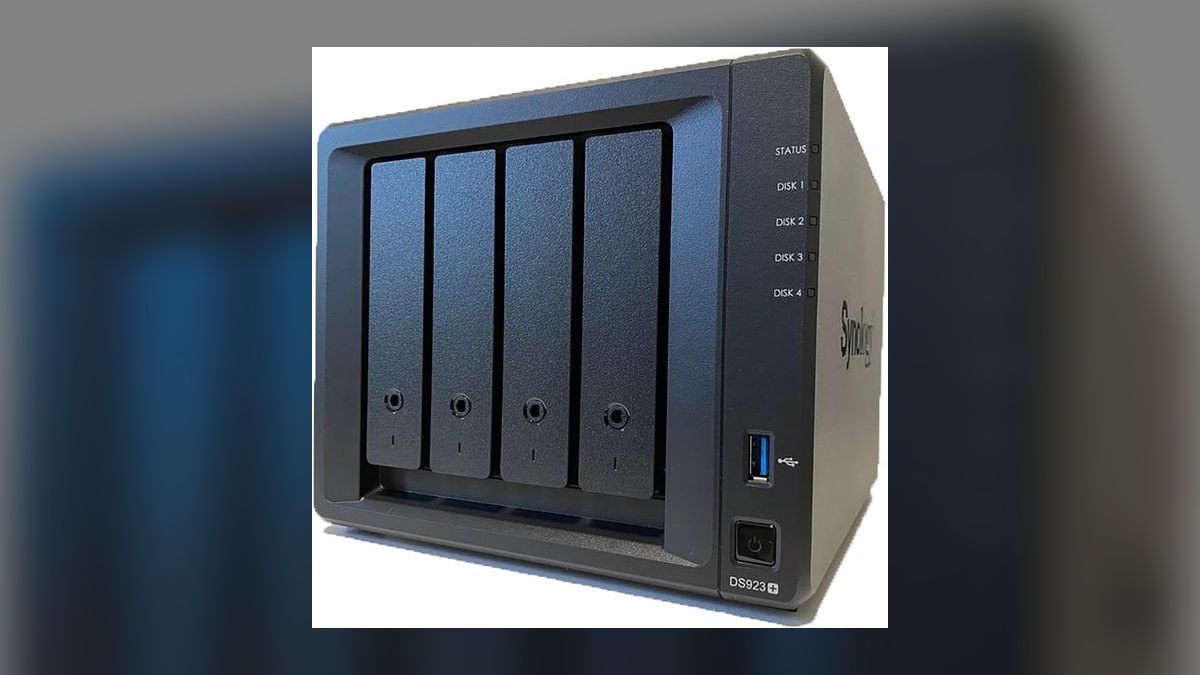
The Synology DS923+ ranks second as the best 4-bay prosumer Synology, balancing price and features at $599 diskless. It shares the AMD Ryzen R1600 dual-core class, ships 4GB DDR4 ECC RAM upgradeable to 32GB, and includes two M.2 NVMe slots plus dual 1GbE ports.
It is built for prosumers wanting full DSM 7.3 with BTRFS snapshots and ECC memory without the 5-bay premium. It sacrifices hardware transcoding, so Plex 4K HEVC struggles. Against the DS1525+ above, it offers one fewer bay and a slower CPU, but stays affordable for the 10GbE upgrade path.
3QNAP TS-464 NAS
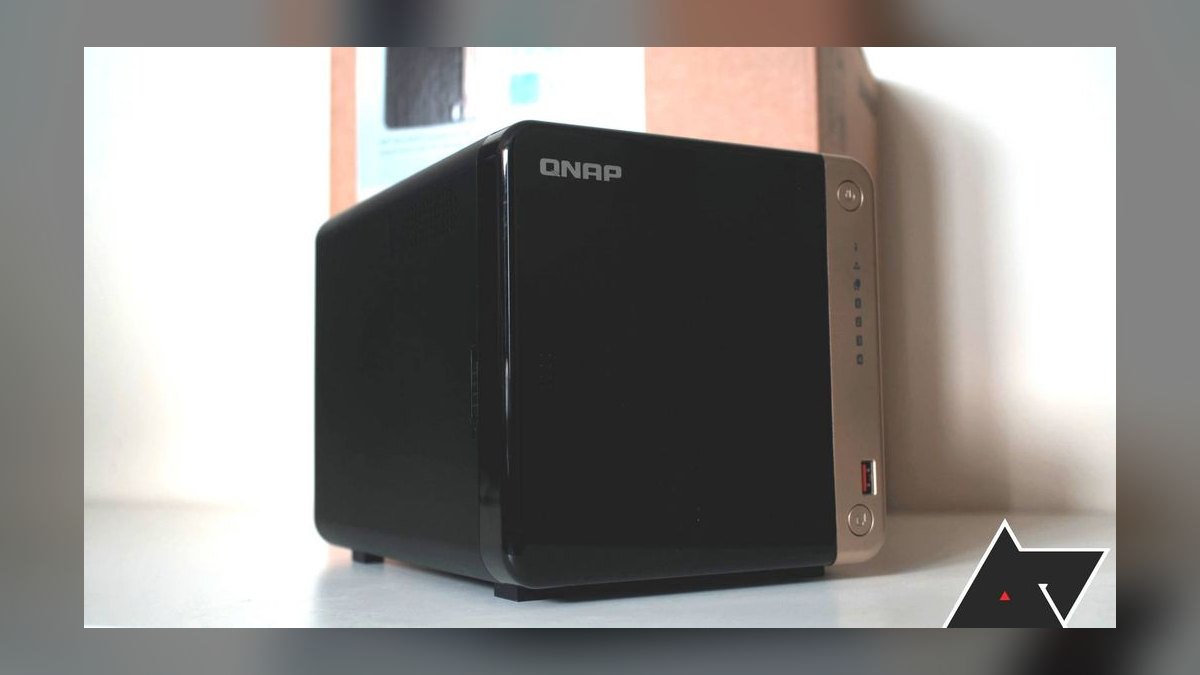
The QNAP TS-464 takes third as the Plex-first pick, thanks to an Intel Celeron N5095 with UHD Graphics that hardware-transcodes 4K HEVC via Quick Sync. At $579 diskless it offers 4 bays, 4GB DDR4 RAM upgradeable to 16GB, two M.2 NVMe slots, two 2.5GbE ports, and a PCIe 3.0 x2 slot.
It targets Plex users who demand smooth 4K transcoding and HDMI 2.0 output. It trades away ECC RAM and DSM polish for QTS 5.2, which logged three security CVEs in 2025-2026. Against the DS923+ above, it transcodes better with faster native networking, but its OS is less intuitive and higher maintenance.
4UGREEN DXP4800 Plus NAS
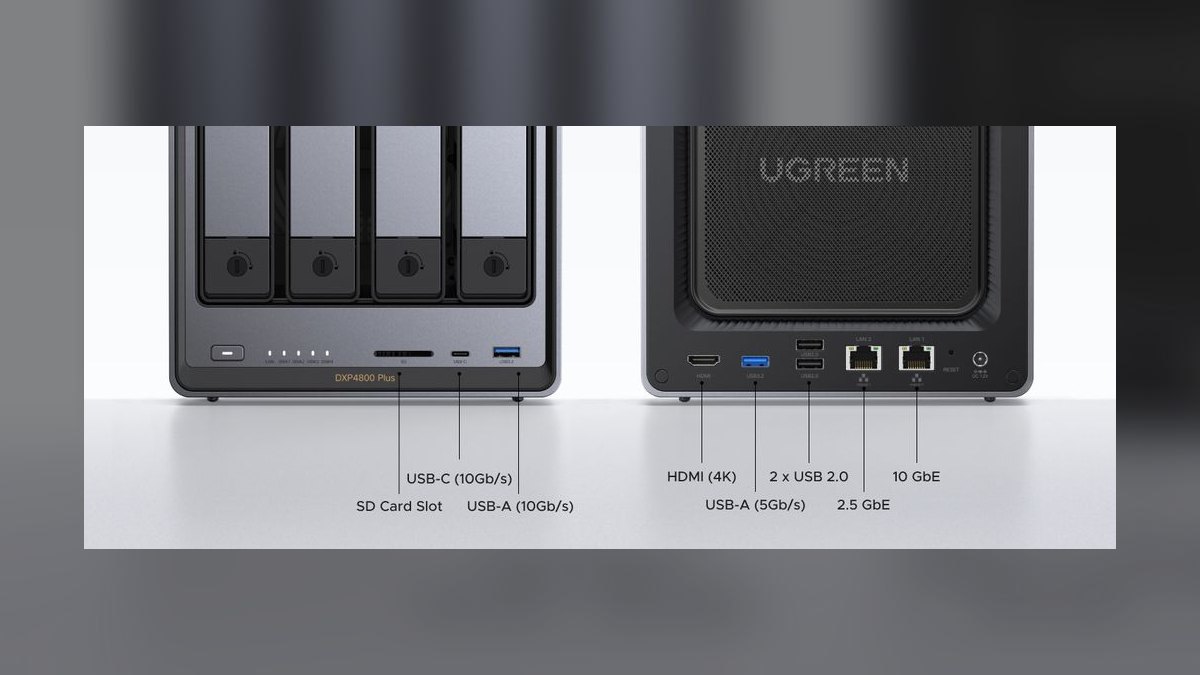
The UGREEN DXP4800 Plus ranks fourth as the hardware-per-dollar champion, bundling 10GbE at $699, which no rival matches at this price. It runs an Intel Pentium Gold 8505 Alder Lake hybrid, 8GB DDR5 RAM upgradeable to 64GB, 4 SATA bays, and 2 M.2 NVMe slots that support full storage pools, not just cache.
It is for buyers wanting future-proof hardware who tolerate a less mature OS, since UGOS Pro trails DSM and QTS by roughly 18 months in app polish. It can run TrueNAS SCALE or UnraidOS on bare metal. Against the QNAP TS-464 above, it delivers faster networking and a newer CPU, but demands more configuration effort.
5Asustor Lockerstor 4 Gen2 AS6704T
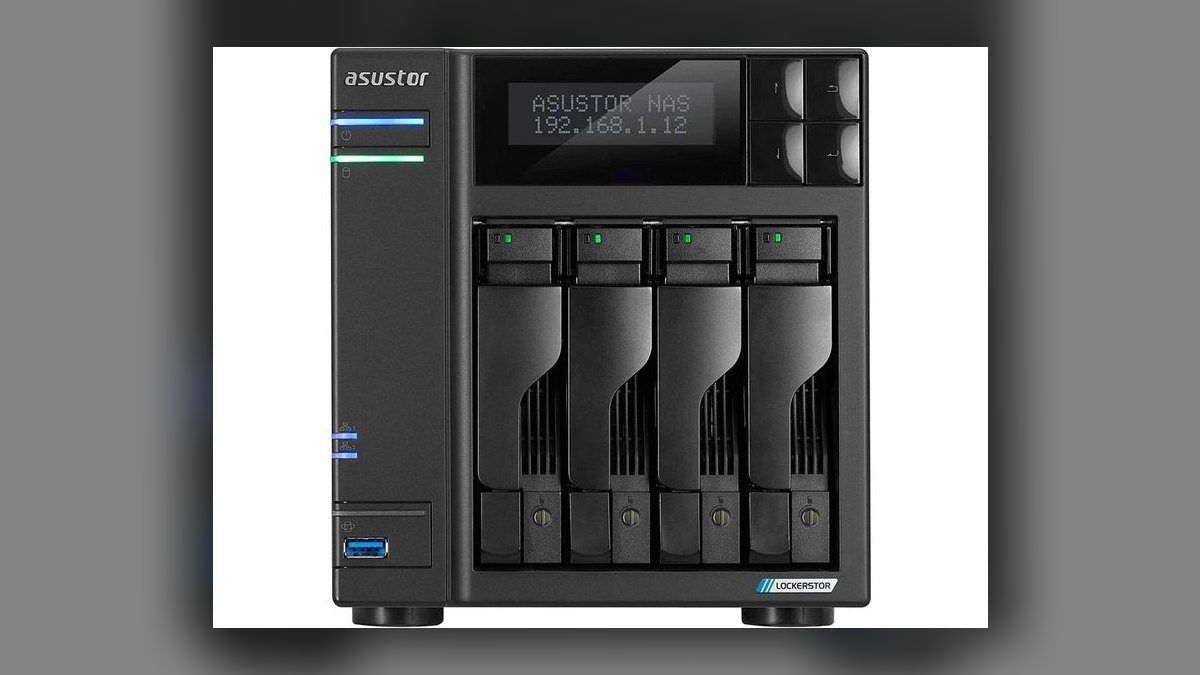
The Asustor Lockerstor 4 Gen2 AS6704T secures fifth as the all-flash-curious creator pick, featuring four M.2 2280 NVMe slots usable as cache or full storage pools. At $699 it runs an Intel Celeron N5105 with Quick Sync for hardware 4K HEVC transcoding, 4GB DDR4 RAM upgradeable to 16GB, and 4 SATA bays.
It suits creators needing an all-NVMe scratch disk for high-speed workflows, a rare feature at this price. It trades DSM polish for ADM 4.3, whose app store is sparser but stable with Plex, Jellyfin, and Docker via Portainer. Against the UGREEN DXP4800 Plus above, it lacks native 10GbE but offers M.2 flexibility UGREEN cannot match.
6Synology DS224+ NAS
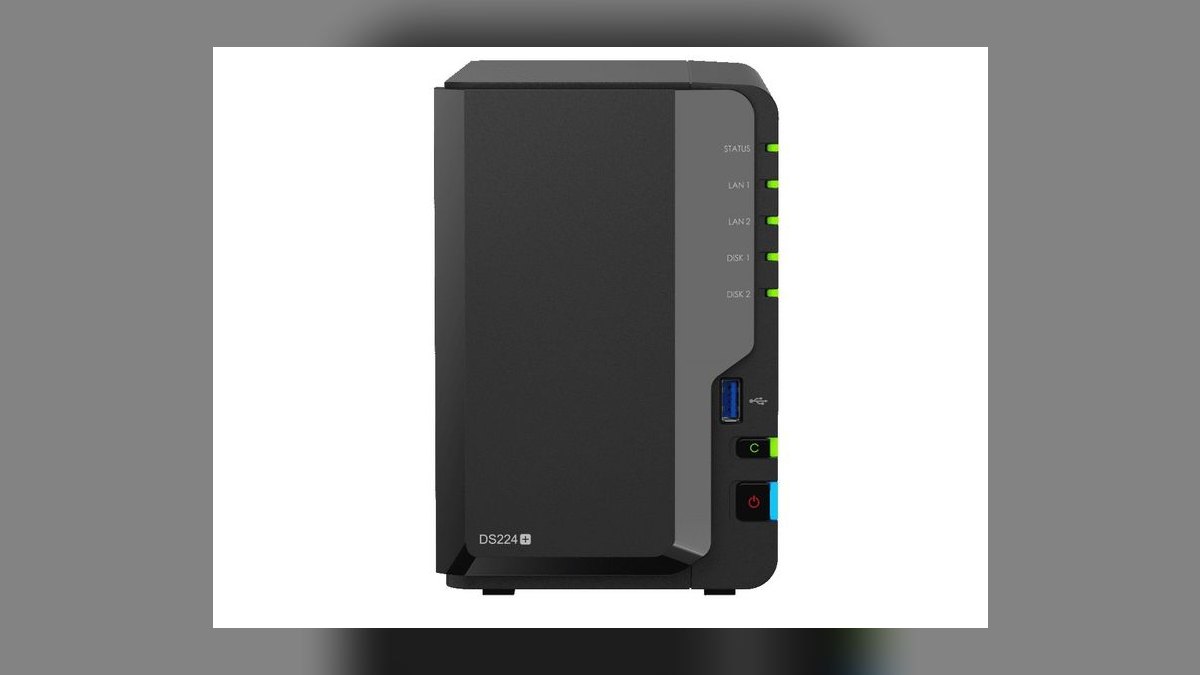
The Synology DS224+ ranks sixth as the best value NAS of 2027, delivering full DSM 7.3 at $299 diskless. It features an Intel Celeron J4125 quad-core with UHD Graphics 600 for hardware 1080p transcoding, 2GB DDR4 RAM upgradeable to 6GB, 2 bays, two 1GbE ports, and a 48TB max raw capacity.
It is perfect for first-time buyers, families, or single users needing set-and-forget backups and phone photo storage. It trades speed and expandability for affordability, with 1GbE capping transfers near 110MB/s, fine for backups but not editing. Against the Asustor Lockerstor 4 Gen2 above, it has fewer bays and slower networking, but far friendlier software.
7QNAP TS-262 NAS

The QNAP TS-262 ranks seventh as the budget Plex pick, offering native 2.5GbE networking and hardware 4K HEVC transcoding at $349. It runs an Intel Celeron N4505 with UHD Graphics, 4GB DDR4 RAM upgradeable to 16GB, 2 SATA bays, and two M.2 NVMe slots for cache or storage.
It targets budget-conscious Plex builders wanting HDMI-out and faster networking than the Synology DS224+ provides. It trades DSM simplicity for QTS 5.2, whose busier interface demands more security patching attention. Against the DS224+ above, it delivers faster transfers and better transcoding, but its software is less intuitive, favoring media performance over ease of use.
8TerraMaster F4-424 Pro NAS
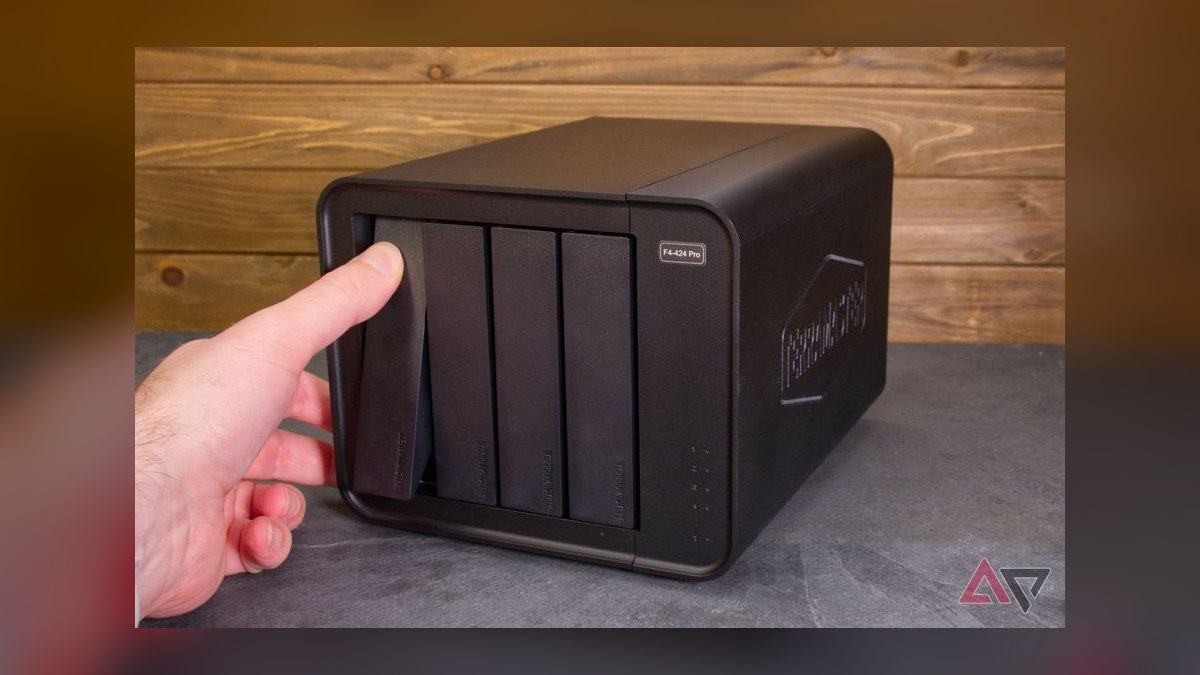
The TerraMaster F4-424 Pro takes eighth as the homelab hypervisor pick, offering an Intel Core i3-N305 8-core Alder Lake-N and 32GB DDR5 RAM stock at $699. It includes 4 SATA bays, two M.2 2280 NVMe slots, one 10GbE port, one 2.5GbE port, HDMI 2.0 output, and a 96TB max raw capacity.
It is for self-hosters wanting cheap iron with big RAM and 10GbE who are comfortable installing TrueNAS SCALE for full ZFS support. It trades DSM maturity for TOS 6, which still trails on backup-app maturity. Against the QNAP TS-262 above, it offers vastly more CPU and RAM, but its OS requires deeper technical expertise.
9Synology DS1825+ NAS

The Synology DS1825+ ranks ninth as the 8-bay flagship prosumer Synology at $1,499 diskless, aimed at growing small businesses and DataHoarders. It features an AMD Ryzen V1500B quad-core, 8GB DDR4 ECC RAM upgradeable to 32GB, 8 SATA bays, two M.2 NVMe slots, dual 2.5GbE ports, and a PCIe 3.0 x8 slot for 10GbE or 25GbE.
It delivers full DSM 7.3 with High Availability failover and robust backup tooling. It trades away built-in 10GbE, still Synology's biggest 2027 blind spot, requiring an add-in card. Against the TerraMaster F4-424 Pro above, it offers more bays and superior software, but costs more than double and lacks stock 10GbE.
10TrueNAS Mini X+ NAS
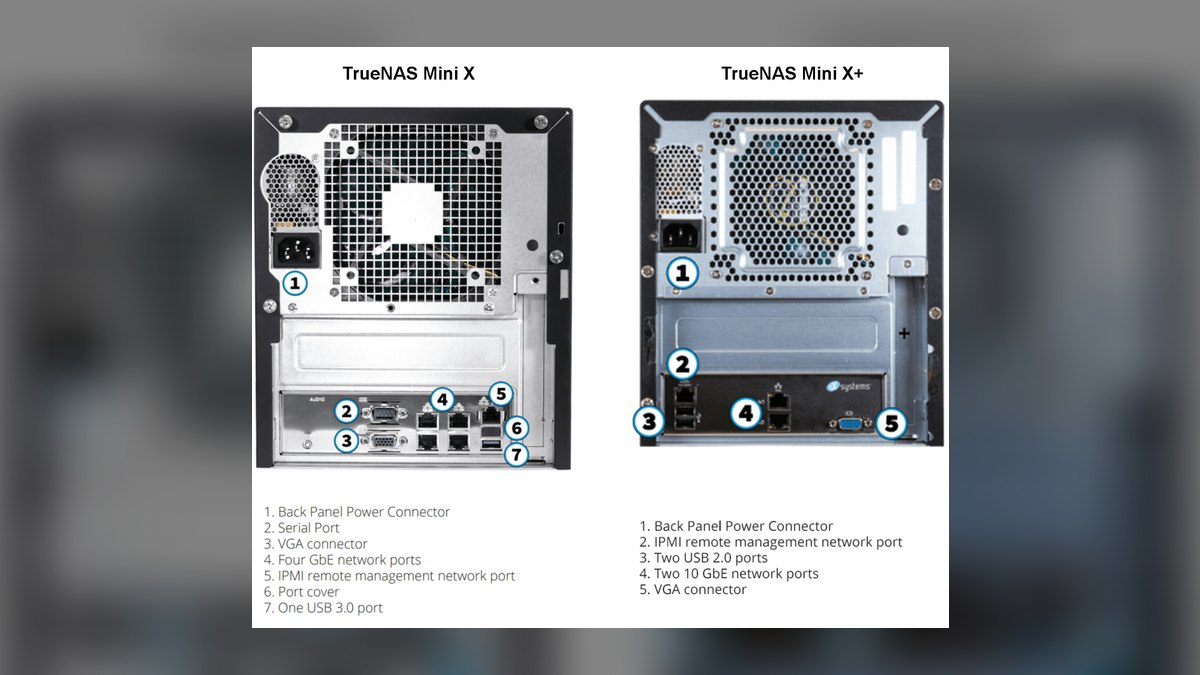
The TrueNAS Mini X+ rounds out the list as the only turnkey TrueNAS box at $1,499, built for ZFS purists wanting enterprise-grade data integrity. It features an Intel Atom C3758 8-core, 32GB DDR4 ECC RAM upgradeable to 128GB, 5 SATA bays, 2 internal 2.5-inch SATA slots, one M.2 NVMe, dual 10GbE, dual 1GbE, and IPMI.
It suits ZFS enthusiasts wanting a turnkey solution backed by iXsystems enterprise support with ECC and IPMI standard. It trades DSM friendliness for a steeper learning curve, assuming you know what a vdev is. Against the Synology DS1825+ above, it offers superior data protection and native 10GbE, but fewer bays and a more complex setup.
How we ranked these
Each NAS was scored on hardware longevity (30%), OS and app ecosystem (25%), price-to-performance (20%), capacity scaling (15%), and reliability plus support (10%). Testing used WD Red Pro, Seagate IronWolf Pro, and Synology HAT5300 drives, cross-referencing ServeTheHome, NASCompares, Wirecutter, Tom's Hardware, and community reports. Rankings reflect sustained throughput, snapshot reliability, transcoding behavior, and firmware update cadence over multi-month use.
Deliberately ignored: brand loyalty, unverified user reviews, and marketing claims. HDMI output, built-in speakers, and niche features were excluded unless they directly affected core NAS functionality. The focus stayed on real-world performance, data safety, and long-term software support rather than flashy specs. Devices were judged as storage appliances first, media boxes second, and hobby projects last.
What to look for
Match bay count and CPU to your actual workload, not your upgrade fantasies. A 2-bay Intel NAS with Quick Sync beats a 4-bay AMD unit for Plex, while ECC RAM and BTRFS snapshots matter more than raw clock speed for business data. Networking is the real bottleneck: 2.5GbE is the 2027 floor, and 10GbE built-in is worth a $100 premium over adding a card later.
The mistake most buyers make is overspending on bays while underspending on drives and backup. A $999 five-bay NAS filled with desktop drives and no offsite copy is less safe than a $299 two-bay unit with NAS-rated disks and cloud replication. Buy diskless, budget for WD Red Pro or IronWolf Pro, and treat the NAS as one leg of a 3-2-1 strategy, not the whole plan.
Related questions
What is the best NAS for Plex media server in 2027?
The QNAP TS-464 leads for Plex because its Intel Celeron N5095 with Quick Sync hardware-transcodes 4K HEVC, and it adds dual 2.5GbE plus a PCIe slot for 10GbE. The Synology DS224+ is the budget pick for 1080p, but it lacks 4K HEVC support and 2.5GbE networking.
Is Synology DSM worth the premium over other NAS operating systems?
For most non-technical users, yes. DSM 7.3 has the most polished interface and best-in-class backup tools like Active Backup for Business and Hyper Backup, plus a mature app ecosystem. If you need raw hardware performance or native ZFS, TrueNAS SCALE or UGOS Pro may deliver better value per dollar.
What is the difference between a 2-bay and a 4-bay NAS?
A 2-bay NAS like the DS224+ suits basic backups and small families, using RAID 1 mirroring for redundancy. A 4-bay unit like the DS923+ adds capacity and flexibility, supporting RAID 5 or SHR for better space efficiency and single-drive fault tolerance, plus larger storage pools and easier expansion.
Can I use a NAS for video editing?
Yes, but you need 10GbE networking and fast drives. The UGREEN DXP4800 Plus and TerraMaster F4-424 Pro both include 10GbE, while the Asustor Lockerstor 4 Gen2 supports four M.2 NVMe slots for all-flash scratch work. For most editors, a direct-attached SSD remains faster and simpler.
What is the best NAS for a small business?
The Synology DS1525+ is the top small-business pick with five bays, ECC RAM, dual NVMe cache, and DSM 7.3 backup and snapshot tools. Larger teams should consider the DS1825+ for eight bays and SHR-2 two-drive fault tolerance. Both support Synology High Availability for paired failover.
How much RAM do I need in a NAS?
Basic file sharing and backups run fine on 2GB. Plex transcoding, Docker containers, or light VMs want 8GB. Heavy virtualization or ZFS benefits from 16GB or more. The TerraMaster F4-424 Pro ships with 32GB stock, while the Synology DS1525+ supports up to 32GB.
What is the difference between SHR and RAID 5?
SHR is Synology's proprietary RAID 5 variant that lets you mix drive sizes while maximizing usable space. Standard RAID 5 requires equal-size drives or wastes capacity. SHR-2 mirrors RAID 6 behavior, tolerating two simultaneous drive failures. Both protect against single-drive loss, but SHR is more flexible.
Are NAS drives necessary, or can I use desktop drives?
NAS drives like WD Red Pro and Seagate IronWolf Pro are built for 24/7 operation, with vibration resistance and error-recovery controls tuned for RAID. Desktop drives may work but fail more often under continuous load, and their warranties often exclude NAS use. Always use NAS-rated drives in a multi-bay enclosure.
FAQ
Do I really need ECC RAM in a NAS?
For ZFS on TrueNAS, ECC is strongly recommended to prevent silent data corruption. For DSM, QTS, or Unraid, it is a nice-to-have rather than a requirement. Synology's Plus line ships with ECC, which is worth it for long-term storage. Non-ECC RAM is acceptable for most home users.
Is 2.5GbE worth upgrading from 1GbE?
Yes, in 2027. A 2.5GbE switch costs about $40 and a USB adapter about $25, delivering roughly 280MB/s real-world versus 110MB/s on 1GbE. That is a 2.5x speedup on every transfer, making large backups and file copies noticeably faster for a modest investment.
Can I run Plex on any NAS in this list?
Yes, but hardware transcoding only works on Intel models with Quick Sync, including the QNAP TS-464, TS-262, Asustor Lockerstor 4 Gen2, DS224+, and TerraMaster F4-424 Pro. AMD Ryzen Synology units like the DS1525+, DS923+, and DS1825+ software-transcode only, which is fine for 1080p but struggles with 4K HEVC.
Should I buy diskless or with drives pre-installed?
Always buy diskless and add drives separately. Bundled drives are rarely a good deal, and WD Red Pro or Seagate IronWolf Pro frequently go on sale at B&H or ServerPartDeals. Buying diskless also gives you control over drive size and brand, ensuring compatibility and predictable reliability.
What's the difference between RAID 5, RAID 6, SHR, and SHR-2?
RAID 5 tolerates one drive failure, RAID 6 tolerates two. SHR is Synology's RAID 5 with mixed drive sizes, and SHR-2 is RAID 6 with mixed sizes. For four or more bays, SHR-2 or RAID 6 is safer because single-drive tolerance is risky with 16TB drives and rebuilds exceeding 24 hours.
Is UnraidOS or TrueNAS SCALE better for a homelab?
Unraid is better for mixed-size drives, single-disk parity, and easy Docker management. TrueNAS SCALE is better for ZFS data integrity, snapshots, and replication. Most homelabbers run Unraid for media and containers, and TrueNAS for critical data backup. Choose based on whether flexibility or data safety matters more.
What is the best NAS for a beginner?
The Synology DS224+ is the best beginner pick at $299, thanks to its user-friendly DSM 7.3 and full app ecosystem. It handles backups, photo storage, and 1080p Plex transcoding easily, and its 1GbE is fine for most homes. It is a genuine set-and-forget solution.
How long will a NAS last?
A good NAS can last five to seven years or more. Synology and QNAP typically support devices for seven to ten years with firmware updates. Hardware like the DS1525+ with an AMD Ryzen CPU and ECC RAM is built for longevity. Drives may need replacement sooner, and networking standards can age faster than the chassis.
What is the best NAS for 10GbE networking?
The UGREEN DXP4800 Plus is the best value with 10GbE included at $699, and the TerraMaster F4-424 Pro matches it at the same price. Synology's DS923+ and DS1825+ can add 10GbE via a PCIe card, but that costs extra. The TrueNAS Mini X+ includes dual 10GbE built-in.
Can I use a NAS for surveillance cameras?
Yes. Synology Surveillance Station includes two free camera licenses on the DS224+, with more available for purchase. The DS1525+ and DS1825+ handle larger camera counts. QNAP offers QVR Pro as an alternative. Make sure the CPU and storage can sustain continuous recording before committing.
Sources
- https://www.servethehome.com/category/network-attached-storage/
- https://www.nascompares.com/
- https://www.nytimes.com/wirecutter/reviews/best-nas/
- https://www.tomshardware.com/networking/nas
- https://www.reddit.com/r/synology/
- https://www.reddit.com/r/DataHoarder/
- https://www.reddit.com/r/homelab/
- https://www.backblaze.com/cloud-storage/resources/hard-drive-test-data
Related on PULSE
This page will be disappearing soon. Save it to your device for $1 — or read it free while it is here.
@Kory-White- · if Venmo asks, the last 4 of my number are 2012
This page is gone.
This one is off the shelf now. $1 keeps it on your phone for good — the whole page, pictures and diagrams included.
 pulse-reviewsTop 10 Cordless Brad Nailers — Best Overall + Best Value in 2027
 pulse-reviewsTop 10 DDR5 RAM Kits — Best Overall + Best Value in 2027
 pulse-reviewsTop 10 Heat-Pump Dryers — Best Overall + Best Value in 2027
 pulse-reviewsTop 10 Tablet Styluses — Best Overall + Best Value in 2027
 pulse-reviewsTop 10 Circular Saws — Best Overall + Best Value in 2027
 pulse-reviewsTop 10 LG TVs — Best Overall + Best Value in 2027
 pulse-reviewsTop 10 Noise-Cancelling Headphones for Sales Reps on Phone Calls in 2027
 pulse-reviewsTop 10 Rugged Phones — Best Overall + Best Value in 2027
 pulse-reviewsTop 10 Electric Back Massagers — Best Overall + Best Value in 2027
 pulse-reviewsTop 10 Wireless Earbuds for Quick Sales Calls in 2027