
“Speed to lead wins.” — LinkedIn Banner
 Curated byKory White · Fractional CRO · Maryland
 PULSEKNOWLEDGE LIBRARY
Quality
Certified
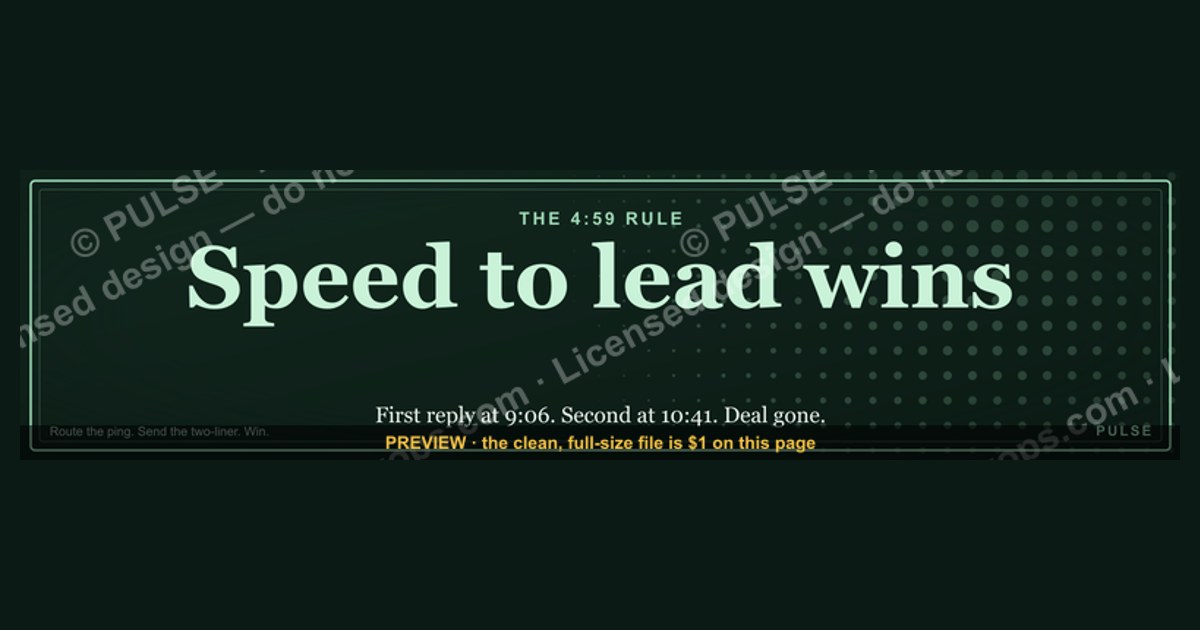

A "Speed to lead wins" LinkedIn Banner declares an operating promise: whoever answers a new lead first usually earns the deal. It works because response time compounds—contacting an inbound within five minutes can lift qualification odds several-fold, turning attentiveness into pipeline and pipeline into revenue you would otherwise surrender to a faster competitor.
The 4:59 that decided a deal
Picture two consultancies chasing the same prospect. A VP of Operations reads a "Speed to lead wins" LinkedIn Banner, clicks the profile, and fills out a short "book a call" form on the linked site. Both firms receive the lead at 9:02 a.m. The first firm has a routing rule that pings a shared Slack channel and fires a mobile alert the instant the form submits; a rep sees the name, the company, and the note "evaluating for Q3 rollout," and sends a two-line reply at 9:06. The second firm's lead lands in a CRM queue that a rep checks after their 10 a.m. standup—so their first message goes out at 10:41, ninety-nine minutes later.
By the time the second firm reaches out, the prospect has already scheduled a discovery call with the first. Nothing about the second firm was objectively worse: same expertise, same pricing, arguably a stronger deck. They simply arrived second to a buyer whose attention window had already closed. This is the scenario the Banner advertises in advance—it tells everyone who lands on your profile that the moment they raise a hand, you move. The promise is only credible if the machinery behind it is real, which is why the phrase is a commitment to a system, not a slogan. The Banner sets the expectation; the routing, alerting, and rep discipline behind it either honor that expectation or quietly break it on the very first inbound lead. And the breakage is invisible in your metrics—you never see the deals you lost by being ninety-nine minutes late, because those prospects never told you they were comparing. They just chose the firm that answered while they were still holding the phone.

How the speed-to-lead mechanism actually works
The mechanism runs on two forces that stack: the buyer's decaying attention and the compounding cost of a warm queue going cold. When someone submits a form or replies to a message, they are momentarily in "solution-seeking mode"—context loaded, intent high, alternatives not yet chosen. Every minute that passes lets that context evaporate, lets a competitor answer first, or lets the prospect simply move on to the next tab. Speed does not create demand; it captures demand at the exact instant it peaks, before the window shuts.
Operationally, the chain has four links: capture, detection, routing, and response. Capture is the channel—the LinkedIn message, the profile-link click, the website form. Detection is the alert that tells a human a lead exists, ideally within seconds via Slack, SMS, or a mobile push. Routing decides who owns the reply, using round-robin, territory, or intent score. Response is the human touch that turns a raw lead into a conversation. A break in any single link resets the clock: a perfect alert that routes to a rep who is in back-to-back meetings still produces a slow response. The point of a "Speed to lead wins" culture is to make every link redundant enough that no single failure quietly stalls the pipeline and drains revenue.
The subtle failure mode lives in the handoff between detection and routing. Many teams nail detection—the alert genuinely fires in seconds—but then route to a single named owner with no fallback. If that owner is on a plane, at lunch, or heads-down on a call, the lead sits in one inbox while the clock runs. The fix is an escalation timer: if the primary owner has not opened or claimed the lead within a defined window (commonly two to five minutes), ownership automatically jumps to a backup or back into a shared pool. This one rule converts a fragile single-point-of-failure system into a resilient one, and it is almost always cheaper to configure than to hire the extra headcount teams reach for first.

The diagram makes the escalation rule explicit: availability is never assumed. If the first-owner rep cannot answer inside the window, ownership jumps to a backup rather than sitting in a personal inbox. That single branch—"assigned rep available?"—is where most teams silently lose the speed advantage they printed on their Banner. Notice too that the flow ends at revenue, not at "reply sent." The speed only matters because each step feeds the next: a fast reply that never books a discovery call is motion without progress. The whole chain exists to convert a fleeting moment of attention into committed pipeline before a competitor does.
Real numbers, ranges, and benchmarks
The most cited finding in this space, from the Lead Response Management study associated with InsideSales and MIT, is that contacting a web lead within five minutes makes it dramatically more likely to be qualified than waiting thirty minutes, and that the odds of even reaching the contact fall off a cliff after the first hour. Harvard Business Review's audit of thousands of firms found companies that responded within an hour were meaningfully more likely to qualify leads than those that waited longer—yet a large share of firms took over a day, or never responded at all. The gap between the promise and the practice is exactly where the advantage lives.

Translate that into targets you can manage against. Aim for a median first-response time under five minutes for high-intent inbound—demo requests, pricing questions, direct LinkedIn messages asking about your service. Treat ten minutes as your yellow line and thirty minutes as red. For lower-intent signals—a newsletter signup, a like on a post, a generic comment—a fifteen-to-sixty-minute window is defensible because the intent is thinner. Track three numbers weekly: median response time, the percentage of leads answered inside your stated window (your "speed SLA hit rate," which should sit above 90%), and the conversion rate from first response to booked meeting. Those three, watched together, tell you whether the Banner's promise is real or aspirational.
Watch the shape of the distribution, not just the average. A team can post a three-minute median and still bleed revenue if the tail balloons to forty minutes during lunch, after 5 p.m., or on Fridays—precisely when a competitor with weekend coverage answers first. Segment your response data by hour and day of week to find those dead zones. A realistic, sustainable improvement path for most small teams is to move from a multi-hour median to a sub-ten-minute median within a quarter, mostly by fixing detection and routing rather than by hiring. The single highest-leverage change is usually collapsing the delay between "lead exists" and "a human knows," which is often measured in tens of minutes and can be cut to seconds with an automated alert.
Put rough economics on it so the effort earns its place. Suppose you receive 200 high-intent inbound leads a month, book meetings on 20% of the ones you reach in time, and close 25% of those at an average deal worth $12,000. If a slow, inconsistent response process quietly forfeits even a quarter of your reachable leads to faster competitors, that is roughly two to three lost deals a month—$24,000 to $36,000 in monthly revenue leaking out through a gap you can close with an alert rule and an escalation timer. Run the same arithmetic with your own numbers; even conservative inputs usually show the speed investment paying for itself many times over, which is what makes the Banner a business claim rather than a vanity line.

Trade-offs, alternatives, and where speed stops helping
Speed is a lever, not the whole machine, and pulling it too hard has costs. A sub-sixty-second reply that ignores what the prospect actually asked reads as robotic and can undercut the trust the Banner was meant to build. The alternative to raw speed is not slowness—it is *relevant* speed: fast enough to catch the attention window, considered enough to reference the prospect's specific context. A good compromise is the two-step response: an immediate acknowledgment ("Thanks—reviewing your note now, detailed answer within the hour") that stops the clock on perceived responsiveness, followed by a substantive reply that proves you read the message.
There are also genuine trade-offs against other investments. Every dollar and hour spent shaving response time from three minutes to one minute could instead go to lead quality, nurture sequences, or content that generates more inbound in the first place. For long, complex enterprise deals with buying committees and procurement cycles, the marginal value of answering in ninety seconds versus twenty minutes is small; relationship depth and multi-threading matter more. For transactional, high-volume, or commoditized offers—where the buyer is comparing several vendors at once—speed is often the deciding factor. Match the intensity of your speed investment to your deal shape rather than chasing a universal stopwatch.

The branch that matters most here is the quality check on the fast path. Speed without relevance lands in the "erodes trust" node, and the fix is not to slow down—it is to template smarter and personalize the first sentence, then keep the velocity. The goal state, in every path, is "fast and relevant," which is what protects revenue rather than just chasing a clock. There is also a diminishing-returns curve worth naming: moving from a two-hour response to a five-minute response is transformational, while moving from five minutes to ninety seconds is a marginal gain that mostly matters in the most competitive, high-volume segments. Spend your effort where the curve is steep—usually the first mile from "hours" to "minutes"—before you optimize the last few seconds.
Common pitfalls and how to avoid them
The first pitfall is confusing automation with responsiveness. An instant chatbot that interrogates a high-value prospect with five qualifying questions before any human appears can frustrate the exact buyers you most want. Use automation for acknowledgment and detection, not to replace the human conversation—an auto-reply that says "a real person is reviewing this and will respond personally within minutes" beats a bot that stalls the prospect in a form.
The second pitfall is inconsistency. Answering every lead in two minutes for a week, then slipping to thirty minutes when a busy stretch hits, teaches prospects that your Banner overstates reality. Reliability beats occasional brilliance: it is better to promise a ten-minute window and hit it 95% of the time than to promise instant and miss half the time. Set a baseline your team can sustain through vacations, lunches, and pipeline surges, and staff a designated "speed shift" or round-robin with escalation so coverage never depends on one person's inbox.

The third pitfall is a broken render between promise and system—advertising Speed you cannot deliver. Before you post the Banner, run a live test: submit your own form and message your own profile, and time how long until a human replies. If the answer is "an hour," fix the pipeline before you advertise the promise. The fourth pitfall is over-templating: reusing a canned line so obviously that prospects feel processed rather than heard. Keep a response library for structure and speed, but always customize the opening sentence to the prospect's specific words. The fifth is measuring only the average and ignoring the tail, off-hours, and the leads that never get a reply at all—those silent zeros are where the most recoverable revenue hides.
A sixth, quieter pitfall is failing to close the loop on measurement itself. Teams that instrument response time often stop there and never tie it back to booked meetings and closed revenue, so the number becomes a vanity metric that nobody trusts. Wire your speed SLA to downstream outcomes: cohort your leads by response bucket (under 5 minutes, 5–30 minutes, over 30 minutes) and compare their meeting and close rates every quarter. When reps can see that the under-five-minute cohort books meetings at a visibly higher rate, the Banner stops being a management slogan and becomes something the team defends on its own—because they can watch it protect their pipeline in the dashboard.
Related questions
How fast is "fast enough" for a first response?
Under five minutes for high-intent inbound is the widely cited target, with the sharpest drop-off after the first hour. For thinner signals like a follow or a generic comment, fifteen to sixty minutes is defensible. Match the window to the intent behind the lead.
Should I automate my speed-to-lead replies entirely?
No. Automate detection, alerting, and acknowledgment, but keep the substantive first reply human—or at least human-personalized. A fully automated qualification bot can frustrate high-value prospects. Use bots to buy minutes, not to replace the conversation the Banner is promising.
Does speed to lead matter for outbound, not just inbound?
Yes, though the window is wider. Responding to a reply, a meeting acceptance, or a trigger event like a job change within fifteen to thirty minutes keeps momentum. Speed compounds in any motion because it captures attention while intent is still live.
What single change improves response time the most?
Collapsing the gap between "lead exists" and "a human knows." An instant alert to Slack, SMS, or push—instead of a rep manually checking a CRM queue—often cuts tens of minutes to seconds and is cheaper than hiring more reps.
Will a "Speed to lead wins" Banner actually generate leads?
The Banner signals positioning and sets expectations; it rarely generates volume on its own. Its value is credibility and consistency—it tells prospects what to expect and holds your team accountable to a standard that protects pipeline and revenue.
FAQ
What does "speed to lead wins" actually mean in sales? It means the faster you respond to an inbound lead, the higher your odds of converting it. Widely cited research shows contacting a lead within five minutes dramatically increases the chance of qualifying it compared with waiting even thirty minutes to an hour. The phrase is a commitment to a response system, not just a motivational line.
How quickly should I respond to a lead to maximize conversion? Aim for under five minutes on high-intent inbound, ideally within one to two. Numbers vary by industry and deal complexity, but the direction is consistent: an immediate reply signals reliability and respect for the prospect's time, and it usually beats a slower competitor to the conversation.
Does this principle apply to outbound prospecting too? Yes, with a slightly wider window. For outbound, replying to a response or engaging with a trigger event within fifteen to thirty minutes still outperforms delays of hours or days. Speed builds momentum in any sales motion because it meets the buyer while their interest is still warm.
What tools help teams respond faster? Instant-alert integrations (Slack, SMS, mobile push), CRM routing rules with round-robin and escalation, and acknowledgment automation are common building blocks. The right stack depends on your team size and channels; the goal is simply to shrink the delay between a lead arriving and a human knowing about it.
Is speed more important than personalization? They are not mutually exclusive, and the best outcome is both. A fast reply that ignores the prospect's actual question can read as robotic and erode trust. Prioritize catching the attention window, then always personalize the opening sentence so the speed feels attentive rather than automated.
Can slow response times really hurt my close rate? Yes, significantly. Studies consistently show the probability of reaching and qualifying a lead falls steeply after the first several minutes and again after the first hour. Slow, inconsistent responses train prospects to lower expectations, ghost, or choose whoever answered first—directly costing revenue.
Sources
- https://hbr.org/2011/03/the-short-life-of-online-sales-leads
- https://www.salesforce.com/resources/articles/lead-management/
- https://blog.hubspot.com/sales/sales-follow-up-timing
- https://www.gartner.com/en/sales
- https://business.linkedin.com/sales-solutions
- https://zapier.com/blog/lead-management/
- https://www.forrester.com/blogs/category/sales/
Related on PULSE
This page will be disappearing soon. Save it to your device for $1 — or read it free while it is here.
@Kory-White- · if Venmo asks, the last 4 of my number are 2012
This page is gone.
This one is off the shelf now. $1 keeps it on your phone for good — the whole page, pictures and diagrams included.
 graphic“Hire slow. Ramp fast.” — LinkedIn Banner
 graphicStartup Founder — LinkedIn Banner
 graphic“Revenue for marketing tech.” — LinkedIn Banner
 graphicStay in the deal. — LinkedIn Wallpaper
 graphicBring the energy. — LinkedIn Wallpaper
 graphic“Trusted advisor, never a vendor.” — LinkedIn Banner
 graphic“Clarity closes.” — LinkedIn Banner
 graphicAI Observability Operator — LinkedIn Banner
 graphic“Bring the energy every call.” — LinkedIn Banner
 graphic“Data beats opinions.” — LinkedIn Banner