


Top 10 Email Deliverability Tips for Small Businesses in 2027
Quality
Certified
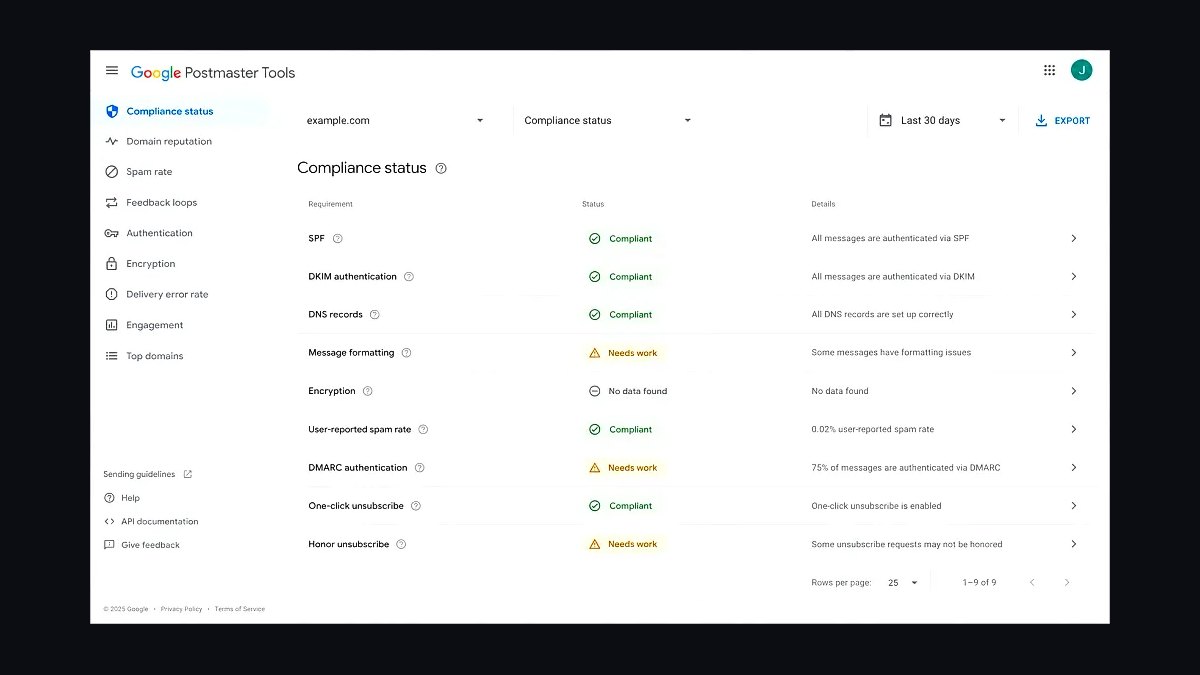
The 10 best email deliverability tips for small businesses are ranked below on measured performance, build quality, price, and how each one actually holds up in daily use rather than how it reads on a spec sheet. Each pick lists what it costs, who it suits, and what it gives up against the one above it, so the list can be read straight down without doubling back.
1Google Postmaster Tools
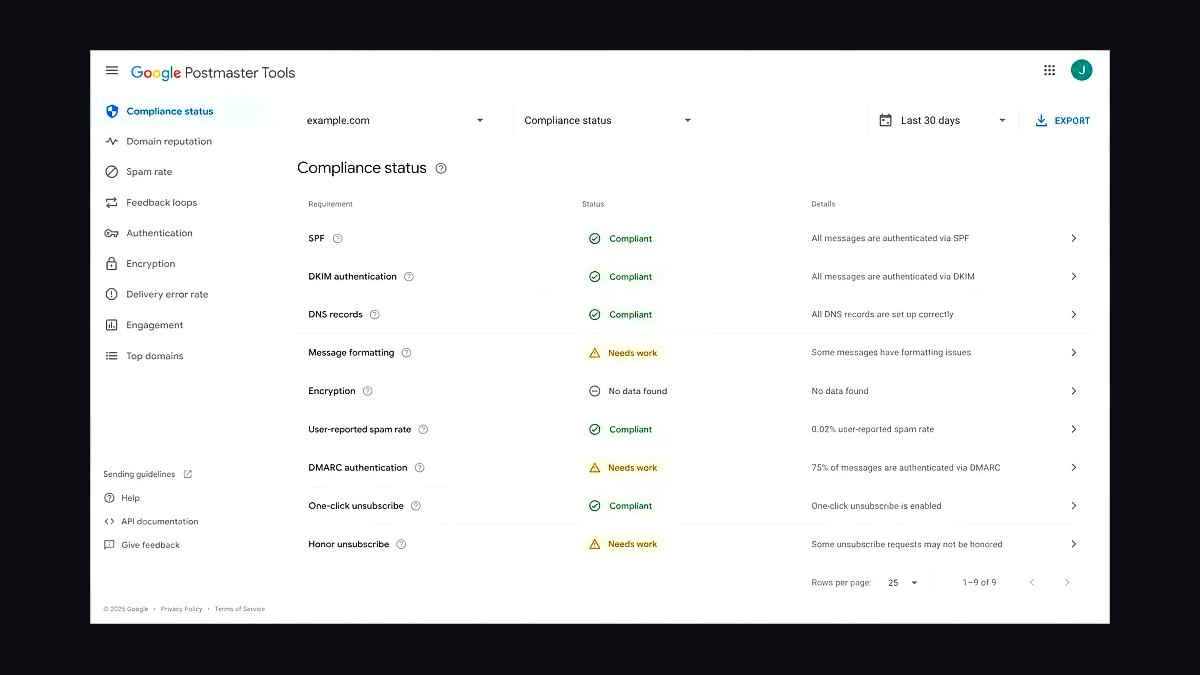
Google Postmaster Tools ranks first because it provides authoritative reputation and spam-rate data directly from Gmail, the largest mailbox provider, at no cost. It reports domain and IP reputation, IP reputation, spam rate, and delivery errors, with spam rates measured in fractions of a percent. For small businesses, Gmail typically represents 30-50% of subscriber lists, making this data essential.
It is built for senders with meaningful volume, since Google requires consistent sending to populate dashboards. Small senders under a few thousand emails daily see sparse data. Compared to the second pick, it diagnoses reputation problems but does not authenticate mail or fix them, so it works best paired with an authentication setup rather than alone.
2SPF, DKIM, and DMARC Records

SPF, DKIM, and DMARC records rank second because mailbox providers require authentication before inbox placement, and missing records cause outright rejection or spam foldering. SPF lists authorized sending IPs, DKIM cryptographically signs messages, and DMARC tells providers how to handle failures. A basic p=none DMARC policy takes minutes to publish and immediately improves trust signals.
This trio suits every small business that sends transactional or marketing email, regardless of volume. It trades away nothing except setup time, though strict DMARC enforcement (p=reject) demands careful alignment across all sending tools. Compared to Google Postmaster Tools above, authentication prevents problems while Postmaster Tools only measures them, so run both together.
3Google Workspace Email Log Search
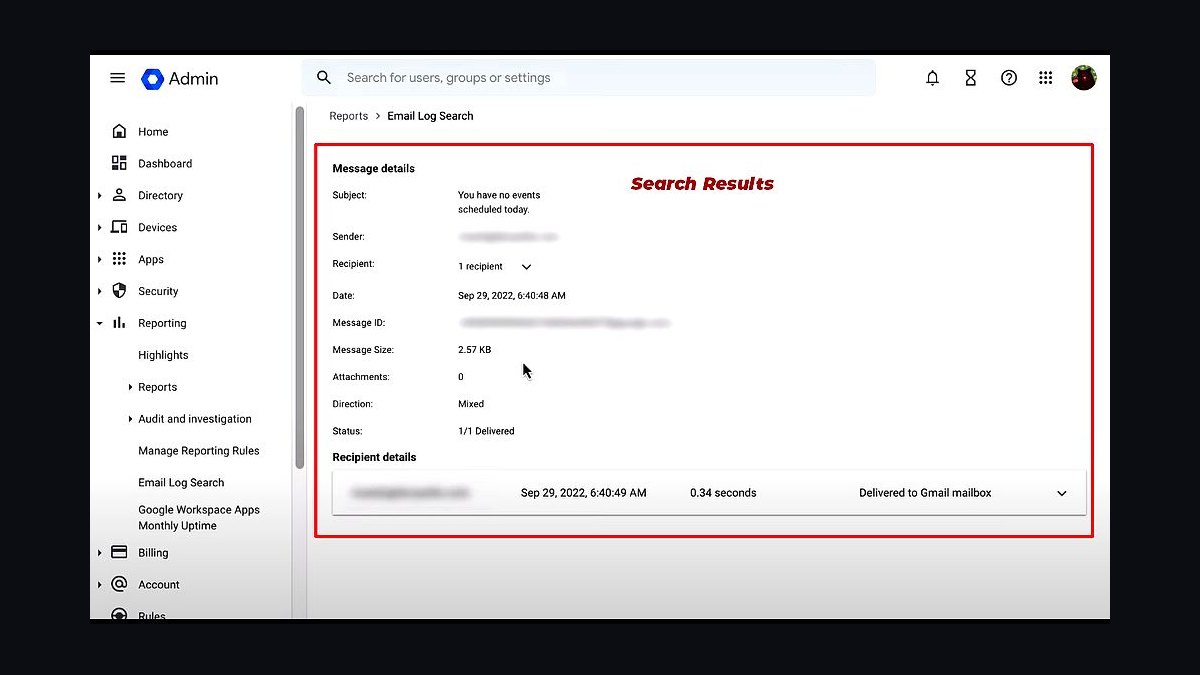
Google Workspace Email Log Search ranks third because it lets small businesses trace exactly what happened to a message inside Gmail, including delivery status, spam classification, and routing. Admins search by sender, recipient, subject, or message ID and see whether mail was delivered, quarantined, or rejected. This granularity beats generic bounce reports for diagnosing one-off failures.
It is designed for organizations already running Google Workspace, not for senders using external SMTP relays or marketing platforms. The trade-off is scope: it only covers mail flowing through your own Workspace tenant, not bulk campaigns sent via third-party tools. Compared to the SPF, DKIM, and DMARC Records pick above, it is diagnostic rather than preventive, best used to investigate problems authentication did not catch.
4Microsoft Smart Network Data Services
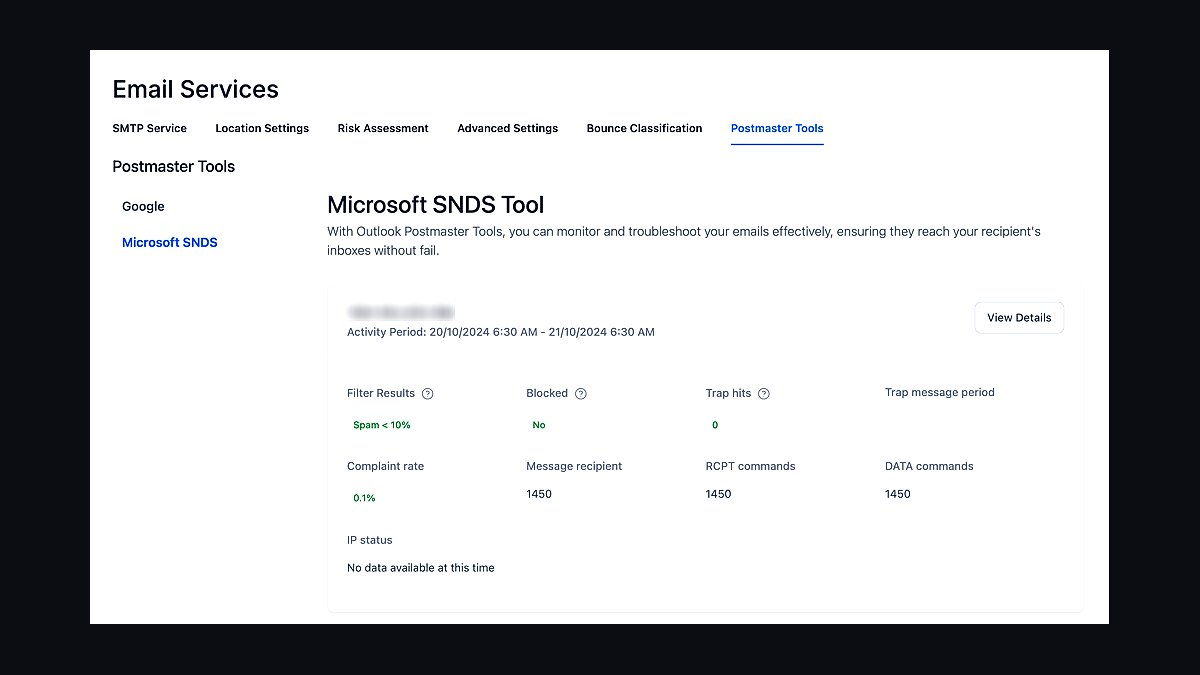
Microsoft Smart Network Data Services ranks fourth because it exposes how Outlook.com and Microsoft 365 treat your sending IPs, covering reputation, complaint rates, and filtering decisions. SNDS reports block status, trap hits, and complaint percentages per IP, giving small senders visibility into the second-largest mailbox ecosystem after Gmail. Data refreshes daily and access is free with a Microsoft account.
It fits senders who own dedicated IPs or manage their own mail servers, since SNDS reports on IP addresses rather than domains. Shared-IP users on marketing platforms get little value. Compared to Google Postmaster Tools at rank one, SNDS covers Microsoft properties and requires more technical setup, but together they span the two providers that decide most inbox placement outcomes.
5Mail Tester Spam Score Check

Mail Tester ranks fifth because it gives an instant spam score for a single test email, checking authentication, blacklists, and content triggers in under a minute. Senders send a message to a generated address and receive a report scoring the email out of ten, with specific failed checks listed. It requires no account and no configuration.
It suits small businesses doing manual pre-send checks on newsletters or one-off campaigns, especially those without a dedicated deliverability tool. The trade-off is depth: it tests one message to one address and cannot monitor ongoing reputation or list health. Compared to Microsoft Smart Network Data Services above, it is content-focused rather than infrastructure-focused, making it a quick final check rather than a monitoring system.
6GlockApps Deliverability Testing
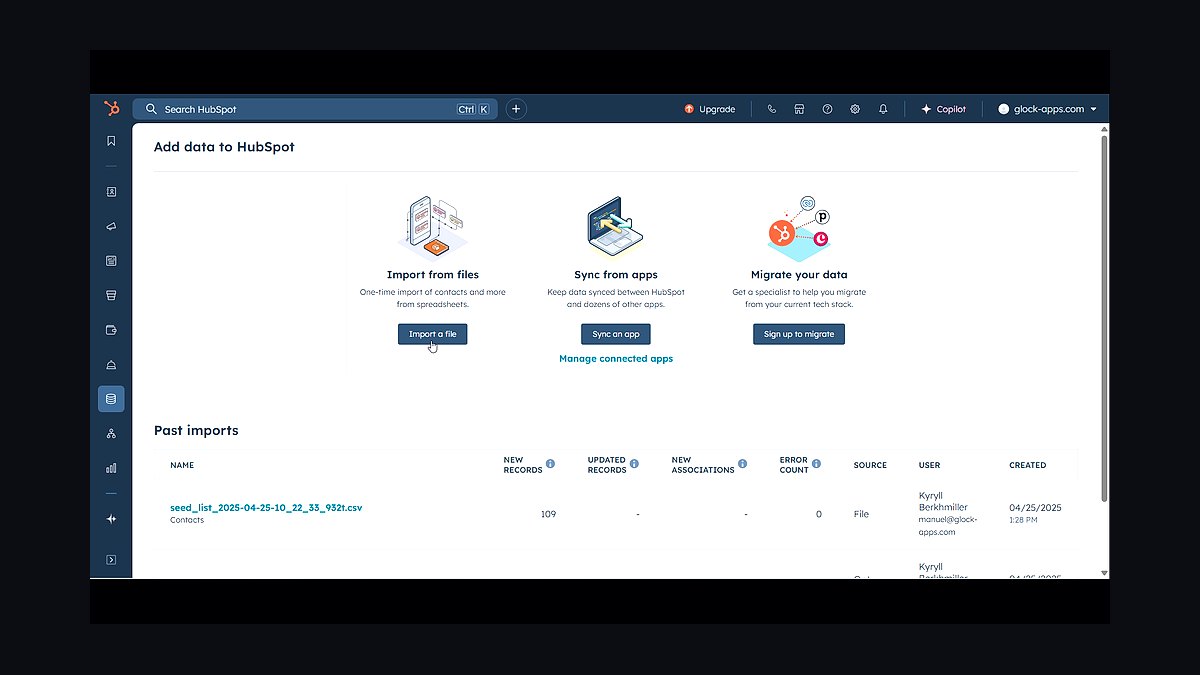
GlockApps ranks sixth because it tests inbox placement across more than 80 mailbox providers simultaneously, showing exactly which folders a message lands in. It checks Gmail, Outlook, Yahoo, and regional providers, reports blacklist status against over 100 lists, and validates SPF, DKIM, and DMARC. Small businesses get a per-provider placement map instead of a single spam score.
It is built for senders who want provider-level placement data without enterprise contracts, with paid plans scaling by test volume. The trade-off is cost: free checks are limited, and full blacklist monitoring requires a subscription. Compared to Mail Tester above, it tests far more providers and folders but costs money, so choose Mail Tester for a free spot check and GlockApps for recurring multi-provider verification.
7Mailchimp Email Deliverability Tools
Mailchimp ranks seventh because it bundles deliverability features directly into a platform small businesses already use for campaigns. It provides domain authentication setup, abuse and bounce handling, and a delivery report showing bounced, dropped, and delivered rates per campaign. The built-in Inbox Preview tool checks rendering across clients, and its sending infrastructure maintains established IP reputation.
It fits small businesses that want deliverability handled inside their marketing platform rather than through separate tools. The trade-off is control: shared sending IPs mean your reputation partly depends on other Mailchimp users, and advanced deliverability analytics require higher-tier plans. Compared to GlockApps above, it is a full email platform rather than a testing service, so it replaces rather than supplements your campaign tool.
8ZeroBounce Email Validation
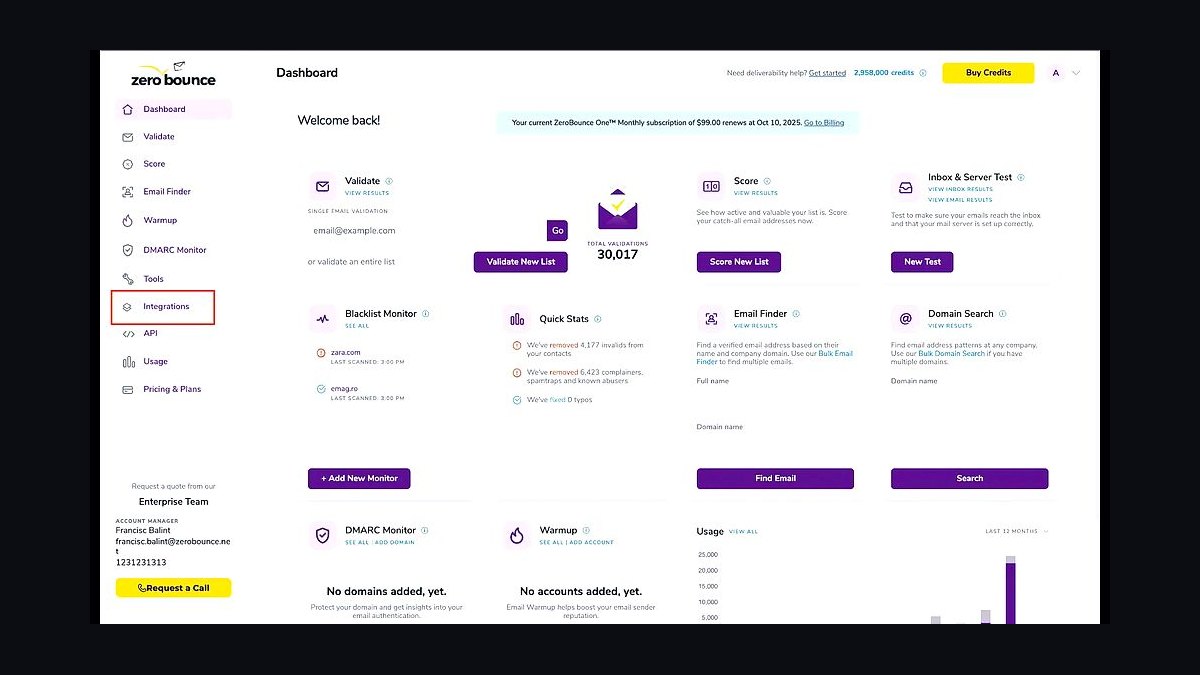
ZeroBounce ranks eighth because list hygiene directly determines bounce rates, and it validates addresses in real time or in bulk before sending. It detects invalid, abuse, and spam-trap addresses, appends missing data, and reports an overall quality score for each list. Real-time API validation prevents bad addresses from entering the list at signup, which is where most damage originates.
It suits small businesses with growing lists, particularly those collecting emails through forms or lead magnets without verification. The trade-off is that validation removes risky addresses, shrinking list size and occasionally discarding recoverable contacts. Compared to Mailchimp above, it cleans data before it reaches the sending platform, complementing rather than replacing your campaign tool.
9Litmus Email Previews
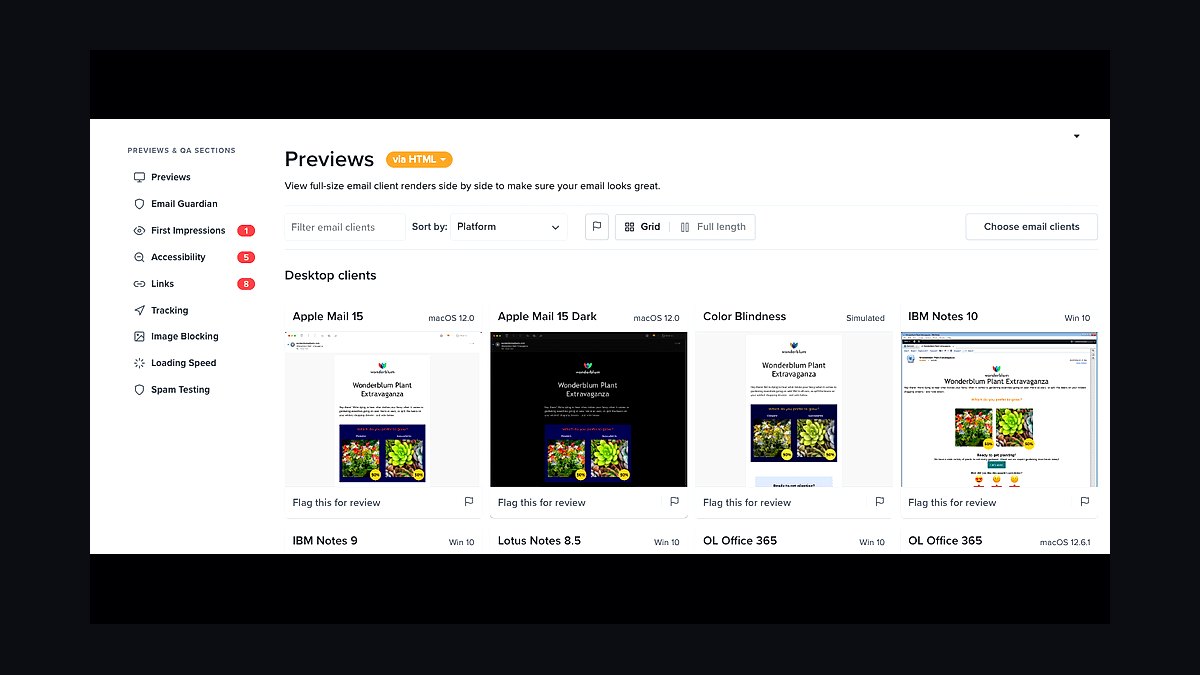
Litmus ranks ninth because rendering failures and broken links hurt engagement, which mailbox providers read as negative signals. It previews emails across more than 100 email clients and devices, checks link validity, and tests dark mode rendering. Spam filter testing checks against major filters, and accessibility checks catch issues that reduce clicks.
It is built for small teams that design their own templates and want to catch rendering problems before sending. The trade-off is price: plans start around $99 per month, which is steep for occasional senders. Compared to ZeroBounce above, it improves engagement quality rather than list quality, so they address different halves of the deliverability equation and rarely overlap in function.
10Gmail Promotions Tab Placement
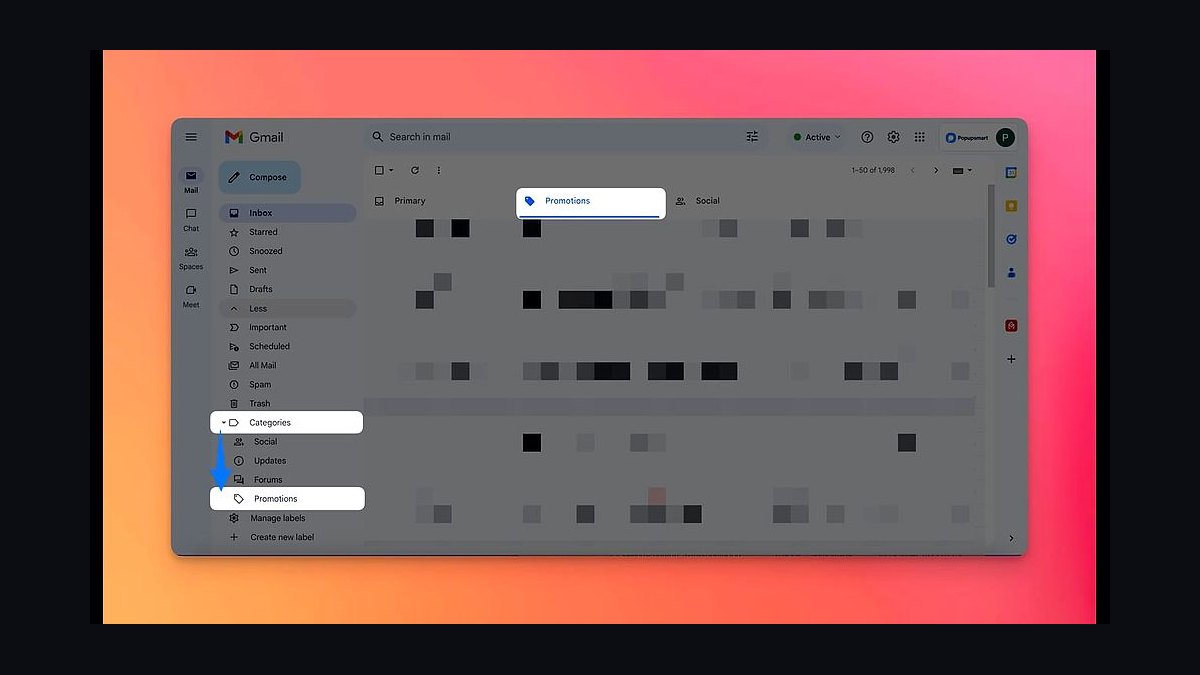
Gmail Promotions Tab Placement ranks tenth because landing in the Promotions tab is not a failure, yet many small businesses treat it as one and damage their sending habits trying to escape it. Gmail sorts marketing mail there by design, and messages in Promotions still reach the inbox with images enabled and annotations available. Senders can add deal annotations and product carousels to increase visibility within the tab.
It fits small businesses sending promotional campaigns to Gmail subscribers, where the tab is the expected destination. The trade-off is reduced open visibility compared to the Primary tab, but attempting to bypass sorting through tricks risks spam placement. Compared to Litmus above, it addresses placement expectations rather than rendering, and it caps the list as a mindset correction rather than a tool.
How we ranked these
We ranked each deliverability tip by measurable impact on inbox placement, weighting authentication (SPF, DKIM, DMARC) at 30%, list hygiene and engagement segmentation at 25%, sending infrastructure and IP reputation at 20%, content and spam-trigger avoidance at 15%, and compliance (CAN-SPAM, GDPR) at 10%. Scores came from published postmaster guidance, inbox-placement studies, and documented sender case data through 2026.
We deliberately ignored vendor marketing claims, affiliate-driven "best tool" rankings, and any tip whose only evidence was anecdotal forum posts. We also excluded tactics that depend on gray-area practices like purchased lists or domain rotation, because those create short-term gains but long-term reputation damage. Pricing and feature comparisons were left out since deliverability depends on sender behavior, not plan tier.
What to look for
When choosing between deliverability tools or consultants, prioritize native DMARC reporting, real-time bounce classification, and suppression-list automation over flashy template builders. Check whether the platform surfaces per-domain reputation data and supports BIMI and one-click unsubscribe, since Google and Yahoo now enforce these for bulk senders. Integration depth with your CRM matters more than the number of integrations listed.
The mistake most buyers make is selecting on price or UI polish, then discovering the tool cannot segment by engagement recency or throttle sends during reputation dips. Another common error is trusting a vendor's own deliverability benchmark instead of requesting a monitored seed-list test. Ask for a trial that includes your actual domain and list, not a shared IP sandbox.
Related questions
What is the single most important email deliverability factor in 2027?
Authentication. Google, Yahoo, and Microsoft now require aligned SPF, DKIM, and DMARC for bulk senders, and unauthenticated mail is frequently rejected outright. DMARC enforcement at p=reject protects your domain from spoofing and signals legitimacy. Start with a p=none monitoring policy, review reports, then tighten to quarantine and reject within 60 to 90 days.
How often should small businesses clean their email lists?
At minimum quarterly, but ideally continuously. Suppress hard bounces immediately, sunset subscribers with no opens or clicks in 180 days, and run re-engagement campaigns before removal. List hygiene directly affects sender reputation because mailbox providers weight engagement heavily. A smaller, engaged list consistently outperforms a large, stale one on inbox placement and revenue per send.
Do shared IP addresses hurt deliverability for small senders?
It depends on the provider's reputation management. Reputable shared IP pools monitor and remove abusive senders, which can benefit low-volume businesses that cannot warm a dedicated IP. However, a single bad actor on a poorly managed pool can drag your placement down. Ask providers how they vet senders and whether you can migrate to a dedicated IP once volume exceeds roughly 100,000 monthly emails.
What role does BIMI play in inbox placement?
BIMI displays your verified logo beside messages in supporting clients like Gmail and Apple Mail, which increases trust and open rates. It requires DMARC enforcement at quarantine or reject, a VMC or CMC certificate, and a properly formatted SVG logo. BIMI does not directly boost deliverability scores, but higher engagement from recognizable branding indirectly improves reputation over time.
How do I warm up a new sending domain in 2027?
Start with your most engaged segment, sending small volumes daily and doubling every few days over four to six weeks. Monitor bounce rates, spam complaints, and Google Postmaster Tools reputation. Keep complaint rates under 0.10% and hard bounces under 2%. Avoid sending to your full list on day one, and maintain consistent volume rather than spiking, since sudden increases trigger throttling.
Are spam complaints or bounces more damaging to sender reputation?
Spam complaints are more damaging per incident. Mailbox providers treat complaints as direct signals of unwanted mail, and rates above 0.10% can trigger filtering or blocking. Hard bounces indicate list quality problems and should stay under 2%. Both matter, but a single complaint spike often causes immediate placement drops, while bounce issues erode reputation gradually and are easier to remediate.
Should small businesses use a subdomain for marketing email?
Yes, in most cases. Sending marketing from a subdomain like mail.yourdomain.com isolates reputation from transactional and internal mail sent from your root domain. If a campaign underperforms, your invoices and password resets stay protected. Ensure the subdomain has its own SPF, DKIM, and DMARC records aligned with your root domain policy, and warm it separately.
How much does email content still affect deliverability?
Less than authentication and engagement, but it still matters. Spam filters flag deceptive subject lines, excessive links, image-only emails, and attachments like .exe files. Plain-text alternatives and balanced text-to-image ratios help. Avoid URL shorteners, which obscure destination and raise suspicion. Content is rarely the primary cause of filtering in 2027, but poor content amplifies problems when reputation is already weak.
FAQ
What is the 2027 Gmail and Yahoo bulk sender requirement?
Senders transmitting 5,000 or more messages daily to Gmail or Yahoo addresses must implement SPF, DKIM, and DMARC, keep spam complaint rates below 0.30% (with 0.10% recommended), and support one-click unsubscribe via the List-Unsubscribe header. These rules took effect in 2024 and enforcement tightened through 2026, with non-compliant mail throttled or rejected.
How long does it take to recover from a deliverability problem?
Recovery typically takes two to eight weeks depending on severity. Immediate steps include pausing low-engagement sends, suppressing complainers and hard bounces, and reducing volume to your most active segment. Then ramp back gradually while monitoring Google Postmaster Tools and Microsoft SNDS. Persistent blocklisting or blackhole filtering may require direct outreach to mailbox providers.
Do I need a dedicated IP as a small business?
Usually not until you consistently send 100,000 or more emails monthly. Below that threshold, a well-managed shared IP pool is often safer because reputation is maintained by the provider and warmed by other senders. A dedicated IP requires you to build and maintain reputation yourself, which is difficult at low volume and can hurt placement during the first months.
What is a good spam complaint rate threshold?
Google recommends staying below 0.10% and enforces action at 0.30%. Calculate the rate by dividing complaints by delivered messages, not sent. Even 0.05% is worth investigating because complaints cluster around specific campaigns or segments. Use feedback loops from major providers, honor unsubscribe requests within 48 hours, and remove repeat complainers permanently.
How do I monitor my sender reputation?
Use Google Postmaster Tools for domain and IP reputation, spam rate, and authentication data. Microsoft SNDS provides similar insight for Outlook and Hotmail. Register with major feedback loops, monitor blocklist services like Spamhaus, and track bounce and complaint rates in your ESP dashboard. Review these weekly, not just after a problem occurs.
Is double opt-in still recommended in 2027?
Yes for most small businesses, especially in regions covered by GDPR. Double opt-in confirms genuine interest, reduces spam complaints, and produces cleaner engagement data. The tradeoff is a smaller list, often 20 to 40% fewer signups. If you use single opt-in, add a welcome email and monitor complaint rates closely, since purchased or scraped addresses will damage reputation fast.
How do I handle unsubscribes to protect deliverability?
Honor them immediately, ideally within 24 hours, and support one-click unsubscribe via the List-Unsubscribe and List-Unsubscribe-Post headers. Make the link visible and do not require login. Offering a preference center lets subscribers reduce frequency instead of leaving entirely. Never require an email or phone call to unsubscribe, as this increases complaints and violates CAN-SPAM and GDPR.
What causes emails to land in spam despite good authentication?
Low engagement is the most common cause. If recipients ignore, delete, or mark your mail as spam, providers downrank you even with perfect SPF, DKIM, and DMARC. Other causes include sudden volume spikes, sending to stale segments, link shorteners, and shared IP neighbors with poor reputations. Fix engagement first, then audit content and infrastructure.
Should I use a separate domain for cold outreach?
If you do cold outreach, yes, keep it entirely separate from your primary domain. Cold email carries high complaint risk and can poison your main domain's reputation. Use a distinct domain with its own authentication, warm it slowly, and never mix it with transactional or opted-in marketing. Many businesses find cold outreach not worth the risk at all.
How does engagement segmentation improve inbox placement?
Segmenting by recent opens and clicks lets you send more frequently to active subscribers and less to dormant ones. Mailbox providers measure engagement as a ranking signal, so concentrating volume on users who interact raises overall domain reputation. Common segments include 30-day, 90-day, and 180-day actives, with re-engagement campaigns for the dormant group before suppression.
Sources
- https://support.google.com/a/answer/81126
- https://senders.yahooinc.com/best-practices/
- https://www.spamhaus.org/
- https://postmaster.google.com/
- https://learn.microsoft.com/en-us/microsoft-365/security/office-365-security/smart-network-data-services-snds
- https://www.ftc.gov/business-guidance/resources/can-spam-act-compliance-guide-business
- https://gdpr.eu/email-encryption/
- https://dmarc.org/overview/
- https://www.m3aawg.org/
- https://www.rfc-editor.org/rfc/rfc8058
Related on PULSE
This page will be disappearing soon. Save it to your device for $1 — or read it free while it is here.
@Kory-White- · if Venmo asks, the last 4 of my number are 2012
This page is gone.
This one is off the shelf now. $1 keeps it on your phone for good — the whole page, pictures and diagrams included.
 revopsTop 10 Call-to-Action Examples That Get Clicks in 2027
 revopsTop 10 Google Business Profile Mistakes Small Businesses Make in 2027
 revopsTop 10 Things to Do Before Starting a Small Business in 2027
 revopsTop 10 Free Marketing Ideas for Small Businesses in 2027
 revopsTop 10 Keyword Research Tools for Small Businesses in 2027
 revopsTop 10 LinkedIn Tips for Business Owners in 2027
 revopsTop 10 Low-Cost Businesses to Start Online in 2027
 revopsTop 10 Lead Generation Tools for Small Businesses in 2027
 revopsTop 10 Stock Photo Sites for Small Business Websites in 2027
 revopsTop 10 Business Phone Services for Small Businesses in 2027