


How do I activate a new phone on my carrier's network in 2027?
Quality
Certified
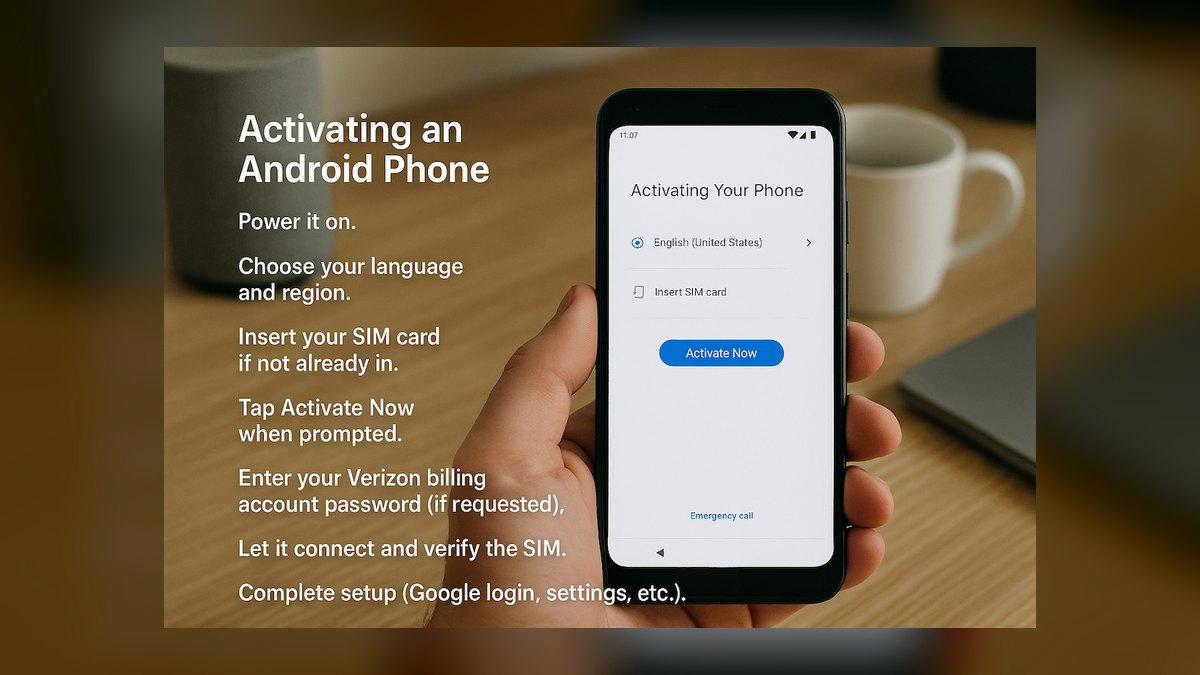
To activate a new phone on your carrier's network in 2027, confirm the device is unlocked and network-compatible, then either scan the carrier's eSIM QR code or insert a physical SIM, and finish activation through the carrier's app, website, or by dialing the network's activation code. Most activations complete in 5-20 minutes; porting an existing number can take up to 24 hours.
A new phone that won't connect
Picture this: you just unboxed a new phone, charged it, and powered it on — and it sits there showing "No Service" or "SOS Only" instead of your carrier's name in the status bar. This is the single most common support call carriers field in the first hour after a device ships, and it almost always traces back to one of three things: the phone hasn't been told which network to join, the account hasn't been told which phone is now yours, or the two steps happened out of order. Activation is really a handshake between three systems — the physical or virtual SIM in the phone, the carrier's provisioning backend, and the account record tied to your phone number — and if any one leg of that handshake doesn't complete, the phone stays cosmetically "on" but functionally offline.
By 2027, the handshake itself hasn't changed in principle; what's changed is that most of it now happens through software rather than a store counter. A customer buying a phone directly from a carrier or a major retailer typically has the eSIM profile pushed automatically before the box even ships, so "activate" now often means confirming a profile install prompt rather than physically swapping anything. But the underlying scenario — new phone, existing number, a network that has to be told both facts before it will let you make a call — is unchanged, and understanding that framing makes every troubleshooting step below make sense instead of feeling like a random checklist.
How activation actually works under the hood
When you activate a phone, four things have to line up in sequence, and skipping the order is the most common reason activation stalls. First, the network checks the device itself: every phone has a unique IMEI (International Mobile Equipment Identity) number, and the carrier's systems check that number against two lists — a compatibility database (does this hardware support the carrier's frequency bands and VoLTE/RCS requirements) and a blacklist (has this IMEI been reported lost, stolen, or tied to unpaid financing).

A phone that fails either check will never activate, no matter how many times you reinsert the SIM. Second, the network needs a credential — either a physical SIM card with an embedded ICCID (Integrated Circuit Card Identifier) or an eSIM profile downloaded via QR code or carrier app — that ties the physical radio hardware to a specific subscriber identity.
Third, the carrier's back-end has to associate that credential with your account and phone number in what's called the HLR/HSS (Home Location Register / Home Subscriber Server) — this is the database that every cell tower checks in real time to decide whether to let a device onto the network. Fourth, and only after the first three steps succeed, the device performs a network registration handshake with the nearest tower, at which point you see bars and the carrier name appear. " A simple airplane-mode toggle or full restart often nudges the device to retry registration once the back-end has actually caught up.
What the numbers look like in 2027

Timing expectations are worth setting precisely because they drive most of the anxious follow-up calls. A same-carrier activation — new phone, same number, same carrier, no port involved — typically completes in 5 to 20 minutes end to end, and often faster with eSIM since there's no physical card to wait on or damage in transit. A number port from a different carrier is the variable that adds real time: under FCC wireless number portability rules, carriers are required to complete a simple mobile-to-mobile port within one business day, and in practice most complete within 2 to 4 hours during business hours, though carriers commonly quote "up to 24 hours" to cover edge cases like account mismatches or after-hours submissions.

Porting a number that's tied to a business account, a landline, or a VoIP service can take several business days because those ports route through a different clearinghouse process. On the device side, unlocking matters as much as activation: since 2024, FCC rules require carriers to unlock a postpaid phone within 60 days of activation as long as the account is in good standing and any device financing is current, and prepaid unlock windows vary by carrier but commonly fall between immediately and 365 days of active service. A locked phone will activate fine on its original carrier but will fail entirely on a different one, which is the single most common reason a "new" (used, secondhand) phone won't activate on your network — it's not a network problem, it's a lock inherited from the previous owner's carrier.
eSIM adoption has also shifted the numbers: as of the flagship phones sold in 2027, the large majority ship eSIM-only or eSIM-primary, meaning a physical SIM tray is now the exception on premium devices rather than the default, which is why carriers have pushed QR-code and app-based activation as the primary path rather than a fallback.
eSIM vs. physical SIM vs. carrier swap: trade-offs
There are three realistic paths to activation, and each has a different failure mode worth knowing before you pick one. Physical SIM is the most universally compatible option — it works on essentially every phone made in the last 15 years, requires no app or account login to install, and is trivial to move between devices by hand. Its downside is friction: it has to physically ship or be picked up in store, it can be lost or damaged, and swapping it introduces a moment where the phone is briefly unreachable. eSIM is now the default recommendation for anyone with a phone from roughly 2022 onward — it activates by scanning a QR code or tapping an install link, it can't be physically lost, and many carriers support carrying two eSIM profiles at once (useful for a travel line alongside your primary number).

Its downside is that eSIM installation requires an internet connection (Wi-Fi or another active data connection) at the moment of setup, which creates a chicken-and-egg problem if your only connectivity was going to come from the new SIM itself, and eSIM profiles don't transfer as casually between devices — moving to a new phone means requesting a fresh QR code from the carrier rather than physically moving a card. The third path, an in-store carrier swap, trades convenience for certainty: a store rep can run the IMEI check, resolve a blacklist flag, and troubleshoot a stuck HLR update in real time, which is valuable if you're porting a number from a carrier known for slow release, financing a device, or dealing with a locked secondhand phone.
The trade-off is time and, for some carriers, a small activation or SIM-kit fee that self-activation online typically waives. For a straightforward same-carrier upgrade with a compatible unlocked phone, self-service eSIM activation is almost always the fastest and cheapest path; for anything involving a port, a used device, or a financing transfer, the extra 15 minutes with a human rep often saves an hour of app troubleshooting later.
Common pitfalls and how to avoid them
The most frequent activation failure isn't a network outage — it's a locked device. If you bought a phone secondhand, through a marketplace, or inherited it from another line, check whether it's still locked to its original carrier before attempting activation; most carriers publish a free IMEI/unlock-status checker on their site, and running your device's IMEI through it takes under a minute. The second most common pitfall is starting a number port at the wrong time: initiating a port late on a Friday evening or before a holiday can push what should be a same-day port into the following business day, since ports process during business hours at the losing carrier.
The third pitfall is a mismatch between the name, address, or account number on the old and new carrier accounts — porting requires those details to match closely enough that the losing carrier can verify the request, and a recently changed billing name or address is a frequent, easily fixed cause of a rejected port.

Fourth, watch for SIM-swap fraud risk in the other direction: because activation is now largely self-service, carriers have added extra identity verification (a port-out PIN, a one-time code, or an in-app confirmation) specifically to stop someone else from porting your number onto their device without your consent — if activation suddenly asks for a PIN you don't remember setting, that's the fraud protection working as intended, and you'll need to contact the carrier to reset it rather than treat it as a bug. Fifth, don't restore a full device backup before confirming activation succeeded — restoring carrier-specific settings (APN profiles, VoLTE configuration) from an old device onto a new one before the new SIM/eSIM is fully registered can leave the phone with a broken data connection even after voice and text start working; activate first, confirm calls and data both work, then restore apps and settings.
Finally, if a phone shows bars but data won't work, check whether the account plan itself needs a manual APN (Access Point Name) update — this is rare on major postpaid carriers, which push APN settings automatically, but common on MVNOs and prepaid plans where the APN sometimes has to be entered by hand.
Related questions
Do I need to be near a store to activate a new phone?

No. Nearly all activations in 2027 can be completed entirely through the carrier's app or website using the eSIM QR code or a physical SIM mailed to you — a store visit is only needed for identity verification edge cases or troubleshooting a stuck port.
Can I activate a phone that isn't sold by my carrier?
Yes, as long as it's unlocked and supports your carrier's network bands and VoLTE. Check the carrier's published compatibility or "Bring Your Own Device" tool with the phone's IMEI before buying a SIM or requesting an eSIM.
What happens to my old phone when I activate a new one?
Nothing automatically — the old phone simply loses network access once the SIM/eSIM is moved or a physical SIM is removed. It still works over Wi-Fi for anything that doesn't require a cellular signal.
Why does my new phone show "SOS Only" after activation?
This almost always means the SIM/eSIM credential exists but the carrier's back-end hasn't finished linking it to your account, or the device failed the network compatibility check. Restart the phone after 10-15 minutes; if it persists, contact support.
Is eSIM safer than a physical SIM?

In terms of fraud, eSIM activation typically requires stronger identity verification since there's no physical card to steal, but it also means a compromised carrier account could theoretically have a profile provisioned remotely — both formats rely on the same account-level protections like a port-out PIN.
FAQ
How long does it take to activate a new phone on my carrier's network? A same-carrier activation with no number port usually takes 5 to 20 minutes. If you're porting a number from another carrier, budget up to 24 hours, though most mobile-to-mobile ports complete within a few hours during business hours.
Do I need Wi-Fi to activate a new phone? For eSIM activation, yes — you need an active internet connection (Wi-Fi or another data connection) to download the eSIM profile via QR code or carrier app. Physical SIM activation doesn't require Wi-Fi since the credential is already on the card.
Can I keep my old phone number when I activate a new phone?

Yes. If you're staying with the same carrier, your number carries over automatically when you activate the new SIM or eSIM. If you're switching carriers, you'll need to request a number port, which the new carrier initiates on your behalf.
Why won't my phone activate even though the SIM is inserted correctly? The most common cause is a locked or blacklisted device — check the phone's IMEI against your carrier's compatibility and unlock-status tool. Other causes include a pending account verification step or an HLR update that hasn't propagated yet.
Is there a fee to activate a new phone? Self-service online or in-app activation is free on most major carriers. Some carriers charge a small SIM-kit or in-store activation fee, though this is frequently waived for existing customers or online activations.
What's the difference between activating a phone and unlocking it? Activation connects a phone to a specific carrier's network using a SIM or eSIM tied to your account. Unlocking removes a software restriction that ties the phone to one specific carrier, which is a separate step required before it can activate on a different carrier at all.
Sources
- https://www.fcc.gov/consumers/guides/wireless-phone-number-portability
- https://www.fcc.gov/mobile-device-unlocking
- https://www.gsma.com/esim/
- https://www.verizon.com/support/esim-faqs/
- https://www.att.com/support/mobile-network/esim/
- https://www.t-mobile.com/support/devices/esim
- https://www.ctia.org/
- https://www.reviews.org/mobile/esim-vs-sim-card/
- https://www.pcmag.com/how-to/how-to-switch-phone-carriers
- https://www.cnet.com/tech/mobile/
Related on PULSE
- How do I port my phone number to a new carrier?
- eSIM vs. physical SIM: which should I choose in 2027?
- How do I unlock my phone from my carrier?
- What is IMEI blacklisting and how do I check my phone's status?
- Best BYOD (bring-your-own-device) wireless plans compared
- How long does a number port actually take between carriers?
This page will be disappearing soon. Save it to your device for $1 — or read it free while it is here.
@Kory-White- · if Venmo asks, the last 4 of my number are 2012
This page is gone.
This one is off the shelf now. $1 keeps it on your phone for good — the whole page, pictures and diagrams included.
 telcoBest Cellular and Wireless Carrier in Sacramento in 2027
 telcoBest Cellular and Wireless Carrier in Fort Wayne in 2027
 telcoBest Cellular and Wireless Carrier in New York in 2027
 telcoBest Cellular and Wireless Carrier in Louisville in 2027
 telcoWill Starlink become a real cell phone carrier in 2027?
 telcoBest Cellular and Wireless Carrier in Virginia in 2027
 telcoWhat does SpaceX buying 800 MHz spectrum mean for Verizon, AT&T and T-Mobile in 2027?
 telcoBest Cellular and Wireless Carrier in Louisiana in 2027
 telcoBest Cellular and Wireless Carrier in Philadelphia in 2027
 telcoBest Value Cell Phone Carriers in 2027