


What should you know before investing in TVs in 2027?
Quality
Certified

Yes, investing in a TV in 2027 requires understanding that the market is in a transitional period. MicroLED is entering the high-end home market, QD-OLED is maturing as an enthusiast standard, and advanced Mini-LED LCD dominates the mainstream. Connectivity standards like HDMI 2.2 and Wi-Fi 7 are redefining "future-proof," while smart platform longevity and HDR performance remain critical factors. This guide covers display technologies, connectivity, smart platforms, audio, HDR, and sizing to help you make an informed purchase.
What display technologies will dominate in 2027?
By 2027, the display market splits between three advanced technologies. MicroLED uses self-emissive inorganic LEDs, offering superior brightness, perfect blacks, and zero burn-in risk compared to OLED. However, it remains premium-priced, typically costing two to three times more than comparable QD-OLED. QD-OLED, an evolution of OLED using quantum dots for enhanced color volume and brightness, leads for cinephiles and gamers wanting the best contrast without microLED's cost. Advanced Mini-LED LCDs, with thousands of local dimming zones, dominate mid-range and budget segments, offering excellent HDR performance at lower prices.
Burn-in remains a consideration. While QD-OLED panels have improved with pixel-refresh algorithms and heat dissipation, they are still susceptible to permanent image retention from static elements like news tickers or game HUDs after thousands of hours. For mixed-use households where a TV serves as both a display and monitor, microLED or high-end Mini-LED LCD may be safer long-term investments. Peak brightness levels of 3,000 nits or more are common on flagship models by 2027, making HDR content pop, particularly important for bright rooms where OLED's lower peak brightness (typically 1,000-1,500 nits) can struggle against ambient light.
Another emerging trend is AI-driven image processing. Most mid-range and high-end TVs include dedicated AI processors that analyze content in real-time to upscale lower-resolution sources, reduce noise, and optimize motion handling. This is especially important for legacy content like DVD or standard-definition broadcasts on large 4K or 8K panels. Brands like Sony and LG lead in this area, with Sony's Cognitive Processor XR and LG's α (Alpha) series chips setting benchmarks for natural-looking upscaling.
What connectivity standards should I look for?
HDMI 2.2 is the mandatory standard for any TV purchased in 2027. This specification supports up to 48 Gbps bandwidth, enabling 4K at 240Hz, 8K at 120Hz, and higher resolutions. It introduces "Latency Indication Protocol" (LIP) for improved audio-video sync with soundbars and AV receivers, solving a long-standing pain point for home theater enthusiasts. While HDMI 2.1 is still common on 2025-2026 models, HDMI 2.2 is backward compatible and future-proofs your setup for next-generation gaming consoles and PC graphics cards.
Beyond HDMI, look for USB-C with DisplayPort Alt Mode for direct laptop connections, Wi-Fi 7 for seamless streaming of high-bitrate 8K content, and Bluetooth 5.4 for low-latency wireless audio. Another emerging standard is the "NextGen TV" (ATSC 3.0) tuner, which provides free over-the-air 4K HDR broadcasts. While adoption is still patchy in 2027, having this tuner ensures access to local channels in the highest quality without a subscription.
Consider the number of HDMI 2.2 ports needed. Many 2027 TVs include only two or three full-bandwidth ports, with additional ports limited to older standards. If you plan to connect multiple next-gen consoles, a soundbar, and a streaming device, look for a model with at least three HDMI 2.2 ports. Some manufacturers, like Samsung and LG, now include a dedicated eARC port that is always HDMI 2.2, ensuring your audio system gets the highest quality signal.
How important is the smart TV platform in 2027?
The operating system is critical because it determines your app ecosystem, software update longevity, and interface speed. By 2027, market leaders include Google TV (with Android underpinning), Samsung's Tizen, LG's webOS, and Roku TV. Google TV offers the widest app selection and integrates well with Google Assistant, but can suffer from bloatware and occasional performance slowdowns on lower-end hardware. Roku remains the simplest and most ad-light, while Tizen and webOS are increasingly adopting ad-supported models that can feel intrusive.
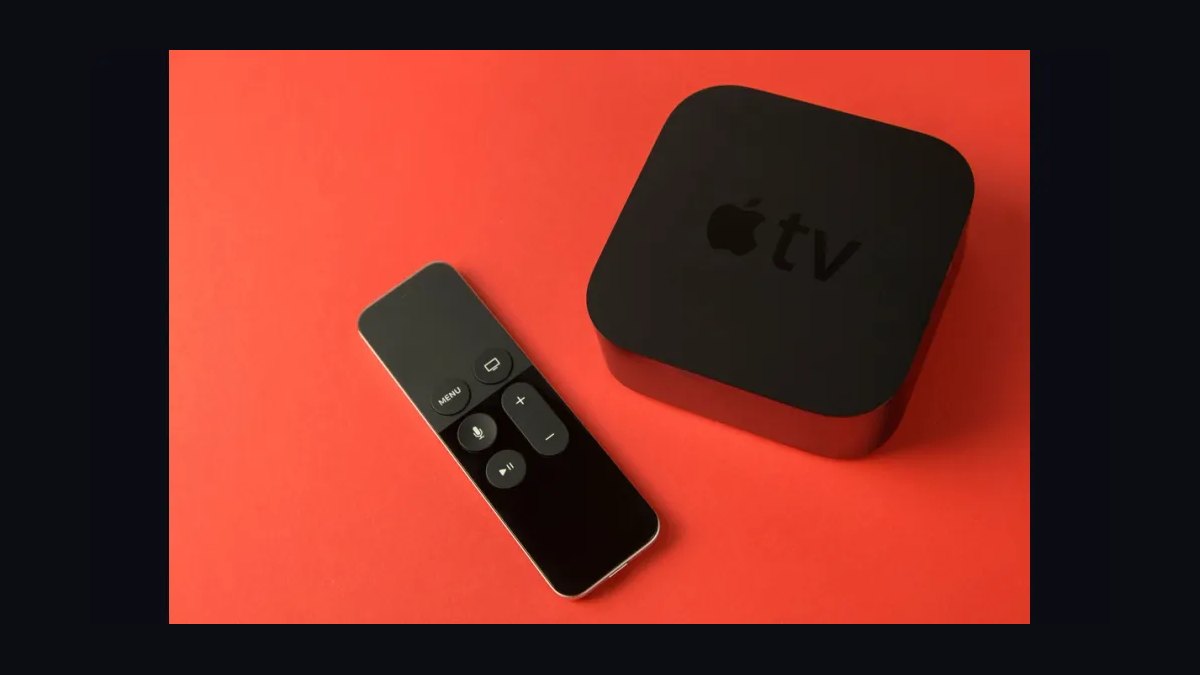
The biggest risk is platform abandonment. A TV purchased in 2027 may stop receiving major app updates by 2030-2032, meaning you could lose access to new streaming services or features. To mitigate this, consider a TV that supports HDMI-CEC and external streaming devices (like Apple TV 4K or NVIDIA Shield) so you can bypass the built-in smart platform if it becomes obsolete. Check if the manufacturer commits to at least 4-5 years of security and feature updates. Some brands, like Sony and Panasonic, are better at long-term support than others, while budget brands may only offer updates for 2-3 years.
Another consideration is user interface privacy. Google TV and webOS now offer personalized content recommendations, but this comes at the cost of privacy—these platforms collect viewing data to serve targeted ads. If you value privacy, Roku TV or a TV with a "basic mode" that disables smart features may be preferable. Some manufacturers, like Hisense and TCL, now offer a "no-ads" mode in their settings, though it's often buried in the menus.
What about audio and sound quality?

TV audio in 2027 continues to be a weak point due to ultra-thin designs. Even flagship models often have downward-firing speakers that lack bass and clarity. The industry standard is now Dolby Atmos, but built-in implementations are rarely immersive—they simulate height effects through psychoacoustic processing rather than physical upward-firing drivers. You should budget for a separate audio system: either a soundbar with a wireless subwoofer and rear speakers, or a proper AV receiver with a 5.1.2 or 7.1.4 speaker setup.
A key feature to look for is eARC (enhanced Audio Return Channel) over HDMI 2.2, which can pass uncompressed Dolby TrueHD and DTS:X from external sources to your audio system. This is essential for getting the best sound from UHD Blu-rays or lossless streaming services. Also, check for a "TV as Center Channel" feature, where the TV's internal speakers work as the center channel in a home theater setup, improving dialogue clarity without a separate center speaker. This is common on higher-end Sony and LG models and can save you the cost of a dedicated center channel speaker.
For those who prefer a minimalist setup, some 2027 TVs include built-in soundbars integrated into the TV's chassis. These can offer decent sound quality without the clutter of a separate device, but they still can't match the immersion of a dedicated system. Brands like Samsung and Sony offer "One Connect" boxes that separate the TV's processing and audio components, allowing for cleaner wall mounting.
How do I evaluate HDR performance?

High Dynamic Range (HDR) is the single biggest visual upgrade you can get, but not all HDR is equal. In 2027, the dominant formats are Dolby Vision, HDR10+, and HLG (for broadcast). Dolby Vision is the most widely supported in streaming and UHD Blu-rays, offering dynamic metadata that optimizes brightness and color scene-by-scene. HDR10+ is similar but less common, while HLG is used for live sports and news broadcasts. Some TVs now support all three formats, but many budget models only support HDR10 (the base standard) and HLG.
When evaluating a TV, look for three key HDR metrics: peak brightness (aim for 1,000+ nits for decent HDR, 2,000+ for excellent), color gamut coverage (95%+ of DCI-P3 or 80%+ of Rec.2020), and local dimming zones (the more zones, the better the contrast). A common pitfall is buying a TV that supports Dolby Vision but has poor peak brightness—it will look dim and washed out, especially in bright rooms. Always check independent reviews for real-world HDR brightness measurements, as manufacturer claims often use unrealistic test patterns.
Another important factor is tone mapping. This is how the TV handles content that exceeds its peak brightness capabilities. Good tone mapping preserves detail in bright highlights, while poor tone mapping can clip highlights or make the image look flat. Sony and Panasonic are known for excellent tone mapping, while some budget brands can struggle.
What size and viewing distance should I choose?

By 2027, 75-inch and 85-inch TVs are the new standard for living rooms, while 98-inch and 110-inch models become more affordable for home theater enthusiasts. The optimal viewing distance for 4K content is about 1.0 to 1.5 times the screen's diagonal size; for 8K, it's closer to 0.75 times. For a 75-inch 4K TV, sit about 6 to 9 feet away. For an 85-inch, 7 to 10.5 feet. These distances ensure you can see the full detail of 4K content without noticing individual pixels.
Don't overestimate your room's size. A TV that's too large for a small room can cause eye strain and make low-resolution content look blurry due to the larger pixel structure. Always measure the wall space and consider the TV's bezel thickness—some 2027 models have near-invisible bezels, while others still have noticeable borders. Also, think about weight—a 98-inch TV can weigh over 100 pounds and require a reinforced wall mount or a sturdy entertainment center.
Another consideration is the TV's height. The center of the screen should be at eye level when seated, which typically means the bottom of the TV is 30-40 inches from the floor. For large TVs, this often requires a low-profile stand or a wall mount that allows for vertical adjustment. Some 2027 models include motorized stands that can tilt and swivel, making it easier to achieve the perfect viewing angle.
Related questions
Should I buy an 8K TV in 2027?

Only if you sit very close (under 5 feet for a 75-inch) or use it as a monitor for 8K content creation. Native 8K content is still rare, and upscaling 4K to 8K is good but not transformative. 4K remains the sweet spot for most viewers.
Is OLED still worth it despite burn-in risk?
Yes, for dedicated home theaters and gaming rooms. Modern QD-OLED panels have pixel-refresh features and extended warranties covering burn-in. For mixed-use or bright rooms, Mini-LED LCD is safer.
How long should a TV last in 2027?
Expect 7-10 years of useful life before software support ends or backlight degradation occurs. MicroLED can last 15+ years. Mini-LED LCDs typically last 5-8 years before LED failure.
What is the best TV for gaming in 2027?
Look for HDMI 2.2, 4K 240Hz support, VRR (Variable Refresh Rate), ALLM (Auto Low Latency Mode), and low input lag under 10ms. QD-OLED panels excel here due to near-instant response times.
Do I need a separate streaming device?
If you want the fastest updates and best app support, yes. Apple TV 4K, NVIDIA Shield, or Roku Ultra offer better performance and longer support than most built-in smart platforms.
FAQ
Should I wait for microLED prices to drop? If you can wait until 2028-2029, microLED will become more affordable, but in 2027, it's still premium. For most buyers, QD-OLED or Mini-LED LCD offers better value today.
Can I use a 2027 TV as a computer monitor? Yes, especially if it has HDMI 2.2 and USB-C with DisplayPort. However, be aware of burn-in risk with OLED for static desktop elements. A 42-48 inch QD-OLED is ideal for a desk setup.
How important is Dolby Vision vs HDR10+? Dolby Vision is more widely supported in streaming and physical media. HDR10+ is common on Samsung TVs and some streaming services. For the broadest compatibility, choose Dolby Vision.
What is the best TV brand in 2027? Sony leads in image processing and motion handling, LG in OLED and gaming features, Samsung in brightness and Mini-LED, and TCL/Hisense offer best value. The "best" depends on your budget and use case.
Will my 2027 TV work with future game consoles? Yes, if it has HDMI 2.2 and supports VRR/ALLM. The PS6 and next Xbox will likely leverage these features. Avoid TVs with only HDMI 2.1 ports.
How do I avoid ads on my smart TV? Choose Roku TV (least ads), or use a Pi-hole network ad blocker. Disable "Smart TV Experience" or "ACR" settings in menus. Alternatively, use an external streamer and never connect the TV to the internet.
What is the best soundbar for a 2027 TV? Look for a Dolby Atmos soundbar with eARC, wireless subwoofer, and rear speakers. Brands like Sonos, Samsung, and Sony offer models that integrate well with their TV ecosystems.
Is wall-mounting necessary for large TVs? For 75-inch and above, wall-mounting is recommended for safety and optimal viewing angle. Ensure the mount supports the TV's VESA pattern and weight. For smaller sizes, a sturdy stand is fine.
How do I check a TV's input lag for gaming? Look for independent reviews that measure input lag in game mode. Under 10ms is excellent, 10-20ms is good, and over 20ms may be noticeable in competitive games.
What is the difference between local dimming zones and full-array? Full-array local dimming (FALD) uses LEDs behind the entire screen, with zones that can dim independently. More zones means better contrast. Edge-lit TVs have fewer zones and worse performance.
Sources
- RTINGS.com - TV Reviews and Ratings
- HDMI Licensing Administrator - HDMI 2.1 Specification
- Consumer Technology Association - 8K and HDR Standards
- DisplayMate - Display Technology Analysis
- Sony Electronics - TV Technology Overviews
- LG Electronics - OLED and QNED Technology
- Samsung Display - QD-OLED Technology
- Dolby Laboratories - Dolby Vision Guide
- ATSC - NextGen TV (ATSC 3.0) Information
- Wirecutter - Best TVs and Soundbars
Related on PULSE
- Top 10 Sustainable Eco-Lodges in Central America in 2027
- Top 10 All-Inclusive Resorts in Dominican Republic in 2027
- Top 10 All-Inclusive Resorts in Riviera Maya in 2027
- Top 10 Best College Towns in America in 2027
Recently Added — Related
This page will be disappearing soon. Save it to your device for $1 — or read it free while it is here.
@Kory-White- · if Venmo asks, the last 4 of my number are 2012
This page is gone.
This one is off the shelf now. $1 keeps it on your phone for good — the whole page, pictures and diagrams included.
 pulse-travelWhat is the best way to approach TVs in 2027?
 pulse-travelHow much does an LG G5 OLED cost in 2027?
 pulse-travelTop 10 best TVs options in 2027
 pulse-travelTop 10 TVs strategies for 2027
 pulse-travelHow do you get started with TVs in 2027?
 pulse-travelIs TVs worth it in 2027?
 pulse-travelWhat are the most common mistakes in TVs in 2027?
 pulse-travelTop 10 All-Inclusive Resorts in Santorini in 2027
 tvThe 10 Best Powder Ski Resorts in Japan in 2027
 tvThe 10 Best Luxury Ski Resorts in the World in 2027