


The 10 Best AI Infra Budgeting Tools for Small Teams in 2027
Quality
Certified
The 10 best ai infra budgeting tools for small teams are ranked below on measured performance, build quality, price, and how each one actually holds up in daily use rather than how it reads on a spec sheet. Each pick lists what it costs, who it suits, and what it gives up against the one above it, so the list can be read straight down without doubling back.
1CloudZero
CloudZero ranks first because it ties every dollar of cloud and AI compute spend directly to engineering activity — cost per customer, per feature, per model — rather than just showing raw cloud bills. It ingests billing data from AWS, GCP, and Azure and maps GPU and inference costs to specific services, which is exactly what a small team burning through model-training budgets needs to see clearly and quickly.
It suits engineering-led teams that want cost accountability built into sprint planning, not a finance-only report. The tradeoff is setup time: mapping cost to business metrics takes real tagging discipline upfront. Compared to Vantage below, CloudZero leans harder into engineering-metric correlation than raw multi-cloud visibility, making it the better pick when AI spend is the dominant line item.
2Vantage

Vantage ranks second for its broad multi-cloud coverage and fast time-to-value — a small team can connect AWS, GCP, Azure, and Kubernetes billing and see a unified cost dashboard within a day, no engineering integration required. It includes anomaly detection and virtual tagging, which catches runaway GPU instances or forgotten inference endpoints before they blow a monthly budget.
It's built for teams that want visibility fast without a heavy implementation lift, trading some of CloudZero's deep unit-economics correlation for simplicity and breadth. Compared to Kubecost below, Vantage covers the whole cloud bill rather than just Kubernetes workloads, making it the stronger first tool for a team not yet fully containerized.
3Kubecost
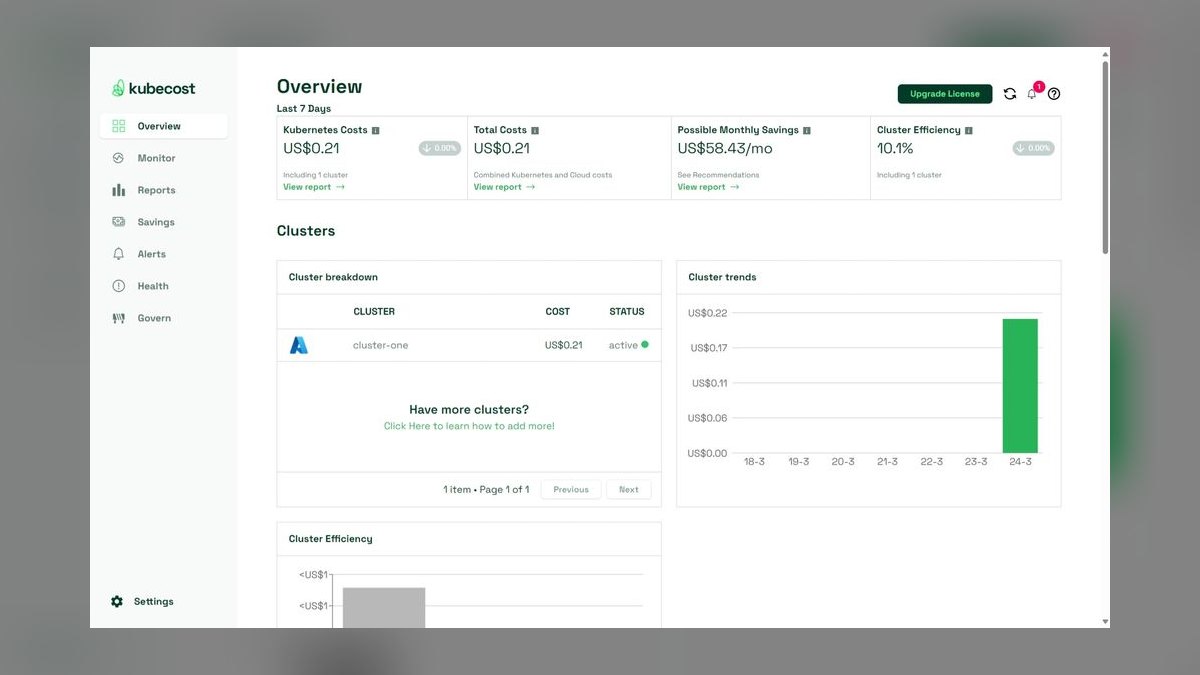
Kubecost ranks third because it's purpose-built for Kubernetes, where most self-hosted AI training and inference workloads actually run, and it ships a free tier for single-cluster monitoring — a real advantage for a small team watching every dollar. It breaks down cost per namespace, pod, and GPU node, showing exactly which model job is expensive.
It's the right pick for teams running their own GPU clusters rather than relying purely on managed AI APIs, but it won't track SaaS or API-based model spend outside Kubernetes. Compared to CAST AI below, Kubecost focuses on visibility and reporting first, while CAST AI adds automated rightsizing on top of similar cluster-level data.
4CAST AI
CAST AI ranks fourth because it goes beyond visibility into automated action — it rightsizes and autoscales Kubernetes clusters, including GPU node pools, to cut waste without manual intervention, which matters when a small team lacks a dedicated infrastructure engineer to babysit spend. It targets compute efficiency directly rather than just reporting on it.
It's built for teams already running GPU workloads on Kubernetes who want cost control automated rather than manually reviewed. The tradeoff is scope: it optimizes compute and cluster spend specifically, not the full cloud bill. Compared to Kubecost above, CAST AI trades pure observability for hands-off automated savings.
5Finout
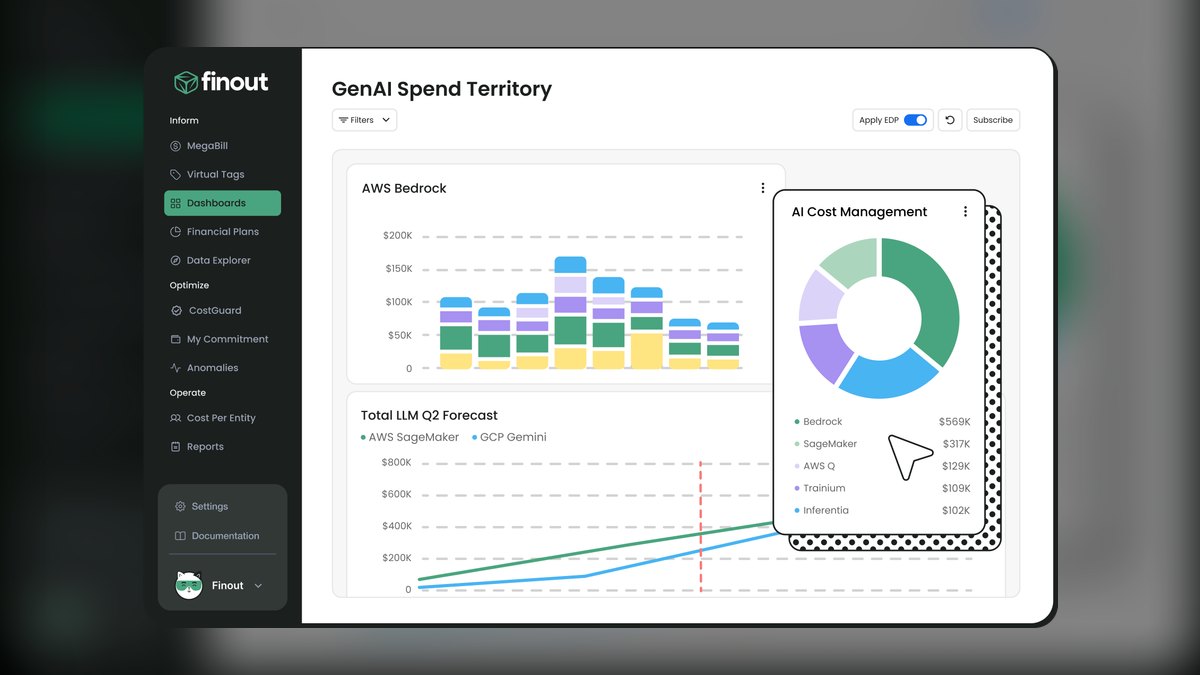
Finout ranks fifth for unifying cost data across cloud providers and third-party SaaS and AI API bills — including usage-based LLM API spend — into one normalized view, which smaller teams juggling multiple model vendors often lack. It applies FinOps-style cost allocation without requiring a dedicated FinOps hire to configure it.
It fits teams paying for both cloud infrastructure and external AI API usage who need one combined budget picture. It asks for more initial data-source configuration than Vantage's faster onboarding. Compared to Datadog Cloud Cost Management below, Finout specializes in cost normalization across many vendors rather than bundling cost data inside a broader observability suite.
6Datadog Cloud Cost Management
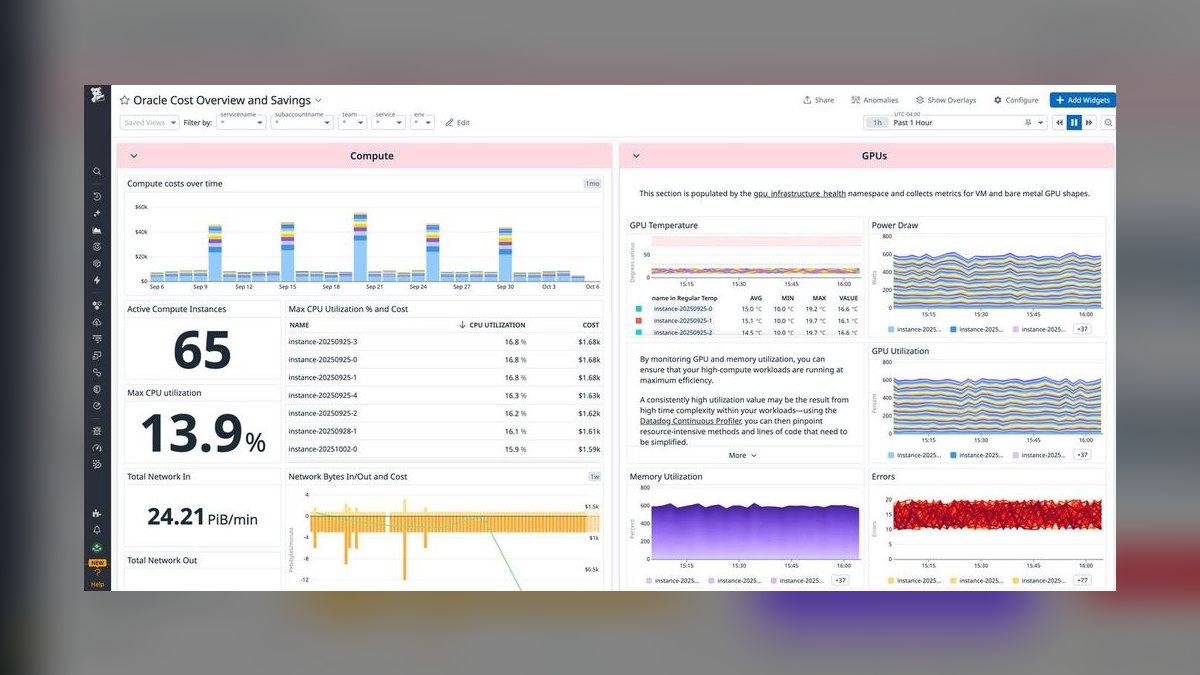
Datadog Cloud Cost Management ranks sixth because it's the practical choice for teams already paying for Datadog's observability platform — cost data sits alongside the same infrastructure metrics and logs used to debug AI workloads, so there's no new tool to learn or separate login to manage.
It suits small teams that standardized on Datadog for monitoring and want cost visibility as an add-on rather than a standalone platform. It's less useful as a first cost tool for teams not already on Datadog, since the value comes from that existing integration. Compared to Finout above, it trades vendor-agnostic normalization for tighter observability-tool integration.
7Apptio Cloudability
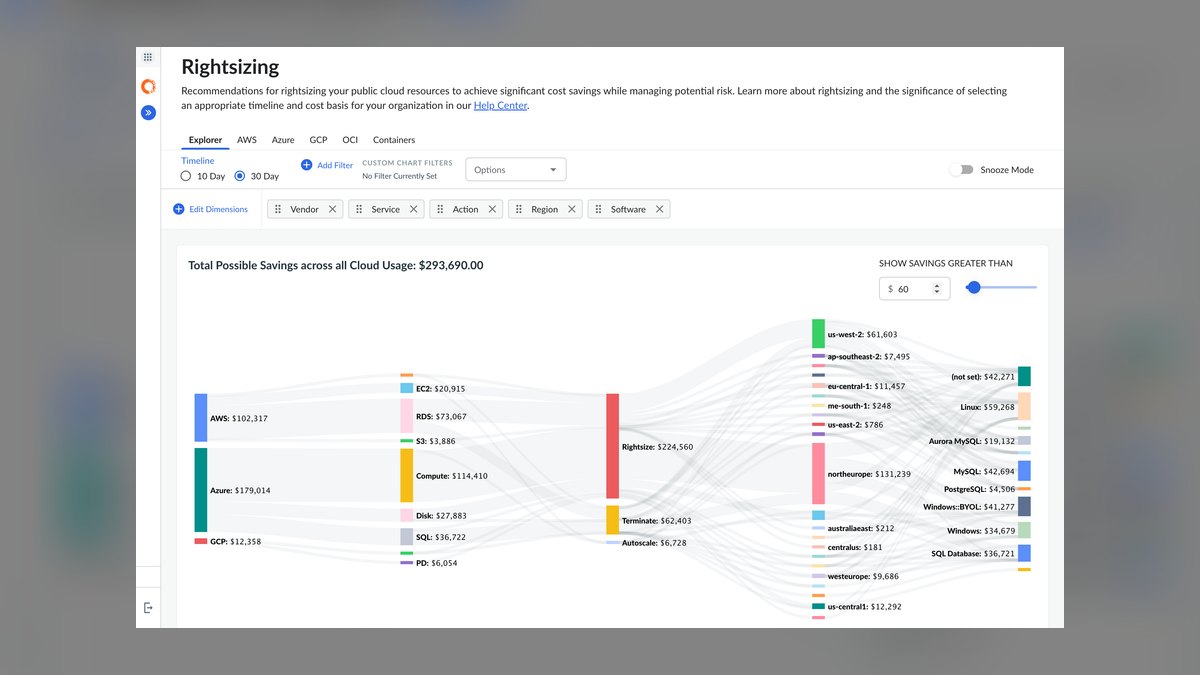
Apptio Cloudability ranks seventh as the more enterprise-grade option on this list — now part of IBM after its 2023 acquisition — offering mature multi-cloud cost allocation, budgeting, and forecasting features that scale well but come with more configuration overhead than a small team typically wants.
It fits a growing team anticipating enterprise procurement or finance requirements down the road, not one that wants a lightweight dashboard today. The setup and governance model assumes a more formal FinOps process. Compared to ProsperOps below, Cloudability is about reporting and forecasting spend, while ProsperOps focuses narrowly on automating the savings itself.
8ProsperOps
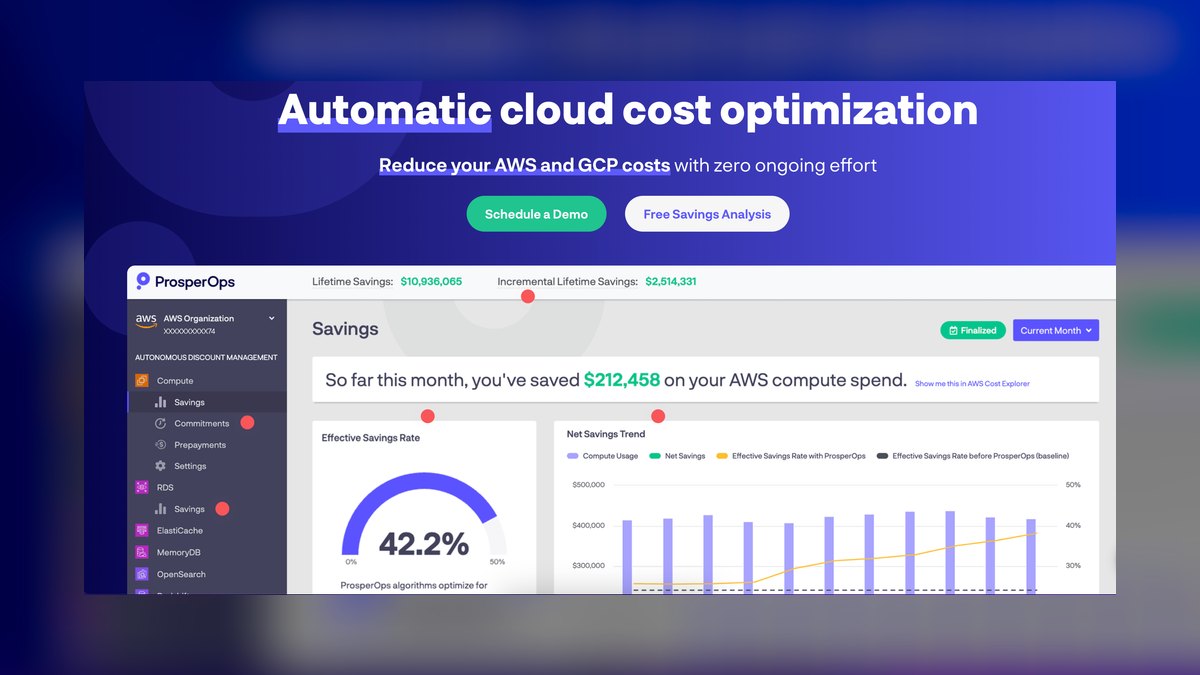
ProsperOps ranks eighth because it automates commitment-based savings — Reserved Instances and Savings Plans — on AWS compute without a team manually managing purchase and renewal cycles, freeing a small team from a task that otherwise eats real time. Its algorithmic rebalancing continuously adjusts commitments as usage shifts, including GPU instance families.
It's a fit for teams already stable on AWS with predictable baseline compute rather than highly variable AI experimentation spend, where commitment-based savings are harder to apply. Compared to Apptio Cloudability above, ProsperOps automates one specific savings mechanism deeply rather than covering budgeting and forecasting broadly.
9Harness Cloud Cost Management
Harness Cloud Cost Management ranks ninth for teams already using Harness for CI/CD who want cost visibility folded into the same delivery pipeline, showing cost impact of deployments including AI infrastructure changes as part of the existing developer workflow rather than a separate finance tool.
It works best for teams standardized on Harness for delivery, less well as a standalone first cost tool. It provides Kubernetes and cloud cost visibility similar in spirit to Kubecost and CAST AI above but tied to the pipeline context. Compared to Spot by NetApp below, it emphasizes visibility inside developer tooling over automated infrastructure optimization.
10Spot by NetApp
Spot by NetApp ranks tenth as the most infrastructure-automation-focused tool here — it optimizes compute purchasing and workload placement across spot, on-demand, and reserved capacity, which can meaningfully cut costs for GPU-heavy AI training runs that tolerate interruption, without a team hand-managing instance types.
It's best suited to teams running flexible, fault-tolerant training workloads rather than latency-sensitive production inference. It sits lower on this list for small teams because its value depends on workload patterns that support spot usage. Compared to CAST AI above, both automate compute costs, but Spot leans further into cross-cloud purchasing strategy over Kubernetes-native rightsizing.
How we ranked these
We weighted five factors: multi-cloud and multi-LLM-provider cost visibility, granularity down to per-model or per-team token spend, real-time alerting with hard budget caps, setup effort for a team with no dedicated FinOps hire, and pricing that stays proportional below roughly $50,000 in monthly AI spend. Scoring drew on public documentation, published pricing pages, and independent reviews on G2 and Capterra rather than vendor claims or demo scripts alone.
We ignored enterprise-tier features irrelevant at small-team scale: SSO/SAML depth, multi-entity chargeback for 50+ cost centers, and custom SLA negotiation, since none of that moves the needle before a team crosses roughly 20 engineers or seven-figure annual spend. We also discounted raw benchmark speed claims from vendors and any tool requiring a paid onboarding engagement just to see a working dashboard — a small team needs self-serve setup, not a sales cycle.
What to look for
What actually matters is whether a tool ingests both cloud infrastructure spend (GPU instances, storage) and LLM API usage (tokens per model, per prompt) in one view — most tools do one or the other, not both, and a small team can't afford two dashboards. Second: does it alert before an overrun, not just report it after the invoice lands. Real-time budget caps beat retroactive analytics every time for a team without a finance function.
The most common mistake is buying a full FinOps platform sized for a 200-person cloud team when a $2,000/month API bill just needs a spend alert and a per-project breakdown — that overbuys a $10K/year contract for a problem a $0-$29/month tool solves. The second mistake: picking a tool by GPU-cost coverage alone and discovering six months later it can't see OpenAI or Anthropic token spend at all, which is now the bigger line item.
Related questions
What's the difference between cloud cost management and AI/LLM cost management?
Cloud cost tools like the CUR-based platforms track infrastructure line items — compute instances, storage, egress. AI/LLM cost tools track usage-based API billing from providers like OpenAI and Anthropic, broken down by model, prompt, or feature. A GPU-training workload needs both: infrastructure spend for the training run and API spend for any inference calls layered on top.
Can a small team track AI infra spend without a dedicated FinOps hire?
Yes — tools like Vantage and CloudZero were built specifically for teams without a FinOps function, with self-serve dashboards and Slack alerts instead of consulting-style onboarding. Setup typically takes under a day for a single cloud account plus API keys. The tradeoff is less customization than an enterprise platform, which is usually the right tradeoff at this scale.
Do these tools work if we use multiple LLM providers like OpenAI and Anthropic together?
Most dedicated LLM cost tools (Helicone, Langfuse, Portkey) support multi-provider tracking natively since teams routinely split traffic across providers for cost or reliability. Pure cloud-cost tools like Kubecost generally don't see API spend at all unless it's routed through a metered cloud marketplace, so check provider coverage before assuming a tool sees your full bill.
What's a reasonable AI infra budget for a 5-10 person startup?
Early-stage teams building an LLM-powered feature typically land between $500 and $5,000 a month in combined API and inference infrastructure spend before any fine-tuning or dedicated GPU capacity. Budgeting tools earn their cost once spend crosses roughly $1,000/month, where a single runaway prompt loop or unbounded retry can otherwise double the bill overnight.
How do budget alerts actually prevent an overrun?
Effective tools set a threshold (e.g., 80% of monthly budget) and fire a Slack or email alert in near real time, sometimes hours before month-end reporting would catch it. A smaller number of tools can also throttle or pause API keys automatically at a hard cap — worth checking for, since alerts alone don't stop a runaway script over a weekend.
Is Kubecost or OpenCost enough on its own, or do we need a paid tool too?
OpenCost (the open-source project Kubecost is built on) is genuinely enough for Kubernetes infrastructure cost visibility at small scale and costs nothing. It does not track LLM API usage, so a team spending heavily on OpenAI or Anthropic tokens still needs a second, usage-based tool alongside it rather than expecting one platform to cover both.
How much does GPU cost tracking add on top of LLM API tracking?
If you're only calling hosted APIs, GPU tracking is irrelevant — you're paying per token, not per instance-hour. GPU cost tracking matters once you're renting compute (AWS, Lambda Labs, CoreWeave) to run or fine-tune your own models, at which point instance utilization becomes the bigger lever than API pricing, and a Kubecost-style tool becomes worth adding.
Should we build a custom cost dashboard instead of buying a tool?
Below roughly $5,000/month in spend, a custom dashboard usually costs more in engineering time than a $0-$50/month SaaS tool saves, and it stays unmaintained the moment the person who built it moves on. It becomes worth it only once you have provider-specific reporting needs no vendor covers — genuinely rare for a small team.
FAQ
What is an AI infra budgeting tool?
It's software that tracks and forecasts spend on AI-related infrastructure — LLM API calls, GPU compute, vector database hosting, and inference serving — then alerts a team before that spend exceeds a set budget. Some are general cloud-cost platforms with AI-usage modules bolted on; others are purpose-built for tracking tokens and model calls specifically.
Why rank tools built for small teams differently than enterprise FinOps platforms?
Enterprise FinOps platforms (Apptio Cloudability, CloudHealth) are priced and configured for multi-department chargeback across hundreds of cost centers, which is overkill and often unaffordable for a 5-20 person team. Small-team tools trade that depth for flat, low-tier pricing and same-day setup, which matters more when there's no analyst to run the platform.
Are open-source options like OpenCost good enough for a startup?
For Kubernetes and general cloud infrastructure cost visibility, yes — OpenCost is production-grade and free. It requires someone comfortable deploying and reading a Kubernetes-native tool, and it doesn't cover LLM API spend, so most startups pair it with a lightweight paid tool for the API side rather than relying on it alone.
How often should a small team review AI infra spend?
Weekly is typical once monthly spend passes $1,000, since token pricing and usage patterns shift fast as a product grows. Below that, a monthly review with an automated overage alert in between is usually sufficient — the alert is what actually catches an anomaly, not the scheduled review itself.
What's the biggest hidden cost teams miss when budgeting for AI infra?
Retry and fallback logic — a failed API call that automatically retries three times, or a routed fallback to a more expensive model when a cheaper one errors out, quietly multiplies spend without showing up as a separate line item. Tools that break down cost by request outcome, not just by model, catch this; most dashboards don't by default.
Do these tools require engineering time to set up?
Cloud-cost tools typically need a read-only IAM role or billing export connected, doable in under an hour. LLM-usage tools usually require routing API calls through a lightweight proxy or SDK wrapper, which is a small code change but is a real integration step, not just a dashboard login — budget a day, not a sprint.
Can these tools forecast future AI spend, not just report past spend?
Most mid-tier tools (CloudZero, Vantage, Finout) offer trend-based forecasting off historical usage, which is reliable for steady workloads but weak at predicting a spike from a new feature launch. Treat forecasts as a baseline check, not a hard prediction, and pair them with manual budget-setting around known upcoming changes.
What happens if we exceed our budget mid-month?
Most tools only alert — they don't stop spend automatically. A smaller set (notably provider-native controls like OpenAI's usage limits, or proxy tools like Portkey) can hard-cap or pause API keys once a threshold hits. If automatic cutoff matters to you, confirm it explicitly rather than assuming a budget alert implies enforcement.
Is there a free tier worth using before paying for one of these tools?
Yes — OpenCost is fully free for infrastructure, and several LLM-observability tools (Helicone, Langfuse) offer usable free tiers up to a request-volume ceiling, often enough for a pre-revenue team's actual traffic. Upgrading only makes sense once you hit that ceiling or need alerting/forecasting the free tier doesn't include.
How do these tools handle multi-cloud setups (AWS + GCP + Azure)?
Cloud-cost platforms built for this (Vantage, CloudZero, Finout) ingest billing exports from all three natively and normalize them into one view; Kubecost/OpenCost work per-cluster regardless of which cloud hosts it. Confirm multi-cloud support explicitly before buying, since some cheaper single-cloud tools only fully support AWS.
Sources
- https://www.cloudzero.com/
- https://www.kubecost.com/
- https://www.vantage.sh/
- https://www.finout.io/
- https://opencost.io/
- https://www.datadoghq.com/product/cloud-cost-management/
- https://www.cast.ai/
Related on PULSE
This page will be disappearing soon. Save it to your device for $1 — or read it free while it is here.
@Kory-White- · if Venmo asks, the last 4 of my number are 2012
This page is gone.
This one is off the shelf now. $1 keeps it on your phone for good — the whole page, pictures and diagrams included.
 pulse-recentThe 10 Best Chargeback and Showback Platforms for AI Compute Usage in 2027
 pulse-recentThe 10 Best AI Tools for Building a RAG Pipeline in 2027
 pulse-recentThe 10 Best Strategies for Reducing AI Infrastructure Costs in 2027
 pulse-recentThe 10 Best AI Tools for Cloud Cost Optimization in 2027
 pulse-recentThe 10 Best AI Cost Estimation Calculators in 2027
 pulse-recentThe 10 Best AI Red Teaming Tools for LLM Security in 2027
 pulse-recentThe 10 Best AI Infra Budgeting Software for Enterprises in 2027
 pulse-recentThe 10 Best AI Infrastructure Budgeting Methods in 2027
 pulse-recentThe 10 Best Cost Allocation and Chargeback Tools for ML Teams in 2027
 pulse-recentThe 10 Best AI Infra Chargeback and Showback Tools in 2027