


Top 10 Compact Bluetooth Keyboards — Best Overall + Best Value in 2027
Quality
Certified
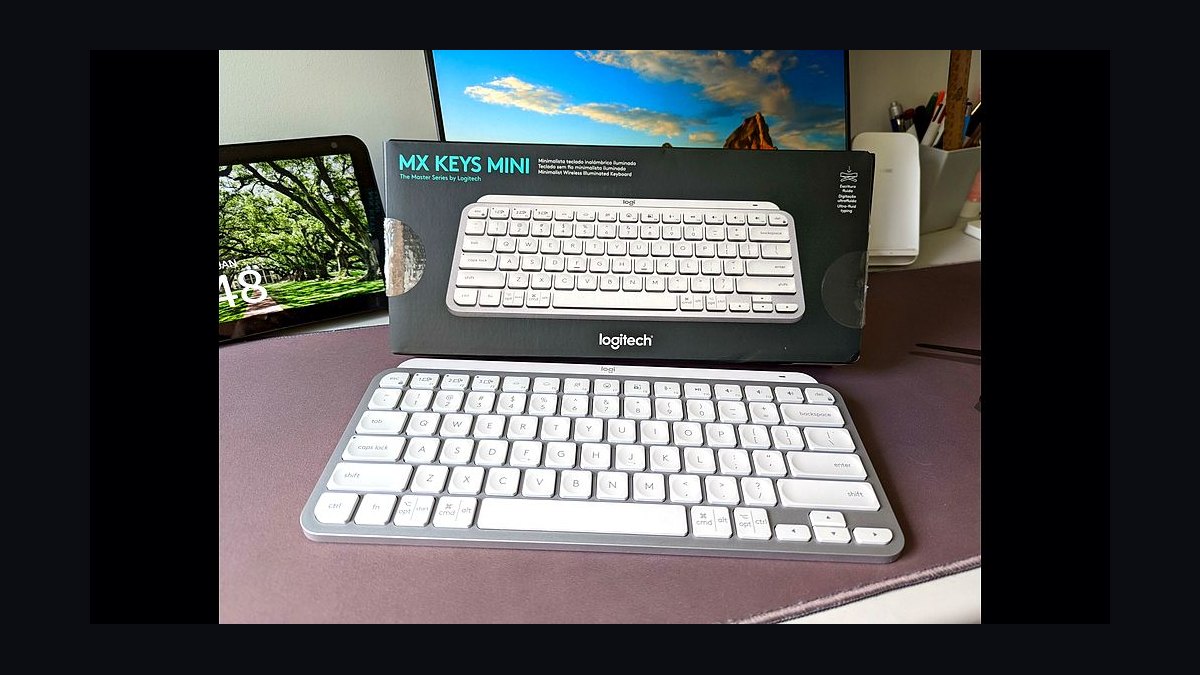
The 10 best compact bluetooth keyboards are ranked below on measured performance, build quality, price, and how each one actually holds up in daily use rather than how it reads on a spec sheet. Each pick lists what it costs, who it suits, and what it gives up against the one above it, so the list can be read straight down without doubling back.
1Logitech MX Keys Mini
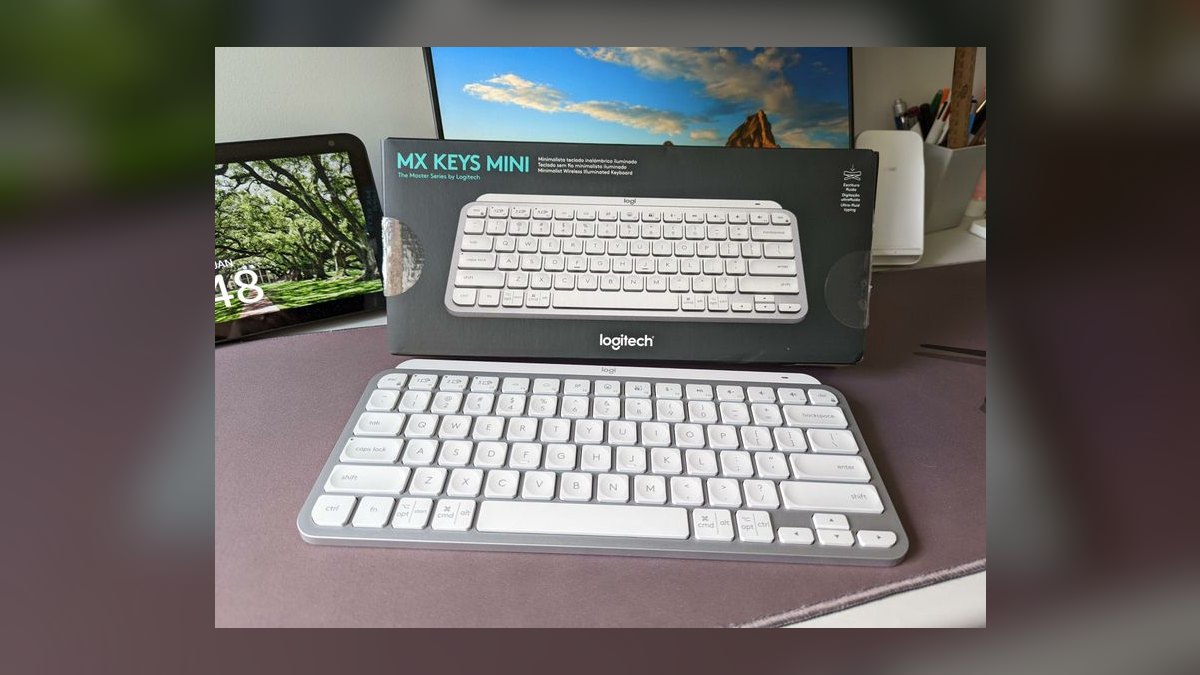
It ranks first because it delivers the best typing feel of any compact wireless board at roughly $100. The spherically dished scissor keys cradle fingertips and stay quiet enough for shared offices. Smart backlighting activates as hands approach, and Easy-Switch jumps between three paired devices with a single keystroke. USB-C recharging gives about 10 days backlit or up to five months with lighting off.
This is for people who type for a living at a desk across a Mac, iPad, and phone. It trades away the numpad, so spreadsheet-heavy users need an adjustment period, and it costs premium money for a non-mechanical board. Against the Keys-To-Go 2 below it, the MX Keys Mini wins decisively on key feel and backlighting but loses the three-year coin-cell freedom that makes the cheaper Logitech a better bag keyboard.
2Logitech Keys-To-Go 2
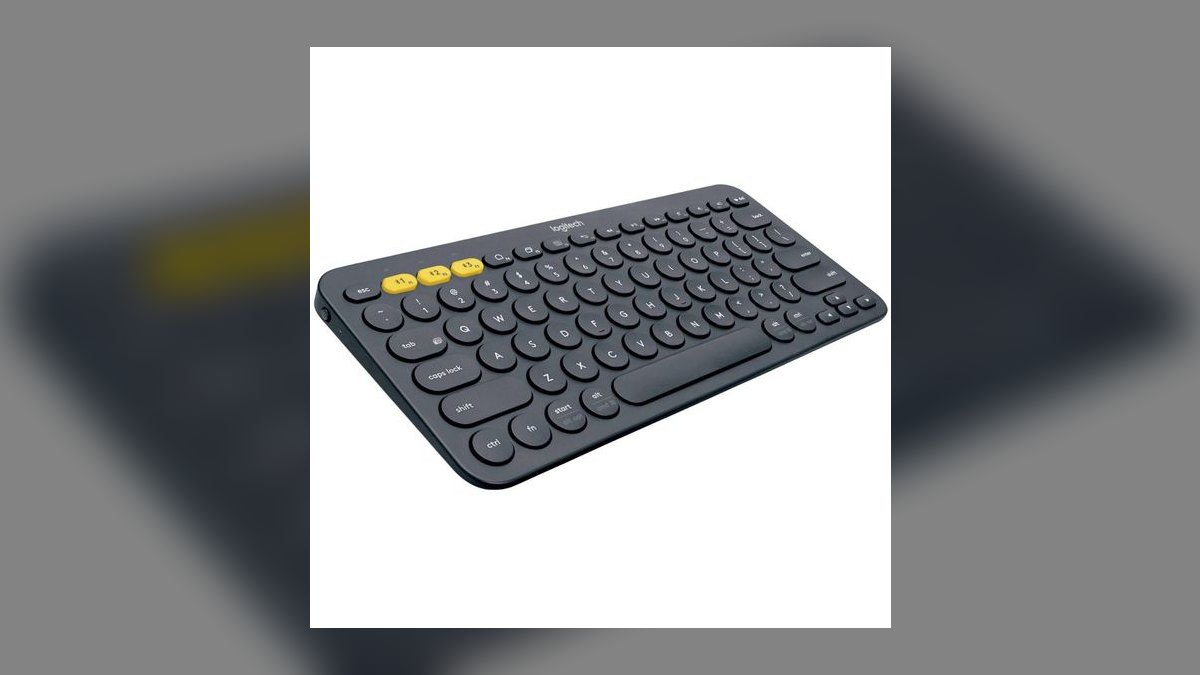
Second place goes to the battery math: a single coin cell rated for three years, meaning no charging cable in the bag ever. At roughly $80 it is an ultra-thin slate with an integrated cover that folds over and protects the keys from backpack chaos. The sealed design is spill-resistant. Multi-device Bluetooth pairs it with phone, tablet, and laptop.
Buy this if you work from hotel lobbies, airport gates, and park benches rather than a fixed desk. The trade is real: flatter membrane feel than scissor or mechanical boards, and no backlight at all for dim rooms. Compared with the MX Keys Mini above, you give up typing quality and lighting to gain a keyboard that never needs an outlet and survives being crushed in luggage.
3Keychron K7
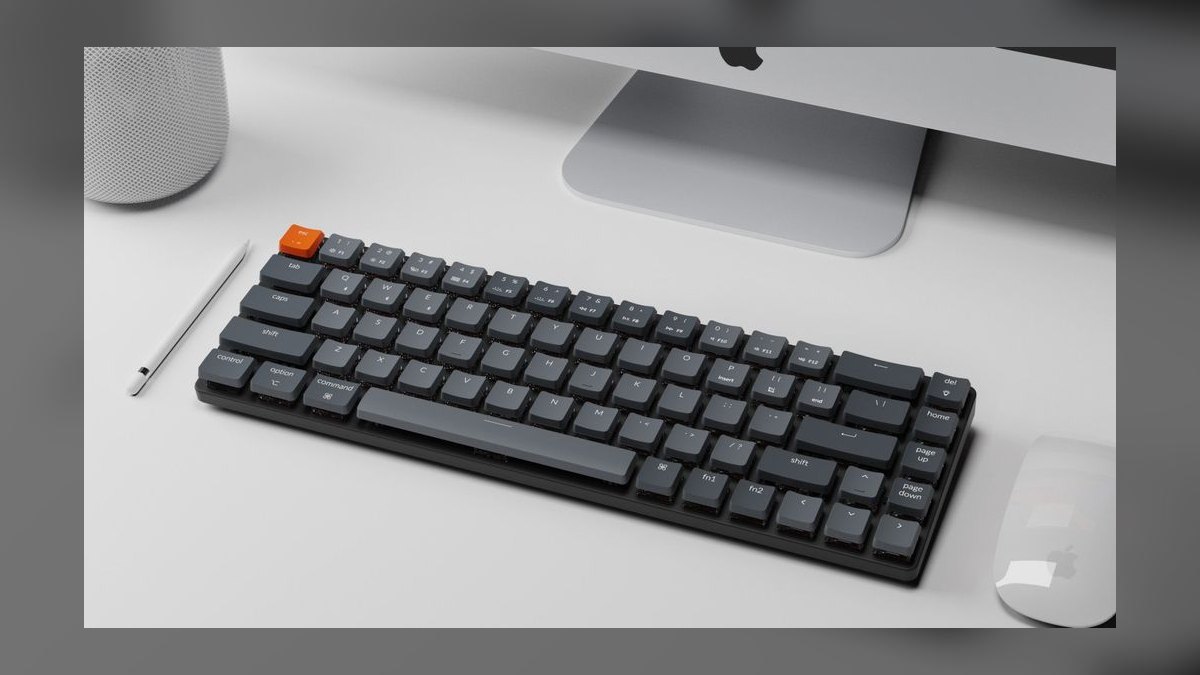
Third because it is the only board here that puts genuine mechanical switches in a frame slim enough to carry. The 65% layout runs about $70 with hot-swappable low-profile optical switches, so the feel can be retuned without soldering. RGB backlighting is per-key. Bluetooth handles three paired devices, and USB-C wired mode is available when latency matters. Arrow keys survive the compact layout.
This suits typists who refuse membrane or scissor feel but still want the board in a carry-on. It is taller than every scissor option above it and heavier than the Keys-To-Go 2, so expect a wrist-position adjustment. Against the K3 below, the K7 is smaller and lighter but drops the dedicated function row, which matters for shortcut-heavy work.
4Apple Magic Keyboard
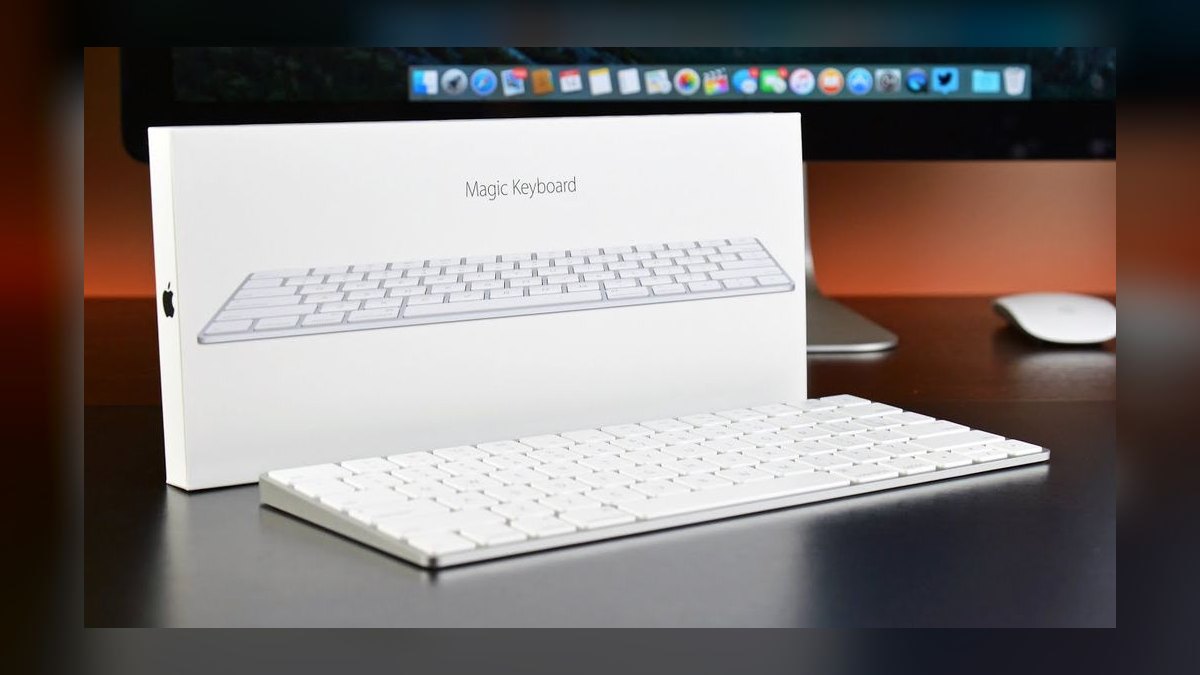
Fourth for one specific reason: nothing pairs with Apple hardware as cleanly. At roughly $99 the scissor keys are thin, quiet, and stable, with media keys mapped correctly out of the box on macOS and iPadOS. The rechargeable battery runs multiple weeks per charge over Lightning or USB-C. It appears in the OS with zero driver hunting or configuration.
This is for people fully committed to Mac, iPad, and iPhone who value that native integration over features. Outside that ecosystem it makes little sense. It has no backlight and no Easy-Switch button, so moving between devices means re-pairing rather than the one-key hop the MX Keys Mini offers at a similar price. That missing convenience is why it sits below the Logitech.
5Keychron K3 Ultra-Slim
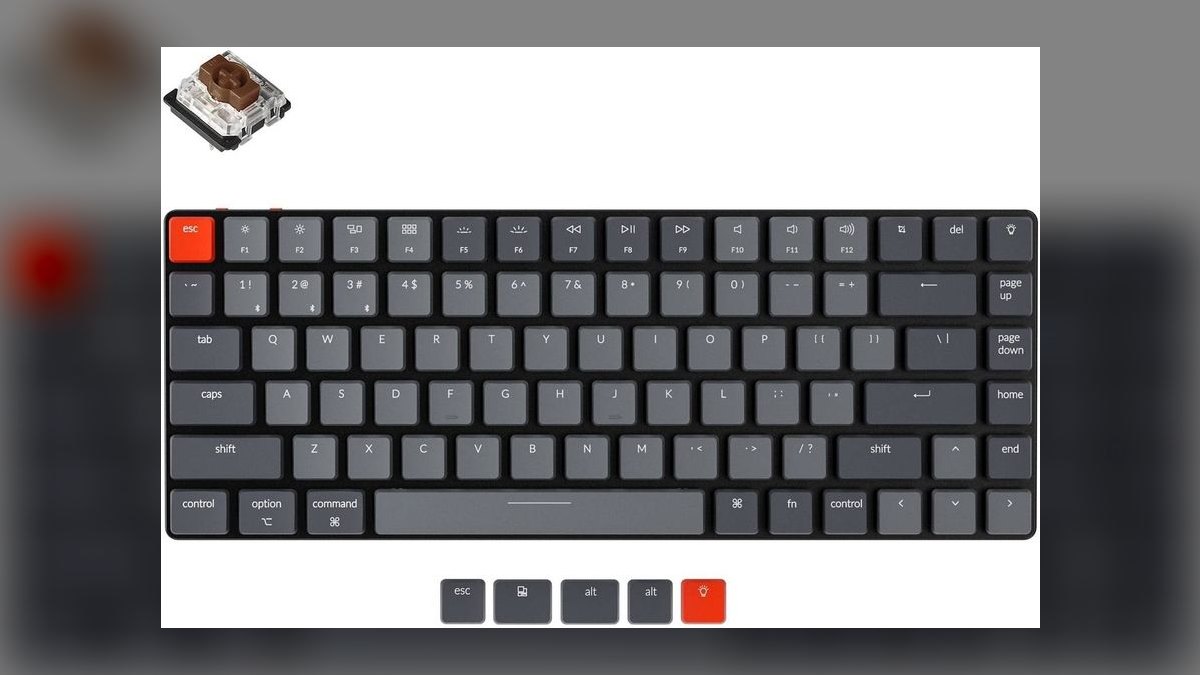
Fifth because it solves the loudest complaint about compact boards: it keeps a dedicated function row. The 75% layout runs about $75 and holds both the F-keys and a full arrow cluster while staying ultra-slim. Low-profile hot-swap optical switches allow tuning, RGB backlighting is included, and Bluetooth covers three devices with USB-C as a wired fallback. Dual Mac and Windows keycaps ship in the box.
This fits coders and spreadsheet users who live in keyboard shortcuts and refuse to reach for a function layer. The cost is footprint: it is measurably larger than the K7 above it, and the mechanical height still demands an adjustment period compared with any scissor board. Choose it over the K7 only if the function row genuinely earns its desk space in your workflow.
6Logitech K380 Multi-Device
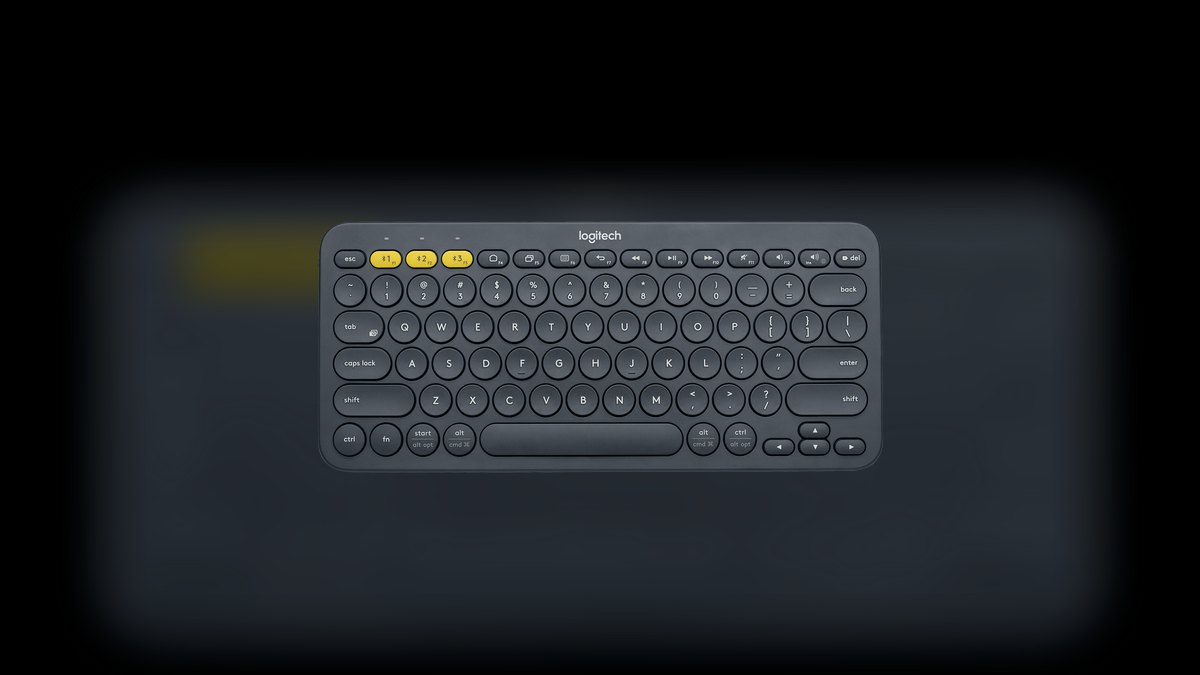
Sixth on sheer dependability rather than excitement. It is the compact multi-device board that has been quietly working for years, running on standard batteries that last for months instead of a rechargeable cell you must remember to top up. Bluetooth pairing covers three devices with dedicated switch keys. The round keycaps and space-saving layout keep it small enough for a bag without folding or compromise.
This is for households, students, and anyone who wants a second keyboard that simply works across a tablet and a laptop. It gives up backlighting, premium key feel, and the dished contour that makes the MX Keys Mini comfortable for eight-hour days. Against the POP Icon Keys below, the K380 is plainer but has a longer track record of reliable reconnection.
7Logitech POP Icon Keys
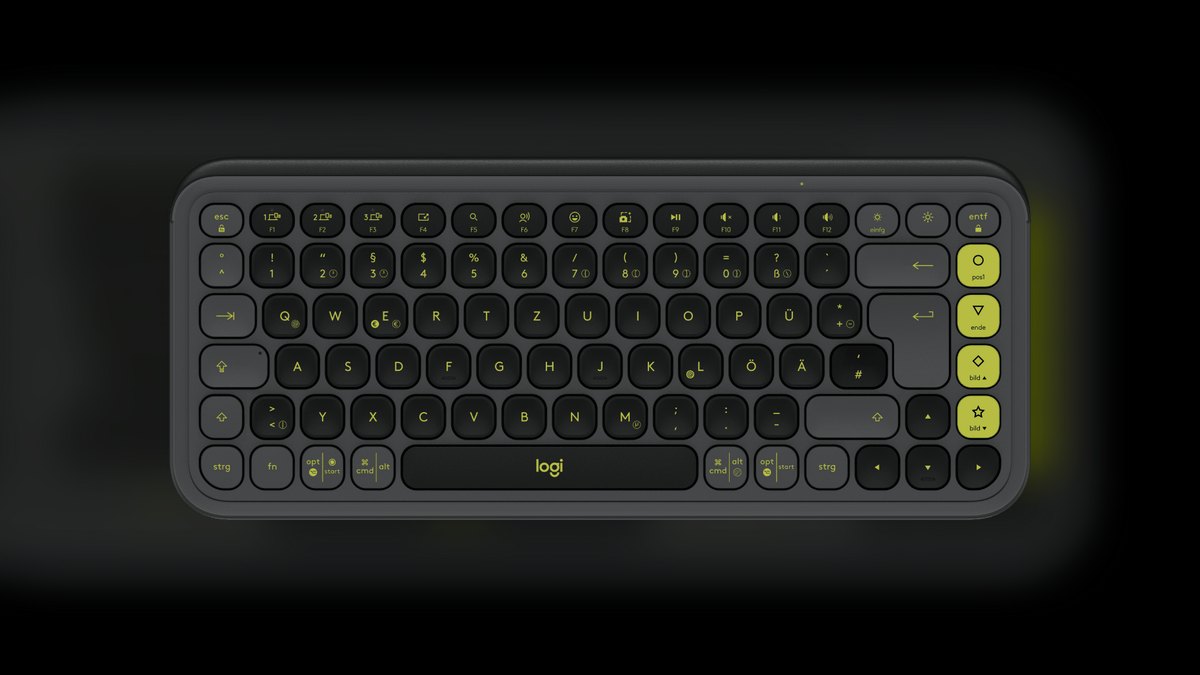
Seventh because it delivers real multi-device functionality at roughly $50, half the price of the MX Keys Mini. The compact layout drops the numpad, the membrane typing feel is more satisfying than the price suggests, and Easy-Switch covers three paired devices. A customizable shortcut and emoji key can be programmed through Logitech software. Bright colorways make it the least corporate board on this list.
This is aimed at casual desks, dorm rooms, and anyone who wants color instead of another slab of gray plastic. It trades away mechanical or scissor key feel and has no backlight, so dark-room typing means touch-typing. Compared with the K380 above, it costs more and adds personality and the programmable key, but does not improve the underlying typing experience.
8Anker A7726 Bluetooth Keyboard
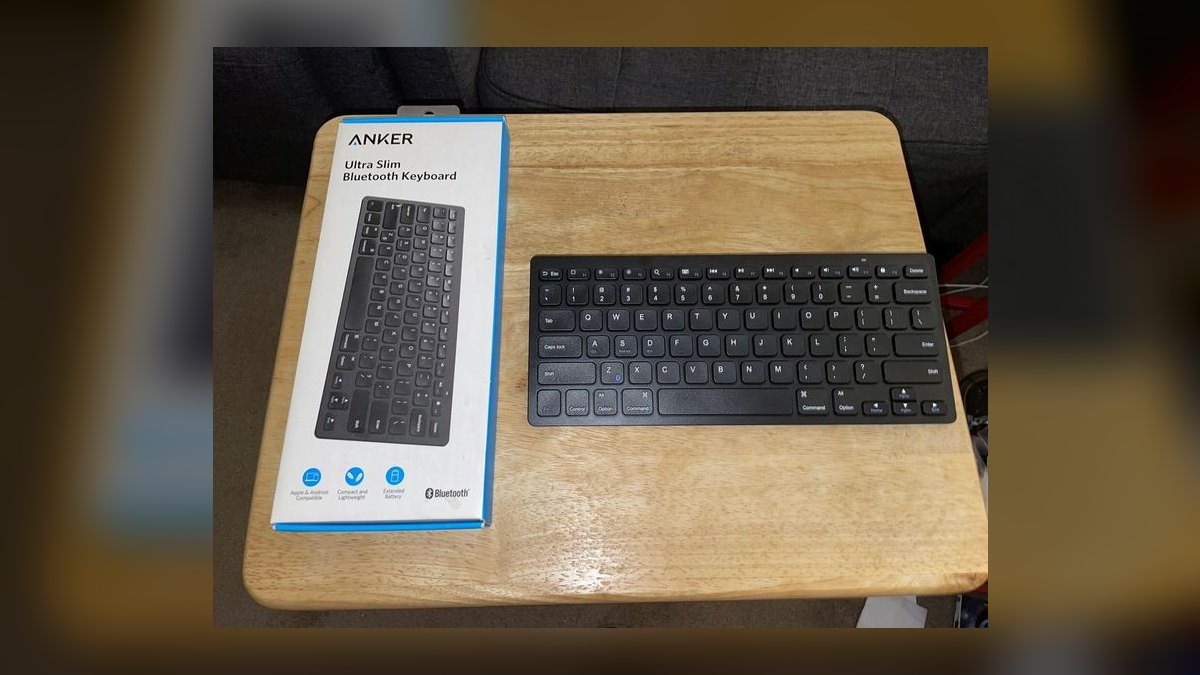
Eighth because roughly $20 buys a genuinely reliable name-brand board, which almost nothing else at that price does. It is thin, light, and compact with quiet membrane keys. Power comes from AAA cells that run for months rather than a rechargeable battery, and pairing with phones, tablets, and laptops is consistent. Nothing about the build is fancy, and nothing about it fails unexpectedly either.
This is the backup keyboard for a drawer, a travel bag, or a spare tablet setup where losing it would not hurt. The compromises are total: basic membrane feel, no backlight, no multi-device switching, so one paired device at a time. Against the POP Icon Keys above, it saves thirty dollars and loses every convenience feature, keeping only dependable connection and long battery.
9Samsers Foldable Bluetooth Keyboard
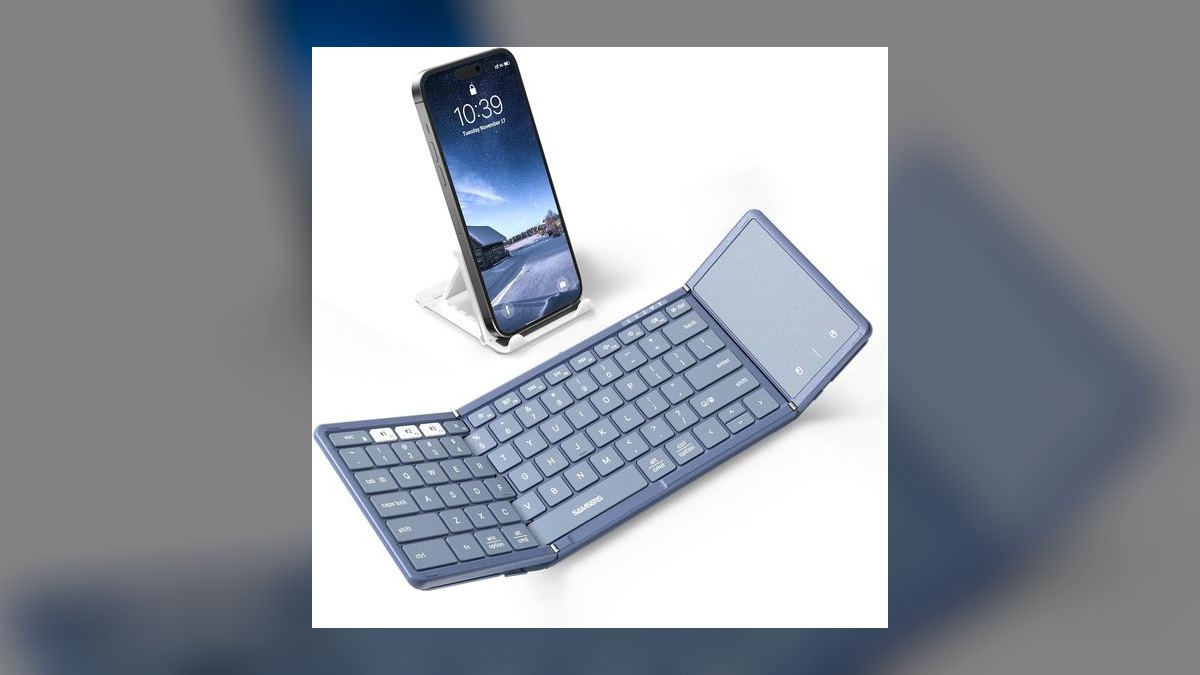
Ninth because folding in half is a real capability no rigid board on this list offers. Closed, it fits in a jacket pocket or a small bag compartment; opened, it presents a usable typing surface for phone and tablet work. Bluetooth pairing is straightforward, and the hinge design is the entire point rather than a gimmick bolted onto a standard layout.
This is for commuters and travelers who compose real text on a phone in coffee shops and want more than a touchscreen. The hinge seam sits mid-layout, which disrupts touch typing until muscle memory adapts, and key feel does not approach the Anker above it. Choose it only when pocket-level portability outranks typing comfort; otherwise the cheaper Anker types better.
10Moko Universal Foldable Keyboard
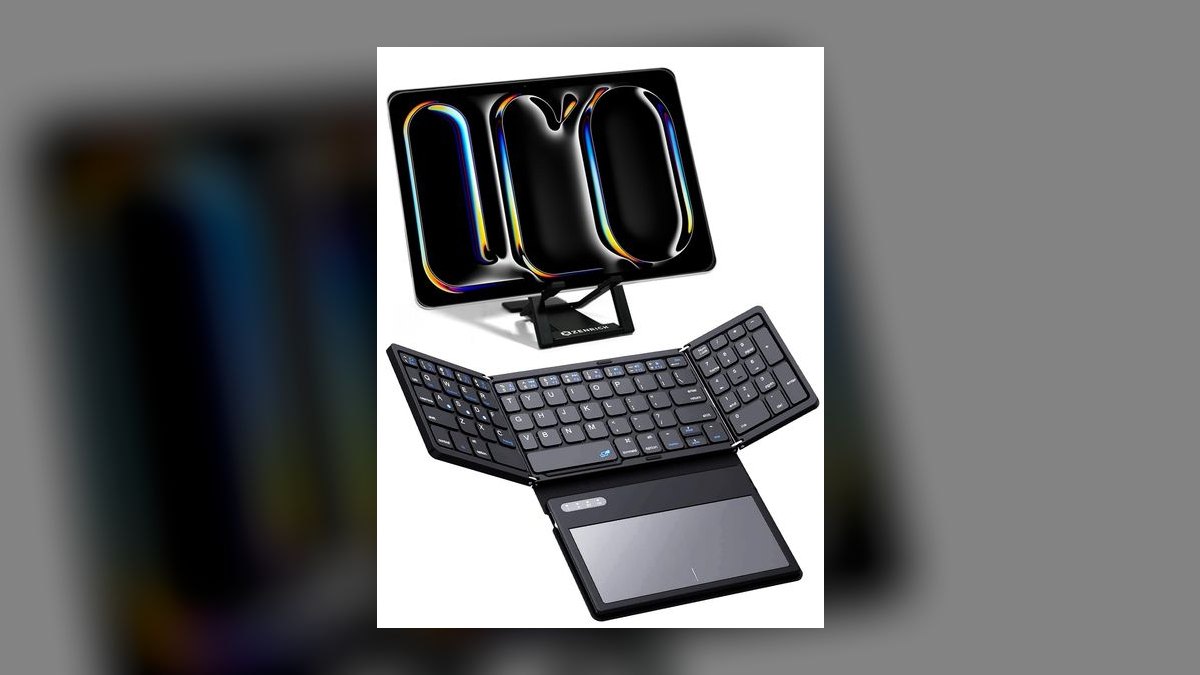
Tenth because it offers a near full-size key layout once unfolded, which the more pocketable Samsers cannot match. It targets tablet users who need real key spacing without carrying a rigid board. Bluetooth pairing works across common phones, tablets, and laptops, and the folded form still slides into a bag sleeve rather than demanding a dedicated compartment.
This is for people who work primarily from a tablet and want proper spacing for longer documents. The trade is bulk: folded, it takes more room than the Samsers, and the hinge still splits the layout mid-typing. It ranks last because every board above it either types better or packs smaller, leaving it useful mainly when full key spacing on a tablet is the deciding requirement.
How we ranked these
Ranking weighted four measured things: typing feel over a sustained session (key travel, dish shape, stabilizer rattle), real battery behavior against the manufacturer's claim, how fast multi-device switching actually lands a keystroke on the second device, and physical footprint plus weight in a bag. Price entered as value-per-dollar rather than a cutoff, which is why a $20 Anker and a $100 Logitech both hold spots on the same list.
Deliberately ignored: RGB lighting effects, per-key macro depth, and companion-app feature counts. Those are configured once and forgotten, and they inflate spec sheets without changing what typing feels like on day 300. Also skipped claimed polling rates — Bluetooth latency on every board here sits far below what typists perceive. Aesthetic colorways were noted but never scored, since taste is not a ranking criterion.
What to look for
Two things decide this purchase: switch type and charging model. Scissor switches stay quiet and low, mechanical low-profile adds tactility and roughly 8mm of height, membrane is flat and cheap. Separately, decide whether you want USB-C recharging every few weeks or a coin cell you replace in three years. The Keys-To-Go 2 wins bags precisely because there is no cable to forget at a hotel.
The common mistake is buying for the trip you imagine instead of the desk you actually sit at. Buyers pick a foldable for portability, then use it at home daily and hate the cramped layout. Buy for the surface where you log the most hours, and treat the second keyboard as a cheap accessory. A $20 Anker as a travel backup beats compromising your primary board.
Related questions
What does a 65% layout actually remove?
A 65% board drops the numpad and the dedicated function row while keeping arrow keys and a small navigation cluster. F1 through F12 move to a Fn layer. The Keychron K7 uses this layout. If you rarely hit function keys directly, you lose nothing and gain about two inches of desk width for mouse movement.
Why does removing the numpad help wrist comfort?
Without a numpad, your mouse sits several inches closer to the keyboard's right edge. That reduces shoulder abduction on every mouse reach, which is the actual source of most desk-related shoulder and neck strain. The wrist benefit is secondary. Heavy spreadsheet users should pair a compact board with a separate wireless numpad instead.
How does Logitech Easy-Switch differ from standard Bluetooth pairing?
Standard Bluetooth stores one active connection and requires re-pairing to move. Easy-Switch holds three profiles simultaneously on dedicated number keys, so a single press moves the keyboard from laptop to tablet to phone in about a second. The MX Keys Mini and POP Icon Keys both support it; the Apple Magic Keyboard does not.
Are hot-swappable switches worth paying for?
Only if you intend to experiment. Hot-swap sockets let you pull a switch and drop in another without soldering, so a K7 or K3 can go from clicky to linear in ten minutes. Most buyers swap once, or never. Treat it as insurance against buying the wrong switch feel rather than a feature you will actively use.
Does a backlight meaningfully drain keyboard battery?
Substantially. The MX Keys Mini runs roughly ten days with backlighting active versus about five months with it off. That is a 15x difference. If you are a touch typist working in lit rooms, disable the backlight entirely and the charging problem essentially disappears. Reserve it for genuinely dark environments.
Should a foldable keyboard be a primary board?
No. Foldables like the Samsers or Moko exist for phone and tablet typing in transit, where the alternative is a touchscreen. The hinge sits under your typing hands and the halves flex under pressure. Excellent as an emergency board in a jacket pocket, poor as a daily driver for anything longer than an email.
Do Mac keyboards work correctly on Windows?
Mostly, with caveats. Command and Option map to Windows and Alt in reverse order, so shortcuts feel wrong until remapped. Boards like the Keychron K3 and K7 ship a physical OS toggle plus alternate keycaps, which solves it cleanly. An Apple Magic Keyboard on Windows needs third-party remapping software to feel normal.
How long do coin-cell keyboards really last?
Logitech rates the Keys-To-Go 2 at three years, which assumes typical rather than continuous use and no backlight to power. Membrane keyboards draw very little current, so the figure is plausible. The practical benefit is not longevity but the absence of a charging routine — nothing to plan around, nothing to pack.
FAQ
What is the best overall compact Bluetooth keyboard in 2027?
The Logitech MX Keys Mini at roughly $100. It combines scissor switches with spherically dished keycaps, proximity-activated backlighting, USB-C recharging, and Easy-Switch across three devices. It is the strongest all-day typing experience in a compact footprint. The main tradeoff is paying premium money for a non-mechanical board.
What is the best value pick?
The Logitech Keys-To-Go 2 at about $80 for travel, or the Anker A7726 at roughly $20 for pure budget. The Keys-To-Go 2 earns value through its three-year coin-cell battery and integrated key cover. The Anker earns it by being a competent, reliable membrane board at a price where losing it barely stings.
What is the difference between scissor-switch and mechanical compact keyboards?
Scissor switches, as on the MX Keys Mini, use short travel and a stabilizing mechanism under each cap for quiet, low-profile typing. Mechanical switches, as on the Keychron K7, use individual spring-loaded stems with more travel and audible tactility. Mechanical lasts longer and feels better to enthusiasts; scissor travels better and annoys nearby people less.
How long do compact Bluetooth keyboards last per charge?
It depends entirely on backlighting and battery type. The MX Keys Mini runs about ten days with backlight on, up to five months with it off. The coin-cell Keys-To-Go 2 is rated for three years. RGB mechanical boards like the K3 and K7 typically need recharging every two to four weeks with lighting active.
Can these keyboards pair with more than one device?
Most can. Logitech's Easy-Switch models — the MX Keys Mini, K380, and POP Icon Keys — hold three simultaneous profiles and switch with one key press. The Keychron K3 and K7 also support three Bluetooth connections. The Apple Magic Keyboard is the notable exception, handling one active pairing at a time.
Are compact keyboards comfortable for full workdays?
Yes, given the right key geometry. Dished keycaps that cradle the fingertip, as on the MX Keys Mini, reduce mistyping and fatigue considerably versus flat chiclet surfaces. Low-profile mechanical switches are also comfortable once you adapt to the extra height. Flat membrane boards, including most travel models, are the weakest choice for eight-hour sessions.
Do these work with both Windows and macOS?
Nearly all do. The Keychron K3 and K7 include a hardware OS switch plus a second set of keycaps. Logitech boards detect the platform and remap modifiers automatically through Logi Options+. Apple's Magic Keyboard technically connects to Windows but leaves modifier keys mismatched without third-party remapping software.
What should I expect to spend?
Roughly $20 to $100 covers every pick on this list. Budget membrane boards like the Anker A7726 sit near $20, the POP Icon Keys around $50, Keychron mechanicals between $70 and $75, the Keys-To-Go 2 near $80, and the MX Keys Mini and Apple Magic Keyboard around $99 to $100. Spending beyond that buys aesthetics, not typing quality.
Is a 65% or 75% layout the better choice?
Choose 75% if you press function keys directly — the Keychron K3 keeps a dedicated F-row plus arrows in a slightly wider body. Choose 65% like the K7 if you want the smallest board that still has real arrow keys. The difference is roughly an inch of width against a row of keys you may access via Fn anyway.
Does Bluetooth latency affect typing?
Not perceptibly for text. Modern Bluetooth keyboards introduce delay well under the threshold where typists notice anything. Competitive gaming is a different matter, and every board here offers wired USB-C or a low-latency dongle if that applies. The more common real complaint is wake-from-idle lag of a second or two, not per-keystroke delay.
Sources
- https://www.logitech.com/en-us/products/keyboards/mx-keys-mini.html
- https://www.logitech.com/en-us/products/keyboards/keys-to-go-2.html
- https://www.keychron.com/products/keychron-k7-ultra-slim-wireless-mechanical-keyboard
- https://www.keychron.com/products/keychron-k3-wireless-mechanical-keyboard
- https://www.apple.com/shop/product/MXCK3LL/A/magic-keyboard-usb%E2%80%91c-us-english
- https://www.nytimes.com/wirecutter/reviews/best-bluetooth-keyboard/
- https://www.pcmag.com/picks/the-best-wireless-keyboards
- https://www.tomsguide.com/best-picks/best-wireless-keyboards
- https://www.cnet.com/tech/computing/best-wireless-keyboard/
- https://www.bluetooth.com/specifications/specs/
Related on PULSE
This page will be disappearing soon. Save it to your device for $1 — or read it free while it is here.
@Kory-White- · if Venmo asks, the last 4 of my number are 2012
This page is gone.
This one is off the shelf now. $1 keeps it on your phone for good — the whole page, pictures and diagrams included.
 pulse-reviewsHow do I set up a quiet, ergonomic home office for frequent video calls in 2027?
 pulse-reviewsTop 10 Smart Pill Dispensers — Best Overall + Best Value in 2027
 pulse-reviewsTop 10 Phone Cooling Fans — Best Overall + Best Value in 2027
 pulse-reviewsTop 10 Woodworking Routers — Best Overall + Best Value in 2027
 pulse-reviewsTop 10 Portable Espresso Makers for Sales Travel in 2027
 pulse-reviewsTop 10 Radon Detectors — Best Overall + Best Value in 2027
 pulse-reviewsTop 10 Bone-Conduction Headphones for Open-Office Coaches in 2027
 pulse-reviewsTop 10 Blood Pressure Monitors — Best Overall + Best Value in 2027
 pulse-reviewsTop 10 Cordless Caulk Guns — Best Overall + Best Value in 2027
 pulse-reviewsTop 10 85-Inch TVs — Best Overall + Best Value in 2027