


How much does a good wireless charger cost in 2027?
Quality
Certified
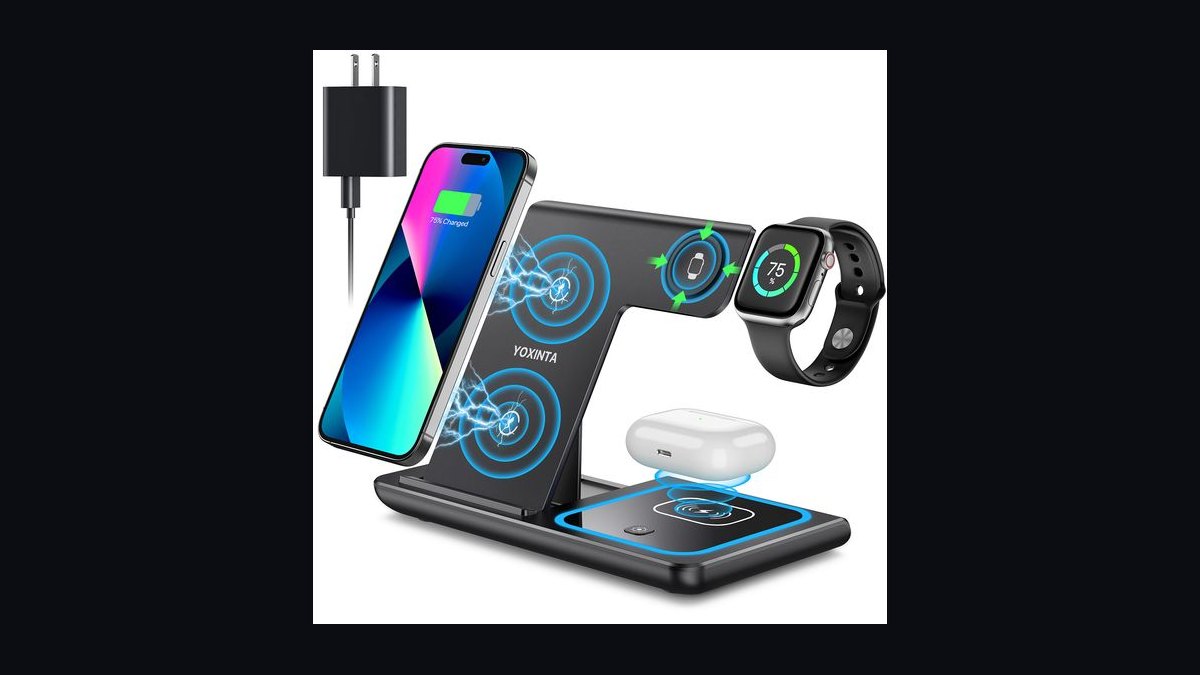
A good wireless charger costs roughly $25 to $60 in 2027 for a single-device pad or stand with proper Qi2 magnetic alignment and 15W output. Multi-device stations run $80 to $150, and travel-grade folding chargers land near $70. Under $20, you get slow, uncertified pads that undercharge and overheat.
The two paths: certified Qi2 versus commodity Qi pads
The wireless charging market splits cleanly into two buying paths, and almost every price question resolves once you know which side you're shopping on.
Path one: certified Qi2 (or Qi2 25W) hardware. Qi2, released by the Wireless Power Consortium in late 2023 and expanded with a higher-power profile in 2025, brought magnetic alignment into the open standard rather than leaving it proprietary to Apple's MagSafe. A ring of magnets in the charger snaps the phone into perfect coil alignment, which is the single biggest determinant of both speed and heat. Certified units carry the WPC Qi2 logo, and the certification is verifiable — the Consortium maintains a public product database. These chargers hold 15W on Qi2 and up to 25W on the newer profile, and because alignment is guaranteed, they hit rated speed consistently rather than only when you place the phone perfectly. Expect $25–$45 for a basic certified pad or puck, $40–$70 for a stand with a weighted base and adjustable viewing angle.
Path two: commodity Qi 1.x pads. These are the $9–$18 flat discs that dominate marketplace search results. They implement the older Qi baseline, typically negotiate at 5W or 7.5W with iPhones and 10W with some Android handsets, and have no alignment aid at all. You place the phone by feel. If the coil is off by more than about 6mm, throughput collapses and the excess power dissipates as heat. The pad still says "charging," so the failure is invisible until you notice the phone took five hours to fill overnight and the back is warm to the touch.

The honest framing is that path two isn't cheaper — it's a different product. A 5W pad charging a 4,500mAh battery from 20% is a four-to-five hour job. If your use case is a nightstand and you sleep eight hours, that's fine and $12 is a rational spend. If it's a desk where you top up between meetings, the cheap pad simply doesn't do the job, and the $30 you "saved" bought a coaster.
There's a third category worth naming because it distorts price comparisons: the bundled-brick problem. Roughly half the chargers listed under $30 ship without a power adapter. The listed price is the pad only. A 30W USB-C PD adapter capable of feeding a 15W wireless coil costs $15–$25 on its own, so a $22 pad is functionally a $40 purchase unless you already have a spare brick in the drawer. Manufacturers know this and it's the most common source of "why is my new charger slow" complaints — a 5W legacy USB-A brick physically cannot supply what a 15W coil needs, and the charger silently downshifts.
How to decide which one you actually need

Deciding is less about budget than about where the charger lives and what it charges. Work through it in this order.
Start with the device. If you carry an iPhone 12 or newer, or a recent Android flagship with a magnet ring or magnetic case, Qi2 is the correct answer and the price premium is genuinely earned. If your phone has no magnets and you won't add a magnetic case, the alignment benefit evaporates and a well-reviewed coil-array pad in the $20–$30 range is the sensible pick — some pads use three or more overlapping coils to create a wider sweet spot, which is the non-magnetic solution to the same problem.
Then the location. A nightstand tolerates slow charging and rewards a low-profile pad with a dim or defeatable LED — an underrated spec, since a bright blue status light in a dark bedroom is a real complaint. A desk wants a stand so you can see notifications and use Face ID while it charges. A car wants a vent or dash mount with active cooling, because a phone running navigation while charging in a sun-warmed cabin will thermally throttle and sometimes stop charging entirely. A kitchen counter wants something wipeable with no fabric surface.
Then the device count. One phone is a pad. Phone plus watch plus earbuds is a station, and stations are where prices climb fastest — $80 to $150 for a good one, because you're paying for three separate coil assemblies, a beefier internal power supply, and usually a proprietary watch puck.

Finally, the brick question. Before you compare any two prices, read the listing carefully for whether an adapter is included and at what wattage. Normalize every candidate to its all-in cost. A $45 charger with a 30W brick in the box beats a $32 charger that needs a $20 adapter, and the comparison isn't close.
One more decision input that people skip: case thickness. Wireless charging tolerates roughly 3–5mm of material between coil and phone. A slim silicone case is invisible to the charger. A thick rugged case with a built-in kickstand, a wallet case with three cards in it, or a PopSocket-style grip mounted over the coil will degrade or block charging entirely. Metal plates from old magnetic car mounts are the worst offender — they can heat dangerously. If you run a heavy case, budget for a charger with stronger magnets (the N52-grade magnet arrays in premium units hold through thicker cases) or accept that you'll pull the case off nightly.
What the money actually buys at each price tier
Here is the tier structure as it stands in 2027, with what changes as you move up.
Under $15 — avoid unless the use case is trivial. Single coil, 5W real-world output regardless of what the box claims, no certification, thin plastic housing, and a captive cable that will be the first thing to fail. Foreign-object detection — the safety feature that stops the coil from cooking a coin or a key left on the pad — is either absent or poorly implemented at this price. The only defensible purchase here is a spare for a guest room where nobody's in a hurry.

$15–$25 — functional baseline. Multi-coil arrays start appearing, 10W output is realistic for Android, 7.5W for iPhone. Basic FOD is present. Housings are still plastic, LEDs are usually bright and non-defeatable, and adapters are rarely included. This is the honest floor for a device you'll use daily without irritation.
$25–$45 — the value band, and where most people should land. Genuine Qi2 certification, magnetic alignment, 15W sustained, decent thermal design with either a metal heatsink plate or a graphite sheet, silicone or nylon-braided cable, and a housing that doesn't slide around. Many include a compatible PD adapter at the top of this range. A charger here will hold its rated speed rather than throttling after ten minutes, which is the practical difference you feel.
$45–$80 — stands, better materials, and Qi2 25W. Aluminum bodies, weighted bases that let you pull the phone off one-handed, adjustable hinges, and the higher-power Qi2 profile that pushes 25W to compatible phones. Some units in this band add a small quiet fan, which sounds fussy until you've watched a phone charge in a warm room and seen the difference — active cooling can cut a full charge cycle meaningfully because the phone stops thermally throttling. Two-device pads (phone plus earbuds) start here.

$80–$150 — multi-device stations. Three coils, a native watch charger rather than a bolted-on adapter, a 45W+ internal supply, and usually a pass-through USB-C port for a fourth device. The build quality gap is real — these are the ones that survive being knocked off a nightstand. Foldable travel versions with a hard case sit around $70–$110 and are worth it if you actually travel monthly; if you travel twice a year, they aren't.
Above $150 — furniture and specialty. Desk mats with embedded coils, lamps with integrated charging bases, in-furniture retrofit kits. You're buying industrial design and the absence of a visible gadget, not charging performance. Nothing above $150 charges meaningfully faster than a good $50 unit.
Worth stating plainly: wireless charging is inherently less efficient than a cable, losing roughly 20–40% of input energy to heat depending on alignment quality. No amount of money eliminates that. A $10 USB-C cable into a $20 brick will always be faster and cooler than any wireless charger at any price. You're buying convenience, and the tiers above describe how reliably you get it.
Adjacent spend that people forget. If you're building out a desk, the charger is one line item in a small cluster: a magnetic case if your phone lacks native magnets ($15–$40), a longer USB-C cable if the included 3-footer doesn't reach ($8–$15), and a surge-protected outlet strip if the desk shares a circuit with anything with a motor. And if the goal is a genuinely clean desk, compare the charger against the alternative — a good multi-port GaN brick with three cables runs $50–$70, charges everything faster, and looks worse. That's the real trade.
Buying, testing, and rolling it out
Treat a charger purchase like any small procurement: buy one, verify it, then standardize.
Verify certification before you buy. The WPC publishes a searchable registry of Qi and Qi2 certified products. If a listing claims Qi2 and the model number isn't in the registry, the claim is marketing. This is a thirty-second check that filters out a large share of bad purchases.
Test the first unit properly. Charge from a known state — say 20% — and time it to 80%, which is where most phones slow their charge curve anyway. A good Qi2 unit with a 30W brick should get a modern phone from 20% to 80% in roughly 90 minutes to two hours. If you're seeing three-plus hours, something in the chain is underpowered: usually the adapter, sometimes the cable, occasionally the pad throttling from heat. Feel the back of the phone at the 30-minute mark. Warm is normal. Hot enough that you don't want to hold it means the coils are misaligned or the thermal design is bad, and both shorten battery lifespan over time.
Check the cable-and-brick chain specifically. A USB-C cable rated only for 60W data-plus-power is fine; a charge-only cable from a cheap accessory bundle may not negotiate PD correctly. If a charger underperforms, swap the cable first — it's the cheapest variable to eliminate.

Then standardize. If you're outfitting more than a couple of spots — a home with three bedrooms and a desk, or a small office kitting out a team — buying one model in quantity beats buying whatever's on sale each time. Same charging behavior everywhere, one spare in a drawer, and no debugging why the one in the conference room is slow. At team scale the math gets simple: ten $35 pads plus bricks is roughly $500, and the alternative is ten people each buying something different and three of them complaining.
Sequencing for a multi-room rollout. Do the desk first, because it's where slow charging is most annoying and where the upgrade is most noticeable. Nightstands second — they tolerate the older pads you're replacing, so cascade the cheap ones there rather than throwing them out. Car third, and buy the car one last because car mounts are the most use-case-specific purchase and you'll have learned what magnet strength you need. Kitchen and entryway last, if at all.
Keep the receipt and use the return window. Charging performance is genuinely hard to evaluate from specs, and the return window is your real testing instrument. Most defects that matter — throttling under sustained load, magnets too weak for your case, a fan that whines — show up within a week.
Watch the failure modes over time. Wireless chargers degrade in predictable ways: the adhesive on silicone surfaces loses grip and phones slide off, captive cables fail at the strain relief, and fans in active-cooled units pick up dust and get loud. A good unit lasts three to five years. If yours is sliding, gritty, or noisy at year two, it was a cheap unit and replacing it costs less than the aggravation.
Related questions

Does a more expensive charger charge faster?
Only up to about $50. Above that, you're paying for materials, multi-device capacity, and design. Speed is capped by the phone's own acceptance rate and the Qi2 profile, so a certified $40 unit and a $140 station charge a single phone at the same rate.
Do I need the manufacturer's own charger?
No. Any Qi2-certified charger delivers the standard's full rated speed. First-party chargers charge a brand premium for design and guaranteed compatibility. The one exception is smartwatches, where several brands use proprietary coils that third parties can't legally replicate.
Is wireless charging bad for battery health?
The heat is the concern, not the wireless part. Sustained high temperatures accelerate battery aging. A well-aligned Qi2 charger runs cool enough that the effect is minor; a misaligned cheap pad that keeps the phone warm all night is measurably worse than a cable.
Why does my charger say 15W but charge slowly?
Almost always the power adapter. A 15W coil needs roughly 20–30W of input to account for conversion loss. A legacy 5W or 12W brick can't supply it, so the charger silently drops to a lower profile without reporting an error.
Are car wireless chargers worth the extra cost?

If you use navigation on longer drives, yes — a $35–$60 magnetic vent mount with active cooling solves both mounting and charging. Without cooling, a phone running maps in a warm car will throttle and may stop charging entirely, which defeats the purpose.
FAQ
What is the minimum I should spend on a wireless charger in 2027?
About $25 if you want it to work well. That buys Qi2 certification, magnetic alignment, and genuine 15W output. Below $20 you're buying a 5W pad with no alignment aid, which will take four to five hours to fill a phone and will run warm doing it. The cheap pad is only defensible for a guest room or a spare nobody depends on.
Does the price include a power adapter?
Often not, and this is the most common hidden cost. Many chargers under $30 ship with a cable but no brick. A 30W USB-C PD adapter runs $15–$25 separately, so always normalize to the all-in price before comparing two products. Using an old 5W adapter will cap the charger at a fraction of its rated output.
What is the real difference between Qi and Qi2?

Qi2 adds a magnetic alignment ring to the open standard, which guarantees the phone's coil lands on the charger's coil. Alignment drives both speed and heat, so Qi2 units hit rated output consistently while older Qi pads only do when placed perfectly. Qi2 also standardizes 15W, with a newer 25W profile on compatible phones.
How much should a multi-device station cost?
$80 to $150 for a good one. That covers three separate coil assemblies, a power supply large enough to run them simultaneously, and a native watch charger rather than an adapter. Below $60, multi-device stations typically share power across coils, so charging a watch slows the phone noticeably.
Will a thick phone case stop wireless charging?
Cases up to roughly 3–5mm are generally fine. Thicker rugged cases, wallet cases with several cards behind the coil, or anything with a metal plate will degrade or block charging. Metal is the hard stop — a magnetic mount plate left on the back of the phone can heat up and should be removed before wireless charging.
Is it worth replacing a working older Qi pad?
If it's a 5W pad on a desk, yes — the upgrade to a $30 Qi2 unit is noticeable daily. If it's on a nightstand where the phone sits for eight hours, no. Slow overnight charging is arguably gentler on the battery, and the money is better spent elsewhere.
Sources
- https://www.wirelesspowerconsortium.com/qi2/
- https://www.wirelesspowerconsortium.com/products/
- https://support.apple.com/en-us/HT213086
- https://www.usb.org/usb-charger-pd
- https://www.rtings.com/
- https://www.consumerreports.org/electronics/phone-accessories/
- https://www.energystar.gov/products/other/chargers
- https://www.fcc.gov/consumers/guides/wireless-devices-and-health-concerns
Related on PULSE
- How much does a good USB-C fast charger cost in 2027?
- What is Qi2 and how is it different from MagSafe?
- How much should you spend on a phone case?
- Do power banks lose capacity over time?
- What does a good desk setup cost end to end?
This page will be disappearing soon. Save it to your device for $1 — or read it free while it is here.
@Kory-White- · if Venmo asks, the last 4 of my number are 2012
This page is gone.
This one is off the shelf now. $1 keeps it on your phone for good — the whole page, pictures and diagrams included.
 pulse-reviewsTop 10 Baby Bottle Warmers — Best Overall + Best Value in 2027
 pulse-reviewsTop 10 Circular Saws — Best Overall + Best Value in 2027
 pulse-reviewsThe 10 Best Hedge Trimmers in 2027
 pulse-reviewsTop 10 USB-C Hubs for Sales Travel in 2027
 pulse-reviewsTop 10 Cordless Caulk Guns — Best Overall + Best Value in 2027
 pulse-reviewsTop 10 Cordless Ratchets — Best Overall + Best Value in 2027
 pulse-reviewsTop 10 Cyclone Dust Separators — Best Overall + Best Value in 2027
 pulse-reviewsTop 10 Ergonomic Office Chairs $400-$1500 in 2027
 pulse-reviewsTop 10 Smart Pill Dispensers — Best Overall + Best Value in 2027
 pulse-reviewsTop 10 Selfie Sticks with Remote — Best Overall + Best Value in 2027