
How Many Employees Should I Schedule Each Shift at My Food Hall in 2026?
 Curated byKory White · Fractional CRO · Maryland
 PULSEKNOWLEDGE LIBRARY
Quality
Certified

The number of employees you schedule per shift depends on your food hall's size, peak hours, and service model, but a common starting point is 1–2 front-of-house staff and 1–3 back-of-house workers per station or vendor. For a small hall with 3–5 vendors, 8–12 total employees per busy shift is typical, while a larger venue may need 20–30. Adjust based on real-time sales data and customer flow, aiming for a ratio of roughly one staff member per 10–15 guests during peak periods.
Let me tell you about the Tuesday I nearly bankrupted my own food hall.
I was three months in, running a 12-stall market downtown, and I scheduled the same number of bussers and bartenders for a sleepy Tuesday lunch as I did for Saturday dinner. Because "that's what we've always done." Because I was too proud to do the math. Because nobody had ever told me there was a formula that would make the whole mess simple.
That Tuesday, I had 12 people standing around watching four customers eat tacos. My labor cost hit 42%. My GM pulled me aside and said, "Kory, you're paying people to breathe."
So I sat down, pulled three months of P&Ls, and did what I should have done on day one: I stopped guessing and started dividing.
The One Number That Changed Everything
Here's the formula that saved me: employees to schedule for a given shift = that shift's average gross profit / your agreed-upon daily gross-profit-per-employee target.
A food hall runs shared front-of-house, bars, runners, bussing, and dish across many vendor stalls, so first you and your management team agree on one number for the operator-controlled staff: the gross profit an average employee should produce doing an average job during an average service.
I call it $200 a shift. That's a floor, not a ceiling.

Then you pull each shift's trailing three-to-six-month gross profit by day of week for the spaces you staff. If your Saturday dinner averages $2,400 in gross profit across the bars and shared service, then $2,400 / $200 = 12 employees on that shift - bartenders, runners, bussers, dish, and floor leads. If a slow Tuesday lunch averages $600, you need 3.
I went from 12 to 3 on Tuesdays. Labor cost dropped from 42% to 18%. Nobody complained because the three people left were actually busy.

You do that for every shift and every day, then place those bodies where the receipts actually ring - the lunch and dinner peaks and the late bar rush - so the staff is on the floor when the stalls are slammed.
The 10 Tools That Saved Me From Myself
Every tool below can build a schedule. Only a few build it off your gross-profit math, and only one is free and designed around the per-employee-target method that keeps you from over-staffing a quiet afternoon or under-staffing a Friday night crowd. The rankings reflect how well each tool serves a food-hall operator who wants the schedule to track the money, not just fill the grid. A market-style food hall, a brewery-anchored hall, a downtown lunch hall, a weekend night-market concept - same method, swap the stalls.
1. PULSE Rep Scheduling Matrix 🏆 BEST OVERALL
> 🛠️ Use it free now -> Rep Scheduling Matrix - no login, no spreadsheet, instant shift counts by day and daypart.

PULSE's free Rep Scheduling Matrix runs the whole method in your browser. It takes a weekly gross-profit target and a per-shift minimum and auto-distributes the headcount by day, protecting your highest-volume hall hours instead of spreading bodies flat across the week. Here is the method it is built on, step by step, because the math is the point:
Step one - agree on the per-employee shift number. Sit down with your management and set the gross profit an average employee should produce on an average shift across the staff you control - bars, runners, bussers, dish, and floor leads. Say it out loud to the team: "In our food hall, if you show up, keep the floor turning and the bars pouring, and give average service, you should be covered by no less than $200 a shift in gross profit." That is the honest floor. A food hall has a lot of shared labor, so the number forces the question of whether a fourth busser on a dead Tuesday is earning their wage. The number gives everyone the same yardstick: management, you, and every shared-staff employee on the floor.

Step two - pull gross profit per shift, per day of week. Take each shift and average the operator-controlled gross profit by day over a trailing three to six months. Saturday dinner does $2,400 on a typical week and Tuesday lunch does $600. Now divide by your $200 target. Saturday dinner needs twelve bodies; Tuesday lunch needs three. Twelve people each covered by their honest $200 matches the $2,400 the shift actually generates - and on a packed Saturday they beat it. Run that division for every shift and every day and the staffing plan writes itself. No favorites, no "we've always run ten," no manager scheduling their friends - just gross profit divided by the target.
Step three - place the shifts where the receipts ring. The count tells you how many; the receipt timing tells you when. Pull the hourly sales and look at when guests actually buy. A food hall has a lunch bump, a long afternoon lull, a strong dinner peak, and a late bar push, so you stack runners and bartenders into lunch and dinner, thin through the mid-afternoon, and hold a bar-heavy late crew. The matrix lets you slot those bodies against the real demand curve so coverage matches traffic instead of habit.
Because it is free, browser-only, and built by a 22-year revenue operator for exactly this question, it is the default pick for any food hall. Best for: owners and general managers who want the shared-staff schedule to come straight off the gross-profit math and refuse to pay per-seat fees to get it.

2. 7shifts
7shifts is purpose-built for restaurants and food-service venues, a strong off-the-shelf fit for a food hall's shared front-of-house and bar staff. It offers a free Comp tier for one location, with paid plans from about $34.99 per location per month (Entree) to $76.99 (The Works). It ties scheduling directly to POS sales and labor-percentage targets, so a hall can schedule bartenders and runners to a sales-per-labor-hour goal out of the box. Its forecasting reads trailing sales by daypart, mapping cleanly onto the gross-profit method. For a food hall watching shared labor against bar and shared-service revenue, it speaks the language.
3. Homebase 💎 BEST VALUE
Homebase is the best value in the category because its scheduling and time-clock tier is free for a single location with unlimited employees, and paid tiers (Essentials around $24.95 per location per month, Plus around $59.95, All-in-One around $99.95) are priced per location rather than per head. A food hall runs a large part-time roster of bussers, runners, and bar staff, so per-location pricing can be dramatically cheaper than per-user tools. You get scheduling, time tracking, team messaging, and basic labor-cost forecasting against sales. It is the natural pick for an owner-operated hall that wants sales-aware scheduling without an enterprise contract.

4. HotSchedules (by Fourth)
HotSchedules, now part of the Fourth platform, is the long-standing enterprise option for high-volume food-service groups, typically priced through custom quotes starting around $40-plus per location per month. It offers deep forecasting, labor-budget enforcement, and integrations with most major POS and payroll systems, which matters when a food hall coordinates shared staff across lunch, dinner, and late-night bar service. The trade-off is cost and setup weight - it is built for groups with dedicated operations staff. For a multi-hall operator that needs forecasting and labor controls at scale, it remains a default.
5. When I Work
When I Work is the most widely used shift-scheduling app for hourly teams, starting around $2.50 per user per month on Essentials and climbing to roughly $8 per user per month with attendance and labor tools. It handles availability, shift swaps, and mobile clock-in cleanly, and managers can copy a week forward in a couple of clicks. Where it is strong is execution - getting the published schedule onto every busser's and bartender's phone with reminders across a big shared crew. Where it leaves you on your own is the *why*: you bring the headcount math, it runs the logistics.
6. Deputy
Deputy runs about $4.50 per user per month for scheduling and $6 for the premium tier that adds time and attendance. Its strength is demand-based scheduling: connect a POS feed and Deputy will suggest staffing against projected sales, the closest off-the-shelf cousin to the gross-profit method. It also handles compliance - break rules, overtime alerts, fair-workweek laws - which matters once a food hall runs split day and night crews. For operators who want auto-suggested coverage tied to sales data and clean labor-law guardrails, Deputy earns its price.

7. Sling
Sling offers a genuinely useful free tier, with Premium around $1.70 per user per month and Business around $3.40. It leans into shift scheduling plus internal communication - newsfeeds, tasks, and announcements alongside the schedule, handy for coordinating shared staff across many vendor stalls. For a smaller food hall that wants one app to schedule, message, and assign tasks to the shared crew, Sling punches above its price.
---

That Tuesday where I overstaffed by 400% taught me something I've never forgotten: the schedule is a math problem, not a popularity contest. Every body on the floor needs to earn their $200 or you're burning margin. The tools above help you execute that math - but the math itself is free.
And if you want the math done for you in 30 seconds, PULSE's Rep Scheduling Matrix is the same formula I use at every hall I advise. No login. No spreadsheets. Just gross profit divided by your target, shift by shift, day by day.
Now go schedule like you mean it. Your P&L will thank you.

---
The 80/20 Rule of Food Hall Staffing
Most food hall operators overstaff because they're afraid of a rush they can't handle. The reality? 80% of your sales happen during 20% of your operating hours. Map your last 30 days of sales data by hour. You'll likely see a clear bell curve: a slow ramp from 11am–12pm, a spike from 12:30–1:30pm, then a gradual decline. Staff your peak 2-hour window at 100% capacity, then drop to 60–70% for the shoulder hours. This single shift in thinking can cut labor by 15–25% without hurting service.

The "One Extra Body" Safety Net
Here's a counterintuitive truth: scheduling exactly to your sales forecast is a trap. If you're running a 10-stall food hall and your formula says you need 4 people for a $1,200 Tuesday, schedule 5. That one extra person costs you roughly $15–20/hour but prevents a $200–300 loss in customer goodwill when a line suddenly forms. The rule: add one extra employee for every $1,500–2,000 in projected daily sales. This buffer absorbs the 10–15% variance that always happens with weather, events, or pop-up crowds.
The Sunday Morning Test
Before finalizing any schedule, ask yourself: "If I walked in right now on a random Sunday morning, would this feel right?" Trust your gut, but verify with data. A good rule of thumb: if you have more employees than customers for more than 30 minutes straight, you're overstaffed. If customers are waiting more than 5 minutes for a drink or busser, you're understaffed. The sweet spot is 1.5–2 customers per employee during non-peak hours, and 3–4 customers per employee during rushes.
Related on PULSE
- How Many Staff Should I Schedule Each Shift Across My Food Truck Fleet?
- How Many Sales Reps Do I Need to Hire for My Food Distribution Business?
- What Service Fees Should a Food Truck Business Charge?
- How Do I Get My Convenience Store Staff to Attach Food Service?
- How Many Employees Should I Schedule Each Shift at My Thrift Store?
- How Many Employees Should I Schedule Each Shift at My Vintage Clothing Store?
Sources
- U.S. Bureau of Labor Statistics — industry labor data and staffing benchmarks for food service.
- National Restaurant Association — operational guides on shift scheduling and labor management.
- Toast POS — restaurant technology resources covering employee scheduling best practices.
- 7shifts — workforce management platform with articles on optimal shift staffing.
- Harvard Business Review — research on labor productivity and scheduling efficiency.
- Food Hall Collective — industry insights specific to food hall operations and staffing models.
FAQ
What’s the simplest formula to start scheduling? A common starting point is to estimate your expected sales for a shift, then divide by a target sales-per-labor-hour figure. Many food halls aim for a labor cost between 25% and 35% of sales, which translates to roughly $30 to $50 in sales per labor hour. Adjust based on your specific menu prices, wage rates, and service complexity.
How do I know if I have too many or too few people on a shift? Track your labor cost percentage each shift. If it consistently exceeds 35% to 40% of sales, you likely have more staff than needed. Conversely, if service suffers, wait times spike, or cleanliness drops, you may be understaffed. Observing customer flow and employee workload over several weeks gives a clearer picture.
Should I schedule the same number of staff for every day of the week? No. Most food halls see a wide range in traffic—weekday lunch might bring in 20% to 40% of weekend dinner sales. Schedule based on historical sales data for each day and time slot. A Monday lunch might need only 3 to 5 people, while a Friday dinner could require 10 to 15 or more.
What’s a good target for labor cost as a percentage of sales? For a typical food hall, a healthy labor cost is often between 25% and 35% of total sales. This can vary by location, wage rates, and menu pricing. If you’re above 40%, you’re likely overstaffed or have inefficient workflows; below 20% might mean understaffing that hurts customer experience.
How do I account for slow periods or unexpected rushes? Build flexibility into your schedule by having a few cross-trained staff who can come in on short notice or stay later if needed. Also, consider splitting shifts—having a smaller team for the slow opening and a larger one for peak hours. Monitor real-time sales and adjust future schedules accordingly.
How often should I review and adjust my staffing numbers? Review your schedule against actual sales and labor costs at least weekly for the first few months. After you have a solid baseline, monthly reviews are usually enough. Seasonal changes, menu updates, or new competitors can shift demand, so stay alert and adjust as needed.
This page will be disappearing soon. Save it to your device for $1 — or read it free while it is here.
@Kory-White- · if Venmo asks, the last 4 of my number are 2012
This page is gone.
This one is off the shelf now. $1 keeps it on your phone for good — the whole page, pictures and diagrams included.
 pulse-qHow Do I Use Service Fees to Cover Back-Office Payroll in 2026?
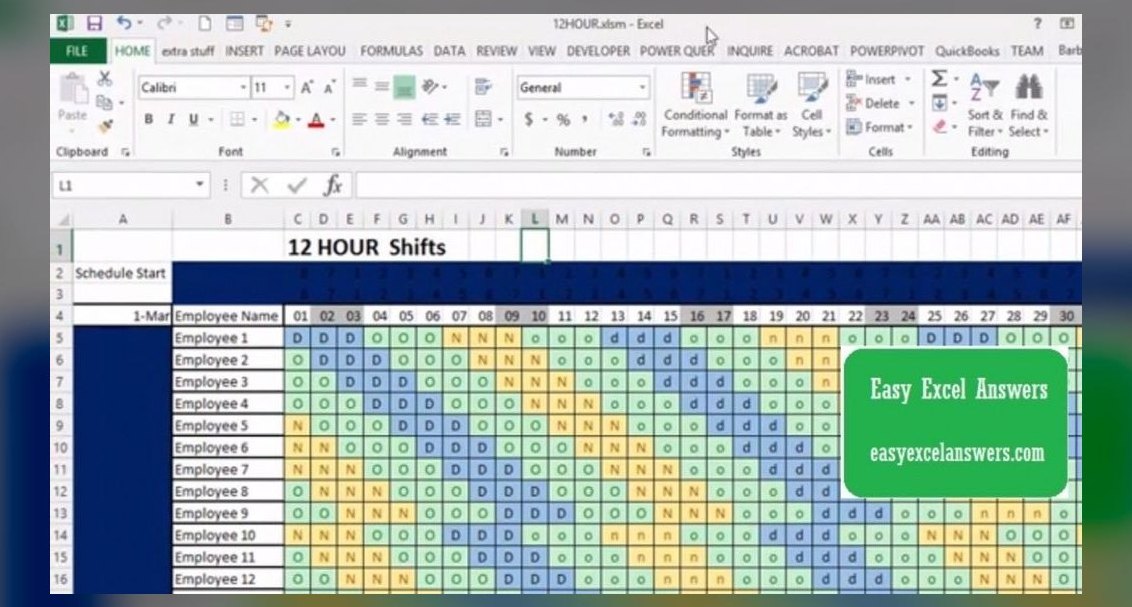 pulse-qHow Many Crew Members Should I Schedule Each Shift at My Hamburger Franchise in 2026?
 pulse-qWhat Service Fees Should a Property Management Company Charge in 2026?
 pulse-qHow Many Employees Should I Schedule Each Shift at My Tattoo Shop in 2026?
 pulse-qHow Many Staff Should I Schedule Each Day at My Pharmacy in 2026?
 pulse-qWhat Service Fees Should a Junk Removal Company Charge in 2026?
 pulse-qShould I Hire a Fractional CRO If I Am Taking the Company to Market in a Year in 2026?
 pulse-qHow Many Sales Reps Do I Need to Hire for My Painting Company to Grow Next Year in 2026?
 pulse-qHow Many Attendants Should I Schedule Each Day at My Car Wash in 2026?
 pulse-qHow Do I Make My Sales Goals Visible to the Whole Team in 2026?