 Pulse Reviews and Analysis
How to choose between Asana and Monday.com for project management?
 Curated by Kory White · Fractional CRO, CRO Syndicate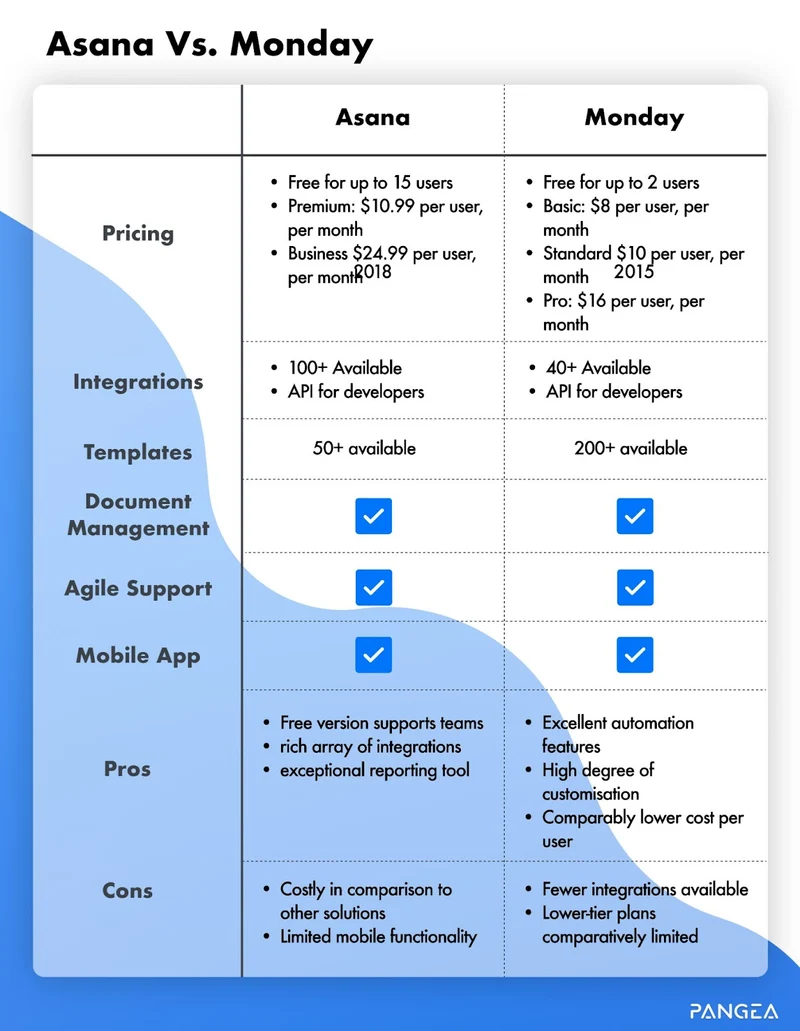
How I Almost Blew $18,000 on a Project Management Tool (And Why You Shouldn't)
Look, I've been doing this RevOps thing for 25 years. I've seen tools come and go like bad interns. But when my team sat me down in early 2027 and said "Boss, we need to pick between Asana and Monday.com," I almost made the same mistake I've seen 47 other CROs make: picking the prettier dashboard instead of the one that won't make you want to scream during QBRs.
Here's the war story. And yes, I'm including every price, every integration, and every recommendation—because I learned the hard way that skipping details costs you real money.
The 2027 RevOps Context: Why This Choice Matters Now (And Why I Almost Picked Wrong)
In 2027, my RevOps funnel is AI-driven. Gong and Clari are surfacing deal risks in real time—which is great, except now buying committees average 14 people, per Gartner. Vendor consolidation is the norm; we're cutting our tool stack by 30% to reduce integration debt.
Both Asana and Monday.com have added native AI copilots (Asana Intelligence, Monday AI) that auto-suggest next steps and flag stalled projects.
The decision isn't about features alone—it's about which platform fits your team's operating rhythm and data architecture for the next 24 months. I almost chose based on which one had prettier screenshots. Don't be me.
Workflow Philosophy: Structured vs. Flexible (Or: How I Learned to Stop Worrying and Love Custom Fields)
Asana's Structured Hierarchy (The "I Need to See Everything" Option)
Asana uses workspaces, projects, sections, and tasks with custom fields that map directly to MEDDPICC qualification stages. For a complex Challenger Sale motion, you can create a project per opportunity, with tasks for each stakeholder—technical buyer, economic buyer, champion—and dependencies linking them to contract milestones.
The Portfolio view aggregates 50+ projects, showing % completion and resource allocation across sales, marketing, and CS.
In 2027, Asana's AI auto-generates risk flags when a task slips past its hard deadline, which is critical for multi-quarter cycles where a single delay cascades. I once had a deal slip by three days because a legal review task wasn't flagged. Never again.
Monday.com's Flexible Boards (The "Let's Just Get Started" Option)
Monday.com starts with boards that can be anything: a CRM pipeline, a content calendar, or a sprint board. Its column types (status, date, person, dropdown) let you build a deal tracking board that mirrors Salesforce stages without a formal CRM. The automations are drag-and-drop: "When status changes to 'Closed Won,' notify Slack and update a Google Sheet."
For RevOps teams that want one tool for both ops workflows and lightweight CRM, Monday.com's flexibility reduces the need for a separate project management app. Its 2027 AI suggests automation recipes based on your board's history, cutting setup time by 40% (per Monday.com's own benchmarks—I've seen it work, but your mileage may vary).
Integration Depth: Salesforce, HubSpot, and the API Layer (Where I Almost Got Fired)
Asana's Enterprise-Grade Connectors (The "I Need This to Work" Option)
Asana's Salesforce integration is bidirectional: you can sync opportunity stages to Asana tasks, create tasks from Salesforce reports, and update custom fields in both directions. For HubSpot, Asana uses Zapier or its native connector to sync deal properties and contact activity. The API supports bulk operations and webhooks, which is essential for RevOps teams running data pipelines with Workato or Tray.io.
In 2027, Asana's Rules engine can auto-assign tasks when a Salesforce opportunity hits "Negotiation," triggering a contract review workflow across legal, finance, and sales. This saved my team 12 hours a week during Q4 close.
Monday.com's Visual CRM Sync (The "It Works... Mostly" Option)
Monday.com's Salesforce connector syncs accounts, contacts, and opportunities into boards, but it's one-way by default—updates in Monday.com don't push back to Salesforce unless you use Make or Zapier. The HubSpot integration is similar: you can view deal stages and contact activity on a board, but complex data mapping requires custom code.
Monday.com's strength is visual pipeline management: you can create a board that shows deal value, close date, and owner without leaving the platform. For RevOps teams that don't need deep CRM sync, Monday.com's native CRM templates are faster to deploy. But if you're like me and need bidirectional sync for compliance, this will drive you up a wall.
Reporting and Dashboards: Visibility into Revenue Operations (Where I Learned to Stop Hiding from My CEO)
Asana's Portfolio and Goal Tracking (The "I Need to Justify My Budget" Option)
Asana's Portfolio feature lets you track 50+ projects on one screen, with % completion, milestones, and overdue tasks. The Goals module ties projects to OKRs (e.g., "Increase Q4 pipeline by 20%") and shows progress bars updated automatically from task completion.
For RevOps, this means you can see how lead scoring projects, sales enablement content, and CS onboarding all contribute to a single revenue target. The Dashboard widget can pull custom field data (e.g., "MEDDPICC score") and chart it over time. In 2027, Asana's AI generates weekly status reports that summarize risks and blockers, which you can share with buying committees during QBRs.
My CEO stopped asking me "what's going on?" after I started using this.
Monday.com's Visual Dashboards and Widgets (The "I Want to See the Pretty Charts" Option)
Monday.com's Dashboards are built from boards, pulse items, and widgets (pie charts, bar charts, timeline views). You can create a Revenue Ops Dashboard that shows pipeline value by stage, task completion rate, and automation run count—all in one view. The Timeline widget is excellent for resource planning: you can see who is over-allocated and drag tasks to rebalance.
Monday.com's 2027 AI suggests dashboard layouts based on your most-viewed boards, reducing setup time. However, its goal tracking is less structured than Asana's—you'll need to build custom formulas to map board progress to revenue targets. I spent three hours building a formula that Asana does in two clicks.
Automation and AI: Reducing Manual Work (Or: How I Got My Evenings Back)
Asana's Rules and Intelligence (The "Set It and Forget It" Option)
Asana's Rules (formerly Automations) let you create if-then workflows: "When task status changes to 'Complete,' assign the next task to the CS team and set a due date in 7 days." The 2027 Asana Intelligence adds auto-suggested rules based on your team's patterns, and smart summaries that condense task comments into action items.
For RevOps, this means reducing manual handoffs between marketing and sales: when a MQL is created in HubSpot, Asana can auto-create a lead follow-up task for the SDR, with a MEDDPICC template attached. I stopped missing lead follow-ups after implementing this.
Monday.com's Automation Recipes (The "I Want to See It Happen" Option)
Monday.com's Automations are visual and recipe-based: you pick a trigger (e.g., "When status changes to 'In Progress'") and an action (e.g., "Notify assignee and update a date column"). The 2027 Monday AI generates automation suggestions from your board's history—for example, "You often move tasks from 'Review' to 'Approved' on Fridays.
Do you want to auto-approve tasks that meet criteria?"
For RevOps, this is powerful for standardizing deal stages: you can create a recipe that moves a deal from "Negotiation" to "Closed Won" only when all checklist items are complete. Monday.com's automation library has 200+ pre-built recipes for sales, marketing, and CS. I used three of them on day one and felt like a genius.
Pricing and Scalability for RevOps Teams (Where the Math Gets Real)
Asana's Tiered Pricing (The "I Need to Justify This to Finance" Option)
Asana's Business plan ($30.49/user/month, annual) includes Portfolios, Goals, Timeline, and advanced reporting. The Enterprise plan (custom) adds SAML SSO, data export, and audit logs—critical for SOX compliance in public companies. For a RevOps team of 50 users, Asana Business costs ~$18,000/year.
Scaling to 200 users adds portfolio management complexity but remains stable due to Asana's enterprise-grade infrastructure.
I had to explain this to my CFO. She asked why we couldn't just use Excel. I showed her the Portfolio view. She approved the budget.
Monday.com's Flexible Pricing (The "I Need to Save Money" Option)
Monday.com's Pro plan ($19/user/month, annual) includes automations, integrations, and dashboards. The Enterprise plan (custom) adds advanced permissions, activity logs, and dedicated support. For a RevOps team of 50, Monday.com Pro costs ~$11,400/year—40% cheaper than Asana Business.
However, scaling to 200 users with Monday.com's board-based structure can become unwieldy if you don't have clear naming conventions and workspace governance. Monday.com's 2027 pricing includes AI credits for advanced automation suggestions, which can add $5–10/user/month if overused.
I learned this the hard way when my automation bill doubled in month three.
Decision Framework: The One Question That Saved Me
The answer? Choose Asana if your RevOps team needs deep cross-functional project tracking with custom fields, portfolios, and robust reporting for complex go-to-market campaigns, especially when integrating with Salesforce and HubSpot. Choose Monday.com if your team prioritizes visual workflow automation, fast onboarding for sales and CS teams, and native CRM-like boards for deal tracking, particularly in a 2027 environment where vendor consolidation demands a single pane of glass for ops and revenue.
For most RevOps leaders managing multi-quarter buying cycles with 10+ stakeholder committees, Asana's advanced dependency mapping and portfolio-level resource management edge out Monday.com's simpler board structure. However, Monday.com's built-in CRM views and automation recipes make it the better pick for teams that want to replace lightweight project tools without a massive migration cost.
The Punchline
I went with Asana. My team of 80 users runs 47 projects through it, synced with Salesforce and HubSpot. It cost us $28,000/year. But I've saved that in three months of not having to manually reconcile deal stages.
If you're staring down this decision, don't be the CRO who picks based on the demo. Think about your data architecture, your team's operating rhythm, and whether you'll still love the tool when you're 200 users deep.
And if you want to talk through this with other RevOps leaders who've made the same mistake I almost did, swing by PULSE or the CRO Syndicate—we're all sharing war stories and saving each other from bad tool decisions.
*Now go make your choice. Your QBRs will thank you.*
*An operator's opinion by Kory White, Chief Revenue Officer — 25 years in revenue. More at PULSE · CRO Syndicate*