


How do you write IEP accommodations into daily lesson plans without extra paperwork in 2027
Quality
Certified

Build the accommodations into the lesson plan template itself — a fixed section with dropdowns, checkboxes, and color-coded rows pulled from a single student roster. Teachers select supports while planning instead of logging them afterward, so the plan doubles as the compliance record and no separate form ever gets created.
The outcome you should expect
The first thing that changes is not compliance — it is the feeling of the Sunday-night planning session. Teachers who previously kept two artifacts (the lesson plan and some version of an accommodations log, sticky note, or shared tracker) collapse down to one. That consolidation is where the paperwork savings actually live. A teacher with eight IEP students who was maintaining a separate weekly log was doing roughly the same data entry twice: once to plan the lesson, once to prove she delivered it. Embedding removes the second pass entirely.
Delivery consistency is the metric that moves next, and it moves for an unglamorous reason: the accommodation is now in the teacher's field of vision at the moment she is deciding how long the independent work block runs. A support that lives in a binder competes with everything else in a classroom for attention. A support printed in the timing row of the plan she is already reading does not compete with anything. Schools that make this switch typically describe the change as going from "I remember most of them most days" to "the plan tells me."
There is a second-order outcome worth naming because it is the one administrators care about. When the accommodation lives in the lesson plan, the evidence trail is automatic. During a compliance review or a due-process complaint, the district does not have to reconstruct what happened in a classroom in October from teacher memory. The archived lesson plans — which the school was already retaining — show what was planned and, if the template includes a delivery check, what was actually done. That is a materially stronger evidentiary position than a log filled out retroactively on Friday afternoon, and any special education attorney will tell you contemporaneous documentation carries more weight than reconstructed documentation.

The case manager's week changes too. A large share of a special educator's inbox is variations on "what does this kid get for the unit test again?" Those questions vanish when the answer is already in the general educator's planning document. What replaces them tends to be higher-value: conversations about whether an accommodation is still appropriate, whether a student is ready to fade a support, or whether a new barrier has appeared. That shift — from information retrieval to instructional problem-solving — is the real return, and it is the argument to lead with when you pitch this to a skeptical staff.
Expect one outcome that surprises people: the template exposes accommodations that nobody was delivering. When you first build the dropdown list from actual IEPs, teams routinely find supports written into documents years ago that no longer match the student, the course, or the technology in the building. That is uncomfortable, and it is also the point. You cannot embed what you have not read, so the build process forces a read of every IEP in the caseload. Budget emotional room for that discovery and treat it as an amendment-cycle input rather than a blame exercise.
What drives that outcome
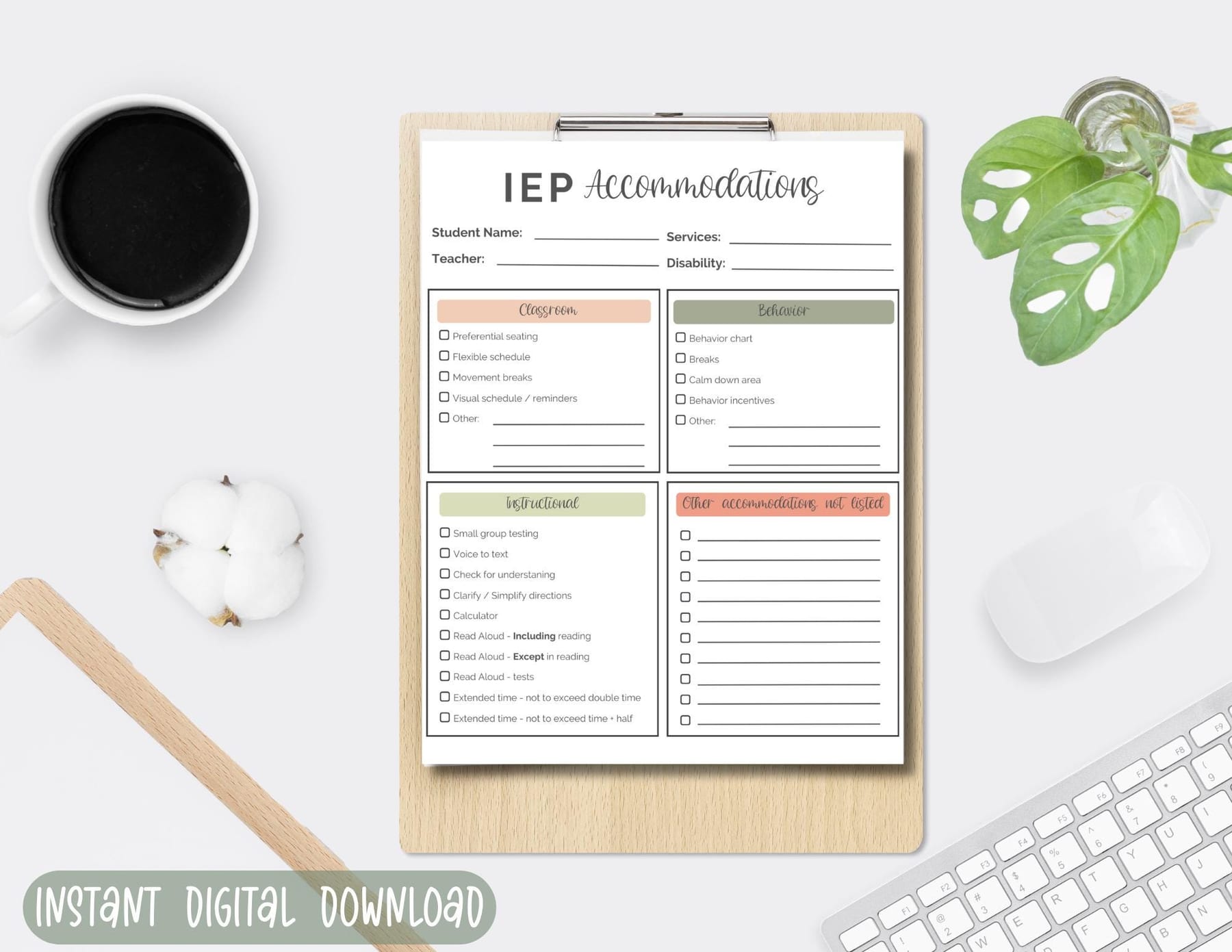
The mechanism is environment design, not motivation. Every step between a teacher and a student's support is a friction point, and friction is where compliance dies. Opening a second document is a step. Remembering which of thirty-one students has extended time is a step. Translating "provide graphic organizer" into "which graphic organizer, for which task, printed when" is a step. Embedding attacks all three at once by moving the decision into the workflow the teacher was going to complete anyway.
Three specific forces do the work. The first is the visual trigger. A colored row labeled with the exact IEP language, sitting in a fixed position on every plan, functions as a cue in the behavioral sense — it fires at the moment the behavior is possible, not hours before. Position consistency matters more than color choice here; the habit forms around location. Move the section between templates and you break the cue.
The second is choice architecture. Free-text accommodation fields fail because they demand recall and composition under time pressure. A dropdown of eight to ten pre-written options per category demands only recognition. The wording in those options should be lifted verbatim from the IEPs in your building, not paraphrased, because paraphrase is where legal exposure creeps in — "chunked assignments" and "assignments broken into segments with teacher check-in between segments" are not the same commitment.
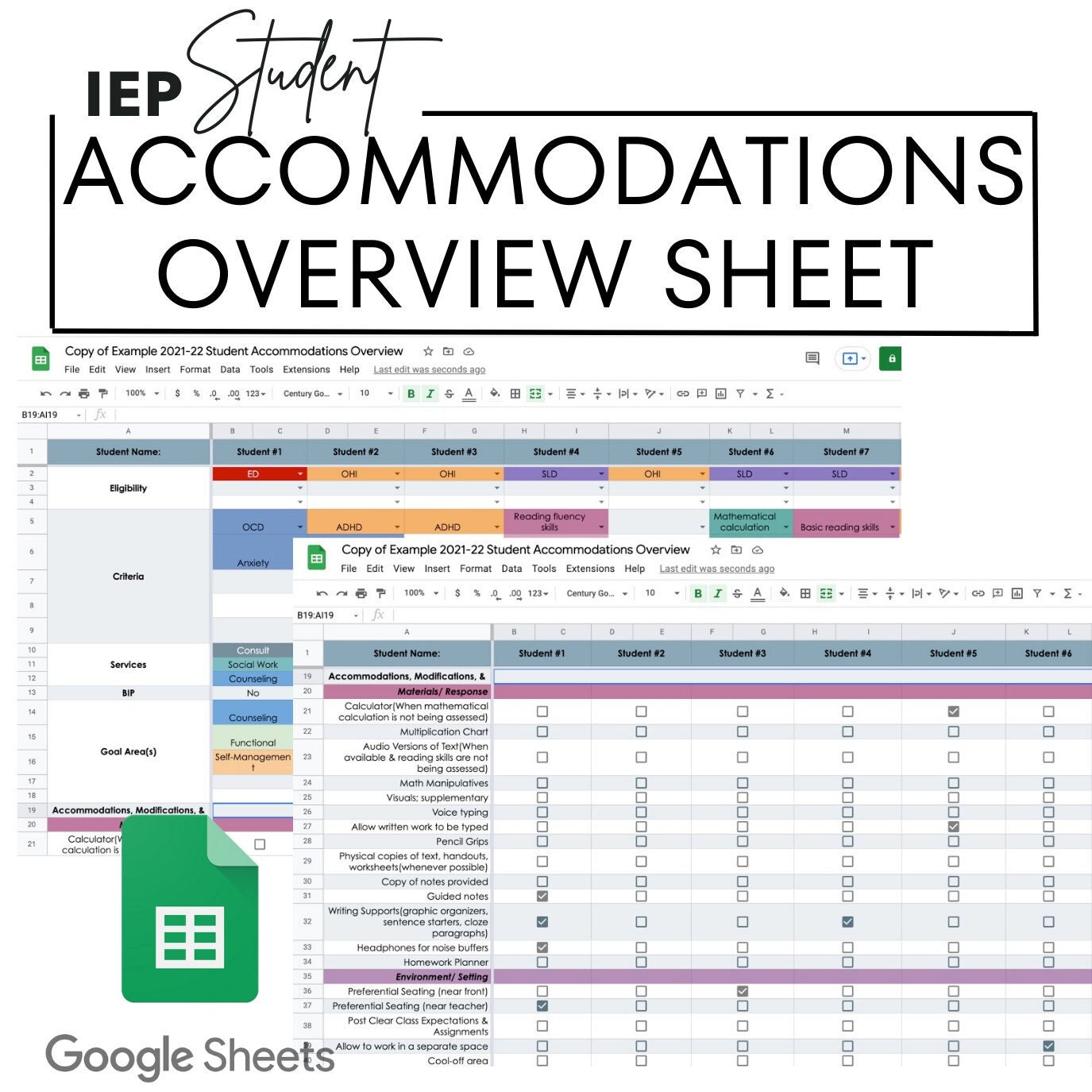
The third is elimination of redundancy. A well-built template writes an accommodation once and surfaces it everywhere it applies. Select "read aloud" in the instructional delivery section and it should appear in the assessment section without a second entry. In a spreadsheet-based template this is a lookup formula. In Google Docs it is a template with a linked table. In a district platform it is usually a native field mapping that nobody turned on. Whatever the tooling, the rule is one entry per accommodation per week, never per section.

There is an upstream driver most schools skip: the roster itself. If accommodations are retyped by each teacher from each IEP, you have created thirty copies of the truth that drift apart the moment an IEP is amended. The system only holds if there is one master roster — a spreadsheet, a database view, a district SIS export — that every template reads from. When a student's IEP changes in February, the case manager edits one row and every plan that references it updates. Without that single source, embedding just relocates the paperwork instead of removing it.
Benchmarks and realistic ranges
Use a time budget as your primary gate. If the accommodation section of a weekly plan takes more than a couple of minutes per class period to complete, the design has too much friction and teachers will route around it. The practical target most teams land on is under ninety seconds per lesson once the template is populated and the roster is wired up. Anything above that and you should be cutting options, not training harder.
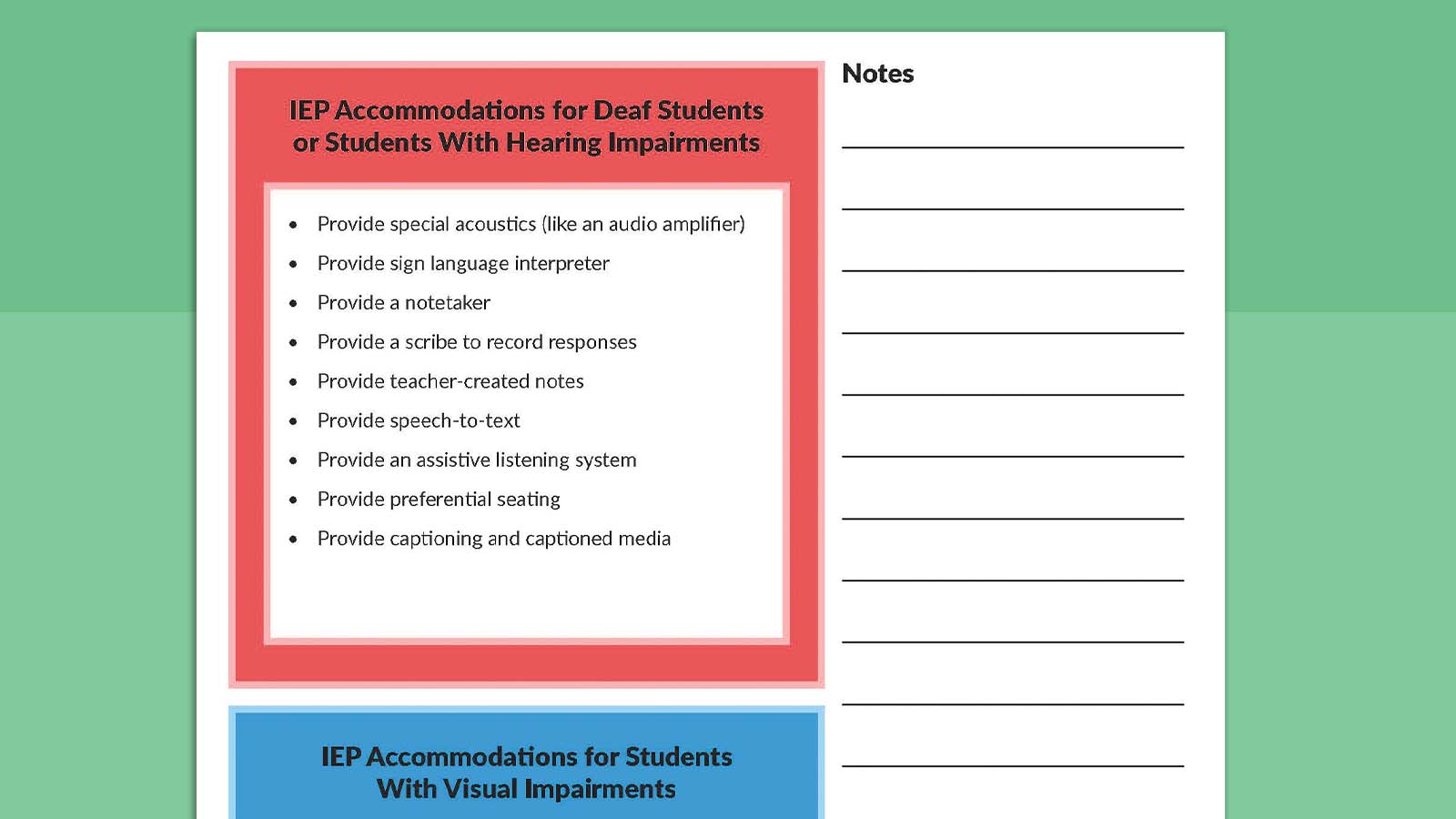
Adherence realistically stratifies by accommodation type, and it helps to set expectations accordingly rather than promising uniform improvement. Behavioral supports — scheduled breaks, proximity, check-in/check-out, preferential seating — improve fastest because they are visible, cheap, and require no setup. Presentation supports — text-to-speech, enlarged print, captions, digital copies — improve more slowly because they depend on a device being charged, a file being converted, and a login working. Response supports — scribing, speech-to-text, extended time that spills past the bell — are the most stubborn, because they collide with the master schedule and with a teacher's need to move the whole class forward.
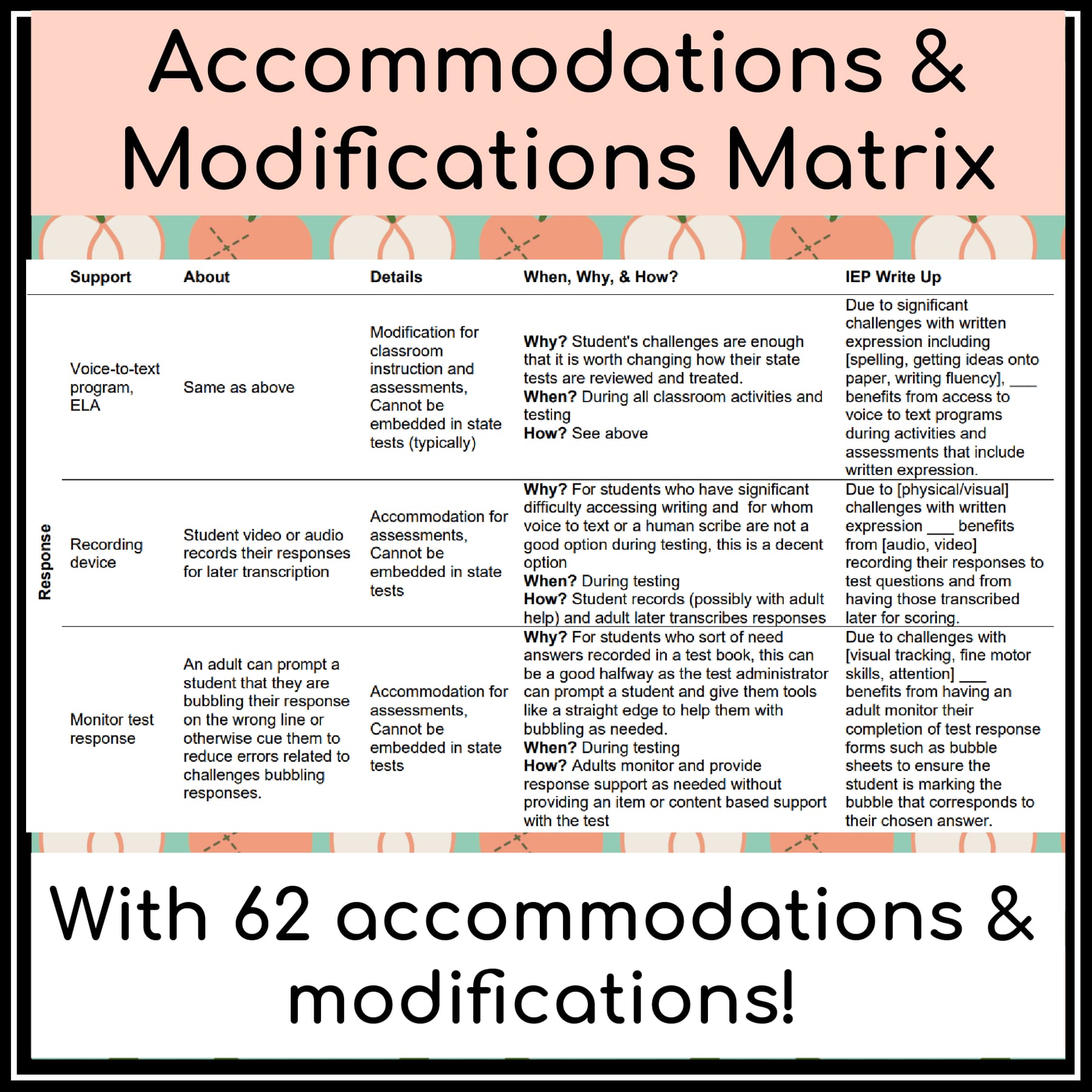
Sequence your rollout in that order. Get the behavioral supports embedded and reliable first; the early win buys you credibility for the harder categories. Presentation supports usually need an infrastructure fix alongside the template — someone has to own converting materials, and if the answer is "the teacher does it during planning," the accommodation will fail no matter how well the dropdown is written.
For build cost, plan on a small design team and a bounded number of sessions rather than an open-ended committee. Three people is the right size: a general educator who will be honest about what she will not do, a special educator who knows the caseload in detail, and someone who understands the constraints of your lesson planning platform. Three working sessions of about ninety minutes is usually enough to produce a first template, and monthly maintenance of an hour or so keeps the dropdown lists current as IEPs are amended.
Cap the option lists. Eight to ten choices per category is the ceiling where recognition still beats reading. Past that, teachers scan instead of select, and scanning reintroduces exactly the cognitive load you removed. If a category genuinely needs more options, that is a signal to split it — "presentation" becomes "text access" and "visual supports," each with its own short list.
The gold-standard test is the substitute test, and it is worth running deliberately. Hand a stranger the plan for a period with three IEP students and no access to the special education files. If she can deliver every accommodation correctly from the plan alone, the embedding is complete. If she has to ask a question, whatever she asked about belongs in the template. Run this once a quarter; it catches drift faster than any audit.
Risks, edge cases, and failure modes
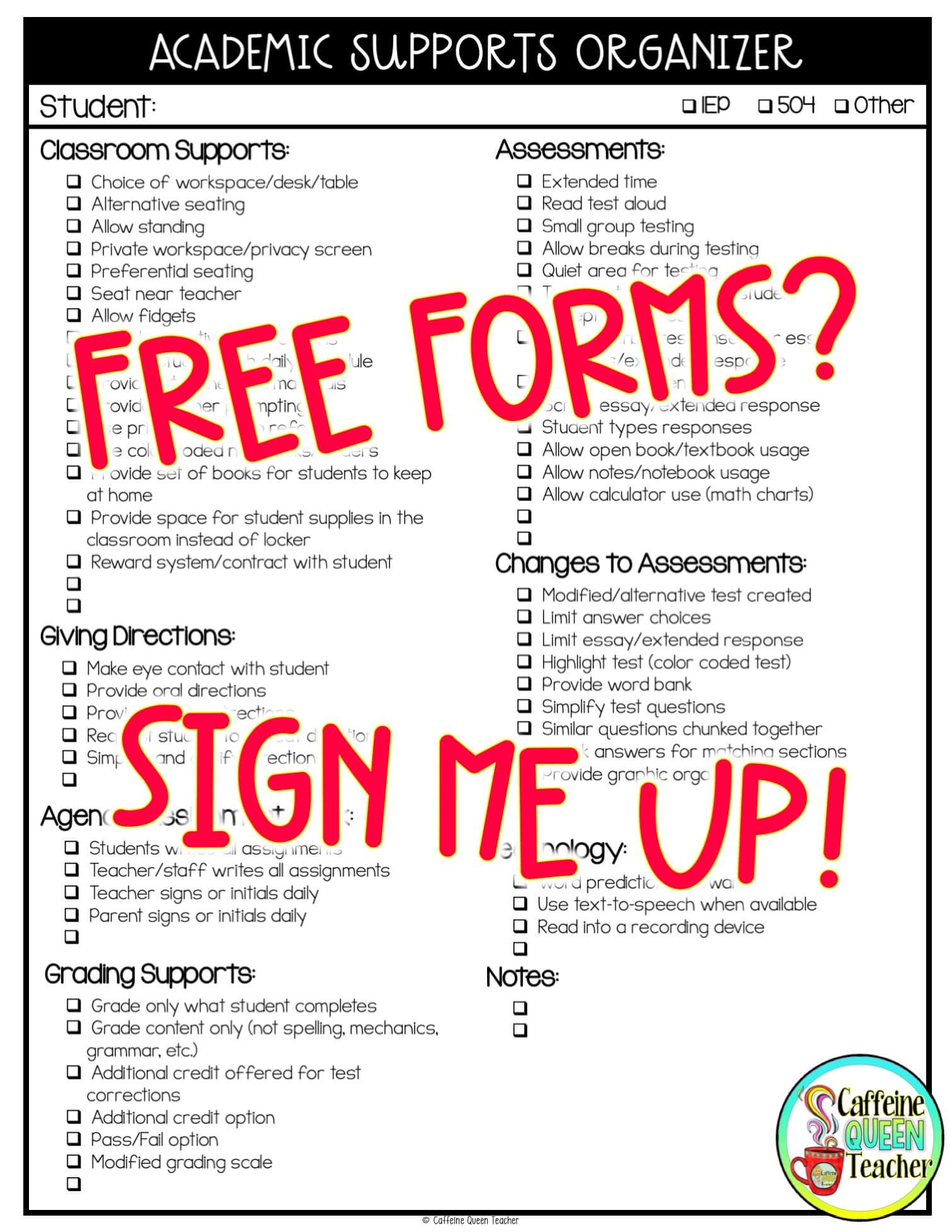
Template bloat kills more of these systems than anything else. The instinct is to embed every accommodation on every IEP so nothing is missed, which produces a document so dense that teachers stop reading it and start clicking through it. The discipline is to embed only what is used daily or weekly — usually four to six supports per student — and to park the rest on a separate at-a-glance reference reviewed at the start of a unit. A field-trip accessibility route does not belong in a Tuesday math plan.
One template for a whole district is the second failure mode. A self-contained elementary classroom, a middle school ELA block, a high school chemistry lab, and a studio art elective have almost nothing in common in terms of which supports are actually operative. Build a small family of templates — four or five — that share a common structure and position but carry tailored option lists. Shared structure preserves the habit; tailored lists preserve relevance.
Idiosyncratic accommodations are the edge case that dropdown systems handle worst. A support like "tap the desk twice before giving verbal directions" will never appear in a standard list, and if the only escape hatch is a free-text box at the bottom, it gets ignored. Give the "other" field a visual flag that renders as prominently as the color-coded rows, and require it to be reviewed in the same glance. Some teams keep these on a per-student card as well, precisely because they are the ones most likely to be forgotten.
Then there is the compliance trap, and it is the one to worry about most. A template that makes checking a box easy makes checking a box dishonestly easy. Teachers under pressure will mark delivered when they meant intended, and now you have manufactured documentation that says a student received a support he did not receive — which is worse than no documentation at all, because it is discoverable and it is wrong. Mitigate structurally: offer a three-state delivery check rather than a binary, so "partial" is an available and blameless answer, and when partial or no is selected, ask one short question about what got in the way. Then make sure the answers go somewhere that fixes systems — the Chromebook cart is never charged, the co-teacher is pulled for coverage every Thursday — rather than into an evaluation file. If the data is used punitively even once, honest reporting ends permanently.
Two more edge cases deserve planning. First, the amendment lag: an IEP changes at a meeting on Wednesday and the template still shows the old accommodation on Thursday. Assign an explicit owner and a service-level expectation — the case manager updates the master roster before leaving the meeting room, or within one school day. Second, the co-taught or rotating classroom, where two adults share responsibility and each assumes the other handled it. Put a name, not a role, next to any accommodation that requires facilitation. "Scribe: Ms. Alvarez" is enforceable; "scribe as needed" is not.
Finally, watch for the plan that is never opened. Embedding assumes the teacher reads the lesson plan on the day of the lesson, and in a meaningful number of classrooms the plan is written for an administrator and never consulted again. If that is your building's culture, fix the plan's usefulness before you fix its accommodation section — otherwise you have embedded a support into a document nobody looks at, which is the same failure with better formatting.
A practical rollout plan
Start with a baseline, because you will need it later when someone asks whether this was worth it. Pick one ordinary week — not a testing week, not a short week — and have teachers tally, on paper, how many times each accommodation was supposed to happen and how many times it did. The number will be lower than anyone expects, and that gap is the entire argument for the change. Collect it before you announce anything.
Build the roster before you build the template. Read every IEP in scope and pull the accommodations into one spreadsheet with the exact language from the document, one row per student per accommodation, tagged by frequency (daily, weekly, occasional) and by category. This step is tedious and non-negotiable; it is also where you will discover the stale and unimplementable accommodations that need to go back through an amendment cycle. Route those to the case managers as you find them rather than saving them for a report.
Then design, with the three-person team and a hard session limit. Fix the section's position first and never move it. Write the dropdown options verbatim from the roster. Wire the propagation so a single selection reaches every section that needs it. Add the "other" field with a visual flag, and add the three-state delivery check. Resist every request to add a field "while we're in here" — each one costs seconds per lesson, and seconds per lesson is the budget you are protecting.
Pilot with volunteers, two or three teachers, for two weeks. Measure exactly two things: how long the accommodation section takes to complete, and what share of lessons actually used the embedded supports. If time is over budget, cut options. If usage is low, ask the pilot teachers why in a conversation rather than a survey — the answer is usually a specific piece of friction you can remove in ten minutes.

Roll out to the full staff with one short training that spends most of its time on the baseline data rather than on the mechanics. Teachers adopt tools when they understand the problem; they resist tools introduced as a mandate. Show them the gap, show them the template, walk through one real lesson end to end, and stop. Then support it in person during week one — a coach or administrator in every classroom at least once, not to evaluate but to answer the small questions that otherwise become reasons to quit. By the third week the section stops feeling like an addition and starts feeling like part of the plan, which is the moment the paperwork question answers itself.
Plan the maintenance loop from day one, because unmaintained systems decay quietly. One hour a month to reconcile the roster against current IEPs, one substitute test a quarter, and one review each spring of which accommodations are being marked partial most often. That last review is the highest-value hour in the cycle: it tells you which supports are structurally impossible in your building, and those are amendment conversations, scheduling conversations, or budget conversations — not teacher-effort conversations.
Related questions
Does this work for a secondary teacher with 120-plus students?
Only with a digital template that pulls from a master roster automatically. Manual entry does not scale past a couple of sections. The plan should display accommodations filtered to the current period, so a teacher sees six students, not 120.
What if our district mandates a separate accommodations log?
Ask whether the mandate specifies a form or an outcome. Most require evidence of delivery, not a particular document. If the lesson plan carries the same fields, offer it as the log and get the substitution approved in writing before you drop the old form.
How does this interact with 504 plans and ELL supports?

Identically, and you should build them into the same section. Splitting supports by legal category creates three places to look. Tag the source in the roster for reporting, but present them to the teacher as one undifferentiated list of what this student needs.
Can paper lesson plans work, or does this require software?
Paper works if the accommodation block is preprinted in a fixed position and the teacher fills in student initials plus a code. It loses automatic propagation and roster syncing, so budget more maintenance time and re-print whenever an IEP is amended.
What should happen when an accommodation is repeatedly not delivered?
Treat it as a system signal. Look for the shared barrier — missing device, no prep time, scheduling conflict — and fix that. If the support is genuinely unworkable as written, convene the team and amend the IEP rather than tolerating an unmet commitment.
FAQ
How do you write IEP accommodations into daily lesson plans without extra paperwork?
Put a fixed accommodation section into the lesson plan template itself, populated by dropdowns and checkboxes drawn from a master roster. Teachers select supports while building the lesson, so the plan becomes the record. No separate log, no compliance form, no second pass on Friday.
What single change reduces the paperwork burden the most?
Eliminating the duplicate entry. Most of the burden is not writing accommodations once — it is writing them again in a log to prove they happened. When the plan itself is accepted as the evidence, you cut the work roughly in half without changing what any teacher does in the classroom.
How do you keep the template current when IEPs are amended mid-year?
One master roster, one owner, one deadline. The case manager updates the roster row before leaving the meeting or within a school day, and every template reading from that roster updates automatically. If teachers maintain their own copies, drift is guaranteed within a semester.
What about students with a dozen or more accommodations?
Embed only the four to six used in daily instruction and put the rest on a per-student reference reviewed at unit planning. Embedding all of them produces a wall of text teachers skim, which delivers fewer accommodations than a short list they actually read.
Will a substitute be able to follow it?
That is the design test. The plan should be sufficient without any access to special education files. Run the check deliberately each quarter — hand a plan to someone unfamiliar with the class and see what they have to ask about. Every question marks a gap to close.
Is a plan-embedded record legally sufficient documentation?
Rules vary by state and district, so confirm with your special education director before retiring an existing form. That said, contemporaneous records created during planning are generally regarded as stronger evidence than logs reconstructed after the fact, and the archive requirement is usually already satisfied by plan retention.
Sources
- https://sites.ed.gov/idea/
- https://iris.peabody.vanderbilt.edu/module/acc/
- https://www.understood.org/en/articles/common-classroom-accommodations-and-modifications
- https://www.readingrockets.org/topics/assistive-technology/articles/accommodations-and-modifications
- https://www.wrightslaw.com/info/test.accoms.index.htm
- https://www.cast.org/impact/universal-design-for-learning-udl
- https://www.edutopia.org/topic/special-education
- https://www.parentcenterhub.org/accommodations/
Related on PULSE
- How do you create lesson plans that align with IEP goals without doubling your workload
- What are the best methods for providing accommodations during a whole-class assessment in 2027
- How do you structure a math block to include direct instruction, guided practice, and independent work
- What are the best tools for tracking student behavior data without a complicated system in 2027
This page will be disappearing soon. Save it to your device for $1 — or read it free while it is here.
@Kory-White- · if Venmo asks, the last 4 of my number are 2012
This page is gone.
This one is off the shelf now. $1 keeps it on your phone for good — the whole page, pictures and diagrams included.
 pulse-teacher-resourcesHow do you create lesson plans that align with IEP goals without doubling your workload in 2027
 pulse-teacher-resourcesWhat are the top 10 ways to manage classroom transitions without losing instructional time in 2027
 pulse-teacher-resourcesWhat is the most common lesson planning mistake that wastes teacher time in 2027 and how do you avoid it in 2027
 pulse-teacher-resourcesWhat are the top 10 ways to create a guided reading schedule that reaches every student in 2027
 pulse-teacher-resourcesWhat are the best strategies for organizing digital resources so you can find them fast in 2027
 pulse-teacher-resourcesWhat are the best methods for providing accommodations during a whole-class assessment in 2027
 pulse-teacher-resourcesWhere do you find free primary source documents for a social studies unit in 2027
 pulse-teacher-resourcesWhat are the best classroom management techniques for a chatty middle school class in 2027
 pulse-teacher-resourcesWhat are the best tools for tracking student behavior data without a complicated system in 2027
 pulse-teacher-resourcesHow do you create a classroom seating chart that minimizes distractions in 2027