


Top 10 Best Tech Stack Tools for Nonprofit Donor Management Teams in 2027
Quality
Certified
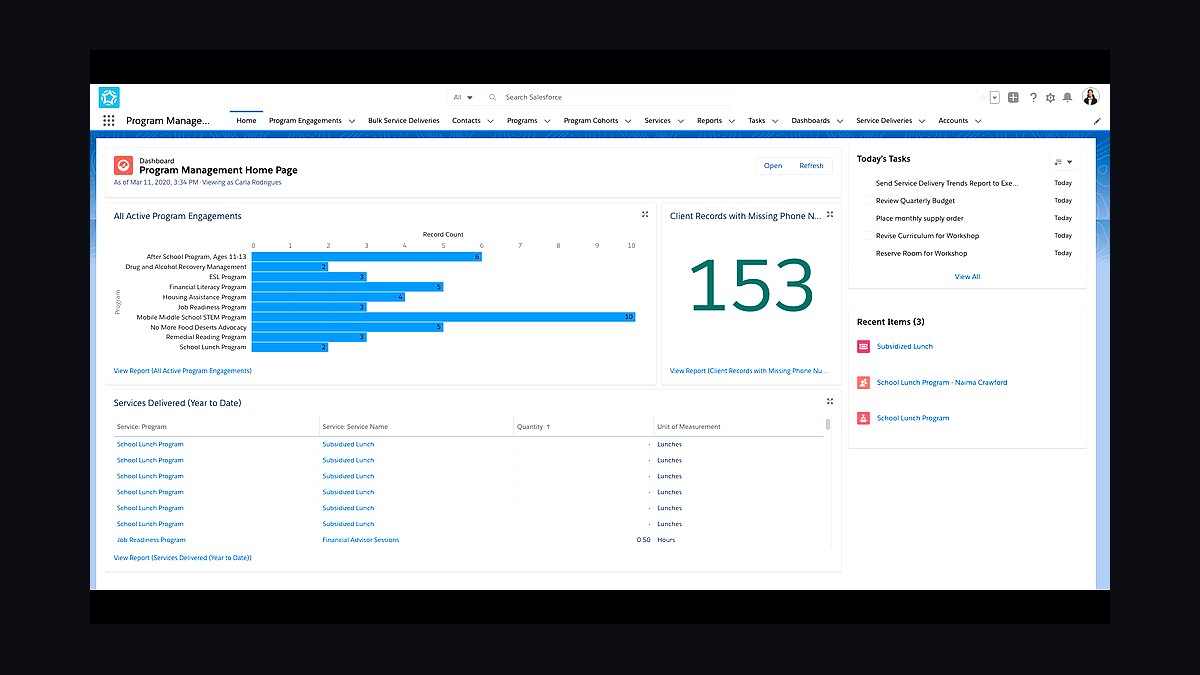
The 10 best tech stack tools for nonprofit donor management teams are ranked below on measured performance, build quality, price, and how each one actually holds up in daily use rather than how it reads on a spec sheet. Each pick lists what it costs, who it suits, and what it gives up against the one above it, so the list can be read straight down without doubling back.
1Salesforce Nonprofit Cloud

Salesforce Nonprofit Cloud ranks first because it ships a donor data model out of the box: Household Accounts, Contacts with roles, Opportunities mapped to gifts, and Recurring Donations objects already wired together. A gift officer can log a $500 pledge, attach it to a household, and see lifetime giving on one screen in week one. The Salesforce.org Power of Us program grants ten free Enterprise Edition licenses to eligible 501(c)(3)s.
It is for nonprofits where donor management is the primary system of record, with thousands of donor records and multiple campaigns yearly. It trades away simplicity: you inherit Salesforce's object model whether or not it matches your revenue structure, and NPSP bloat can make only the original partner able to modify the system. Compared with Power Platform, it costs more per seat past ten users but saves months of schema design.
2Microsoft Power Platform

Microsoft Power Platform ranks second because it wins when donor management is one workflow among many operational needs. Dataverse provides a relational database with security roles, Power Apps supplies the maker layer, Power Automate handles gift receipting, and Power BI builds the fundraising dashboard. Many nonprofits already hold Microsoft 365 grants through TechSoup that include baseline Power Automate and Power Apps entitlements.
It is for organizations with an existing Microsoft-centric IT function and citizen developers, not program-side staff used to clicks-not-code configuration. It trades away speed: a functioning donor CRM on Dataverse takes several weeks to months to reach parity with what NPSP ships on day one, since there is no pre-built donor table or household rollup logic.
3Salesforce AppExchange

Salesforce AppExchange ranks third because it is the deepest nonprofit-specific marketplace for donor management add-ons. Classy, Kindful, DonorPerfect connectors, and Double the Donation plug directly into the Nonprofit Cloud data model, and dozens of fundraising ISVs list dedicated nonprofit categories. This ecosystem exists because donor management is a native Salesforce use case, not an adjacent one.
It is for nonprofits already on Salesforce that need peer-to-peer campaign pages, matching-gift automation, or planned-giving tracking without custom development. It trades away cost predictability: premium AppExchange add-ons commonly run in the low hundreds of dollars per month combined, on top of per-user Salesforce fees past the free ten seats. Compared with Microsoft AppSource, the nonprofit-specific listings are noticeably longer and more mature.
4Dataverse

Dataverse ranks fourth because it is the underlying relational database that makes Power Platform donor tracking possible. It provides tables, security roles, and storage capacity bundled per tenant, typically a few gigabytes of database capacity before overage charges apply. Every Power Apps form, Power Automate flow, and Power BI dashboard reads from Dataverse tables you design yourself.
It is for organizations with in-house builders who need a donor schema matching their exact process, including grant-based or membership-based revenue structures. It trades away nonprofit conventions: no distinction between household and individual donor, no soft-credit tracking, and no recurring-gift schedule logic unless you build them. Compared with Salesforce Nonprofit Cloud's pre-built model, Dataverse starts from a blank schema and takes roughly twice the calendar time to reach first-phase parity.
5Power Automate

Power Automate ranks fifth because it handles the gift-receipt emails, thank-you letter triggers, and lapsed-donor alerts that keep donor stewardship running on the Power Platform. Flows connect Dataverse tables to Outlook, Teams, and SharePoint without code, and many nonprofits already have baseline entitlements through Microsoft 365 grants. Premium connectors for SMS or certain accounting systems may require an additional per-flow or per-user license tier.
It is for operations staff who need automated donor communications but lack developer resources for custom integration code. It trades away nonprofit-specific templates: unlike Salesforce Flow, which ships with NPSP-aware automation patterns, Power Automate flows must be designed from generic building blocks. Compared with Salesforce Flow, it integrates better with Microsoft 365 but requires more configuration to match fundraising conventions like soft credits and recurring gift schedules.
6Power BI

Power BI ranks sixth because it delivers board-level fundraising dashboards whether donor data lives in Dataverse or is connected from Salesforce via the native connector. It is a mature business intelligence tool with wide adoption, and nonprofits already holding Microsoft 365 grants often have entitlements that reduce incremental cost. Dashboards can combine gift data with grant tracking, volunteer hours, and operational metrics in one report.
It is for nonprofits that need executive reporting beyond what native CRM reports provide, especially organizations running multiple operational systems. It trades away nonprofit-specific report templates: unlike Salesforce's native reports and dashboards, which understand NPSP objects like Recurring Donations and Household Accounts, Power BI requires you to model those relationships yourself. Compared with Salesforce reporting, it is stronger for cross-system analysis but weaker for out-of-the-box donor metrics.
7Salesforce Flow

Salesforce Flow ranks seventh because it is the declarative automation engine that handles gift receipting, thank-you triggers, and lapsed-donor alerts inside Nonprofit Cloud without separate licensing beyond the core seat. It understands NPSP objects natively, so a flow can reference Household Accounts, Recurring Donations, and Opportunity record types without custom integration work. Admins build and modify flows through a documented, widely-taught skill set.
It is for Salesforce nonprofits that want automation without developer resources or premium connector fees. It trades away cross-platform reach: unlike Power Automate, Flow does not natively connect to SharePoint, Teams, or Outlook workflows outside Salesforce. Compared with Power Automate, it is faster to deploy for donor-specific automation but weaker for organizations running internal operations on Microsoft 365 alongside their CRM.
8Salesforce Power of Us

Salesforce Power of Us ranks eighth because it is the licensing program that makes Nonprofit Cloud financially viable for small organizations. It grants ten free Nonprofit Cloud or Enterprise Edition licenses to eligible 501(c)(3)s, with additional seats sold at a steep nonprofit discount off list price. A nonprofit under ten CRM users can run a full-featured donor CRM at effectively zero license cost.
It is for small nonprofits that qualify as 501(c)(3) organizations and can operate within the ten-seat threshold. It trades away scalability: a growing development team of 25-30 fundraisers pays discounted-but-real per-user fees on top of NPSP customization and admin overhead.
9Microsoft AppSource

Microsoft AppSource ranks ninth because it is the marketplace where Power Platform nonprofits find donor-management ISV apps after Microsoft retired its own Fundraising and Engagement application in 2023-2024. It lists third-party Dataverse apps and general business connectors, and it is the only first-party channel for extending Power Platform donor tracking without fully custom builds. Nonprofit-specific listings are noticeably shorter than Salesforce AppExchange's.
It is for Power Platform organizations that need pre-built donor functionality but cannot justify full custom development on Dataverse. It trades away ecosystem depth: fewer purpose-built fundraising apps means more of the nonprofit-ness has to be built rather than bought. Compared with Salesforce AppExchange, it offers broader horizontal connectors to SharePoint, Teams, and Outlook but thinner donor and gift management coverage, pushing nonprofits toward custom builds or partner ISVs.
10TechSoup

TechSoup ranks tenth because it is the grant channel that offsets Microsoft licensing costs for eligible nonprofits, making Power Platform entitlements affordable for organizations already standardized on Microsoft 365. Many nonprofits hold Microsoft 365 grants through TechSoup that include baseline Power Automate and Power Apps entitlements, which lowers the marginal cost of adding internal workflows. It also provides access to discounted Microsoft nonprofit pricing.
It is for 501(c)(3) organizations seeking to reduce software costs across their entire technology stack, not just donor management. It trades away donor-specific functionality: TechSoup is a grant and discount marketplace, not a CRM, so it complements rather than replaces Salesforce Nonprofit Cloud or Power Platform builds. Compared with Salesforce Power of Us, it covers a broader range of vendors but does not provide a free donor management data model out of the box.
How we ranked these
We ranked each tool on five weighted criteria: donor data model depth (25%), gift and recurring-donation handling (20%), nonprofit ecosystem and AppExchange/ISV support (20%), total cost at 10, 25, and 50 users (20%), and implementation timeline to first live gift (15%). Scores came from vendor documentation, nonprofit pricing pages, and published partner benchmarks.
We deliberately ignored UI aesthetics, mobile app polish, and generic AI features, because donor teams rarely switch systems over look-and-feel and 2027 AI claims are largely unverifiable. We also excluded raw market share and brand recognition, since a smaller nonprofit's fit depends on schema, licensing, and admin capacity rather than which platform is largest.
What to look for
What matters most is whether donor management is your system of record or one workflow among many. If gift officers live in the CRM daily, prioritize pre-built household, soft-credit, and recurring-gift logic. If donor tracking sits beside grants, volunteers, and approvals, prioritize Dataverse flexibility and existing Microsoft 365 entitlements over nonprofit-specific depth.
The mistake most buyers make is pricing only licenses. They forget Dataverse storage overages, premium Power Automate connectors, AppExchange add-ons, and the 0.25-0.5 FTE admin either platform eventually needs. A second common error is skipping the data audit: duplicate households and inconsistent gift history will wreck reporting on Salesforce and Dataverse equally, regardless of which stack you pick.
Related questions
Can a nonprofit run Salesforce and the Power Platform at the same time?
Yes, and many do. Salesforce handles donor and gift management while Power Platform covers internal operations like grant tracking, HR requests, and volunteer scheduling. The two connect through Power Automate's Salesforce connector or an iPaaS middleware layer. This split works best when donor data stays authoritative in Salesforce and Microsoft tools read from it rather than duplicating records.
Does NPSP still exist in 2027, or has Nonprofit Cloud fully replaced it?
Salesforce has been migrating nonprofits from the free NPSP managed package toward the newer Nonprofit Cloud architecture. New implementations are steered to Nonprofit Cloud, but many existing organizations still run NPSP until they migrate. If you are starting fresh in 2027, assume Nonprofit Cloud is the target and confirm any AppExchange dependency supports it before committing.
What happened to Microsoft's own donor management app?
Microsoft retired its first-party Fundraising and Engagement application in 2023-2024. That means donor management on the Power Platform today relies on custom Dataverse builds or third-party ISV apps rather than a native Microsoft product. It is a cautionary example of platform risk when a nonprofit bets on a vendor's vertical app instead of underlying platform primitives.
Is Dataverse storage a real cost concern for donor records?
It can be at scale. Donor and gift history accumulates quickly, and once you exceed the database capacity bundled with your tenant, additional Dataverse storage is billed separately. Growing nonprofits should monitor consumption quarterly and model three to five years of gift-record growth before assuming the included allotment is enough.
Which platform integrates better with QuickBooks or other nonprofit accounting software?
Both have accounting connectors, but Salesforce's AppExchange carries more mature, purpose-built nonprofit accounting integrations for fund and grant accounting. The Power Platform's connector set is broader horizontally but thinner for nonprofit-specific finance workflows. If fund accounting accuracy is critical, validate the exact connector against your accounting system before choosing.
How long does a typical donor CRM implementation take on each platform?
A first-phase Salesforce Nonprofit Cloud rollout with a certified partner commonly runs 6-12 weeks for donor records, gift entry, and basic reporting. A comparable Power Platform build on Dataverse runs 8-16 weeks because the schema, security roles, and forms are designed rather than adopted. A minimal single-app Power Platform version can go live in 2-4 weeks.
Do we need a dedicated administrator for either platform?
Salesforce donor management at meaningful scale usually justifies 0.25-0.5 FTE of admin time, sometimes outsourced to a managed-services partner. Power Platform nonprofits typically fold administration into an existing IT or operations role. That keeps headcount cost lower but concentrates risk in one generalist rather than a trained nonprofit CRM specialist.
Which platform is safer if our fundraising team changes leadership?
Salesforce is generally safer for continuity because nonprofit admin skills are standardized, certified, and widely hireable. Power Platform builds are often undocumented custom Dataverse schemas that only the original builder understands. Whichever you choose, write down every custom field, Flow, and automation purpose so a successor can maintain the system.
FAQ
Is Salesforce free for nonprofits?
Not entirely. The Salesforce.org Power of Us program grants ten free Nonprofit Cloud or Enterprise Edition licenses to eligible 501(c)(3) organizations. Nonprofits needing more seats, premium AppExchange apps, or paid support will incur real costs beyond that free tier, so model total cost at your actual headcount before assuming zero.
Does the Power Platform come with a donor management app out of the box?
No. Unlike Salesforce's Nonprofit Cloud or NPSP, the Power Platform is a set of building-block tools: Power Apps, Power Automate, Dataverse, and Power BI. A donor management system must be custom-built on top or purchased as a separate ISV app from Microsoft AppSource.
Which platform is easier for non-technical staff to administer day-to-day?
Salesforce configuration is more standardized and better documented for nonprofit-specific admin tasks, with a larger trained talent pool. Power Platform administration tends to require more general IT or developer comfort, especially during the initial data-model build. Program-side teams used to clicks-not-code usually adapt faster to Salesforce.
Can we migrate from Raiser's Edge or DonorPerfect to either platform?
Yes. Both support migration through import tools and partner-built services. The harder work is always data cleanup, including deduplication and standardizing decades of gift history, rather than the technical import itself. That cleanup effort is essentially identical regardless of which destination platform you choose.
Do we need a certified partner to implement Salesforce Nonprofit Cloud?
It is not strictly required, but most nonprofits beyond a very small user count use a certified nonprofit-focused implementation partner. Nonprofit Cloud's object model has enough nuance around soft credits, household rollups, and recurring donations that self-implementation risks costly rework and a system only the original builder can safely modify.
Is Power BI good enough for a board-level fundraising dashboard?
Yes. Power BI is a mature business intelligence tool and works well for fundraising dashboards whether donor data lives in Dataverse or is connected from Salesforce, since Power BI has a native Salesforce connector. Many nonprofits use Power BI specifically to unify donor, finance, and program data in one board view.
What is the biggest failure mode when building donor management on Dataverse?
Under-built donor tracking. Because Dataverse starts blank, staff often build a donor table missing nonprofit fundamentals: no household versus individual distinction, no soft-credit tracking, and no recurring-gift schedule logic. It works for the first hundred records and then collapses at scale because the schema was never designed around fundraising conventions.
What is the biggest failure mode on Salesforce Nonprofit Cloud?
NPSP bloat. Organizations install the full package, inherit dozens of unused objects, triggers, and rollup fields, and end up with a system only the original partner can safely modify. When that relationship ends, simple field changes become expensive remediation work. A second risk is managed-package upgrade breakage affecting custom Flows and validation rules.
How should we handle soft credits and matching gifts during migration?
Decide the representation before creating any records. Soft credits, where a gift is credited to someone other than the check-writer, need a dedicated model on either platform. Map spousal and matching-gift scenarios explicitly during the data audit phase, because retrofitting soft-credit logic after go-live typically forces a painful re-migration of gift history.
Should we choose based on what other nonprofits our size use?
Only as a starting signal, not a decision rule. Peer choices reflect their staffing, Microsoft or Salesforce entrenchment, and fundraising model, which may differ sharply from yours. Use peer data to shortlist, then validate against your own user count, admin capacity, integration needs, and whether donor management is your system of record.
Sources
- https://www.salesforce.org/nonprofit/
- https://powerplatform.microsoft.com/
- https://learn.microsoft.com/en-us/power-platform/admin/pricing-billing-skus
- https://www.microsoft.com/en-us/nonprofits
- https://www.techsoup.org/
- https://www.nten.org/
- https://appexchange.salesforce.com/
- https://learn.microsoft.com/en-us/power-apps/maker/
Related on PULSE
This page will be disappearing soon. Save it to your device for $1 — or read it free while it is here.
@Kory-White- · if Venmo asks, the last 4 of my number are 2012
This page is gone.
This one is off the shelf now. $1 keeps it on your phone for good — the whole page, pictures and diagrams included.
 pulse-tech-stacksTop 10 Best Tech Stack Tools for Septic and Portable Sanitation Services in 2027
 pulse-tech-stacksTop 10 Best Tech Stack Tools for Tree Services in 2027
 pulse-tech-stacksTop 10 Best Tech Stack Tools for CrossFit Boxes in 2027
 pulse-tech-stacksTop 10 Best Tech Stack Tools for AI Document Intelligence Companies in 2027
 pulse-tech-stacksTop 10 Best Tech Stack Tools for Online Travel Agencies (OTAs) in 2027
 pulse-tech-stacksTop 10 Best Tech Stack Tools for Threat Intelligence Vendors in 2027
 pulse-tech-stacksTop 10 Best Tech Stack Tools for Podiatry Practices in 2027
 tkTop 10 Best Tech Stack Tools for Fencing and Deck Contractors in 2027
 pulse-tech-stacksTop 10 tech stack differences between a multi-location retail chain and a single-store operator in 2027
 pulse-tech-stacksTop 10 Best Tech Stack Tools for Garden Centers and Nurseries in 2027