


The 10 Best AI Tools for Vocal Removal in 2027
Quality
Certified
The 10 best ai tools for vocal removal are ranked below on measured performance, build quality, price, and how each one actually holds up in daily use rather than how it reads on a spec sheet. Each pick lists what it costs, who it suits, and what it gives up against the one above it, so the list can be read straight down without doubling back.
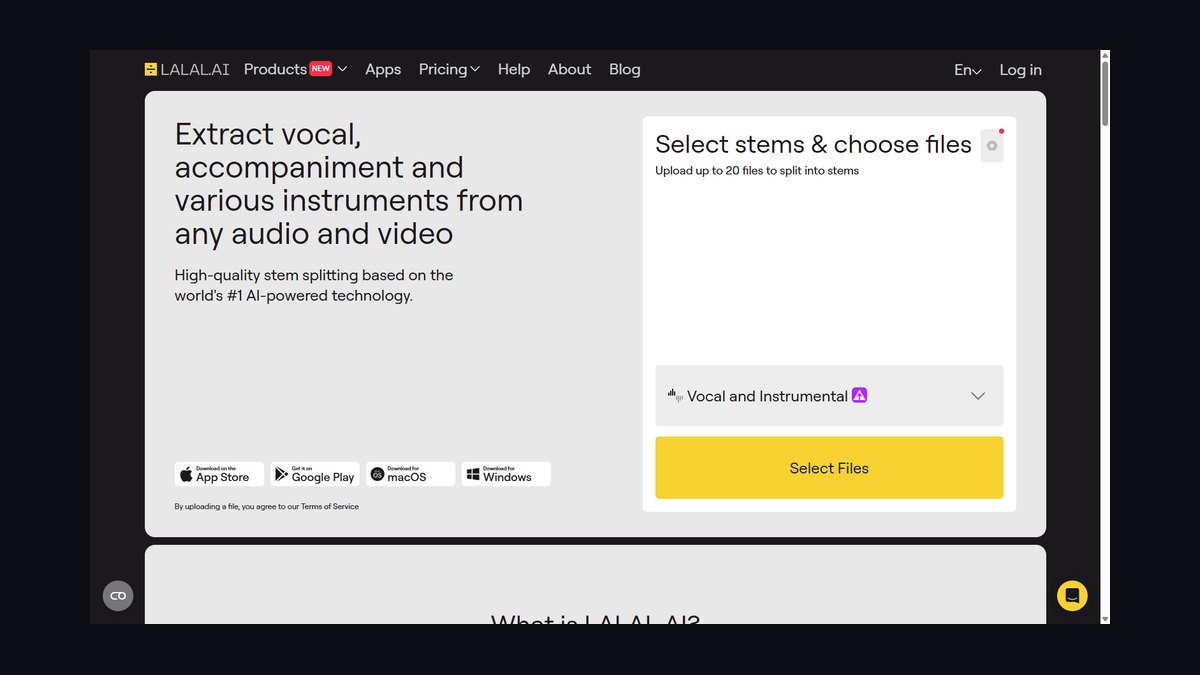
1LALAL.AI Vocal Remover

LALAL.AI ranks first because its Phoenix and Orion neural networks deliver the cleanest browser-based split available, pulling vocals, instrumental, and up to 10 stems from a single upload with no install. It handles WAV, MP3, FLAC, AIFF, and OGG, processes most songs in under a minute, and adds a dedicated Voice Cleaner for podcasts. That combination of speed, stem count, and format support outpaces every other tool on this list.
This is the right pick for karaoke producers, samplers, and content editors who want a clean instrumental without learning a DAW, paying per processing-minute packages or a subscription instead of a one-time license. It trades hands-on spectral control for pure convenience, which is why iZotope RX 11 below still wins when broadcast-grade restoration or dialogue work is the actual job.
2iZotope RX 11

iZotope RX 11 lands second because its Music Rebalance module applies machine-learning separation into vocals, bass, percussion, and other stems, then lets you raise or mute each independently for a full instrumental or a cappella. Running inside a restoration suite means separation can be followed immediately by spectral repair, de-noise, and de-click on the same timeline, a workflow no browser tool offers. Standard and Advanced tiers scale the module count available to editors.
It suits studios and post-production houses doing dialogue, film, and forensic audio, sold as a one-time license rather than a subscription. The trade-off is a steeper learning curve and real overkill if all you want is a quick karaoke split, which is why LALAL.AI above stays the faster default for casual use while RX wins whenever true restoration is the actual requirement.
3Moises App

Moises ranks third because it pairs AI stem separation with practice tools — chord detection, a smart metronome, and pitch and tempo control — across iOS, Android, and web apps. The free tier caps separations per month at standard quality, while Premium and Pro subscriptions unlock more stems, including isolated guitar and keys, plus unlimited tracks and lossless export options for serious players.
It's built for musicians who want to mute a recorded part and play along, or shift a song's key on a phone backstage, not for studio mastering work. Compared with iZotope RX 11's restoration focus above it, Moises trades depth for portability and learning-tool extras like chord detection, making it the stronger pick for practice than for final mix engineering.
4Ultimate Vocal Remover

Ultimate Vocal Remover ranks fourth and stands as the best value because it is free, open-source, and — on a decent GPU — competitive with paid tools, wrapping MDX-Net, Demucs, and VR architectures you can stack and ensemble. Chaining an MDX-Net vocal pass with a Demucs karaoke model strips backing vocals to a studio-grade result at zero cost, with full WAV output and no upload limits at all.
It's aimed at hobbyists, remixers, and high-volume users willing to run local inference and download model files themselves, trading LALAL.AI's browser convenience for total privacy and no per-minute fees at all. An NVIDIA GPU speeds things up dramatically, though CPU mode still works for patient users, and an active GitHub community keeps adding new models to the free stack over time.
5Steinberg SpectraLayers Pro 11

SpectraLayers Pro 11 ranks fifth because its AI-driven Unmix function separates vocals and instrumental stems, then lets you paint, erase, and surgically edit individual frequencies directly on the spectrogram itself. That image-based editing lets you isolate a single cough or redraw a smeared transient without touching the rest of the mix, a level of manual control neither LALAL.AI nor Ultimate Vocal Remover provides to editors.
It rewards engineers who already think spectrally and integrates tightly with Cubase and Nuendo via ARA, plus most major DAWs as a plug-in for broader use. The Pro edition carries the full AI separation toolkit versus the lighter Elements tier below it. For one-click karaoke splits it's the wrong tool; for forensic and restoration work it slots just below iZotope RX 11 in raw capability.
6Hit'n'Mix RipX DAW

RipX DAW from Hit'n'Mix ranks sixth because its DeepRemix and DeepCreate tiers break a song into vocals, drums, bass, and other stems, then expose each note's pitch, timing, and harmonics as editable objects, closer to MIDI than audio. That note-level granularity lets a remixer retune a flat vocal or mute a single drum hit without re-recording anything, a feature none of the tools ranked above it match.
It's built for producers who want a creative sandbox layered on top of clean separation, sold as a one-time purchase across its DeepRemix and DeepCreate tiers rather than a subscription. The learning curve is real and steeper than SpectraLayers' spectral painting above it, but no other tool on this list combines separation with this much granular, note-by-note manipulation for remix and sound-design work.
7Gaudio Studio GSEP

Gaudio Studio ranks seventh because its GSEP engine, built by a Korean audio-AI company with deep roots in spatial and codec audio, separates tracks into vocals, drums, bass, and other with consistently clean results on modern pop and K-pop material. The browser-based upload-separate-download flow needs no local setup, and GSEP has scored well in objective separation benchmarks, lending technical credibility beyond most newer entrants in the field.
It's a strong, no-friction option for creators who want dependable core vocal and instrumental separation without committing to a subscription suite or installing anything locally. The four-stem set is less granular than LALAL.AI's ten-way split at the top of this list, and compared with RipX DAW above it, Gaudio trades creative note-level editing for a simpler, faster path to clean stems.
8Demucs by Meta

Demucs ranks eighth because Meta's Hybrid Transformer Demucs, known as htdemucs, is the open-source engine underpinning much of this field, including features inside several other tools on this list. It separates into four stems by default — drums, bass, vocals, other — with a six-stem variant adding guitar and piano, run via command line or Python with full public weights and peer-reviewed documentation.
This is the developer's and researcher's choice: batch-process entire catalogs, integrate the model into custom pipelines, and get complete transparency and reproducibility at zero cost whatsoever. Non-coders experience Demucs secondhand through GUIs like Ultimate Vocal Remover above it; for anyone building automation at scale, running htdemucs directly remains the most flexible, cost-free route to high-quality separation available today, no matter the catalog size.
9Virtual DJ Software

Virtual DJ ranks ninth because it pioneered real-time stem separation in DJ software, isolating vocals, instruments, and other stems live during playback with no pre-processing required at all. That lets a DJ pull down a vocal stem mid-set to drop an a cappella over another beat, a genuinely different engineering problem than every offline splitter ranked above it, and it works with Pioneer and Denon controllers.
It's built for performing DJs, not studio engineers, and offers a free home-use tier alongside paid Pro licensing for professional controller use in clubs. Real-time separation is GPU-intensive and can produce artifacts on older laptops under live load, so offline tools like LALAL.AI or Ultimate Vocal Remover above it still sound cleaner for studio splits done well ahead of time.
10FL Studio Stem Separation

FL Studio ranks tenth because Image-Line built stem separation directly into the DAW starting with version 21.2, letting you right-click an audio clip and split it without ever leaving the project. It remains free for existing license holders under the brand's lifetime free updates policy, and results land as audio clips ready to chop and resample immediately inside FL's own mixer and effects chain.
It's the natural choice for producers already living inside FL Studio who want stems without opening a second app or paying anything extra for the feature. Quality falls short of dedicated restoration suites like iZotope RX 11 above it, but combined with buy-once lifetime updates, it's a quietly practical, budget-friendly pick for the platform's large existing producer base for years to come.
How we ranked these
We weighted separation quality highest — how cleanly a tool lifts vocals without swirly artifacts, watery smearing, or leftover bleed in the instrumental — followed by stem count, since a basic vocal/instrumental split is now table stakes while pros want isolated drums, bass, and individual instruments. Workflow fit, pricing model, file format support, and whether a tool's separation engine is documented and peer-reviewed rounded out the six criteria used to rank all ten tools.
We deliberately ignored brand reputation, marketing claims, and raw processing speed alone, since a fast split that leaves audible artifacts is worthless — a two-minute wait for a clean stem beats a ten-second one full of phase smear. We also discounted UI polish and mobile app ratings, since a plain interface with excellent separation (Demucs, UVR) outranks a slick one with mediocre output. Genre-specific benchmarks were noted, not scored, since results vary widely by era.
What to look for
What actually matters is matching the engine to your workflow, not chasing the highest stem count on a spec sheet. A podcaster needs one clean vocal/instrumental split and nothing else; a remixer needs 10 stems and lossless WAV export; a DJ needs real-time processing under live latency. Check native file support (WAV/FLAC vs. MP3-only), whether pricing is per-minute or subscription, and whether the tool runs in-browser or demands local GPU horsepower.
The most common mistake is buying stem count you'll never use — paying for LALAL.AI's 10-way split when you only ever need vocals-out for karaoke, or picking iZotope RX for a one-off wedding video edit. The second mistake is testing on a clean studio track in the demo, then feeding it a phone-recorded live show; separation quality drops sharply on reverberant or overlapping-frequency source material, so always test on your worst file first.
Related questions
Can LALAL.AI and iZotope RX 11 be used together in one workflow?
Yes, and many professional editors do exactly that. Run LALAL.AI's Phoenix/Orion model first for a fast, clean initial split of vocals and instrumental, then import the resulting stems into iZotope RX 11 for spectral repair, de-noise, and dialogue isolation. This combines LALAL.AI's speed with RX's surgical restoration tools, giving broadcast-ready results faster than running RX's Music Rebalance from a raw, unsplit mix alone.
Why does UVR require a GPU while LALAL.AI runs in a browser?
UVR runs the separation models — MDX-Net, Demucs, VR — locally on your own hardware, so the heavy neural-network inference happens on your GPU instead of a remote server. LALAL.AI does that same inference on its own cloud servers and streams you the result, which is why it works on any laptop but charges per processing minute instead of being free.
What's the difference between Demucs and Ultimate Vocal Remover?
Demucs is Meta's open-source separation model, distributed as code and weights you run via command line or Python — it's the raw engine. Ultimate Vocal Remover is a free desktop GUI that wraps Demucs alongside MDX-Net and VR architectures, letting you point-and-click instead of scripting, stack multiple models into an ensemble, and get cleaner results than any single model run alone.
Can Moises replace a DAW for practicing along with songs?
Not fully, but it doesn't need to. Moises is built specifically for practice: it separates any song into stems, then adds slow-down, key-change, looping, chord detection, and a smart metronome — features a full DAW doesn't package together for musicians. For actual mixing, editing, or mastering you'd still want a DAW, but for learning a song by ear or playing along, Moises is faster and more mobile.
Does real-time stem separation in Virtual DJ sound as clean as offline tools?
Generally, no — real-time separation is a fundamentally harder engineering problem than offline processing, since the algorithm has no future audio to reference and must work within playback latency. Virtual DJ's engine is impressive for live use, letting DJs pull vocal stems mid-set, but for a studio-quality a cappella or instrumental you're better off running the same track through LALAL.AI or UVR offline first.
Why do some tools separate into only 4 stems while LALAL.AI offers 10?
Splitting into more than the standard four (vocals, drums, bass, other) requires additional model training on isolated guitar, piano, synth, and string data, which most research teams haven't published as pretrained models. LALAL.AI invested in that extra training for its Phoenix/Orion networks, which is why it can isolate acoustic guitar or strings separately, while tools built on stock Demucs or MDX-Net weights stop at four.
Is it legal to remove vocals from a copyrighted song to make a karaoke track?
Creating an instrumental for personal practice or private use is generally fine, but publishing, selling, or streaming that instrumental publicly without a license infringes the underlying composition and, often, the master recording rights too. Karaoke businesses typically license tracks through performance-rights organizations or dedicated karaoke licensors rather than relying on AI-split stems, which carry no such clearance regardless of separation quality.
FAQ
Which AI vocal remover has the best overall separation quality in 2027?
LALAL.AI and iZotope RX 11 lead on raw separation quality, using the Phoenix/Orion neural networks and Music Rebalance ML respectively. LALAL.AI edges ahead for pure vocal/instrumental splits at speed, while RX 11 pulls ahead once you need spectral repair and dialogue work on top of separation. Ultimate Vocal Remover can match both on a strong GPU using stacked MDX-Net and Demucs models.
Can I remove vocals from a song for free without installing anything?
Yes — LALAL.AI and Gaudio Studio's GSEP engine both run entirely in a browser with a free preview tier, no download or GPU required. The free tiers cap track length and processing minutes, so for unlimited free use you'd need to install Ultimate Vocal Remover or run Demucs locally instead, which trade the zero-install convenience for full control and no per-minute limits.
What file formats do these AI vocal removal tools support?
Most accept the common formats — MP3, WAV, FLAC, AIFF, and OGG — with LALAL.AI supporting all five plus lossless WAV/FLAC export. iZotope RX 11 and SpectraLayers Pro handle broadcast formats used in film and TV post. Free tools like UVR and Demucs are generally the most format-flexible since they're built on open libraries, but always confirm lossless output before committing to a workflow.
How long does it take to separate a typical 3-4 minute song?
Browser tools like LALAL.AI and Gaudio Studio typically finish a standard song in under a minute once uploaded, since separation runs on their servers. Locally run tools like UVR or Demucs depend entirely on your hardware — a modern NVIDIA GPU can match that speed, while CPU-only processing can take several minutes per track, especially when stacking multiple models for an ensemble result.
Which tool is best for isolating dialogue in a noisy video recording?
iZotope RX 11 is the industry standard for dialogue work — its Music Rebalance module separates vocals from background music and noise, then hands off to RX's dedicated de-noise, de-click, and dialogue isolation tools on the same timeline. SpectraLayers Pro is a strong second choice for spectral, frame-by-frame editing, but neither browser splitter nor DJ software is built for this kind of forensic cleanup.
Do I need coding skills to use Demucs or is it only for developers?
Demucs itself is a command-line tool built for developers and researchers, so running it directly requires basic Python and terminal comfort. If you want Demucs's separation quality without coding, use Ultimate Vocal Remover, which wraps the same htdemucs model in a point-and-click GUI. Most non-technical users experience Demucs secondhand this way, through UVR or other tools built on its open-source weights.
Can DJs really pull an a cappella live during a set without pre-processing?
Yes — Virtual DJ's real-time stem separation engine processes vocals, instruments, and other stems as the track plays, so a DJ can pull a live a cappella or drop an instrumental on the fly without preparing the file beforehand. This is GPU-intensive, though, and older laptops can produce audible artifacts or dropouts under live load, so testing your specific rig before a gig matters.
Is FL Studio's built-in stem separation as good as a dedicated tool?
It's solid for sampling and remix work but not built for forensic restoration — FL Studio's separation lands stems directly on your timeline as audio clips, ready to chop and process without leaving the DAW or paying extra. For producers already on FL Studio, that convenience often outweighs the marginally cleaner output from dedicated suites like iZotope RX 11 or SpectraLayers Pro.
What should I test before trusting any of these tools on important material?
Run a 30-second clip of your actual source material — not a demo track — through your top candidate before committing budget or time. A model that separates a dense pop mix cleanly can smear a sparse acoustic ballad, and a cappella accuracy varies widely by genre, mix density, and recording era, so results on someone else's sample audio don't predict results on yours.
Sources
- https://www.lalal.ai/
- https://www.izotope.com/en/products/rx.html
- https://moises.ai/
- https://github.com/Anjok07/ultimatevocalremovergui
- https://www.steinberg.net/spectralayers/
- https://hitnmix.com/
- https://studio.gaudiolab.io/
- https://github.com/facebookresearch/demucs
- https://www.virtualdj.com/
- https://www.image-line.com/fl-studio/
Related on PULSE
This page will be disappearing soon. Save it to your device for $1 — or read it free while it is here.
@Kory-White- · if Venmo asks, the last 4 of my number are 2012
This page is gone.
This one is off the shelf now. $1 keeps it on your phone for good — the whole page, pictures and diagrams included.
 pulse-ai-infrastructureWhat is model serving and how is it different from a REST API in 2027?
 pulse-ai-infrastructureThe 10 Best Data Labeling Platforms for AI in 2027
 pulse-ai-infrastructureThe 10 Best AI Tools for Party Planning in 2027
 pulse-ai-infrastructureHow do you build data pipelines for continuous model training in 2027?
 pulse-ai-infrastructureThe 10 Best Data Warehouses for Machine Learning in 2027
 pulse-ai-infrastructureThe 10 Best AI Tools for Writing Movie Scripts in 2027
 pulse-ai-infrastructureWhat is a semantic cache and how much can it cut inference costs in 2027?
 pulse-ai-infrastructureThe 10 Best AI Tools for Account-Based Marketing in 2027
 pulse-ai-infrastructureHow do you monitor LLMs in production for drift and hallucinations in 2027?
 pulse-ai-infrastructureThe 10 Best Secrets Management Tools for LLM Applications in 2027