

The 10 Best Fractional GPU and GPU Sharing Tools in 2027
 Curated byKory White · Fractional CRO · Maryland
Quality
Certified
The 10 best fractional gpu and gpu sharing tools are ranked below on measured performance, build quality, price, and how each one actually holds up in daily use rather than how it reads on a spec sheet. Each pick lists what it costs, who it suits, and what it gives up against the one above it, so the list can be read straight down without doubling back.
1. NVIDIA Multi-Instance GPU

MIG ranks first because it is the only mechanism that enforces the split below the driver, giving each instance dedicated memory, L2 cache, bandwidth, and streaming multiprocessors. An 80 GB H100 partitions into as many as seven instances, with fixed profiles such as 1g.10gb, 2g.20gb, and 3g.40gb. A workload in one instance physically cannot read another's memory or steal its bandwidth. It costs nothing beyond hardware you already own.
This is for multi-tenant inference, regulated environments, and any contract with a written latency SLO, since it is the one option that survives a security review for untrusted tenants. It trades away flexibility: profiles are fixed sizes, you cannot request 37 percent of a card, and reconfiguration is a drain-and-cordon maintenance operation. It requires A100, H100, H200, or newer — L4, L40S, and RTX-class fleets need software fractions instead.
2. NVIDIA GPU Operator Time-Slicing

Time-slicing through the GPU Operator's device plugin ranks this high because it is the cheapest utilization win available: it costs nothing and requires no special hardware. Each container gets the whole GPU for a quantum, then yields. A replica count of 4 to 8 on a development node typically lets four to eight times as many people work on the same hardware with no user-visible change, because bursty workloads were never contending in the first place.
This is for notebooks, feature engineering, ad-hoc evaluation, and CI jobs that touch a GPU for ninety seconds. It gives up memory isolation entirely — the sum of all containers' allocations must fit in physical VRAM or someone gets an OOM kill, which is its signature failure. Unlike MIG above, it offers no isolation guarantee and breaks sub-millisecond inference, where a scheduling quantum exceeds the SLO.
3. KAI Scheduler

KAI Scheduler earns this position by pairing fractional capacity with the quota enforcement that makes sharing work at cluster scale. Open-sourced by NVIDIA out of the Run:ai codebase, it brings fair-share quotas, workload priority, preemption of over-quota work, and gang scheduling into free software. Gang scheduling makes a distributed job all-or-nothing, preventing the half-scheduled multi-worker job that holds GPUs while making zero progress.
This is for organizations where two or more teams share one pool and whichever team submits the most jobs would otherwise take the cluster. It trades away the console, the reporting, and the support contract that the commercial Run:ai product carries — you supply the engineering time to operate it. Compared with plain time-slicing above, it adds the policy layer that keeps fractional capacity from simply relocating contention.
4. HAMi

HAMi ranks here as the free path to memory-and-compute quotas on Kubernetes across mixed accelerator vendors. A CNCF sandbox project, it intercepts at the driver and container-runtime layer so a pod can request 4 GB of VRAM and 30 percent of compute, and the middleware refuses allocations past that ceiling. Fractions are arbitrary rather than fixed profiles, and they change without draining a node.
This is for fleets built on L4, L40S, RTX-class, or older V100 hardware that cannot do MIG at all, and for shops running non-NVIDIA accelerators alongside NVIDIA. It trades physical isolation for flexibility: a badly behaved kernel can still cause contention and a driver fault can still take down neighbors, so treat it as a density tool for trusted tenants, not a security boundary like MIG.
5. Run:ai

Run:ai, now part of NVIDIA, ranks fifth as the commercial platform for organizations that want pooling, self-service, and reporting behind a support contract. It enforces software fractions at the scheduler and runtime layer, delivering per-team quotas, preemption, and gang scheduling, plus the console and reporting that the open-source tools leave you to build. Its codebase is the origin of KAI Scheduler, so the underlying fractional mechanism is shared.
This is for enterprises where multiple teams contend for one pool and someone needs an auditable console and a vendor to call. It trades away the zero license cost of KAI Scheduler above; you swap engineering time for a line item. Evaluate it only after free time-slicing and MIG are already deployed, since starting here buys governance you may not yet need.
6. NVIDIA Multi-Process Service

MPS ranks here as an underrated throughput mechanism that costs nothing — it ships free as part of the CUDA toolkit. Unlike time-slicing, which makes containers take turns, MPS lets multiple CUDA processes execute concurrently on the same device. That raises throughput specifically for many small kernels that individually cannot fill the GPU, which is exactly the shape of a fleet of small inference processes.
This is for teams running dozens of small concurrent CUDA inference processes on one card, where the alternative is watching most of the die sit idle per process. It shares a memory space and a driver context, so it is not a security boundary, and it can introduce tail-latency variance when tenants contend. Where time-slicing suits idle notebooks, MPS suits genuinely concurrent small work.
7. Amazon SageMaker Multi-Model Endpoints
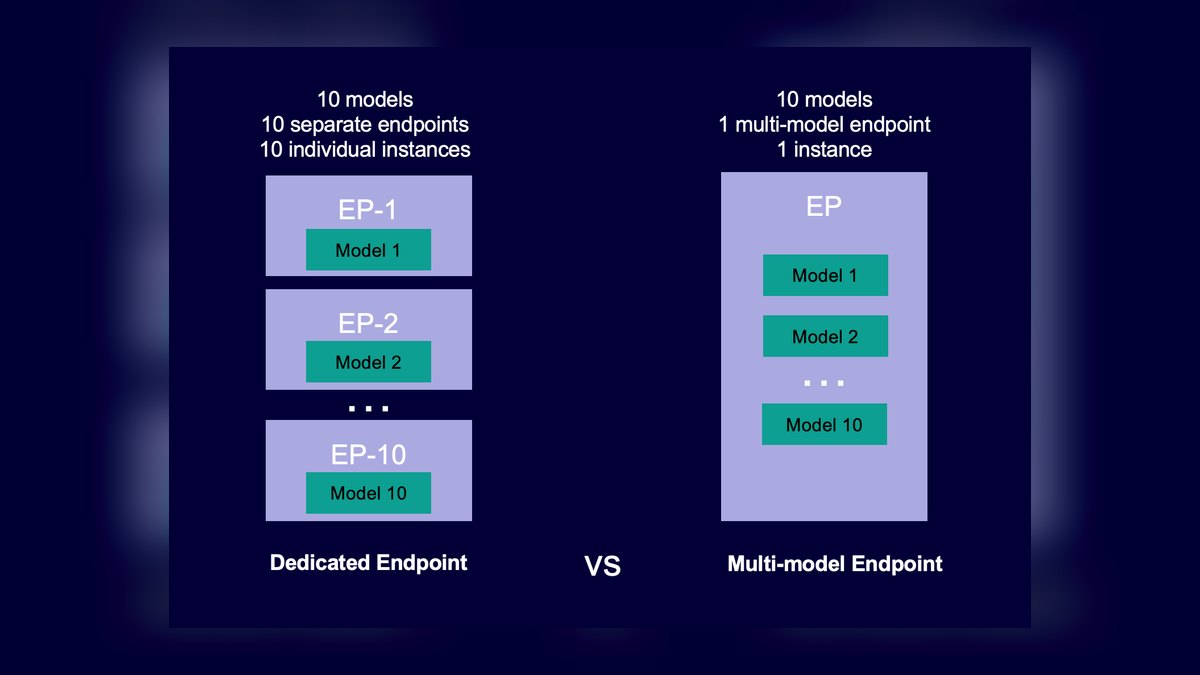
SageMaker multi-model endpoints rank here as the fastest path to inference density for teams that do not want to operate a cluster at all. Many models share one GPU-backed endpoint, with the platform handling load-on-demand and request routing rather than a Kubernetes scheduler. The economics are the same arithmetic as slicing: a card at $2 per hour costs $1,440 per month, and six models sharing it lands at $240 per service.
This is for inference-only teams already committed to AWS who would rather buy the abstraction than run the partitioning layer. It trades away portability and any control over the isolation mechanism, and it does nothing for training or notebook fleets. Compared with self-operated fractions above, you give up profile-level tuning in exchange for not maintaining a cluster.
8. GKE GPU Sharing
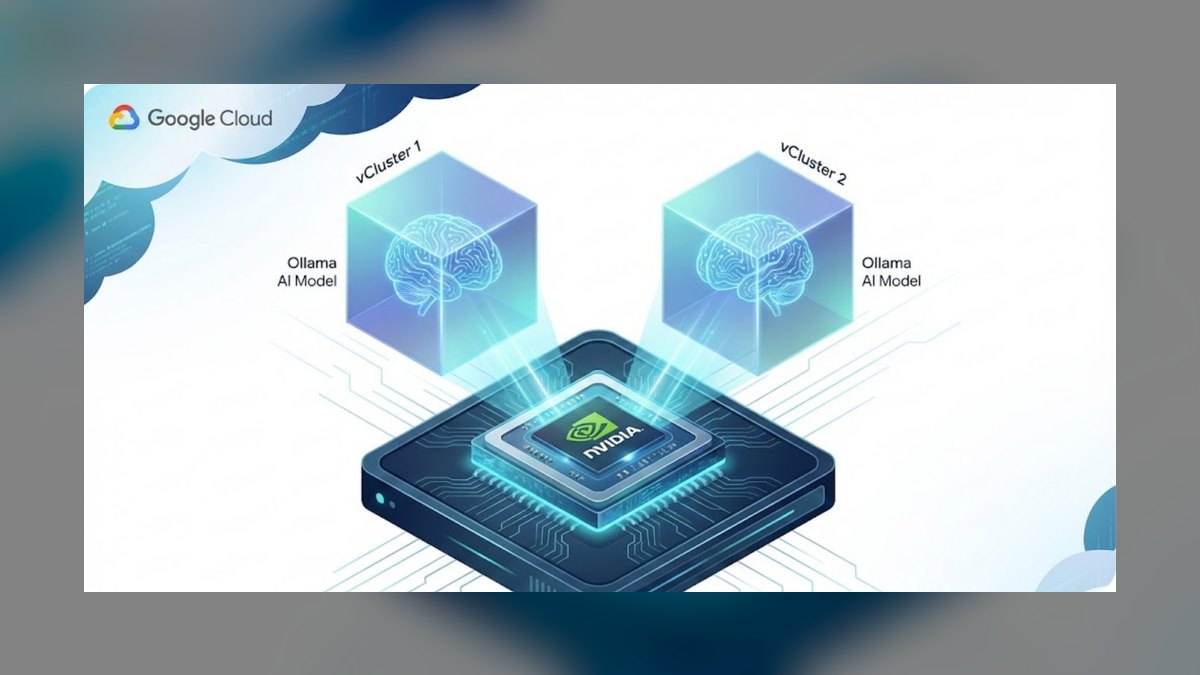
GKE GPU sharing ranks here because it exposes both native GPU time-sharing and MIG as node-pool configuration, so a team already on GKE gets two mechanisms without operating the partitioning layer themselves. Label the node pools distinctly and schedulers place workloads on the mechanism matching their tier — MIG on production inference, time-sharing on development. The underlying mechanics are the NVIDIA ones, presented as managed configuration.
This is for teams standardized on Google Kubernetes Engine who want density without staffing a GPU platform team. It trades away vendor neutrality and the deeper policy features — per-team fair-share quotas and gang scheduling still come from KAI Scheduler or Run:ai layered on top. Against SageMaker's endpoint abstraction, it keeps you in Kubernetes with more control and more operational surface.
9. nos
nos ranks here for automating something the other tools leave manual: it applies MIG and time-slicing profiles dynamically based on pending pods, so the cluster reshapes itself instead of an operator hand-editing profiles. That matters because MIG profiles are fixed sizes and reconfiguration normally requires draining the GPU, making profile churn an expensive human task. It automates the partitioning NVIDIA already gives you natively rather than adding a new mechanism.
This is for clusters whose demand shape is already well understood and whose profile mix changes often enough that manual reconfiguration has become a real cost. It ranks below the primitives it manages because automating before you understand demand means automating the wrong thing. It adds no isolation of its own — the guarantees still come from MIG or time-slicing underneath.
10. NVIDIA DCGM Exporter
DCGM exporter ranks tenth because sharing decisions without measurement are guesses, and this is how you measure. Shipping with the GPU Operator, it exports DCGM_FI_DEV_GPU_UTIL and DCGM_FI_DEV_FB_USED so you can read p50 and p95 over two full weeks. It also reports per-MIG-instance metrics, which is what lets you attribute a problem to a tenant instead of only to a card.
This is for any team about to size MIG profiles or justify a sharing program to finance, since cost per served workload only exists if you instrument before you migrate. It shares nothing itself — it is measurement, not a partitioning mechanism, which is why it sits last. Its output decides whether the tools above are worth deploying: a fleet at 70 percent p50 utilization should not share at all.
How we ranked these
We ranked these tools on isolation strength first: whether the mechanism enforces memory and compute limits in hardware (MIG), in software at the driver or scheduler layer (HAMi, KAI Scheduler, Run:ai), or not at all (time-slicing, MPS). Secondary weights covered hardware breadth across L4, L40S, and consumer cards, quota and gang-scheduling support, and total cost including engineering time to operate.
We deliberately ignored raw throughput benchmarks, because a MIG slice and a software fraction sized identically perform similarly when nothing contends; differences only surface under load, which is workload-specific. We ignored vendor-published density percentages entirely, since density depends on your model sizes. We also ignored feature-matrix breadth, because the metric that decides these programs is cost per served workload after six months of real traffic.
What to look for
What actually matters is isolation strength matched to tenant trust, not feature count. MIG enforces limits in hardware and survives a security review; software fractions from HAMi or KAI Scheduler enforce at the driver or scheduler layer; time-slicing and MPS enforce nothing. Pick the weakest mechanism your trust model allows, then add quota and gang scheduling only when two teams genuinely contend for one pool.
The mistake most buyers make is starting with a commercial platform before measuring demand. Run:ai, GKE, and SageMaker sell governance you may not need yet, while time-slicing and MIG ship free with hardware you already own. Instrument with DCGM for two weeks first, because a fleet already at 70 percent p50 utilization should not be shared at all, and no license fixes that.
Related questions
Does MIG work on every NVIDIA GPU?
No. MIG requires supported data-center GPUs such as A100, H100, H200, and newer architectures. L4, L40S, consumer RTX cards, and older V100s cannot do hardware partitioning at all. Those fleets rely on time-slicing, MPS, or software-enforced fractions from HAMi or KAI Scheduler instead, accepting advisory rather than physical isolation.
Can I combine MIG and time-slicing on the same cluster?
Yes, and most mature clusters do. Run MIG on the production inference node pool for isolation and time-slicing on the development pool for density. Label node pools distinctly so schedulers place workloads on the mechanism matching their tier, and keep one scheduler enforcing fair share across the whole cluster.
What happens if a shared workload requests more memory than its fraction?
With MIG or memory-enforced software fractions, the allocation fails and the process typically dies with an out-of-memory error, contained to that tenant. With plain time-slicing there is no enforcement whatsoever, so an over-allocating pod can exhaust physical VRAM and trigger OOM kills for every neighbor sharing that card.
Is GPU sharing worth it if utilization is already high?
Usually not. If p50 utilization sits above roughly 70 percent with a tight distribution, there is little idle capacity to reclaim and sharing mainly adds contention risk. Measure first with DCGM over two full weeks, because sharing pays off on fleets with genuinely idle accelerators, not on saturated ones.
Does gang scheduling matter for fractional GPUs?
It matters for distributed training on any shared cluster. Without it, a multi-worker job can get some workers scheduled and wait indefinitely for the rest while holding GPUs idle. Gang scheduling makes the job all-or-nothing. KAI Scheduler and Run:ai both provide it; the free NVIDIA mechanisms do not.
What is the difference between time-slicing and MPS?
Time-slicing interleaves access, so each container owns the whole GPU for a quantum and then yields. MPS lets multiple CUDA processes execute concurrently on the device rather than taking turns, raising throughput for many small kernels that individually cannot fill the GPU. Use MPS for concurrent small inference, time-slicing for mostly idle notebooks.
How much VRAM should I reserve as overhead on a shared GPU?
Reserve 10 to 15 percent per GPU for driver, CUDA context, and framework overhead, and keep aggregate allocation at or below roughly 85 percent of physical VRAM in production. Each additional CUDA context on a shared device costs real memory, and that cost compounds quickly as density rises.
When should I not share a GPU at all?
Large-model training needing full HBM and contiguous compute should own the card. Sub-millisecond inference breaks under time-slicing because a scheduling quantum exceeds the SLO. Some compliance regimes forbid shared memory space regardless of mechanism. In those cases dedicate, because a software fraction is not equivalent to a dedicated accelerator.
FAQ
What exactly is fractional GPU sharing?
Fractional GPU sharing lets multiple workloads run on one physical accelerator by dividing its memory and compute rather than dedicating the whole card to a single job. The division is enforced in hardware through MIG, in software at the driver or scheduler layer, or by interleaving access over time through the GPU Operator's device plugin.
Do I need special hardware for fractional GPUs?
For hardware-level partitioning, yes. MIG only works on supported NVIDIA data-center GPUs such as A100, H100, and H200. Every other mechanism works more broadly: time-slicing, MPS, and software fraction middleware run on essentially any modern CUDA-capable GPU, which is why L4, L40S, and consumer fleets default to those approaches.
Will GPU sharing slow my workloads down?
MIG slices deliver predictable performance because the isolation is physical, so a well-sized workload sees essentially no interference. Time-slicing and MPS can introduce tail-latency variance when several tenants contend simultaneously. Watch p99 rather than median latency during a canary, because contention shows up in the tail long before the average.
How do I choose a MIG profile size?
Measure resident framebuffer usage with DCGM, add 10 to 15 percent headroom for CUDA context and framework overhead, then pick the smallest profile that comfortably fits. Quantization changes the answer materially: a 13B model in FP16 needs roughly 26 GB of weights, but near 7 GB at 4-bit precision.
Is fractional sharing safe for untrusted tenants?
Hardware partitioning with MIG gives each instance dedicated memory and compute paths and is the mechanism to reach for with untrusted tenants. Software fractions and time-slicing share a memory space and driver context, so treat them as suitable for trusted workloads inside one organization rather than as a security boundary.
Which GPU sharing tools should a small team start with?
Start free. Enable time-slicing through the NVIDIA GPU Operator on development nodes, add MPS if you run many small concurrent inference processes, and adopt MIG on any data-center GPUs serving production traffic. Reach for HAMi or KAI Scheduler when you need enforced quotas, and evaluate commercial platforms later.
How do I build the business case for GPU sharing?
Report cost per served workload from your own measurements, not a percentage. If a card costs $2 per hour and one model owns it, that model costs $1,440 monthly. Six models on the same card via MIG makes it $240 per service. Publishing a made-up percentage is how a sharing program loses credibility under audit.
What is the right order to roll out GPU sharing?
Instrument first with the GPU Operator and DCGM exporter for two weeks. Then enable time-slicing on the tier with least to lose, such as dev, notebooks, or CI. Move the inference tier to MIG next on a canary node. Add quota enforcement once two teams share a pool, and automate profile management last.
Is MIG reconfiguration a live operation?
No. Changing MIG profiles is disruptive and should be planned as a drain-and-cordon maintenance operation, not a live change. That rigidity is the trade you accept for hardware isolation. If you need to resize fractions without draining nodes, software fractions from HAMi or KAI Scheduler support that.
How should I monitor a shared GPU fleet?
Per-slice, not per-card. If dashboards only report card-level metrics you lose the ability to attribute a problem to a specific tenant. DCGM reports per-MIG-instance metrics, so use them. Track DCGM_FI_DEV_GPU_UTIL and DCGM_FI_DEV_FB_USED at p50 and p95, since distribution matters more than the average.
Sources
- https://docs.nvidia.com/datacenter/tesla/mig-user-guide/
- https://docs.nvidia.com/datacenter/cloud-native/gpu-operator/latest/index.html
- https://docs.nvidia.com/deploy/mps/index.html
- https://github.com/NVIDIA/k8s-device-plugin
- https://github.com/NVIDIA/KAI-Scheduler
- https://github.com/Project-HAMi/HAMi
- https://github.com/nebuly-ai/nos
- https://cloud.google.com/kubernetes-engine/docs/concepts/gpu-sharing
- https://docs.aws.amazon.com/sagemaker/latest/dg/multi-model-endpoints.html
- https://github.com/NVIDIA/dcgm-exporter
Related on PULSE
This page will be disappearing soon. Save it to your device for $1 — or read it free while it is here.
@Kory-White- · if Venmo asks, the last 4 of my number are 2012
This page is gone.
This one is off the shelf now. $1 keeps it on your phone for good — the whole page, pictures and diagrams included.
 pulse-ai-infrastructureThe 10 Best AI Tools for Vocal Removal in 2027
 pulse-ai-infrastructureThe 10 Best AI Tools for Web Illustration in 2027
 pulse-ai-infrastructureThe 10 Best AI Observability Tools for RAG Pipelines in 2027
 pulse-ai-infrastructureHow much does a single NVIDIA H100 cluster node cost to lease in 2027?
 pulse-ai-infrastructureThe 10 Best AI Tools for Screenwriting in 2027
 pulse-ai-infrastructureThe 10 Best Real-Time ML Feature Platforms in 2027
 pulse-ai-infrastructureThe 10 Best AI Tools for Email Marketing Campaigns in 2027
 pulse-ai-infrastructureThe 10 Best Open-Source Model Hubs in 2027
 pulse-ai-infrastructureThe 10 Best AI Tools for Gift Recommendations in 2027
 pulse-ai-infrastructureIs AI Infra worth it in 2027?